16443 - Battery charger APA - Free user manual and instructions
Find the device manual for free 16443 APA in PDF.


User questions about 16443 APA
0 question about this device. Answer the ones you know or ask your own.
Ask a new question about this device
Download the instructions for your Battery charger in PDF format for free! Find your manual 16443 - APA and take your electronic device back in hand. On this page are published all the documents necessary for the use of your device. 16443 by APA.
USER MANUAL 16443 APA
natural_image
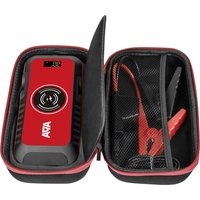
Exterior view of a black AFA battery with digital display and clamp (no text or symbols on main body)© EAL GmbH, 16443 03. 2023

Art.-Nr.: 16443
Lithium Powerpack 10.000 mAh
Operating instructions 8

Réf. 16443
Lithium Powerpack 10.000 mAh
text_image
No. 01 Pension Power Current Voltage Power Power Power Power Power Power Power Power Power Power Power Power Power Power Power Power Power Power Power Power Power Power Power Power Power Power Power Power Power Power Power Power Power Power Power Power Power Power Power Power Power Power Power Power Power Power Power Power Power Power POWER Power Power Power Power Power Power Power Power Power Power Power Power Power Power Power Power Power Power Power Power Power Power Power Power Power Power Power Power Power Power PowerCd = Cadmium, Hg = Quecksilber, Pb = Blei
9. KONTAKTINFORMATIONEN
EAL GmbH
Read the operating instructions carefully prior to initial use and observe all of the safety notes! Not observing such may lead to personal injury, damages to the device or your property! Store the original packaging, the receipt and these instructions so that they may be consulted at a later date! On transfer of the product, please include these operating instructions as well. Please check the contents of package for integrity and completeness prior to use!
1. PROPER USE OF THE PRODUCT
The Lithium Powerpack is used to charge the batteries of mobile phones, smart phones, tablet computers, MP3 players and similar devices, which can be charged using a USB cable.
In addition, there is also the possibility of jump-starting 12 V vehicles.

The Powerpack is only a support for a weak starter battery. It cannot replace an empty, deep-discharged or faulty vehicle battery.
This device is not designed to be used by children or persons with limited mental abilities or without experience and/or lack of required specialist knowledge. Keep children away from the device.
The device is not designated for commercial use.
Use according to the intended purpose also includes the observance of all information in these instructions, particularly the observance of the safety instructions. Any other use is considered to be contrary to the intended purpose and may lead to material damage or personal injuries. The EAL GmbH will not assume any liability for damage resulting from improper use.
2. SCOPE OF DELIVERY
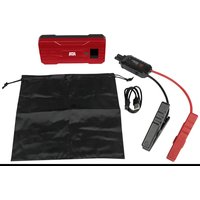
1 x Powerpack
1 x USB-C charging cable
1 x Jump lead
1 x Bag
1 x Operating manual
3. SPECIFICATIONS
Size (L x W x H): approx. 160 x 79 x 28 [mm]
Weight: approx. 0.320 kg
Battery capacity: 10000 mAh
Energy content: 37 Wh
Output: 5 V 2.1 A (USB), 12 V
(EC5 jump start)
Input: 5 V 2.0 A (USB-C charging slot)
Maximum load: 400 A jump start, (800 A, peak)
Charging time: approx. 4 h
Temperature range: -20 – 65 °C
LED lamp: Steady light, fast flashing, SOS
Length jump lead: red: approx. 190 mm, black: approx. 130 mm
4. SAFETY PRECAUTIONS

- The warning triangle sign indicates all instructions which are important for safety. These must always be followed, otherwise you could injure yourself or damage the device.
• Children may not play with the device. - Cleaning and user maintenance may not be carried out by children without supervision.
- Do not treat packaging material carelessly. It may become a dangerous toy for children!
- Only use this product for its designated purpose!
- Do not manipulate or disassemble the device!
- For your own safety, only use accessories and spare parts that are stated in these instructions or that are recommended by the manufacturer!
- Before attempting starting help, check the manual of your vehicle to check how to carry out a jump start for your vehicle.
- When using lead batteries, always wear protective goggles and clothing.
- Lead batteries contain aggressive caustic acids. Prevent skin and eyes from coming into contact with the lead battery fluids! Never dismantle lead batteries! Wash affected skin thoroughly using soap and water. If acid has got into an eye, rinse immediately for at least 10 minutes under clean, running, lukewarm water! Then immediately consult a doctor!
- If your clothing has acid on, rinse immediately with plenty of soap and water!
- Never wear rings, necklaces, watches or similar when handling batteries or chargers. The short-circuiting of the battery contacts creates the risk of burns and explosion!
- The Powerpack is only designed as a starting aid for a vehicle that has a battery of its own. The Powerpack cannot replace the vehicle battery.
- Always disconnect the jump lead from the Powerpack before storage to ensure that no short circuits can occur between the terminal clamps.
- Do not attempt to remove and replace the battery pack of the Powerpack. If the
battery comes to the end of its useful life, dispose of the entire in accordance with your local guidelines.
- Place the Powerpack on a heat-resistant surface during charging.
- Never charge the Powerpack using a damaged charger.
- Do not leave the Powerpack unattended during charging.
- Never attempt to start a vehicle when the battery is frozen, as this brings a risk of explosion.
- Store these instructions carefully and, if necessary, pass them on to other users.

5. EXPLANATION OF SYMBOLS

Complies with EC directives
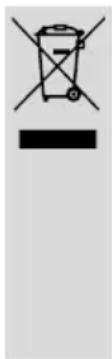
Labelled electrical products may not be disposed of in the household waste

Batteries may not be disposed of in the household waste system.

Devices with this symbol may only be operated in the house (dry environment)

Read the operating instructions
6. OPERATING INSTRUCTIONS
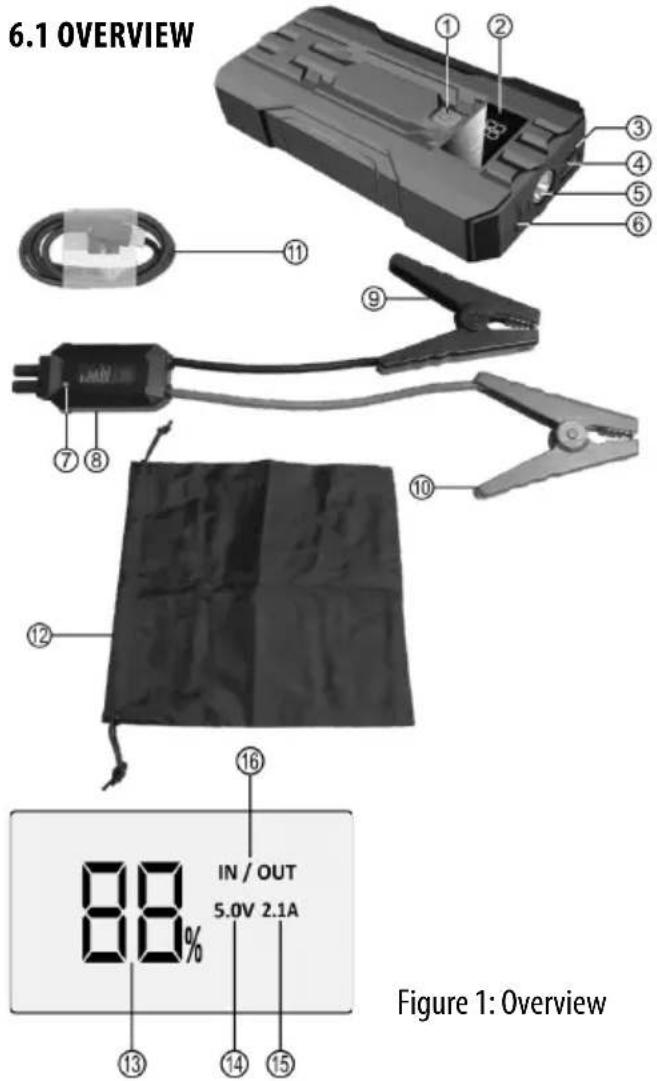
6.1 OVERVIEW
text_image
6.1 OVERVIEW IN / OUT 5.0V 2.1A Figure 1: Overview1 Switch 8 Smartbox jump lead
2 Display 9 Terminal clamp, black (-)
3 USB-C input 10 Terminal clamp, red (+)
4 USB output 11 USB-C charging cable
5 LED light 12 Bag
6 EC5 starting help connection 13 Charging level in % 14 Voltage
7 Control lamp Smartbox 15 Current
16 Input / output
6.2 CHECKING THE CHARGING LEVEL OF THE POWERPACK
Press the switch once (Position 1 in the overview). The display (Position 2 in the overview) is activated and shows the charging level of the Powerpack as a percentage (Position 13 in the overview).
Use a USB charger with a 2 A output to charge the Powerpack (not included in delivery!). Insert the USB-C connector of the charging cable (Position 11 in the overview) into the USB-C input (Position 3 in the overview) of the Powerpack. Insert the USB-A connector of the charging cable into the charger. Connect the charging device to a socket.
The display shows the charging progress as a percentage, 1% - 99%. At 100%, the battery of the Powerpack is completely charged.
After charging, first remove the charger from the socket and then disconnect the charging cable from the charger and the Powerpack.
6.4 JUMP START FOR 12 V VEHICLES
- Switch off the ignition and all consumers on your vehicle.
- Ensure that the battery capacity of the Powerpack is still at least 75% and that the battery callipers of your vehicle battery are not soiled or oxidised.
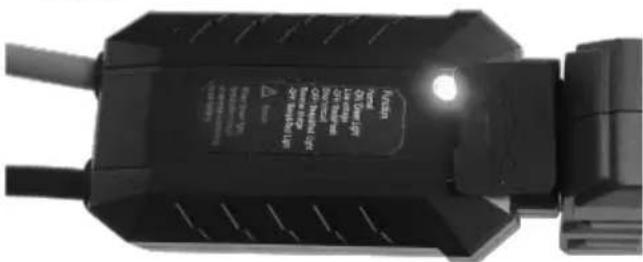
- Connect the Powerpack and the jump lead by inserting the connector of the Smartbox (Position 8 in the overview) of the jump lead into the starting help connection (position 6 in the overview) of the Powerpack. The LED light (Position 5 in the overview) is activated. Ensure that the connector is inserted firmly and securely. The control lamp (Position 7 in the overview) of the Smartbox flashes alternately red/green.
- First connect the red terminal clamp (Position 10 in the overview) of the jump lead with the positive pole, and then the black terminal clamp (Position 9 in the overview) with the negative pole of the vehicle battery. The terminal clamps must have a firm and secure contact to the battery poles.
- If the jump leads are connected correctly, the control lamp shines green permanently, and a single tone is issued.
text_image
VH10 VH10 VH10 VH10 VH10 VH10 VH10 VH10 VH10 VH10 VH10 VH10 VH10 VH10 VH10 VH10 VH10 VH10 VH10 VH10 VH10Figure 2: Control lamp Smartbox
- Start the vehicle motor. Do not operate the starter for longer than 3 seconds. If the starting attempt was not successful, wait at least two minutes before trying again. After a third failed attempt, do not start a further attempt and instead check your vehicle for faults.
- Disconnect the jump lead from the Powerpack. Then remove the terminal clamps from the vehicle battery.
6.4.1 POSSIBLE ERRORS DURING JUMP START
The control lamp of the Smartbox does not shine green permanently:
- The terminal clamps have no contact or poor contact to the battery callipers
→ Clean the battery poles and reattach the terminal clamps - The battery of the Powerpack is not adequately charged
→ Charge the battery - The current required for the jump start exceeds the possibilities of the Powerpack
→ Use a Powerpack with greater performance
6.5 USING THE LED LIGHT / SIGNAL LAMP
To switch on the LED lamp continuously (Position 5 in the overview), keep the switch (Position 1 in the overview) of the Powerpack pressed for approx. 3 seconds. Then, you can switch the following light functions one after another by pressing the switch again: fast flashing – SOS – OFF.
6.6 CHARGING USB DEVICES
If your USB device has a USB-C port, you can use the supplied USB-C cable for charging. For other ports, use a cable suitable for your device. These instructions describe how to use the supplied USB-C charging cable. Insert the USB-A plug into the USB output (position 4 in the overview) of the Powerpack. The USB-C plug, connect to your USB device. Press the switch (position 1 in the overview) of the Powerpack to start the charging process. The display shows the charging voltage (position 14 in the overview) and the charging current (position 15 in the overview).
After charging, first disconnect the charging cable from the Powerpack, then remove the charging cable from your USB device.
7. CLEANING, STORAGE AND MAINTENANCE
7.1 CLEANING
Only clean the Powerpack with a soft cloth and do not use any aggressive cleaning agents or solvents. Never allow liquids to ingress into the housing.
7.2 STORAGE
When it is not in use, the Powerpack should be stored in a dry place. Do not expose the Powerpack to moisture, oil, dust, dirt, high temperatures, excessive vibrations or mechanical stresses. Always disconnect the jump lead from the Powerpack before storage to ensure that no short circuits can occur between the terminal clamps.
7.3 MAINTENANCE
When the Powerpack is not in use, recharge it once it reaches a battery capacity of 25%.
8. NOTES REGARDING ENVIRONMENTAL PROTECTION
natural_image
Simple line drawing of a trash bin with no text or symbolsThe packaging is made up of environmentally friendly materials which may be disposed of via your local recycling points. Do not put electrical devices into the household waste. Electronic and electrical devices must be collected separately and sent for environmentally friendly recycling. Contact your community or town administration for information regarding the disposal of electrics.
9. CONTACT INFORMATION
EAL GmbH
42115 Wuppertal, Germany
+49 (0)202 42 92 83 0
natural_image
Close-up of a black electrical plug with visible wiring and label (no readable text or symbols)natural_image
Simple line drawing of a trash bin with no text or symbolsAfmetingen (Ixbxh): ca. 160 x 79 x 28 [mm]
natural_image
Close-up of a black electrical plug with visible wiring and label (no readable text or symbols)6.6 USB-APPARATEN OPLADEN
natural_image
Close-up of a black electrical plug with visible internal components and cable (no text or symbols)Figura 2: Spia Smartbox