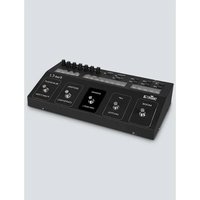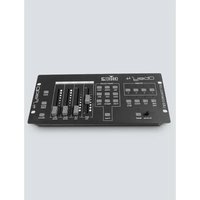
Obey 4 - Controller Chauvet - Free user manual and instructions
Find the device manual for free Obey 4 Chauvet in PDF.


| Product Type | DMX Controller |
| Brand | Chauvet |
| Model | Obey 4 |
| Dimensions (L x W x H) | 325 x 140 x 52 mm |
| Weight | 1.4 kg |
| Power Supply | DC 12 V, 500 mA max. (AC 100-240 V, 50/60 Hz power adapter included) |
| Control Protocol | DMX-512 USITT |
| DMX Channels | 16 (up to 4 fixtures, 4 channels each) |
| Data Output | XLR 3-pin female |
| Operation Modes | Preset (9 colors), Chase, Color Macro, RGB Fade, RGB Fade with Offset, Auto, Manual RGBW, Sound Activation |
| Strobe | Adjustable from 2 to 33 Hz |
| Blackout | With adjustable fade (speed via fader) |
| Intensity Control | Faders for Red, Green, Blue, White/Amber, Master Dimmer, Fade Time, Speed |
| DMX Addressing | Fixture 1: 1, Fixture 2: 5, Fixture 3: 9, Fixture 4: 13 (via DIP switches) |
| Maximum Ambient Temperature | 40 °C |
| Use | Indoor only |
| Maintenance and Cleaning | Clean optics with isopropyl alcohol and a soft lint-free cloth; vacuum dust from vents |
| Safety | Do not expose to rain or moisture; disconnect before servicing; use a safety cable |
| Warranty | Limited 2-year warranty |
| Package Contents | Obey 4, power adapter, warranty card, user manual |
Frequently Asked Questions - Obey 4 Chauvet
User questions about Obey 4 Chauvet
0 question about this device. Answer the ones you know or ask your own.
Ask a new question about this device
Download the instructions for your Controller in PDF format for free! Find your manual Obey 4 - Chauvet and take your electronic device back in hand. On this page are published all the documents necessary for the use of your device. Obey 4 by Chauvet.
USER MANUAL Obey 4 Chauvet
natural_image
Abstract geometric pattern composed of black dots forming a triangular shape (no text or symbols)CHAVET ^®
TABLE OF CONTENTS
1. BEFORE YOU BEGIN....6
WHAT IS INCLUDED....6
UNPACKING INSTRUCTIONS 6
MANUAL CONVENTIONS 6
ICONS 6
SAFETY INSTRUCTIONS 7
2. INTRODUCTION 8
FEATURES 8
PRODUCT OVERVIEW....8
3. SETUP 9
AC POWER....9
MOUNTING....9
Orientation....9
Installation....9
FIXTURE ADDRESSING....9
4. OPERATING INSTRUCTIONS....10
DMX PRIMER....14
GENERAL TROUBLESHOOTING....14
FIXTURE LINKING....15
DATA CABLING....15
DMX Data Cable 15
CABLE CONNECTORS ....15
SETTING THE STARTING ADDRESS....16
3-Pin to 5-Pin Conversion Chart....16
Setting up a DMX Serial Data Link....16
GENERAL MAINTENANCE....17
TECHNICAL SPECIFICATIONS .... 17
RETURNS......18
CONTACT US....19
1. ANTES DE EMPEZAR 20
QUÉ VA INCLUIDO....20
INSTRUCCIONES DE DESEMBALAJE 20
CONVENCIONES DEL MANUAL 20
ICONOS 20
INSTRUCCIONES DE SEGURIDAD....21
VUE D'ENSEMBLE DU PRODUIT 36
3. INSTALLATION 37
ALIMENTATION SECTEUR 37
MONTAGE....37
Orientation....37
Installation....37
ADRESSAGE DES PROJECTEURS 37
4. INSTRUCTIONS D'EMPLOI 38
FONCTIONNEMENT AVEC PRÉRÉGLAGES (PRESET) 38
FONCTIONNEMENT EN FONDU RVB (MODE RGB FADE) 38
FONCTIONNEMENT AUTOMATIQUE (MODE AUTO) 38
FONCTIONNEMENT AVEC SEQUENCES (MODE CHASES) 39
FONCTIONNEMENT EN DECALAGE RVB (MODE RGB OFFSET) 39
FONCTIONNEMENT AVEC MACRO COULEUR (MODE COLOR MACRO) 40
PRIORITÉ AU SON 40
BLANC (OU AMBRE) 40
PRIORITÉ AU STROBOSCOPE 41
BLACKOUT 41
RVBBLC MANUEL (MODE MANUAL RGBW) 41
5. ANNEXE....42
INTRODUCTION AU DMX 42
DÉPANNAGE GÉNÉRAL 42
CHAINAGE DES APPAREILS 43
CABLAGE DE DONNEES 43
KONVENTIONEN DES HANDBUCHS....48
SYMBOLE 48
RGB-VERPLAATSINGSBEDIENING....67
KLEURENMACROBEDIENING....68
GELUIDSOVERNAME 68
WIT (OF AMBER) 68
STROBOSCOOPOVERNAME 69
BLACKOUT 69
HANDMATIGE RGBW-MODUS 69
- BIJLAGE 70
DMX-PRIMER 70
ALGEMENE PROBLEMEN OPLOSSEN....71
KOPPELING VAN DE ARMATUREN....72
GEGEGEVENSBEKABELING 72
NEEM CONTACT OP....76
Copyright © Chauvet, 2015, All Rights Reserved
Information and specifications in this User Manual are subject to change without notice.
Chauvet assumes no responsibility or liability for any errors or inaccuracies that may appear in
this manual.
Author: R. Isenstadt
Revision: 2
Release Date: 03/17/2015
1. BEFORE YOU BEGIN
What is Included
- Obey™ 4
- Power Supply
- Warranty Card
- User Manual
Unpacking Instructions
Immediately upon receiving a product, carefully unpack the carton, check the contents to ensure that all parts are present, and have been received in good condition. Notify the shipper immediately and retain packing material for inspection if any parts appear damaged from shipping or the carton itself shows signs of mishandling. Save the carton and all packing materials. In the event that a product must be returned to the factory, it is important that the fixture be returned in the original factory box and packing.
Manual Conventions
Chauvet manuals use the following conventions to differentiate certain types of information from the regular text.
| CONVENTION | MEANING |
| [10] A DIP switch to be configured | |
| A key to be pressed on the fixture's control panel | |
| 1-512 A range of values | |
| 50/60 | A set of values of which only one can be chosen |
| Settings | A menu option not to be modified (for example, showing the operating mode/current status) |
| MENU>Settings | A sequence of menu options to be followed |
| ON | A value to be entered or selected |
Icons
This manual uses the following icons to indicate information that requires special attention on the part of the user.
| ICONS | MEANING |
 | This paragraph contains critical installation, configuration or operation information. Failure to comply with this information may render the fixture partially or completely inoperative, cause damage to the fixture or cause harm to the user. |
 | This paragraph contains important installation or configuration information. Failure to comply with this information may prevent the fixture from functioning correctly. |
 | This paragraph reminds you of useful, although not critical, information. |
Safety Instructions

Please read these instructions carefully. It includes important information about the installation, usage and maintenance of this product.
- Please keep this User Manual for future consultation. If you sell the product to another user, be sure that they also receive this instruction booklet.
- Always make sure that you are connecting to the proper voltage, and that the line voltage you are connecting to is not higher than that stated on the decal or rear panel of the fixture.
- This product is intended for indoor use only! To prevent risk of fire or shock, do not expose fixture to rain or moisture.
• Make sure there are no flammable materials close to the unit while operating. - The unit must be installed in a location with adequate ventilation, at least 20 in (50 cm) from adjacent surfaces. Be sure that no ventilation slots are blocked.
• Always disconnect from power source before servicing. - Secure fixture to fastening device using a safety chain.
• Maximum ambient temperature (Ta) is 104 °F (40 °C). Do not operate fixture at temperatures higher than this. - In the event of a serious operating problem, stop using the product immediately. Never try to repair the unit by yourself. Repairs carried out by unskilled people can lead to damage or malfunction. Please contact the nearest authorized technical assistance center.
• Never connect the device to a dimmer pack or rheostat. - Make sure the power cord is never crimped or damaged.
- Never disconnect the power cord by pulling or tugging on the cord.
- Never carry the fixture directly from the cord.
• To eliminate wear and improve its lifespan, during periods of non-use completely disconnect from power via breaker or by unplugging it.
2. INTRODUCTION
Features
• Compact DMX-512 controller for LED fixtures (up to 4-channels)
Channel 1: red
Channel 2: green
Channel 3: blue
Channel 4: white (or amber)
• Controls up to 4 separate fixtures
• Each fixture can be in different playback modes simultaneously
- Playback options include automated, sound-activated or manual RGBW
- Playback modes:
Preset: 9 built-in colors
Chases: manually trigger automated programs
Color macro: manually scroll through the color spectrum
RGB fade: automatically scroll through the color spectrum
RGB fade delay: automatically scroll through the color spectrum with a small delay to each fixture
Auto: randomly selects different colors for each fixture
• Variable fade times for all playback modes
• Variable strobing on the fly (2 Hz – 33 Hz)
- Adjustable blackout allows fixtures to fade in and out
• Adjustable audio sensitivity
Product Overview
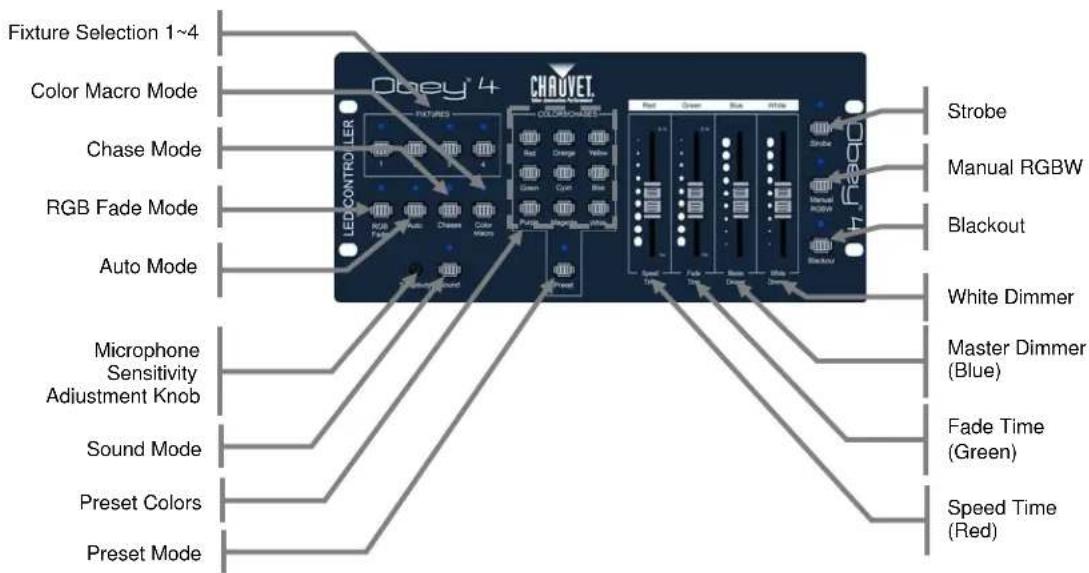
flowchart
graph TD
    A["Fixture Selection 1~4"] --> B["Chrovet"]
    C["Color Macro Mode"] --> B
    D["Chase Mode"] --> B
    E["RGB Fade Mode"] --> B
    F["Auto Mode"] --> B
    G["Microphone Sensitivity Adjustment Knob"] --> B
    H["Sound Mode"] --> B
    I["Preset Colors"] --> B
    J["Preset Mode"] --> B
    B --> K["Strobe"]
    B --> L["Manual RGBW"]
    B --> M["Blackout"]
    B --> N["White Dimmer"]
    B --> O["Master Dimmer (Blue)"]
    B --> P["Fade Time (Green)"]
    B --> Q["Speed Time (Red)"]
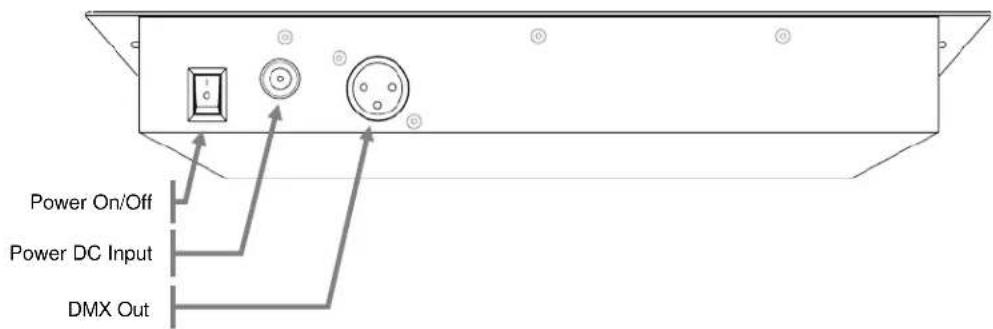
Back Panel
3. SETUP
AC Power
This fixture runs on 12 VDC, 500 mA. Before powering on the unit, check the output of the power supply to be sure that it is correct.
To determine the power requirements for a particular fixture, see the label affixed to the back plate of the fixture or refer to the fixture's specifications chart. A fixture's listed current rating indicates its average current draw under normal conditions.

- Always connect the fixture to a switched circuit. Never connect the fixture to a rheostat (variable resistor) or dimmer circuit, even if the rheostat or dimmer channel is used only as a 0 to 100% switch.
• To eliminate wear and improve its lifespan, during periods of non-use completely disconnect from power via breaker or by unplugging it.
• Always connect the fixture to a circuit with a suitable electrical ground.
Mounting
Orientation
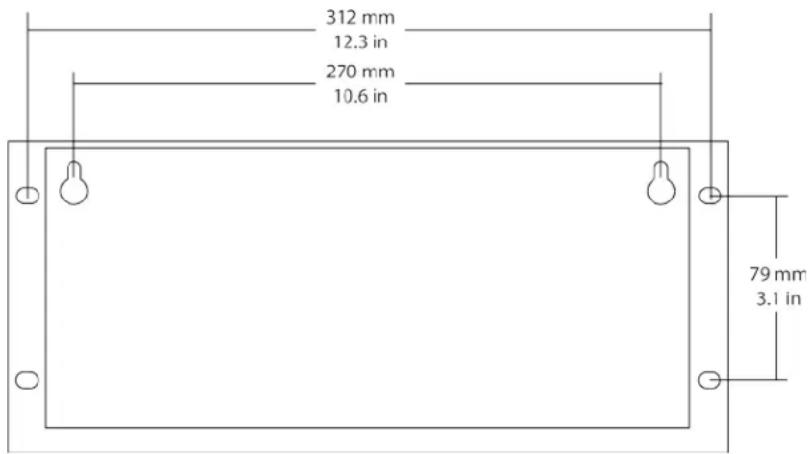
The Obey ^™ 4 may be mounted in any safe position.
Installation
Please see the drawing below, which shows the back of the controller. It details the dimensions for mounting. This will aid in placing the holes for installation.
Fixture Addressing
The Obey™ 4 can control up to 4 separate fixtures. Each fixture must be set to predetermined DMX addresses. Please see the chart below for the DMX starting addresses of each of the four
Fixture 1: 1 - DIP switch assignment [1]
Fixture 2: 5 - DIP switch assignment [1, 3]
Fixture 3: 9 - DIP switch assignment [1, 4]
Fixture 4: 13 - DIP switch assignment [1, 3, 4]
4. OPERATING INSTRUCTIONS

Please note: the white/amber fader works independently of the current operating mode. Only blackout will effect on this channel.
Preset Operation
This controller has preset colors. There are nine preset colors to choose from, which may be accessed using the nine preset buttons. Please see the instructions below for this operation.
- Select one or more
. - Press
until the appropriate LED indicator lights. - Adjust the
to the desired level to set the Fade Time. - Adjust the
to the desired level to set the intensity. may be adjusted; however, it will not be affected by this mode. - Select one of the nine
buttons.

Please be sure that the Strobe or Blackout functions are not overriding the controls.

Sound will not function in Preset Mode.
RGB Fade Operation
This controller has a preset color fading program, which will fade all units in unison between colors. Please see the instructions below for this operation.
- Select one or more
. - Press
until the appropriate LED indicator lights. - Adjust the
to the desired level to set the speed time. - Adjust the
to the desired level to set the fade time. - Adjust the
to the desired level to set the intensity. may be adjusted; however, it will not be affected by this mode.

Please be sure that the Strobe & Blackout functions are not overriding the controls.

Sound will function in RGB Fade Mode.
Auto Operation
This controller has built-in automatic programs, which will change each unit independently, between random colors. Please see the instructions below for this operation.
- Select one or more
. - Press
until the appropriate LED indicator lights. - Adjust the
to the desired level to set the speed time - Adjust the
to the desired level to set the fade time. - Adjust the
to the desired level to set the intensity. may be adjusted; however, it will not be affected by this mode.

Please be sure that the Strobe & Blackout functions are not overriding the controls.

The fixtures in this mode will not be the same color. Each fixture will operate on a random color.

Sound will function in Auto Mode.
Chase Operation
This controller has preset color chases. There are several color combinations to choose from. Please see the instructions below for this operation.
- Select one or more
. - Press
until the appropriate LED indicator lights. - Use the
to select a chase. See the chart below for a description on which button triggers which chase. - Adjust the
to the desired level to set the speed time. - Adjust the
to the desired level to set the fade time. - Adjust the
to the desired level to set the intensity. may be adjusted; however, it will not be affected by this mode.
Chase Selection
Use the following
| Red: | Red/Green |
| Orange: | Green/Blue |
| Yellow: | Red/Blue |
| Green: | Red/Cyan |
| Cyan: | Green/Magenta |
| Blue: | Yellow/Blue |
| Purple: | White/Blackout |
| Magenta: | Color Cycle |
| White: | Yellow/Magenta |


Please be sure that the Strobe & Blackout functions are not overriding the controls.
Sound will function in Chase Mode.
RGB Offset Operation
This controller has a built-in color fade program that will chase between fixtures sequentially: 1–4, continuously Please see the instructions below for this operation.
- Press
& simultaneously. - Adjust the
to the desired level to set the speed time. - Adjust the
to the desired level to set the fade time. - Adjust the
to the desired level to set the intensity. may be adjusted; however, it will not be affected by this mode.


Sound will function in RGB Offset Mode.
Please be sure that the Strobe & Blackout functions are not overriding the controls.
Color Macro Operation
This controller has preset color macros, some with different intensities. Please see the instructions below for this operation.
- Select one or more
. - Press
until the appropriate LED indicator lights. - Move the
fader to select the color. - Adjust the
to the desired level to set the fade time. - Adjust the
to the desired level to set the intensity. - Adjust the
to the desired level to set the white intensity.

This mode applies the same color to all fixtures.

Sound will NOT function in Color Macro Mode.
Sound-Override
The modes in this controller that have multiple steps are normally triggered using the
Sound-Override mode will ONLY work in one of the following modes:
- RGB Fade
• AUTO - CHASES
Please see the following steps for operation.
- Press
until the LED indicator lights. - Adjust the sound sensitivity by rotating the
.
White (or Amber)
The
The only functions that effect the White (or amber) color are
Strobe-Override
One of the functions for the
Please see the instructions below for this operation.
- Select one or more
. - See note below about RGBW Operation.
- Press
until the appropriate LED indicator lights. -
Adjust
to the desired level. -
In order to return to the desired mode, press
until the appropriate LED indicator is off.

In order to deactivate this function for a single fixture,

Strobe-Override will only affect fixtures that are selected.

Double-tap

If the fixture is in RGBW Operation, the faders must be adjusted above 0% in order for the strobe to function.
Blackout
This controller has a dedicated blackout button. This button works in conjunction with the
- Select one or more
. - Adjust the
fader to the desired value to determine how quickly the lights will fade out. - Press
until the appropriate LED indicator lights.

The blackout function will also work with the

The fading blackout function will not work when the controller is in Manual RGBW mode.

Double-tap
Manual RGBW Mode
This controller has the ability to manually choose a custom color combination by simply using the Red, Green Blue, and White faders. However,
- Select one or more
. - Press
until the appropriate LED indicator lights. - Adjust the Red, Green, Blue, and White faders to the desired levels.

Blackout dimming speed will not work in Manual RGBW mode. When

Speed/Fade Time will not work in Manual RGBW mode.
5. APPENDIX
DMX Primer
There are 512 channels in a DMX connection. Channels may be assigned in any manner. A fixture capable of receiving DMX will require one or a number of sequential channels. The user must assign a starting address on the fixture that indicates the first channel reserved in the controller. There are many different types of DMX controllable fixtures and they all may vary in the total number of channels required. Choosing a start address should be planned in advance. Channels should never overlap. If they do, this will result in erratic operation of the fixtures whose starting address is set incorrectly. You can however, control multiple fixtures of the same type using the same starting address as long as the intended result is that of unison movement or operation. In other words, the fixtures will be slaved together and all respond exactly the same.
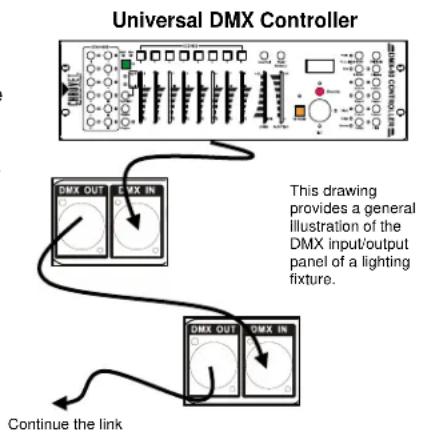
DMX fixtures are designed to receive data through a serial Daisy Chain. A Daisy Chain connection is where the DATA OUT of one fixture connects to the DATA IN of the next fixture. The order in which the fixtures are connected is not important and has no effect on how a controller communicates to each fixture. Use an order that provides for the easiest and most direct cabling. Connect fixtures using shielded two conductor twisted pair cable with three pin XLR male to female connectors. The shield connection is pin 1, while pin 2 is Data Negative (S-) and pin 3 is Data positive (S+).
General Troubleshooting
| SYMPTOM | POSSIBLE CAUSE(S) | POSSIBLE ACTION(S) |
| Breaker/Fuse keeps blowing | Excessive circuit loadShort circuit along the power wires | Check total load placed on the electrical circuit.Check for a short in the electrical wiring (internal and/or external). |
| Device does not power up | No powerLoose power cord | Check for power on Mains.Check power cord |
| Fixture is not responding to DMX | Wrong DMX addressingDamaged DMX cablesWrong polarity settings on the controllerLoose DMX cablesFaulty DMX interfaceFaulty Main PCB | Check Control Panel and unit addressingCheck DMX cablesCheck polarity switch settings on the controllerCheck cable connectionsReplace DMX inputReplace Main PCB |
| Loss of signal | Non DMX cablesBouncing signalsLong cable / Low level signalToo many fixturesInterference from AC wires | Use only DMX compatible cablesInstall terminator as suggested.Install amplifier right after fixture with strong signal.Install an optically coupled DMX splitter after unit #32.Keep DMX cables separated from power cables or black lights. |

If you still have a problem after trying the above solutions, please contact Chauvet Technical Support.
Fixture Linking
You will need a serial data link to run light shows of one or more fixtures using a DMX controller or to run synchronized shows on two or more fixtures set to a master/slave operating mode. The combined number of channels required by all the fixtures on a serial data link determines the number of fixtures the data link can support.

Fixtures on a serial data link must be daisy chained in one single line. To comply with the EIA-485 standard, no more than 32 fixtures should be connected on one data link. Connecting more than 32 fixtures on one serial data link without the use of a DMX optically-isolated splitter may result in deterioration of the digital DMX signal.
Maximum recommended serial data link distance: 500 m (1640 ft) Maximum recommended number of fixtures on a serial data link: 32
Data Cabling
To link fixtures together you must obtain data cables. You can purchase Chauvet certified DMX cables directly from a dealer/distributor or construct your own cable. If you choose to create your own cable please use data-grade cables that can carry a high quality signal and are less prone to electromagnetic interference.
DMX Data Cable
Use a Belden© 9841 or equivalent cable which meets the specifications for EIA RS-485 applications. Standard microphone cables cannot transmit DMX data reliably over long distances. The cable must have the following characteristics:
Type: shielded, 2-conductor twisted pair Maximum capacitance between conductors: 30 pF/ft Maximum capacitance between conductor and shield: 55 pF/ft Maximum resistance: 20 ohms/1000 ft Nominal impedance: 100–140 ohms
Cable Connectors
Cabling must have a male XLR connector on one end and a female XLR connector on the other end.
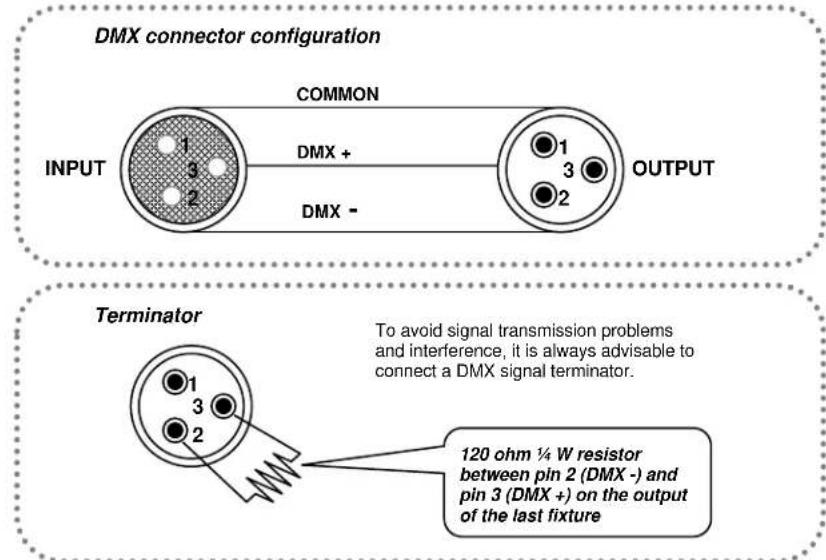

Do not allow contact between the common and the fixture's chassis ground. Grounding the common can cause a ground loop, and your fixture may perform erratically. Test cables with an ohm meter to verify correct polarity and to make sure the pins are not grounded or shorted to the shield or each other.
Setting the Starting Address
This DMX mode enables the use of a universal DMX controller device. Each fixture requires a start address from 1–512. A fixture requiring one or more channels for control begins to read the data on the channel indicated by the start address. For example, a fixture that uses six DMX channels and was addressed to start on DMX channel 100, would read data from channels: 100, 101, 102, 103, 104, and 105. Choose start addresses so that the channels used do not overlap, and note the start address selected for future reference.
If this is your first time addressing a fixture using the DMX control protocol, we suggest jumping to the "Appendix" section and reading the heading "DMX Primer". It contains very useful information that will help you understand its use.
3-Pin to 5-Pin Conversion Chart

If you use a controller with a 5-pin DMX output connector, you will need to use a 5-pin to 3-pin adapter. The chart below details a proper cable conversion:
3-PIN TO 5-PIN CONVERSION CHART
| Conductor | 3-Pin Female (Output) | 5-Pin Male (Input) |
| Ground/Shield | Pin 1 | Pin 1 |
| Data (-) signal | Pin 2 | Pin 2 |
| Data (+) signal | Pin 3 | Pin 3 |
| Not used | Pin 4 | |
| Not used | Pin 5 |
Setting up a DMX Serial Data Link
- Connect the (male) 3-pin connector side of the DMX cable to the output (female) 3-pin connector of the controller.
- Connect the end of the cable coming from the controller which will have a (female) 3-pin connector to the input connector of the next fixture consisting of a (male) 3-pin connector.
- Then, proceed to connect from the output as stated above to the input of the following fixture and so on.
General Maintenance
To maintain optimum performance and minimize wear, fixtures should be cleaned frequently. Usage and environment are contributing factors in determining frequency. As a general rule, fixtures should be cleaned at least twice a month. Dust build up reduces light output performance and can cause overheating. This can lead to reduced lamp life and increased mechanical wear. Be sure to power off fixture before conducting maintenance.
- Unplug fixture from power.
- Use a vacuum or air compressor and a soft brush to remove dust collected on external vents.
- After the product has reached room temperature, clean all glass with a mild solution of glass cleaner or Isopropyl Alcohol and a soft lint free cotton cloth or lens tissue.
- Apply solution to the cloth or tissue and drag dirt and grime to the outside of the lens.
- Gently polish optical surfaces until they are free of haze and lint.

Always dry the parts carefully after cleaning them.
TECHNICAL SPECIFICATIONS
WEIGHT & DIMENSIONS
Length.... 12.8 in (325 mm)
Width 5.5 in (140 mm)
Height 2.1 in (52 mm)
Weight 3 lb (1.4 kg)
POWER
Operating Range.....DC 12 V, 500 mA max
Adapter (external power supply: 100–240 VAC, 50/60 Hz).....Provided
INDOOR/OUTDOOR
Rating ......For indoor use only
THERMAL
Maximum ambient temperature.... 104 °F (40 °C)
CONTROL & PROGRAMMING
Data Output ....3-pin XLR female socket
Data pin configuration pin 1 shield, pin 2 (-), pin 3 (+)
Protocols......DMX-512 USITT
DMX control channels....001-016
ORDERING INFORMATION
Obey™ 4 OBEY4
WARRANTY INFORMATION
Warranty 2-year limited warranty


RoHS


RETURNS
In case you need to get support or return a product:
• If you are located in the U.S., contact Chauvet World Headquarters (see Contact Us).
• If you are located in the UK or Ireland, contact Chauvet Europe Ltd. (see Contact Us).
• If you are located in Mexico, contact Chauvet Mexico (see Contact Us).
• If you are located in Benelux, contact Chauvet Europe BVBA (see Contact Us).
- If you are located in any other country, DO NOT contact Chauvet. Instead, contact your local distributor. See www.chauvetlighting.com for distributors outside the U.S., UK, Ireland, Mexico, or Benelux.

If you are located outside the U.S., UK, Ireland, Mexico, or Benelux, contact your distributor of record and follow their instructions on how to return Chauvet products to them. Visit our website www.chauvetlighting.com for contact details.
Call the corresponding Chauvet Technical Support office and request a Return Merchandise Authorization (RMA) number before shipping the product. Be prepared to provide the model number, serial number, and a brief description of the cause for the return.
Send the merchandise prepaid, in its original box, and with its original packing and accessories. Chauvet will not issue call tags.
Clearly label the package with the RMA number. Chauvet will refuse any product returned without an RMA number.

Write the RMA number on a properly affixed label. DO NOT write the RMA number directly on the box.
Before sending the product, clearly write the following information on a piece of paper and place it inside the box:
- Your name
- Your address
- Your phone number
- RMA number
• A brief description of the problem
Be sure to pack the product properly. Any shipping damage resulting from inadequate packaging will be your responsibility. FedEx packing or double-boxing are recommended.

Chauvet reserves the right to use its own discretion to repair or replace returned product(s).
CONTACT Us
WORLD HEADQUARTERS - Chauvet
General Information
Address: 5200 NW 108 ^th Avenue
Sunrise, FL 33351
Voice: (954) 577-4455
Fax: (954) 929-5560
Toll free: (800) 762-1084
Technical Support
Voice: (954) 577-4455 (Press 4)
Fax: (954) 756-8015
Email: tech@chauvetlighting.com
World Wide Web www.chauvetlighting.com
UNITED KINGDOM AND IRELAND - Chauvet Europe Ltd.
General Information
Address: Unit 1C
Brookhill Road Industrial Estate
Pinxton, Nottingham, UK
NG16 6NT
Voice: +44 (0)1773 511115
Fax: +44 (0)1773 511110
Technical Support
Email: uktech@chauvetlighting.com
World Wide Web
www.chauvetlighting.co.uk
MEXICO - Chauvet Mexico
General Information
Address: Av. Santa Ana 30
Parque Industrial Lerma
Lerma, Mexico C.P. 52000
Voice: +52 (728) 285-5000
Technical Support
Email: servicio@chauvet.com.mx
World Wide Web www.chauvet.com.mx
CHAUVET EUROPE - Chauvet Europe BVBA
General Information
Outside the U.S., United Kingdom, Ireland, Mexico, or Benelux contact your dealer. Follow their instructions to request support or to return a product. Visit our website for contact details.
1. ANTES DE EMPEZAR
Qué va incluido
Brookhill Road Industrial Estate
Pinxton, Nottingham, UK
NG16 6NT
Voz: +44 (0)1773 511115
Fax: +44 (0)1773 511110
Servicio Técnico
Email: uktech@chauvetlighting.com
World Wide Web www.chauvetlighting.com
MÉXICO - Chauvet Mexico
Información General
Maximum recommended serial data link distance: 500 m (1640 ft) Maximum recommended number of fixtures on a serial data link: 32
Câblage de données
INFORMATIONS DE GARANTIE
Brookhill Road Industrial Estate
Pinxton, Nottingham, UK
NG16 6NT
Téléphone: +44 (0)1773 511115
Télécopie: +44 (0)1773 511110
Support Technique
E-mail: uktech@chauvetlighting.com
Site Web www.chauvetlighting.co.uk
MEXIQUE - Chauvet Mexico
Brookhill Road Industrial Estate
Pinxton, Nottingham, GB
NG16 6NT
3-PIN NAAR 5-PIN CONVERSIEDIAGRAM
Toll free: (800) 762-1084
Technische Support
Brookhill Road Industrial Estate
Pinxton, Nottingham, UK
NG16 6NT
Bandopname: +44 (0)1773 511115
Fax: +44 (0)1773 511110
Technische Support
E-mail: uktech@chauvetlighting.com
World Wide Web
www.chauvetlighting.co.uk