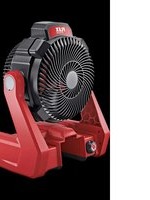
CF 18.0/230 - Fan Flex - Free user manual and instructions
Find the device manual for free CF 18.0/230 Flex in PDF.


| Product Type | Cordless Cooling Fan |
| Brand | Flex |
| Model | CF 18.0/230 |
| Power Supply | 18 V lithium-ion battery (types AP18.0/2.5 or AP18.0/5.0) or 230 V mains adapter |
| Battery Capacity | 2.5 Ah or 5.0 Ah |
| Weight (with 2.5 Ah battery) | 0.4 kg |
| Weight (with 5.0 Ah battery) | 0.72 kg |
| Runtime (2.5 Ah battery) | 2.2 hours |
| Runtime (5.0 Ah battery) | 4.5 hours |
| Maximum Airflow | 1095 m³/h |
| Maximum Air Speed | 294 m/min |
| Sound Pressure Level | 70 dB(A) |
| Sound Power Level | 81 dB(A) |
| Tilt Angle | Up to 50° forward, 130° backward |
| Mounting Options | Suspension via keyhole slots, hooks, rod housings (diameter 12.7-17.78 mm), tripod (15.87 mm or 6.35 mm) |
| Speed Control | Yes, continuous rotary switch |
| Maintenance | Regular cleaning of grilles with dry compressed air |
| Intended Use | Indoor, commercial and industrial use |
| Safety | Short-circuit protection, stop before maintenance, do not use near children without supervision |
Frequently Asked Questions - CF 18.0/230 Flex
User questions about CF 18.0/230 Flex
0 question about this device. Answer the ones you know or ask your own.
Ask a new question about this device
Download the instructions for your Fan in PDF format for free! Find your manual CF 18.0/230 - Flex and take your electronic device back in hand. On this page are published all the documents necessary for the use of your device. CF 18.0/230 by Flex.
USER MANUAL CF 18.0/230 Flex
natural_image
Technical line drawing of a fan assembly with visible blades and mounting brackets (no text or symbols)natural_image
Technical line drawing of a mechanical component with directional arrows indicating flow or movement (no text or symbols)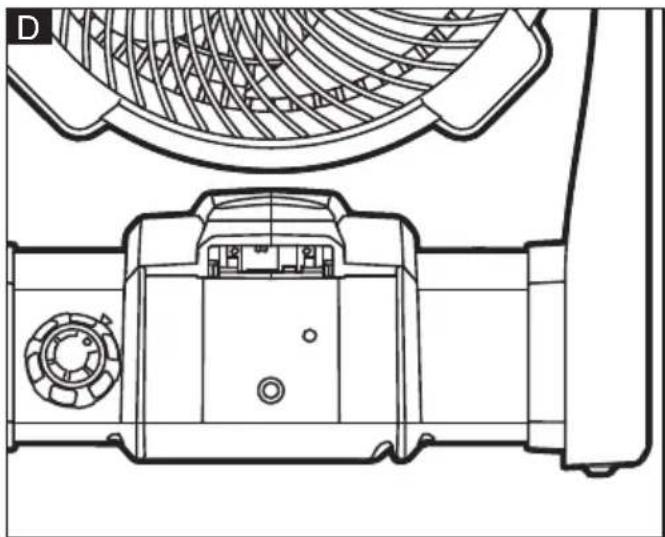
natural_image
Technical line drawing of a mechanical component with internal structure and top view (no text or symbols)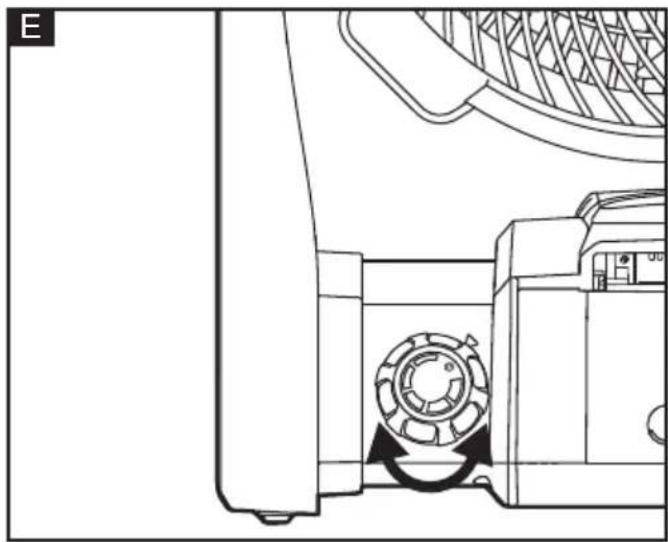
natural_image
Technical line drawing of a mechanical component with a circular component and directional arrow (no text or symbols)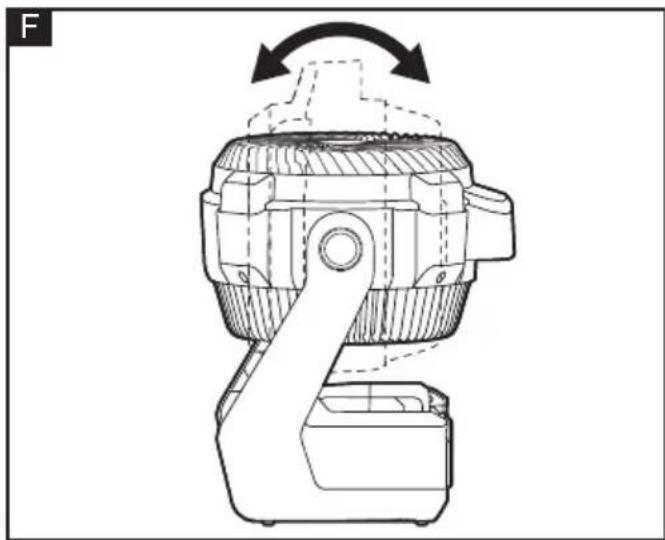
natural_image
Technical line drawing of a mechanical device with no visible text or symbols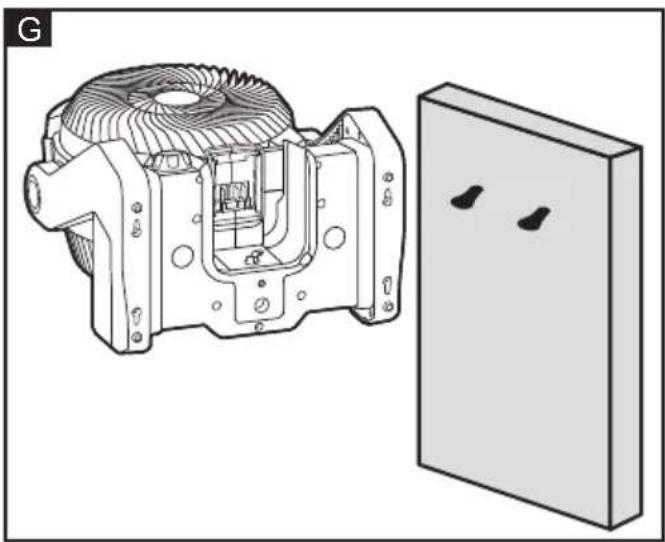
natural_image
Technical illustration of a mechanical housing assembly with a separate panel (no text or symbols visible)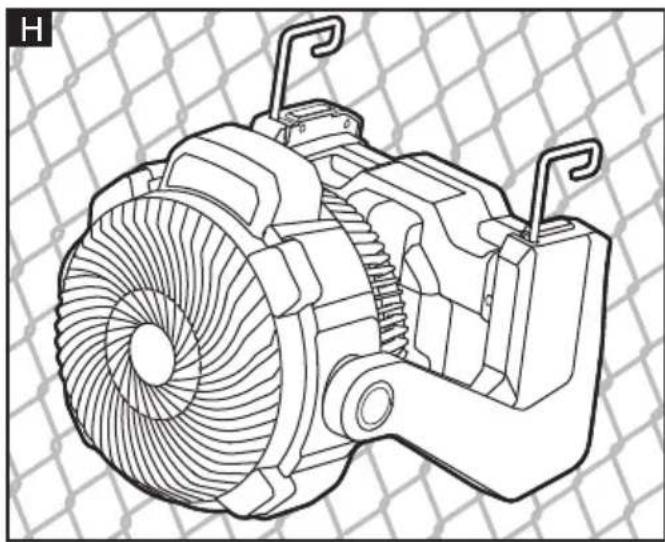
natural_image
Technical line drawing of a mechanical fan assembly with mounting brackets (no text or symbols)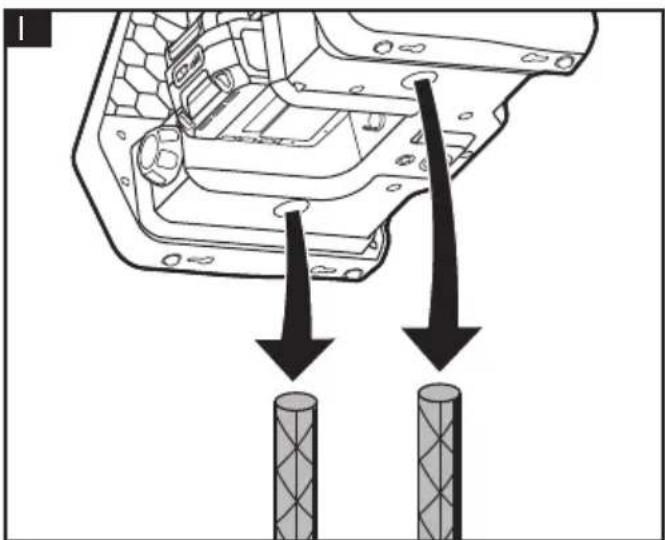
natural_image
Diagram showing a mechanical component with two arrows pointing to two cylindrical components (no text or symbols present)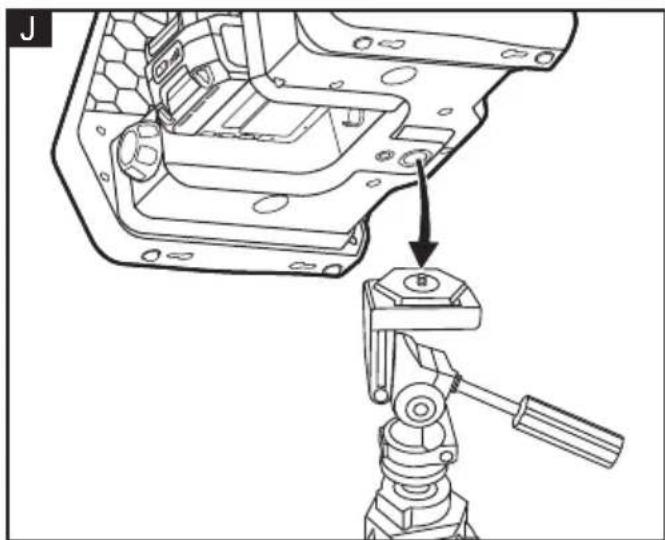
natural_image
Technical line drawing of a mechanical assembly with a tool inserted, showing part details and mounting bracket (no text or symbols)Peter Lameli Klaus Peter Weinper Technical Head Head of Quality Department
Symbols used in this manual

WARNING!
Denotes impending danger. Non-observance of this warning may result in death or extremely severe injuries.

CAUTION!
Denotes a possibly dangerous situation. Non-observance of this warning may result in slight injury or damage to property.

NOTE
Denotes application tips and important information.
Symbols on the power tool

To reduce the risk of injury, read the operating instructions!

Disposal information for the old machine (see page 13)!
For your safety

WARNING!
Before using the power tool, please read and follow:
– these operating instructions,
- the "General safety instructions" on the handling of power tools in the enclosed booklet (leaflet-no.: 315.915),
- the currently valid site rules and the regulations for the prevention of accidents.
This power tool is state of the art and has been constructed in accordance with the acknowledged safety regulations.
Nevertheless, when in use, the power tool may be a danger to life and limb of the user or a third party, or the power tool or other property may be damaged.
The cooling fan may be used only
-asintended,
- in perfect working order.
Faults which impair safety must be repaired immediately.
Intended use
The cooling fan is designed
– for household use in industry and trade,
– for general ventilation for indoor spaces
Safety warnings for cooling fan
■ Indoor use only.
■ Do not allow the appliance to be used as a toy. Close attention is necessary when used by or near children.
- Use only as described in this manual. Use only manufacturer's recommended attachments.
- Do not handle the charger, including charger plug, or charger terminals with wet hands.
- Do not put any object into any openings. Do not use with any opening blocked; keep openings free of dust, lint, hair, and anything that may reduce air flow.
- Keep hair, loose clothing, fingers, and all parts of body away from openings and moving parts. Loose clothes, jewelry, or long hair can be drawn into air vents.
■ Do not charge the battery pack outdoors.
- Do not incinerate the appliance even if it is severely damaged. The batteries can explode in a fire.
■ Do not leave the appliance unattended when the battery is inserted. Remove the battery when the fan is not in use and before servicing.
- Keep the appliance and its handle dry, clean and free from oil and grease. Always use a clean cloth when cleaning. Never use brake fluids, gasoline, petroleum-based products, or any strong solvents to clean your fan. Following this rule will reduce the risk of loss of control and deterioration of the enclosure plastic.
■ Batteries can explode in the presence of a source of ignition, such as a pilot light. To reduce the risk of serious personal injury, never use any cordless product in the presence of open flame. An exploded battery can propel debris and chemicals. If exposed, flush with water immediately.
■ Save these instructions. . Refer to them frequently and use them to instruct others who may use this tool. If you loan this tool to someone else, also loan these instructions to them to prevent misuse of the product and possible injury.
■ This appliance can be used by children aged from 8 years and above and persons with reduced physical, sensory or mental capabilities or lack of experience and knowledge if they have been given
supervision or instruction concerning use of the appliance in a safe way and understand the hazards involved
– Children shall not play with the appliance
- Cleaning and user maintenance shall not be made by children without supervision
■ If the appliance is to be stored unused for a long period, the batteries are removed.
■ The supply terminals are not to be short-circuited
■ If the supply cord is damaged, it must be replaced by the manufacturer, its service agent or similarly qualified persons in order to avoid a hazard.
Noise information
The noise values have been determined in accordance with EN 62841. The evaluated noise level of the power tool is typically:
- Sound pressure level L_pA : 70 dB(A);
- Sound power level L_WA : 81 dB(A);
- Uncertainty: K = 3 dB.

CAUTION!
The indicated measurements refer to new power tools. Daily use causes the noise and vibration values to change.

CAUTION!
Wear ear protection at a sound pressure above 85 dB(A).
Technical specifications
See figure B
| CF 18.0/230 | |||
| Machine type Cooling Fan | |||
| Battery | AP18.0/2.5 | AP18.0/5.0 | |
| Weight of battery | kg 0.4 | 2 0.72 | |
| Working time h 2 | 2 4.5 | ||
| Max. Air volume m3/h 10 | 95 | ||
| Max Air Speed | m/min | 294 | |
Overview (see figure A)
The numbering of the product features refers to the illustration of the machine on the graphics page.
1 Carrying handle
2 Adjustable head
3 Battery bay
4 Control switch
5 AC/DC socket
6 Hooks
7 Tripod mounting holes (15.87mm or 6.35mm)
8 Rod Pockets (2)
9 Key Holes (4)
10 Release button for battery
11 Li-ion battery
12 AC/DC adapter
Operating instructions

NOTE
For further information on the manufacturer's products go to www.flex-tools.com.

WARNING!
Remove the battery before carrying out any work on the power tool.
Before switching on the power tool
Unpack the cooling fan and check that there are no missing or damaged parts.

NOTE
The batteries are not fully charged on delivery. Prior to initial operation, charge the batteries fully. Refer to the charger operating manual.
Inserting/replacing the battery
■ Make sure that the control switch 4 is in the OFF position.
■ Press the charged battery 11 into the power tool until it clicks into place. (see figure C)
■ To remove, press the release button 10 and pull out the battery.

CAUTION!
When the device is not in use, protect the battery contacts. Loose metal parts may short-circuit the contacts; explosion and fire hazard!
Installing/Removing AC adapter for use with AC Power
■ Turn the control switch 4 to the OFF position.
■ Insert the cylindrical end of the AC/DC adapter 12 into the AC/DC socket 5. (see figure D)
■ Connect the AC/DC adaptor plug to the AC power source.
■ Make sure that the AC/DC adaptor 12 is secured before beginning operation.
To Start/Stop the Fan
■ Connect the portable fan to a power cord or to an approved battery pack.
■ Turn the control switch 4 clockwise to turn the fan ON and to adjust the fan speed. (see figure E)
■ To stop the fan, turn the control switch counterclockwise to the OFF position.
Changing Fan Speed
■ For high speeds, rotate the control switch 4 clockwise.
■ For low speeds, rotate the control switch counterclockwise.
Adjusting Fan Angle
■ To adjust the fan angle, grasp fan by the carrying handle 1 and tilt fan head forward or backward. (see figure F)
■ The fan can pivot forward within a range of 50^ , the fan can pivot backward within a range of 130^ .
Hanging/Mounting the Fan
Your fan has a variety of hanging options. Choose the option that is best suited for your location.
NOTE: The portable fan can hang in a vertical or horizontal position. Be careful not to hang the fan in such a way that it prevents normal fan operation or damages the cord.
Hanging the fan using the key hole
■ Place the wide portion of at least two of the key holes 9 over the heads of a screws. (see figure G)
■ Slide the portable fan down until the screws are inside the narrow portion of the key hole and the fan is secure.
Hanging the fan using the hooks
■ Pull the hooks 6 completely out of their slots and rotate them as needed. (see figure H)
■ Hang the fan from a sturdy location.
NOTE: Hooks will not rotate until they are fully extended.
Mounting the fan to rods using the rod pockets
The fan can be mounted to secured rods, tubes, or rebar using the two rod pockets 8 on the base of the fan. (see figure I)
NOTE: The mounting posts must have a diameter between 12.7 and 17.78 mm. Align the rod pockets with the rods and slide the fan down onto the rods.
Mounting the fan to a tripod using a tripod mounting hole
■ Place the fan on the tripod mounting screws (15.87mm or 6.35 mm). Make sure the mounting hole 7 on the base of the fan seats completely onto the mounting screw. (see figure J)
■ Turn the fan clockwise to secure it to the tripod.
Maintenance and care

WARNING!
Remove the battery before carrying out any work on the power tool.
Cleaning
■ Clean the power tool and grille in front of the vent slots regularly. Frequency of cleaning is dependent on the material and duration of use.
■ Regularly blow out the housing interior and motor with dry compressed air.
Spare parts and accessories
For other accessories, in particular tools and cooling fan accessories, can be found in the manufacturer's catalogues.
Exploded drawings and spare-part lists can be found on our homepage:
www.flex-tools.com
Disposal information

WARNING!
Render redundant power tools unusable:
- mains operated power tool by removing the power cord,
- battery operated power tool by removing the battery.

EU countries only Do not throw electric power tools into the household waste!
In accordance with the European Directive 2012/19/EU on Waste Electrical and Electronic Equipment and transposition into national law used electric power tools must be collected separately and recycled in an environmentally friendly manner.

Raw material recovery instead of waste disposal.
Device, accessories and packaging should be recycled in an environmentally friendly manner. Plastic parts are identified for recycling according to material type.

WARNING!
Do not throw batteries into the household waste, fire or water. Do not open used batteries.
EU countries only: In accordance with Directive 2006/66/EC defective or used batteries must be recycled.

NOTE
Please ask your dealer about disposal options!
CE-Declaration of Conformity
We declare under our sole responsibility that the product described under "Technical specifications" conforms to the following standards or normative documents:
EN 62841 in accordance with the regulations of the directives 2014/30/EU, 2006/42/EC, 2011/65/EU.
Responsible for technical documents: FLEX-Elektrowerkzeuge GmbH, R & D Bahnhofstrasse 15, D-71711 Steinheim/Murr
Peter Lameli Klaus Peter Weinper Technical Head Head of Quality Department
(QD)
Exemption from liability
The manufacturer and his representative are not liable for any damage and lost profit due to interruption in business caused by the product or by an unusable product. The manufacturer and his representative are not liable for any damage which was caused by improper use of the power tool or by use of the power tool with products from other manufacturers.
Peter Lameli Klaus Peter Weinper Technical Head Head of Quality
Department (QD)
Technical Head Head of Quality
Department (QD)
Peter Lameli Klaus Peter Weinper Technical Head Head of Quality
Department (QD)
Peter Lameli Klaus Peter Weinper Technical Head Head of Quality
Department (QD)
Peter Lameli Klaus Peter Weinper Technical Head Head of Quality
Department (QD)
Technical Head Head of Quality Department
(QD)
Peter Lameli Klaus Peter Weinper Technical Head Head of Quality
Department (QD)
Peter Lameli Klaus Peter Weinper Technical Head Head of Quality Department
(QD)
Technical Head Head of Quality
Department (QD)
Peter Lameli Klaus Peter Weinper Technical Head Head of Quality Department
Technical Head Head of Quality
Department (QD)
Peter Lameli Klaus Peter Weinper Technical Head Head of Quality
Department (QD)
Peter Lameli Klaus Peter Weinper Technical Head Head of Quality
Department (QD)
Peter Lameli Klaus Peter Weinper Technical Head Head of Quality Department
(QD)
Peter Lameli Klaus Peter Weinper Technical Head Head of Quality
Department (QD)
Peter Lameli Klaus Peter Weinper Technical Head Head of Quality Department
(QD)
Peter Lameli Klaus Peter Weinper Technical Head Head of Quality Department
Peter Lameli Klaus Peter Weinper Technical Head Head of Quality
Department (QD)
Peter Lameli Klaus Peter Weinper Technical Head Head of Quality
Department (QD)
Technical Head Head of Quality
Department (QD)
Peter Lameli Klaus Peter Weinper Technical Head Head of Quality
Department (QD)
Peter Lameli Klaus Peter Weinper Technical Head Head of Quality
Department (QD)
Peter Lameli Klaus Peter Weinper Technical Head Head of Quality
Department (QD)
Technical Head Head of Quality
Department (QD)