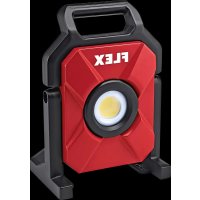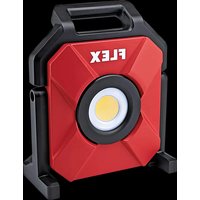
CL 10000 10.8/18.0 - Lamp Flex - Free user manual and instructions
Find the device manual for free CL 10000 10.8/18.0 Flex in PDF.


| Product type | Cordless LED construction site spotlight |
| Brand | Flex |
| Model | CL 10000 10.8/18.0 |
| Dimensions (L x W x H) | 349 x 290 x 208 mm |
| Weight (without battery) | 3.6 kg |
| Power supply | Lithium-ion battery 10.8 V or 18 V (several capacities available) |
| Maximum luminous flux | 10,000 lm (with 18 V battery) |
| Protection rating | IP65 (without battery) |
| Impact resistance rating | IK07 |
| Protection class | III (low voltage) |
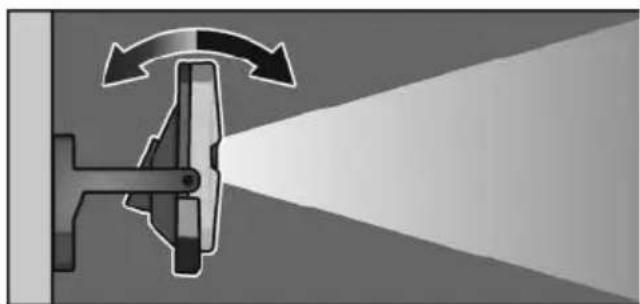
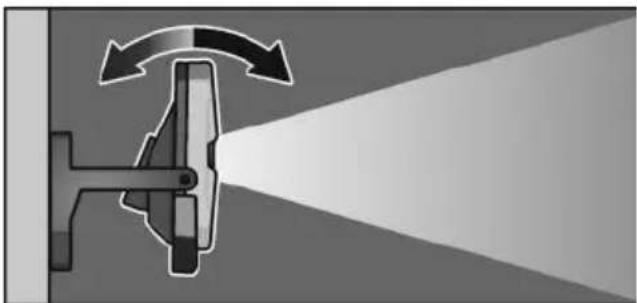
| Head tilt angle | 90° upward, 20° downward |
| USB-C port | 5 V / 1 A for charging mobile devices |
| Wall mounting | Wall mounting holes |
| Tripod mounting | 5/8" thread |
| Special functions | ECO mode (300 lm), brightness adjustment, integrated hook |
| Maintenance and cleaning | Remove battery before cleaning; use a brush or dry cloth; do not use water or liquid products |
| Safety instructions | Do not look into the light source; maintain a minimum distance; do not use on public roads |
| Spare parts and repairability | Exploded views and spare parts at www.flex-tools.com; repairs only by authorized workshop |
| Disposal | Device and batteries must not be disposed of with household waste; recycling according to directive 2012/19/EU |
Frequently Asked Questions - CL 10000 10.8/18.0 Flex
User questions about CL 10000 10.8/18.0 Flex
0 question about this device. Answer the ones you know or ask your own.
Ask a new question about this device
Download the instructions for your Lamp in PDF format for free! Find your manual CL 10000 10.8/18.0 - Flex and take your electronic device back in hand. On this page are published all the documents necessary for the use of your device. CL 10000 10.8/18.0 by Flex.
USER MANUAL CL 10000 10.8/18.0 Flex
natural_image
Two identical gray industrial fan-shaped devices with black handles, shown from different angles (no text or symbols visible)de Originalbetriebsanleitung .... 3
en Original operating instructions 10
fr Notice d'instructions d'origine 17
it Istruzioni per l'uso originali 24
es Instrucciones de funcionamiento originales ..... 3 1
pt Instruções de serviço originais ..... 38
nl Originele gebruiksaanwijzing 45
da Originale driftsvejledning 53
no Originale driftsanvisningen 60
sv Originalbruksanvisning 67
fi Alkuperäinen käyttöohjekirja 74
el Auθεντικές οδηγίες χειρισμού 81
tr Orijinal işletme kılavuzu 88
pl Instrukcja oryginalna 95
hu Eredeti üzemeltetési útmutató .....102
cs Originální návod k obsluze .....110
sk Originálny návod na obsluhu .....117
hr Originalna uputa za rad 124
sl Izvirno navodilo za obratovanje 131
ro Instructiuni de functionare originale 138
bg Оригинално упътване за експлоатация ..... 146
ru Оригинальная инструкция по эксплуатации .....154
et Originaalkasutusjuhend ....162
It Originali naudojimo instrukcija .....169
Iv Lietošanas pamācības oriģināls .....176
ar 189 ترجمة لإرشادات التشفيل الأصلية
Inhalt
Verwendete Symbole 3
Symbole am Gerät 3

VORSICHT!
USB-C Anschluss
natural_image
3D mechanical component diagram showing a bracket with mounting holes and a close-up inset of the handle (no text or symbols)natural_image
Two identical mechanical device diagrams showing a lever mechanism with arrows indicating motion (no text or symbols)Hakenfunktion
VORSICHT!
Symbols used in this manual ..... 10
Symbols on the power tool 10
For your safety 10
Technical specifications ..... 12
Overview 13
Instructions for use 14
Maintenance and care 16
Disposal information 16
Exemption from liability 16
Symbols used in this manual

WARNING!
Denotes impending danger.
Non-observance of this warning may result in death or extremely severe injuries.

CAUTION!
Denotes a possibly dangerous situation.
Non-observance of this warning may result in slight injury or damage to property.

NOTE
Denotes application tips and important information.
Symbols on the power tool

Before switching on the power tool, read the operating manual!
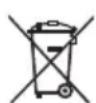
Disposal information (see page 16)!
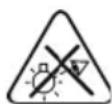
Do not look into the light source!
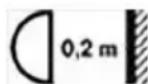
Minimum distance from all illuminated surfaces and objects.
There is a risk of the illuminated objects overheating if the safe distance violated.

Rough service luminaires

Protection class III (safety extra-low voltage)
For your safety

WARNING!
Before using the device, read and adhere to:
– these operating instructions
– the currently applicable operating regulations and the accident prevention regulations
- This device reflects the latest state of engineering development and was designed in agreement with the recognised safety regulations. However, when being used the device may present a risk to the health and life of the user or third party or damage to the device or other objects could ensue. The lamp may only be used as intended and in technically sound condition. Faults that impair safety must be rectified immediately.
Intended use
The battery-operated LED work lamp
CL 5000 10.8/18.0 / CL 10000 10.8/18.0 is designed
-for commercial use in industry and trade,
-for targeted illumination of the workplace,
-for illuminating rooms.
The battery-powered LED work lamp
CL 5000 10.8/18.0 / CL 10000 10.8/18.0 is not suitable
-for use as a headlight.
Safety instructions for battery-powered LED work lamp

WARNING!
Read all safety warnings and all instructions. Failure to follow the warnings and instructions may result in electric shock, fire and/or serious injuries. Save all warnings and instructions for future reference.
■ Do not work with the battery-powered LED work lamp in explosive environments.
■ Do not point the light beam at people or animals and do not look into the light beam, even from far away.
■ Do not cover the lamp head while the battery-powered LED work lamp is in operation. The lamp head heats up when in use and the accumulating heat may cause burns.
■ Do not use the battery-powered LED work lamp in road traffic.
■ Before any work on the battery-powered LED work lamp (e.g. assembly, service etc.) and also during transport and storage, remove the battery from the battery-powered LED work lamp.
■ Do not let children use the battery-powered LED work lamp. It is designed for professional use. Children may be accidentally blinded or may blind others.
■ Protect the battery from heat, e.g. from continuous exposure to sunlight, fire, water and humidity. There is a risk of explosion.
If the battery is damaged or used improperly, fumes may be emitted. Provide fresh air and consult a doctor if you feel unwell. The fumes may irritate the respiratory tract.
- Pointed objects, such as nails or screw-drivers, or external forces may damage the battery. This may cause an internal short-circuit and the battery to burn, smoke, explode or overheat.
■ The light source contained in this luminaire shall only be replaced by the manufacturer or his service agent or a similar qualified person.
Safety instructions for handling batteries
■ Do not open the battery. Short-circuiting hazard!
■ Protect the battery against heat, including prolonged sunshine, fire, water and moisture. Explosion hazard!
■ A damaged or incorrectly used battery may result in the emission of fumes.
Ensure a supply of fresh air and consult a doctor in the event of any physical complications. The fumes may irritate the respiratory tracts.
- Liquid may leak out of the battery if the battery is incorrectly used. Avoid contact with such liquid. If contact accidentally occurs, rinse with water. If liquid contacts eyes, seek medical attention.
Liquid discharged from the battery may cause irritation or burns.
■ Use FLEX rechargeable batteries only in connection with FLEX tools and FLEX accessories. Only in this way is the rechargeable battery protected against dangerous overloads.
■ Recharge batteries only with chargers recommended by the manufacturer. A charger that is suitable for one type of battery may create a fire hazard when used with another battery.
■ The battery may be damaged by pointed objects such as e.g. nails or screwdrivers or by external application of force. This may give rise to an internal short circuit, causing the battery to burn, smoke, explode or overheat.
Technical specifications
| CL 5000 10.8/18.0 CL 10000 10.8/18.0 | |||
| Machine type Battery-powered LED work lamp | |||
| Lithium-ion battery V/Ah | 10.8/2.510.8/4.018/2.518/5.018/8.0 | ||
| Lighting duration- 10.8/2.5- 10.8/4.0- 18/2.5- 18/5.0- 18/8.0 | h/min | 1h 25min -10%2h -10%1h 30min -10%3h -10%4h 45min -10% | 1h 25min -10%2h 20min -10%40min -10%1h 27min -10%2h 10min -10% |
| Max. total luminous flux(+18V battery) | lm 5000 10000 | ||
| Weight (without battery) kg 1.9 3.6 | |||
| Size (LxWxH) mm 294x214x200 349x290x208 | |||
| Installation height(Indoor use only) | m | ≤3 | |
| Protection class | III / ◆ | ||
| IP Code IP65 (without battery) | |||
| IK Code IK07 | |||
Overview
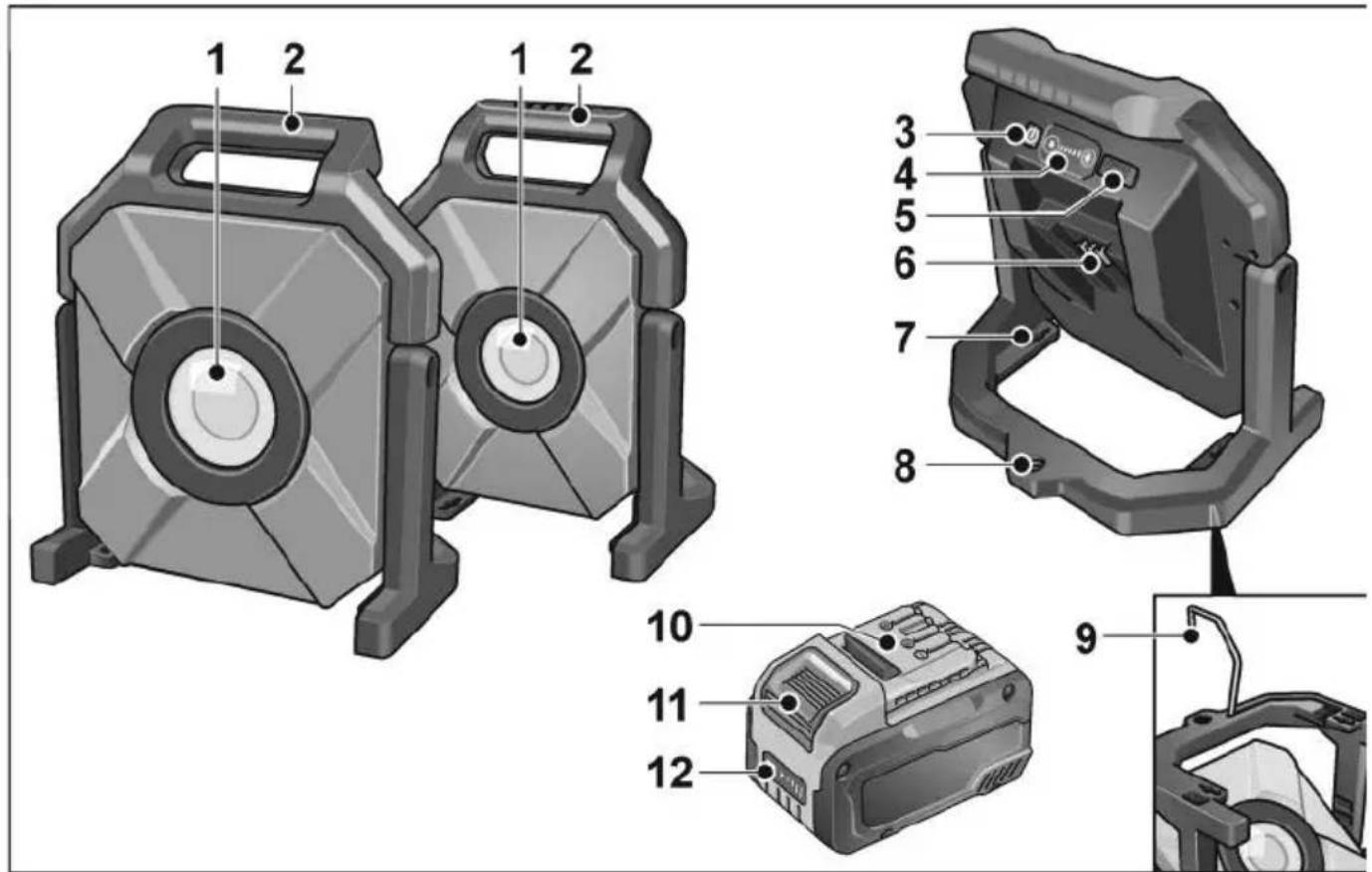
1 Protective glass of lamp head
2 Handle
3 On/Off switch
4 Light intensity buttons
Adjusting lighting output
5 USB-C port
6 Slot for battery
7 Wall mounting holes
8 Threads (5/8") for stand
9 Frame with hook for wall mounting
10 Battery
11 Release button for battery
12 State of charge indicator
Instructions for use

WARNING!
Before any work on the device, pull out the battery.
Before switching on the power tool
Unpack the device and accessories and check that no parts are missing or were damaged during transport.
Inserting/replacing the battery
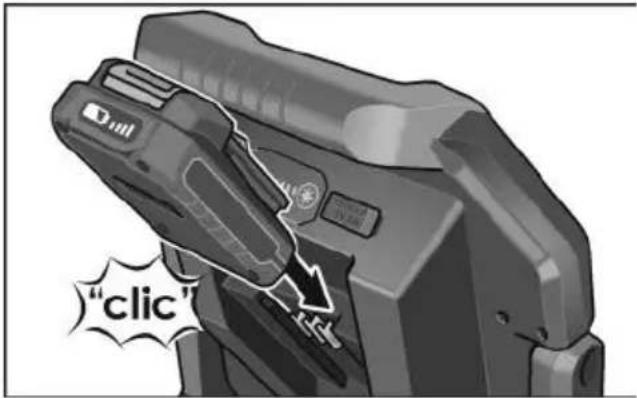
■ Push the charged battery into the device until it engages fully.
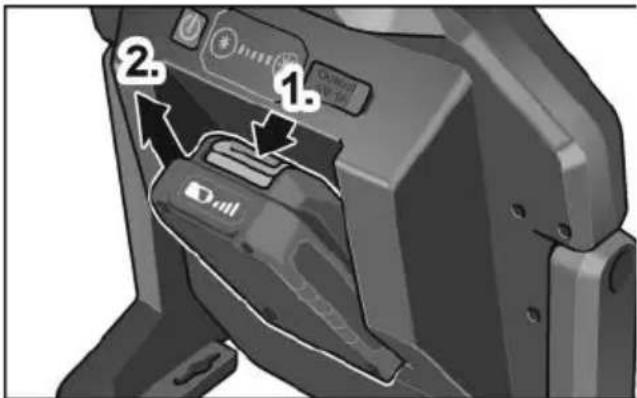
■ To remove, press the release button (1.) and take out the battery (2.).

CAUTION!
When the device is not in use, protect the battery contacts. Loose metal parts may short-circuit the contacts; there is a risk of explosion and fire!
Battery state of charge
■ Press the button to check the state of charge at the state of charge indicator LEDs.
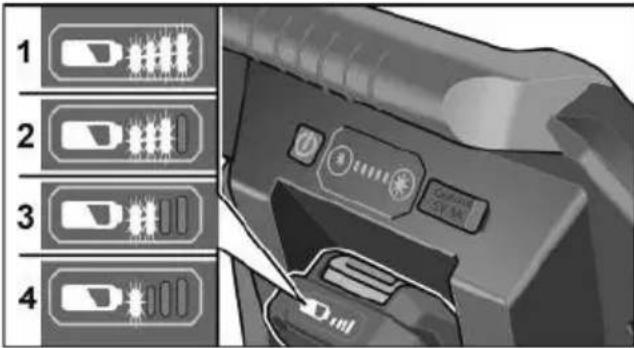
The indicator goes out after 5 seconds.
If one of the LEDs flashes, the battery must be recharged. If none of the LEDs light up after the button is pressed, the battery is faulty and must be replaced.
ECO mode
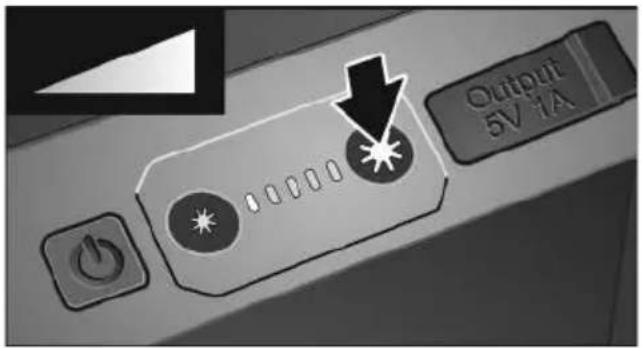
The battery-powered LED work lamps are equipped with a reminder function for low battery power. After flashing three times, the lamp switches automatically to ECO mode with a lighting output of 300 LM. There is enough time to change the battery.
In ECO mode, the brightness indicator flashes.
- By pressing and holding the brightness down button, the lamp can be manually switched to ECO mode for the longest period of operation possible.
-Pressing any random button cancels ECO mode as long as the battery power is sufficient.
Switching on and off
■ Switch the battery-powered LED work lamp on and off by pressing the on/off switch.
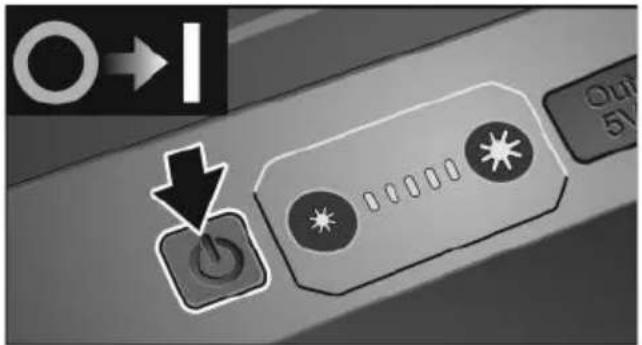
■ Pressing the light intensity buttons changes the lighting output.
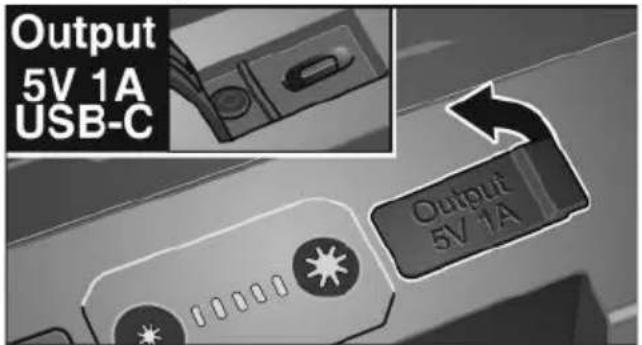
USB-C port
Smartphones, for example, can be charged via the integrated USB-C port.
i NOTE
With the lamp switched off, the USB-C port is automatically deactivated after 2 hours.
Mounting
■ To mount the battery-powered LED work lamp on the wall, use the wall mounting holes.
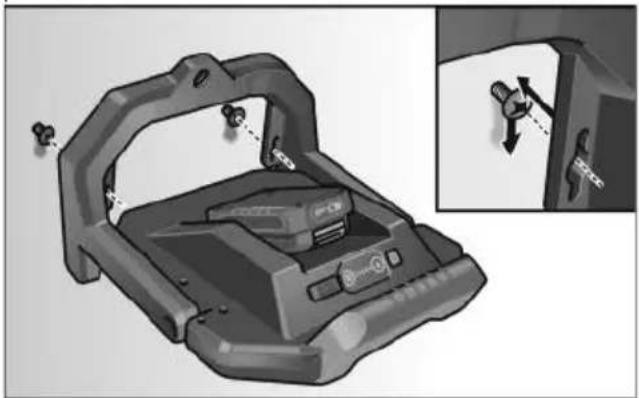
natural_image
Mechanical component diagram showing a bracket with mounting holes and a close-up inset of a mechanical assembly (no text or symbols visible)■ To mount the battery-powered LED work lamp on the tripod, use the thread (5/8").
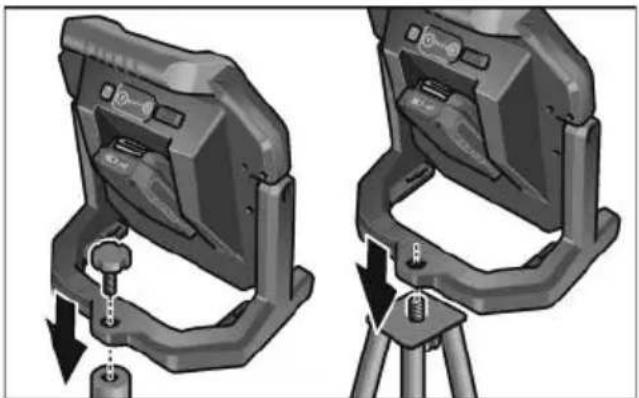
natural_image
Two identical mechanical device diagrams with arrows indicating motion, mounted on a tripod (no text or symbols visible)Hook function
CAUTION!
Use of the hook is at the user's own risk!
i NOTE
We recommend positioning the battery-powered LED work lamp on firm ground or screwing it onto a sturdy tripod.
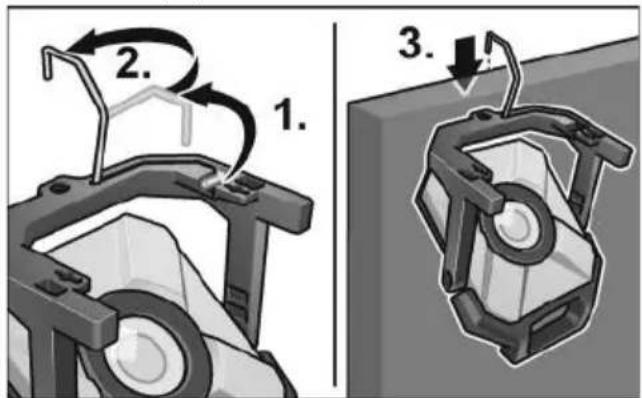
■ To hang the battery-powered LED work lamp, fold out the hook from the frame (1.), rotate 180^ (2.) and hang up the device (3.).
Swivel function
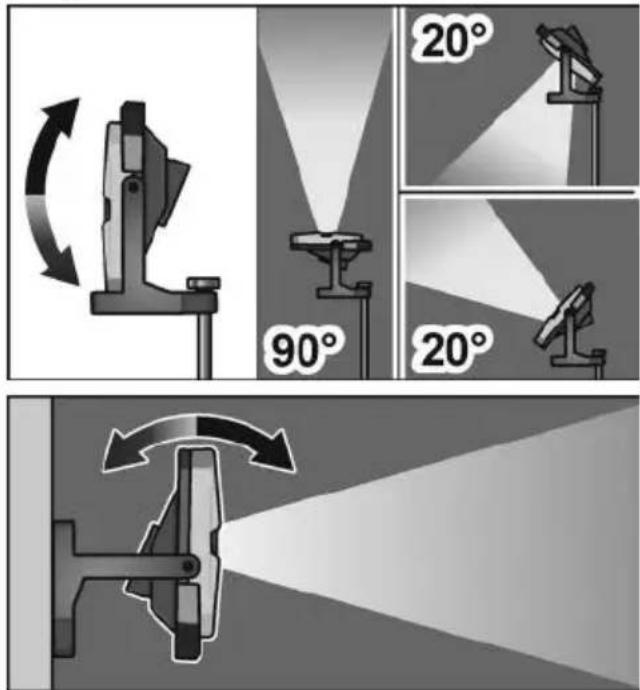
■ The lamp head can be swivelled 90^ upwards and 20^ downwards.
Maintenance and care
Cleaning

WARNING!
Before any work on the device, pull out the battery. Do not use water or liquid detergents.
■ Remove dirt and dust from the housing with a paint brush or dry cloth.
Repairs
Repairs may be carried out by an authorised customer service centre only.
Spare parts and accessories
Exploded drawings and spare-part lists can be found on our homepage: www.flex-tools.com
Disposal information

WARNING!
Render end-of-life electrical equipment inoperable before disposal:
- for mains-powered electrical equipment, remove the power lead.
- for battery-powered electrical equipment, remove the battery.

EU countries only:
Do not dispose of the electrical equipment in household waste.
In accordance with the European Directive 2012/19/EC on Waste Electrical and Electronic Equipment and its incorporation into national law, used electrical equipment must be collected separately and recycled in an environmentally-friendly manner.

Raw material recovery instead of waste disposal.
Device, accessories and packaging should be recycled in an environmentally friendly manner. Plastic parts are identified for recycling according to material type.

WARNING!
Do not throw batteries into the household waste, fire or water. Do not open used batteries.
Accumulators/batteries should be collected, recycled or disposed of in an environmentally friendly manner.

EU countries only:
In accordance with Directive 2006/66/EC defective or used batteries must be recycled

NOTE
Please ask your dealer about disposal options!
Exemption from liability
The manufacturer and his representative are not liable for any damage and lost profit due to interruption in business caused by the product or by an unusable product. The manufacturer and his representative are not liable for any damage which was caused by improper use of the power tool or by use of the power tool with products from other manufacturers.
Table des matières

PRUDENCE!
natural_image
3D rendering of a mechanical device with mounting bracket and internal components, shown with an inset view showing a close-up of a component (no text or symbols visible)natural_image
Two identical mechanical device diagrams showing a lever mechanism with arrows indicating motion (no text or symbols)natural_image
Diagram of a mechanical lever with light beam and curved arrow indicating motion (no text or symbols)
PRUDENZA!
Attacco USB-C
natural_image
Mechanical device component with mounting bracket and internal mechanism, shown in 3D view (no text or symbols)natural_image
Two identical mechanical device diagrams showing a lever mechanism with arrows indicating motion (no text or symbols present)PRUDENZA!
¡CUIDADO!
natural_image
3D mechanical component diagram showing a bracket with mounting holes and a close-up view of the door (no text or symbols)natural_image
Two identical mechanical device diagrams showing a base mount with arrows indicating motion, mounted on a tripod (no text or symbols present)Función del gancho
¡PRECAUCIÓN!
ATENÇÃO!
natural_image
Mechanical component diagram showing a bracket with mounting holes and a close-up view of the internal structure (no text or symbols)natural_image
Two identical mechanical device diagrams with arrows indicating motion, mounted on a tripod (no text or symbols)Função de gancho
ATENÇÃO!

VOORZICHTIG!
USB-C-aansluiting
natural_image
Mechanical component diagram showing a bracket with mounting holes and a close-up view of the internal structure (no text or symbols)natural_image
Two identical mechanical device diagrams with arrows indicating motion, mounted on a tripod (no text or symbols present)Haakfunctie
VOORZICHTIG!
natural_image
Diagram of a mechanical device emitting light through a beam, showing rotational motion (no text or symbols)
FORSIGTIG!
USB-C-tilslutning
natural_image
Mechanical device component with mounting bracket and control panel, shown in 3D view (no text or symbols)natural_image
Two identical mechanical device diagrams showing a lever mechanism with arrows indicating motion (no text or symbols)Krogfunktion
! FORSIGTIG!
natural_image
Diagram of a mechanical device emitting light through a beam, showing rotational motion (no text or symbols)
FORSIKTIG!
natural_image
3D rendering of a mechanical device with mounting bracket and internal components, shown with an inset view showing a close-up of a component (no text or symbols visible)natural_image
Two identical 3D mechanical device diagrams with arrows indicating motion, mounted on a tripod (no text or symbols visible)Krokfunksjon
FORSIKTIG!

VAR FÖRSIKTIG!
USB-C-anslutning
natural_image
3D mechanical component diagram showing a bracket with mounting holes and a close-up inset of the handle (no text or symbols)natural_image
Two identical mechanical device diagrams with arrows indicating motion, mounted on a tripod (no text or symbols)Krokfunktionen
VAR FÖRSIKTIG!
natural_image
Diagram of a mechanical lever with light beam and curved arrow indicating rotation (no text or symbols)! VARO!
natural_image
3D mechanical component diagram showing a bracket with mounting holes and a close-up inset of the internal part (no text or symbols)natural_image
Two identical mechanical device diagrams showing a lever mechanism with arrows indicating motion (no text or symbols)Koukkutoiminto
HUOMIO!
natural_image
Diagram of a mechanical device emitting light through a beam, showing rotational motion (no text or symbols)Huolto ja hoito
Puhdistus

VAROITUS!

ΠΡΟΣΟΧΗ!
Σύνδεση USB-C
natural_image
Mechanical device component with mounting bracket and internal components, shown in two views (no text or symbols visible)natural_image
Two identical mechanical device diagrams showing a lever mechanism with arrows indicating motion (no text or symbols)
DIKKAT!
natural_image
3D rendering of a mechanical device with mounting bracket and control panel, shown with an inset close-up of a hand holding a lock (no text or symbols visible)natural_image
Two identical mechanical device diagrams showing a lever mechanism with arrows indicating motion (no text or symbols)Kanca fonksiyonu
DÍKKAT!

OSTROŻNIE!
Złącze USB-C
natural_image
3D rendering of a device with attached bracket and control panel, shown with an inset view of a mechanical component (no text or symbols visible)natural_image
Two identical mechanical device diagrams showing a lever mechanism with arrows indicating motion (no text or symbols present)Funkcja haka
natural_image
Diagram of a mechanical lever with light beam and curved arrow indicating motion (no text or symbols)USB-C csatlakozó
natural_image
3D rendering of a mechanical device with mounting bracket and internal components, shown with an inset view showing a close-up of a lock mechanism (no text or symbols present)natural_image
Two identical mechanical device diagrams with arrows indicating motion, mounted on a tripod (no text or symbols)Akasztó funkció
VIGYÁZAT!

POZOR!
natural_image
Mechanical component diagram showing a bracket with mounting holes and a close-up view of the internal structure (no text or symbols)natural_image
Two identical 3D mechanical device diagrams with arrows indicating motion, mounted on a tripod (no text or symbols visible)Funkce háku
POZOR!
natural_image
Diagram of a mechanical device emitting light through a beam, showing rotational motion (no text or symbols)Údržba a ošetřování
Čistění

VAROVÁNÍ!

POZOR!
USB-C prípojka
natural_image
3D mechanical component diagram showing a bracket with mounting holes and a close-up inset of the door (no text or symbols)natural_image
Two identical mechanical device diagrams showing a lever mechanism with arrows indicating motion (no text or symbols)Funkcia háka
POZOR!
natural_image
Diagram of a mechanical device emitting light through a beam, showing rotational motion (no text or symbols)
OPREZ!
Kada alat nije u uporabi zaštitite kontakte akumulatora. Nepričvršćeni metalni dijelovi mogu kratko spojiti kontakte, postoji opasnost od eksplozije i požara!
Stanje napunjenosti akumulatora
USB-C priključak
natural_image
3D mechanical component diagram showing a bracket with mounting holes and a close-up inset of the component (no text or symbols)natural_image
Two identical mechanical device diagrams with arrows indicating motion, mounted on a tripod (no text or symbols)Funkcija kuke
OPREZ!
natural_image
Diagram of a mechanical device emitting light through a beam, showing rotational motion (no text or symbols)Održavanje i njega
Čišćenje
UPOZORENJE!
Prije svih radova na alatu izvadite akumulator.

POZOR!!
Priključek USB-C
natural_image
Mechanical device component with mounting bracket and internal housing, shown in 3D view (no text or symbols)natural_image
Two identical mechanical device diagrams showing a lever mechanism with arrows indicating motion (no text or symbols present)Funkcija kavlja
PREVIDNO!
ATENTIE!
natural_image
3D mechanical component diagram showing a bracket with mounting holes and a close-up view of the internal structure (no text or symbols)natural_image
Two identical mechanical device diagrams with arrows indicating motion, mounted on a tripod (no text or symbols visible)Funcția cârligului
ATENTIE!
natural_image
Diagram of a mechanical device emitting light through a beam, showing rotational motion (no text or symbols)Conform Directivei Europene
2006/66/CE, accumulatorii/bateriile

ВНИМАНИЕ!
USB-C порт
natural_image
Mechanical device component with mounting bracket and internal components, shown in two views (no text or symbols visible)natural_image
Two identical mechanical device diagrams with arrows indicating motion, mounted on a tripod (no text or symbols present)Функция на куката
ВНИМАНИЕ!
natural_image
Diagram of a mechanical device emitting light through a beam, showing rotational motion (no text or symbols)natural_image
Mechanical component diagram showing a bracket with mounting holes and a close-up view of the internal structure (no text or symbols)natural_image
Two identical mechanical device diagrams with arrows indicating motion, mounted on a tripod (no text or symbols visible)Функция крючка
ВНИМАНИЕ!
natural_image
Diagram of a mechanical lever with light beam and curved arrow indicating rotational motion (no text or symbols)
ETTEVAATUST!
USB-C ühendus
natural_image
3D rendering of a mechanical device with mounting bracket and internal components, shown with an inset close-up of a lock mechanism (no text or symbols visible)natural_image
Two identical mechanical device diagrams with arrows indicating motion, mounted on a tripod (no text or symbols)Konksufunktsioon
ETTEVAATUST!

ATSARGIA!!
Attacco USB-C
natural_image
3D mechanical component diagram showing a bracket with mounting holes and a close-up view of the internal structure (no text or symbols)natural_image
Two identical mechanical device diagrams with arrows indicating adjustment or movement, mounted on a tripod (no text or symbols present)UZMANĪBU!
natural_image
3D rendering of a mechanical device with mounting bracket and internal components, shown with an inset view of a hand holding a tool (no text or symbols visible)natural_image
Two identical mechanical device diagrams showing a lever mechanism with arrows indicating motion (no text or symbols)Āka funkcija
UZMANĪBU!
natural_image
Diagram of a mechanical device emitting light through a beam, showing rotational motion (no text or symbols)الصيانة والعنابة
الynnظيف
غذیر!

natural_image
Two identical mechanical device diagrams showing a lever mechanism with arrows indicating motion (no text or symbols)وظيفةHALطاف
USB-C وصلة