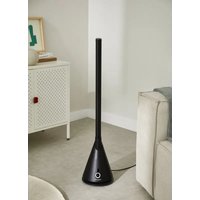
COOL DC - Fan Create - Free user manual and instructions
Find the device manual for free COOL DC Create in PDF.


| Product type | Column fan |
| Brand | Create |
| Model | COOL DC |
| Power supply | Mains plug (230 V~, 50 Hz) |
| Power | Approximately 40 W |
| Number of speeds | 9 adjustable speeds |
| Air flow modes | Normal flow, Strong flow (H), Loose flow (L) |
| Oscillation | Yes, controlled from the unit or remote control |
| Timer | 1 to 8 hours, adjustable automatic shut-off |
| Remote control | Yes, with CR2025 button cell battery |
| LED display | LED button indicating speed and mode |
| Height (estimated) | Approximately 90 cm |
| Weight (estimated) | Approximately 4 kg |
| Cleaning surface | Soft dry cloth; avoid water and chemicals |
| Air grille cleaning | Soft brush or vacuum cleaner |
| Remote control battery type | CR2025 (non-rechargeable) |
| Safety | Automatic shut-off if tipping over? (not specified) |
| Spare parts | Remote control, battery, power cable |
| Warranty | 2 years (according to local legislation) |
| Usage conditions | Indoors, stable and dry surface |
Frequently Asked Questions - COOL DC Create
User questions about COOL DC Create
0 question about this device. Answer the ones you know or ask your own.
Ask a new question about this device
Download the instructions for your Fan in PDF format for free! Find your manual COOL DC - Create and take your electronic device back in hand. On this page are published all the documents necessary for the use of your device. COOL DC by Create.
USER MANUAL COOL DC Create
natural_image
Line drawing of a laboratory condenser with a conical flask and vertical rod (no text or symbols)BLADELESS TOWER FAN
VENTILADOR DE TORRE SIN ASPAS
USER MANUAL
CREATE CREATE CREATE ATE CREATE CREATE CRE CREATE CREATE CREATE ATE CREATE CREATE CRE CREATE CREATE CREATE ATE CREATE CREATE CRE CREATE CREATE CREATE ATE CREATE CREATE CRE CREATE CREATE CREATE ATE CREATE CREATE CRE CREATE CREATE CREATE ATE CREATE CREATE CRE CREATE CREATE CREATE ATE CREATE CREATE CRE CREATE CREATE CREATE ATE CREATE CREATE CRE CREATE CREATE CREATE ATE CREATE CREATE CRE CREATE CREATE CREATE ATE CREATE CREATE CRE CREATE CREATE CREATE ATE CREATE CREATE CRE CREATE CREATE CRE CREATE CREATE CRE CREATE CREATE CRE
CREATE CREATE CREATE ATE CREATE CREATE CRE CREATE CREATE CREATE ATE CREATE CREATE CRE CREATE CREATE CREATE ATE CREATE CREATE CRE CREATE CREATE CREATE CREATE CREATE CREATE CREATE CREATE CREATE CREATE CREATE CREATE CREATE CREATE CREATE CREATE CREATE CREATE CREATE CREATE CREATE CREATE CREATE CREATE CREATE CREATE CREATE CREATE CREATE CREATE CREATE CREATE CREATE CREATE CREATE CREATE CREATE CREATE CREATE CREATE CREATE CREATE CREATE CREATE CREATE CREATE CREATE CREATE CREATE CREATE CREATE CREATE CREATE CREATE CREATE CREATE CREATE CREATE CREATE CRE
INDEX
ENGLISH
Security instructions 6
Parts list 7
Before first use 7
Product placement 7
Battery replacement 8
Operating instructions 8
Remote control 8
Functions 9
Care and maintenance 10
Fan surface 10
Air inlet and outlet 10
Remote control 10
Power plug 10
Storage 10
PORTUGUÊS
Thank you for choosing our fan. Before using the appliance, and to ensure the best use, carefully read these instructions.
The safety precautions enclosed herein reduce the risk of death, injury and electrical shock when correctly adhered to. Keep the manual in a safe place for future reference, along with the completed warranty card, purchase receipt and package. If applicable, pass these instructions on to the next owner of the appliance. Always follow basic safety precautions and accident-prevention measures when using an electrical appliance. We assume no liability for customer failing to comply with these requirements.
SECURITY INSTRUCTIONS
When using any electrical appliance, basic safety precautions should always be observed.
- The appliance is not intended for use by children, elderly or disabled people, or any individual lacking experience and knowledge concerning the use of the fan, unless they have been given supervision or instruction by a person responsible for their safety.
- Children should be supervised to ensure that they do not play with the appliance.
- Use a separate mains power socket in accordance with the appliance current. Do not use the socket with other appliances at the same time.
- If the fan does not work, the power must be turned off and repaired by qualified personnel.
- Do not move the fan when it is plugged in.
- When plugging or unplugging the mains power plug, hold the plug with your hand and do not pull the power cord.
- If the mains power cable is damaged, it must be replaced by the manufacturer, its service agent or similarly qualified persons in order to avoid a hazard.
- Do not stretch or strain the mains power cable and keep it away from overheated surfaces.
- Do not run the fan on carpets, and do not cover with carpets or similar materials.
- The mains power cable should be kept away from passing areas and placed in areas that it will not be tripped over.
- Turn off all functions before unplugging the fan.
- When it is not in use for a long time, unplug it from the mains power socket. To avoid the risk of tripping, securely store the wires.
- Do not put any object on the air inlet or outlet to make sure the air inlet and outlet are free from dust, lint, hair, and any obstacle that may reduce airflow.
- The fan should be placed on a non-inclined dry surface with good ventilation, where is away from heat sources and has no surrounding corrosive gas. There should be 30 cm space around the fan to ensure air flow.
-
It is only intended to be used in a dry place only. It cannot be used outdoors or on a wet surface.
-
Do not immerse the fan, mains power cable or power plug in water or other liquids to avoid danger. For non-professionals, do not use other extension power cords.
- Do not use air purifier or similar products directly next to the fan. Do not use any detergent or lubricant on the fan. The plug must be unplugged before cleaning and maintenance.
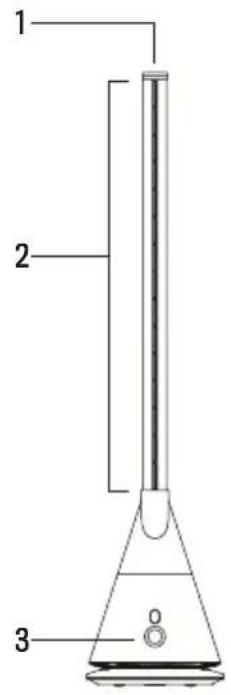
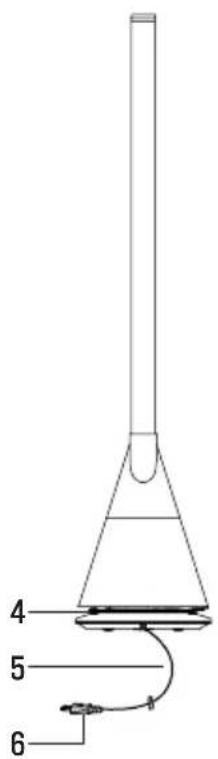
PARTS LIST
- Remote control shelf
- Air outlet
- LED button
- Air inlet
- Mains power cable
- Power plug
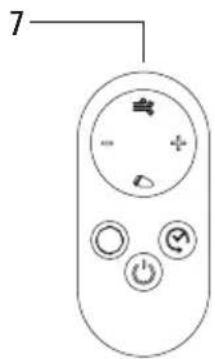
- Remote control
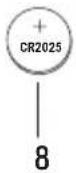
- CR2025 button cell
Front view
Back view
BEFORE FIRST USE
PRODUCT PLACEMENT
- The fan shall be placed on a flat level surface. Do not place the fan on an unstable surface to prevent the fan from tipping over and causing damage or malfunction.
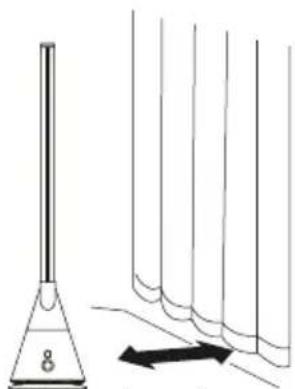
- Avoid blocking the air inlet in use. Keep the fan away from curtains when it is plugged in to prevent blocking the air inlet and preventing the fan from working.
- Don't place objects within 30 cm in front of the outlet.
Don't place objects within 30 cm
natural_image
Simple line drawing of a funnel and test tubes with an arrow indicating direction (no text or symbols)Away from curtains
BATTERY REPLACEMENT
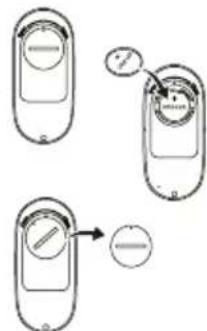
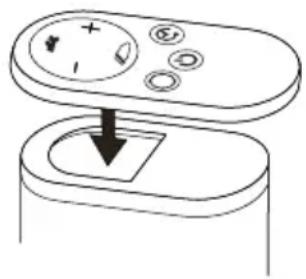
- Use a button cell CR2025:
- Hold the battery cover down and turn counter-clockwise to open it.
- Insert a new battery with the + mark upwards.
- Place the battery cover back onto the remote then rotate clockwise to the close position.
Caution: Do not recharge the battery after it has been used and keep out of reach from children. Remove the battery if the remote is not being used for an extended period of time. Consult a doctor if any component is swallowed. Take out battery if it is not to be used for a long time.
OPERATING INSTRUCTIONS
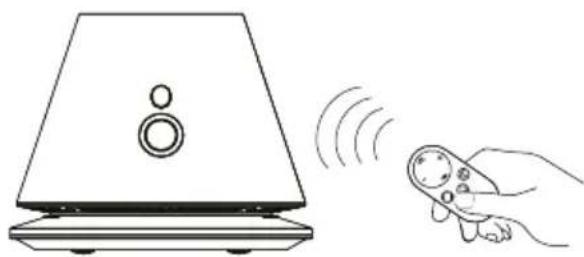
- When operating the fan with the remote control, we suggest that the remote control is aimed at the receiver at the front of the fan to achieve the best control signal.
- The following cases may occur when operating the fan:
natural_image
Line drawing of a speaker emitting sound waves from a remote control (no text or symbols)- This fan may work when using remote control of other electrical appliances.
-
Other appliances may work when using the remote control of this fan.
-
This is due to the overlap of the frequency of the remote control. It is not a quality problem.
- Keep the remote control away from other appliances while using it to avoid misuse.
- Insert the mains power plug into the mains power socket and the LED button will be on.
REMOTE CONTROL
All functions can be operated by the remote control.
- Strong air flow
- Speed increase / decrease
- Low air flow
- Swing
- On / Off
- Timer
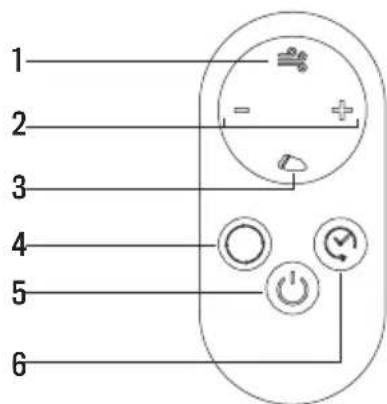
You will hear a beep sound when you press the button on the fan or remote control every time.

ON / OFF
Fan: To start fan operation press the button panel. Tap the panel to cycle from fan speed 1 – 9. Hold down the button panel for 2 seconds and a buzz will sound, release the panel and the fan will stop operation.
Remote control: The fan also can be turned on/off by using the remote control.


TIMER
Remote control: Press this button to set the timer off from 1 to 8 hours. 0 refers to timer off (with 2 beep souds).
- The other functions of the fan still can be used after the timer function is set.
- The fan will stop running when the set time is up. Press the power button again if you need to restart it.
• After the fan power is turned off, the timer setting will also be cancelled.

LOW AIR FLOW
Remote control: Press this button on the remote control, LED button will show L, and the wind turns to be soft. Press wind speed button + - to exit this mode.

STRONG AIR FLOW
Remote control: Press this button on the remote control, LED button will show H, and the wind turns to be strong. Press wind speed button + - to exit this mode.

SWING
Fan: Press the button for 1 second to start swing. Press it again for 1 second and remove the hand after hearing one beep sound to stop the swing.
Remote control: Swing function also can be operated by the remote control.
- When the remote control is not in use, put it on the remote control shelf at the top. There is a magnet inside to hold the remote control.
Caution: The fan power is not completely turned off if you just turn off the power button on either the fan or the remote control. If you do not use the fan for a long time, unplug it.
natural_image
Diagram of a device with a button and a square base, showing no text or symbolsCARE AND MAINTENANCE
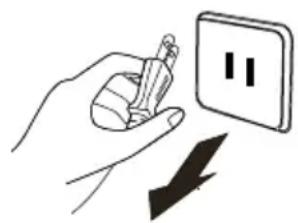
Switch off the fan and unplug it from the mains power socket before performing cleaning and maintenance tasks.
Caution: Don't splash water on the fan. It may damage the fan. Do not use paint thinner, gasoline, alcohol, bleach or metal objects to clean the surface of the fan. Otherwise, it may discolor or deteriorate the surface of the fan or the remote control.
FAN SURFACE
Gently wipe the surface with a clean soft cloth. If the fan surface is dirty, you can use a mild detergent after diluted with a wet cloth to wipe the fan surface, then wipe it with a soft dry cloth.
AIR INLET AND OUTLET
Use a soft brush or a vacuum cleaner to clean the dust around the air inlet and the air outlet. Dust accumulation would affect the use of the fan. Clean the fan regularly.
REMOTE CONTROL
Wipe the remote control surface gently with a dry, soft cloth. Remove the battery of the remote control if it is not to be used for a long time.
POWER PLUG
Clean the mains power plug with a dry soft cloth.
natural_image
Illustration of a hand holding a pencil next to an electrical outlet with a downward arrow (no text or symbols)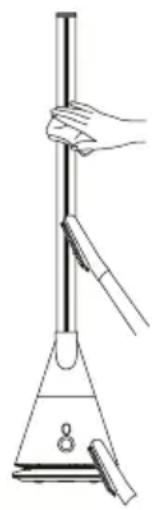
natural_image
Line drawing of a laboratory setup with a funnel, stand, and beaker (no text or symbols)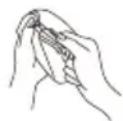
STORAGE
- Place the fan in a large plastic bag for dust protection after care and maintenance.
- Avoid shaking pieces and electrical appliances with refrigeration/heating function.
- Avoid placing it in direct sunlight, hot and wet places.
- Store the fan in a clean and dry place.
- Place it where children can't touch it.
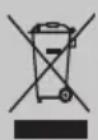
In compliance with Directives: 2012/19/EU and 2015/863/EU on the restriction of the use of dangerous substances in electric and electronic equipment as well as their waste disposal. The symbol with the crossed dustbin shown on the package indicates that the product at the end of its service life shall be collected as separate waste. Therefore, any products that have reached the end of their useful life must be given to waste disposal centres specialising in separate collection of waste electrical and electronic equipment, or given back to the retailer at the time of purchasing new similar equipment, on a one for one basis. The adequate separate collection for the subsequent start-up of the equipment sent to be recycled, treated and disposed of in an environmentally compatible way contributes to preventing possible negative effects on the environment and health and optimises the recycling and reuse of components making up the apparatus. Abusive disposal of the product by the user involves application of the administrative sanctions according to the laws.
natural_image
Line drawing of a speaker emitting sound waves from a handheld remote control (no text or symbols)natural_image
Simple line drawing of a device with a button and a downward arrow, no text or symbols present.natural_image
Illustration of a hand using a power tool to switch an electrical outlet with a downward arrow (no text or symbols)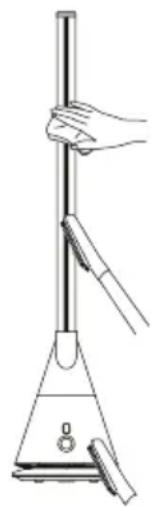
natural_image
Line drawing of a hand holding a vertical rod above a conical flask (no text or symbols)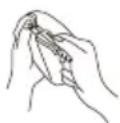
ALMACENAMIENTO
natural_image
Line drawing of a speaker with sound waves affecting a remote control (no text or symbols)natural_image
Diagram of a device with a control panel and a downward arrow pointing to a square component (no text or symbols)natural_image
Illustration of a hand holding a pencil next to a wall with double vertical lines and a downward arrow (no text or symbols)
natural_image
Line drawing of a laboratory setup with a funnel, beaker, and stand (no text or symbols)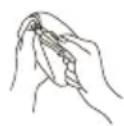
ARMAZENAMENTO
natural_image
Line drawing of a speaker emitting sound waves from a handheld remote control (no text or symbols)natural_image
Diagram of a device with a control panel and a downward arrow indicating action (no text or symbols)natural_image
Illustration of a hand using a power tool to switch an electrical outlet with a downward arrow (no text or symbols)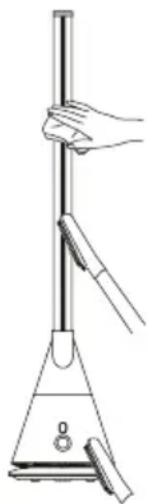
natural_image
Line drawing of a hand holding a vertical rod above a triangular stand (no text or symbols)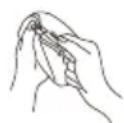
RANGEMENT
natural_image
Simple line drawing of a funnel and vertical tubes with an arrow indicating direction (no text or symbols)natural_image
Line drawing of a speaker emitting sound waves from a remote control (no text or symbols)natural_image
Diagram of a device with a button and a downward arrow pointing to a square component (no text or symbols)natural_image
Illustration of a hand holding a pencil next to a wall with double vertical lines and a downward arrow (no text or symbols)SUPERFICIE DEL VENTILATORE
natural_image
Line drawing of a laboratory filtration setup with a funnel and beaker (no text or symbols)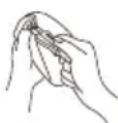
CONSERVAZIONE
natural_image
Simple line drawing of a funnel and test tubes with an arrow indicating direction (no text or symbols)Fern von Vorhängen
AUSTAUSCH DER BATTERIE
natural_image
Line drawing of a speaker emitting sound waves from a handheld remote control (no text or symbols)natural_image
Simple line drawing of a device with a button and a square base, no text or symbols presentnatural_image
Illustration of a hand holding a pencil next to an electrical outlet with a downward arrow (no text or symbols)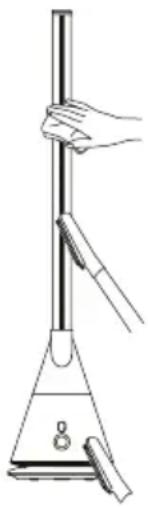
natural_image
Line drawing of a laboratory filtration setup with a funnel and stand (no text or symbols)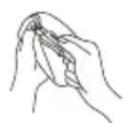
AUFBEWAHRUNG
PLAATSING VAN HET APPARAAT
natural_image
Line drawing of a speaker emitting sound waves from a handheld remote device (no text or symbols)natural_image
Diagram of a device with a button and an arrow pointing to a square component (no text or symbols)natural_image
Illustration of a hand holding a pencil next to a wall with a double vertical symbol and a downward arrow (no text or labels)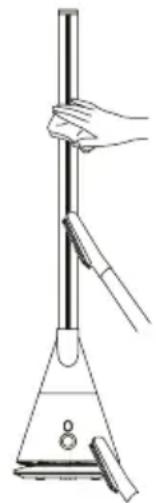
natural_image
Line drawing of a laboratory filtration setup with a funnel and stand (no text or symbols)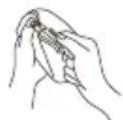
OPSLAGRUIMTE
natural_image
Simple line drawing of a conical flask with liquid and a row of test tubes, no text or symbols presentZ dala od zasłon
WYMIANA BATERII
natural_image
Line drawing of a speaker emitting sound waves from a remote control (no text or symbols)natural_image
Simple line drawing of a device with a button and a downward arrow, no text or symbols present.natural_image
Illustration of a hand using a power tool to switch an electrical outlet with a downward arrow (no text or symbols)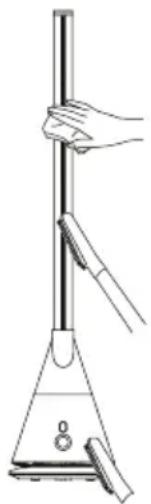
natural_image
Line drawing of a laboratory filtration setup with a funnel and stand (no text or symbols)