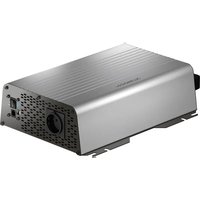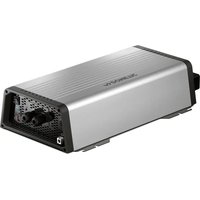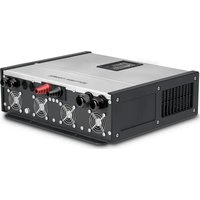
MT ICC3000SI-N - Battery charger DOMETIC - Free user manual and instructions
Find the device manual for free MT ICC3000SI-N DOMETIC in PDF.


| Product type | Inverter-charger combination (DC/AC converter and battery charger) |
| Brand | Dometic |
| Model | MT ICC3000SI-N |
| Dimensions (W x D x H) | 370 x 431 x 132 mm |
| Weight | 19.0 kg |
| Input power supply | 12 V DC (internal battery) and 185-270 V AC (mains) |
| Inverter output power (continuous) | 3200 W |
| Inverter peak power (3 s) | 5000 W |
| Maximum charging current | 120 A |
| Inverter output voltage | 230 V AC, pure sine wave, 50 Hz |
| Maximum efficiency | 92% |
| Operating temperature | -20 °C to +50 °C |
| Compatible battery types | Lead-acid, Gel, AGM, LiFePO4 |
| Charging programs | 4-phase (IUOU) with temperature compensation |
| Main functions | Inverter, charger, automatic mains/inverter switching, AC input current amplification, mains current limitation, load detection, automatic shutdown, silent night mode |
| Protections | Overvoltage, undervoltage, short circuit, overheating, overcurrent, voltage ripple |
| Communication | Wired remote control (RJ45), temperature sensor (RJ12), trigger input, programmable relays |
| Protection rating | Class I (indoor installation only) |
| Ventilation | Integrated fan, speed adjustable in night mode |
| Mounting | Wall or surface mounting, mounting kit included |
| Included accessories | Remote control, temperature sensor, battery cable, mounting kit, manual |
| Maintenance and cleaning | Disconnect the device before cleaning; use a damp cloth; regularly check cables |
| Warranty | Statutory warranty (contact the dealer) |
| Certifications | CE, UKCA |
Frequently Asked Questions - MT ICC3000SI-N DOMETIC
User questions about MT ICC3000SI-N DOMETIC
0 question about this device. Answer the ones you know or ask your own.
Ask a new question about this device
Download the instructions for your Battery charger in PDF format for free! Find your manual MT ICC3000SI-N - DOMETIC and take your electronic device back in hand. On this page are published all the documents necessary for the use of your device. MT ICC3000SI-N by DOMETIC.
USER MANUAL MT ICC3000SI-N DOMETIC
natural_image
Technical line drawing of two electronic equipment modules with cooling fans and ventilation slots (no text or symbols)MTICC1600SI-N, MTICC3000SI-N
EN
Inverter charger combination
Installation and Operating Manual.....12
DE
© 2023 Dometic Group. The visual appearance of the contents of this manual is protected by copyright and design law. The underlying technical design and the products contained herein may be protected by design, patent or be patent pending. The trademarks mentioned in this manual belong to Dometic Sweden AB. All rights are reserved.
3
A
B
4
natural_image
Line drawing of a cabinet with a checkmark above it, no text or symbols present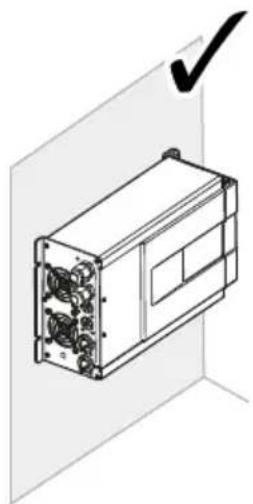
natural_image
Technical line drawing of a device with ports and a checkmark indicating approval (no text or symbols present)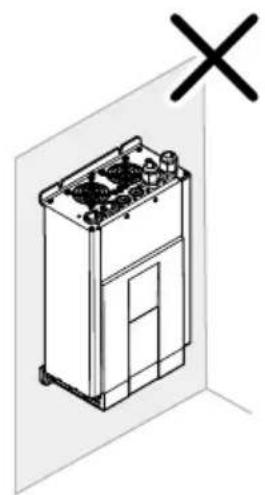
natural_image
Isometric line drawing of a kitchen appliance with a cross symbol above it (no text or labels)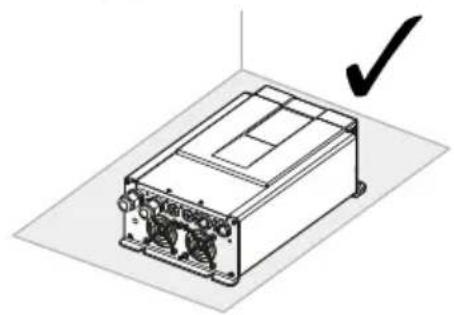
natural_image
Isometric view of a rectangular electronic device with ports and a checkmark indicating a detail (no text or symbols present)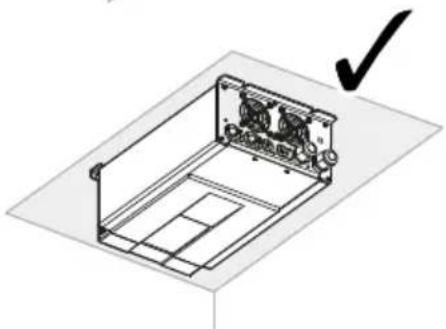
natural_image
Isometric line drawing of a mechanical housing or enclosure with internal components and a checkmark indicating selection (no text or symbols present)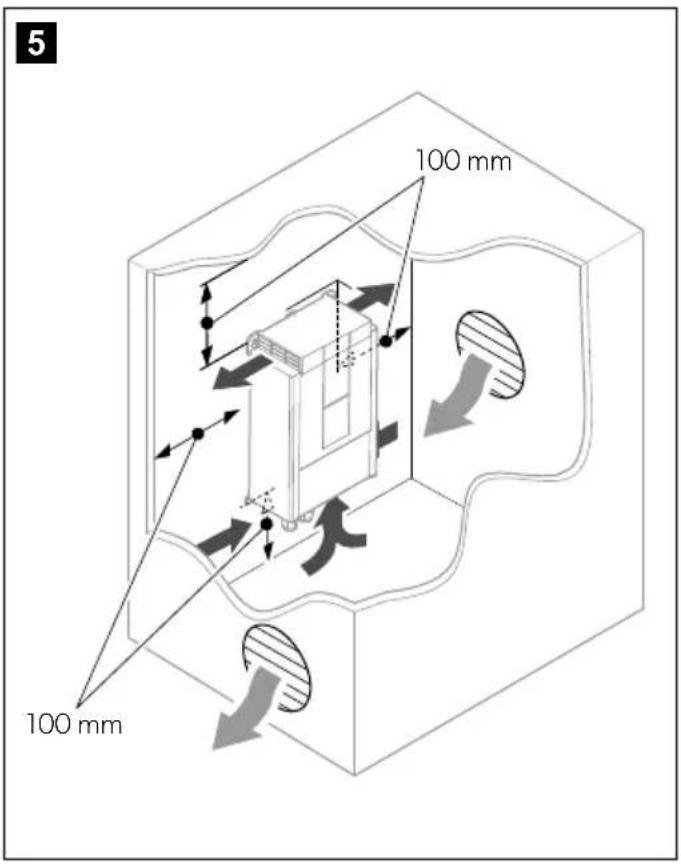

11
A
12
13
14
flowchart
graph TD
    A["230 V"] --> B["RCD"]
    B --> C["MCB"]
    C --> D["RCD"]
    D --> E["OUT"]
    F["230 V"] --> G["IN"]
    G --> H["230 V"]
    I["230 V"] --> J["DC Bus"]
    K["DC Bus"] --> L["DC Bus"]
15
A
flowchart
graph TD
    A["REMOTE"] --> B["ON: INV. → ON"]
    B --> C["OFF: INV. → OFF"]
    D["REMOTE"] --> E["ON: INV. → ON"]
    E --> F["OFF: INV. → OFF"]
B
16
17
18
flowchart
graph TD
    A["Bus 230V"] --> B["MCB"]
    B --> C["RCD"]
    C --> D["Out"]
    D --> E["Device 1"]
    D --> F["Device 2"]
    D --> G["Device 3"]
    D --> H["Device 4"]
    style A fill:#f9f,stroke:#333
    style B fill:#ccf,stroke:#333
    style C fill:#cfc,stroke:#333
    style D fill:#fcc,stroke:#333
    style E fill:#ffc,stroke:#333
    style F fill:#cfc,stroke:#333
    style G fill:#fcc,stroke:#333
    style H fill:#ffc,stroke:#333
19

natural_image
Pure electrical circuit lines without any symbols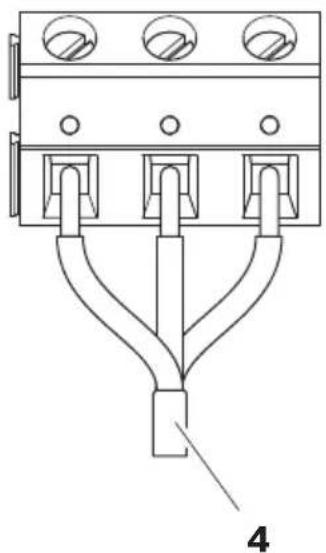
natural_image
Pure electrical circuit lines without any symbolsA
flowchart
graph TD
    A["REMOTE"] --> B["ON: INV. → ON"]
    A --> C["OFF: INV. → OFF"]
    D["REMOTE"] --> E["ON: INV. → ON"]
    D --> F["OFF: INV. → OFF"]
B
Please read these instructions carefully and follow all instructions, guidelines, and warnings included in this product manual in order to ensure that you install, use, and maintain the product properly at all times. These instructions MUST stay with this product.
By using the product, you hereby confirm that you have read all instructions, guidelines, and warnings carefully and that you understand and agree to abide by the terms and conditions as set forth herein. You agree to use this product only for the intended purpose and application and in accordance with the instructions, guidelines, and warnings as set forth in this product manual as well as in accordance with all applicable laws and regulations. A failure to read and follow the instructions and warnings set forth herein may result in an injury to yourself and others, damage to your product or damage to other property in the vicinity. This product manual, including the instructions, guidelines, and warnings, and related documentation, may be subject to changes and updates. For up-to-date product information, please visit documents.dometic.com.
Contents
Explanation of symbols....12
Safety Instructions ....12
Scope of delivery .....15
Accessories 15
Target group ....16
Intended use ....16
Technical description .....16
Mounting the inverter charger combination .. 20
Connecting the inverter charger combination. .21
Configuring the inverter charger combination. 23
Operation.... 25
Cleaning and maintenance 27
Warranty.... 32
Disposal 32
Explanation of symbols

DANGER!
Safety instruction: Indicates a hazardous situation that, if not avoided, will result in death or serious injury.

WARNING!
Safety instruction: Indicates a hazardous situation that, if not avoided, could result in death or serious injury.

CAUTION!
Safety instruction: Indicates a hazardous situation that, if not avoided, could result in minor or moderate injury.

NOTICE!
Indicates a situation that, if not avoided, can result in property damage.

NOTE
Supplementary information for operating the product.
Safety Instructions
Also observe the safety instructions and stipulations issued by the vehicle manufacturer and authorized workshops.
General safety

DANGER! Failure to obey these warnings will result in death or serious injury.
Electrocution hazard
- Do not touch exposed cables with your bare hands. This applies especially when operating the device from the AC power supply.
- To be able to disconnect the device quickly from the AC power supply, the socket must be close to the device and be easily accessible.

WARNING! Failure to obey these warnings could result in death or serious injury.
Electrocution hazard
- Installation and removal of the device may only be carried out by qualified personnel.
- Do not operate the device if the device itself or the connection cable is visibly damaged.
- If this device's power cable is damaged, the power cable must be replaced by the manufacturer, a service agent or a similarly qualified person in order to prevent safety hazards.
- This device may only be repaired by qualified personnel. Improper repairs can lead to considerable hazards.
- If you disassemble the device:
- Detach all connections.
-
Ensure that no voltage is present on any of the inputs and outputs.
-
Do not use the device in wet conditions or submerge in any liquid. Store in a dry place.
- Only use accessories that are recommended by the manufacturer.
- Do not modify or adapt any of the components in any way.
- Disconnect the device from the power supply: – Before each cleaning and maintenance
- After every use
– Before changing a fuse
– Before carrying out electrical welding work or work on the electrical system
Fire hazard/Flammable materials
- In event of fire, use a fire extinguisher which is suitable for electrical devices.
Health hazard
- This device can be used by children aged from 8 years and above and persons with reduced physical, sensory or mental capabilities or lack of experience and knowledge if they have been given supervision or instruction concerning use of the device in a safe way and understand the hazards involved.
• Electrical devices are not toys.
Always keep and use the device out of the reach of very young children.
- Children must be supervised to ensure that they do not play with the device.
- Cleaning and user maintenance shall not be made by children without supervision.

NOTICE! Damage hazard
- Before start-up, check that the voltage specification on the data plate is the same as that of the power supply.
- Ensure that other objects cannot cause a short circuit at the contacts of the device.
- Ensure that the negative and positive poles never come into contact.
Installing the device safely

WARNING! Failure to obey these warnings could result in death or serious injury.
Explosion hazard
- Never mount the device in areas where there is a risk of gas or dust explosion.
-
Only install and operate the device in closed, well-ventilated rooms.
-
Do not install or operate the device under the following conditions:
– In salty, wet or damp environments
– In the vicinity of corrosive fumes
– In the vicinity of combustible materials
– In areas where there is a risk of explosions

CAUTION! Failure to obey these cau-tions could result in minor or moderate injury.
Risk of injury
- Ensure that the device is standing firmly. The device must be set up and fastened in such a way that it cannot tip over or fall down.
- When positioning the device, ensure that all cables are suitably secured to avoid any form of trip hazard.

NOTICE! Damage hazard
- Ensure that the mounting surface is capable of supporting the weight of the device.
- Always use sockets which are grounded and secured by residual current circuit breakers.
- Do not place the device near heat sources (heaters, direct sunlight, gas ovens, etc.).
- Set up the device in a dry location where it is protected against splashing water.
Safety when connecting the device electrically

DANGER! Failure to obey these warnings will result in death or serious injury.
Electrocution hazard
- For installation on boats:
If electrical devices are incorrectly installed on boats, corrosion damage might occur. Have the device installed by a specialist (marine electrician).
- If you are working on electrical systems, ensure that there is somebody close at hand who can help you in emergencies.

WARNING! Failure to obey these warnings could result in death or serious injury.
Electrocution hazard
- Observe the recommended cable cross-sections.
- Lay the cables so that they cannot be damaged by the doors or the hood.
Crushed cables can lead to serious injury.

NOTICE! Damage hazard
- Use ductwork or cable ducts if it is necessary to lay cables through metal panels or other panels with sharp edges.
- Do not lay the 230 V mains cable and the 12 V DC cable in the same duct.
- Do not lay the cable so that it is loose or heavily kinked.
- Fasten the cables securely.
Operating the device safely

CAUTION! Failure to obey these cau-tions could result in minor or moderate injury.
Electrocution hazard
- Before starting the device, ensure that the power supply line and the plug are dry and the plug is free from rust or dirt.
- Always disconnect the power supply when working on the device. Do not disconnect any cables when the device is still in use.
- Observe that parts of the device may still conduct voltage even if the fuse has blown.
- Do not disconnect any cables when the device is still in use.

NOTICE! Damage hazard
- Ensure that the air inlets and outlets of the device are not covered.
- Ensure a good ventilation.
- Do not pull on the connection cables.
- The device shall not to be exposed to rain.
Safety precautions when handling batteries

WARNING! Failure to obey these warnings could result in death or serious injury.
Risk of injury
- Batteries contain aggressive and caustic acids. Avoid battery fluid coming into contact with your body. If your skin does come into contact with battery fluid, wash that part of your body thoroughly with water. If you sustain any injuries from acids, contact a doctor immediately.

CAUTION! Failure to obey these cau-tions could result in minor or moderate injury.
Risk of injury
- When working on batteries, do not wear any metal objects such as watches or rings.
Lead acid batteries can cause short circuits which can cause serious injuries. - Wear goggles and protective clothing when you work on batteries. Do not touch your eyes when you are working on batteries.
Explosion hazard
- Never attempt to charge a frozen or defective battery.
Place the battery in a frost-free area and wait until the battery has acclimatised to the ambient temperature. Then start the charging process. - Do not smoke, use an open flame, or cause sparking near the engine or a battery.

NOTICE! Damage hazard
- Only use rechargeable batteries.
- Prevent any metal parts from falling on the battery. This can cause sparks or short-circuit the battery and other electrical parts.
- Ensure that the polarity is correct when connecting the battery.
- Follow the instructions of the battery manufacturer and those of the manufacturer of the system or vehicle in which the battery is used.
- If you need to remove the battery, first disconnect the ground connection. Disconnect all connections and all consumers from the battery before removing it.
-
Only store fully charged batteries. Recharge stored batteries regularly.
-
Immediately recharge deeply discharged lead batteries to avoid sulfation.
- Check the acid level for open lead-acid batteries regularly.
Safety precautions when handling lithium batteries

CAUTION! Failure to obey these cau-tions could result in minor or moderate injury.
Risk of injury
- Only use batteries with integrated battery management system and cell balancing.

NOTICE! Damage hazard
- Only install the battery in environments with an ambient temperature of at least 0^ .
- Avoid deep discharge of the batteries.
Scope of delivery
MT ICC 1600 SI-N
| Description Quantity | |
| Inverter Charger Combination ICC 1600 SI-N | 1 |
| Temperature sensor with cable (3 m) and RJ12 plug | 1 |
| Mounting screw 4 | |
| Battery cable set (2 x 1.5 m/ 35 mm ^2 ) with cable lugs (M8) | 1 |
| Remote control 1 | |
| Wall mounting box for remote control 1 | |
| Connection cable (5 m) with RJ45 plugs for remote control | 1 |
| Mounting screw for remote control 4 | |
| Installation and operating manual 1 | |
MT ICC 3000 SI-N
Description Quantity
Inverter Charger Combination 1 ICC 3000 SI-N
| Description | Quantity |
| Temperature sensor with cable (3 m) and RJ12 plug | 1 |
| Wall bracket 1 | |
| Mounting screw 7 | |
| Crimp terminal (M10) 2 | |
| Remote control 1 | |
| Wall mounting box for remote control 1 | |
| Connection cable (5 m) with RJ45 plugs for remote control | 1 |
| Mounting screw for remote control 4 | |
| Installation and operating manual 1 |
Accessories
Available as accessories (not included in the scope of delivery):
| Description | Ref. no. |
| ICC Info Control | 9620000283(MT83124) |
| MT 5000iQ, 100 A shunt | 9620000129(MT01262) |
| MT 5000iQ, 200 A shunt 9620000218(MT01265) | |
| MT 5000iQ, 400 A shunt 9620000303(MT01268) | |
| Fuse set (MT ICC 1600 SI-N) | 9620000166(MT06250) |
| Fuse set (MT ICC 3000 SI-N) | 9620000346(MT83125) |
| Fuse, 250 A (MT ICC 1600 SI-N) | 9620000212(MT88250) |
| Fuse, 425 A (MT ICC 3000 SI-N) | 9620003903(MTHS520) |
| Battery cable set (2 x 1.5 m/95 mm ^2 ) with cable lugs (M10) | 9620000251(MT83121) |
Target group
The electrical installation and setup of the device must be performed by a qualified electrician who has demonstrated skill and knowledge related to the construction and operation of electrical equipment and installations, and who is familiar with the applicable regulations of the country in which the equipment is to be installed and/or used, and has received safety training to identify and avoid the hazards involved.
All other actions are intended also for non-professional users.
Intended use
The inverter charger combination is intended to convert the house battery voltage (12 V DC) into a pure sinusoidal 230 V alternating voltage (AC) for operation and stable power supply of connected 230 V consumers. In addition, when connected to the mains, the device can be used to charge the house battery or to support weak AC input sources with additional energy (AC input current boost).
The inverter charger combination is suitable to charge the following battery types:
- Lead acid batteries
- Lead gel batteries
• Absorbed glass mat (AGM) batteries - LiFePO4 batteries
The inverter charger combination is not suitable to charge other types of batteries (e.g. NiCd, NiMH, etc.).
The inverter charger combination is suitable for:
• Installation in recreational vehicles (RV)
• Stationary or mobile use
- Indoor use
The inverter charger combination is not suitable for:
- Outdoor use
This product is only suitable for the intended purpose and application in accordance with these instructions.
This manual provides information that is necessary for proper installation and/or operation of the product. Poor installation and/or improper operating or maintenance will result in unsatisfactory performance and a possible failure.
The manufacturer accepts no liability for any injury or damage to the product resulting from:
- Incorrect assembly or connection, including excess voltage
- Incorrect maintenance or use of spare parts other than original spare parts provided by the manufacturer
• Alterations to the product without express permission from the manufacturer - Use for purposes other than those described in this manual
Dometic reserves the right to change product appearance and product specifications.
Technical description
General description
The inverter charger combination is a combination of a DC-to-AC sine wave inverter with an integrated battery charger.
If 230 V mains is available, this external power source can be used both to supply the sockets in the recreational vehicle and for charging the vehicle battery.
If no 230 V mains is available, the inverter converts the battery's direct current into alternating current, thus ensuring the power supply for the connected consumers.
The inverter charger combination offers the following functions:
- Automatic mains priority switching: Allows to supply the AC sockets from different voltage sources. If no 230 V mains is available, the inverter can take over the supply of the sockets. When 230 V mains are connected, the device synchronizes and the AC sockets are then supplied by the mains.
- AC input current boost: Temporary support of weak AC input sources with additional energy from the house battery when high starting currents are needed (e.g. air conditioner) or the connected load requires more power than is available from the mains or a 230 V generator
- Mains input current limitation: Limitation of the 230 V mains input to a maximum available current
- Power factor corrected mains input: Optimizing energy efficiency and providing the maximum possible charging current of the AC power source with connected loads
- Microprocessor-controlled, temperature-compensated IUOU charging programs for various battery types
- Integrated load detection: Automatic standby of the inverter in case of prolonged non-use (after 10 minutes)
- Automatic shutdown: Avoiding unnecessary power consumption, the device automatically switches off when no mains is available
The inverter charger combination has the following protective mechanisms:
• High battery voltage shutdown
- Low battery voltage shutdown
- Low input voltage protection
• High input current protection
• High temperature shutdown
- Low temperature protection (only LiFePO4 batteries)
• Protection against short circuit
• High ripple protection
The inverter charger combination can be adapted to different battery types via DIP switches (see chapter "Setting the charging program" on page 23).
The temperature sensor monitors the battery temperature during the charging process.
The inverter charger combination is equipped with a remote control.
Description of the device
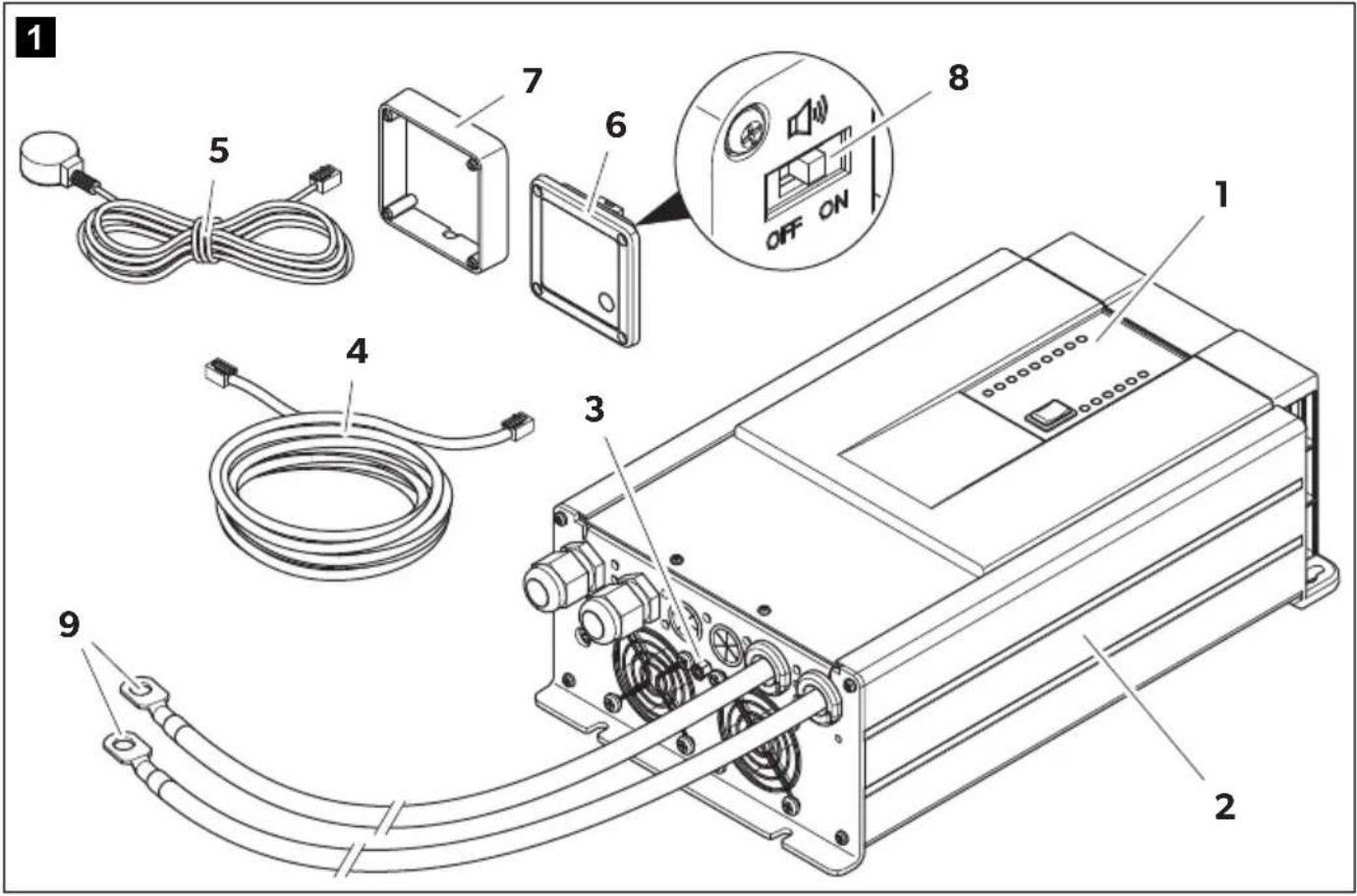
MT ICC 1600 SI-N
Item in
fig. 1, Designation
page 3
1 Control panel
2 Inverter charger combination
3 Connection panel
4 Connection cable (5 m) with RJ45 plugs for remote control
5 Temperature sensor with cable (3 m) and RJ12 plug
6 Remote control
7 Wall mounting box for remote control
8 Switch for acoustic signal
9 Connected battery cable set (2 x 1.5 m/35 mm ^4 ) with cable lugs (M8)
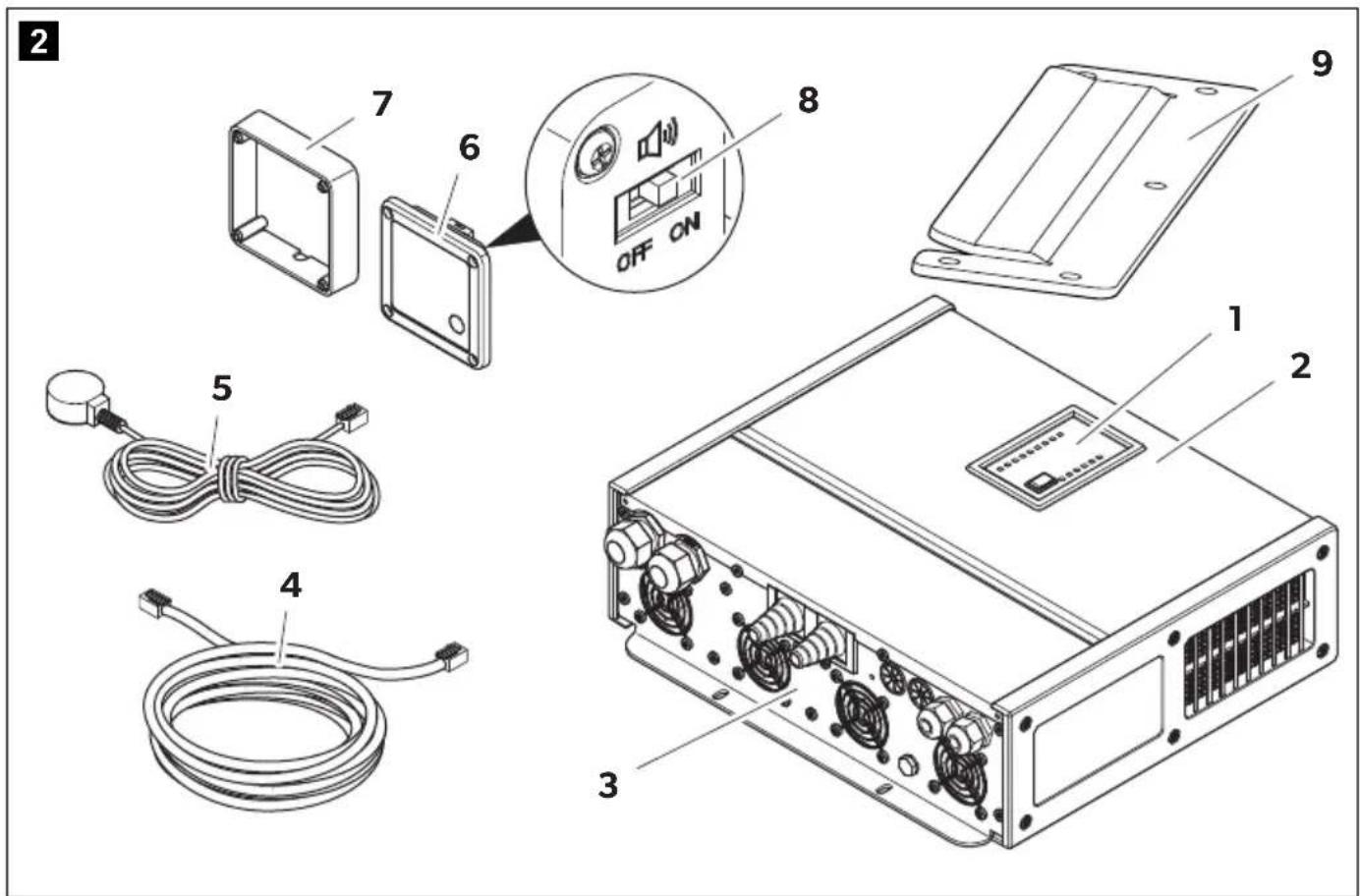
MT ICC 3000 SI-N
Item in
fig. 1, Designation
page 3
1 Control panel
2 Inverter charger combination
3 Connection panel
4 Connection cable (5 m) with RJ45 plugs for remote control
5 Temperature sensor with cable (3 m) and RJ12 plug
6 Remote control
7 Wall mounting box for remote control
8 Switch for acoustic signal
9 Wall bracket
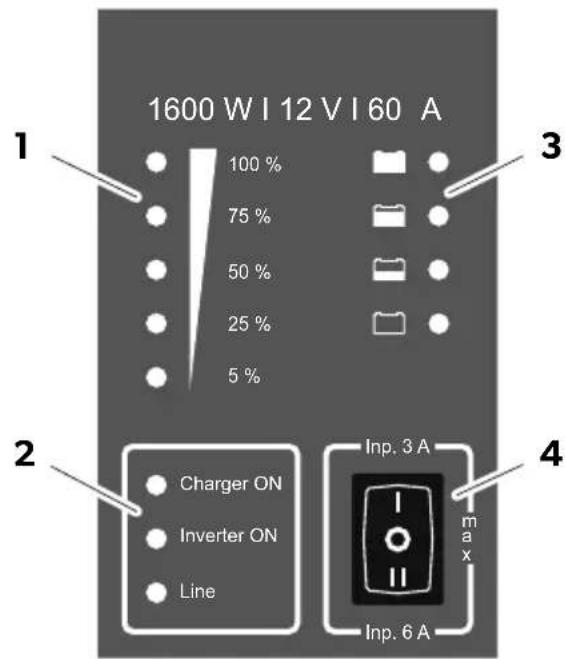
Control panel on the device
Item in fig. 3 A, Designation page 4
1 Power indication LEDs
2 Operating mode indication LEDs
3 State of charge indication LEDs (100%, 80%, 50%, 0%)
4 Switch (3-stage) for AC input current limitation
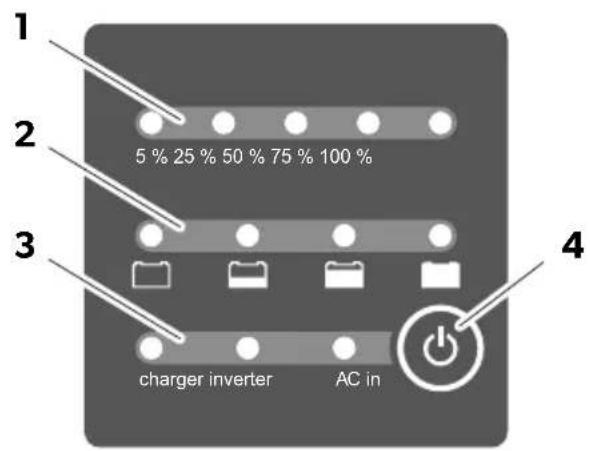
Remote control
Item in fig. 3 B, Designation page 4
1 Power indication LEDs
2 Operating mode indication LEDs
3 State of charge indication LEDs (100%, 80%, 50%, 0%)
4 Operating mode selection button (button)
Power indication LEDs
Operating mode Description
| Inverter operation Indication of output power delivered (in %)Note: LED turns red when the output power exceeds the continuous output power value (Pnom) |
| Mains operation Indication of momentary charging current related to the maximum charging current of the device (in %) |
Operating mode indication LEDs
| LED Status Description | ||
| "Charger ON"(charger on) | On (green) Mains operation | |
| On (red) Charger deactivated | ||
| Flashing(red) | Error (see chapter "Error indication" on page 30) | |
| Off No mains operation | ||
| "Inverter ON"(inverter on) | On (green) Inverter operation (continuous mode or mains support/ power boosting) | |
| On (red) Inverter deactivated | ||
| Flashing(green) | Inverter operation (automatic mode or mains support/ power boosting) | |
| Flashing(red) | Error (see chapter "Error indication" on page 30) | |
| Off No inverter operation | ||
| "Line"(AC input) | On (green) AC input approved, AC transfer switch closed | |
| On (red) AC transfer switch disabled | ||
| Flashing(green) | AC input present and within range, device synchronizes | |
| Flashing(red) | AC input present but out of range (see chapter "Error indication" on page 30) | |
| Off No AC input present, AC transfer switch opened | ||
Battery charging function
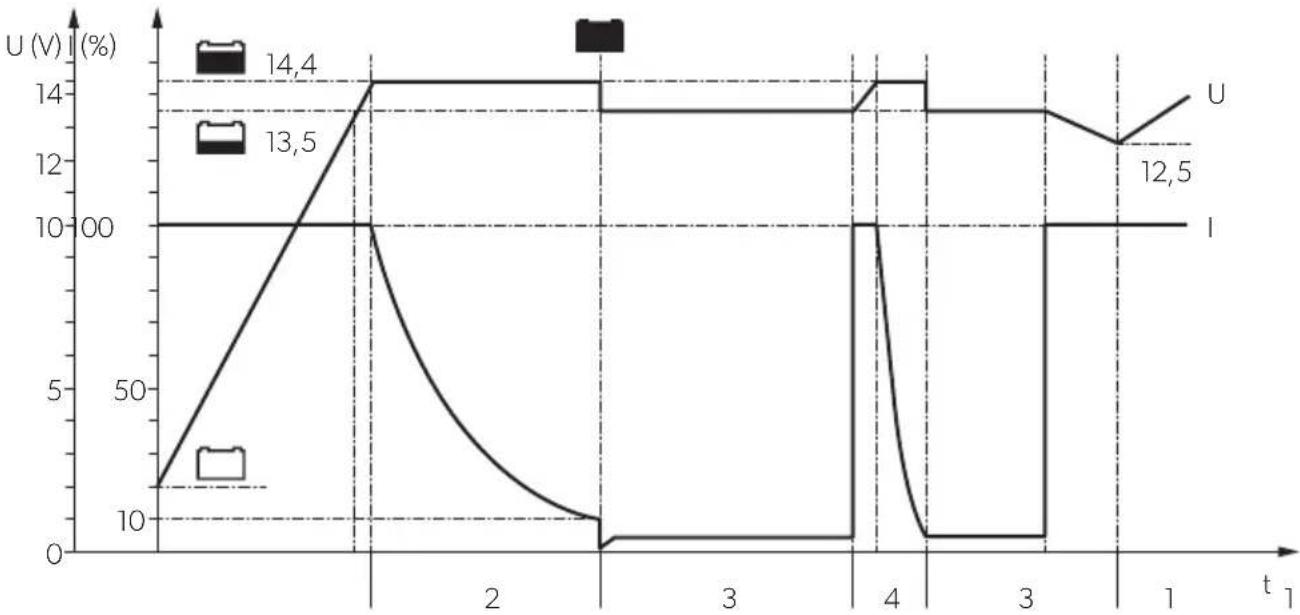
The selectable charging programs (see chapter "Setting the charging program" on page 23) perform a charging process in four phases, referred to as IUOU characteristics.
line
| t | U (V) | I (Ω) | | ---- | ----- | ----- | | 0 | 14.4 | 13.5 | | 1 | 14.4 | 13.5 | | 2 | 14.4 | 0 | | 3 | 14.4 | 0 | | 4 | 14.4 | 0 | | 5 | 14.4 | 0 | | 6 | 14.4 | 0 | | 7 | 14.4 | 0 | | 8 | 14.4 | 0 | | 9 | 14.4 | 0 | | 10 | 12.5 | 0 | | 11 | 12.5 | 0 | | 12 | 12.5 | 0 | | 13 | 12.5 | 0 | | 14 | 12.5 | 0 | | 15 | 12.5 | 0 | | 16 | 12.5 | 0 | | 17 | 12.5 | 0 | | 18 | 12.5 | 0 | | 19 | 12.5 | 0 | | 20 | 12.5 | 0 |1: Constant current phase (Bulk)
The battery is constantly charged with the maximum charging current (100%). The charging current decreases when the battery has reached a state of charge of 75% (90% for LiFePO4 batteries). The duration of the constant current phase depends on the condition of the battery, the load from the DC loads and the state of charge.
2: Constant voltage phase (Absorption)
The constant voltage phase starts when the absorption voltage (U1) is reached. The charging current is reduced depending on the state of charge. During the constant voltage phase, the battery voltage is kept constant at a high level and the state of charge is increased to 100%. The duration of the constant voltage phase depends on the battery type, but is terminated after a maximum of 4 h (absorption time-out).
3: Trickle charging phase (Float)
The trickle charging phase starts when the charging current falls below a minimum value or the absorption time-out has been reached. The trickle charging phase serves to maintain the state of charge (100 %) and runs at lowered charging voltage (U2) and variable current. If DC loads are connected, they are powered by the device.
If the power required exceeds the capacity of the device, this surplus power is provided by the battery and the battery voltage drops. As soon as the battery voltage has dropped to a certain value the device re-enters the constant current phase and charges the battery.
4: Reconditioning phase (Pulse)
Once a week, the device switches back to the constant voltage phase for a short time (max. 1 h) in order to revive the battery. This prevents any fatigue phenomena such as sulfation or electrolyte stratification.
Temperature sensor
With the temperature sensor connected the inverter charger combination adapts the charging voltage (for lead batteries) or the charging current (for LiFePO4 batteries) according to the measured temperature at the battery.

NOTE
- Charging voltage adaptation: 30 mV/°C (referenced to 20 °C)
- Charging current adaption: Charging current reduction up to 10% of the maximum charging current (at battery temperatures <0 °C) or to 0% (at battery temperatures >52 °C)
Alarm relay (only MT ICC 1600 SI-N)

NOTICE! Damage hazard
Ensure that the maximum relay contact load is not exceeded to avoid damage to the relay: 30 V---/1 A or 60 V---/0.3 A.
- The alarm relay is activated as soon as the AC power supply is available and the AC transfer switch is closed. The alarm relay can be used to:
- Generate an AC power supply detection signal in the vehicle control panel.
- Switch on and off less critical loads (e.g. absorber refrigerator, electrical heating systems) that should only be operated in connection with AC power supply.
Programmable relays (only MT ICC 3000 SI-N)

NOTICE! Damage hazard
Ensure that the maximum relay contact load is not exceeded to avoid damage to the relays: 30 V==/16 A or 250 V\~/16 A
- The programmable relay 1 (Prog.Relay1) is activated as soon as the device detects an error (see chapter "Error indication" on page 30). The programmable relay 1 can be used to generate an error detection signal in the vehicle control panel.
- The programmable relay 2 (Prog.Relay2) is activated as soon as the AC power supply is available and the AC transfer switch is closed. The programmable relay 2 can be used to:
- Generate an AC power supply detection signal in the vehicle control panel.
- Switch on and off less critical loads (e.g. absorber refrigerator, electrical heating systems) that should only be operated in connection with AC power supply.
- Activate or deactivate the auxiliary charging output.
Trigger input

NOTE
For use of the default or additional functions, the trigger input must be connected (see chapter "Connecting the trigger input" on page 23).
By factory default the trigger input closed or bridged causes a delayed shutdown in the event of a mains failure: The device initially switches to inverter operation. Only when no mains is detected at the AC input within 5 minutes, the device switches off to avoid power consumption of the house battery.
Additionally, the trigger input can be used for external control of certain functions of the device, e.g. to temporarily deactivate the AC input current boost.
Mounting the inverter charger combination
Installation location

NOTICE! Damage hazard
- Before drilling any holes, ensure that no electrical cables or other parts of the vehicle can be damaged by drilling, sawing and filing.
- Do not mount the device so that the connections point upwards.

NOTE
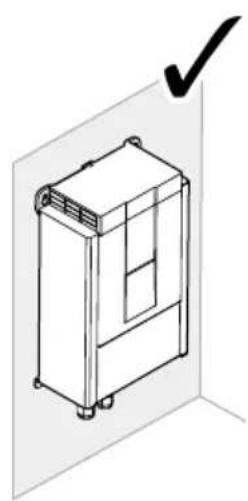
The inverter charger combination can be installed either sitting or hanging (fig. 4, page 4).
Observe the following instructions when selecting an installation location:
- Ensure that the mounting surface is solid and level.
- Observe the distance specifications (fig. 5, page 5).
MT ICC 1600 SI-N
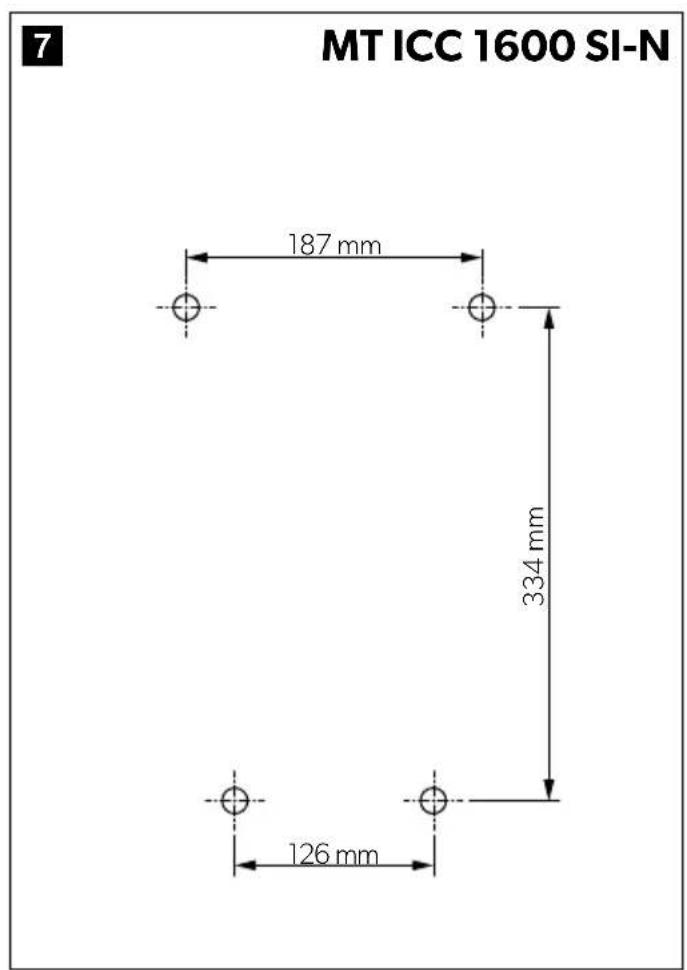
- Drill 4 holes according to the drilling template (fig. 7, page 5).
- Fasten the device with the mounting screws.
MT ICC 3000 SI-N
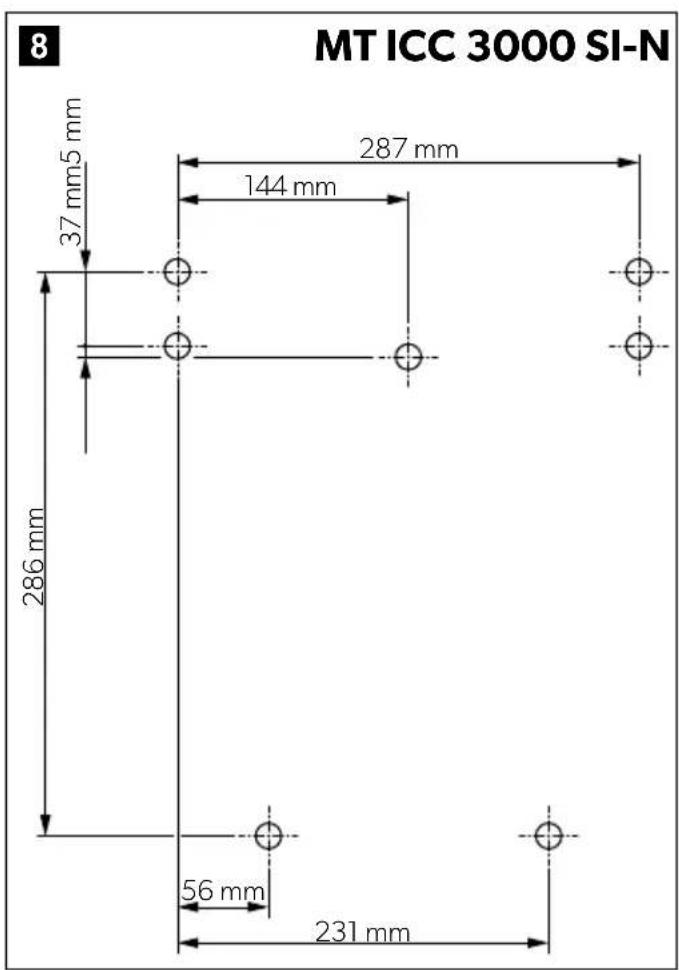
- Drill 7 holes according to the drilling template (fig. 8, page 5).
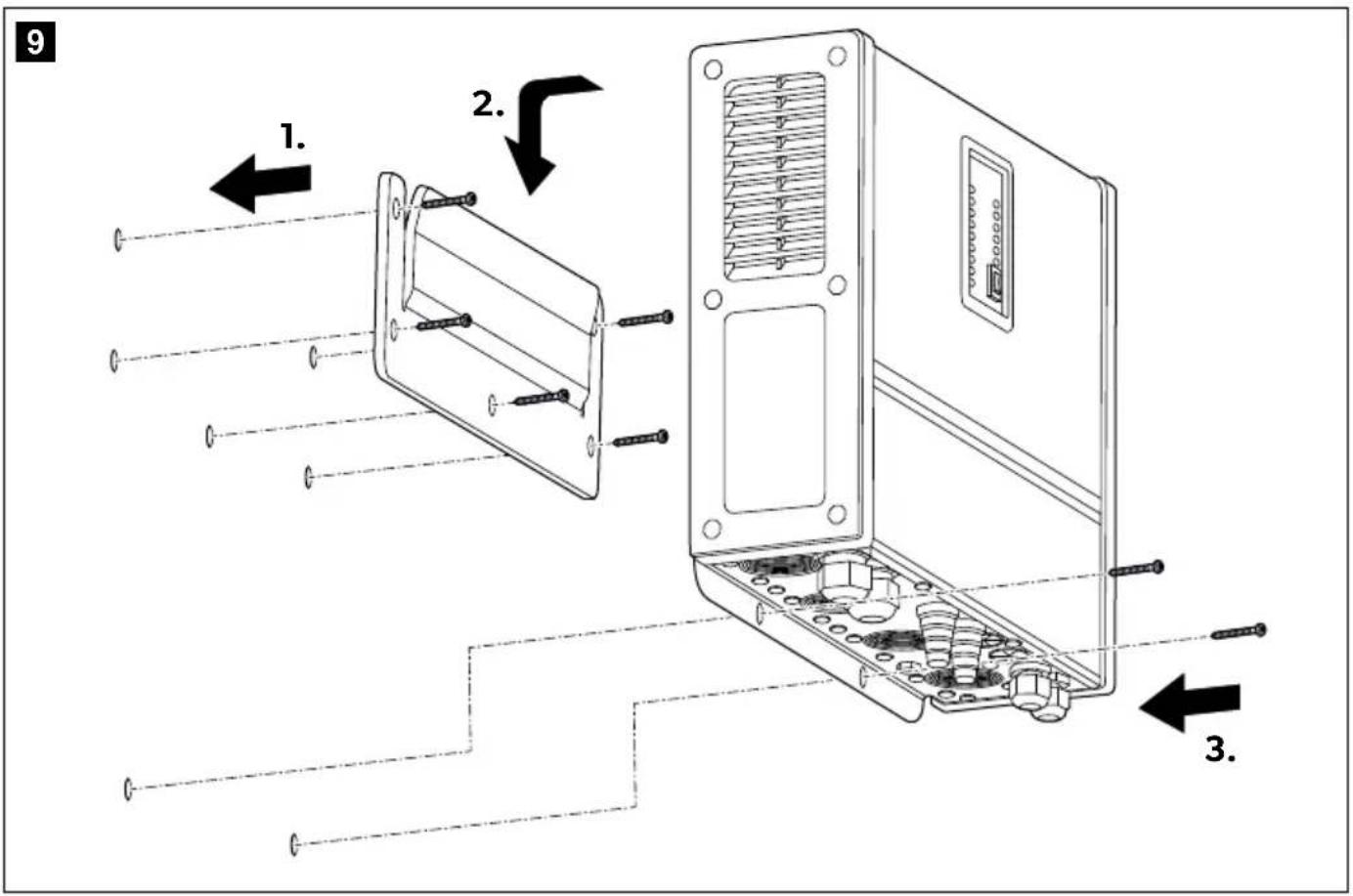
- To mount the device, proceed as shown (fig. 9, page 6).
Mounting the remote control
The remote control can be mounted depending on the installation position of the inverter charger combination.
Flush mounting
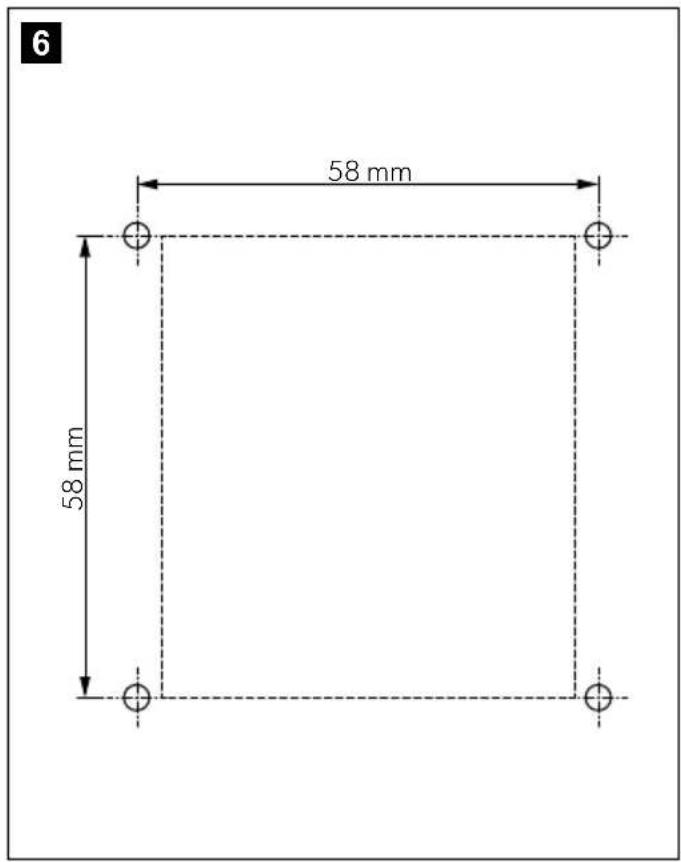
- Make a cutout according to the drilling template (fig. 6, page 5).
- Drill 4 holes according to the drilling template (fig. 6, page 5).
- Set the switch for acoustic signal to the desired position (ON/OFF).
- To mount the device, proceed as shown (fig. 10, page 6).
Surface mounting
- Drill 4 holes according to the drilling template (fig. 6, page 5).
- Set the switch for the acoustic signal to the desired position (ON/OFF).
- To mount the device, proceed as shown (fig. 10, page 6).
Connecting the inverter charger combination

WARNING! Electrocution hazard
Observe the recommended cable cross-sections, cable lengths and fuse.

CAUTION! Fire hazard
Place the fuses near the batteries to protect the cable from short circuits and possible burning.

NOTICE! Damage hazard
Do not reverse the polarity.
Observe the following instructions when connecting the inverter charger combination:
- Always connect the inverter charger combination before connecting the batteries.
-
Protect the positive cable of the house battery with a fuse:
-MT ICC 1600 SI-N: 250 A
-MT ICC 3000 SI-N: 425 A -
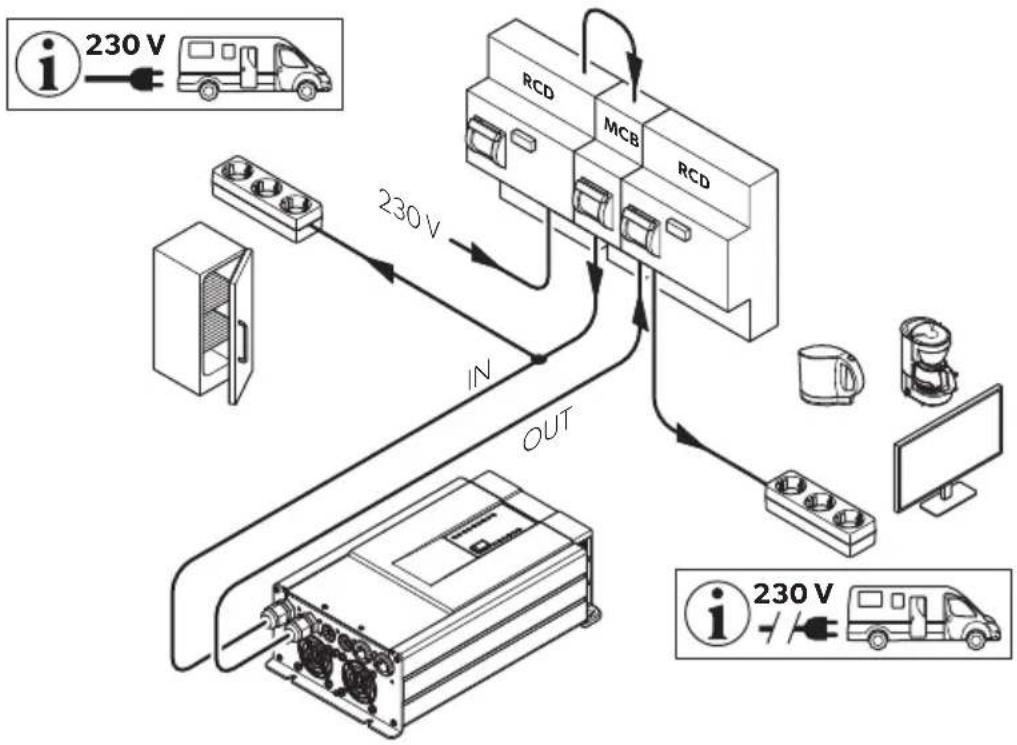
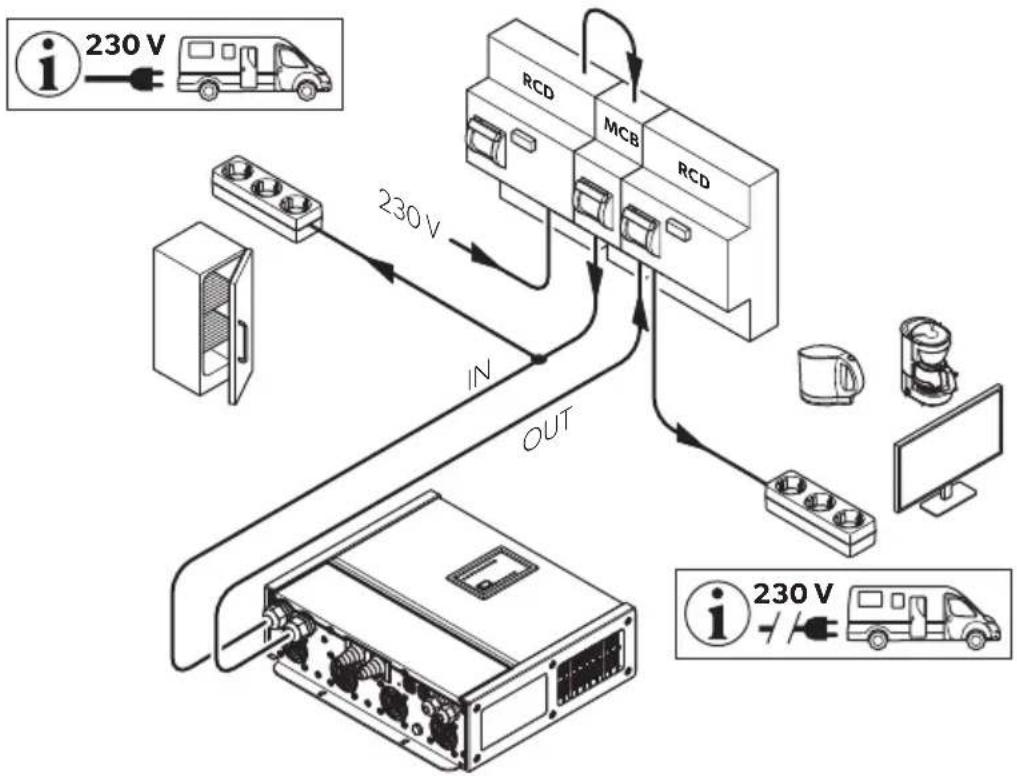
Protect the AC input with a fuse (≥16 A) or by a miniature circuit breaker (MCB).
-
Connect a residual current circuit breaker (RCB) in series connection with the AC output.
Consider the total output current in periods with peak current demand and additional activation of mains current boost when sizing: -
MT ICC 1600 SI-N: 16 A + 6 A = 22 A (5 kW)
- MT ICC 3000 SI-N: 16 A + 12 A = 28 A (6.4 kW)
- Connect the temperature sensor to the house battery (see chapter "Connecting the temperature sensor" on page 23).
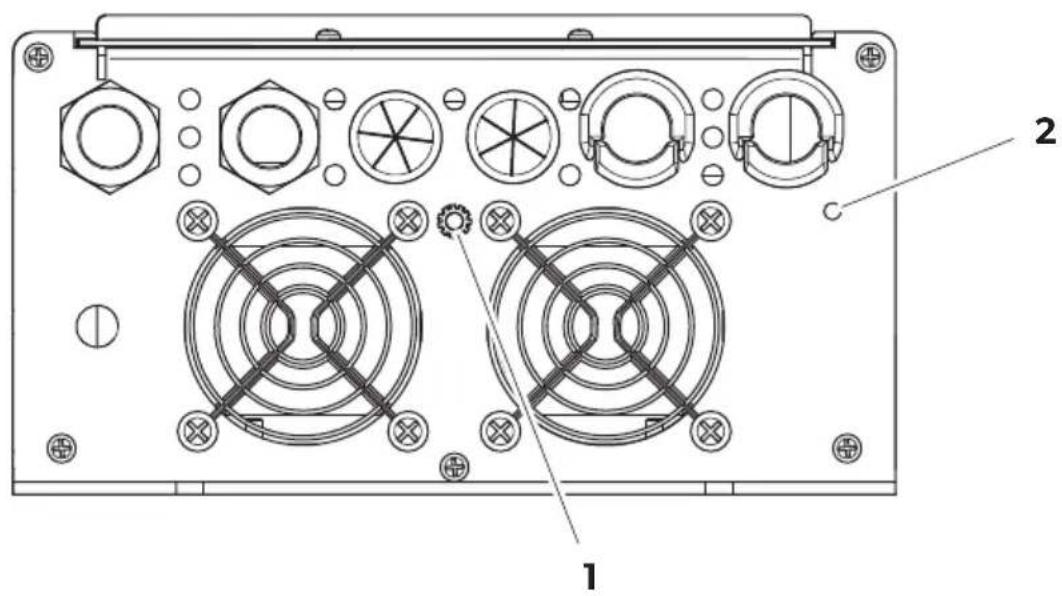
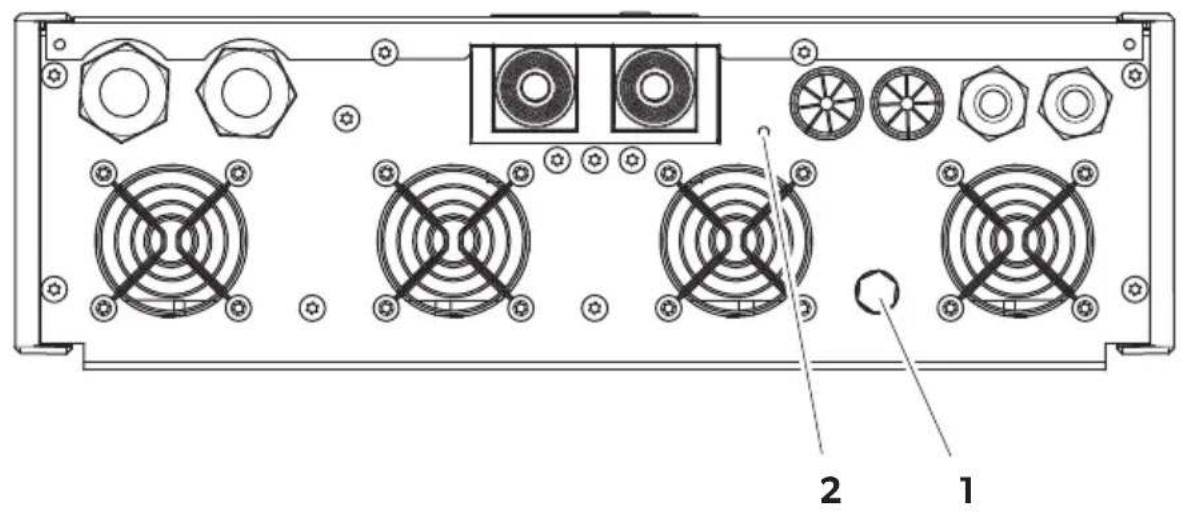
- Connect the protective conductor or the ground screw of the housing to ground (chassis):
- MT ICC 1600 SI-N: fig. 12 1, page 8
- MT ICC 3000 SI-N: fig. 16 1, page 10
MT ICC 1600 SI-N

NOTICE! Damage hazard
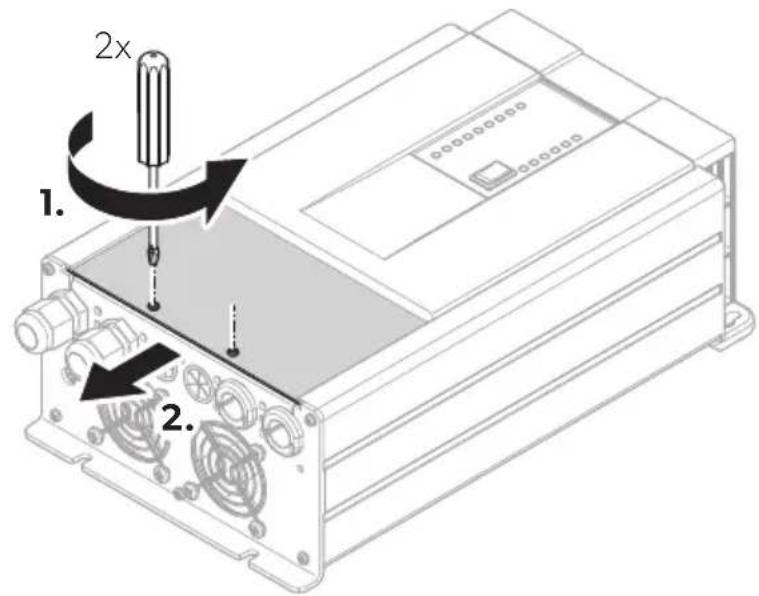
Never use the device if the cover of the connection compartment is not mounted.
-
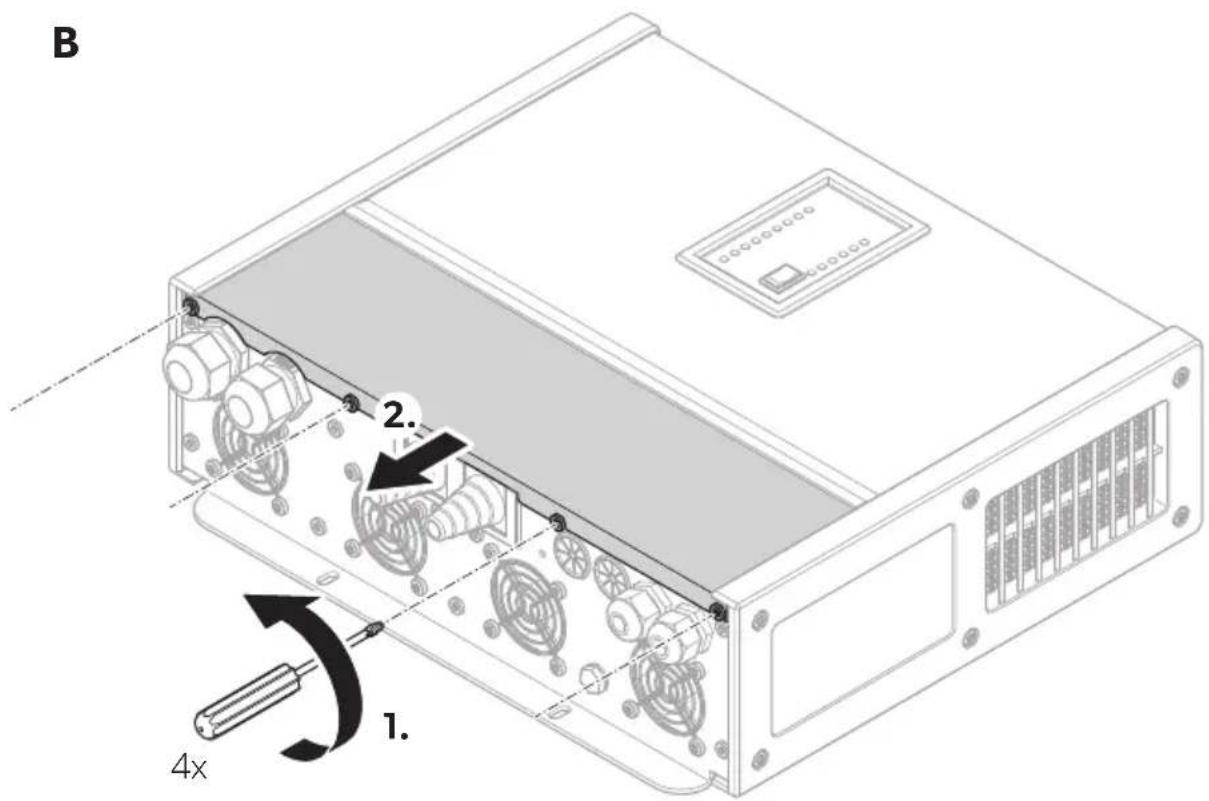
Remove the cover of the connection compartment (fig. 11 A, page 7).
-
To connect the inverter charger combination proceed as shown:
- AC connection: fig. 13, page 8
- DC connection: fig. 14, page 9
- AC connection: fig. 13, page 8 - DC connection: fig. 14, page 9
No. in fig. 13, Description page 8
| 1 | D | I | P | s | w | i |
| 2 Connection terminals | ||||||
| 3 Temperature sensor | ||||||
| 4 Remote control | ||||||
| 5 | A | C | o | u | t | p |
| 6 | A | C | i | n | p | u |

House battery
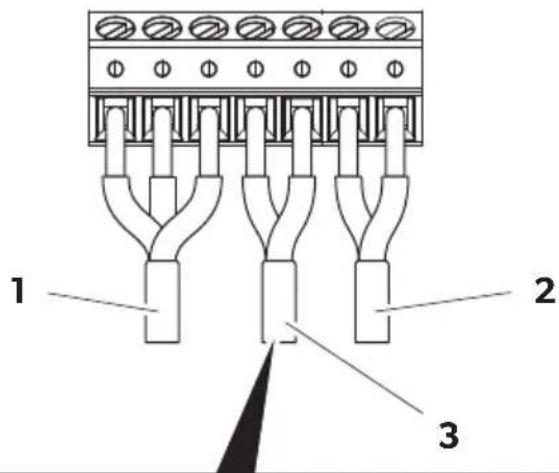
Connection terminals (fig. 15, page 9)
No. Description
1 Connection terminals (NO/NC/COM) for alarm relay (potential free, maximum relay contact load: 30 V/1 A or 60 V/0.3 A)
2 Trigger input (5 V/5 mA capable switch)
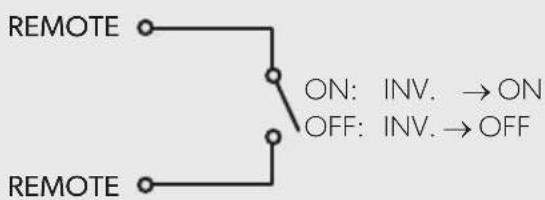
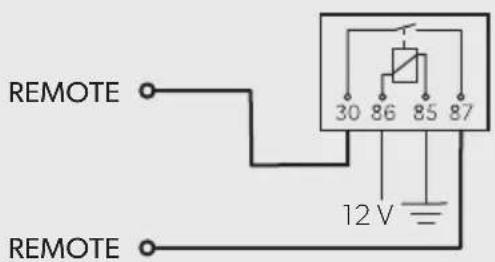
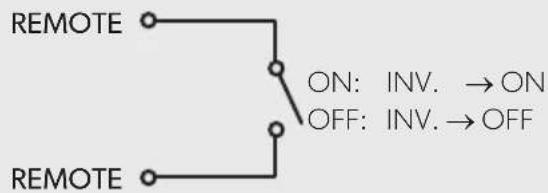
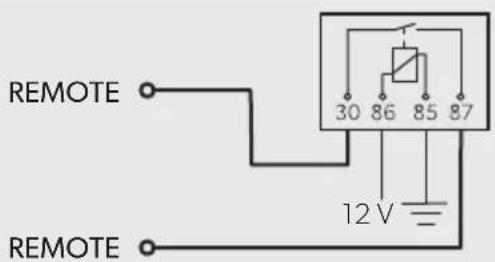
3 Remote switch input (60V/10mA capable switch), for breaker contact (A) or relay contact (B) used as remote switch
-
If necessary, configure the inverter charger combination (see chapter "Configuring the inverter charger combination" on page 23).
-
Remount the cover of the connection compartment.
MT ICC 3000 SI-N

NOTICE! Damage hazard
Never use the device if the cover of the connection compartment is not mounted.
-
Remove the cover of the connection compartment (fig. 11 A, page 7).
-
Determine the required cable cross-section of the battery cables in relation to the cable length:
- Cable length ≤ 1.5m : 95mm^2
– Cable length 1.5 m – 3 m: 120 mm ^4
-
Connect the negative terminal of the house battery to the negative terminal of the starting battery or to ground (chassis).
-
Protect the auxiliary charging output cable for the starting battery with a fuse (10 A).
-
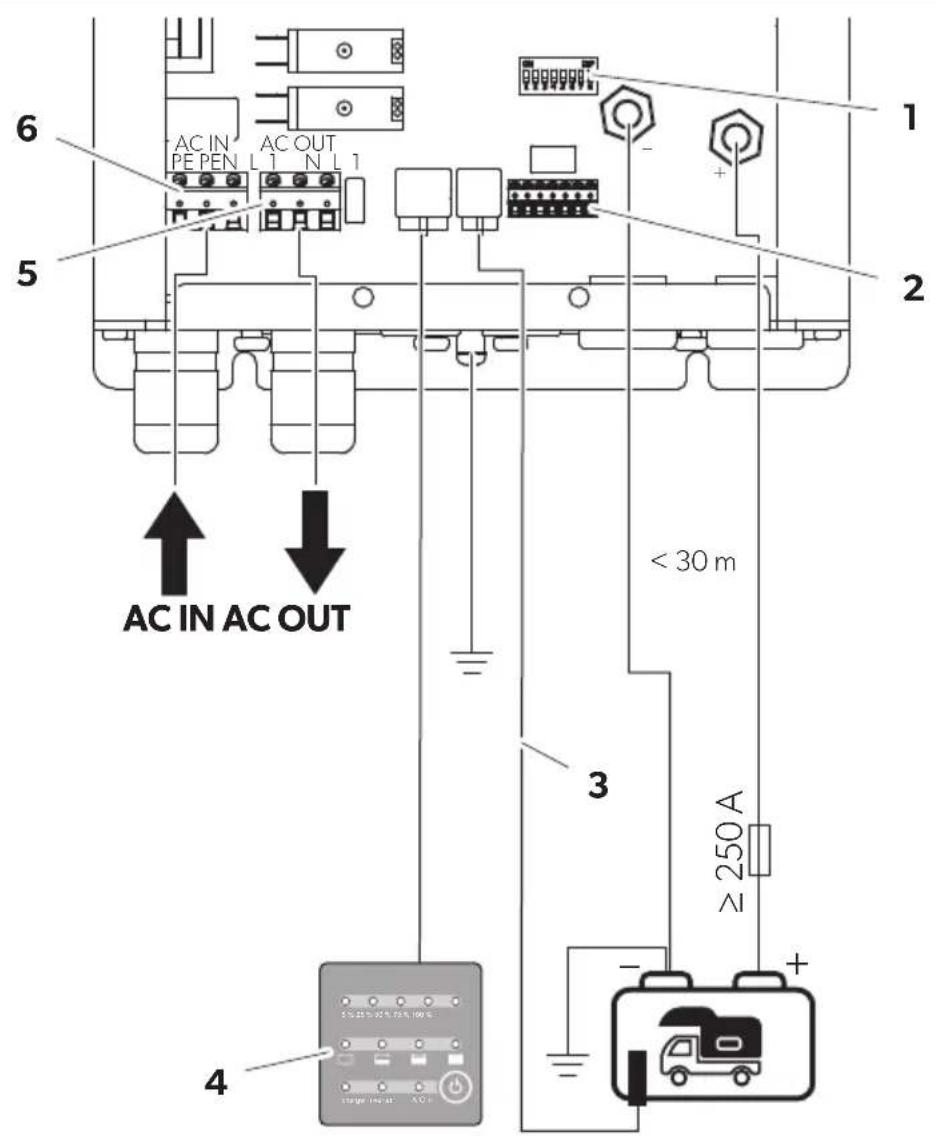
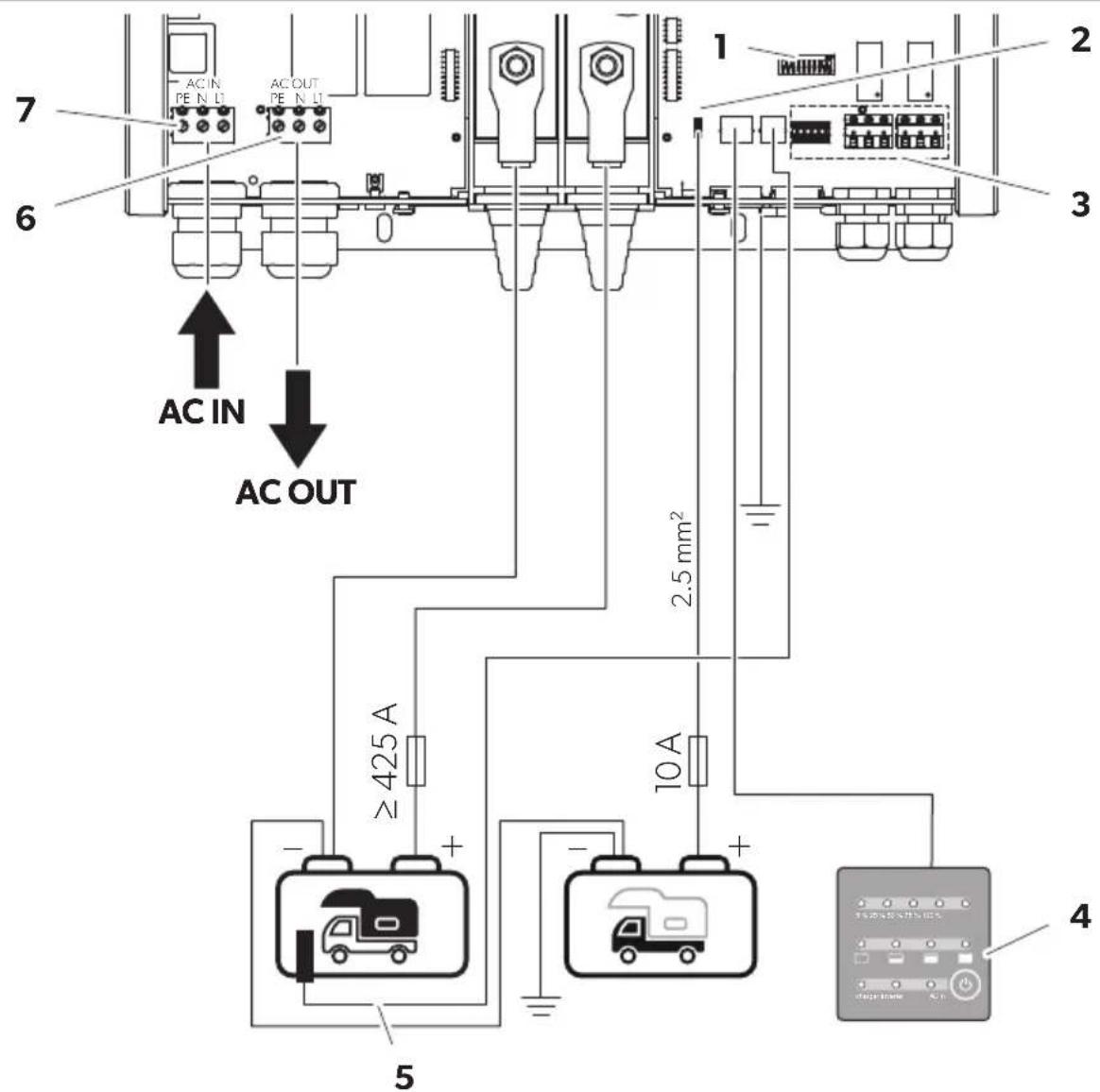
To connect the inverter charger combination proceed as shown:
- AC connection: fig. 17, page 10
- DC connection: fig. 18, page 11
| No. in fig. 17, page 10 | Description | |||||
| 1 | D | I | P | s | w | i |
| 2 Auxiliary charging output (12 V/4 A) | ||||||
| 3 Connection terminals | ||||||
| 4 Remote control | ||||||
| 5 Temperature sensor | ||||||
| 6 | A | C | o | u | t | p |
| 7 | A | C | i | n | p | u |

House battery

Starting battery
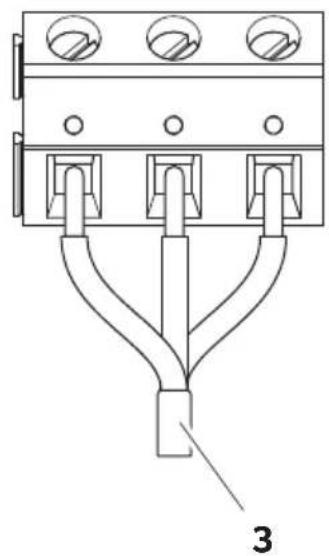
Connection terminals (fig. 19, page 11)
No. Description
1 Remote switch input (60 V/ 10 mA capable switch), for breaker contact (A) or relay contact (B) used as remote switch
2 Trigger input (5 V/5 mA capable switch)
3 Connection terminals (NO/NC/COM) for programmable relay 1 (potential free, maximum relay contact load: 30 V==/16 A or 250 V\~/16 A)
4 Connection terminals (NO/NC/COM) for programmable relay 2 (potential free, maximum relay contact load: 30 V==/16 A or 250 V\~/16 A
-
If necessary, configure the inverter charger combination (see chapter "Configuring the inverter charger combination" on page 23).
-
Remount the cover of the connection compartment.
Connecting the temperature sensor
▶ Attach the temperature sensor probe to the side of the house battery using the adhesive surface provided (fig. 14 1, page 9 and fig. 18 1, page 11).
For Dometic Büttner LiFePO4 batteries: Use the internal temperature sensor of the battery:
- Cut off the temperature sensor probe.
- Connect both wires to terminal C on the 6-pin connector of the battery.

Find further information in the installation and operating manual for Dometic Büttner LiFePO4 batteries online at https://documents.dometic.com/?object_id=84977
Connecting the trigger input
▶Connect the trigger input to an external switch, a potential-free relay contact or to COM (see connection terminals) via a wire jumper.
Configuring the inverter charger combination
The inverter charger combination can be configured via the DIP switches in the connection panel or via Dashboard (device specific configuration-software, for authorized personal only).
- Remove the cover of the connection compartment.
- Slide the DIP switch to the position shown in the table below to set to local or external configuration.

NOTE
Use a small screwdriver to carefully move the DIP switches to the required position.
- Remount the cover of the connection compartment after configuration.
DIP switch position (black)
Setting
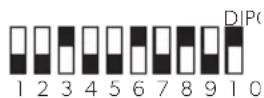
Factory default settings
The default settings are pre-configured.
DIP switch position (black)
Setting
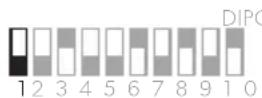
Local configuration via DIP switches: The device initially uses the factory settings. If required, move the DIP switches to adjust the settings.
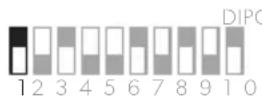
For authorized personal only:
External configuration via Dashboard: DIP switch settings are ignored (except remote switch input). The device uses the Dashboard settings.
▶ Contact an authorized service agent for device specific configuration via Dashboard.
Setting the charging program
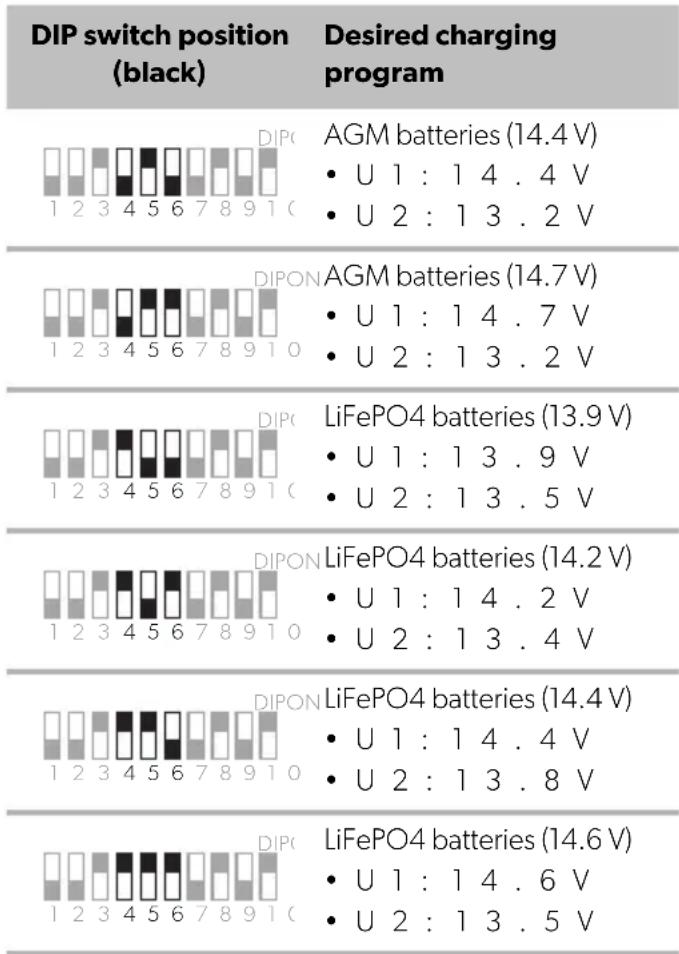
Select the charging program suitable for the type of house battery used based on the manufacturer's specifications or the information in the table below.
By factory default the charging program is set to lead gel batteries (14.4 V).

NOTICE! Damage hazard
Only use batteries that are suitable for the specified charging voltage.

NOTE
The specified charging times apply to an average ambient temperature of 20 °C .
DIP switch position (black)
Desired charging program
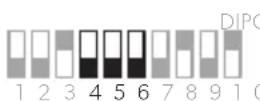
Lead-acid batteries (14.4 V)
• U1: 14.4 V
• U 2 : 1 3 . 2 V
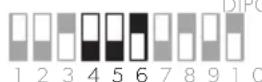
DIPON
Lead gel batteries (14.4 V)
• U1: 14.4 V
• U 2:13.5V
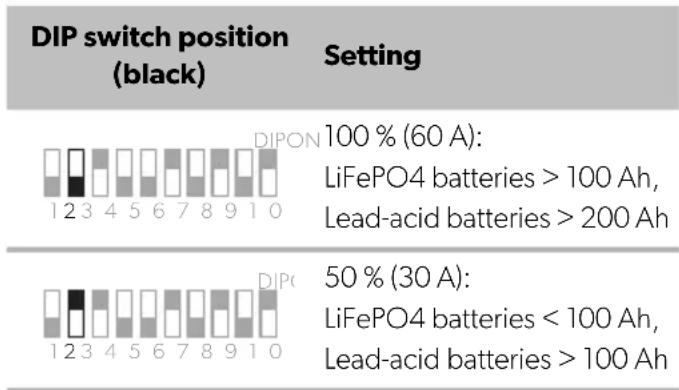
Reducing the charging current
By factory default the charging current is set to 100%.
MT ICC 1600 SI-N (60 A)
other
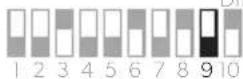
DIP switch position (black) Setting | Setting | Value | | :--- | :--- | | 100 % (60 A): LiFePO4 batteries > 100 Ah, Lead-acid batteries > 200 Ah | 100 | | 50 % (30 A): LiFePO4 batteries < 100 Ah, Lead-acid batteries > 100 Ah | 30 |MT ICC 3000 SI-N (120 A)
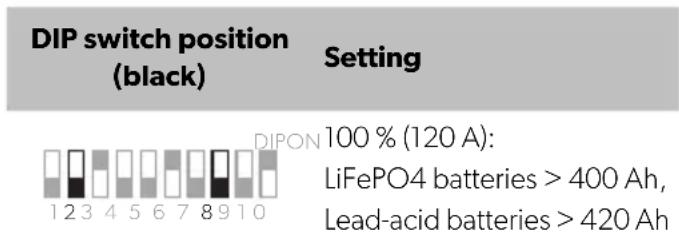
bar
| Setting | DIP switch position (black) | DIPON | | :--- | :--- | :--- | | 100 % (120 A): LiFePO4 batteries > 400 Ah, Lead-acid batteries > 420 Ah | 12345678910 | 12345678910 |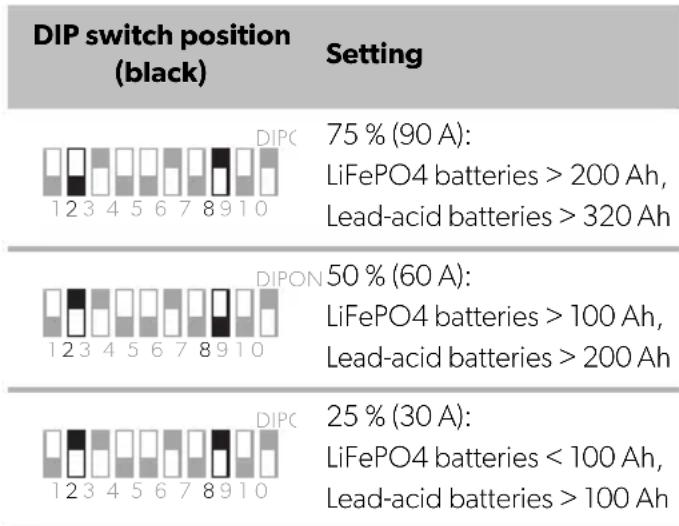
other
DIP switch position (black) Setting | Setting | Current Density (%) | | :--- | :--- | | 75% (90 A): LiFePO4 batteries >200 Ah, Lead-acid batteries >320 Ah | 75% (90 A): LiFePO4 batteries >200 Ah, Lead-acid batteries >320 Ah | | 50% (60 A): LiFePO4 batteries >100 Ah, Lead-acid batteries >200 Ah | 50% (60 A): LiFePO4 batteries >100 Ah, Lead-acid batteries >200 Ah | | 25% (30 A): LiFePO4 batteries <100 Ah, Lead-acid batteries >100 Ah | 25% (30 A): LiFePO4 batteries <100 Ah, Lead-acid batteries >100 Ah |Setting low voltage protection
By factory default the low voltage protection is activated.
| DIP switch position (black) | Setting |
| Low voltage protection activated: • Battery disconnection: <10.8 V • Automatic restart: >12 V | |
| Low voltage protection deactivated: • Battery disconnection: <8.0 V • Automatic restart: >8.5 V |
Setting AC input current boost
By factory default the AC input current boost is activated.
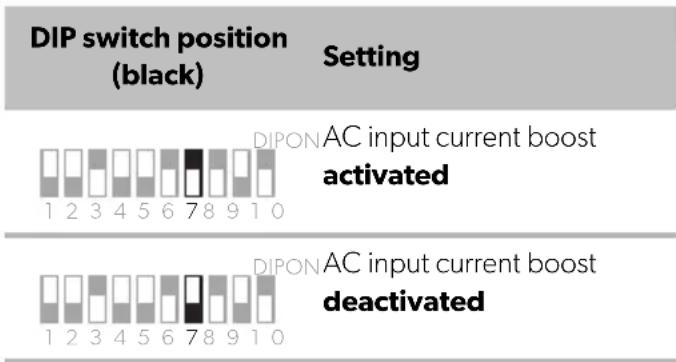
Activating or deactivating remote switch input
MT ICC 1600 SI-N
By factory default the remote switch input is deactivated.
DIP switch position (black)
Setting
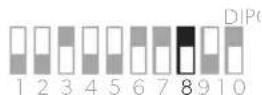
Remote switch input
deactivated
Note: Device can not be switched off. Power consumption in standby mode approx. 90 mA.
Remote switch input activated
Note: Remote switch needs to be connected to operate the device.
MT ICC 3000 SI-N
By factory default the remote switch input is activated.
DIP switch position (black)
Setting
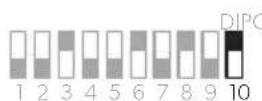
Remote switch input
deactivated
Note: Device can not be switched off. Power consumption in standby mode approx. 113 mA.
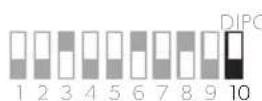
Remote switch input
activated
Note: Remote switch needs to be connected to operate the device.
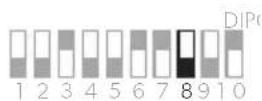
Setting grounding switch at 230 V output (only MT ICC 3000 SI-N)
By factory default N and PE are connected.
DIP switch position (black)
Setting
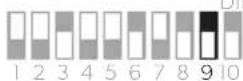
DIPON
Neutral conductor (N) and protective conductor (PE) connected
DIPON
Neutral conductor (N) and protective conductor (PE)
disconnected
Operation
Mains operation: If mains is available, voltage and frequency of the mains input signal are analyzed continuously. As long as voltage and frequency are within the required tolerances, the device synchronizes to the mains input signal. Connected 230 V consumers are supplied from the 230 V input source and the 12 V vehicle battery is charged. As soon as the voltage or frequency exceeds the required tolerances (e.g. no mains voltage is available), the charging process is stopped and the device switches off.
Inverter operation: If no mains is available, the connected consumers can be supplied by the inverter in automatic or continuous mode (see chapter "Setting the automatic mode" on page 26 and chapter "Setting the continuous mode" on page 27).
Switching on

NOTE
The device automatically switches on if mains is available.
▶ If no mains is available, press the ⏻ button on the remote control to switch the device on.
√ The device is set to automatic mode in inverter operation.
Switching to standby mode

NOTE
- In standby mode the device continues to consume standby power (see chapter "Technical Data" on page 33).
- The device automatically switches to standby mode when the load at the output is < 25W for more than 10 minutes in automatic mode (inverter operation).
▶Press the ⏻ button on the remote control twice to switch the device to standby mode.
Switching off

NOTE
- The device automatically switches off if no mains is available.
Optional: Delayed shutdown with trigger input connected in factory default setting (see chapter "Trigger input" on page 20). - Switch off the device when not in use to avoid unnecessary power consumption.
▶Switch off the device using the remote switch connected to the remote switch input.
Note: Ensure that the remote switch input is activated (see chapter "Activating or deactivating remote switch input" on page 25).
Limiting the mains input current
The device can be limited to the maximum available mains input current in three setting levels.

NOTE
AC input current boost remains active in all setting levels. The AC input current boost supplements the missing power up to the maximum surge power when the connected loads exceed the available mains input power.
▶ Set the switch for AC input current limitation (see chapter "Control panel on the device" on page 18) to the desired position.
Switch position
Setting

3A (at 230V)

Maximum current (≤16 A)

6A (at 230V)
Setting the night mode

NOTE
When using the night mode the system stays in this mode for 10 hours and then automatically returns to normal operation.
In night mode the charging power is reduced by 50 % and the cooling fan is switched to the lowest speed for quiet operation. The LEDs on the control panel and the remote control are darkened.
▶Press and hold the ⏻ button on the remote control for at least 6 seconds to activate the night mode.
√ 2 beeps sound. Night mode is activated.
▶Press the operating mode selection button again or turn off the device to interrupt night mode prematurely.
Setting the automatic mode
In automatic mode the inverter operates depending on the load at the AC output:
-
25 W: Inverter on
- < 25 W (for 10 minutes): Inverter switches to standby
▶Press the operating mode selection button (see chapter "Remote control" on page 18) to set automatic mode in inverter operation.
Setting the continuous mode
In continuous mode the inverter operates independently of the load at the AC output (recommended for small loads < 25 W).
- Press the operating mode selection button (see chapter "Remote control" on page 18) to set automatic mode in inverter operation.
- Press and hold the operating mode selection button for at least 3 seconds to set to continuous mode in inverter operation.
Activating charge equalization (only for lead acid batteries)
During charge equalization the battery is charged to 15.5 V at reduced output current.

NOTICE! Damage hazard
- Only carry out charge equalization on lead-acid batteries.
- Disconnect all loads connected to the battery during charge equalization.
- Observe the exact acid level of the battery during the entire process. Stop charge equalization as soon as the acid level is in accordance with the technical data provided by the manufacturer.

NOTE
- Charge equalization can only be carried out if the charging program for lead acid batteries is set (see chapter "Setting the charging program" on page 23) and the device is in trickle charging phase.
-
By safety timer the device ends charge equalization after 2 hours and switches back to trickle charging phase. If necessary, activate the charge equalization again.
-
Press and hold the equalize switch (fig. 12 2, page 8 and fig. 16 2, page 10) for at least 3 seconds to activate charge equalization.
√ All state of charge indication LEDs flash.
2. Press the equalize switch to stop charge equalization.
√ The device switches back to trickle charging phase.
Cleaning and maintenance

WARNING! Electrocution hazard
Unplug the device from the power supply before cleaning and maintenance.

NOTICE! Damage hazard
- Never clean the device under running water or in dish water.
- Do not use sharp or hard objects, abrasive cleaning agents or bleach during cleaning as these can damage the device.
▶Occasionally clean the device with a soft, damp cloth.
▶ Regularly check live cables or lines for insulation faults, breaks or loose connections.
Troubleshooting
| Fault Possible cause Suggested remedy | ||
| The inverter charger combination does not work. | Remote switch input activated, but remote switch not connected. | ► Connect the remote switch or deactivate the remote switch input. |
| Remote switch connected, but contact not closed. | ► Check if remote switch contact is closed. | |
| Short circuit has been generated. The device fuse must be replaced by an authorized service agent after it has been triggered by excess current. | ||
| The battery is defective or significantly sulfated. | ► Replace the battery. | |
| The battery voltage is too low (<8 V). | ► Charge the battery. | |
| Insulation faults, breaks or loose connections at the live cables. | ► Check live cables for insulation faults, breaks or loose connections. | |
| Mains operation does not work. | The input voltage and input frequency are not within the required tolerances or are too unstable. | ► Ensure that the input voltage and input frequency are within the required tolerances (see chapter “Technical Data” on page 33). |
| Full state of charge (100%) is not reached. | The charging program is not set correctly for the battery used. | ► Check the setting of the charging program (see chapter “Setting the charging program” on page 23). |
| The charging current is not set correctly. | ► Check the setting of the charging current (see chapter “Reducing the charging current” on page 24). | |
| Excessive voltage loss in the connection cables or at the terminals. | ► Check the connections. ► Check the cable cross-sections and lengths. ► Check the voltages directly at the terminals. | |
| Too many loads connected. | ► Reduce the connected loads. | |
Fault Possible cause Suggested remedy
| Maximum charging current is not reached. Unusually long charging time. | High temperature protection of the house battery: The inverter charger combination switches to reduced charging current when the temperature of the battery exceeds the cutoff value (>52 °C). | ▶ Check that the air inlets and outlets are not covered or obstructed. ▶ Allow the battery to cool down. The inverter charger combination returns automatically to full charging current when the temperature drops to the restart value (<50 °C). |
| Only LiFePO4 batteries: Low temperature protection of the house battery. The inverter charger combination switches to reduced charging current (up to 10 % of the maximum charging current) when the temperature of the battery drops below the cutoff value (<0 °C). | ▶ Ensure ambient temperatures >0 °C. The inverter charger combination returns automatically to full charging current when the temperature exceeds the restart value (>0 °C). | |
| The device is in constant voltage phase. No action required (see chapter “Battery charging function” on page 19). | ||
| Mains input current is limited. | ▶ Set the switch for AC input current limitation to maximum current (see chapter “Limiting the mains input current” on page 26). | |
| Inverter charger combination switches to standby mode. Power indication LEDs light up red. | Output power exceeds permanently the continuous output power. | ▶ Ensure that the total nominal power of the AC output load is lower than the continuous output power of the inverter. |
| The battery is no longer taking a charge or is unable to hold a charge. | The battery is defective. | ▶ Replace the battery. |
| The remote control does not work. | The remote control is connected incorrectly. | ▶ Check the connections. |
| The remote control or the control panel only light up poorly. | Night mode is activated. | ▶ Switch off the night mode (see chapter “Setting the night mode” on page 26). |
Error indication

NOTE
- All errors are indicated by the operating mode indication LEDs flashing red (see chapter "Operating mode indication LEDs" on page 18). The number of flashes per second depends on the type of fault.
- The inverter charger combination needs to be restarted manually if too many errors occur in a short period of time.
| LED | Number of flashes/ s | Fault Suggested remedy | |
| "Inverter ON" + "Charger ON" + "Line" | 1 The battery is defective. | Replace the battery. | |
| Battery voltage too low (<8 V).Allow the battery to recharge slowly. | |||
| Battery voltage too high (>16.5 V).Reduce the connected voltages. | |||
| Battery voltage ripple too highCheck the connections.Increase the cable cross-sections.Reduce the cable lengths.Ensure that no other devices connected to the same battery generate a high ripple voltage.The inverter charger combination needs to be restarted manually. | |||
| 2 Maximum AC switching current has been exceeded. | Reduce the AC output load.The inverter charger combination needs to be restarted manually. | ||
| 4 AC power supply is connected incorrectly. | Ensure that the AC power supply is connected to AC input. | ||
| Internal device errorContact an authorized service agent for repair. | |||
| "Inverter ON" + "Charger ON" | 3 High temperature shutdown: The inverter charger combination switches to standby mode. | Reduce the AC output load in inverter operation.Check that the air inlets and outlets are not covered or obstructed.Reduce the ambient temperature. Do not place the device near heat sources (e.g. direct sunlight).Ensure that the distance specifications have been observed when installing the device. | |
| "Inverter ON" 1 Battery voltage too low (<10 V) | ▶ Allow the battery to recharge slowly. | ||
| 2 Inverter is overloaded. Connected loads require permanently more output power than the continuous output power. | ▶ Ensure that the total nominal power of the AC output load is lower than the continuous output power of the inverter. | ||
| Connected AC output load causes a short circuit | ▶ Check and remove defective AC output loads if necessary. ▶ Check the cables and connections of the AC output for insulation faults, breaks or loose connections. | ||
| Over current protection of the inverter. Connected AC output load causes excessive starting current. | ▶ Disconnect the AC output load and wait 20 seconds for the inverter to switch on again. The inverter charger combination needs to be restarted manually if the device has switched off four times in succession due to over current protection. | ||
| "Charger ON" 5 The charging program is not set correctly. | ▶ Check the setting of the charging program (see chapter "Setting the charging program" on page 23). | ||
| Only LiFePO4 batteries: Temperature sensor is connected incorrectly or not at all. | |||
| "Line" 1 The input voltage and input frequency are not within the required tolerances or are too unstable. | ▶ Ensure that the input voltage and input frequency are within the required tolerances (see chapter "Technical Data" on page 33). | ||
Warranty
The statutory warranty period applies. If the product is defective, please contact your retailer or the manufacturer's branch in your country (see dometic.com/dealer).
For repair and warranty processing, please include the following documents when you send in the product:
• A copy of the receipt with purchasing date
- A reason for the claim or description of the fault
Note that self-repair or non-professional repair can have safety consequences and might void the warranty.
Disposal
Recycling packaging material

Place the packaging material in the appropriate recycling waste bins wherever possible.
Recycling products with non-replaceable batteries, rechargeable batteries or light sources
If the product contains any non-replaceable batteries, rechargeable batteries or light sources, you don't have to remove them before disposal.
If you wish to finally dispose of the product, ask your local recycling center or specialist dealer for details about how to do this in accordance with the applicable disposal regulations.
The product can be disposed free of charge.
Technical Data
| MT ICC 1600 SI-N | MT ICC 3000 SI-N | |
| Inverter output | ||
| Continuous output power P_nom | 1600 W 3200 W | |
| Maximum surge power (3 s) P_surge | 2500 W 5000 W | |
| Output voltage range 230 V~ ± 2 % | ||
| Output frequency 50 Hz ± 0.05 % | ||
| Output waveform Pure sine wave | ||
| Distortion THD THD ≤5 % a t P | nom (Resistive load) | |
| Nominal input voltage | 12 V---(±3%) | |
| Input voltage range 10-16.5 V | ||
| Peak efficiency 92 % | ||
| Standby power consumption | 90 mA at 13 V | 113 mA at 13 V |
| No load power consumption [ASB] | <10 W[2.0 W] | <20 W[3.5 W] |
| Charger | ||
| Input voltage range | 185-270 V~ | |
| Input frequency range | 45-65 Hz | |
| Maximum charging current | 60 A | 120 A (4 A) |
| Charging voltage (bulk/ float at 25 °C) | 14.4 V/ 13.2 V | |
| Auxiliary charging output | - | 4 A |
| Nominal battery voltage | 12 V--- | 12 V--- |
| Recommended battery capacity | 200-300 Ah | 400 Ah |
| AC transfer switch | ||
| Maximum continuous current | 16 A_rms | 32 A_rms |
| Switching time | 0-5 ms | |
| General technical data | ||
| Protection class | I | |
| Ambient temperature for operation | -20 °C to +50 °C | |
| Ambient temperature for storage | -40 °C to +80 °C | |
| Ambient humidity | ≤95%, non-condensing | |
| Dimensions (W x D x H) | 351 x 210 x 114 mm | 370 x 431 x 132 mm |
| Weight | 10.7 kg | 19.0 kg |
| Inspection/certification | CE UK CA | |
Description technique
line
| t | U (V) | I (Ω) | | ---- | ----- | ----- | | 0 | 14.4 | 13.5 | | 1 | 14.4 | 13.5 | | 2 | 14.4 | 0 | | 3 | 14.4 | 0 | | 4 | 14.4 | 0 | | 5 | 14.4 | 0 | | 6 | 14.4 | 0 | | 7 | 14.4 | 0 | | 8 | 14.4 | 0 | | 9 | 12.5 | 0 | | 10 | 12.5 | 0 |1 : Phase de courant constant (principale)
Batteries LiFePO4 > 400 Ah,
Batteries LiFePO4 > 200 Ah,
Batteries LiFePO4 > 100 Ah,
Batteries LiFePO4 < 100 Ah,
line
| t | U (V) | I (%) | | ---- | ----- | ----- | | 1 | 14.4 | 13.5 | | 2 | 14.4 | 0 | | 3 | 14.4 | 0 | | 4 | 14.4 | 0 | | 5 | 14.4 | 0 | | 6 | 14.4 | 0 | | 7 | 14.4 | 0 | | 8 | 14.4 | 0 | | 9 | 14.4 | 0 | | 10 | 12.5 | 0 |1: Fase a corrente costante (bulk)
- Loodzuuraccu's
- Gelaccu's
- Vliesaccu's (AGM-accu's)
- LFP - accu's
LFP-accu's > 400 Ah,
Loodzuuraccu's > 420 Ah
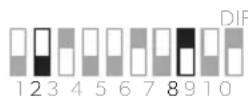
ON 75% (90 A):
LFP-accu's > 200 Ah,
Loodzuuraccu's > 320 Ah
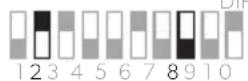
ON 50% (60 A):
LFP-accu's > 100 Ah,
Loodzuuraccu's > 200 Ah
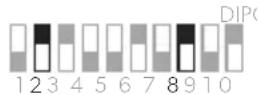
25% (30 A):
LFP-accu's < 100 Ah,
Loodzuuraccu's > 100 Ah
Laagspanningsbeveiliging instellen
FORSIGTIG! Brandfare
Anbring sikringen i nærheden af batterierne for at beskytte kablet mod kortslutning og mulig brand.

VIGTIGT! Fare for beskadigelse
line
| t | U (V) | I (Ω) | | ---- | ----- | ----- | | 0 | 14.4 | 13.5 | | 1 | 14.4 | 13.5 | | 2 | 14.4 | 0 | | 3 | 14.4 | 0 | | 4 | 14.4 | 0 | | 5 | 14.4 | 0 | | 6 | 14.4 | 0 | | 7 | 14.4 | 0 | | 8 | 14.4 | 0 | | 9 | 12.5 | 0 | | 10 | 12.5 | 0 |1: Konstant strömfas (bulk)
line
| t | U (V) | I (%) | | ---- | ----- | ----- | | 1 | 14.4 | 13.5 | | 2 | 14.4 | 0 | | 3 | 14.4 | 0 | | 4 | 14.4 | 0 | | 5 | 14.4 | 0 | | 6 | 14.4 | 0 | | 7 | 14.4 | 0 | | 8 | 14.4 | 0 | | 9 | 12.5 | 0 | | 10 | 12.5 | 0 |1: Konstant strømfase (bulk)
Batteriet lades konstant med maksimal ladestrøm (100 %). Ladestrømmen synker når batteriet har nådd en ladetilstand på 75 % (90 % for LiFePO4-batterier). Varigheten på konstant strømfase avhenger av batteritilstanden, belastningen fra likestrøm og ladetilstanden.
Bryter-knapp-stilling
Innstilling

3A (ved 230V)

Maksimal strøm (≤16 A)

6A (ved 230V)
Stille inn nattmodus

MERK
dometic.com/sales-offices