LT10 - Battery charger AEG - Free user manual and instructions
Find the device manual for free LT10 AEG in PDF.


| Product type | Battery charger for lead-acid batteries (WET, AGM, GEL, MF) |
| Model | AEG LT10 |
| Input voltage | 220-240 V AC, 50/60 Hz |
| Max input current | 1.5 A |
| Output voltage | 12 V DC / 24 V DC |
| Charge current (12 V) | 2 A / 6 A / 10 A (max.) |
| Charge current (24 V) | 2 A / 6 A (max.) |
| Recommended battery capacity | 2 - 200 Ah |
| Ambient temperature | -20 °C to +40 °C |
| Protection class | II (double insulation) |
| Weight | Approximately 1.5 kg |
| Dimensions (L x W x H) | Approximately 25 x 15 x 10 cm |
| Main functions | Automatic charging with microprocessor, desulfation, maintenance charge, power supply, temperature compensation |
| Protections | Reverse polarity, short circuit, overcharge, overheating, spark formation |
| LED indicators | Power, Charge, Full, Error, Bad Battery, selected current |
| Display | Digital display for voltage, current, charge status |
| Cleaning and maintenance | Clean with a soft, dry cloth. Roll up the cable properly. Store in a clean, dry place. |
| Spare parts | Cable with clamps and cable with ring terminals supplied. Optional accessories available. |
| Repairability | Do not disassemble. Contact a specialized workshop for repair. |
| General information | User manual included. Brand AEG. Microprocessor charger for car, boat batteries, etc. |
Frequently Asked Questions - LT10 AEG
User questions about LT10 AEG
0 question about this device. Answer the ones you know or ask your own.
Ask a new question about this device
Download the instructions for your Battery charger in PDF format for free! Find your manual LT10 - AEG and take your electronic device back in hand. On this page are published all the documents necessary for the use of your device. LT10 by AEG.
USER MANUAL LT10 AEG
Instructions for use
Microprocessor charger Lf10
FR
Mode d'emploi
Read these instructions before using the charger. Follow all instructions and recommendations.
FR - Page 31
Connecting the device. 24
Start charging 24
Switching the display 24
Bridging power supply 25
Automatic temperature adjustment 25
Completing charging and disconnecting the charger 26
Charging phases 26
Safety functions 27
Troubleshooting 27
Cleaning, care and maintenance. 28
Service 28
Disposal. 28
INTRODUCTION
Explanation of symbols and signal words used in these operating instructions and/or the device:

Follow instructions when using the machine.

Risk of bodily or fatal injury to children!

Follow warnings and safety instructions!

Only use device in locations protected from weather!

Double-insulated casing (Safety class II)

Consider the environment when disposing of the packaging!
Note:
These instructions also refer to the battery charger as device.
Normal use
The charger is intended for charging open and a variety of closed, maintenance-free lead-acid rechargeable batteries (batteries) as found in cars, boats, lorries and other vehicles, e.g.:
Wet batteries (WET)
head-acid batteries (liquid electrolyte)
gel batteries (gel-type electrolyte)
GM batteries (electrolyte inside absorbed glass matt)
This device is not intended for use by children or persons with limited mental capacity or lacking experience and/or lacking expertise. Children should be supervised to ensure they do not play with the device.
This device is not intended for commercial use.
Any other use or modification of the device is considered improper and involves significant risks. The manufacturer assumes no liability for damages due to improper use.
Contents
Be sure to verify contents immediately upon opening the product. Check the product and all parts for damage. Do not use a defective product or parts.
Microprocessor charger LT10
lamp terminal connection cable
Ring terminal connection cable
Instructions for use
Accessories available for convenient connection:
Ring terminal connection cable
Battery connection cable for on-board outlet
Please include all relevant documentation to other users!
Technical data
| Model LT10 | |
| Item number 97024 | |
| Input 220 - 240 V AC | 50/60 Hz |
| Input current max. 1.5 A | A |
| Output 12 V DC / 24 V DC | A |
| Charging voltage (max.) | 14.7 V / 29.4 V |
| Charging current +/-10 % | 12 V: 2 A / 6 A / 10 A 24 V: 2 A / 6 A |
| Recommended battery capacity | 2 - 200 Ah |
| Ambient temperature | -20 °C till +40 °C |
| Type of batteries lead-acid batteries (WET, MF, AGM and GEL) | |
| Safety class II | |
SAFETY
General Safety Guidelines
Read all safety guidelines and instructions. Noncompliance with safety guidelines and instructions can cause electric shock, fire and/or serious injury. Keep all safety guidelines and instructions for future reference.

Warning!

Life-threatening danger to infants and children! Never leave children unsupervised in the packing material as this can cause
suffocation. Do not allow children to play with cables - strangulation hazard! Do not allow children to play with the components or fasteners, as they could be swallowed and result in suffocation.
The manufacturer is not responsible for damages caused by:
improper connection and / or operation.
Exterior force, damage to the device and / or damage to parts of the device caused by mechanical impact or overload.
Any type of modification to the device.
Use of the device for purposes that are not described in this instruction manual.
Consequential damages caused by non-intended and / or improper use, and / or defective batteries.
Moisture and / or insufficient ventilation.
The unauthorized opening of the device.
This will void the guarantee.

Risk of chemical burns!
Batteries contain acid, which could damage the eyes and skin. Charging batteries further generates gasses and vapours hazardous to the health.
Avoid any contact with caustic battery acid. Immediately thoroughly flush skin and any objects which have come into contact with acid. If eyes have come into contact with battery acid, flush eyes with running water at least 5 minutes. Contact your physician.
Use safety goggles and acid-proof safety gloves. Protect clothing, e.g. with an apron.
Never tip the battery, as acid may leak.
Always ensure adequate ventilation.
Do not inhale emerging gasses and vapours.


Explosion and fire hazard!
- Couseous hydrogen (detonating gas) may form when charging the battery. Contact with open fire (flame, embers, sparks) may result in explosions.
Never charge the battery close to an open fire or in places where sparks may occur.
Always ensure sufficient ventilation.
Be sure the supply voltage matches the input voltage specified on the device (220-240 V AC) to prevent damage to the device.
Only connect and disconnect the battery connecting cables when the charger is disconnected from the mains.
Do not cover the device whilst charging, as it may be damaged from extreme heating.
immediately stop using the device if you notice smoke or an unusual odour.
Do not use the device in rooms where explosive or flammable substances are stored (e.g. petrol or solvents).

Risk of electrical shock!
Chargers may interfere with the operation of active electronic implants, e.g. pacemakers, thus pose a personal hazard.
avoid pouring or dripping water or other liquids over it. If water penetrates electrical devices, the risk of electric shock increases.
Ensure that all plugs and cables are free of moisture. Never connect the device to the mains with wet or moist hands.
Never touch both connections at once when the device is in uses.
nplug from mains before connecting or disconnecting the charging cable with the battery, or when the device is no longer being used.
Remove all device cables from the battery before attempting to drive your vehicle.
Always unplug device by the plug. The cable may be damaged.
Do not use device if damaged. Damage to the power cable, the device or the charging cable increase the risk of electrical shock.
Do not attempt to disassemble or repair the device. Immediately have a defective device or damaged power cable repaired or replaced by a speciality shop.
Risk of short circuits! Do not allow the two connectors from the charging cable to touch if the power plug is plugged into the power outlet. Be sure not to connect the connectors or the battery poles through conductive objects (e.g. tools).
Never use the cable to carry or pull the device.

Risk of injury!
Never attempt to charge non-rechargeable, damaged or frozen batteries.
Do not use this device to charge dry cell batteries. These could burst, resulting in personal injury and property damage.
Please read and follow the operating manual and all safety instructions for the batteries to be charged and the vehicle before using this device.
Risk of damage!
Never place the device over or near the battery to be charged. Gasses from the battery could damage the unit. Place the device as far from the battery as the connecting cable will allow.
Never operate the device if it has been dropped or damaged in any other way. For inspection and repair, take it to a qualified electrician.
PRODUCT OVERVIEW
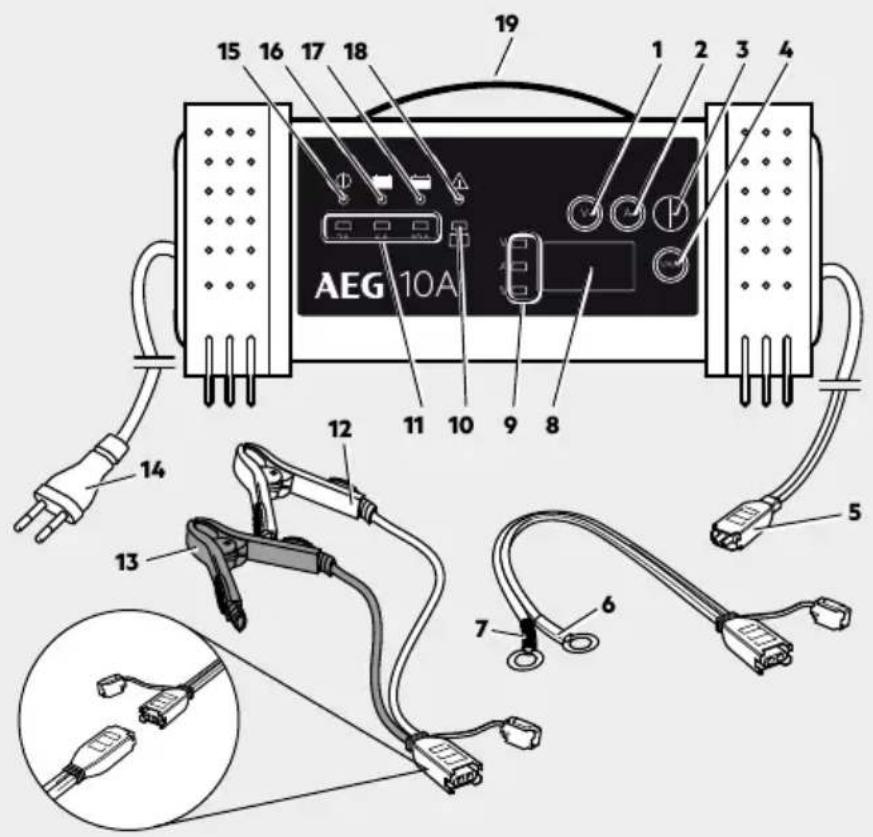
| No. | Description Function | |
| 1 | 12 V / 24 V button | to select the voltage. The display shows the respective selection (12P or 24P). |
| 2 | A 2 A / 10 A / 20 A button | to select the charging current. Displayed with the respective LED (see no. 11). |
| 3 | START / STOP button | to start and stop the charging process and to start and stop the ‘Power supply’ function. |
| 4 „V / A / %” button to switch the parameter in the display. | ||
| 5 Comfort plug connection | ||
| 6 Terminal connection cable (+) with ring lug (red) | ||
| 7 Terminal connection cable (-) with ring lug (black) | ||
| 8 Display indicates the parameters. | ||
| 9 LED (red) V / A / % | Indicates the selected charging parameter (in charging mode only). Switch with the button (4). | |
| 10 LED (red) Bad Battery lights up if the battery voltage is between 0.5 V - 1.5 V | ||
| 11 LED | (red) 2 A / 6 A / 10 A | Displays the selected charging current (in charging mode only).Switch with the button (2). |
| 12 | Terminal connection cable (+)with clamp (red) | To connect the charger to the battery (+ terminal) |
| 13 | Terminal connection cable (-)with clamp (black) | To connect the charger to the battery (- terminal) |
| 14 Power cable with power plug to supply power. | ||
| 15 | LED Power | lights up when the power cable is plugged in. |
| 16 | LED Full | lights up when the battery is fully charged. |
| 17 | LED Charge | lights up during charging. |
| 18 | LED Error | lights up if connected incorrectly.An alarm will also sound. |
| 19 Handle | for carrying the charger. | |
Functions
The charger is equipped with a microprocessor (MCU - Micro Computer Unit) and features fully automatic charging-, diagnostic-, emergency- and maintenance functions. After selecting the battery type connected (12 V or 24 V) the battery charger will recognise the battery capacity and the battery condition and calculate the required charging parameters (charging voltage, charging current). This allows for efficient and safe charging. If the wrong battery voltage is set or the battery is defective, it will not charge and the "Error" LED (18) will light up (also see "Troubleshooting").
The "trickle charge" function allows the charger to be permanently connected. A full charge will be maintained.
The 'Power supply' function allows the charger to provide a bridging power supply. While changing the batteries, the charger provides the vehicle with electricity and no data is lost.
The 'Automatic temperature adjustment' function measures the ambient temperature and adjusts the charging phase according to the ambient temperature.
OPERATION
Before use

Warning!
Before using this device be sure to read the operating manual for the battery and the vehicle and understand all safety notices.
Use safety goggles and acid-proof safety gloves.
Ensure adequate ventilation.
Ensure the battery poles are clean. If the battery has removable vent caps, fill each battery cell with distilled water to the level recommended by the battery manufacturer. Do not overfill the cells.
Connecting the device
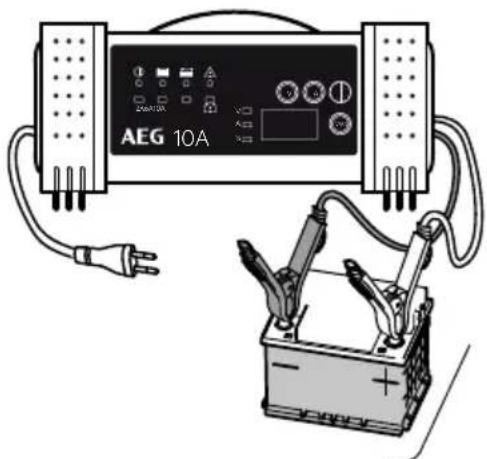
- Connect the required terminal connection cable (with rings or clamps) to the device's comfort plug connection (5).
- Connect the red (+) pole connector cable to the positive pole of the battery.
- Connect the black (-) pole connector cable to the negative pole of the battery.
Note:
The black (-) clamp can also be connected to the vehicle chassis (Please refer to the auto maker's instructions!). Be sure both clamps have good contact and are securely seated.
4. Plug the charger plug into a 230V power socke.
The "Power" LED (15) will light up.
- Before beginning the charging process, ensure the charging voltage (12 V/24V) the charger is set to matches the connected battery. Selecting the charging current too high can damage/destroy the connected battery.
Start charging
- Repeatedly press the "12 V / 24 V" button (1) to select the respective charging mode, 12 V or 24 V. The display will show your selection.
- Repeatedly press the 2A / 6A / 10A (2) button (2) to select the respective charging current.
- Press the "START / STOP" button (3) to start the charging process.
The charging process will now start. The "Charge" LED (17) will light up.
If the battery is connected incorrectly, the "Error" LED (18) will light up. In this case, unplug the charger and check the battery and the correct connection (also see "Troubleshooting").
If the battery is detected as defective, the "Bad Battery" LED (10) will light up.
When the battery is fully charged, the "Full" LED (16) will light up and the "Charge" LED (17) goes out.
Note:
Once the battery is fully charged, the charger will switch to trickle charge to maintain the charging status and protect the battery from overcharging.
Switching the display
During the charging process you can repeatedly press the / / % button (4) to display the following parameters:
= charging voltage
charging current
= battery charge condition
Before charging only the current battery voltage can be displayed, and after charging only the battery charge condition.
Bridging power supply
While changing the batteries, the charger provides the vehicle with electricity (13.6V± 0.3V,7A± 1A) and no data is lost.
- Connect the charger to the battery terminal.
- Plug the charger plug into a 230V power socket.
- Press the START/STOP button (3) for 5 seconds.
The „Power" LED (15) will light up. A voltage of 13.6V will be indicated in the display.
- Remove the battery.
- Insert a new battery.
- Press the "START / STOP" button (3) to switch off the bridging power supply.
- Unplug from the 230V power socket.
- Separate the charger from the battery terminal.
Automatic temperature adjustment
| Automatic tempera- rature adjustment ±2°C | 12 V ±0.25 V | 24 V ±0.25 V |
| ≤ 7.5°C 15.25 V | 30.5 V | |
| 7.5°C - 12.49°C 15.1 V 30.2 V | ||
| 12.5°C - 17.49°C 14.95 V 29.9 V | ||
| 17.5°C - 22.49°C 14.8 V 29.6 V | ||
| 22.5°C - 27.49°C 14.65 V 29.3 V | ||
| 275°C - 32.49°C 14.5 V 29.0 V | ||
| ≥ 32.5 °C | 14.35 V 28.7 V |
Charging time in hours (approx.)
| Model | LT10 | ||
| Charging current (max.) Battery size | 2 A 12 V / 24 V | 6 A 12 V / 24 V | 10 A 12 V |
| 10 Ah | 7 h | 2 h | 1,5 h |
| 25 Ah | 17 h | 6 h | 3 h |
| 50 Ah | 33 h | 11 h | 7 h |
| 75 Ah | 49 h | 16 h | 10 h |
| 100 Ah | 65 h | 21 h | 13 h |
| 125 Ah | 82 h | 26 h | 16 h |
| 150 Ah | 98 h | 32 h | 19 h |
| 200 Ah | 130 h | 42 h | 25 h |
Completing charging and disconnecting the charger
- Press the ,START / STOP button (3) to finish the charging process.
- First, remove the plug from the 230V power socket
- Disconnect the black (-) terminal connection cable from the negative battery terminal.
- Disconnect the red (+) terminal connection cable from the positive battery terminal.
CHARGING PHASES
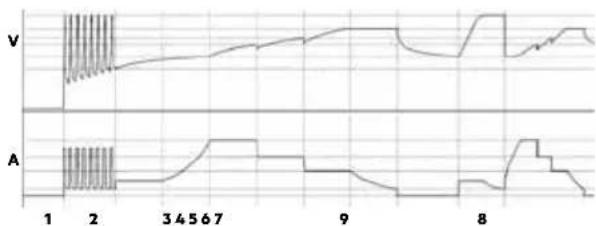
The concept of the charging process is explained based on a 12 V battery.
Diagnosis
Diagnostic function which automatically checks the battery status and recognises the voltage.
| Voltage Function | |
| 0 V bis 1.5 V “Error” LED (18) lit. Battery defective. | |
| 1.5 V bis 12 V Charging starts. | |
| 12 V bis 13 V Maintenance charging starts. | |
| 14.6 V Battery fully charged. “Full” LED (16) lit. | |
| >15 V “Error” LED (18) lit. |
Step 1: Condition check
The charger checks the battery condition and calculates the required charging parameters.
Step 2: Desulphation (rescue)
The charger can rescue most drained batteries with voltages up to a minimum of 1.5 ± 0.5V .
- The safety switch does not allow the charger to start charging if the voltage is below 1.5 ± 0.5V .
- At a voltage range of 1.5 ± 0.5V to 10.5 ± 0.5V the charger will initiate pulse charging.
- If the voltage rises above 10.5 ± 0.5V , the charger will switch to the previously selected regular charging mode, which will charge faster and more safely.
Step 3: Precharging
The battery is gently charged with a low charging current to return the battery to a chargeable state.
Step 4: Soft start
The battery is gently charged with a low charging current.
Step 5: Base charge with a constant current
The battery is quickly and safely charged with a consistent current.
Step 6: Base charge with a constant voltage
The battery is charged at a constant charge end voltage until it is fully charged.
Step 7: Analysis
Once the battery is fully charged, the charging process will stop.
Step 8: Equalisation charge
If the battery is fully charged and drops to 12.8V within 2 minutes, another charging process will begin automatically.
Step 9: Maintenance charging
The charger monitors the battery capacity. Once the battery falls below 12.8V , the charger will emit a charging pulse. This maintains the battery's highest possible charging level.
SAFETY FUNCTIONS
The charger features the following safety features to prevent damage to the charger and the battery or the vehicle:
short circuit (defective battery),
incorrect connection (connected with reversed polarity),
parking
overheating
excess current
Overcharging
TROUBLESHOOTING
| Error/Problem Possible cause | Correction | |
| The "Bad Battery" LED (10) will light up. | Defective batter Have the battery checked by a speciality repair shop.Replace battery. | |
| "Error" LED (18) lit | Battery incorrectly/not connected | Unplug charger and check the connections. |
| Incorrect battery voltage (12/24 V) selected | Unplug charger and wait for the LEDs to go out. Reconnect the charger and select the correct battery voltage. | |
| Battery cannot be charged No | power supply, charger not plugged in. Verify the charger is plugged into a 230 V mains outlet and the "Power" LED (15) is on. Battery may be defective. | |
| Long charging time Only a very low charging current is used in very low temperatures (below 0°C). This will extend the charging time. As the battery warms up, the charging current is adjusted accordingly. | Charge battery in normal conditions.Explosion hazard!Never charge frozen batteries. | |
| Battery capacity too high for the charger being used. | Use a suitable charger. | |
| Battery voltage too low Battery wasn't charged long enough. Ensure the battery is charged long enough. | ||
CLEANING, CARE AND MAINTENANCE
Clean clamps after every charging. To prevent corrosion, wipe off any battery fluid which may have come into contact with the clamps.
Carefully wind the cable when storing the device. This will help prevent accidental damage to the cable and the device.
Clean the product with a soft, dry cloth.
Store the machine in a clean, dry place.
Service
Should you have any questions regarding commissioning or operating in spite of studying these operating instructions, or if a problem should occur against all expectations, please get in contact with your specialist supplier.
Disposal
The packaging consists of non-contaminating materials that you can dispose of at your local recycling point.

Do not throw electrical appliances in with domestic waste!
In accordance with European Directive 2012/19/ EC for waste electrical and electronic equipment (WEEE) and conversion to national law, used electrical appliances must be collected separately and taken to a recycling point. For ways to dispose of old electrical appliances please contact your community or city administration.
Illustrations may vary slightly from the product itself. We reserve the right to modify the product in accordance with technical advances. Decoration not included.
TABLE DES MATIÈRES
Introduction 32
Courant de transfert (Power Supply)
Corrente bypass (Power Supply)
www.aeg-automotive.com


- FR - Page 31
- INTRODUCTION
- Normal use
- Contents
- SAFETY
- General Safety Guidelines
- Warning!
- Risk of chemical burns!
- Explosion and fire hazard!
- Risk of electrical shock!
- Risk of injury!
- Risk of damage!
- PRODUCT OVERVIEW
- Functions
- OPERATION
- Before use
- Connecting the device
- Note:
- Start charging
- Switching the display
- Bridging power supply
- Completing charging and disconnecting the charger
- CHARGING PHASES
- Diagnosis
- Step 1: Condition check
- Step 2: Desulphation (rescue)
- Step 3: Precharging
- Step 4: Soft start
- Step 5: Base charge with a constant current
- Step 6: Base charge with a constant voltage
- Step 7: Analysis
- Step 8: Equalisation charge
- Step 9: Maintenance charging
- SAFETY FUNCTIONS
- TROUBLESHOOTING
- CLEANING, CARE AND MAINTENANCE
- Service
- Disposal
- TABLE DES MATIÈRES
- Courant de transfert (Power Supply)
- Corrente bypass (Power Supply)
Brand : AEG
Model : LT10
Category : Battery charger