CL7700 OPTI - Headphones GEEMARC - Free user manual and instructions
Find the device manual for free CL7700 OPTI GEEMARC in PDF.


User questions about CL7700 OPTI GEEMARC
0 question about this device. Answer the ones you know or ask your own.
Ask a new question about this device
Download the instructions for your Headphones in PDF format for free! Find your manual CL7700 OPTI - GEEMARC and take your electronic device back in hand. On this page are published all the documents necessary for the use of your device. CL7700 OPTI by GEEMARC.
USER MANUAL CL7700 OPTI GEEMARC
natural_image
Black Boenorc ear cap device with curved neck and earplugs, displayed against a light blue background (no text or symbols visible on the device body)En 2 - 31
Fr 32 - 60
Ge 61 - 89
INTRODUCTION ....3
Unpacking the CL7700 OPTI 4
Receiver(Headset) description ....5
Transmitter (Charger Stand) description....6
Transmitter Back Panel 6
Voice Notification ....7
Getting Started – Connecting the Charger Stand to your Television (or an Other Audio Device) 8
INSTALLATION......8
A. Φ3.5mm audio socket 10
B. Optical socket....10
USING THE CL7700 OPTI 12
Charging your CL7700 OPTI 12
Turning on the CL7700 OPTI 13
SETTINGS....15
Volume Setting 15
Balance Setting 15
Tone Setting....17
Stereo/Mono Setting 18
PAIRING....19
Phone Call pairing 19
ECO MODE 24
CL7700 OPTI with Hi-Fi or MP3 Player 25
TROUBLESHOOTING....25
GENERAL INFORMATIONS ...... 26
Cleaning 26
Environmental 26
Battery Warnings....27
Features 28
TECHNICAL SPECIFICATIONS....28
Electrical Specification of the Charger Stand 29
GUARANTEE 30
RECYCLING DIRECTIVES 31
INTRODUCTION
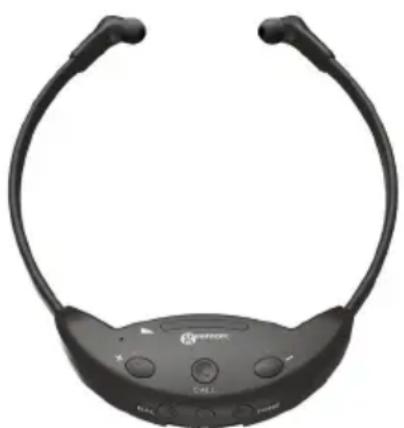
Thank you for having purchased the Geemarc CL7700 OPTI – our Amplified 2.4GHz wireless TV headset. The CL7700 OPTI is a stylish, top quality headset delivered with its Charger Stand, which can be connected to televisions, laptops, music players, and iPods. The headset provides high quality CD sound, and can be used alone as a Bluetooth headset, without the need of having its Charger Stand nearby.
The CL7700 OPTI is useful in situations where members of the same household do not wish to watch the same TV program together. By wearing our headset, one can watch TV without disturbing those around, who might prefer to read.
The headset has tone, volume, and balance controls, and you can choose to have either stereo or mono sound. It also has a built-in rechargeable battery which self-charges when the headset is placed on its Charger Stand.
This easy-to-use, stylish device will allow you to hear the beauty of sound with amazing quality and clarity.
You can pair your TV headset at your mobile phone in Bluetooth mode and answer at one call or even listen the music by one application.
It is important that you read the following instructions if you wish to enjoy the full potential of your Geemarc CL7700 OPTI. Keep this user guide in a safe place for future reference.
natural_image
Front view of a black smart earband device with adjustable neck and front brackets (no visible text or symbols)INTRODUCTION
Unpacking the CL7700 OPTI
When unpacking our CL7700 OPTI, you should find the following items in the box:
• 1x CL7700 OPTI Bluetooth controlled headset
• 1x Transmitter (Charger Stand)
• 1x AC power adapter 1,5 meter
• 1x Optical cable 1 meter
• 1x 3.5 mm male Jack to 3.5 mm male Jack cable
- 2x Pairs of ear pad gel (small size & large size)
- 1x User guide

eemarc™
Hear the Difference
For product support and help visit our website at
www.geemarc.com
E-mail : help@geemarc.com
Telephone 01707 387602
lines are open 09h00 to 16h00 Mon to Fri
Grande-Synthe, France.
Made for Geemarc Telecom
S.A. in China





INTRODUCTION
Receiver(Headset) description
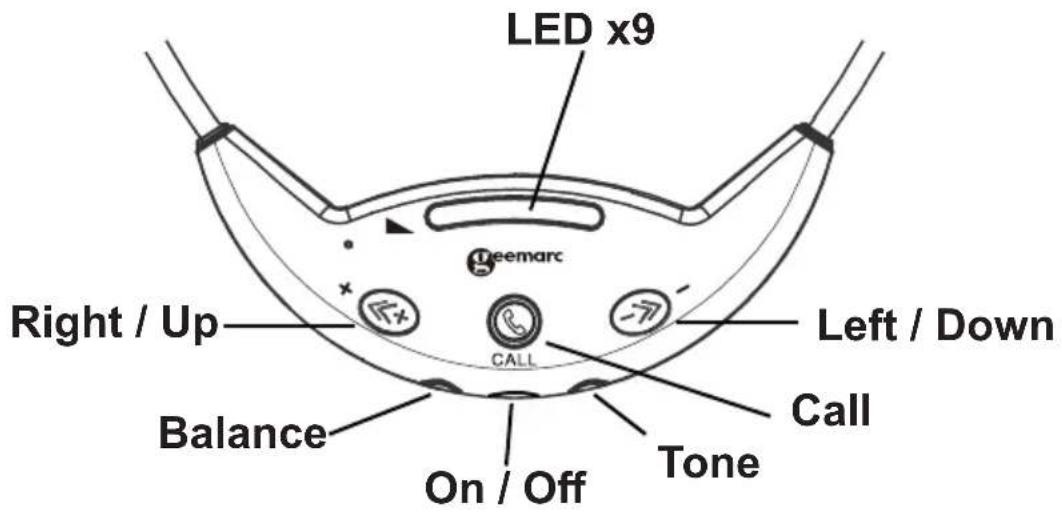
1. Receiver Buttons :
text_image
LED x9 Right / Up Balance On / Off Call Left / Down Tone Geemarc| DescriptionButton | |
| ON/OFF | Power ON and OFF the device |
| TONE | For entering “Tone Adjust Status” |
| BALANCE | For entering “Balance Adjust Status” |
| RIGHT/UP For adjusting setting | |
| LEFT/DOWN | For adjusting setting |
| CALL | For answer phone and Bluetooth pairing switch back and forth between two devices. |
2. Receiver LEDs :
There are 9 LEDs. These LEDs will be used to indicate the status in different status.

text_image
Location of "Up/Right" Button Location of "Down/Left" ButtonINTRODUCTION
Transmitter (Charger Stand) description
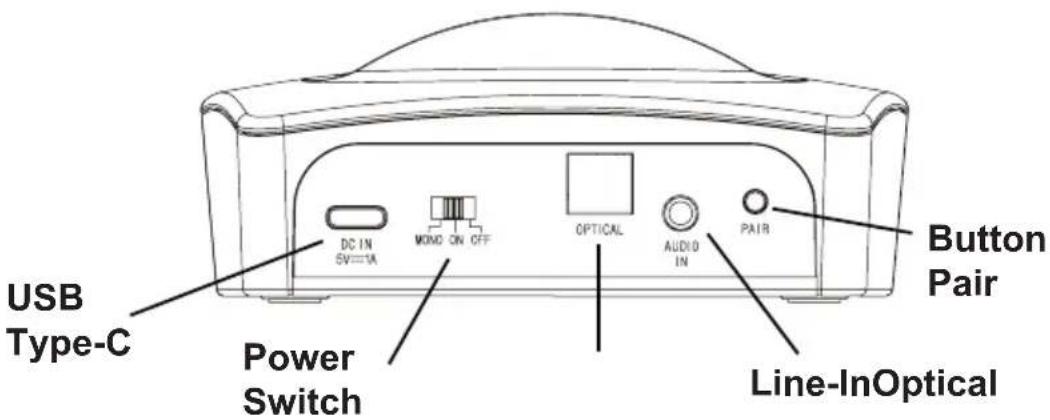
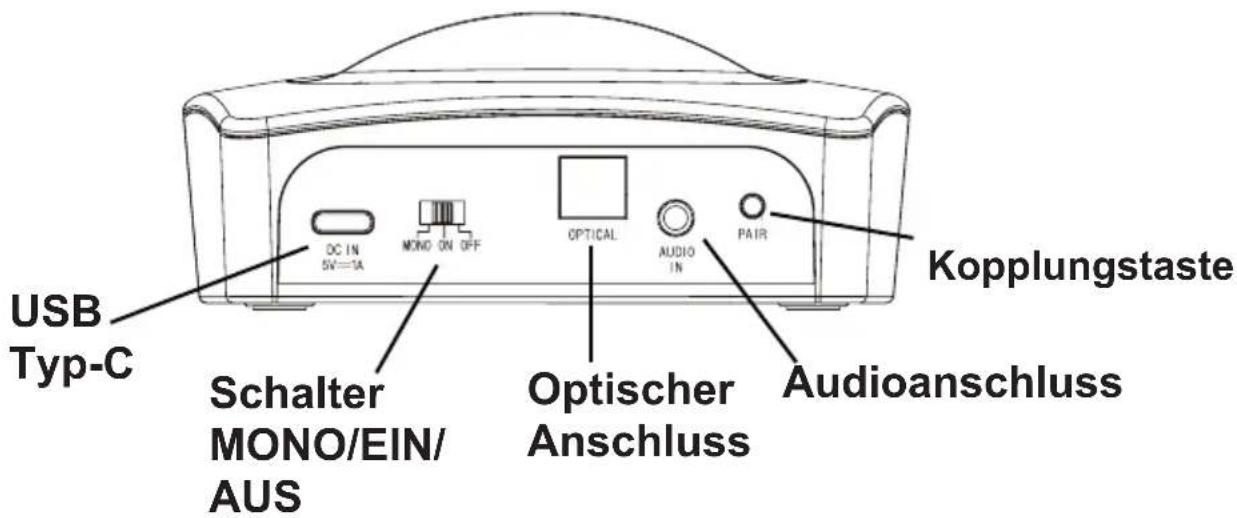
Transmitter Back Panel
text_image
USB Type-C Power Switch DC IN SW=1A MOMD ON OFF OPTICAL AUDIO IN PAIR Button Pair Line-InOptical| Button | Description | |
| Pairing Button P | Pairing button on Charger Stand | |
| Switch | Status Description | |
| Power Switch | OFF | The Charger Stand is powered OFF. |
| Power Switch | ON | The Charger Stand is powered ON, and it will make the CL7700 OPTI works in Stereo mode. |
| Power Switch | MONO | The Charger Stand is powered ON, and it will make the CL7700 OPTI works in Mono mode. |
| Ports | Description | |
| USB Type-C 5V | Power Input port. | |
| 3.5 mm Line-In | For 3.5mm Line-In audio source. | |
| Optical (SPDIF) | For Optical In audio source. (Remark: When 3.5mm Line-In is plugged in, optical input is ignored) | |
INTRODUCTION
Voice Notification
The Headset should have a set of voice notifications to indicate the status of the Headset. The following voice notifications are supported :
- "Power ON" - when the Headset is power ON.
- "Power OFF" - when the Headset is power OFF.
- "Pairing" - when the Headset enters Pairing Status.
- "Connected"- when the Headset is connected to a device.
- "Disconnected" - when the connection has disconnected.
-
A "Beep" sound - when
a. volume hits the maximum or minimum level.
b. balancing hits, the left or right most.
c. tone hits Tone 1 or Tone 5. -
A "Beep Beep" sound - when
a. the volume level reaches Level 5. (middle position)
b. the balance level reaches at the middle (left and right balance).
c. the tone channel at Tone 3 (middle tone).
d. lost the signal of the connected device, searching the signal of the device and trying to reconnect.
-
"Low Battery" - when the Battery voltage is low.
-
Incoming sound – when a new incoming call occurs.
INSTALLATION
Getting Started – Connecting the Charger Stand to your Television (or an Other Audio Device)
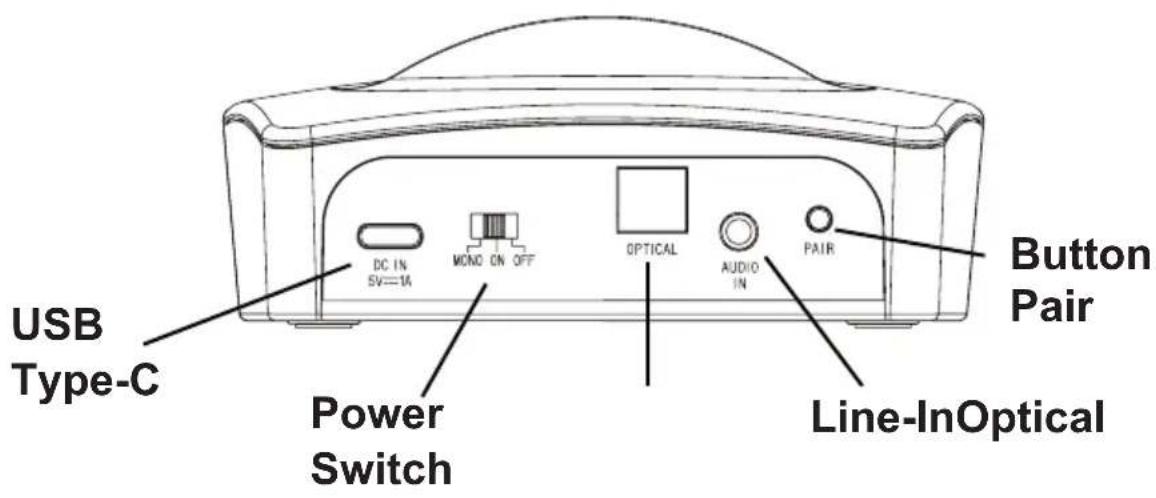
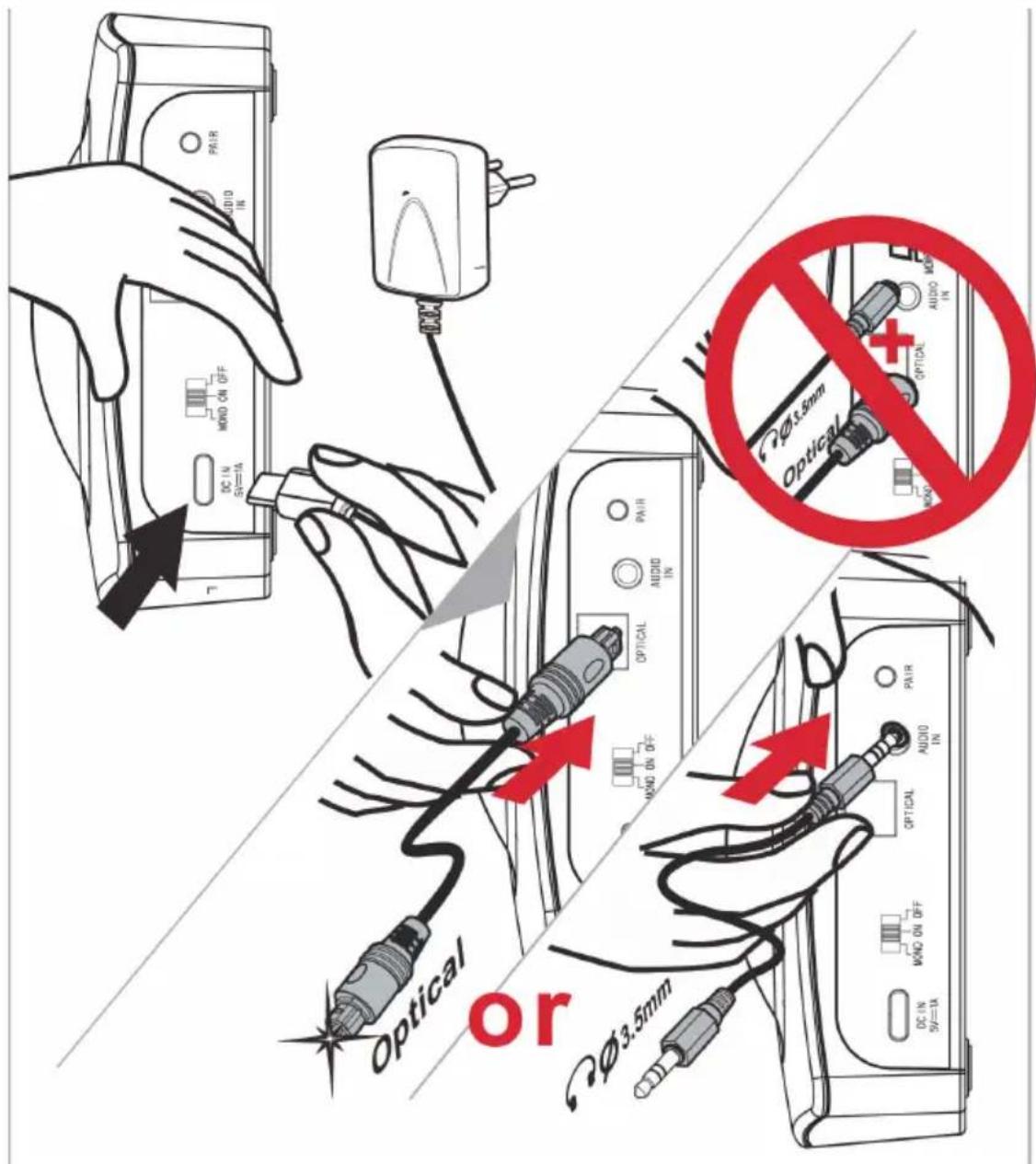
- Insert the USB Type-C connector of the AC power adapter into the "DC IN 5V" socket at the back of the Charger Stand.
text_image
USB Type-C Power Switch DC IN SV=1A MOND ON OFF OPTICAL AUDIO IN PAIR Button Pair Line-InOpticalINSTALLATION
text_image
PAIR AUDIO IN DC IN 5V=1A MORD ON OFF OPTICAL OPTICAL PAIR AUDIO IN DC IN 5V=1A MORD ON OFF OPTICAL OPTICAL PAIR AUDIO IN DC IN 5V=1A MORD ON OFF OPTICAL OPTICAL PAIR AUDIO IN DC IN 5V=1A MORD ON OFF OPTICAL OPTICAL PAIR AUDIO IN DC IN 5V=1A MORD ON OFF OPTICAL OPTICAL DA 3.5mm OPTICAL OPTICAL PAIR AUDIO IN DC IN 5V=1A MORD ON OFF OPTICAL OPTICAL PAIR AUDIO IN DC IN 5V=1A- Insert either one end of the 3.5 mm Jack cable into the "AUDIO IN" socket at the back of the Charger Stand, or one end of the optical cable into the "OPTICAL" socket at the back of the Charger Stand.
- Insert the other end of the cable you have chosen, that is either the male Jack cable or the optical cable, into your audio source's output socket, that is the output socket of the device you are using the headset with.
There are different methods you can follow to set up the Charger Stand depending on what sockets your audio device is equipped with. Please see below:
INSTALLATION
A. Φ3.5mm audio socket
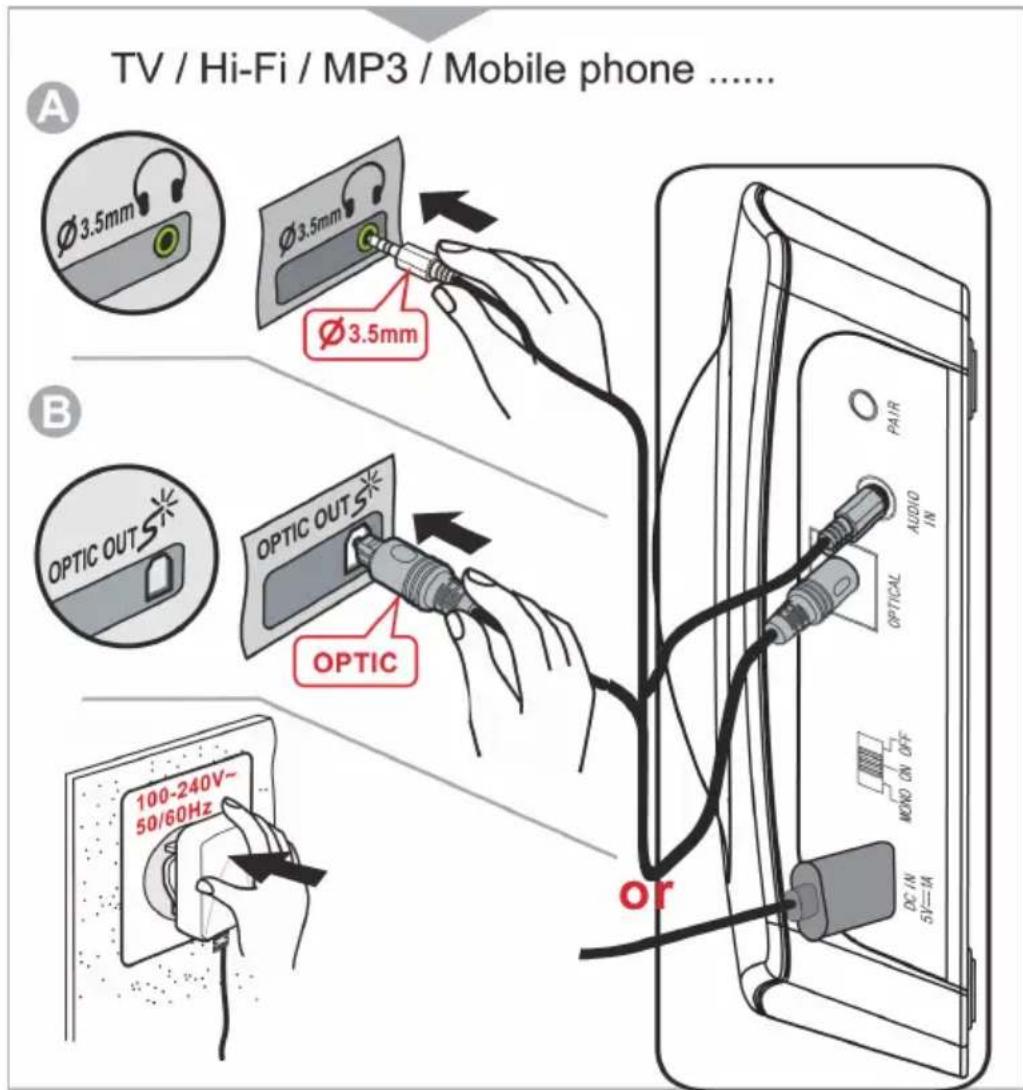
Insert one end of the 3.5 mm Jack cable into the “AUDIO IN” socket at the back of the Charger Stand. Insert the other end of this cable into the 3.5mm audio output of your television (or of any other audio device).
Note: if you connect the Jack audio 3.5mm at the headset output of your TV, it risks that the Sound of the TV speaker is cut.
text_image
TV / Hi-Fi / MP3 / Mobile phone ...... A Ø 3.5mm Ø 3.5mm Ø 3.5mm B OPTIC OUTS OPTIC OUTS OPTIC 100-240V~ 50/60Hz or PAIR AUDIO IN OPTICAL MONO ON OFF DC-IN 5V=INB. Optical socket
Insert one end of the optical cable into the “OPTICAL” socket at the back of the Charger Stand. Insert the other end of this cable into the “OPTICAL OUT” or SPDIF output socket of your television (or of any other audio device).
INSTALLATION
Note: The 3.5 mm Jack and the optical cable cannot both be plugged in at the same time. If one is used then the other needs to be left aside.
-
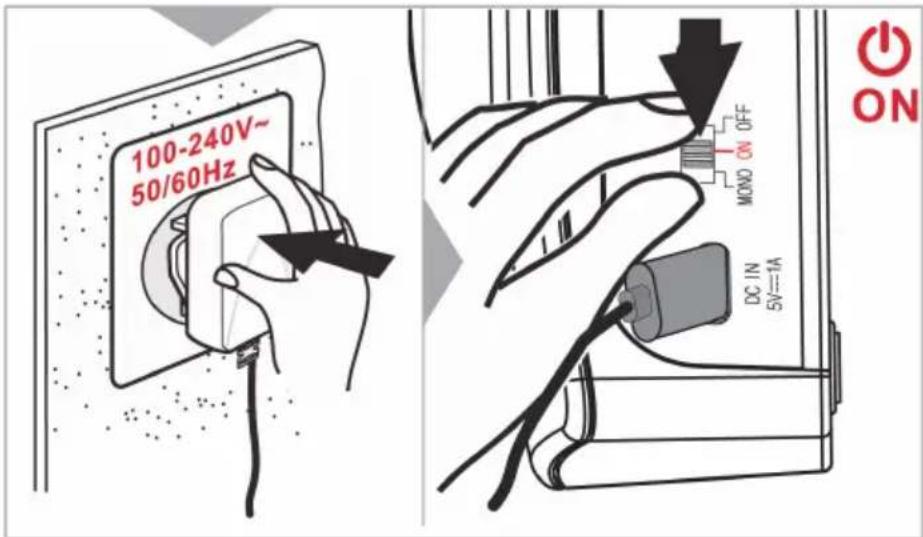
Plug the AC power adapter into the mains.
-
Move the power switch at the back of the Charger Stand to the "ON" position to use your CL7700 in Stereo sound or Mono to use in mono sound.
text_image
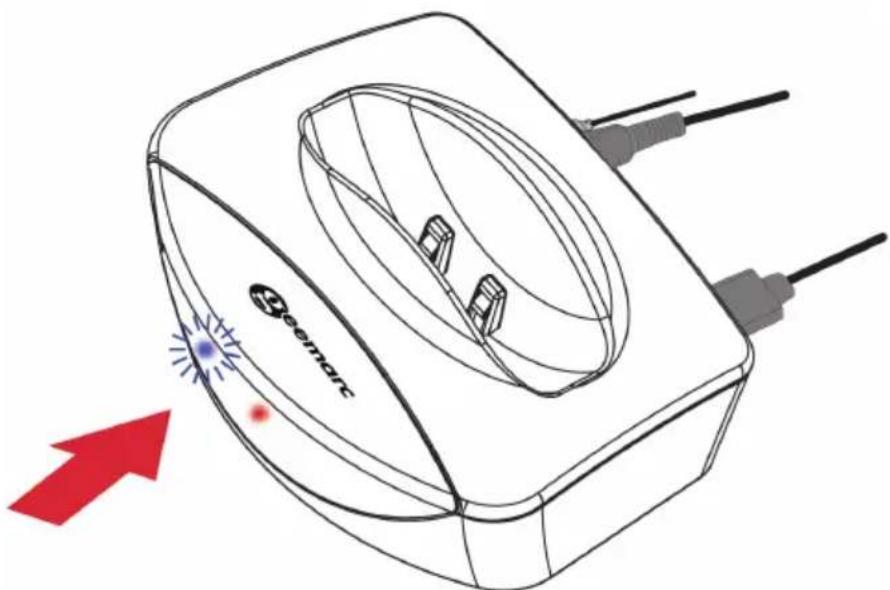
100-240V~ 50/60Hz MOND ON OFF DC IN 5V=VA ON- On the front of the Charger Stand, a red LED will light up on the Charger Stand to indicate it has been turned on. If a blue LED starts blinking, it means the unit has entered the Bluetooth connecting mode.
text_image
SOTATOUSING THE CL7700 OPTI
- Red LEDs light up on the headset when it is placed on the Charger Stand. These red LEDs will blink to indicate the headset is charging. Once the batteries of the headset are fully charged, the red LED will stay on. If the red LEDs blink when the headset is not on the Charger Stand, it means its batteries are low and need to be recharged.
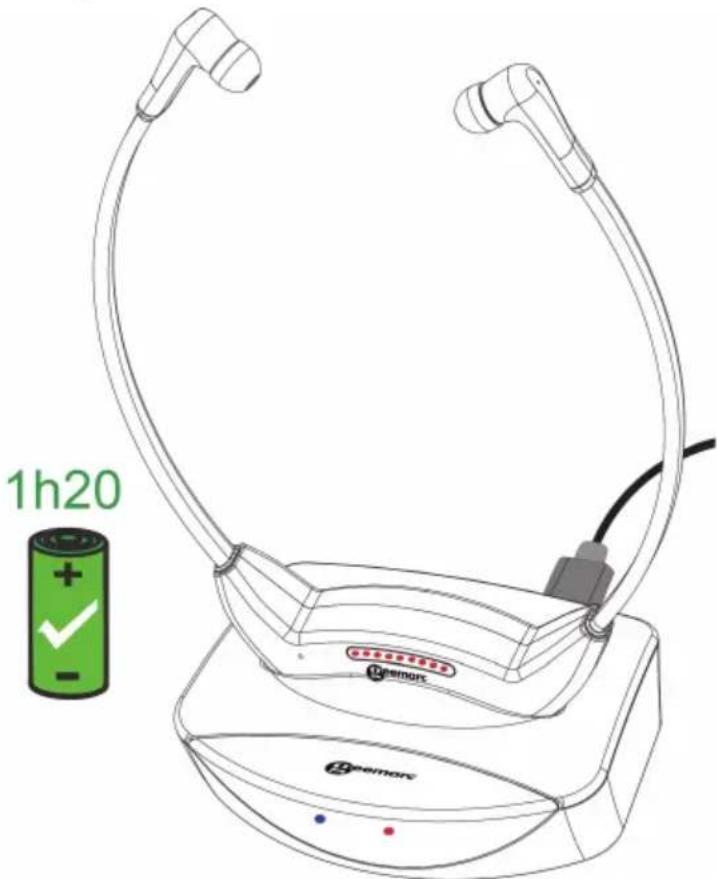
Charging your CL7700 OPTI
- When the Headset is plugged into the Charger Stand, it will be charged (Ensure the Charger Stand is turned ON).
- LEDs on the Headset will be ON with each blinking red LED indicating the current battery capacity level. (blinks every 1 second)
(e.g. The level 5 red LED is blinking to indicate that the battery capacity is charging at the 50% level)

natural_image
Sequence of circular icons with gray and red dots, no text or symbols presentUSING THE CL7700 OPTI
- When the Headset is unplugged from the Charger Stand, it will enter Connecting Status.
Charge Completed
All red LEDs will light up when the Headset is fully charged.

natural_image
Row of eight identical red circles with white borders, no text or symbols presentWhen the Headset is unplugged from the Charger Stand, it will enter Connecting Status.
Turning on the CL7700 OPTI
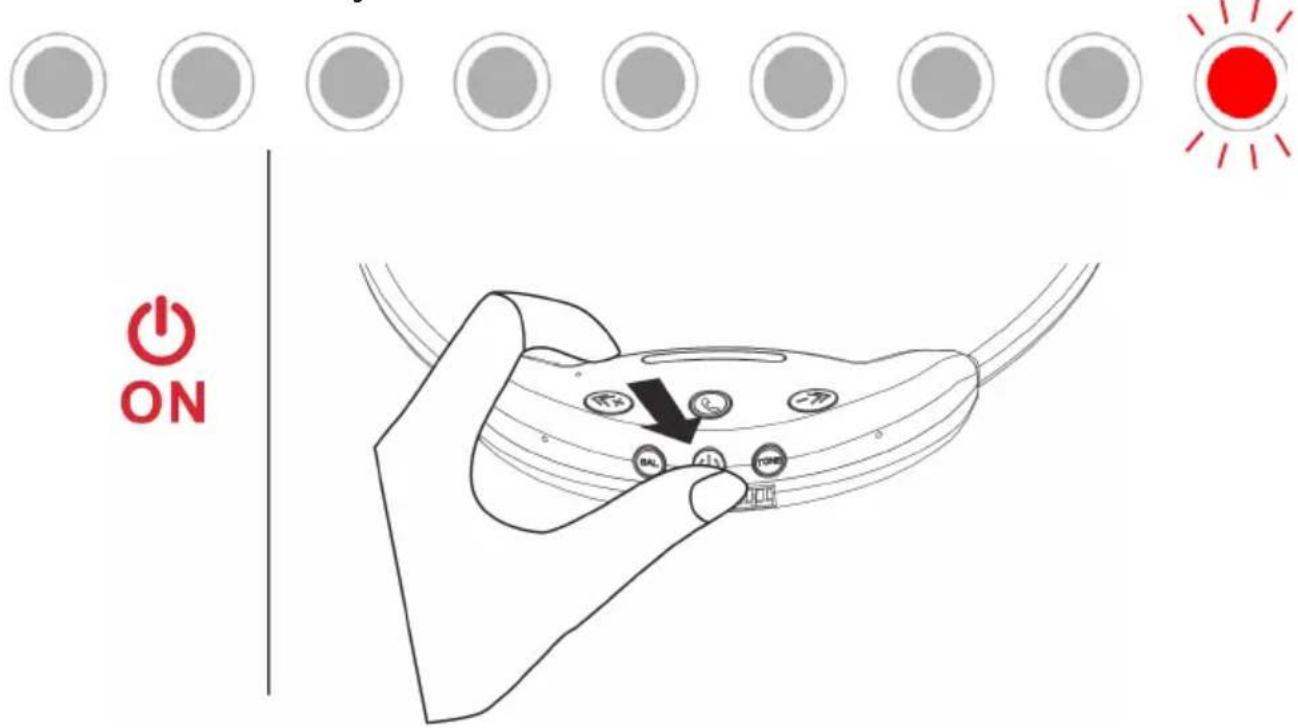
Once the batteries are fully charged, the headset can be removed from its Charger Stand and used. Press and hold the headset's power button for 3 seconds until a red LED starts blinking on the right “->” button.
You can hear the message “Power on” at the start then “Connected” if the headset finds a device (mobile phone, charging base or TV for example). About 10 seconds later, this red LED will stop blinking and stay on to indicate that the CL7700 OPTI is now ready for use.
text_image
ON BAL BALUSING THE CL7700 OPTI
Place the earbuds inside your ears and make sure that the television (or the other audio device you are using the CL7700 OPTI with) is turned on. By default, the headset's settings are at the recommended levels, for further personalisation please see the “settings” part of this user guide.
When the connection is done, you can see 5 Led's on, it means that the volume level is set at the middle position at each start up.









If the connection is not made, the Headset will enter in Standby Status.
The middle LED blinks









If the Headset is idle for 30 minutes, the Headset will be automatically powered OFF.









After 30 seconds, one red LED stays ON indicating the current volume level selected (e.g. 5th red LED is ON for volume level=5)
SETTINGS
Volume Setting
You can set the volume in using “<<+” and “->” buttons on each side. These buttons situate each side allows you to increase or decrease the volume to a level that is suitable for you. The red LED lights represent the volume intensity, the more there are on, the higher the volume is.

natural_image
Row of eight identical red circles with white circular borders, no text or symbols presentIt means that the headset is at the high position

natural_image
Row of eight gray circles with white borders, no text or symbols presentIt means that the sound is Mute
If when adjusting the volume you hear a beep sound twice, it means the volume is at mid-level.

natural_image
Row of eight circular icons with gray and red dots, no text or symbols presentOne beep, it means the volume is at the low or high position.
Balance Setting
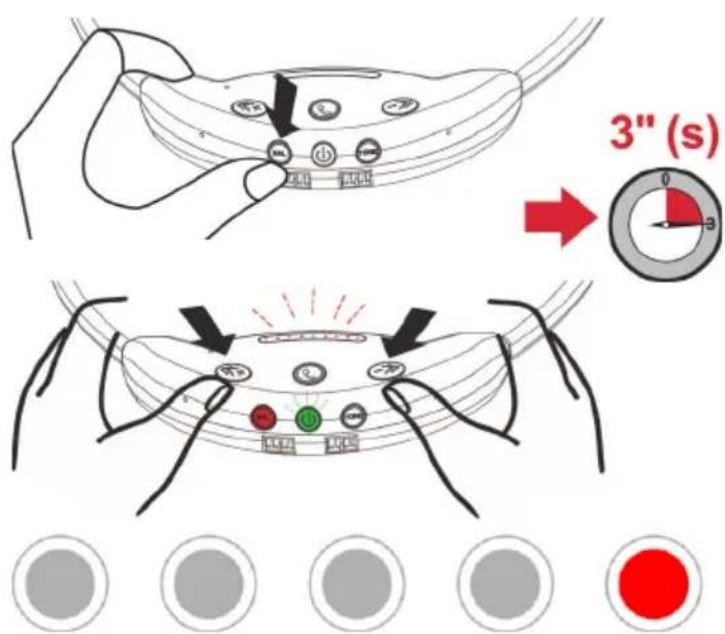
The balance can be adjusted by pressing the headset's "BAL" button.
text_image
3" (s) 0 3After you have pressed and hold this button for 3 seconds, a red LED will light up to show you the current balance.
SETTINGS
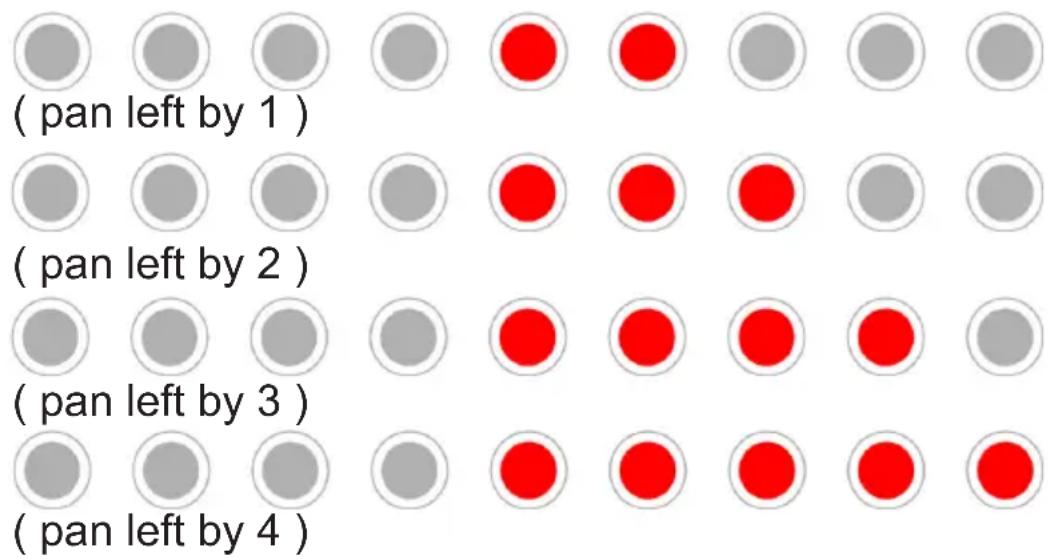
From then on, each time you press the headset's “->” button, you will change the volume level on the right side, whereas each time you press on the headset's “<<+” button, you will change the volume level on the left side. When maximum and minimum levels are reached, the headset will beep once. When mid-level is reached, it will beep twice.
- If the “LEFT/DOWN” button is pressed, the balance level and audio pan to the left side.
text_image
(pan left by 1 ) (pan left by 2 ) (pan left by 3 ) (pan left by 4 )- If the “RIGHT/UP” button is pressed, the balance level and audio pan to the right side.
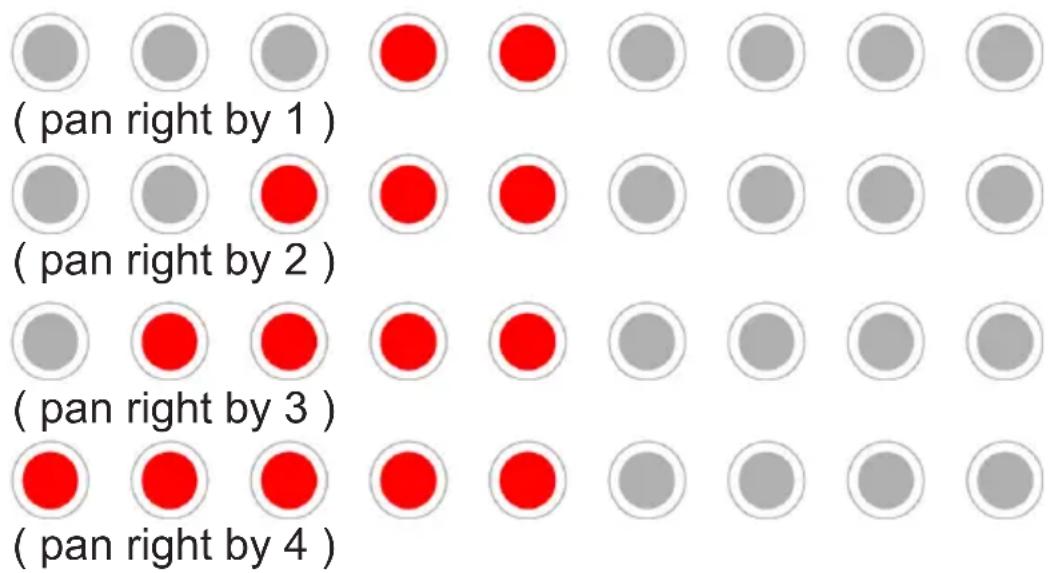
text_image
(pan right by 1 ) ( pan right by 2 ) ( pan right by 3 ) ( pan right by 4 )SETTINGS
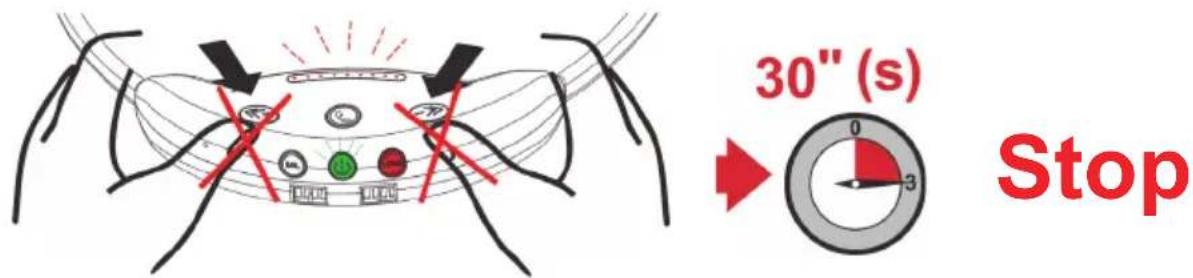
Pressing and holding the “BAL” button for 3 seconds will allow you to leave the balance setting mode. You will leave this mode automatically if after having entered it, you do not press any button for 30 seconds.
Tone Setting
The tone can be adjusted by pressing the headset's tone button.
After you have pressed and hold this button for 3 seconds, red LEDs will light up to show you the current tone.
You can then press the “<<+” and “->>” buttons on the headset to switch between the 5 tones available. When you have reached either tone 1 or 5, the headset will beep once. When you have reached tone 3, it will beep twice.

text_image
3" (s)Tone1:

natural_image
Row of circular icons with gray and red dots, no text or symbols presentTone 2:

natural_image
Row of gray circular icons with two red dots in the center (no text or symbols)Tone 3:

natural_image
Row of circular icons with gray and red dots, no text or symbols presentTone 4:

natural_image
Row of gray circles with two red circles in the center, no text or symbols presentTone 5:

natural_image
Row of circular icons with red and gray dots, no text or symbols presentSETTINGSSETTINGS
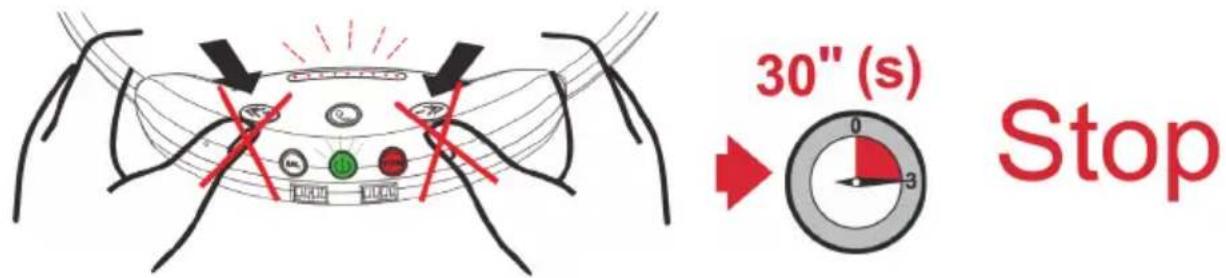
Pressing and holding the "TONE" button for 3 seconds will allow you to leave the tone setting mode. You will leave this mode automatically if after having entered it, you do not press any button for 30 seconds.
text_image
30" (s) StopStereo/Mono Setting
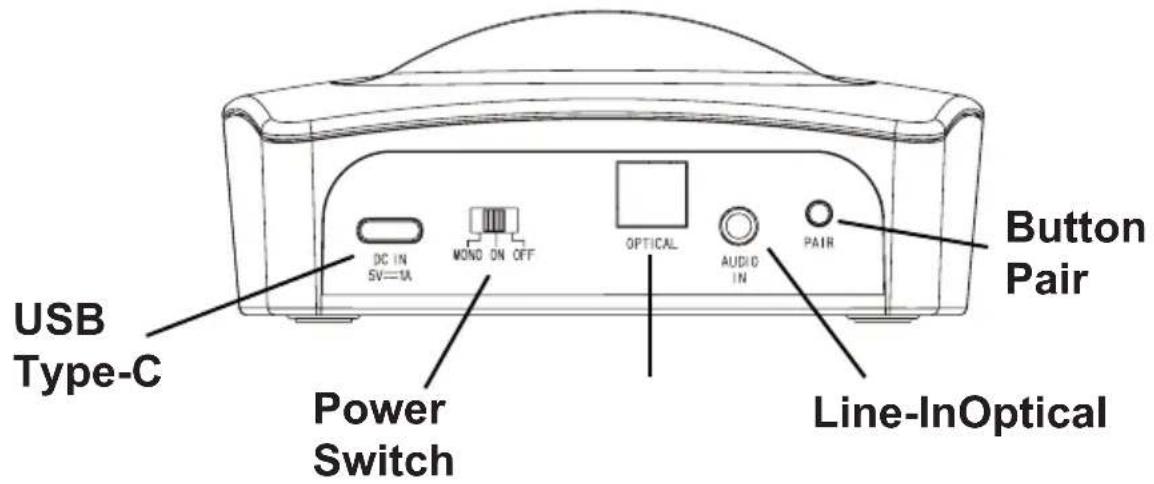
You can switch between Stereo and Mono by simply moving the power switch at the back of the Charger Stand to the position corresponding to the desired mode (MONO / ON / OFF).
Moving the power switch to the "ON" position will make the CL7700 OPTI works in Stereo mode, whereas moving it to the "Mono" position will make the CL7700 OPTI works in Mono mode.
text_image
USB Type-C Power Switch DC IN SV=TA MOND ON OFF OPTICAL AUDIO IN PAIR Button Pair Line-InOpticalPAIRING
Phone Call pairing
You can pair the headset to a smartphone via Bluetooth. To do so please follow the below procedure:
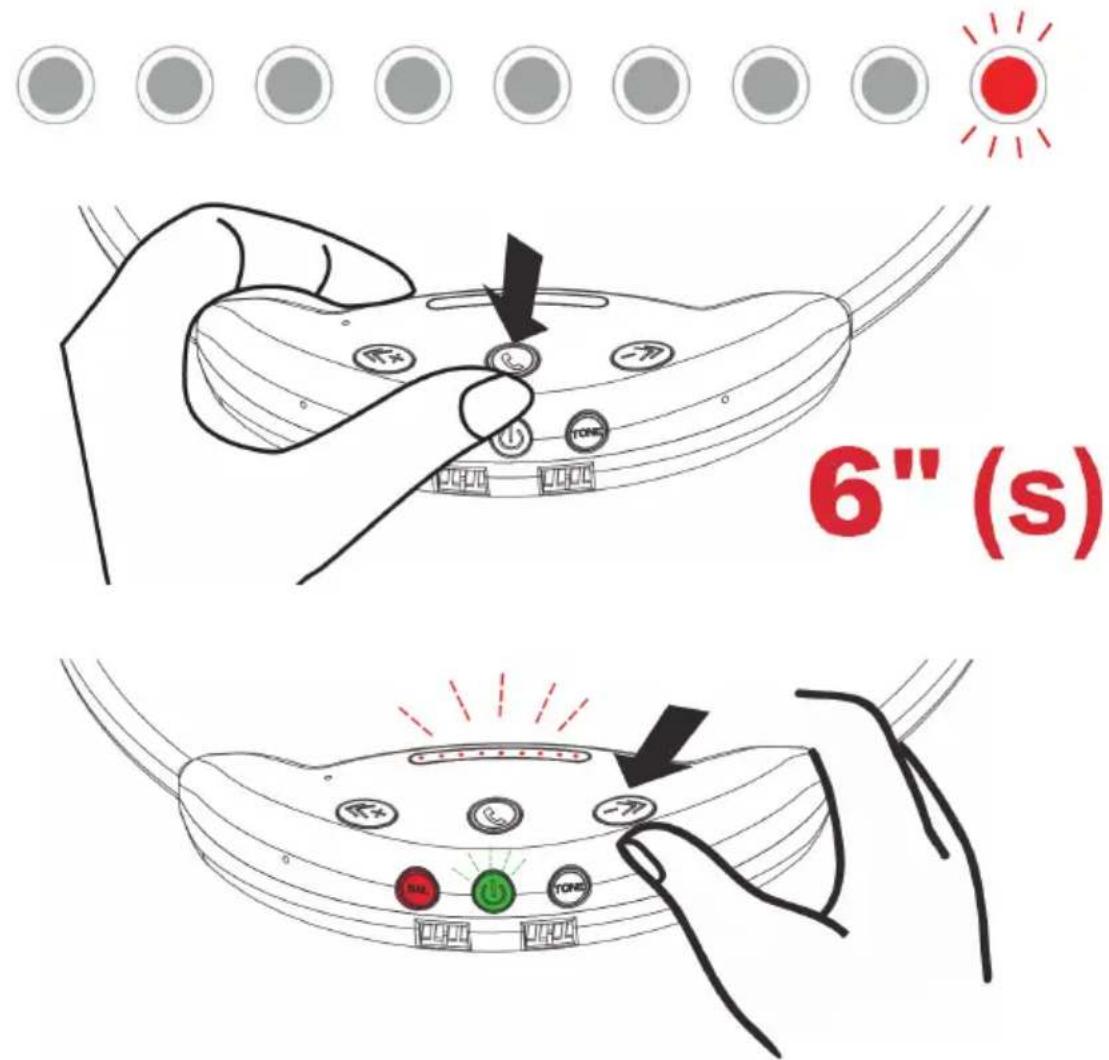
1) Turn on the headset by pressing and holding its power button for 3 seconds, then enter the pairing mode by pressing and holding the "CALL" button for 6 seconds. A red LED upper to the “->” button will start blinking quickly.
text_image
6" (s)PAIRING
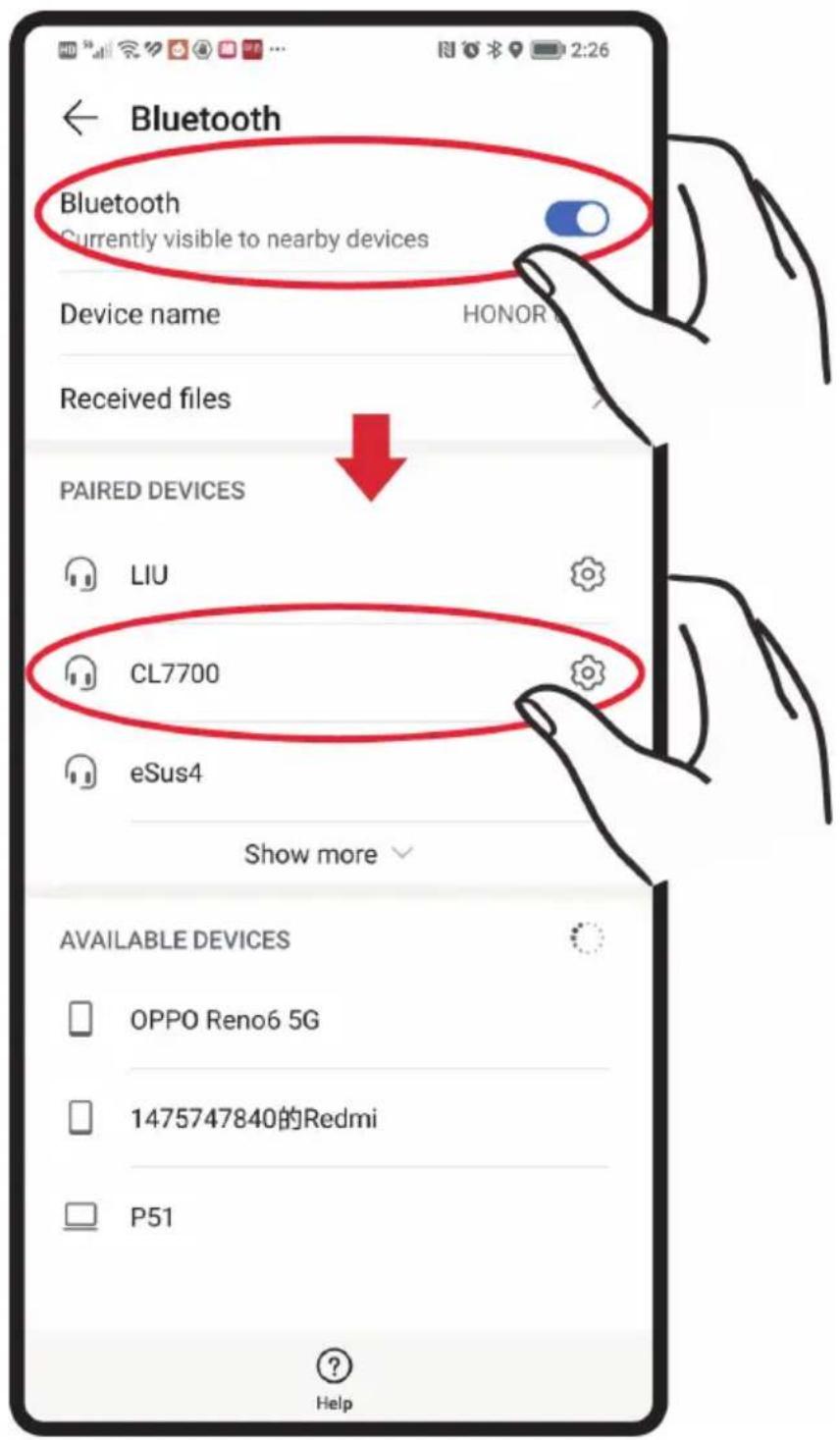
2) On your smartphone, check that the bluetooth mode is turns on and launch the research of device.
3) Using your smartphone, establish a connection with the headset, its Bluetooth name will appear as "CL7700".
text_image
Bluetooth Bluetooth Currently visible to nearby devices Device name HONOR Received files PAIRED DEVICES LIU CL7700 eSus4 Show more AVAILABLE DEVICES OPPO Reno6 5G 1475747840的Redmi P51 HelpPAIRING
4) When there is incoming call, press the headset's "CALL" button to answer. Press that same button again to end the call, reject call by pressing and holding for 3 seconds.
The headset can connect to one mobile phone and the Charger Stand at the same time. If your headset is connected to the Charger Stand and your smartphone, your headset can manage to listen one of the audio sources at a time. For example, when you are listening a TV show on your headset and suddenly your smartphone rings, the headset will not be hearing the TV show and start to hear the phone call on your smartphone. When you end the call, it switches back to hear the TV show.
This function is also applied to listen music on your smartphone. The below example assume that your headset is connected to your smartphone and the Charger Stand. The Charger Stand is connected to the TV with audio input.
When you want to listen a music on your smartphone while listening a TV show on your headset, the headset will not hear the music on your headset, the headset will not hear the music on your smartphone while listening to a TV show on your headset, the headset will not hear the music and will start hearing the TV show. You will need to press the CALL button twice to switch the listening from TV show to smartphone application.
To return to listening to your TV show, you must press the call button twice.
PAIRING
Charger stand pairing
Your headset has already been paired with its Charger Stand at the factory so that both can automatically recognise each other when turned on for the first time. However, if for any reason your headset and its Charger Stand are no longer paired together, there is a very simple pairing procedure you can follow:
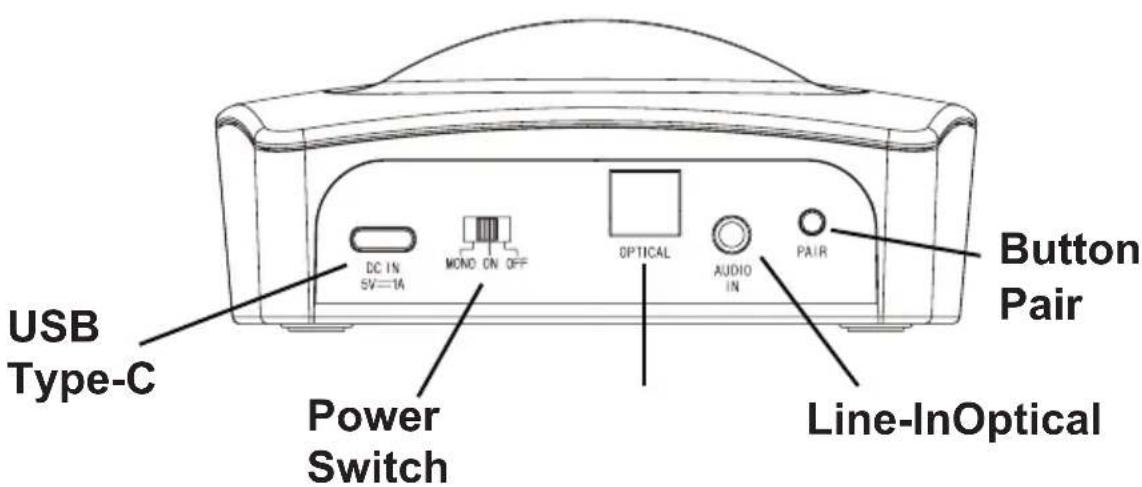
1) Press and hold the "CALL" button for 6 seconds to enter the pairing mode. A red LED upper to the headset's "->>" button will start blinking quickly.



2) Press and hold for 6 seconds the "PAIR" button found on the Charger Stand.
text_image
USB Type-C Power Switch DC IN SV=1A MOND ON OFF OPTICAL AUDIO IN PAIR Button Pair Line-InOpticalPAIRING
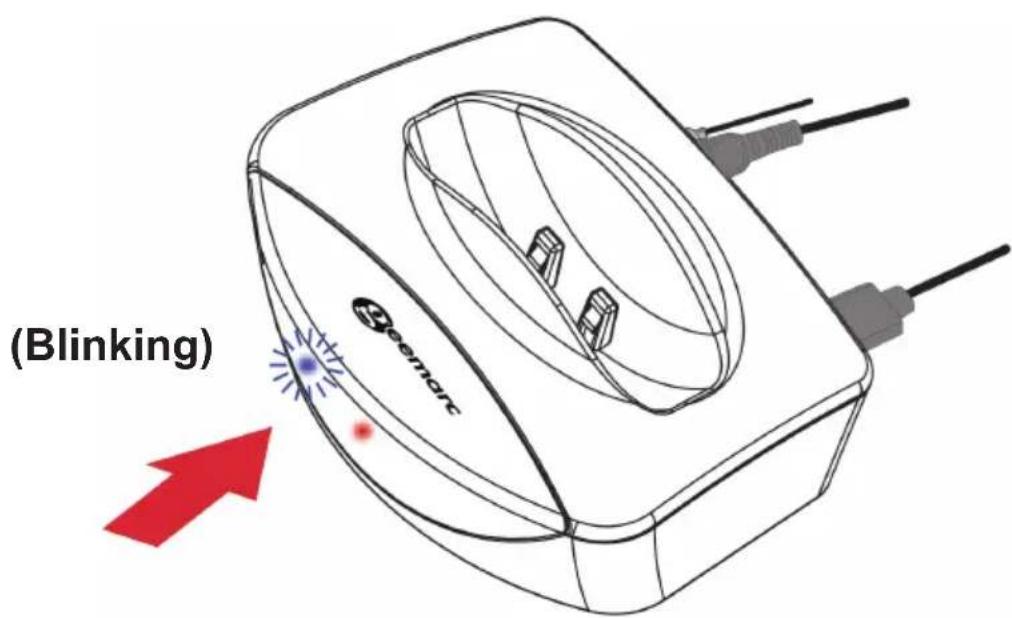
3) A blue LED will blinks quickly on the Charger Stand to show that The Charger Stand is in pairing mode.
text_image
(Blinking)4) A blue LED will light up on the Charger Stand to show that It has successfully been paired to the headset.

natural_image
Two colored circles, one blue and one red, with white circular borders (no text or symbols)After having paired your CL7700 with your mobile phone, place the headset on its charging cradle and wait a few seconds for it to automatically connect to the base.
ECO MODE

text_image
Émode EcoThe CL7700 OPTI works in Eco Mode, which means its emissions are decreased by 90%.
If the sound coming from the device the CL7700 OPTI is paired with is reduced at very low level or muted for more than 5 minutes, the headset will enter in standby status automatically.
The headset will turn itself off automatically if more than 30 minutes go by before it can establish a connection with an audio device, or if it is placed back on its Charger Stand. To turn it back on again, you should either lift the headset off the Charger Stand or press and hold its "POWER" button.
TROUBLESHOOTING
CL7700 OPTI with Hi-Fi or MP3 Player
You can't hear any sound
- Make sure that the AC power adapter is properly plugged into the mains and that its USB Type-C connector is correctly connected to the "DC IN 5V" socket at the back of the Charger Stand.
- Make sure that the Charger Stand is switched on or mono position. The red led in front must be on.
- Make sure that the headset is powered and turned on. You should see a red LED on.
- The headset may be low on battery. Place the headset back on the Charger Stand to recharge its batteries, the red LED on the headset should light up and stay on.
- Make sure that the audio device you are using the CL7700 with is switched on and that it plays or broadcasts a program which sends an audio signal.
- The headset output level is set too low. Adjust the volume to a suitable level.
- It is possible the sound coming from your audio device is too low. Increase the volume from your audio source (television, stereo, computer...)
- The connected audio/video equipment ( For example DVD, Mp3 or Mp4 players) may not be in playback mode. Start playback ON by the equipment.
You can't answer a call with your headset
- Double check that your mobile is connected in bluetooth with the CL7700
- Check that the bluetooth is activated on your mobile phone
The sound is distorted
Restart the pairing process between the headset and its Charger Stand. The headset may be low on battery. Place the headset back onto the Charger Stand to recharge its batteries, the red LED on the headset should light up and stay on. Make sure the sound volume in your headset is not too high. The headset may be too far away from the Charger Stand, move it closer. It is possible the sound coming from your audio device is too high. Decrease the volume from your audio source (television, stereo, computer...)
GENERAL INFORMATIONS
General
To make the best of this product and use it safely, please first read these instructions thoroughly and keep them in a safe place for future reference.
This product can have a really loud receiving volume. Pay attention to whom you allow to use this product. Exposition to excessively high sound levels can cause hearing loss.
The unit is meant to work with a 100-240V AC-50/60Hz power supply, classified as ‘hazardous voltage’ according to the EN62368-1 safety standard.
To disconnect the power, switch on OFF position the switch OFF/ON/MONO situated at the rear of the Charger Stand.
When setting up the unit, make sure that its mains adapter is easily accessible.
Do not open the unit, contact Geemarc's customer servives if repairs are needed.
Please note: Appliances that generate strong electrical or magnetic fields such as microwaves and mobile phones can cause interferences.
Cleaning
Clean the CL7700 OPTI with a soft cloth and never use polishes or cleaning agents as they could damage the electrical components inside the unit.
Environmental
Do not expose the unit to direct sunlight or other heat sources. Always ensure there is a free flow of air in the room where your CL7700 OPTI is. Do not pour water on the unit and do not leave it in a damp or humid place like a bathroom. Do not expose the unit to fire or other hazardous conditions.
GENERAL INFORMATIONS
Battery Warnings
Do not attempt to dismantle the batteries
Do not expose the batteries to fire
Do not swallow the batteries
Keep the batteries away from children
The batteries are to be inserted while observing the correct polarity Do not short-circuit the supply terminals
Dead batteries need to be removed from the product
Do not use another type of battery or non-rechargeable batteries to replace the rechargeable batteries that are supplied with the product.
Turn off the headset when it is not in use or is charging to avoid damaging its batteries
The headset's batteries must be fully charged when it is used for the first time.
Dispose of dead batteries according to the instructions given.
TECHNICAL SPECIFICATIONS
Features
- High amplification which can be adjusted to a series of buttons on the headset
• LED volume control to show the volume level - Left / right balance control
- Environmental noise cancellation during phone calls
- Rechargeable battery inside the TV headset
- 8 hours of continuous use with sound volume at mid-level
- Charger Stand (1.2 hours about to have a full charging)
- Easy-to-use
- EQ tone adjustment
- Connectivity with other Bluetooth devices
Electrical Specification of the Headset:
| Bluetooth Version Bluetooth 5.2 | |
| Frequency Range | 2.402-2.480 GHz |
| Transmitted Power | 10 dBm |
| Receiving sensitivity | -80 dBm |
| Battery Capacity | 220 mAh |
| Volume output at the middle position | 109 dB |
| Charging Voltage | 5 V |
| Number of LED(s) | 9 |
| Receiver Bluetooth Name | CL7700 |
TECHNICAL SPECIFICATIONS
Electrical Specification of the Charger Stand
| Bluetooth Version | Bluetooth 5.2 |
| Frequency Range | 2.402-2.480 GHz |
| Transmitted Power | 8 dBm |
| Audio Input | Optical, 3.5 mm Audio In |
| Power DC Input | USB Type-C |
| Charging output Voltage | 5 V/ 0.250 A max |
| Number of LED(s) | 2 |
| Number of Slide Switch(es) | 1 |
| Transmitter Bluetooth Name | CL7700_CHARGER (Concealed) |
GUARANTEE
From the moment your CL7700 OPTI is purchased, Geemarc guarantee it for the period of two years. During this time, all repairs or replacements (at our discretion) are free of charge. Should you experience a problem then contact our help line or visit our website at www.geemarc.com. The guarantee does not cover accidents, negligence or breakages to any parts. The product must not be tampered with or taken apart by anyone who is not an authorised Geemarc representative. The Geemarc guarantee in no way limits your legal rights.
IMPORTANT: YOUR RECEIPT IS PART OF YOUR GUARANTEE AND MUST BE RETAINED AND PRODUCED IN THE EVENT OF A WARRANTY CLAIM.
Please note: The guarantee applies to the United Kingdom only.
CE DECLARATION: Geemarc Telecom SA hereby declares that CL7700 OPTI is in compliance with the essential requirements and other relevant provisions of the Radio Equipment Directive 2014/53/UE.
The CE declaration of conformity may be consulted at www.geemarc.com
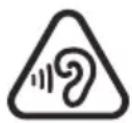
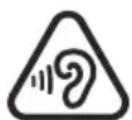
To prevent possible hearing damage, DO NOT listen at high volume levels for long periods.
RECYCLING DIRECTIVES
Recycling Directives: The WEEE (Waste Electrical and Electronic Equipment) has been put in place for the products at the end of their useful life are recycled in the best way.
When this product is finished with, please do not put it in your domestic waste bin. Please use one of the following disposal options:
- Remove the battery and deposit them in an appropriate WEEE skip. Deposit the product in an appropriate WEEE skip.
- Or, hand the old product to the retailer. If you purchase a new one, they should accept it.
Thus if you respect these instructions you ensure human health and environmental protection.

text_image
FR ÉLÉMENTS D'EMBALLAGE
text_image
geemarcGeemarc Telecom SA
Parc de l'Etoile
2 Rue Galilée
59760 Grande-Synthe
For product support and help, visit our website at www.geemarc.com
E-mail : help@geemarc.com telephone 01707 387602
lines are open 09h00 to 16h00 Mon to Fri
Made for Geemarc Telecom S.A. in China.
INTRODUCTION 33
natural_image
Black OPPOC-branded earless device with adjustable neck and front brackets (no visible text or symbols)INTRODUCTION
natural_image
Row of eight identical gray circles with white borders, no text or symbols presenttext_image
PHR AUDIO IN OFF ON LED ON OFF φ=0.5mm OPTICAL AUDIO IN PHR AUDIO IN OFF ON LED ON OFF OPTICAL AUDIO IN PHR AUDIO IN OFF ON LED ON OFF φ=3.5mm OPTICAL AUDIO IN PHR AUDIO IN OFF ON LED ON OFF φ=3.5mmtext_image
GeometricUTILISATION DU CL7700 OPTI
natural_image
Sequence of circular icons with gray and red dots, no text or symbols presentUTILISATION DU CL7700 OPTI
natural_image
Row of eight identical red circles with white borders, no text or symbols presentnatural_image
Row of eight identical red circles with white circular borders, no text or symbols presentnatural_image
Row of eight identical gray circles with white borders, no text or symbols presentnatural_image
Row of circular icons with gray and red dots, no text or symbols presenttext_image
Diagram showing hand positions with red X marks indicating positions on a device panel, labeled with symbols like 'F', 'C', and 'D'.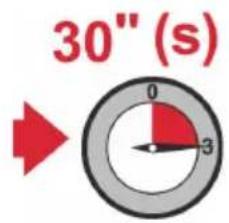
text_image
30" (s) 0 3Stop
text_image
30" (s) Stoptext_image
Bluetooth Bluetooth Currently visible to nearby devices Device name HONOR Received files PAIRED DEVICES LIU CL7700 eSus4 Show more AVAILABLE DEVICES OPPO Reno6 5G 1475747840的Redmi P51 HelpAPPAIRAGE AVEC VOTRE SOCLE
natural_image
Line drawing of a device with a highlighted component and red arrow indicator (no text or symbols)GARANTIE. DÉCLARATION CE.
AVERTISSEMENTS CONCERNANT LA
BATTERIE
GARANTIE :
The CE declaration of conformity may be consulted at
www.geemarc.com
Transmitter (Ladestation): 65
natural_image
Front view of a black electronic device with earbuds and control buttons (no visible text or symbols)Transmitter (Ladestation):
Rückseite:
text_image
Optical or Ø3.5mmnatural_image
Line drawing of a device with a highlighted component and red arrow indicator (no text or symbols)natural_image
Sequence of circular icons with gray and red dots, no text or symbols presentnatural_image
Row of eight identical red circles with white borders, no text or symbols presentnatural_image
Row of eight identical red circles with white borders, no text or symbols presentnatural_image
Row of eight identical gray circles with white borders, no text or symbols presentnatural_image
Row of circular icons with gray and red dots, no text or symbols presenttext_image
Diagram showing hand positions with red X marks and labeled buttons around a device panel, likely illustrating a control or monitoring system.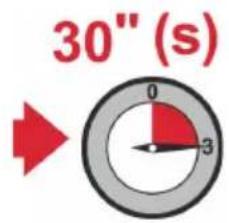
text_image
30" (s) 0 3Stop
natural_image
Row of circular gray circles with one red circle in the bottom-right corner (no text or symbols)Ton 2:

natural_image
Row of gray circular icons with two red dots in the center (no text or symbols)Ton 3:

natural_image
Row of circular icons with gray and red dots, no text or symbols presentTon 4:

natural_image
Row of circular icons with gray and red dots, no text or symbols presentTon 5:

natural_image
Row of circular icons with red and gray dots, no text or symbols presentEINSTELLUNGEN
text_image
30" (s) Stoptext_image
Bluetooth Bluetooth Currently visible to nearby devices Device name HONOR Received files PAIRED DEVICES LIU CL7700 eSus4 Show more AVAILABLE DEVICES OPPO Reno6 5G 1475747840的Redmi P51 HelpKOPPLUNG MIT DER LADESTATION
natural_image
Black and white photo of a premium ear ear device with adjustable neck and ear cap (no text or symbols visible)UGCL7700_OPTI_FrEnGe.V1.5

Geemarc Telecom SA
Parc de l'Etoile
2 Rue Galilée
59760 Grande-Synthe
E-mail : help@geemarc.com telephone 01707 387602
lines are open 09h00 to 16h00 Mon to Fri