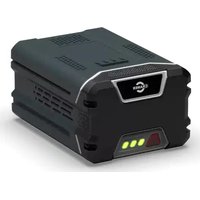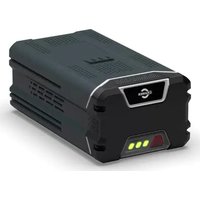
82V430G - Battery Cramer - Free user manual and instructions
Find the device manual for free 82V430G Cramer in PDF.


User questions about 82V430G Cramer
0 question about this device. Answer the ones you know or ask your own.
Ask a new question about this device
Download the instructions for your Battery in PDF format for free! Find your manual 82V430G - Cramer and take your electronic device back in hand. On this page are published all the documents necessary for the use of your device. 82V430G by Cramer.
USER MANUAL 82V430G Cramer
natural_image
Illustration of a portable electronic device with control panel and indicator lights (no text or symbols)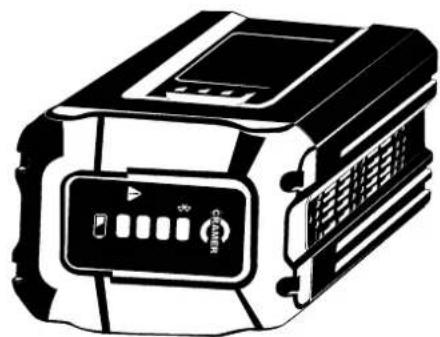
natural_image
Illustration of a portable electronic device with control panel and buttons (no text or symbols)Product Overview
Your machine has been engineered and manufactured to high standard for dependability, ease of operation, and operator safety. When properly cared for, it will give you years of trouble-free performance.
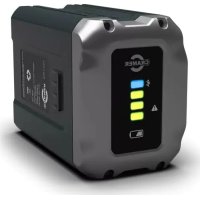
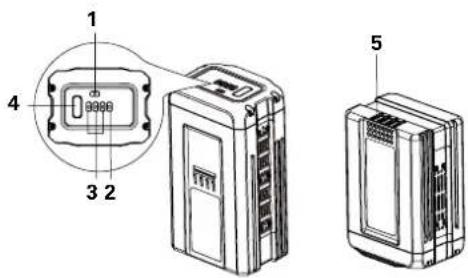
Know Your Battery
1 Fault LED Indicator
2 Bluetooth LED Indicator
3 Power LED Indicators
4 Battery capacity indication button (BCI)
5 Battery Contacts
text_image
1 4 3 2 5Safety Precautions
Carefully read all the safety warnings and instructions in this manual before operating these machines. Save this operator's manual for future reference.
CE These machines conforms to CE safety standards and directives concerning electromagnetic compatibility, machines and low voltage.
WARNING!
Read all safety warnings and all instructions. Failure to follow the warnings and instructions may result in electric shock, fire and/or serious injury.
For the proper use, maintenance and storage of this battery, it is crucially important that you read and understand the instructions given in this manual.
To avoid serious injury, risk of fire, explosion and danger of electric shock or electrocution:
- If the battery pack case is cracked or damaged, DO NOT insert into the charger. Replace with a new battery pack.
- Do not allow the battery pack or charger to overheat. If they are warm, allow them to cool down. Recharge only at room temperature.
• Do not place the battery pack in the sun or in a warm
EN
environment. Keep at normal room temperature.
- Keep for storage in shady, cool and dry condition, if the battery is not charged for a long time; charge the battery for 2 hours every 2 months.
- Please check prior use, if output voltage and current of the battery charger is suitable for the charging battery pack.
- Do not expose the battery to water or salt water, battery should be stored in a cool and dry location and should place the battery in cool and dry environment.
- Do not knock, strike or step on the battery.
- Do not solder directly onto the battery and pierce the battery with nails or other edge tools.
• Do not dismantle, open or shred secondary cells or battery pack. - Do not expose cells or battery pack to heat or fire. Avoid storage in direct sunlight.
- Do not short-circuit a cell or a battery pack. Do not store cells or battery pack haphazardly in a box or drawer where they may short-circuit each other or be short-circuited by other metal objects.
- Do not remove a cell or battery from its original battery pack enclosure required for use.
- Do not subject cells or battery pack to mechanical shock.
- In the event of a cell leaking, do not allow the liquid to come in contact with the skin or eyes. If contact has been made, wash the
affected area with copious amounts of water and seek medical advice.
- Do not use any charger other than that specifically provided for use with the equipment. Please use the specified charger model: 82C2 / 82C1G / 82C6.
- Observe the plus (+) and minus (−) marks on the cell, battery and equipment and ensure correct use.
- Do not use any cell or battery pack which is not designed for use with the equipment.
- Do not mix cells of different manufacture, capacity, size or type within a device.
- Keep cells and battery pack out of the reach of children.
- Seek medical advice immediately if a cell or a battery pack has been swallowed.
• Always purchase the correct cell or battery for the equipment. - Keep cells and battery pack clean and dry.
- Wipe the cell or battery pack terminals with a clean dry cloth if they become dirty.
- Secondary cells and battery pack need to be charged before use. Always use the correct charger and refer to the manufacturer's instructions or equipment manual for proper charging instructions.
• Do not leave a battery pack on prolonged charge when not in use.
• After extended periods of storage, it may be necessary to charge and discharge the cells or battery pack several times to obtain
maximum performance.
- Retain the original product literature for future reference.
- Use only the cell or battery pack in the application for which it was intended.
- When possible, remove the battery pack from the equipment when not in use.
- Dispose of properly.. Return exhausted batteries to your local collection or recycling point.
- SAVE THESE INSTRUCTIONS - DANGER: TO REDUCE RISK OF FIRE OR ELECTRIC SHOCK CAREFULLY FOLLOW THESE INSTRUCTIONS.
Disposal

Separate collection. This product must not be disposed of with normal household waste. Should you find one day that your product needs replacement, or if it is no further use to you, do not dispose of it with household waste. Make this product available for separate collection.

Separate collection of used products and packaging allows materials to be recycled and used again. Re-use of recycled materials helps prevent environmental pollution and reduces the demand for raw materials.

At the end of their useful life, discard batteries with due care for our environment. The battery contains material which is hazardous to you and the environment. It must be removed and disposed of separately at a facility that accepts lithium-ion batteries.

WARNING!
If the battery pack cracks or breaks, with or without leaks, do not recharge it and do not use. Dispose of it and replace with a new battery pack. DO NOT ATTEMPT TO REPAIR IT!
To avoid injury and risk of fire, explosion, or electric shock, and to avoid damage to the environment:
- Cover the battery's terminals with heavy-duty adhesive tape.
- DO NOT attempt to remove or destroy any of the battery pack components.
• DO NOT attempt to open the battery pack.
- If a leak develops, the released electrolytes are corrosive and toxic. DO NOT get the solution in the eyes or on skin, and do not swallow it.
• DO NOT place these batteries in your regular household trash.
• DO NOT incinerate.
- DO NOT place them where they will become part of any waste landfill or municipal solid waste stream.
• Take them to a certified recycling or disposal centre.
Symbol
The following signal words and meanings are intended to explain the levels of risk associated with this product.
| SYMBOL SIGNAL MEANING | ||
| DANGER Indicates an imminently hazardous situation, which, if not avoided, will result in death or serious injury. | ||
| WARNING Indicates a potentially hazardous situation, which, if not avoided, could result in death or serious injury. | ||
| CAUTION Indicates a potentially hazardous situation, which, if not avoided, may result in minor or moderate injury. | ||
| CAUTION (Without Safety Alert Symbol)Indicates a situation that may result in property damage. | ||
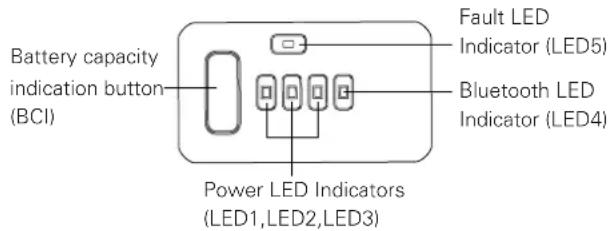
lights will illuminate according to the batteries capacity level and the blue indicator light will indicate bluetooth function. The red indicator light will present faults. See chart below:
text_image
Battery capacity indication button (BCI) Fault LED Indicator (LED5) Bluetooth LED Indicator (LED4) Power LED Indicators (LED1,LED2,LED3)POWER LED INDICATORS (CAPACITY INDICATORS)
| LED INDICATOR STATE | ESTINATED CAPACITY | LED COLOUR |
| LED1, LED2, LED3 All On > 78% | ||
| LED1, LED2 On; LED 3 Off > 38%, < 78% | ||
| LED1 On; LED2, LED3 Off > 20%, < 38% Green | ||
| LED1 Flash; LED2, LED3 Off > 10%, < 20% | ||
| LED1, LED2, LED3 Off < 10% |
Operation
Checking Battery Capacity
Press the battery capacity indicator (BCI) button. The green indicator
BLUETOOTH LED INDICATOR (BLUE LED)
| LED4 Flash | Bluetooth function is activated | Activated method:1) Push BCI button2) Communication Activated;Battery pack is charging and discharging. Enter the battery to a product or a charger will also activate the bluetooth. |
| LED4 On | Bluetooth connect to APP |
NOTE: After press the BCI button, the bluetooth light will flash blue about 30 seconds. If the battery pack has been connected with the app, the blue light will stay on. In parallel to activating the battery, make sure to activate bluetooth on your smart phone. If the connect time is more than 30 seconds, please repress the BCI button to activate the battery again and make sure the smart phone is ready to connect.
FAULT LED INDICATOR (RED LED)
| LED5 Off Normal Normal work mode | ||
| LED5 Flash; LED1, LED2, LED3, LED4 Off | Fault | Over temperature or under temperature |
NOTE: If LED5 flashes, the battery pack will not work. Needs to wait until the temperature of battery pack returns to normal.
Connecting Your Battery With GreenFleet app
The App is designed to bring extra value to you as a user. Down load the app and explore how GreenFleet can help you to become more
structured and efficient in your work.
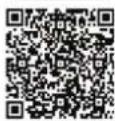
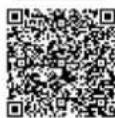
The APP is governed by separate terms and conditions available for viewing through the mobile application. Download the application at:
iOS
Android
Maintenance

WARNING!
Do not at any time let brake fluids, gasoline, petroleum based products, penetrating oils, etc. come in contact with plastic parts. They contain chemicals that can damage, weaken or destroy plastic.

WARNING!
To avoid serious personal injury, always remove the battery pack from the tool when cleaning or performing any maintenance.
Storage
Do not place the battery pack in the sun or in a warm or cold environment. Keep at normal room temperature with dry conditions.
If the battery will not be used for 2 months or more, please store the
EN
battery in a room temperature environment. Please half charge before storage and charge the battery for 2 hours every 2 months.
Troubleshooting
| PROBLEM POSSIBLE CAUSE SOLUTION | ||
| The battery pack charge is reduced after more than one month of non-use. | The battery pack has automatically performed self-maintenance to extend its life. | Fully recharge the battery pack before use. |
| The battery pack LED is flashing red. | The battery pack is over temperature or under temperature. | Allow the battery pack to reach normal temperature.Move battery pack to a surrounding air temperature of above 5 °C (41°F) or below 52 °C (125.6 °F). |
Technical Data
| PROPERTY VALUE | |
| Model 82V220 | |
| Battery | 72V ≈Ah, 216Wh, 82V MAX |
| Voltage per cell 3.6V | |
| Number of cells 20 | |
| Charge time 45 min. (use 82C2 / 82C1G Charger) | |
| RF output power - 8.01 dBm | |
| RF frequency range 2402.0 - 2480.0 MHZ | |
| Model 82V430 | |
| Battery | 72V ≈Ah, 432Wh, 82V MAX |
| Voltage per cell 3.6V | |
| Number of cells 40 | |
| Charge time 90 min. (use 82C2 / 82C1G Charger) | |
| RF output power - 8.01 dBm | |
| RF frequency range 2402.0 - 2480.0 MHZ | |
Produktüberblick
text_image
Technical diagram of a device with labeled components and an inset showing a component with internal structure.At the end of their useful life, discard batteries with due care for our environment. The battery contains material which is hazardous to you and the environment. It must be removed and disposed of separately at a facility that accepts lithium-ion batteries.

WARNUNG!
text_image
Technical diagram of a device with labeled components and an inset showing a digital display interface.text_image
Technical diagram of a device with labeled components and an inset showing a close-up view of a component with internal structure.text_image
Technical diagram of a device with labeled components and an inset showing a close-up view of a component with internal structure.Mesures de sécurité
text_image
Technical diagram of a device with labeled components and an inset showing a digital display screen.natural_image
Pure electrical circuit lines without any symbolsUtilização
text_image
Technical diagram of a device with labeled components and an inset showing a close-up view of a component with internal structure.text_image
Technical diagram of a device with labeled components and an inset showing a close-up view of a component with internal structure.4 Akun varaustilan painike (BCI)
text_image
Technical diagram of a device with labeled parts and an inset showing a 3D component with internal structure.Turvallisuusohjeet

text_image
Technical diagram of a device with labeled components and an inset showing a close-up view of a component with internal structure.text_image
Technical diagram of a device with labeled components and an inset showing a close-up view of a component with internal structure.text_image
Technical diagram of a device with labeled components and an inset showing a close-up view of a digital display.AWARYJNY WSKAŻNIK LED (CZERWONA LED)
text_image
Technical diagram of a device with labeled components and internal wiring, showing front, side, and top views.LED BLUETOOTH KONTROLKA (MODRÁ LED)
text_image
Technical diagram of a device with labeled components and a close-up view showing internal structure.LED BLUETOOTH KONTROLKA (MODRÁ LED)
INDIKATOR LED TEHNOLOGIJE BLUETOOTH (MODRA LUČKA LED)
text_image
Technical diagram of a device with labeled components and an inset showing a close-up view of a component with internal structure.text_image
Technical diagram of a device with labeled components and an inset showing a 3D display with internal structure.text_image
Technical diagram of a device with labeled components and an inset showing a small electronic component with internal structure.natural_image
Pure electrical circuit lines without any symbolstext_image
Technical diagram of a device with labeled components and an inset showing a close-up view of a component with internal structure.text_image
Technical diagram of a device with labeled components and an inset showing a close-up view of a component with internal structure.Güvenlik Önlemleri
BLUETOOTH LED GÖSTERGESI (MAVI LED)
text_image
Technical diagram of a device with labeled components and an inset showing a close-up view of a small electronic device.Drošības Pasākumi
text_image
Technical diagram of a device with labeled components and an inset showing a close-up view of a digital display.Ohutusabinõud