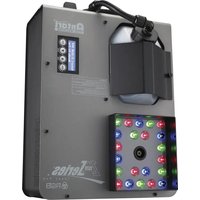
Z-1520 RGB - Effect machine Antari - Free user manual and instructions
Find the device manual for free Z-1520 RGB Antari in PDF.


| Brand | Antari |
| Model | Z-1520 RGB |
| Product Type | RGB LED Fog Machine |
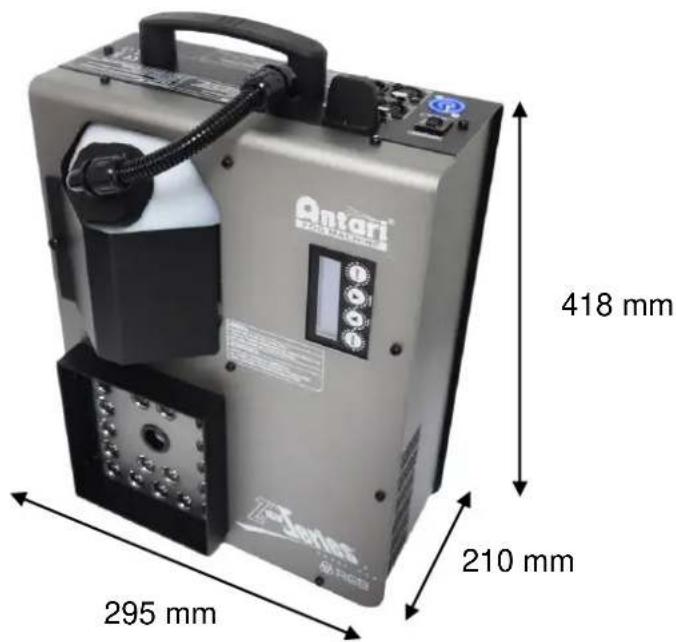
| Dimensions (L x W x H) | 418 x 295 x 210 mm |
| Weight | 10.4 kg |
| Power Supply | AC 120V/60Hz or 230V/50Hz, 1550W |
| Fuse | 120V=15A 250V / 230V=9A 250V |
| Heat-up Time | Approximately 5 minutes |
| Emission Range | 5 m (height) x 1 m (width) |
| Max Continuous Output Duration | 8 seconds |
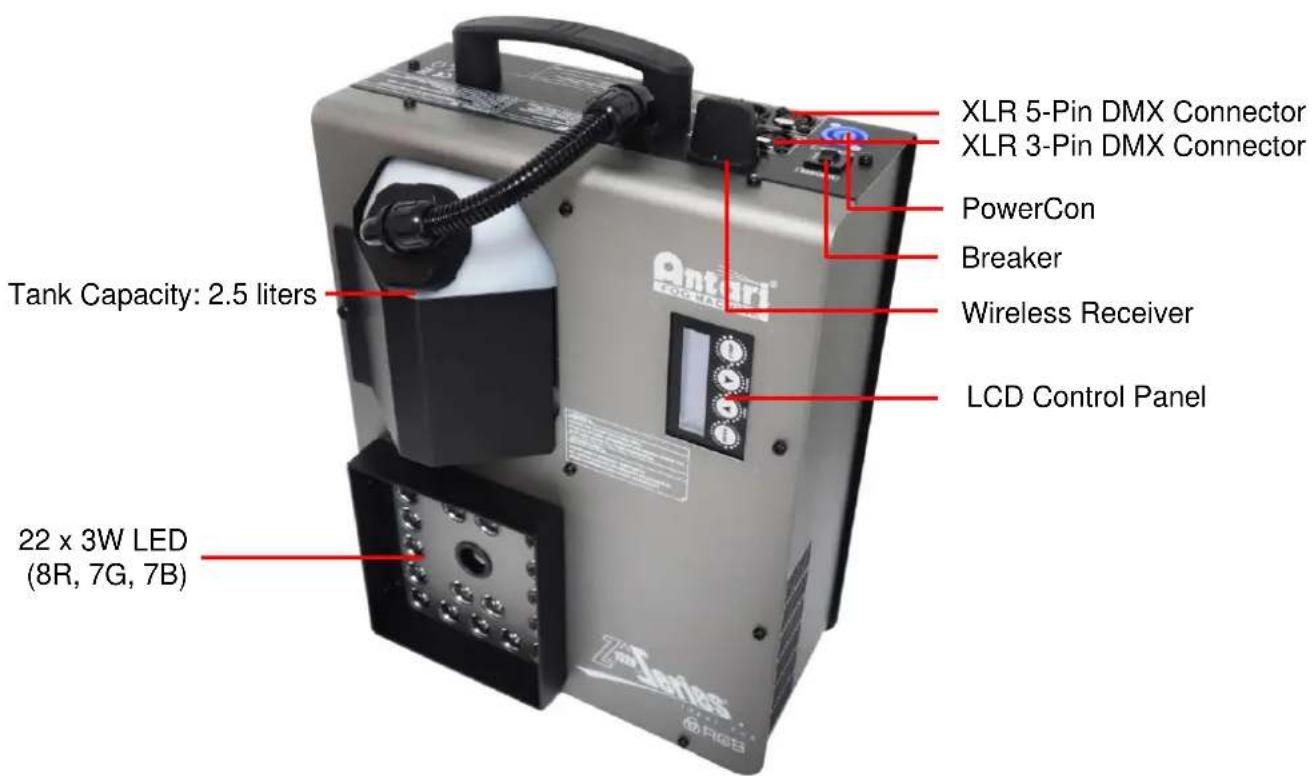
| Tank Capacity | 2.4 L |
| Fluid Consumption | 25 ml/10 seconds |
| Recommended Fluid | Antari FLC water-based |
| Control Types | DMX512, manual, timer, wireless remote |
| DMX Channels | 8 |
| Power Connectors | Neutrik PowerCon |
| DMX Connectors | XLR 3-pin and 5-pin |
| LED | 22 x 3W (red 8, green 7, blue 7) |
| Color Mode | Macro (1-10), Chase (1-15) |
| Wireless Range | Up to 50 m |
| Safety Distance | 50 cm around the device |
| Maintenance | Clean with a dry cloth, purge with distilled water |
| Fuse Replacement | Use a fuse of the same type |
| Warranty | Contact the dealer for any repairs |
Frequently Asked Questions - Z-1520 RGB Antari
User questions about Z-1520 RGB Antari
0 question about this device. Answer the ones you know or ask your own.
Ask a new question about this device
Download the instructions for your Effect machine in PDF format for free! Find your manual Z-1520 RGB - Antari and take your electronic device back in hand. On this page are published all the documents necessary for the use of your device. Z-1520 RGB by Antari.
USER MANUAL Z-1520 RGB Antari
natural_image
Exterior view of a modern industrial laser unit (no visible text or symbols on the device body)



Please read the following safety information carefully before operating the machine. This information includes important safeguards about installation, usage, and maintenance. Pay attention to all warning labels and instructions in this manual and printed on the machine.
If you have questions about how to operate the machine safely, please contact your local Antari dealer for help.
- Keep this device dry.
• Always connect to a grounded circuit to avoid risk of electrocution. - Before connecting machine to power, always check voltage indicate on machine match to your local AC voltage. Do not use the machine if AC power voltage does not match.
- Disconnect the machine from AC power before servicing and when not in use.
- This product is for indoor use only! Do not expose to rain or moisture. If fluid is spilled, disconnect AC power and clean with a damp cloth. If fluid is spilled onto electronic parts, immediately unplug the machine and contact your local Antari dealer for advice.
- No user serviceable and modifiable parts inside. Never try to repair this product, an unauthorized technician may cause damage or malfunction to the machine.
• For adult use only. Never leave the machine running unattended. - Installed the machine in a well-ventilated area. Provide at least 50 cm space around the machine.
- Never add flammable liquid of any kind to the machine.
• Make sure there are no flammable materials close to the machine while operating.
• Only use Antari fluid. Other fluid may lead to heater clog and malfunction.
- If the machine fails to work, unplug the machine and stop operation immediately. Contact your local Antari dealer for advise.
• Before transporting the machine, make sure the fluid tank is completely drained.
- Fog fluid may present health risks if swallowed. Do not drink fog fluid. Store it securely. In case of eye contact or if fluid is swallowed, immediately look for medical advice.
Unpacking and Inspection
Immediately upon receiving the machine, carefully unpack the carton, check the content to ensure that all parts are present and have been received in good condition. If any parts appear damaged or mishandled from shipping, notify the shipper immediately and retrain the packing material for inspection.
What is included: 1 x Z-1520 RGB Fogger
1 x W-2 Wireless Remote
1 x Power Cord
1 x User Manual
Product Dimensions
text_image
Antari 418 mm 295 mm 210 mmProduct Overview
text_image
XLR 5-Pin DMX Connector XLR 3-Pin DMX Connector PowerCon Breaker Wireless Receiver LCD Control Panel Tank Capacity: 2.5 liters 22 x 3W LED (8R, 7G, 7B)Setting Up
Step 1: Place the machine on a flat surface and in a suitable large area with at least 50 cm open space around the machine.
Step 2: Fill the fluid tank with Antari approved fluid.
Step 3: Connect the machine to suitable rated power supply. To determine the power requirement for the machine refer to the label on the back of the machine.

Always connect the machine to a protected circuit and ensure it is properly grounded to avoid risk of electrocution.
Step 4: Turn on the machine and allow it to heat up. Heat up takes approximately 5 mintues. Once the machine has reached operating temperature, the LCD display will show "Ready To Fog". Now the machine is ready for operation.
Step 5: To start making fog, locate the Volume □ button on the control panel, and press the button to start making fog.
Step 6: To turn off the machine, press STOP button and turn Powercon to the OFF position.
Control Panel Operation
The machine can be operated with the onboard digital control interface.
ANTARI Z-1520 RGB
Ready to Fog
Button
[MENU]
▲ [UP]/[TIMER]
▼ [DOWN]/[VOLUME]
[STOP]
Function
Scroll through setting menu
Up/Activate Timer function
Down/Activate Volume function
Deactivate Timer/Volume function
Control Menu
DMX512
Address: 1 Set DMX address from 1 to 504
Stand Alone
Set Master Set machine as Master of Slave unit
Color Mode
Turn LED on or off
On
Color Mode
Macro:01
Set LED output color from macro 1 to 10
Color Mode
Chase:01
Set LED chase from 1 to 15
Timer
Interval 15 Sec
Set interval from 15 to 360 seconds
Timer
Duration 5 Sec
Set duration from 1 to 5 seconds
Wireless Setting
On
Turn wireless control on or off
Wireless Setting
Button A:M01
Set wireless remote button function macro color 1 to 10 or chase 1 to 15 and off.
Wireless Setting
Button B:M01
Set wireless remote button function macro color 1 to 10 or chase 1 to 15 and off.
Wireless Setting
Button C:M01
Set wireless remote button function macro color 1 to 10 or chase 1 to 15 and off.
Wireless Setting
Button D:M01
Set wireless remote button function macro color 1 to 10 or chase 1 to 15 and off.
LED Setting
Fog Only
Setting for LED to turn on with fog only or always on.
LED Fade Out
Delay: 0 Sec
Set LED delay time from 0 to 5 seconds.
Run Last Setting
On
Turn run last setting function on/off
Wireless Operation
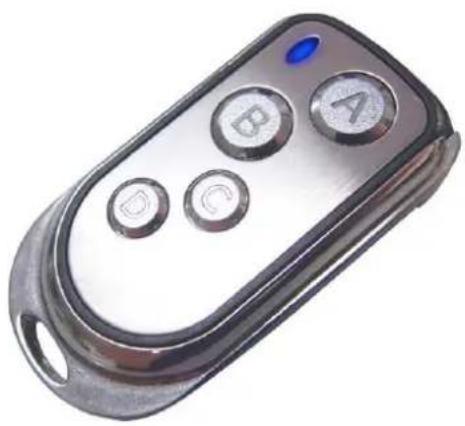
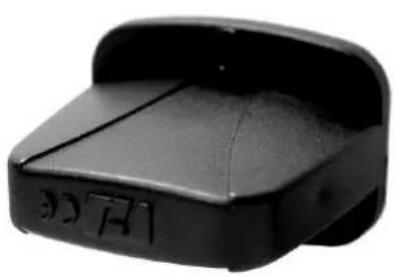
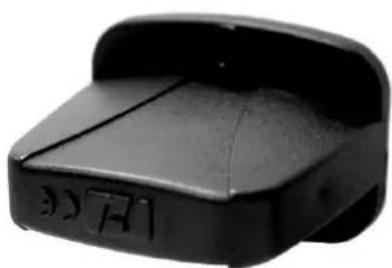
The wireless remote control system W-2 consists of a transmitter equipped with four buttons to activate four user-configurable LED settings and fog; with an onboard receiver attached to the rear panel of Z-1520 RGB.
natural_image
Close-up of a metallic remote control device with four buttons (A, B, C, D) and a blue indicator light on the left (no text or symbols beyond icons)W-2 Wireless Transmitter
natural_image
Black plastic object with engraved markings, no visible text or symbolsWireless Receiver
Wireless settings are configurable through the onboard control panel, refer to control menu section to setup each button.
In a free open space the effective distance is 50 meters, actual usage depends on obstacle level, the effective distance is 10-25 meters.
Registering transmitters
Transmitters can be paired or deleted from the receiver. Each receiver can pair up to 10 transmitters. Follow the steps below to pair or delete a transmitter from a receiver.
Step 1: Power off the Z-1520 RGB Fogger.
Step 2: Press and hold the [DOWN] button.
Step 3: Turn power on and release the [DOWN] button when the LCD display blinks.
Step 4: Follow the menu instruction to pair or delete transmitters.

flowchart
graph LR
    A["Press and hold before power up"] --> B["Wireless Register Up:Pair Down:Del"]
    B --> C["Pair"]
    B --> D["Delete"]
    C --> E["Wireless Register Press button"]
    C --> F["Wireless Register Pair Completed"]
    D --> G["Wireless Register Delete......"]
    D --> H["Wireless Register Delete Completed"]
    I["STOP Press to finish and exit menu"]
Transmitter battery replacement
If the effective distance seems to decrease, it is possible the battery level is low and requires replacement. In order to replace the battery, undo the three screws on the back of transmitter to release the cover. Replace with same type and specification of battery which is 27A 12V.
DMX Connector Pin Assignment
The machine provides 3-pin and 5-pin XLR connectors for DMX connection. The diagram below indicates pin assignment information.
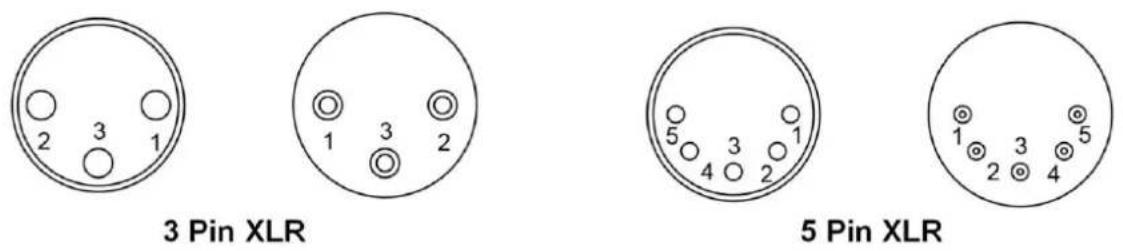
| Pin | Function |
| 1 | Ground |
| 2 | Data- |
| 3 | Data+ |
DMX Channel Function
| Channel 1 | DMX Value Range | Function |
| Fog | 0 – 45 – 255 | Fog OffFog On |
| Channel 2 | DMX Value Range | Function |
| Red LED | 0-255 | 0-100% |
| Channel 3 | DMX Value Range | Function |
| Green LED | 0-255 | 0-100% |
| Channel 4 | DMX Value Range | Function |
| Blue LED | 0-255 | 0-100% |
| Channel 5 | DMX Value Range | Function |
| Chase | 1-15 | Chase 1 |
| 16-31 | Chase 2 | |
| 32-47 | Chase 3 | |
| 48-63 | Chase 4 | |
| 64-79 | Chase 5 | |
| 80-95 | Chase 6 | |
| 96-111 | Chase 7 | |
| 112-127 | Chase 8 | |
| 128-143 | Chase 9 | |
| 144-159 | Chase 10 | |
| 160-175 | Chase 11 | |
| 176-191 | Chase 12 | |
| 192-207 | Chase 13 | |
| 208-223 | Chase 14 | |
| 224-255 | Chase 15 | |
| Channel 6 | DMX Value Range | Function |
| Chase Speed | 0-255 | 0-255 step per min |
| Channel 7 | DMX Value Range | Function |
| Master Dimmer | 0-255 | 0-100% |
| Channel 8 | DMX Value Range | Function |
| Strobe | 0-255 | 1-20 Hz |
Fluid
Only use Antari FLC water-based liquid for the Z-1520 RGB Fogger. The machine is tested and calibrated with this liquid to get the best output performance. Warranty will be void if any other type of liquid is used, improper use of liquid may lead to machine failure and malfunction.
Service and Maintenance
- Do not allow the machine to become contaminated.
- Remove dust from air vents with air compressor, vacuum or a soft brush.
- Only use a damp cloth to clean the casing.
- Before storing run distilled water through the system to help avoid condensing the pump or heater.
- It is recommended to run the machine on a monthly basis in order to achieve best performance and output condition.
• Excessive dust, liquid and dirt built up will degrade performance and cause overheating.
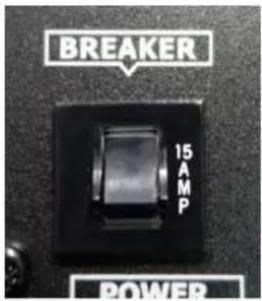
Breaker Reset

Disconnect AC power before resetting the breaker. Only replace fuse with same type and rating.
Step 1: Disconnect AC power.
Step 2: Flip breaker to ON position.
Step 3: Turn on machine for testing.
Breaker
120V = 15A 250V
230V = 9A 250V
text_image
BREAKER 15 AMP POWERTechnical Specifications
Input voltage 120V 60Hz
230V 50Hz
Breaker 120V = 15A 250V
230V = 9A 250V
Power Consumption AC-120V/230V,1550W
Warm-up time 5 min. (approx.)
Coverage volume Height 5 Meters, Width 1 Meter
Max. operating time 8 seconds burst
Fluid tank capacity 2.4 L
Fluid consumption 25 ml/10 sec.
Compatible fluid Antari FLC water-based fluid
Control option DMX 512, Manual, Timer, Wireless remote
DMX channels 8 channels
Power connection Neutrik Powercon
DMX data connection 3-pin and 5-pin XLR
Dimension L 418 x W 295 x H 210 mm
Dry weight 10.4 kg
Notices de Sécurité

natural_image
Close-up of a metallic remote control with four buttons (A, B, C, D) and a blue indicator light on the left (no text or symbols beyond icons)natural_image
Black plastic object with a curved top and side gap, no visible text or symbolsRécepteur sans fil
flowchart
graph TD
    A["Press and hold before power up"] --> B["Wireless Register Up:Pair Down:Del"]
    B --> C["Pair"]
    B --> D["Delete"]
    C --> E["Wireless Register Press button"]
    D --> F["Wireless Register Delete......"]
    E --> G["Wireless Register Pair Completed"]
    F --> H["Wireless Register Delete Completed"]
    I["STOP Press to finish and exit menu"] --> J["End"]
natural_image
Close-up of a metallic remote control with four buttons (A, B, C, D) and a blue indicator light on the left (no text or symbols beyond icons)W-2 Sendeeinheit
natural_image
Black plastic object with a curved top and side gap, no visible text or symbolsFunkempfänger
flowchart
graph LR
    A["Press and hold before power up"] --> B["Wireless Register Up:Pair Down:Del"]
    B --> C["Pair"]
    B --> D["Delete"]
    C --> E["Wireless Register Press button"]
    C --> F["Wireless Register Delete......"]
    D --> G["Wireless Register Delete Completed"]
    H["Press to finish and exit menu"] --> I["Stop"]
text_image
Z1520 Series®. Ideal Fog RGB中文使用手册
使用說明及安全需知

natural_image
Close-up of a metallic remote control with four buttons (A, B, C, D) and a blue indicator light on the left (no text or symbols beyond labels)W-2 無線發射器
*接收器
natural_image
Black plastic object with a curved top and side gap, no visible text or symbols無線接收器
flowchart
graph LR
    A["Press and hold before power up"] --> B["Wireless Register Up:Pair Down:Del"]
    B --> C["Pair"]
    B --> D["Delete"]
    C --> E["Wireless Register Press button"]
    D --> F["Wireless Register Delete......"]
    E --> G["Wireless Register Pair Completed"]
    F --> H["Wireless Register Delete Completed"]
    I["STOP Press to finish and exit menu"] --> J["End"]
更換 W-2 無限發射器電池
text_image
2 3 1 3 Pin XLR 5 Pin XLRFor current product information visit Antari at:www.antari.com For information requests please contact us at:sales@antari.com