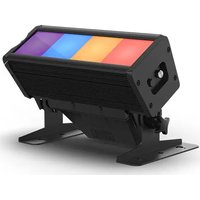
COLORado Solo Batten 4 - Heating Chauvet - Free user manual and instructions
Find the device manual for free COLORado Solo Batten 4 Chauvet in PDF.


| Product Type | LED Batten (Strip) for stage lighting |
| Brand | Chauvet |
| Model | COLORado Solo Batten 4 |
| Power Supply | 100-240 VAC, 50/60 Hz (universal power supply) |
| Maximum Power Consumption | Approx. 200 W (estimated based on number of daisy-chained units) |
| Protection Rating | IP65 (weather-resistant, outdoor use) |
| Light Sources | RGBAW LEDs (Red, Green, Blue, Amber, White) |
| Number of Cells | 4 independent cells |
| Beam Angle | Not specified, typical for this type: approx. 10° x 60° (estimate) |
| Control Protocols | DMX512, Art-Net, sACN, RDM |
| DMX Personalities | 18 modes (3 to 56 channels): RGB, RGBA, RGBAW, HSIC, etc. |
| Connectors | PowerCon IP65 input/output (power), 5-pin XLR DMX, etherCON RJ45 (Ethernet) |
| Max. Units in Chain | 14 units at 120 V, 24 at 208 V, 26 at 230 V |
| Built-in Functions | Color macros, color temperatures, strobe, automatic programs, manual mixing |
| Master/Slave Mode | Yes, via DMX |
| Built-in Web Server | Yes, for network configuration and browser-based control |
| Ambient Operating Temperature | -20 °C to 45 °C (min. startup -20°C, min. operation -30°C) |
| Cooling | Natural convection (fanless) |
| Mounting | Omega brackets included, safety cable required |
| Maintenance and Cleaning | Disconnect before cleaning, use a soft dry cloth; do not use solvents |
| Safety | Do not open (no user-serviceable parts), do not look at the light source, housing hot during operation, use a safety cable when rigging |
| Box Contents | COLORado Solo Batten 4, Omega brackets, IP65 power cord, wall filter, reference manual |
Frequently Asked Questions - COLORado Solo Batten 4 Chauvet
User questions about COLORado Solo Batten 4 Chauvet
0 question about this device. Answer the ones you know or ask your own.
Ask a new question about this device
Download the instructions for your Heating in PDF format for free! Find your manual COLORado Solo Batten 4 - Chauvet and take your electronic device back in hand. On this page are published all the documents necessary for the use of your device. COLORado Solo Batten 4 by Chauvet.
USER MANUAL COLORado Solo Batten 4 Chauvet
natural_image
Technical line drawing of a mechanical device with mounting base and control panel (no text or symbols)About This Guide
The COLORado Solo Batten 4 Quick Reference Guide (QRG) has basic product information such as connection, mounting, menu options, and DMX values. Download the User Manual from www.chauvetprofessional.com for more details.
Disclaimer
The information and specifications contained in this QRG are subject to change without notice.
LIMITED WARRANTY
FOR WARRANTY REGISTRATION AND COMPLETE TERMS AND CONDITIONS PLEASE VISIT OUR WEBSITE.
For Customers in the United States and Mexico: www.chauvetlighting.com/warranty-registration.
For Customers in the United Kingdom, Republic of Ireland, Belgium, the Netherlands, Luxembourg, France, and Germany: www.chauvetlighting.eu/warranty-registration.
Chauvet warrants that this product shall be free from defects in material and workmanship under normal use, for the period specified in, and subject to the exclusions and limitations set forth in the full limited warranty on our website. This warranty extends only to the original purchaser of the product and is not transferable. To exercise rights under this warranty, you must provide proof of purchase in the form of an original sales receipt from an authorized dealer that shows the product name and date of purchase. THERE ARE NO OTHER EXPRESS OR IMPLIED WARRANTIES. This warranty gives you specific legal rights. You may also have other rights that vary from state to state and country to country. This warranty is valid only in the United States, United Kingdom, Republic of Ireland, Belgium, the Netherlands, Luxembourg, France, Germany and Mexico. For warranty terms in other countries, please consult your local distributor.
Safety Notes
These Safety Notes include important information about installation, use, and maintenance.
- DO NOT open this product. It contains no user-serviceable parts.
- To eliminate unnecessary wear and improve its lifespan, during periods of non-use completely disconnect the product from power via breaker or by unplugging it.
- DO NOT look at the light source when the product is on.
- CAUTION: This product's housing may be hot when lights are operating. Mount this product in a location with adequate ventilation, at least 20 in (50 cm) from adjacent surfaces.
• DO NOT leave any flammable material within 50 cm of this product while operating or connected to power. - CAUTION: When transferring product from extreme temperature environments, (e.g., cold truck to warm humid ballroom) condensation may form on the internal electronics of the product. To avoid causing a failure, allow product to fully acclimate to the surrounding environment before connecting it to power.
- Not for permanent outdoor installation in locations with extreme environmental conditions. This includes, but is not limited to:
• Exposure to a marine/saline environment (within 3 miles of a saltwater body of water).
• Where the normal high or low temperatures of the location exceed the temperature ranges in this manual.
- Locations that are prone to flooding or being buried in snow.
• Other areas where the product will be subject to extreme radiation or caustic substances.
- USE a safety cable when mounting this product overhead.
• DO NOT submerge this product (IP65). Regular outdoor operation is fine.
• DO NOT operate this product if the housing, lenses, or cables appear damaged. - DO NOT connect this product to a dimmer or rheostat.
- ONLY connect this product to a grounded and protected circuit.
- ONLY use the hanging/mounting bracket to carry this product.
• In the event of a serious operating problem, stop using immediately.
• The maximum ambient temperature is 113 °F (45 °C). Do not operate this product at higher temperatures.
• The minimum startup temperature is -4^ ( -20^ ). Do not start the product at lower temperatures.
• The minimum ambient temperature is -22^ ( -30^ ). Do not operate the product at lower temperatures.
FCC Compliance
This device complies with Part 15 Part B of the FCC rules. Operation is subject to the following two conditions:
- This device may not cause harmful interference, and
- This device must accept any interference received, including interference that may cause undesired operation.
Any changes or modifications not expressly approved by the party responsible for compliance could void the user's authority to operate the equipment.
Contact
Outside the US, UK, Ireland, Benelux, France, Germany, or Mexico, contact your distributor to request support or return a product. Refer to Contact Us at the end of this QRG for contact information.
What is Included
• COLORado Solo Batten 4 with glare shield
- Seetronic Powerkon IP65 power cord
- Wall wash filter
- Omega brackets
- Quick Reference Guide
AC Power
This product has an auto-ranging power supply that can work with an input voltage range of 100–240 VAC, 50/60 Hz.
Power Linking
You can link up to 14 COLORado Solo Batten 4 products at 120 V, 24 products at 208 V, or 26 products at 230 V. Never exceed this number. Power linking cords can be purchased separately.
AC plug
| Connection | Wire (U.S.) | Wire (Europe) | Screw Color |
| AC Live Black Brown Yellow/Brass | |||
| AC Neutral White Blue | Silver | ||
| AC Ground | Green/Yellow | Green/Yellow | Green |

- To eliminate unnecessary wear and improve its lifespan, during periods of non-use completely disconnect the product from power via breaker or by unplugging it.
- When using this product in an outdoor IP65-type environment, be sure to use IP65 (or higher) rated power cables and secure unused ports with attached IP65 covers.
Signal Connections
You can link the COLORado Solo Batten 4 to a controller or controller software using a DMX connection or an Ethernet connection. If using other Art-Net™ or sACN-compatible products with the COLORado Solo Batten 4, you can control each individually on a single network. See the User Manual for information about how to connect and configure the product for these signals.
Control Personalities
The COLORado Solo Batten 4 uses DMX, Art-Net™, and sACN for its 18 control personalities, ranging from 3-channel to 56-channel in 1-cell modes and 4-cell modes:
| Mode | 1-Cell | 4-Cell |
| RGB | 3 | 12 |
| RGB EXT | 8 | 27 |
| RGBA | 4 | 16 |
| RGBA EXT | 9 | 31 |
| RGBAW | 5 | 20 |
| RGBAW EXT | 10 | 35 |
| RGBAW Fine | 10 | 40 |
| RGBAW FULL | 16 | 56 |
| HSIC | 9 | 29 |
DMX Connection
The COLORado Solo Batten 4 will work with a DMX controller using a 5-pin DMX data connection. A DMX Primer is available from www.chauvetprofessional.com.
Art-Net™ Connection
Art-Net™ is an Ethernet protocol that uses TCP/IP which transfers a large amount of DMX512 data using an Neutrik® etherCON® RJ45 connection over a large network. An Art-Net™ protocol document is available from www.chauvetprofessional.com. Chauvet Professional recommends using unicast Art-Net™ for best results.
Art-Net™ designed by and copyright Artistic Licence Holdings Ltd.
sACN Connection
Also known as ANSI E1.31, Streaming-ACN is an Ethernet protocol that uses the layering and formatting of Architecture for Control Networks to transport DMX512 data over IP or any other ACN compatible network.
Master/Slave Connection
The COLORado Solo Batten 4 uses the DMX data connection for its Master/Slave mode. See the User Manual for information about how to connect and configure the product for master/slave operation.
RDM (Remote Device Management)
Remote Device Management, or RDM, is a standard for allowing DMX-enabled devices to communicate bi-directionally along existing DMX cabling. Check the DMX controller's User Manual or with the manufacturer as not all DMX controllers have this capability. The COLORado Solo Batten 4 supports RDM protocol that allows feedback to make changes to menu map options. Download the User Manual from www.chauvetprofessional.com for more details.
Mounting
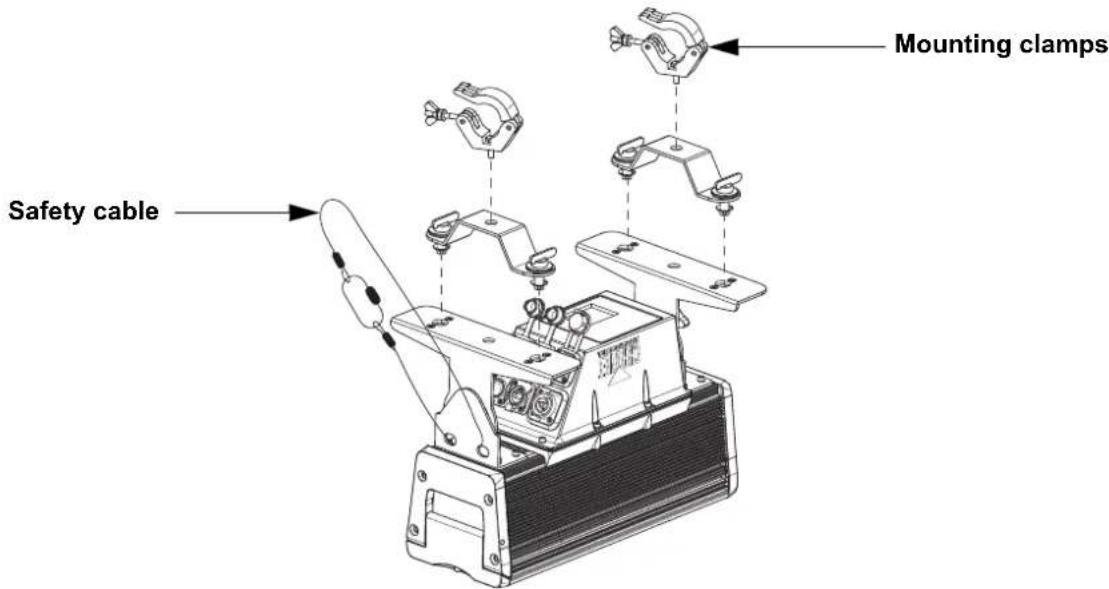
Before mounting this product, read the Safety Notes. Use at least two mounting points per product. Make sure the mounting clamps are capable of supporting the weight of the product. For our Chauvet line of mounting clamps, go to http://trusst.com/productcategory/truss-clamps/.
Mounting Diagram
Web Server
The COLORado Solo Batten 4 Web Server can be accessed by any computer on the same network as the product. It allows network access to system information, settings such as control protocol and starting address, color output testing, and the ability to change the Web Server password.
To access the Web Server:
- Set the IP address of the network to have the same first digit as the IP address of the product.
- Enter the IP address of the product into the URL bar of a web browser application.
- Enter both the user name and password as admin to log in.
Control Panel Description
| Button Function | |
| Exits from the current menu or function | |
| Enables the currently displayed menu or sets the currently selected value into the selected function | |
| Navigates upwards through the menu list or increases the numeric value when in a function | |
| Navigates downwards through the menu list or decreases the numeric value when in a function | |
Passcode
After being prompted, enter the following passcode by pressing:
Color Macro Chart
| DMX Channel Value | Red Value | Green Value | Blue Value | Amber Value | White Value |
| 000 ⇔ 010 | No function | No function | No function | No function | No function |
| 011 ⇔ 034 100% | 0–100% 0% 0% 0% | ||||
| 035 ⇔ 059 100–0% | 100% 0% 0% 0% | ||||
| 060 ⇔ 084 0% | 100% 0–100% 0% 0% | ||||
| 085 ⇔ 109 0% | 100–0% 100% 0% 0% | ||||
| 110 ⇔ 134 | 0–100% | 0% | 100% | 0% | 0% |
| 135 ⇔ 159 | 100% 0% 100–0% 0% 0% | ||||
| 160 ⇔ 184 | 100% 0–100% | 0–100% 0% 0% | |||
| 185 ⇔ 209 100–0% | 100–0% 100% 0% 0% | ||||
| 210 ⇔ 255 | 100% 100% | 100% 100% 100% |
Color Temperature Chart
| DMX Channel Value | Color Temperature |
| 000 ⇔ 010 | No function |
| 011 ⇔ 028 | 1800K |
| 029 ⇔ 046 | 2200K |
| 047 ⇔ 064 | 2700K |
| 065 ⇔ 082 | 3000K |
| 083 ⇔ 100 | 3200K |
| 101 ⇔ 118 | 3500K |
| 119 ⇔ 136 | 4000K |
| 137 ⇔ 154 | 4200K |
| 155 ⇔ 172 | 4500K |
| 173 ⇔ 190 | 5600K |
| 191 ⇔ 208 | 6000K |
| 209 ⇔ 226 | 6500K |
| 227 ⇔ 244 | 7200K |
| 245 ⇔ 255 | 8000K |

The color temperatures above are simulated renditions of the color output produced as compared to a tungsten lamp at the specified color temperature. Chauvet makes no guarantee of the color output accuracy.
Menu Map
| Main Level Programming Levels Description | |||||
| Protocol | DMX512 | Selects the control protocol | |||
| Art-Net | |||||
| Art-Net to DMX | |||||
| sACN | |||||
| Start Address | 1-510* | Selects DMX address (*highest channel restricted to personality chosen) | |||
| Personality | 1 Cell | 1 Cell - RGB 3-channel: RGB | |||
| 1 Cell - RGB EXT | 8-channel: 16-bit dimmer, RGB, color macros, color temperature, strobe | ||||
| 1 Cell - RGBA 4-channel: RGBA | |||||
| 1 Cell - RGBA EXT | 9-channel: 16-bit dimmer, RGBA, color macros, color temperature, strobe | ||||
| 1 Cell - RGBAW 5-channel: RGBAW | |||||
| 1 Cell - RGBAW EXT | 10-channel: 16-bit dimmer, RGBAW, color macros, color temperature, strobe | ||||
| 1 Cell - RGBAW FIN 10-channel: 16-bit RGBAW | |||||
| 1 Cell - RGBAW FULL | 16-channel: 16-bit dimmer, 16-bit RGBAW, color macros, color temperature, strobe, dimmer mode | ||||
| 1 Cell - HSIC | 9-channel: dimmer, 16-bit hue, saturation, color macros, color temperature, strobe, dimmer mode, GN saturation | ||||
| 1 Cell - RGBAW Basic | 13-channel: dimmer, 16-bit dimmer, RGBAW, color macros, color temperature, strobe, auto programs, auto speed, auto delay | ||||
| 4 Cell | 4 Cell - RGB 12-channel (4-cell): RGB | ||||
| 4 Cell - RGB EXT | 27-channel (4-cell): 16-bit dimmer, RGB, color macros, color temperature, strobe | ||||
| 4 Cell - RGBA 16-channel (4-cell): RGBA | |||||
| 4 Cell - RGBA EXT | 31-channel (4-cell): 16-bit dimmer, RGBA, color macros, color temperature, strobe | ||||
| 4 Cell - RGBAW 20-channel (4-cell): RGBAW | |||||
| 4 Cell - RGBAW EXT | 35-channel (4-cell): 16-bit dimmer, RGBAW, color macros, color temperature, strobe | ||||
| 4 Cell - RGBAW Fine 40-channel (4-cell): 16-bit RGBAW | |||||
| 4 Cell - RGBAW FULL | 56-channel (4-cell): 16-bit dimmer, 16-bit RGBAW, color macros, color temperature, strobe, dimmer mode | ||||
| 4 Cell - HSIC | 29-channel (4-cell): dimmer, 16-bit hue, saturation, color macros, color temperature, strobe, dimmer mode | ||||
| Network | Net Switch | 2.x.x.x Sets network to a preset 2.x.x.x IP address | |||
| 10.x.x.x Sets network to a preset 10.x.x.x IP address | |||||
| IP Mode | Default IP Default IP address | ||||
| Custom IP Set manual IP address | |||||
| Universe | 000-255 (Art-NetTM/DMX) or 001-256 (sACN) | Sets universe for Art-NetTM or sACN | |||
| Output Setting | Power Mode | Avoids going over the maximum temperature by adjusting output intensity | |||
| Steady Mode | Uses lower output intensity at a constant rate to avoid going over the maximum temperature | ||||
| Main Level | Programming Levels | Description | |||
| Static Colors | Preset Colors | Color 1-14 | 0-100% Preset color temperatures | Preset static colors | |
| Color Temperature Presets | White 1-14 | ||||
| Manual Color Mixer | Red Red | 0-255 | Combine red, green, blue, amber, and white to make a custom color | ||
| Green Green 0-255 | |||||
| Blue Blue | 0-255 | ||||
| Amber Amber 0-255 | |||||
| White White 0-255 | |||||
| Auto Programs | Run | Auto 1-10 | 0-100% | Selects automatic programs and program speed | |
| User Program 1-10 | |||||
| Edit | User Program 1-10 | Scene 01-30 | Red 0-255 | Selects and edits a custom program | |
| Green 0-255 | |||||
| Blue 0-255 | |||||
| Amber 0-255 | |||||
| White 0-255 | |||||
| Strobe 0-255 | |||||
| Master/Slave | Master DMX mode (Master) | ||||
| Slave Slave mode | |||||
| Dimmer Mode | Off Linear dimmer | ||||
| Dimmer 1-4 | Dimming curves Dimmer 1 (fast) to Dimmer 4 (slow) | ||||
| LED Frequency | 600Hz | Sets the PWM frequency | |||
| 1200Hz | |||||
| 2000Hz | |||||
| 4000Hz | |||||
| 6000Hz | |||||
| 25000Hz | |||||
| Cell Order | 1 - 4(Left to Right) | Sets order of cells | |||
| 4 - 1(Right to Left) | |||||
| Settings | **** (Enter Passcode) | DMX Error/Loss | Hold Last Continues last command upon loss of DMX | ||
| Blackout Blacks out product upon loss of DMX | |||||
| Display Backlight Timeout | On Display backlight always on | ||||
| 10s | Turns off display backlight after 10 seconds of inactivity | ||||
| 20s | Turns off display backlight after 20 seconds of inactivity | ||||
| 30s | Turns off display backlight after 30 seconds of inactivity | ||||
| Display Passcode | On | Locks display (passcode is,,),() | |||
| Off | |||||
| Information | Fixture Hours | - - - - - - - - - - - - - - - - - - - - - - - - - - - - - - - - - - - - - - - - - - - - - - - - - - - - - - - - - - - - - - - - - - - - - - - - - - - - - - - - - - - - - - - - - - - - - - - - - - - - - | Shows total hours, minutes, and seconds the product has been powered on | ||
| Firmware Version | V_ Shows current firmware version | ||||
| Device Label | Colorado Solo Batten 4 | Shows RDM label | |||
| Device UID | - - - - - - - - - - - - - - - - - - - - - - - - - - - - - - - - - - - - - - - - - - - - - - - - - - - - - - - - - - - - - - - - - - - - - - - - - - - - - - - - - - - - - - - - - - - - - - - - - | ||||
| MAC Address | - - - - - - - - - - - - - - - - - - - - - - - - - - - - - - - - - - - - - - - - - - - - - - - - - - - - - - - - - - - - - - - - - - - - - - - - - - - - - - - - - - - - - - - - - - - - - - - - - | Shows MAC address | |||
| Factory Reset | **** (Enter Passcode) | No | Resets the product to factory default settings | ||
| Yes | |||||
4-Cell DMX Values
4 Cell HSIC (29 Channels)
| Channel Function Value Percent/Setting | |||
| 1 Dimmer 1 000 ⇔ 255 0–100% | |||
| 2 | H u e | 1 | 000 ⇔ 255 0–100% |
| 3 Fine | hue 1 000 ⇔ 255 0–100% | ||
| 4 Saturation 1 000 ⇔ 255 0–100% | |||
| 5 | S t r o | 000 ⇔ 009 | No function |
| 010 ⇔ 099 | Strobe, slow to fast | ||
| 100 ⇔ 109 | No function | ||
| 110 ⇔ 179 | Lightning effect, slow to fast | ||
| 180 ⇔ 189 | No function | ||
| 190 ⇔ 255 | Random strobe, slow to fast | ||
| 6 | Color macros 1 | 000 ⇔ 255 | See Color Macro Chart |
| 7 | Color temperatures 1 | 000 ⇔ 255 | See Color Temperature Chart |
| 8 Dimmer 2 000 ⇔ 255 0–100% | |||
| 9 | Hue 2 | 000 ⇔ 255 | 0–100% |
| 10 | Fine hue 2 | 000 ⇔ 255 | 0–100% |
| 11 | Saturation 2 | 000 ⇔ 255 | 0–100% |
| 12 | Strobe 2 | 000 ⇔ 009 | No function |
| 010 ⇔ 099 | Strobe, slow to fast | ||
| 100 ⇔ 109 | No function | ||
| 110 ⇔ 179 | Lightning effect, slow to fast | ||
| 180 ⇔ 189 | No function | ||
| 190 ⇄ 255 | Random strobe, slow to fast | ||
| 13 | Color macros 2 | 000 ⇔ 255 | See Color Macro Chart |
| 14 | Color temperatures 2 | 000 ⇔ 255 | See Color Temperature Chart |
| 15 | Dimmer 3 | 000 ⇔ 255 | 0–100% |
| 16 | Hue 3 | 000 ⇔ 255 | 0–100% |
| 17 | Fine hue 3 | 000 ⇔ 255 | 0–100% |
| 18 | Saturation 3 | 000 ⇔ 255 | 0–100% |
| 19 | Strobe 3 | 000 ⇔ 009 | No function |
| 010 ⇔ 099 | Strobe, slow to fast | ||
| 100 ⇔ 109 | No function | ||
| 110 ⇔ 179 | Lightning effect, slow to fast | ||
| 180 ⇔ 189 | No function | ||
| 190 ⇌ 255 | Random strobe, slow to fast | ||
| 20 | Color macros 3 | 000 ⇔ 255 | See Color Macro Chart |
| 21 | Color temperatures 3 | 000 ⇔ 255 | See Color Temperature Chart |
| 22 | Dimmer 4 | 000 ⇔ 255 | 0–100% |
| 23 | Hue 4 | 000 ⇔ 255 | 0–100% |
| 24 | Fine hue 4 | 000 ⇔ 255 | 0–100% |
| 25 | Saturation 4 | 000 ⇔ 255 | 0–100% |
| 26 | Strobe 4 | 000 ⇔ 009 | No function |
| 010 ⇔ 099 | Strobe, slow to fast | ||
| 100 ⇔ 109 | No function | ||
| 110 ⇔ 179 | Lightning effect, slow to fast | ||
| 180 ⇔ 189 | No function | ||
| 190 ⇈ 255 | Random strobe, slow to fast | ||
| 27 | Color macros 4 | 000 ⇔ 255 | See Color Macro Chart |
| 28 | Color temperatures 4 | 000 ⇔ 255 | See Color Temperature Chart |
| 29 | Dimmer speed | 000 ⇔ 009 | Preset dimmer speed from display menu |
| 010 ⇔ 029 | Dimmer speed mode off | ||
| 030 ⇔ 069 | Dimmer speed mode 1 (fastest) | ||
| 070 ⇔ 129 | Dimmer speed mode 2 | ||
| 130 ⇔ 189 | Dimmer speed mode 3 | ||
| 190 ⇌ 255 | Dimmer speed mode 4 (slowest) | ||
4 Cell RGBAW Full (56 Channels)
| Channel Function Value Percent/Setting | ||||
| 1 Dimmer 000 ⇔ 255 0-100% | ||||
| 2 Fine fimmer 000 ⇔ 255 0-100% | ||||
| 3 | R e d | 1 | 000 ⇔ 255 0-100% | |
| 4 | F i n e | r | e d 1 000 ⇔ 255 0-100% | |
| 5 | G r e e | n | 1 000 ⇔ 255 0-100% | |
| 6 Fine green 1 000 ⇔ 255 0-100% | ||||
| 7 | B l u e | 1 | 000 ⇔ 255 0-100% | |
| 8 Fine blue 1 000 ⇔ 255 0-100% | ||||
| 9 | Amber 1 | 000 ⇔ 255 | 0-100% | |
| 10 | Fine amber 1 | 000 ⇔ 255 | 0-100% | |
| 11 | White 1 | 000 ⇔ 255 | 0-100% | |
| 12 | Fine white 1 | 000 ⇔ 255 | 0-100% | |
| 13 | Color macros 1 | 000 ⇔ 255 | See Color Macro Chart | |
| 14 | Color temperatures 1 | 000 ⇔ 255 | See Color Temperature Chart | |
| 15 | Strobe 1 | 000 ⇔ 009 | No function | |
| 010 ⇔ 099 | Strobe, slow to fast | |||
| 100 ⇔ 109 | No function | |||
| 110 ⇔ 179 | Lightning effect, slow to fast | |||
| 180 ⇔ 189 | No function | |||
| 190 ⇔ 255 | Random strobe, slow to fast | |||
| 16 | Red 2 | 000 ⇔ 255 | 0-100% | |
| 17 | Fine red 2 | 000 ⇔ 255 | 0-100% | |
| 18 | Green 2 | 000 ⇔ 255 | 0-100% | |
| 19 | Fine green 2 | 000 ⇔ 255 | 0-100% | |
| 20 | Blue 2 | 000 ⇔ 255 | 0-100% | |
| 21 | Fine blue 2 | 000 ⇔ 255 | 0-100% | |
| 22 | Amber 2 | 000 ⇔ 255 | 0-100% | |
| 23 | Fine amber 2 | 000 ⇔ 255 | 0-100% | |
| 24 | White 2 | 000 ⇔ 255 | 0-100% | |
| 25 | Fine white 2 | 000 ⇔ 255 | 0-100% | |
| 26 | Color macros 2 | 000 ⇔ 255 | See Color Macro Chart | |
| 27 | Color temperatures 2 | 000 ⇔ 255 | See Color Temperature Chart | |
| 28 | Strobe 2 | 000 ⇔ 009 | No function | |
| 010 ⇔ 099 | Strobe, slow to fast | |||
| 100 ⇔ 109 | No function | |||
| 110 ⇔ 179 | Lightning effect, slow to fast | |||
| 180 ⇔ 189 | No function | |||
| 190 ⇔ 255 | Random strobe, slow to fast | |||
| 29 | Red 3 | 000 ⇔ 255 | 0-100% | |
| 30 | Fine red 3 | 000 ⇔ 255 | 0-100% | |
| 31 | Green 3 | 000 ⇔ 255 | 0-100% | |
| 32 | Fine green 3 | 000 ⇔ 255 | 0-100% | |
| 33 | Blue 3 | 000 ⇔ 255 | 0-100% | |
| 34 | Fine blue 3 | 000 ⇔ 255 | 0-100% | |
| 35 | Amber 3 | 000 ⇔ 255 | 0-100% | |
| 36 | Fine amber 3 | 000 ⇔ 255 | 0-100% | |
| 37 | White 3 | 000 ⇔ 255 | 0-100% | |
| 38 | Fine white 3 | 000 ⇔ 255 | 0-100% | |
| 39 | Color macros 3 | 000 ⇔ 255 | See Color Macro Chart | |
| 40 | Color temperatures 3 | 000 ⇔ 255 | See Color Temperature Chart | |
| 41 | Strobe 3 | 000 ⇔ 009 | No function | |
| 010 ⇔ 099 | Strobe, slow to fast | |||
| 100 ⇔ 109 | No function | |||
| 110 ⇔ 179 | Lightning effect, slow to fast | |||
| 180 ⇔ 189 | No function | |||
| 190 ⇔ 255 | Random strobe, slow to fast | |||
| Channel | Function | Value | Percent/Setting | |
| 42 Red | 4 000 ⇔ 255 0–100% | |||
| 43 Fine | red 4 000 ⇔ 255 0–100% | |||
| 44 Green | 4 000 ⇔ 255 0–100% | |||
| 45 Fine | green 4 000 ⇔ 255 0–100% | |||
| 46 Blue | 4 000 ⇔ 255 0–100% | |||
| 47 Fine | blue 4 000 ⇔ 255 0–100% | |||
| 48 Amber | 4 000 ⇔ 255 0–100% | |||
| 49 Fine | amber 4 000 ⇔ 255 0–100% | |||
| 50 White | 4 000 ⇔ 255 0–100% | |||
| 51 | Fine white 4 | 000 ⇔ 255 | 0–100% | |
| 52 | Color macros 4 | 000 ⇔ 255 | See Color Macro Chart | |
| 53 | Color temperatures 4 | 000 ⇔ 255 | See Color Temperature Chart | |
| 54 Strobe 4 | 000 ⇔ 009 | No function | ||
| 010 ⇔ 099 | Strobe, slow to fast | |||
| 100 ⇔ 109 | No function | |||
| 110 ⇔ 179 | Lightning effect, slow to fast | |||
| 180 ⇔ 189 | No function | |||
| 190 ⇔ 255 | Random strobe, slow to fast | |||
| 55 Strobe all | 000 ⇔ 009 | No function | ||
| 010 ⇔ 099 | Strobe, slow to fast | |||
| 100 ⇔ 109 | No function | |||
| 110 ⇔ 179 | Lightning effect, slow to fast | |||
| 180 ⇔ 189 | No function | |||
| 190 ⇒ 255 | Random strobe, slow to fast | |||
| 56 Dimmer speed | 000 ⇔ 009 | Preset dimmer speed from display menu | ||
| 010 ⇔ 029 | Dimmer speed mode off | |||
| 030 ⇔ 069 | Dimmer speed mode 1 (fastest) | |||
| 070 ⇔ 129 | Dimmer speed mode 2 | |||
| 130 ⇔ 189 | Dimmer speed mode 3 | |||
| 190 ⇔ 255 | Dimmer speed mode 4 (slowest) | |||
4 Cell RGBAW Fine (40-Channel)
| Channel | Function | Value | Percent/Setting |
| 1 | Red 1 | 000 ⇔ 255 | 0–100% |
| 2 | Fine red 1 | 000 ⇔ 255 | 0–100% |
| 3 | Green 1 | 000 ⇔ 255 | 0–100% |
| 4 | Fine green 1 | 000 ⇔ 255 | 0–100% |
| 5 | Blue 1 | 000 ⇔ 255 | 0–100% |
| 6 | Fine blue 1 | 000 ⇔ 255 | 0–100% |
| 7 | Amber 1 | 000 ⇔ 255 | 0–100% |
| 8 | Fine amber 1 | 000 ⇔ 255 | 0–100% |
| 9 | White 1 | 000 ⇔ 255 | 0–100% |
| 10 | Fine white 1 | 000 ⇔ 255 | 0–100% |
| 11 | Red 2 | 000 ⇔ 255 | 0–100% |
| 12 Fine | red 2 000 ⇔ 255 0–100% | ||
| 13 Green | 2 000 ⇔ 255 0–100% | ||
| 14 Fine | green 2 000 ⇔ 255 0–100% | ||
| 15 Blue | 2 000 ⇔ 255 0–100% | ||
| 16 Fine | blue 2 000 ⇔ 255 0–100% | ||
| 17 Amber | 2 000 ⇔ 255 0–100% | ||
| 18 Fine | amber 2 000 ⇔ 255 0–100% | ||
| 19 White | 2 000 ⇔ 255 0–100% | ||
| 20 | Fine white 2 | 000 ⇔ 255 | 0–100% |
| 21 Red | 3 000 ⇔ 255 0–100% | ||
| 22 Fine | red 3 000 ⇔ 255 0–100% | ||
| 23 Green | 3 000 ⇔ 255 0–100% | ||
| 24 Fine | green 3 000 ⇔ 255 0–100% | ||
| 25 Blue | 3 000 ⇔ 255 0–100% | ||
| 26 Fine | blue 3 000 ⇔ 255 0–100% | ||
| 27 Amber | 3 000 ⇔ 255 0–100% | ||
| 28 Fine | amber 3 000 ⇔ 255 0–100% | ||
| 29 White | 3 000 ⇔ 255 0–100% | ||
| 30 Fine | white 3 000 ⇔ 255 0–100% | ||
| 31 Red | 4 000 ⇔ 255 0–100% | ||
| 32 Fine | red 4 000 ⇔ 255 0–100% | ||
| 33 Green | 4 000 ⇔ 255 0–100% | ||
| 34 Fine | green 4 000 ⇔ 255 0–100% | ||
| 35 Blue | 4 000 ⇔ 255 0–100% | ||
| 36 Fine | blue 4 000 ⇔ 255 0–100% | ||
| 37 Amber | 4 000 ⇔ 255 0–100% | ||
| 38 Fine | amber 4 000 ⇔ 255 0–100% | ||
| 39 White | 4 000 ⇔ 255 0–100% | ||
| 40 Fine | white 4 000 ⇔ 255 0–100% |
4 Cell RGBAW EXT (35 Channels)
| Channel | Function | Value | Percent/Setting |
| 1 | Dimmer | 000 ⇔ 255 | 0–100% |
| 2 | Fine dimmer | 000 ⇔ 255 | 0–100% |
| 3 | Red 1 | 000 ⇔ 255 | 0–100% |
| 4 | Green 1 | 000 ⇔ 255 | 0–100% |
| 5 | Blue 1 | 000 ⇔ 255 | 0–100% |
| 6 | Amber 1 | 000 ⇔ 255 | 0–100% |
| 7 | White 1 | 000 ⇔ 255 | 0–100% |
| 8 | Color macros 1 | 000 ⇔ 255 | See Color Macro Chart |
| 9 | Color temperatures 1 | 000 ⇔ 255 | See Color Temperature Chart |
| 10 Strobe 1 | 000 ⇔ 009 | No function | |
| 010 ⇔ 099 | Strobe, slow to fast | ||
| 100 ⇔ 109 | No function | ||
| 110 ⇔ 179 | Lightning effect, slow to fast | ||
| 180 ⇔ 189 | No function | ||
| 190 ⇔ 255 | Random strobe, slow to fast | ||
| 11 | Red 2 | 000 ⇔ 255 | 0–100% |
| 12 Green 2 000 ⇔ 255 0–100% | |||
| 13 Blue 2 000 ⇔ 255 0–100% | |||
| 14 Amber 2 000 ⇔ 255 0–100% | |||
| 15 White 2 000 ⇔ 255 0–100% | |||
| 16 | Color macros 2 | 000 ⇔ 255 | See Color Macro Chart |
| 17 | Color temperatures 2 | 000 ⇔ 255 | See Color Temperature Chart |
| 18 Strobe 2 | 000 ⇔ 009 | No function | |
| 010 ⇔ 099 | Strobe, slow to fast | ||
| 100 ⇔ 109 | No function | ||
| 110 ⇔ 179 | Lightning effect, slow to fast | ||
| 180 ⇔ 189 | No function | ||
| 190 ⇒ 255 | Random strobe, slow to fast | ||
| 19 Red 3 000 ⇔ 255 0–100% | |||
| 20 Green 3 000 ⇔ 255 0–100% | |||
| 21 Blue 3 000 ⇔ 255 0–100% | |||
| 22 Amber 3 000 ⇔ 255 0–100% | |||
| 23 White 3 000 ⇔ 255 0–100% | |||
| 24 | Color macros 3 | 000 ⇔ 255 | See Color Macro Chart |
| 25 | Color temperatures 3 | 000 ⇔ 255 | See Color Temperature Chart |
| 26 Strobe 3 | 000 ⇔ 009 | No function | |
| 010 ⇔ 099 | Strobe, slow to fast | ||
| 100 ⇔ 109 | No function | ||
| 110 ⇔ 179 | Lightning effect, slow to fast | ||
| 180 ⇔ 189 | No function | ||
| 190 ⇔ 255 | Random strobe, slow to fast | ||
| 27 Red | 4 000 ⇔ 255 0–100% | ||
| 28 Green | 4 000 ⇔ 255 0–100% | ||
| 29 Blue | 4 000 ⇔ 255 0–100% | ||
| 30 Amber | 4 000 ⇔ 255 0–100% | ||
| 31 White | 4 000 ⇔ 255 0–100% | ||
| 32 | Color macros 4 | 000 ⇔ 255 | See Color Macro Chart |
| 33 | Color temperatures 4 | 000 ⇔ 255 | See Color Temperature Chart |
| 34 Strobe 4 | 000 ⇔ 009 | No function | |
| 010 ⇔ 099 | Strobe, slow to fast | ||
| 100 ⇔ 109 | No function | ||
| 110 ⇔ 179 | Lightning effect, slow to fast | ||
| 180 ⇔ 189 | No function | ||
| 190 ⇒ 255 | Random strobe, slow to fast | ||
| 35 Strobe all | 000 ⇔ 009 | No function | |
| 010 ⇔ 099 | Strobe, slow to fast | ||
| 100 ⇔ 109 | No function | ||
| 110 ⇔ 179 | Lightning effect, slow to fast | ||
| 180 ⇔ 189 | No function | ||
| 190 → 255 | Random strobe, slow to fast | ||
4 Cell RGBAW (20 Channels)
| Channel | Function | Value | Percent/Setting |
| 1 | Red 1 | 000 ⇔ 255 | 0–100% |
| 2 | Green 1 | 000 ⇔ 255 | 0–100% |
| 3 | Blue 1 | 000 ⇔ 255 | 0–100% |
| 4 | Amber 1 | 000 ⇔ 255 | 0–100% |
| 5 | White 1 | 000 ⇔ 255 | 0–100% |
| 6 | Red 2 | 000 ⇔ 255 | 0–100% |
| 7 | Green 2 | 000 ⇔ 255 | 0–100% |
| 8 | Blue 2 | 000 ⇔ 255 | 0–100% |
| 9 | Amber 2 | 000 ⇔ 255 | 0–100% |
| 10 White 2 000 ⇔ 255 0–100% | |||
| 11 | Red 3 | 000 ⇔ 255 | 0–100% |
| 12 Green 3 000 ⇔ 255 0–100% | |||
| 13 Blue 3 000 ⇔ 255 0–100% | |||
| 14 Amber 3 000 ⇔ 255 0–100% | |||
| 15 White 3 000 ⇔ 255 0–100% | |||
| 16 Red 4 000 ⇔ 255 0–100% | |||
| 17 Green 4 000 ⇔ 255 0–100% | |||
| 18 Blue 4 000 ⇔ 255 0–100% | |||
| 19 Amber 4 000 ⇔ 255 0–100% | |||
| 20 White 4 000 ⇔ 255 0–100% | |||
4 Cell RGBA EXT (31 Channels)
| Channel Function Value Percent/Setting | ||||
| 1 Dimmer 000 ⇔ 255 0-100% | ||||
| 2 Fine dimmer 000 ⇔ 255 0-100% | ||||
| 3 | R e d | 1 | 000 ⇔ 255 0-100% | |
| 4 | G r e e | n | 1 000 ⇔ 255 0-100% | |
| 5 | B l u e | 1 | 000 ⇔ 255 0-100% | |
| 6 | A m b e | r | 1 000 ⇔ 255 0-100% | |
| 7 | Color macros 1 | 000 ⇔ 255 | See Color Macro Chart | |
| 8 | Color temperatures 1 | 000 ⇔ 255 | See Color Temperature Chart | |
| 9 | S t r o | 000 ⇔ 009 | No function | |
| 010 ⇔ 099 | Strobe, slow to fast | |||
| 100 ⇔ 109 | No function | |||
| 110 ⇔ 179 | Lightning effect, slow to fast | |||
| 180 ⇔ 189 | No function | |||
| 190 ⇔ 255 | Random strobe, slow to fast | |||
| 10 | Red 2 | 000 ⇔ 255 | 0-100% | |
| 11 | Green 2 | 000 ⇔ 255 | 0-100% | |
| 12 | Blue 2 | 000 ⇔ 255 | 0-100% | |
| 13 | Amber 2 | 000 ⇔ 255 | 0-100% | |
| 14 | Color macros 2 | 000 ⇔ 255 | See Color Macro Chart | |
| 15 | Color temperatures 2 | 000 ⇔ 255 | See Color Temperature Chart | |
| 16 | Strobe 2 | 000 ⇔ 009 | No function | |
| 010 ⇔ 099 | Strobe, slow to fast | |||
| 100 ⇔ 109 | No function | |||
| 110 ⇔ 179 | Lightning effect, slow to fast | |||
| 180 ⇔ 189 | No function | |||
| 190 ⇔ 255 | Random strobe, slow to fast | |||
| 17 | Red 3 | 000 ⇔ 255 | 0-100% | |
| 18 | Green 3 | 000 ⇔ 255 | 0-100% | |
| 19 | Blue 3 | 000 ⇔ 255 | 0-100% | |
| 20 | Amber 3 | 000 ⇔ 255 | 0-100% | |
| 21 | Color macros 3 | 000 ⇔ 255 | See Color Macro Chart | |
| 22 | Color temperatures 3 | 000 ⇔ 255 | See Color Temperature Chart | |
| 23 | Strobe 3 | 000 ⇔ 009 | No function | |
| 010 ⇔ 099 | Strobe, slow to fast | |||
| 100 ⇔ 109 | No function | |||
| 110 ⇔ 179 | Lightning effect, slow to fast | |||
| 180 ⇔ 189 | No function | |||
| 190 ⇔ 255 | Random strobe, slow to fast | |||
| 24 | Red 4 | 000 ⇔ 255 | 0-100% | |
| 25 | Green 4 | 000 ⇔ 255 | 0-100% | |
| 26 | Blue 4 | 000 ⇔ 255 | 0-100% | |
| 27 | Amber 4 | 000 ⇔ 255 | 0-100% | |
| 28 | Color macros 4 | 000 ⇔ 255 | See Color Macro Chart | |
| 29 | Color temperatures 4 | 000 ⇔ 255 | See Color Temperature Chart | |
| 30 | Strobe 3 | 000 ⇔ 009 | No function | |
| 010 ⇔ 099 | Strobe, slow to fast | |||
| 100 ⇔ 109 | No function | |||
| 110 ⇔ 179 | Lightning effect, slow to fast | |||
| 180 ⇔ 189 | No functional | |||
| 190 ⇔ 255 | Random strobe, slow to fast | |||
| 31 | Strobe all | 000 ⇔ 009 | No function | |
| 010 ⇔ 099 | Strobe, slow to fast | |||
| 100 ⇔ 109 | No function | |||
| 110 ⇔ 179 | Lightning effect, slow to fast | |||
| 180 ⇔ 189 | No function | |||
| 190 ⇔ 255 | Random strobe, slow to fast | |||
4 Cell RGBA (16 Channels)
| Channel Function Value Percent/Setting | ||||||
| 1 | R | e | d | 1 | 000 ⇔ 255 0–100% | |
| 2 | G | r | e | e | n | 1 000 ⇔ 255 0–100% |
| 3 | B | l | u | e | 1 | 000 ⇔ 255 0–100% |
| 4 | A | m | b | e | r | 1 000 ⇔ 255 0–100% |
| 5 | R | e | d | 2 | 000 ⇔ 255 0–100% | |
| 6 | G | r | e | e | n | 2 000 ⇔ 255 0–100% |
| 7 | B | l | u | e | 2 | 000 ⇔ 255 0–100% |
| 8 | A | m | b | e | r | 2 000 ⇔ 255 0–100% |
| 9 | R | e | d | 3 | 000 ⇔ 255 0–100% | |
| 10 | Green 3 | 000 ⇔ 255 | 0–100% | |||
| 11 | Blue 3 | 000 ⇔ 255 | 0–100% | |||
| 12 | Amber 3 | 000 ⇔ 255 | 0–100% | |||
| 13 | Red 4 | 000 ⇔ 255 | 0–100% | |||
| 14 | Green 4 | 000 ⇔ 255 | 0–100% | |||
| 15 | Blue 4 | 000 ⇔ 255 | 0–100% | |||
| 16 | Amber 4 | 000 ⇔ 255 | 0–100% | |||
4 Cell RGB EXT (27 Channels)
| Channel Function Value Percent/Setting | ||||
| 1 | Dimmer | 000 ⇔ 255 | 0–100% | |
| 2 | Fine dimmer | 000 ⇔ 255 | 0–100% | |
| 3 | R e d | 1 | 000 ⇔ 255 0–100% | |
| 4 | G r e e | n | 1 000 ⇔ 255 0–100% | |
| 5 | B l u e | 1 | 000 ⇔ 255 0–100% | |
| 6 | Color macros 1 | 000 ⇔ 255 | See Color Macro Chart | |
| 7 | Color temperatures 1 | 000 ⇔ 255 | See Color Temperature Chart | |
| 8 | S t r o | 000 ⇔ 009 | No function | |
| 010 ⇔ 099 | Strobe, slow to fast | |||
| 100 ⇔ 109 | No function | |||
| 110 ⇔ 179 | Lightning effect, slow to fast | |||
| 180 ⇔ 189 | No function | |||
| 190 ⇔ 255 | Random strobe, slow to fast | |||
| 9 | R e d | 2 | 000 ⇔ 255 0–100% | |
| 10 | Green 2 | 000 ⇔ 255 | 0–100% | |
| 11 | Blue 2 | 000 ⇔ 255 | 0–100% | |
| 12 | Color macros 2 | 000 ⇔ 255 | See Color Macro Chart | |
| 13 | Color temperatures 2 | 000 ⇔ 255 | See Color Temperature Chart | |
| 14 | Strobe 2 | 000 ⇔ 009 | No function | |
| 010 ⇔ 099 | Strobe, slow to fast | |||
| 100 ⇔ 109 | No function | |||
| 110 ⇔ 179 | Lightning effect, slow to fast | |||
| 180 ⇔ 189 | No function | |||
| 190 ⇔ 255 | Random strobe, slow to fast | |||
| 15 | Red 3 | 000 ⇔ 255 | 0–100% | |
| 16 | Green 3 | 000 ⇔ 255 | 0–100% | |
| 17 | Blue 3 | 000 ⇔ 255 | 0–100% | |
| 18 | Color macros 3 | 000 ⇔ 255 | See Color Macro Chart | |
| 19 | Color temperatures 3 | 000 ⇔ 255 | See Color Temperature Chart | |
| 20 | Strobe 3 | 000 ⇔ 009 | No function | |
| 010 ⇔ 099 | Strobe, slow to fast | |||
| 100 ⇔ 109 | No function | |||
| 110 ⇔ 179 | Lightning effect, slow to fast | |||
| 180 ⇔ 189 | No function | |||
| 190 ⇔ 255 | Random strobe, slow to fast | |||
| Channel Function Value Percent/Setting | |||
| 21 Red | 4 000 ⇔ 255 0–100% | ||
| 22 Green | 4 000 ⇔ 255 0–100% | ||
| 23 Blue | 4 000 ⇔ 255 0–100% | ||
| 24 | Color macros 4 | 000 ⇔ 255 | See Color Macro Chart |
| 25 | Color temperatures 4 | 000 ⇔ 255 | See Color Temperature Chart |
| 26 Strobe 4 | 000 ⇔ 009 | No function | |
| 010 ⇔ 099 | Strobe, slow to fast | ||
| 100 ⇔ 109 | No function | ||
| 110 ⇔ 179 | Lightning effect, slow to fast | ||
| 180 ⇔ 189 | No function | ||
| 190 ⇔ 255 | Random strobe, slow to fast | ||
| 27 Strobe all | 000 ⇔ 009 | No function | |
| 010 ⇔ 099 | Strobe, slow to fast | ||
| 100 ⇔ 109 | No function | ||
| 110 ⇔ 179 | Lightning effect, slow to fast | ||
| 180 ⇔ 189 | No function | ||
| 190 ⇒ 255 | Random strobe, slow to fast | ||
4 Cell RGB (12 Channels)
| Channel Function Value Percent/Setting | |||
| 1 | R e d | 1 | 000 ⇔ 255 0–100% |
| 2 | Green 1 | 000 ⇔ 255 | 0–100% |
| 3 | Blue 1 | 000 ⇔ 255 | 0–100% |
| 4 | R e d | 2 | 000 ⇔ 255 0–100% |
| 5 | Green 2 | 000 ⇔ 255 | 0–100% |
| 6 | Blue 2 | 000 ⇔ 255 | 0–100% |
| 7 | R e d | 3 | 000 ⇔ 255 0–100% |
| 8 | Green 3 | 000 ⇔ 255 | 0–100% |
| 9 | Blue 3 | 000 ⇔ 255 | 0–100% |
| 10 Red | 4 000 ⇔ 255 0–100% | ||
| 11 | Green 4 | 000 ⇔ 255 | 0–100% |
| 12 Blue | 4 000 ⇔ 255 0–100% | ||
1-Cell DMX Values
1 Cell RGBAW Basic (13 Channels)
| Channel Function Value Percent/Setting | |||
| 1 Dimmer 000 ⇔ 255 0–100% | |||
| 2 Dimmer fine 000 ⇔ 255 0–100% | |||
| 3 | R e d | 000 ⇔ 255 0–100% | |
| 4 | G r e e | n | 000 ⇔ 255 0–100% |
| 5 | Blue | 000 ⇔ 255 | 0–100% |
| 6 | Amber | 000 ⇔ 255 | 0–100% |
| 7 | White | 000 ⇔ 255 | 0–100% |
| 8 | Color macros | 000 ⇔ 255 | See Color Macro Chart |
| 9 | Color temperatures | 000 ⇔ 255 | See Color Temperature Chart |
| 10 | Strobe | 000 ⇔ 009 | No function |
| 010 ⇔ 099 | Strobe, slow to fast | ||
| 100 ⇔ 109 | No function | ||
| 110 ⇔ 179 | Lightning effect, slow to fast | ||
| 180 ⇔ 189 | No function | ||
| 190 ⇔ 255 | Random strobe, slow to fast | ||
| 11 | Auto programs | 000 ⇔ 040 | No function |
| 041 ⇔ 050 | Auto1 | ||
| 051 ⇔ 060 | Auto2 | ||
| 061 ⇔ 070 | Auto3 | ||
| 071 ⇔ 080 | Auto4 | ||
| 081 ⇔ 090 | Auto5 | ||
| 091 ⇔ 100 | Auto6 | ||
| 101 ⇔ 110 | Auto7 | ||
| 111 ⇔ 120 | Auto8 | ||
| 121 ⇔ 130 | Auto9 | ||
| 131 ⇔ 140 | Auto10 | ||
| 141 ⇔ 150 | Program1 | ||
| 151 ⇔ 160 | Program2 | ||
| 161 ⇔ 170 | Program3 | ||
| 171 ⇔ 180 | Program4 | ||
| 181 ⇔ 190 | Program5 | ||
| 191 ⇔ 200 | Program6 | ||
| 201 ⇔ 210 | Program7 | ||
| 211 ⇔ 220 | Program8 | ||
| 221 ⇔ 230 | Program9 | ||
| 231 ⇔ 240 | Program10 | ||
| 12 | Auto speed | 000 ⇔ 255 | Auto programs speed adjust |
| 13 | Auto delay | 000 ⇔ 255 | Auto programs delay adjust |
1 Cell HSIC (9 Channels)
| Channel Function Value Percent/Setting | ||||
| 1 Dimmer 000 ⇔ 255 0–100% | ||||
| 2 | H u e | 000 ⇔ 255 0–100% | ||
| 3 | F i n e | H | u e 000 ⇔ 255 0–100% | |
| 4 Saturation 000 ⇔ 255 0–100% | ||||
| 5 | S t r o | 000 ⇔ 009 | No function | |
| 010 ⇔ 099 | Strobe, slow to fast | |||
| 100 ⇔ 109 | No function | |||
| 110 ⇔ 179 | Lightning effect, slow to fast | |||
| 180 ⇔ 189 | No function | |||
| 190 ⇔ 255 | Random strobe, slow to fast | |||
| 6 | Color macros | 000 ⇔ 255 | See Color Macro Chart | |
| 7 | Color temperatures | 000 ⇔ 255 | See Color Temperature Chart | |
| 8 Dimmer speed | 000 ⇔ 009 | Preset dimmer speed from display menu | ||
| 010 ⇔ 029 | Dimmer speed mode off | |||
| 030 ⇔ 069 | Dimmer speed mode 1 (fastest) | |||
| 070 ⇔ 129 | Dimmer speed mode 2 | |||
| 130 ⇔ 189 | Dimmer speed mode 3 | |||
| 190 ⇔ 255 | Dimmer speed mode 4 (slowest) | |||
| 9 GN saturation | 000 ⇔ 010 | No function | ||
| 011 ⇔ 029 | Full minus green | |||
| 030 ⇔ 069 | -99% to -1% | |||
| 070 ⇔ 129 | No function | |||
| 130 ⇔ 189 | 1% to 99% | |||
| 190 ⇔ 255 | Full plus green | |||
1 Cell RGBAW FULL (16 Channels)
| Channel Function Value Percent/Setting | ||||
| 1 Dimmer 000 ⇔ 255 0–100% | ||||
| 2 Fine dimmer 000 ⇔ 255 0–100% | ||||
| 3 | R e d | 000 ⇔ 255 0–100% | ||
| 4 | Fine red | 000 ⇔ 255 | 0–100% | |
| 5 | Green | 000 ⇔ 255 | 0–100% | |
| 6 | Fine green | 000 ⇔ 255 | 0–100% | |
| 7 | B l u e | 000 ⇔ 255 0–100% | ||
| 8 | Fine blue | 000 ⇔ 255 | 0–100% | |
| 9 | A m b e | r | 000 ⇔ 255 0–100% | |
| 10 | Fine amber | 000 ⇔ 255 | 0–100% | |
| 11 | White | 000 ⇔ 255 | 0–100% | |
| 12 | Fine white | 000 ⇔ 255 | 0–100% | |
| 13 | Color macros | 000 ⇔ 255 | See Color Macro Chart | |
| 14 | Color temperatures | 000 ⇔ 255 | See Color Temperature Chart | |
| 15 | Strobe | 000 ⇔ 009 | No function | |
| 010 ⇔ 099 | Strobe, slow to fast | |||
| 100 ⇔ 109 | No function | |||
| 110 ⇔ 179 | Lightning effect, slow to fast | |||
| 180 ⇔ 189 | No function | |||
| 190 ⇔ 255 | Random strobe, slow to fast | |||
| 16 | Dimmer speed | 000 ⇔ 009 | Preset dimmer speed from display menu | |
| 010 ⇔ 029 | Dimmer speed mode off | |||
| 030 ⇔ 069 | Dimmer speed mode 1 (fastest) | |||
| 070 ⇔ 129 | Dimmer speed mode 2 | |||
| 130 ⇔ 189 | Dimmer speed mode 3 | |||
| 190 ⇔ 255 | Dimmer speed mode 4 (slowest) | |||
1 Cell RGBAW FIN (10 Channels)
| Channel Function Value Percent/Setting | ||||||
| 1 | R | e | d | 000 ⇔ 255 0–100% | ||
| 2 | F | i | n e | r | e d | 000 ⇔ 255 0–100% |
| 3 | G | r | e e | n | 000 ⇔ 255 0–100% | |
| 4 | F | i | n e | g | r e e n | 000 ⇔ 255 0–100% |
| 5 | Blue | 000 ⇔ 255 | 0–100% | |||
| 6 | Fine blue | 000 ⇔ 255 | 0–100% | |||
| 7 | Amber | 000 ⇔ 255 | 0–100% | |||
| 8 | Fine amber | 000 ⇔ 255 | 0–100% | |||
| 9 | White | 000 ⇔ 255 | 0–100% | |||
| 10 | Fine white | 000 ⇔ 255 | 0–100% | |||
1 Cell RGBAW EXT (10 Channels)
| Channel Function Value Percent/Setting | ||||
| 1 | Dimmer | 000 ⇔ 255 | 0–100% | |
| 2 | Fine Dimmer | 000 ⇔ 255 | 0–100% | |
| 3 | R e d | 000 ⇔ 255 | 0–100% | |
| 4 | G r e e | n | 000 ⇔ 255 | 0–100% |
| 5 | Blue | 000 ⇔ 255 | 0–100% | |
| 6 | Amber | 000 ⇔ 255 | 0–100% | |
| 7 | White | 000 ⇔ 255 | 0–100% | |
| 8 | Color Macros | 000 ⇔ 255 | See Color Macro Chart | |
| 9 | Color Temperatures | 000 ⇔ 255 | See Color Temperature Chart | |
| 10 | Strobe | 000 ⇔ 009 | No function | |
| 010 ⇔ 099 | Strobe, slow to fast | |||
| 100 ⇔ 109 | No function | |||
| 110 ⇔ 179 | Lightning effect, slow to fast | |||
| 180 ⇔ 189 | No function | |||
| 190 ⇔ 255 | Random strobe, slow to fast | |||
1 Cell RGBAW (5 Channels)
| Channel | Function Value | Percent/Setting | |
| 1 | Red | 000 ⇔ 255 | 0–100% |
| 2 | G r e e | n | 000 ⇔ 255 0–100% |
| 3 | Blue | 000 ⇔ 255 | 0–100% |
| 4 | Amber | 000 ⇔ 255 | 0–100% |
| 5 | White | 000 ⇔ 255 | 0–100% |
1 Cell RGBA EXT (9 Channels)
| Channel Function Value Percent/Setting | |||||
| 1 Dimmer 000 ⇔ 255 0–100% | |||||
| 2 Fine Dimmer 000 ⇔ 255 0–100% | |||||
| 3 | R | e | d | 000 ⇔ 255 0–100% | |
| 4 | G | r | e e | n | 000 ⇔ 255 0–100% |
| 5 | B | l | u e | 000 ⇔ 255 0–100% | |
| 6 | A | m | b e | r | 000 ⇔ 255 0–100% |
| 7 | Color Macros | 000 ⇔ 255 | See Color Macro Chart | ||
| 8 | Color Temperatures | 000 ⇔ 255 | See Color Temperature Chart | ||
| 9 | S | t | r o | 000 ⇔ 009 | No function |
| 010 ⇔ 099 | Strobe, slow to fast | ||||
| 100 ⇔ 109 | No function | ||||
| 110 ⇔ 179 | Lightning effect, slow to fast | ||||
| 180 ⇔ 189 | No function | ||||
| 190 ⇔ 255 | Random strobe, slow to fast | ||||
1 Cell RGBA (4 Channels)
| Channel | Function | Value | Percent/Setting | ||||
| 1 | R | e | d | 000 ⇔ 255 0–100% | |||
| 2 | G | r | e | e | n | 000 ⇔ 255 0–100% | |
| 3 | B | l | u | e | 000 ⇔ 255 0–100% | ||
| 4 | A | m | b | e | r | 000 ⇔ 255 0–100% | |
1 Cell RGB EXT (8 Channels)
| Channel Function Value Percent/Setting | |||||
| 1 Dimmer 000 ⇔ 255 0–100% | |||||
| 2 Fine Dimmer 000 ⇔ 255 0–100% | |||||
| 3 | R | e | d | 000 ⇔ 255 0–100% | |
| 4 | G | r | e e | n | 000 ⇔ 255 0–100% |
| 5 | B | l | u e | 000 ⇔ 255 0–100% | |
| 6 | Color Macros | 000 ⇔ 255 | See Color Macro Chart | ||
| 7 | Color Temperatures | 000 ⇔ 255 | See Color Temperature Chart | ||
| 8 | S | t | r o | 000 ⇔ 009 | No function |
| 010 ⇔ 099 | Strobe, slow to fast | ||||
| 100 ⇔ 109 | No function | ||||
| 110 ⇔ 179 | Lightning effect, slow to fast | ||||
| 180 ⇔ 189 | No function | ||||
| 190 ⇔ 255 | Random strobe, slow to fast | ||||
1 Cell RGB (3 Channels)
| Channel | Function | Value | Percent/Setting | ||||
| 1 | R | e | d | 000 ⇔ 255 0–100% | |||
| 2 | G | r | e | e | n | 000 ⇔ 255 0–100% | |
| 3 | B | l | u | e | 000 ⇔ 255 0–100% | ||
Acerca de Esta Guía
RDM (Remote Device Management)
General Information Technical Support
Chauvet World Headquarters
Address: 5200 NW 108th Ave. Voice: (844) 393-7575
Sunrise, FL 33351 Fax: (954) 756-8015
Voice: (954) 577-4455 Email: chauvetcs@chauvetlighting.com
Fax: (954) 929-5560
Toll Free: (800) 762-1084 Website: www.chauvetprofessional.com
Chauvet Europe Ltd.
Address: Unit 1C Email: UKtech@chauvetlighting.eu
Brookhill Road Industrial Estate
Pinxton, Nottingham, UK Website: www.chauvetprofessional.eu
NG16 6NT
Voice: +44 (0) 1773 511115
Fax: +44 (0) 1773 511110
Chauvet Europe BVBA
Address: Stokstraat 18 Email: BNLtech@chauvetlighting.eu
9770 Kruishoutem
Belgium Website: www.chauvetprofessional.eu
Voice: +32 9 388 93 97
Chauvet France
Address: 3, Rue Ampère
91380 Chilly-Mazarin
France Website: www.chauvetprofessional.eu
Voice: +33 1 78 85 33 59
Chauvet Germany
(Entrance by Calle 2)
Zona Industrial Lerma
Visit the applicable website above to verify our contact information and instructions to request support. Outside the US, UK, Ireland, Mexico, France, Germany, or Benelux, contact the dealer of record.

UL 1573
CSA C22.2 No. 166
E113093

RoHS