Air Fresh 5 S - Fan Sonnenkönig - Free user manual and instructions
Find the device manual for free Air Fresh 5 S Sonnenkönig in PDF.


User questions about Air Fresh 5 S Sonnenkönig
0 question about this device. Answer the ones you know or ask your own.
Ask a new question about this device
Download the instructions for your Fan in PDF format for free! Find your manual Air Fresh 5 S - Sonnenkönig and take your electronic device back in hand. On this page are published all the documents necessary for the use of your device. Air Fresh 5 S by Sonnenkönig.
USER MANUAL Air Fresh 5 S Sonnenkönig
natural_image
Line drawing of a modern air conditioner unit with fan and control panel (no text or symbols)Inhaltsverzeichnis
Festnetz 14 Cent/Minute
natural_image
Line drawing of a modern air conditioner unit with fan blades and control panel (no text or symbols)F
SOMMAIRE
natural_image
Technical line drawing of a mechanical assembly with a central component and base plate (no text or symbols)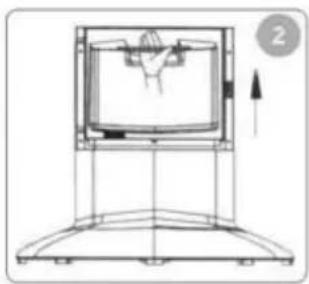
natural_image
Technical line drawing of a mechanical device with a central component and an upward arrow indicator (no text or symbols)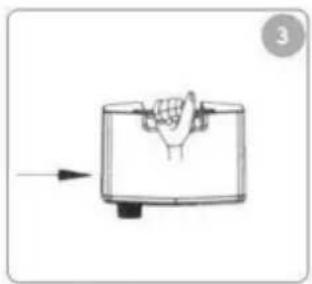
natural_image
Simple line drawing of a hand pressing down on a container with an arrow indicating force (no text or symbols)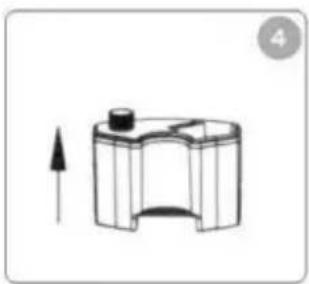
natural_image
Simple line drawing of a mechanical component with an upward arrow, no text or symbols present.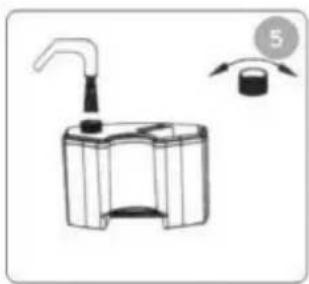
natural_image
Diagram of a mechanical device with a handle and a circular indicator (no text or symbols)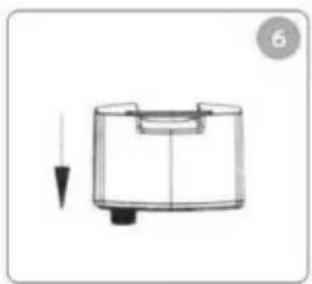
natural_image
Simple line drawing of a cylindrical device with a downward arrow indicating force or direction (no text or symbols)Modifications techniques
Festnetz 14 Cent/Minute
natural_image
Line drawing of a modern air conditioner unit with fan blades and control panel (no text or symbols)I
INDICE
natural_image
Line drawing of a modern air conditioner unit with fan blades and control panel (no text or symbols)NL
NL
INDEX
text_image
Watertank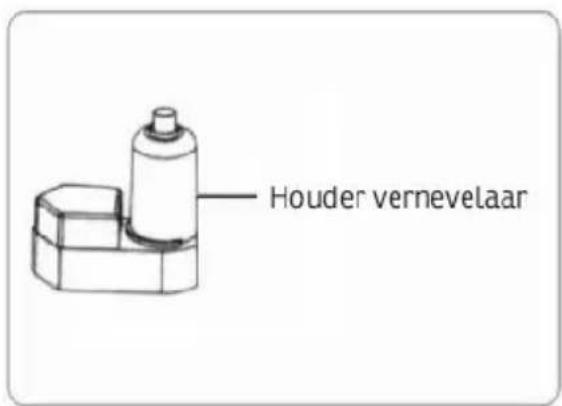
text_image
Houder vernevelaarFestnetz 14 Cent/Minute
natural_image
Line drawing of a modern air conditioner unit with fan and control panel (no text or symbols)E
INDEX
1 Introduction 67
2 Safety Information....68
3 What is an ion? 70
4 Technical specifications.... 71
5 How to handle the water tank 72
6 How to operate the fan.... 73
7 Cleaning and maintenance.... 75
8 Frequently asked questions.... 77
9 Warranty / Disposal / Technical change 79
1 Introduction
Thank you for choosing this fan. Please read the instructions for use carefully before you switch on the fan to ensure its correct and efficient use.
This model of an electric fogging fan is novel and has an attractive appearance. It includes practical features and is easy to operate. The appliance offers ventilation and air humidifier functions and distributes cool humid mist. These functions can be used together or separately. It produces a «cool breeze» during the hot summer months and humidity in the dry season to give you a natural feeling of well-being in your home. This product is designed for various climatic environments, in particularly for dry climates.
Functional elements
The electric fogging fan employs ultrasonic vibration elements to atomize water, forming 1 - 5 microns ultrafine particles. The fan then distributes the humid mist to the air. The humidity cools a single room or an entire apartment. The photocatalyst is a catalyst which accelerates photoreaction. It uses specific titanium oxide to generate surface oxidation which eliminates harmful substances, such as organic compounds or bacteria when exposed to a UV or near-UV light source. It requires no special power source, only normal electric current.
Healthy humidity
Too little humidity (dry ambient air) can dry the skin, which may lead to problems such as cracked lips, dry, itchy skin and a dry, sore throat. We know from experience that a relative humidity of 45% - 65% is ideal for us to live in under various conditions. The ultrasonic fogging fan is itself designed to produce a more pleasant feeling and provide cooling in a very dry environment by adding humidity to the air.
1 Safety Information
E
Please read before first commissioning the safety instructions carefully and observe the safety instructions to prevent damage due to misuse, improper operation, and improper environmental conditions to be avoided. Keep these for later reference. Please make sure to place the device on a suitable and waterproof surfaces, so that spilled liquids can not cause harm.
Check the device after removing the packaging for damage. Do not put the unit in case of suspected corruption in operation and consult a specialist. The recyclable packaging material must not be stored or disposed accessible for young children, but must be disposed of properly.
This appliance is only for the purpose for which it was explicitly developed. Any other use is regarded as improper and therefore dangerous. The supplier is not liable for damage to persons and / or property damage due to an improper or incorrect use.
This appliance can be used by children aged from 8 years and above and persons with reduced physical, sensory or mental capabilities or lack of experience and knowledge if they have been given supervision or instruction concerning use of the appliance in a safe way and understand the hazards involved. Children shall not play with the appliance. Cleaning and user maintenance shall not be made by children without supervision.
Please make sure to place the device on a suitable and waterproof surfaces, so that spilled liquids can not cause harm.
Repairs to electrical appliances must only be carried out by trained personnel only. Improperly performed repairs and alterations to the equipment can have dangerous consequences for the user according to what the warranty will be rejected.
- Before switching on, make sure the appliance and the power cord are undamaged. If you detect any damage, please contact an authorized technical service provider.
- Never disconnect the plug from the mains socket with moist or wet hands.
- When the appliance is operating, do not allow it to come into contact with water.
- Do not introduce any objects into the enclosure or the mist spray hole, otherwise you may destroy the appliance.
-
Disconnect the plug from the mains socket when the appliance is not in operation and before you move, install, deinstall or clean it.
-
Do not disconnect the plug when the appliance is in operation. Before switching it on, always make sure that the plug is fully inserted in the mains socket.
- Disconnect the power plug from the mains socket before removing the water tank.
- Do not add any chemical or metallic substances to the water tank or the outlet channel since these materials are dangerous and may cause problems.
- When the mosquito repellent mat needs changing, switch the mosquito repellent function off, wait 5 minutes and then replace the mat.
- Do not cover the heating plate of the mosquito repellent function with combustible materials.
- The water level safety switch switches off automatically when the water level is too low in the water tank. This is to protect the ultrasonic converter. Refill with water to continue the function.
- Do not leave babies, elderly or sick people directly in front of the fan air for long periods of time.
- Only run the appliance at the specified rated voltage and rated frequency.
- Do not disassemble, repair or modify the appliance yourself. If repairs are necessary, the guarantee becomes null and void if repairs are performed by unauthorized persons/representatives.
- If the power card is damaged, it must be replaced by the manufacturer or one of his service representatives or a similarly qualified person to avoid any risks.
- Do not allow persons (including children) to handle the appliance if they have reduced physical, sensory or metal capabilities or lack the experience and knowledge about operating the appliance, unless they are supervised by a person who is responsible for safety or trained in the use of the appliance.
- Children should be supervised to ensure they do not play with the appliance.
- This appliance can be used by children aged from 8 years and above and persons with reduced physical, sensory or mental capabilities or lack of experience and knowledge if they have been given supervision or instruction concerning use of the appliance in a safe way and understand the hazards involved. Children shall not play with the appliance. Cleaning and user maintenance shall not be made by children without supervision.
3 What is an ion?
An ion is an atom or a group of atoms carrying an electric charge. Positively charged ions are called positive ions and negatively charged ions are called negative ions.
How do negative ions clean the air?
Most particles in the air have a positive charge or are positively ionized, whereas negative ions have a negative charge. Negative ions bond with positively charged particles by magnetic attraction. When the air contains a concentration of negative ions which is high enough, it attracts high quantities of these suspended particles. The particles then become too heavy to remain suspended in the air. As a result, the particles are removed from the air, out of the breathing zone and the respiratory passages where they can cause breathing difficulties and health problems.
Advantages of negative ions
- Negative ions raise the oxygen flow.
- Negative ions clean the air by removing smoke and particles from the air.
- Air cleaned by negative ions leads to greater vigilance, less drowsiness and more mental energy.
- Negative ions can neutralize strong static attraction from TV sets and computer screens and lower the harmful effects on the eyes.
- Negative ions can completely neutralize any static attraction, e.g. when combing hair, to make the air more pleasant and softer.
- The negative ion function of the fan can remain switched on 24 hours a day. Negative ions contribute to a pleasant, healthy home climate and remove harmful particles from the air. The negative ion function on the fan can be used, for example, in bedrooms, in particular in children's bedrooms, to achieve a positive healthy effect
4 Technical specifications
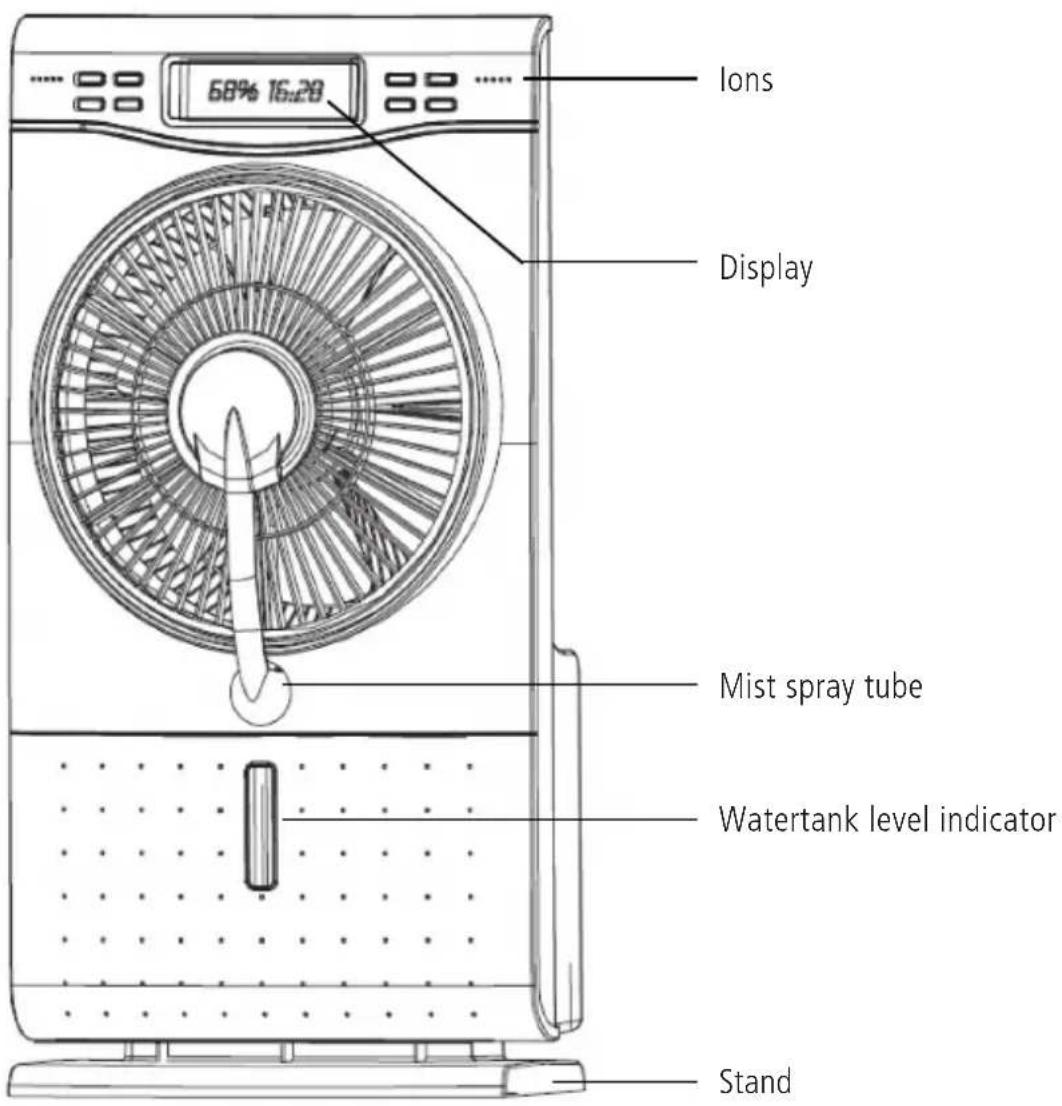
text_image
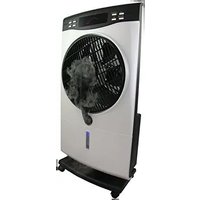
Ions 68% 16:20 Display Mist spray tube Watertank level indicator StandRated voltage: 220-240V
Rated frequency: 50Hz
Fan output: 65W
Air humidifier output: 35W
Total power output: 100W
Mist output: 200ml/h
Size: 300mm
Water tank capacity:....1500ml
5 How to handle the water tank

Place the fan on a firm surface and pour water into the water tank. Comply with the 6 steps below. Note: Disconnect the power plug from the mains socket before removing the water tank. Do not fill the water tank with hot water (40°C and more).
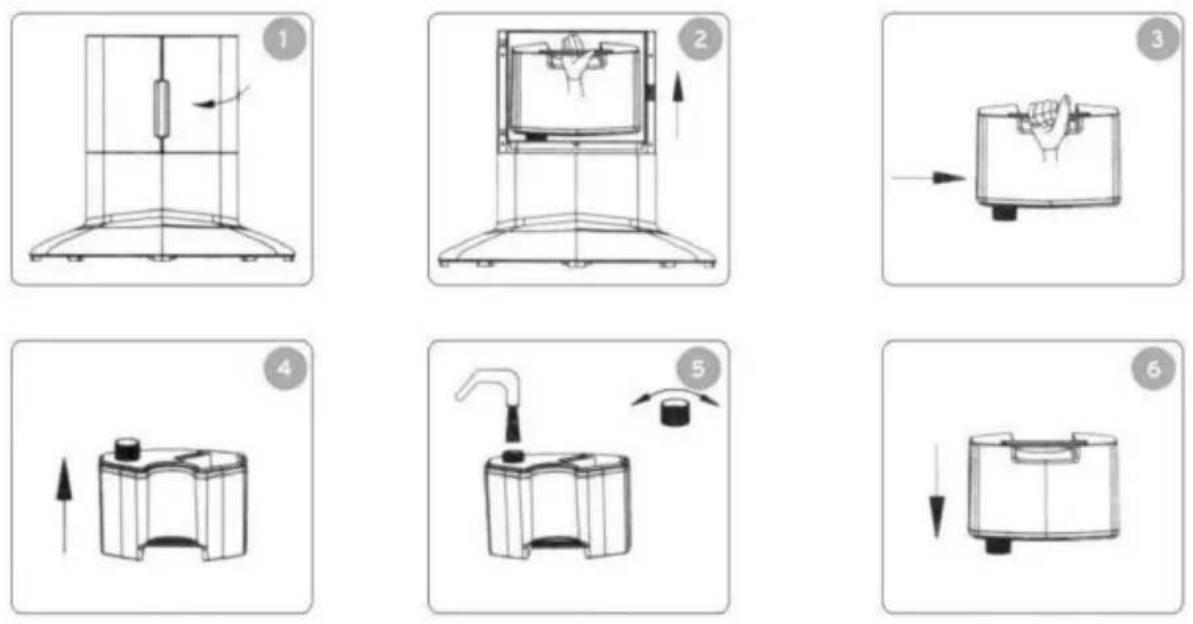
- Open the water tank cover.
- Lift the water tank up.
- Remove the water tank completely.
- Turn the underside of the water Upwards.
- Unscrew and remove water tank lid and fill with water.
- Screw the water tank lid firmly, place tank in fan and close cover.
Note: Do not fill with dirty water or include any additives (such as perfume, essential oils, insect repellents etc.). Only use clean drinking water or filtered water to ensure the long life of the air humidifier.
6 How to operate the fan
-
Plug the plug into the mains socket and ensure that the indicator lamp lights up as shown below.
-
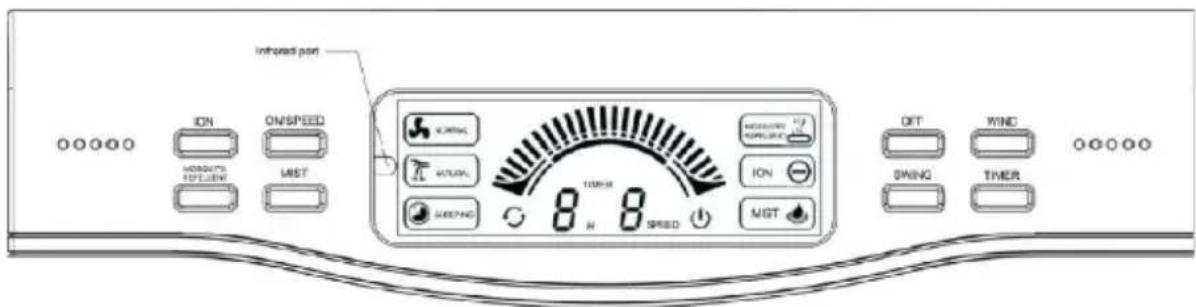
Press the "ON/SPEED" button to adjust the blower speed (low, medium, high). The lamps in the control panel light up accordingly.
-
Press the "WIND" (FAN) button to select the fan mode. The appropriate lamp lights up. "Normal": Fan speed is based on low/medium/high speed.
"Natural": Imitates natural wind based on a high or low fan speed.
"Sleeping" (sleep mode): For the first half hour, a strong and low natural fan speed, then a medium natural fan speed. In the second half hour until the end of the preset time, change to a lower natural fan speed.
-
Press the "SWING" button to change the fan direction. The appropriate lamp lights up. Press this button again to stop the swing movement.
-
Press the "MIST" button. The indicator lamp lights up and the humid mist is distributed by the front mist panel. You can press the "MIST" button separately or together with the fan function to produce a cooling air flow. When the mist function is used separately, it raises air humidity.
-
Press the "TIMER" button to set the fan time from 1 to 9 hours and switch the fan off after the preset time. Press the button once to set a time of 1 hour; press it 9 times to set a runtime of 9 hours.
-
Press the "ION" button. The indicator lamp lights up. Negative ions produced by the ionization function emerge from the appliance and ensure that dust, pollen, mould fungus spores, scales etc. clump together and are removed from the air. You can press the "ION" button separately or together with the fan function.
Note: After the negative ion function has run for a specific time, some dirt will collect around the opening of the negative ion generator. This is an effect of the ions and a totally normal phenomenon. You can clean the opening yourself.

- Press the "MOSQUITO REPELLENT" button. The indicator lamp lights up. The mosquito repellent mat is vaporized and releases a pungent aroma that repels insects. You can press the "MOSQUITO REPELLENT" button separately or together with the fan function.
- Press the "OFF" button. The fan is switched off and all functions return to their starting state. However, the various control buttons can be pressed to switch off individual functions.
- To use the remote control, point the remote control at the infrared port. If the remote control does not function properly, first check the batteries and replace them if necessary. Note: Replace batteries with those of the same type, otherwise the remote control may not operate correctly. If the remote control is not used for a long period of time, remove the batteries. Batteries left in the remote control may cause damage.
7 Cleaning and maintenance
- Before you clean the appliance, disconnect it from the mains and ensure it is not in operation.
- Clean the water tank every two to three weeks. Clean the outlet channel every week.
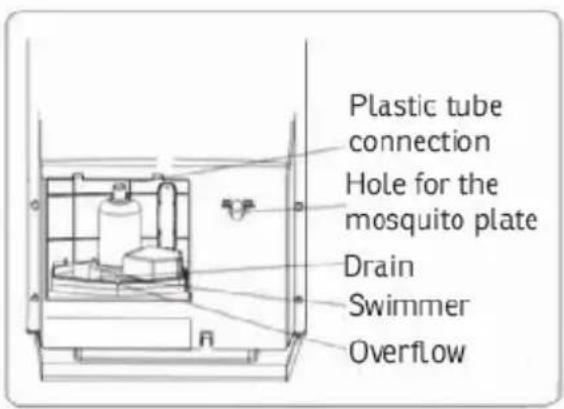
- Remove the water tank to clean. Pull out the plastic tube completely from the atomization vessel. Then remove the atomization vessel and clean it.
- Use a dry cloth to remove residual water after cleaning the atomization vessel and dry it with a soft cloth. If the atomization vessel is soiled, clean it with a mild detergent.
- Once a year after cleaning, apply a few drops of lubrication to the motor shaft to retain the motor life span.
- Pack the appliance properly and store it in a cool dry place if it is not used for a longer period of time.
text_image
Plastic tube connection Hole for the mosquito plate Drain Swimmer Overflow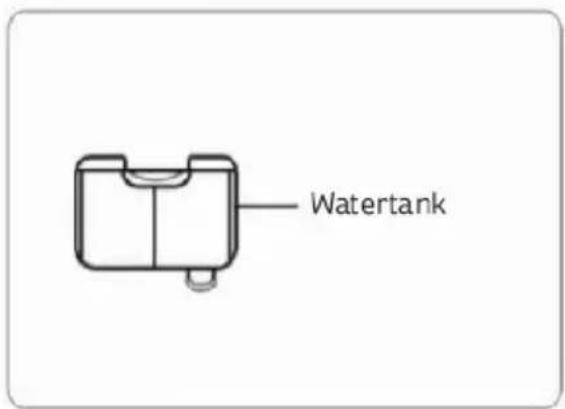
text_image
Watertank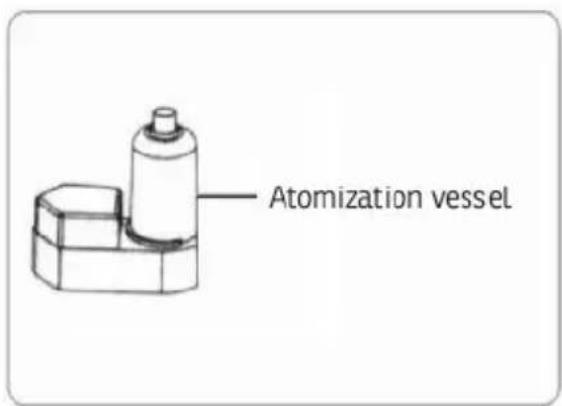
text_image
Atomization vesselSpecial detergent for the ultrasonic air humidifier function:
Function: Use this special detergent to clean the ultrasonic converter in the outlet channel. It removes encrustation to ensure the air humidifier has better performance and longer life.
E

text_image
Ultrasonic transducer Bobber Overflow holeFigure of cleaning ultrasonic transducer
Application: Apply 2-3 drops to the ultrasonic converter. Wait 1 minute. Carefully rinse with clean water and then dry with a clean soft cloth.
Caution: Do not allow the detergent to contact your skin, clothing, mouth or eyes. If this happens, immediately rinse and flush with clean water. Store the detergent in a place protected from direct sunlight and heat sources and out of the reach of children.
8 Frequently asked questions
If the fan fails to function properly, first check the following items (1-4 for mist function) before returning the appliance:
| Question Answer Solution (s) | ||
| 1.Why does the indicator lamp not light up; no mist and no air flow from the fan? | a.Mains plug not properly inserted and power switched off.b."MIST" button switched off. | a.Make sure the mains plug is fully inserted in the mains socket and the power is switched on.b.Switch the "MIST" button on. |
| 2.The ultrasonic converter functions properly but no mist is sprayed. | a.Water tank broken or cracked so that the outlet channel is full of water.b.Fan does not function. | a.Pour the water out of the outlet channel. Fit with a new water tank.b.Fit a new fan. |
| 3.Why is no mist sprayed, even if the indicator lamp lights up and the fan functions? | a.No water or water level too low.b.Float not floating on water.c.Surface of ultrasonic converter encrusted.d.Clamping plate of water level switch loose.e.Ultrasonic converter damaged. | a.Fill with water.b.Remove float and refit it in position.c.Clean ultrasonic converter with supplied detergent.d.Refit clamping plate of water level switch.e.Replace ultrasonic converter. |
| 4.Why does the mist smell funny? | a.Funny smell of a new product disappears after a certain period of use..b.Dirty water or water has been standing for too long. | a.Remove tank and open tank cover; allow to dry at a dry ventilated place.b.Clean water tank and outlet channel and fill with fresh water. |
| 5.Why does the fan not work? | a.The power plug may be damaged or the fuses may have blown.b.Printed circuit board damaged. | a.Make sure the power plug works and check the fuses.b.Replace printed circuit board. |
| 6.Obvious vibrations. | a.The rear protective housing is loose.b.The blade hub has become loose.c.The blade is damaged.d.The blade is imbalanced. | a.Fix the rear protective housing.b.Tighten the blade hub.c.Fit new fan blade.d.Turn fan blade through 180° and then refit the blade. |
| 7.Another unusual problem. | a.Smoke or the smell of fire comes from the motor.b.Exposed metal parts, electrical system or fan insulation damaged.c.The rear motor housing is damaged. | a/b/c.Disconnect the appliance from the mains and return to the seller for repair. |
9 Warranty / Disposal / Technical change
Warranty
All products are checked from our company before the delivery. In case that there is a lack on your product, please contact the vendor. Please bring your proof of purchase for guarantees.
Disposal
Please remove the heater properly. You can bring the product to any specialist dealer fort he removal.
Technical changes
Technical changes in technique and design are possible.
Please save the packaging materials of the unit.
CE declaration of Conformity
This device complies with the following standards:
EN 60335-1:2002 +A1:2004 +A11:2004 +A12:2006 +A2:2006 +A13:2008
EN 60335-2-80:2003 +A1:2004
EN 60335-2-98:2003 +A1:2005 +A2:2008
EN 50366:2003 +A1:2006
Firma
Armin Schmid
Festnetz 14 Cent/Minute