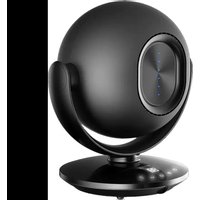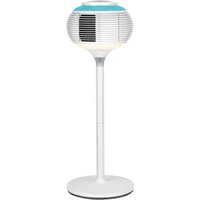
IBRIG - Fan Sonnenkönig - Free user manual and instructions
Find the device manual for free IBRIG Sonnenkönig in PDF.


User questions about IBRIG Sonnenkönig
0 question about this device. Answer the ones you know or ask your own.
Ask a new question about this device
Download the instructions for your Fan in PDF format for free! Find your manual IBRIG - Sonnenkönig and take your electronic device back in hand. On this page are published all the documents necessary for the use of your device. IBRIG by Sonnenkönig.
USER MANUAL IBRIG Sonnenkönig
natural_image
Three identical wireframe spherical objects with internal patterns, displayed on stands (no text or symbols)Inhaltsverzeichnis
natural_image
Illustration of a spherical object with a rectangular opening and a vertical stem, resembling a decorative lamp or stand (no text or symbols visible)natural_image
Illustration of a decorative spherical object with a central square and textured surface, mounted on a stem (no text or symbols)NOTE: If swallowed, immediately call the 24-hour Poison Information Centre on 13 11 26 (in Australia) or 24-hour National Poisons Centre on 0800 764 766 (in New Zealand) for fast, expert advice. Dispose of used batteries in an environmentally friendly manner in accordance with local council regulations immediately. This product has been designed so that the coin/button cell battery is not accessible to young children, as the battery compartment cover is secured with a screw or mechanical fastener. Always ensure that the compartment is secured before use.
7. REINIGUNG
DE
Festnetz 14 Cent/Minute
natural_image
Three identical wireframe spherical objects with internal patterns, displayed on stands (no text or symbols)Table des matières
Dimensions....36 x 36 x 95/68/40 cm
3. DESCRIPTION DES PIÉCES
natural_image
Illustration of a spherical object with a rectangular opening and a vertical stem, resembling a decorative lamp or stand (no text or symbols visible)natural_image
Illustration of a decorative spherical object with a central square and textured surface, mounted on a stand (no text or symbols)Utilisation du sol
natural_image
Two simple cylindrical objects with a separate labeled tag, one with a small arrow and the other with a plus sign (no text or symbols on the objects themselves)NOTE: If swallowed, immediately call the 24-hour Poison Information Centre on 13 11 26 (in Australia) or 24-hour National Poisons Centre on 0800 764 766 (in New Zealand) for fast, expert advice. Dispose of used batteries in an environmentally friendly manner in accordance with local council regulations immediately. This product has been designed so that the coin/button cell battery is not accessible to young children, as the battery compartment cover is secured with a screw or mechanical fastener. Always ensure that the compartment is secured before use.
7. NETTOYAGE
FR
Modifications techniques
Festnetz 14 Cent/Minute
natural_image
Three identical wireframe spherical objects with internal patterns, arranged vertically on a stand (no text or symbols)natural_image
Technical line drawing of a hot air balloon with internal structure and lid (no text or symbols)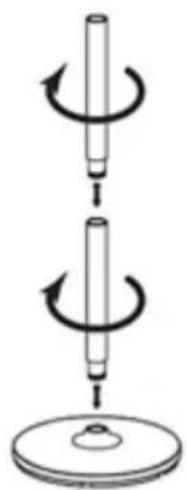
natural_image
Diagram showing two mechanical components with rotational arrows, no text or symbols present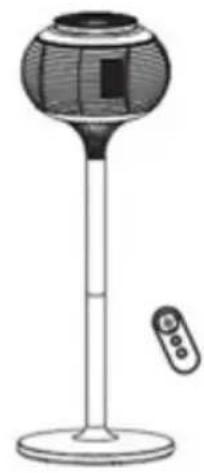
natural_image
Illustration of a portable electronic device with a spherical top and a remote control (no text or symbols)natural_image
Illustration of a spherical object with a rectangular opening and a vertical stem, resembling a decorative lamp or stand (no text or symbols visible)Utilizzo della base
natural_image
Illustration of a decorative spherical object with a black square on top, mounted on a stem (no text or symbols)Uso del suolo
tavolo
NOTA
natural_image
Two simple cylindrical objects with internal supports, one labeled 'scartare' (no other text or symbols)NOTE: If swallowed, immediately call the 24-hour Poison Information Centre on 13 11 26 (in Australia) or 24-hour National Poisons Centre on 0800 764 766 (in New Zealand) for fast, expert advice. Dispose of used batteries in an environmentally friendly manner in accordance with local council regulations immediately. This product has been designed so that the coin/button cell battery is not accessible to young children, as the battery compartment cover is secured with a screw or mechanical fastener. Always ensure that the compartment is secured before use.
7. PULIZIA
Festnetz 14 Cent/Minute
natural_image
Three identical wireframe spherical objects with internal patterns, arranged vertically on a stand (no text or symbols)EN
EN
Tabel of contents
1 Safty instructions....57
2 Technical details 59
3 Pars description 60
4 Packing list....60
5 Assembly 61
6 Operation.... 62
7 Cleaning and maintenance 65
8 Troubleshooting....66
9 Warranty / Disposal / Technical modifications....67
1. SAFETY INSTRUCTIONS
Please read before first commissioning the safety instructions carefully and observe the safety instructions to prevent damage due to misuse, improper operation, and improper environmental conditions to be avoided. Keep these for later reference.
Check the device after removing the packaging for damage. Do not put the unit in case of suspected corruption in operation and consult a specialist. The recyclable packaging material must not be stored or disposed accessible for young children, but must be disposed of properly. This appliance is only for the purpose for which it was explicitly developed. Any other use is regarded as improper and therefore dangerous. The supplier is not liable for damage to persons and / or property damage due to an improper or incorrect use.
This appliance can be used by children aged from 8 years and above and persons with reduced physical, sensory or mental capabilities or lack of experience and knowledge if they have been given supervision or instruction concerning use of the appliance in a safe way and understand the hazards involved. Children shall not play with the appliance. Cleaning and user maintenance shall not be made by children without supervision. Please make sure to place the device on a suitable and waterproof surfaces, so that spilled liquids can not cause harm.
Repairs to electrical appliances must only be carried out by trained personnel only. Improperly performed repairs and alterations to the equipment can have dangerous consequences for the user according to what the warranty will be rejected.
When switching on the appliance for the first time, you may notice a slight odor which is normal with new electrical appliances. Allow odor to dissipate by running appliance at full power for about 30 minutes. Make sure that the room in which the appliance is located is well ventilated during this operation.
This appliance is recommended for room sizes from 6-15m ^2 (65-162 ft ^2 ).
Many factors will affect heating performance such as room openings, number of windows, insulation quality, etc.
To prevent injury to the user or other people and property damage, the following instructions must be followed.
- Use this appliance only as described in this Owner's manual. As with any electrical appliance, the instructions aim to cover as many eventualities as possible. Caution and common sense should be used when operating this appliance. Any other use not recommended by the manufacturer may cause fire, electric shock, injury to persons or other damage to property.
- This appliance is hot when use as a heater. To avoid burns, do not let bare skin touch hot surfaces.
- Keep combustible materials, such as furniture, pillows, bedding, papers, clothes and curtains at least 3 ft. (0.9 m) from the front and top of the appliance and keep them away from the sides and rear. Keep the rear grille away from walls or drapes so as not to block the air intake.
- Extreme caution and reasonable supervision are necessary when the appliance is used by or near children, or pets and whenever the appliance is left operating and unattended.
-
The instruction manual should be used as a reference for the safe use of this equipment. People with reduced physical or mental capabilities, as well as people with no previous experience of using this equipment must be supervised and made aware of the risks.
-
Children should not be allowed to perform the cleaning and maintenance of this appliance.
- Children of less than 4 years should be kept away from the appliance unless continuously supervised.
- Children less than 12 years of age should not operate the appliance. Do not allow children to play with the appliance.
- Do not use this appliance in areas when they are occupied by persons not capable of leaving the room on their own, unless constant supervision is provided.
- This appliance is not intended for use in rooms with increased humidity such as bathrooms, laundry areas and similar indoor locations. Never locate appliance where it may fall into a bathtub or other water container.
- Do not use outdoors. Never expose the product to atmospheric conditions such as direct sun light or rain, etc. This product is intended for normal household use only.
- This appliance draws 10 amps during operation when used as heater. To prevent overload and blown fuses, be sure that no other appliance is plugged into the same outlet (receptacle) or into another outlet (receptacle) wired into the same circuit.
- Always unplug appliance when not in use. To disconnect turn the appliance to OFF, grip plug and pull from wall outlet. Never yank on cord. Never leave the product connected to the power source without supervision.
- Do not operate any appliance with a damaged cord or plug or after the appliance malfunctions or has been dropped or damaged in any manner. Return appliance to an authorized service facility for examination, electrical or mechanical adjustment or repair.
- Do not run cord under carpeting. Do not cover cord with throw rugs, runners or the like. Arrange cord away from traffic area where it will not be tripped over. Route the cord so that it will not be walked on or pinched by furniture.
- Do not insert or allow foreign objects to enter any ventilation or exhaust opening as this may cause an electric shock, fire or damage to the appliance.
- To prevent a possible fire, do not block air intakes or exhaust in any manner. Do not use on soft surfaces, like a bed, where openings may become blocked.
- Ensure the appliance is on a stable, secure surface to eliminate the potential of tipping it over.
- Appliance has hot or arcing or sparking pads inside. Do not use it in areas where gasoline, paint or flammable liquids are used or stored.
- This appliance is equipped with a polarized plug: one blade is wider than the other. The plug will fit into a polarized outlet only one way. If the plug does not at first fit in the outlet, reverse the plug. If it still does not fit, contact a qualified electrician to install a polarized outlet. Do not change the plug in any way.
- It is normal for the appliance's plug and cord to feel warm to the touch. A plug or cord which becomes hot to the touch or becomes distorted in shape may be a result of a worn electrical outlet. Worn outlets or receptacles should be replaced prior to further use of the appliance. Plugging appliance into a worn outlet/ receptacle may result in overheating of the power cord or fire.
- Always plug appliance directly into a wall outlet/receptacle. Never use with an extension cord or relocatable power tap (outlet/power strip).
- Check that neither the appliance nor the power cable has been damaged in any way during transportation.
- Do not run in locations when the appliance will be left unattended for long periods of time. (For example - in an unoccupied summer cottage).
- Do not use any unauthorized attachments or modifications to the appliance.
- Do not use this appliance with a programmer, timer or any other device that switches the appliance on automatically, since a fire risk exists if the appliance is covered or positioned incorrectly.
- Never put the power cable, the plug or the whole device into the water or any other liquids. The device should be cleaned regularly complying with the recommendations described in the section on cleaning and maintenance.
- Do not place the device near sources of heat, flame, an electric heating element or a hot oven. Do not place
on any other device.
- Do not use in rooms below 6 m2.
- Appliance can operate only in vertical position.
• Always switch off the appliance before removing the plug from the socket. - This product is only suitable for well-insulated spaces or occasional use.
EN
Safety Grille
The unit is equipped with cool touch cabinet to protect the heating element. Do not block the air inlet and outlet or place too close to flammable materials as it could cause fire. See safeguards section.
Tip-Over Switch
The appliance will be automatically shut off by an internal switch when it is tipped over. If this occurs, turn the appliance OFF, unplug it, put the appliance back in an upright position and plug it back in.
Overheat Protection
In the case the appliance is overheat, a thermal cut-off will shut the power off, if this occurs, turn the appliance OFF, unplug it, wait for 15-30 minutes. make sure the unit is in upright position, grille is not blocked, HEPA filter is not dirty (replace if needed, see "Replace HEPA filter" in "CLEANING AND MAINTENANCE" section), and plug it back in.
2. TECHNICAL DETAILS
Modell......IBRIG
Voltage.... AC 220-240V
Voltage....50/60 Hz
Power 1200 Watt Heating / 20 Watt Fan
Dimesions 36 x 36 x 95/68/40 cm
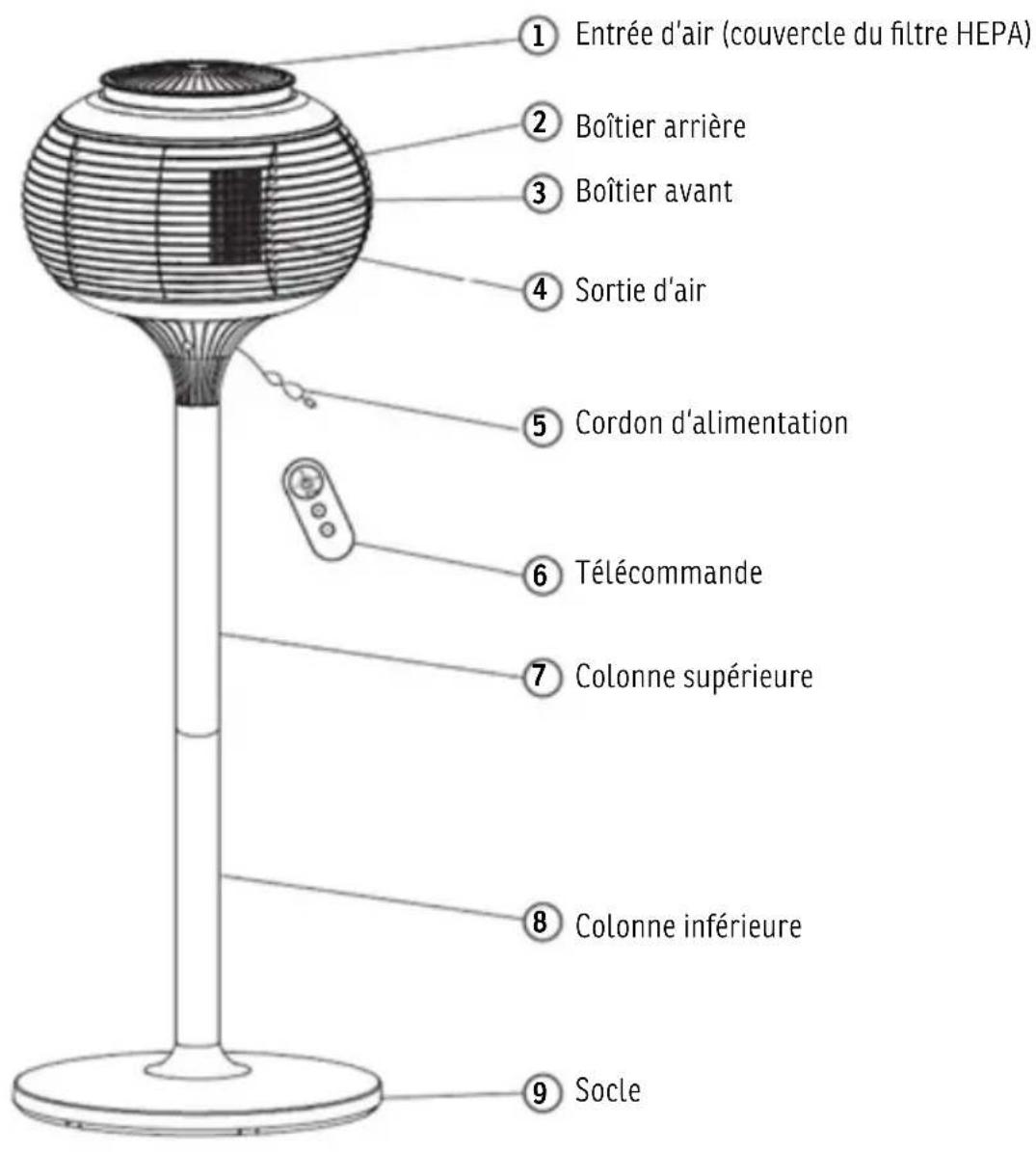
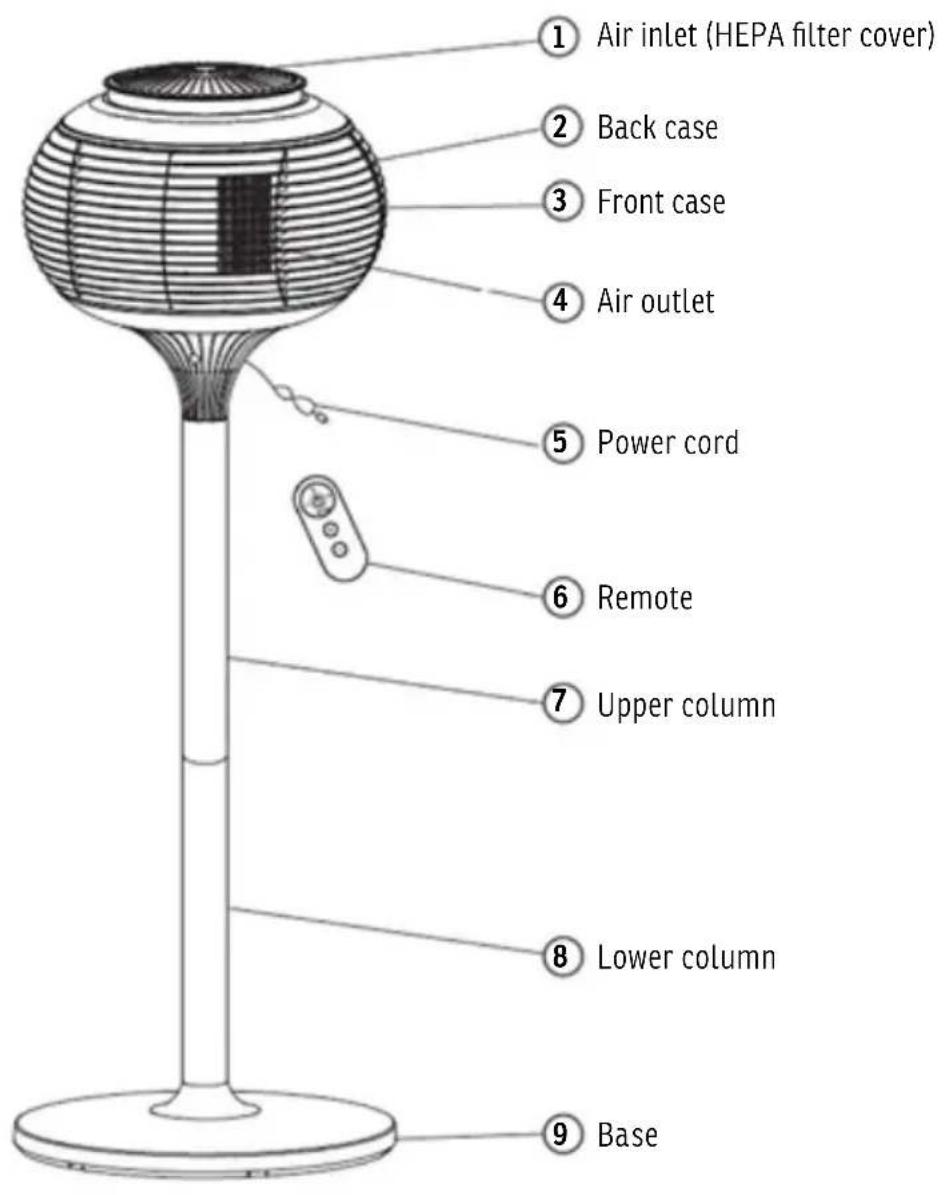
3. PART DESCRIPTION
EN
text_image
1 Air inlet (HEPA filter cover) 2 Back case 3 Front case 4 Air outlet 5 Power cord 6 Remote 7 Upper column 8 Lower column 9 Base4. PACKING LIST
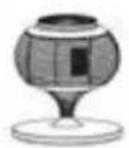
Main unit
1x
Column
2x
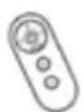
Remote
1x

Manual
1x
5. ASSEMBLY
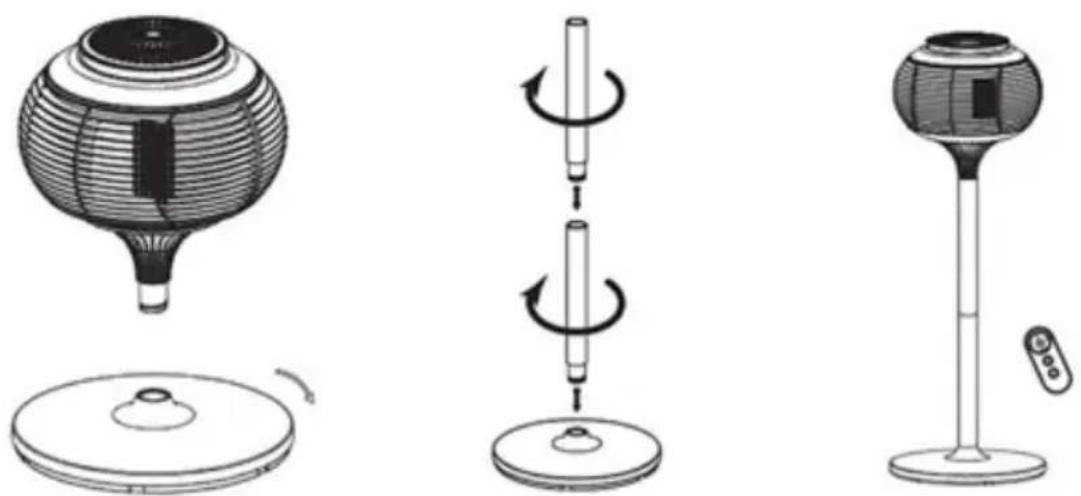
Assembly of the unit:
- Remove the base (9) from the main unit by turning the base (9) clockwise.
- Set the base (9) on the floor. Insert one column (8) into the base (9) and secure them by turning the column (8) clockwise. Insert the upper column (7) into the top of the lower column (8) and secure them by turning the upper column (7) clockwise.
- Insert the main unit head into the top of the upper column (7) and secure them by turning the main unit head clockwise.
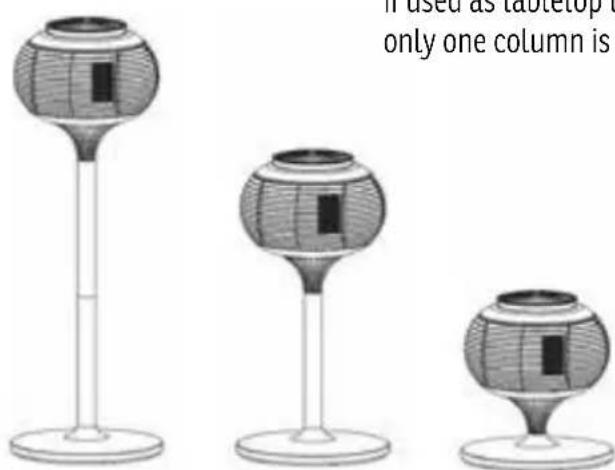
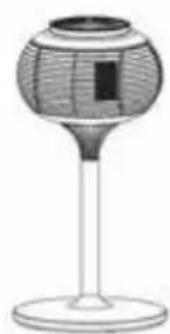
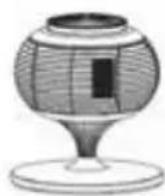
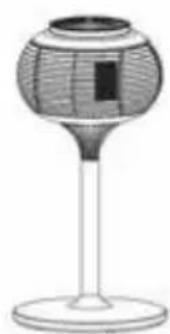
Pedestal use Floor use Tabletop use
NOTE
If used as tabletop unit, no assembly is needed. If used as floor unit, only one column is needed, the two columns are same.
6. OPERATION
EN
text_image
1 2 3 4 5 6 7 8 9 °C °F 10 11 12 13
text_image
13 1 2 ~ 3 5/6 + 11 - 11Remote operation
For your convenience, the buttons on remote control operate the same functions as the control panel of the unit, except:
• The power button only turns unit on and off.
- Use the button to switch between fan and heater mode.
Switching between °C and °F only on main unit control panel
Press and hold (+) and (-) button on main unit simultaneously for 3 seconds to switch between °C and °F.
Initial oscillation position
When the power cord is plugged, the display will be on for one second and off, the unit head will be turning and back to the initial oscillation position.
natural_image
Two simple cylindrical objects with internal brackets and a labeled tag, no text or symbols presentBefore using the remote
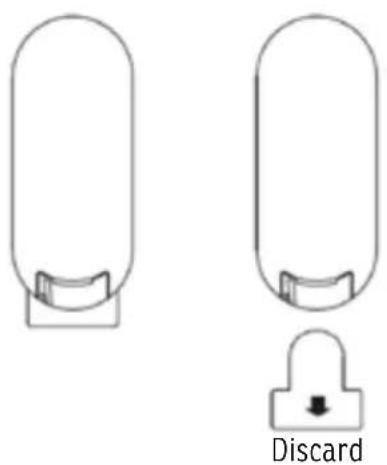
For the initial use of the remote, pull the plastic insulation tab from the bottom of the remote and discard. Your remote is now ready for use. You do not need to remove the battery cover.
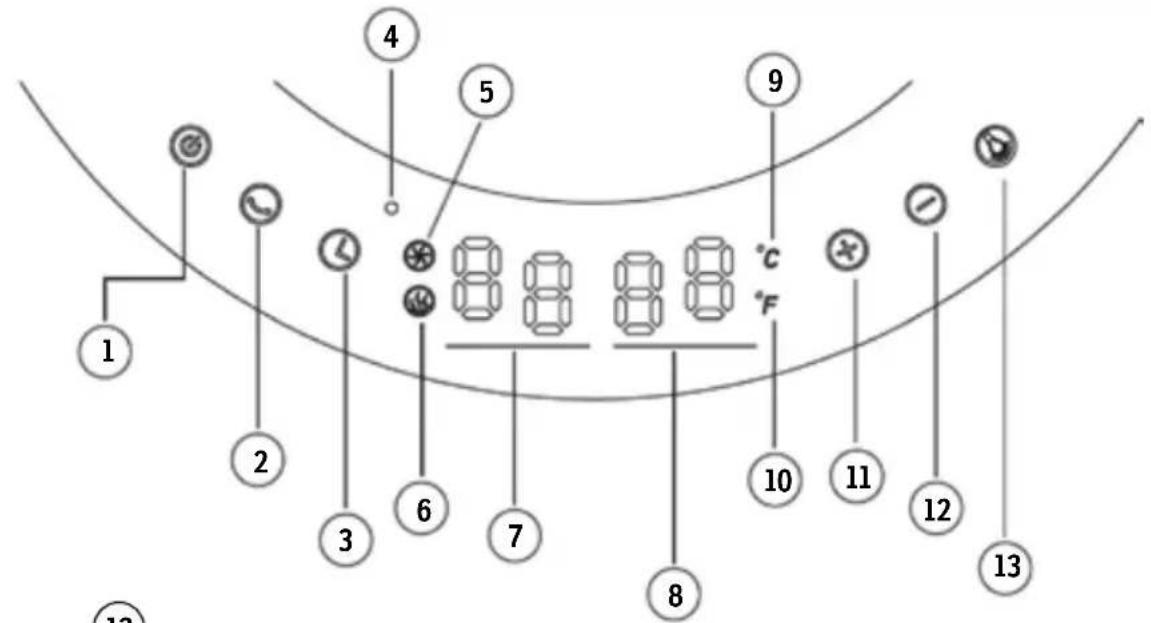
1. Power Button
- Press once: Turn the unit on (Default as fan mode)
- Press twice: Switch to heater mode
- Press third time: Turn the unit off (Unit will be delay off after 10 seconds)
2. Oscillation button
- By pressing this button, turn the oscillation mode on, switch the oscillation angle and turn oscillation off.
- The digits on the display (7) shows the oscillation angle:
- 01----60 degree
• 02----90 degree
• 03----120 degree
3. Timer button
- By pressing this button, turn the auto-off timer on, keep pressing the button to set the desired auto-off timer (00-24 hour) in one hour interval. The timer will show on the display (8), flash for 3 seconds and back to room temperature display.
• 00 means the timer is off - Press this button any time to check the current timer setting
4. Power indicator
Red LED lights when the unit is plugged in.
5. Fan mode icon
This icon shows the unit is running in fan mode
6. Heater mode icon
This icon shows the unit is running in heater mode
7. Mode, Speed display
- Speed in fan mode: 00-12, switch by pressing "+" or "-"
- Speed in heater mode: 00-06, switch by pressing "+" or "-"
- Oscillation angle: (See section 2)
8. Room temperature, timer display
- By default, it will show room temperature.
- Timer: 00-24 hour (See section 3)
9. Celsius icon
This icon shows the temperature display is in Celsius
10. Fahrenheit icon
This icon shows the temperature display is in Fahrenheit
11. Speed increase button
- By pressing this button, increase the speed in fan and heater mode (See section 7)
12. Speed decrease button
- By pressing this button, decrease the speed in fan and heater mode (See section 7)
13. Light button
- Press once: Turn the light on to high mode
- Press twice: Switch to light to low mode
- Press third time: Turn the light off
NOTE: The light can be controlled individually when the unit is off, as long as the unit is plugged to power supply.
text_image
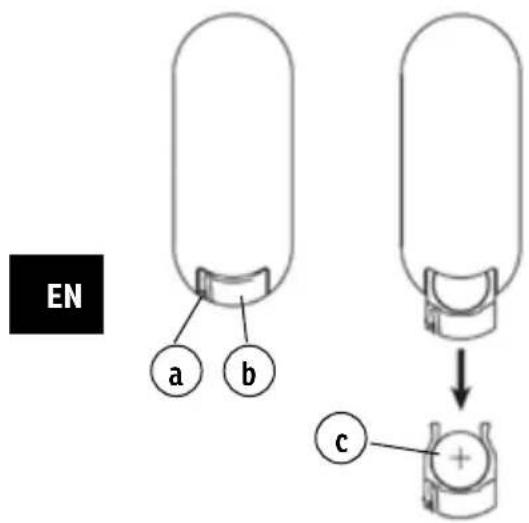
EN a b cChanging the battery
- Press down on the locking tab (a), grab the battery case (b) and pull it out.
- Place a new battery (c) in the battery case with the + side facing up.
- Insert the battery case back into the remote control until it clicks.
Warnings for Products Containing Button Cells
- Keep the batteries out of reach of children.
- This product contains a button battery. If swallowed, it could cause severe injury or death in just 2 hours. Seek medical attention immediately.
- If you suspect your child has swallowed or inserted a button battery, immediately seek urgent medical assistance.
- Examine devices and make sure the battery compartment is correctly secured, e.g. that the screw or other mechanical fastener is tightened. Do not use if compartment is not secure.
- Dispose of used button batteries immediately and safely. Flat batteries can still be dangerous.
- Tell others about the risk associated with button batteries and how to keep their children safe.
Guidelines for using the remote control:
- The remote control must be pointed towards the receiver on the appliance in order to work.
- The range for the remote control is 5 meters. If the remote control is not pointed towards the receiver, the range will be decreased.
- The remote control may not operate in a room where heavy machinery is operating.
- Do not block the line of sight between the remote control and the receiver.
- Handle the remote control with care. Do not drop the remote control on the floor or bang it against hard objects.
Dispose of the battery
- The battery must be taken to a household hazardous waste collection site for proper handling.
NOTE: If swallowed, immediately call the 24-hour Poison Information Centre on 13 11 26 (in Australia) or 24-hour National Poisons Centre on 0800 764 766 (in New Zealand) for fast, expert advice. Dispose of used batteries in an environmentally friendly manner in accordance with local council regulations immediately. This product has been designed so that the coin/button cell battery is not accessible to young children, as the battery compartment cover is secured with a screw or mechanical fastener. Always ensure that the compartment is secured before use.
7. CLEANING AND MAINTENANCE
Before any cleaning, make sure that
- The appliance is turned OFF.
- Disconnect power supply at source by removing plug from power outlet.
- Wait 30 minutes to let the appliance cool down.
- Once cooled down, your appliance is now ready for cleaning.
Regular Cleaning
- Do not use cleaning liquid or chemical sprays on the unit.
- To clean the exterior, use a clean, soft and lightly damp cloth to gently wipe off the dirt from the surface of the unit. Be sure not to wet the heating element and the switches. Allow the unit to dry completely before using it.
WARNING
DO NOT ALLOW WATER TO RUN INTO THE INTERIOR OF THE APPLIANCE AS THIS COULD CREATE A FIRE OR ELECTRIC SHOCK HAZARD, OR DAMAGE THE UNIT.
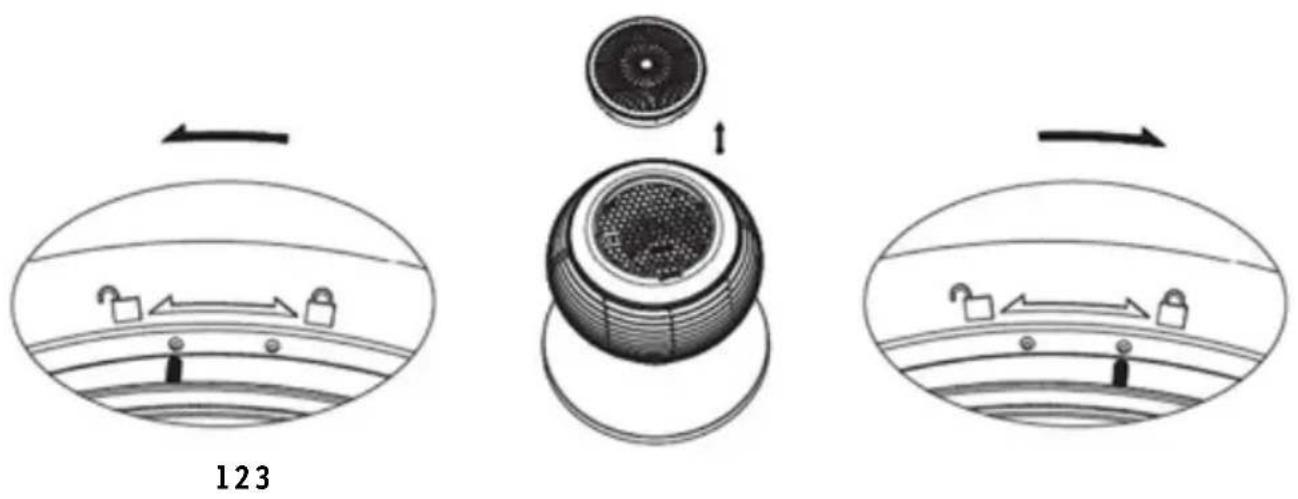
text_image
123Replace HEPA filter
- Hold and turn the top air inlet (HEPA filter cover) (1) counterclockwise to the unlocked position,
- Take air inlet (HEPA filter cover) (1) and replace the HEPA filter located inside the cover.
- Put the air inlet (HEPA filter cover) (1) back, turn it to the locked position to secure the cover.
NOTE: Replace the HEPA filter every 3-6 month, visually check the filter frequently, replace when it is dirty, or air flow is reduced. Contact supplier for HEPA filter replacement.
Storage
- Perform the cleaning procedures described in "CLEANING AND MAINTENANCE"
- Wipe all parts dry.
- Pack the appliance in a plastic bag and store it in a cool, dry place.
7. TROUBLESHOOTING
EN
| Problem Probable Cause Solution | ||
| Unit is not heating when use as heater | The appliance is not set to heater mode | Press the power button, make sure the heater mode icon shows up. |
| Tip-over switch has been activated due to the unit tipping over. | Put the unit back to normal upright position and plug back in. | |
| Follow the instructions in the "Overheat Protection" section. | ||
| Thermal cut-off has been activated due to overheating. | ||
| Air flow is weak HEPA filter is dirty | Replace the HEPA filter, see "Replace HEPA filter" in "CLEANING AND MAINTENANCE" section. | |
| The appliance is creating a burning smell. | A drop of oil may have fallen on the heating element during the manufacturing process. It will quickly evaporate and should not occur again. | To eliminate oil smell if it occurs, ensure room in which appliance is situated is well ventilated. |
| Remove any combustible items from the vicinity of the appliance. | ||
| Check and ensure there are no combustible materials within 3 feet (0.9 meters) of the appliance. | ||
DO NOT ATTEMPT TO OPEN OR REPAIR THE APPLIANCE YOURSELF. DOING SO WILL VOID THE WARRANTY AND MAY CAUSE DAMAGE OR PERSONAL INJURY.
8. WARRANTY / DISPOSAL / TECHNICAL MODIFICATIONS
Warranty
The Products are controlled just before delivery. If despite a lack of your product, try trustfully your seller. Please bring your receipt, as this is to be submitted for each warranty. The guarantee period is 24 months from date of purchase.
Disposal
The device must be disposed of properly. The device can be distributed free of charge for disposal at each dealer.
Technical changes
We reserve the right to modify the price, the design and the technical features.
Please save the packaging materials of the unit.
CE declaration of conformity
This device complies with the following standards
EMC EN 55014-1:2021
EN 55014-2:2021
EN IEC 55015:2019+A11
EN 61547:2009
EN IEC 61000-3-3:2013+A1
EN 61000-3-2:2019+A1
LVD/CE IEC 60335-2-30:2009, IEC 60335-2-30:2009/COR1:2014, IEC 60335-2-30:2009/AMD1:2016, IEC
60335-2-30:2009/AMD2:2021 IEC 60335-1:2010, IEC 60335-1:2010/COR1:2010, IEC 60335-1:2010/
COR2:2011, IEC 60335-1:2010/AMD1:2013, IEC 60335-1:2010/AMD1:2013/COR1:2014,
IEC 60335-1:2010/AMD2:2016, IEC 60335-1:2010/AMD2:2016, COR1:2016
EN 60335-1:2012+A11+A13+A1+A14+A2
EN 60335-2-30: 2009+A11+A1+A12
EN 60335-2-80:2003+A1+A2
EN 62233:2008
EN 60598-2-4:2018
EN 62471:2008
EN 62493:2015
EN IEC 60598-1:2021
AfPS GS 2019:01 PAK
RoHS 2015/863/EU
DISPOSAL INSTRUCTIONS FOR THE ELECTRICAL PART OF THE PRODUCT
In accordance with Article 26 of the Decree-Law of 14 March 2014 implementing Directive 2012/19/EC, and the Law of 31 March 2015 implementing Directive 2015/863/EU on the reduction of the use of hazardous substances in electrical and electronic equipment and on waste management.
The crossed-out dustbin symbol on the machine or packaging indicates that the waste generated at the end of its useful life must be collected separately from other waste. The user must therefore take the device to the appropriate collection points at the end of its service life. Sort electronic and electrical waste or send back to the retailer when purchasing new, equivalent devices in a one-to-one process. Appropriate separate collection for subsequent commissioning of the equipment to be recycled, treatment and environmentally sound disposal helps to avoid possible adverse effects on the environment and health, and promote the reuse and/or recycling of the materials to which they belong. Misuse of this product by the user will result in the application of the administrative penalties provided for in the applicable legislation. Batteries contained in the device must be disposed of separately in the appropriate containers for the collection of used batteries.
DISPOSAL OF BATTERIES AND ACCUMULATORS
In accordance with Legislative Decree 188 of 20 November 2008 implementing Directive 2006/66/EC on batteries, accumulators and related waste, the symbol of the crossed-out waste bin on the battery indicates that the disposal of used batteries is prohibited in household waste.
Single-use and rechargeable batteries contain substances that are highly polluting for the environment. The user is obliged to dispose of used batteries at collection points in the municipality or in appropriate containers. This service is free. In this way, legal requirements are adhered to and the environment protected. The symbols identifying hazardous materials that may be present in single-use and rechargeable batteries are as follows: Hg = Mercury, Cd = Cadmium, Pb = Lead.
Company
Armin Schmid
Festnetz 14 Cent/Minute
natural_image
Three identical wireframe spherical objects with internal patterns, arranged vertically on a stand (no text or symbols)NL
Inhoudsopgave
To prevent injury to the user or other people and property damage, the following instructions must be followed.
natural_image
Illustration of a spherical object with a rectangular opening and a vertical stem, resembling a decorative lamp or stand (no text or symbols visible)Gebruik op sokkel
natural_image
Illustration of a decorative spherical object with a black square on top, mounted on a stand (no text or symbols)NOTE: If swallowed, immediately call the 24-hour Poison Information Centre on 13 11 26 (in Australia) or 24-hour National Poisons Centre on 0800 764 766 (in New Zealand) for fast, expert advice. Dispose of used batteries in an environmentally friendly manner in accordance with local council regulations immediately. This product has been designed so that the coin/button cell battery is not accessible to young children, as the battery compartment cover is secured with a screw or mechanical fastener. Always ensure that the compartment is secured before use.