FTXP60M2V1B - Air Conditioning DAIKIN - Free user manual and instructions
Find the device manual for free FTXP60M2V1B DAIKIN in PDF.


User questions about FTXP60M2V1B DAIKIN
0 question about this device. Answer the ones you know or ask your own.
Ask a new question about this device
Download the instructions for your Air Conditioning in PDF format for free! Find your manual FTXP60M2V1B - DAIKIN and take your electronic device back in hand. On this page are published all the documents necessary for the use of your device. FTXP60M2V1B by DAIKIN.
USER MANUAL FTXP60M2V1B DAIKIN
Operation manual R32 split series
1.1 About this document 2
2 About the system 2
2.1 Indoor unit 2
2.1.1 Indoor unit display 3
2.2 About the user interface 3
2.2.1 Components:User interface 3
2.2.2 Status:User interface LCD 3
2.2.3 To operate the user interface 4
3 Before operation 4
3.1 To fix the user interface to the wall 4
3.2 To insert the batteries. 4
3.3 To switch between Fahrenheit and Celsius. 4
3.4 To turn on the power supply. 4
4 Operation 4
4.1 Operation range 4
4.2 When to use which feature 4
4.3 Operation mode and temperature setpoint. 5
4.3.1 To start/stop operation and to set the temperature.... 5
4.3.2 Airflow rate.. 5
4.3.3 Airflow direction 5
4.3.4 Comfort airflow operation.. 6
4.3.5 Powerful operation 6
4.3.6 Econo operation 6
4.3.7 OFF/ON timer operation 7
5 Energy saving and optimum operation 7
6 Maintenance and service 8
6.1 Overview: Maintenance and service 8
6.2 To clean the indoor unit and user interface 8
6.3 To clean the front panel.. 9
6.4 To clean the air filters 9
6.5 To clean the titanium apatite deodorizing filter and the silver particle filter (Ag-ion filter) 9
6.6 To replace the titanium apatite deodorizing filter and the silver particle filter (Ag-ion filter) 10
6.7 To close the front panel 10
6.8 To take following items into account before a long idle period.. 10
7 Troubleshooting 10
7.1 Symptoms that are NOT system malfunctions 11
7.1.1 Symptom: A sound like water flowing is heard 11
7.1.2 Symptom: A blowing sound is heard.. 11
7.1.3 Symptom: A ticking sound is heard.. 11
7.1.4 Symptom: A whistling sound is heard 11
7.1.5 Symptom: A clicking sound during operation or idle time is heard 11
7.1.6 Symptom: A clapping sound is heard 11
7.1.7 Symptom: White mist comes out of a unit (Indoor unit) 11
7.1.8 Symptom: The units can give off odours 11
7.1.9 Symptom: The outdoor fan rotates while the air conditioner is not in operation 11
7.2 Solving problems based on error codes 11
8 Disposal 11
1 About the documentation
1.1 About this document
Thank you for purchasing this product. Please:
- Keep the documentation for future reference.
Target audience
End users

INFORMATION
This appliance is intended to be used by expert or trained users in shops, in light industry, and on farms, or for commercial and household use by lay persons.
Documentation set
This document is part of a documentation set. The complete set consists of:
-
General safety precautions:
-
Safety instructions that you must read before operating your system
- Format: Paper (in the box of the indoor unit)
Operation manual:
- Quick guide for basic usage
-
Format: Paper (in the box of the indoor unit)
-
User reference guide:
-
Detailed step-by-step instructions and background information for basic and advanced usage
- Format: Digital files on http://www.daikineurope.com/support-and-manuals/product-information/
Latest revisions of the supplied documentation may be available on the regional Daikin website or via your installer.
The original documentation is written in English. All other languages are translations.
2 About the system

WARNING: FLAMMABLE MATERIAL
The refrigerant inside this unit is mildly flammable.
2.1 Indoor unit

CAUTION
Do NOT insert fingers, rods or other objects into the air inlet or outlet. When the fan is rotating at high speed, it will cause injury.

INFORMATION
The sound pressure level is less than 70 dBA.

WARNING
- Do not modify, disassemble, remove, reinstall or repair the unit yourself as incorrect dismantling or installation may cause an electric shock or fire. Contact your dealer.
- In case of accidental refrigerant leaks, make sure there are no naked flames. The refrigerant itself is entirely safe, non-toxic and mildly flammable, but it will generate toxic gas when it accidentally leaks into a room where combustible air from fan heaters, gas cookers, etc. is present. Always have qualified service personnel confirm that the point of leakage has been repaired or corrected before resuming operation.
2.1.1 Indoor unit display
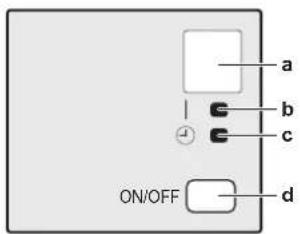
a Signal receiver
b Operation lamp
c Timer lamp
d ON/OFF button
ON/OFF button
If the user interface is missing, you can use the ON/OFF button on the indoor unit to start/stop operation. When operation is started using this button, the following settings are used:
- Operation mode = Automatic
- Temperature setting = 25°C
Airflow rate = Automatic
2.2 About the user interface
- Direct sunlight. Do NOT expose the user interface to direct sunlight.
- Dust. Dust on the signal transmitter or receiver will reduce sensitivity. Wipe off dust with a soft cloth.
- Fluorescent lights. Signal communication might be disabled if fluorescent lamps are in the room. In that case, contact your installer.
- Other appliances. If the user interface signals operate other appliances, move the other appliances, or contact your installer.
- Curtains. Make sure that the signal between the unit and the user interface is NOT blocked by curtains or other objects.

NOTICE
- Do NOT drop the user interface.
- Do NOT let the user interface get wet.
2.2.1 Components: User interface
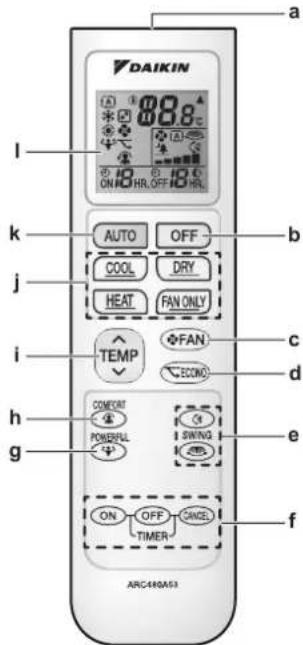
a Signal receiver
b OFF button
c Fan setting button
d Econo operation button
e Swing buttons
f Timer setting buttons (ON, OFF, cancel)
g Powerful operation button
h Comfort operation button
i Temperature adjustment button
JOperationmodebuttons
k Automatic operation mode button
LCD display
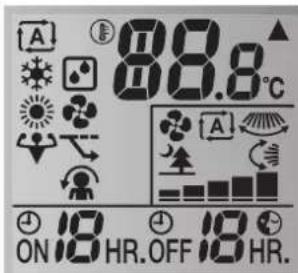
2.2.2 Status: User interface LCD
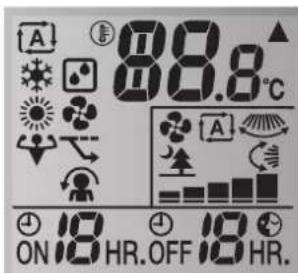
| Icon Description | |
| A | Operation mode = Automatic |
| Operation mode = Drying | |
| Operation mode = Heating | |
| Operation mode = Cooling | |
| Operation mode = Fan only | |
| Powerful operation is active | |
| Econo operation is active | |
| ▲ | The indoor unit receives a signal from the user interface |
| 88.8° | Current temperature setting |
| A | Airflow rate = Automatic |
3 Before operation
| Icon Description | |
| 空心 | Airflow rate = Indoor unit quiet |
| Airflow rate = High | |
| Airflow rate = Medium high | |
| Airflow rate = Medium | |
| Airflow rate = Medium low | |
| Airflow rate = Low | |
| Comfort operation is active | |
| Automatic vertical swing is active | |
| Automatic horizontal swing is active | |
| ON | ON timer is active |
| OFF | OFF timer is active |
2.2.3 To operate the user interface

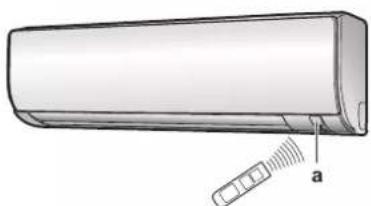
a Signal receiver
1 Aim the signal transmitter at the signal receiver on the indoor unit (maximum distance for communication is 7m
Result: When the indoor unit receives a signal from the user interface, you will hear a sound:
| Sound Description | |
| Beep-beep Operation starts. | |
| Beep Setting changes. | |
| Long beep Operation stops. |
3 Before operation
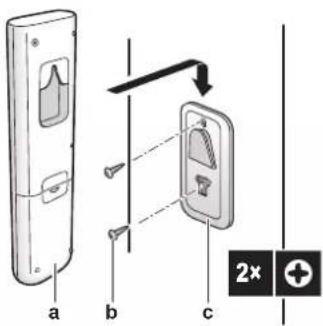
3.1 To fix the user interface to the wall
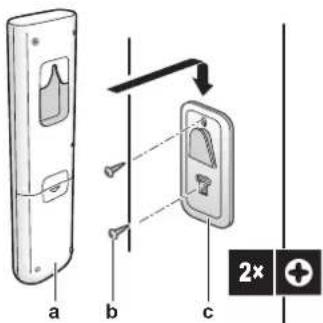
a User interface
b Screws (field supply)
c User interface holder
1 Choose a place where the signals reach the unit.
2 Attach the holder with screws to the wall or a similar location.
3 Hang the user interface on the user interface holder.
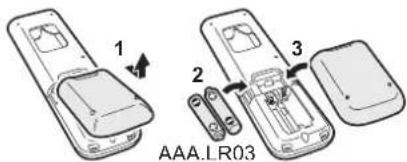
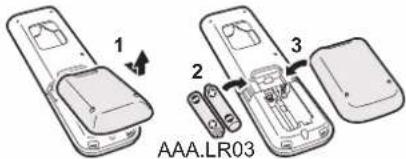
3.2 To insert the batteries
The batteries will last for about 1 year.
1 Remove the back cover.
2 Insert both batteries at once.
3 Put the cover back.
3.3 To switch between Fahrenheit and Celsius
Prerequisite: Change this setting only when the temperature is displayed.
1 Press arep simultaneously for about 5 seconds.
Result: The setting changes.
3.4 To turn on the power supply
1 Turn the circuit breaker on.
Result: The flap of the indoor unit will open and close to set the reference position.
4 Operation
4.1 Operation range
| Operation mode | Operation range |
| Cooling(a)(b) | ·Outdoor temperature: -10~46°C ·Indoor temperature: 18~32°C ·Indoor humidity: ≤80% |
| Heating(a) | ·Outdoor temperature: -15~24°C ·Indoor temperature: 10~30°C |
| Drying(a) | ·Outdoor temperature: -10~46°C ·Indoor temperature: 18~32°C ·Indoor humidity: ≤80% |
If operated outside the operation range:
(a) A safety device might stop the operation of the system.
(b) Condensation might occur on the indoor unit and drip.
4.2 When to use which feature
You can use the following table to determine which features to use:
| Feature | Tasks |
| Basic features | |
| Operation modes and temperature | To start/stop the system and to set the temperature: • Heat up or cool down a room. • Blow air in a room without heating or cooling. • Decrease the humidity in a room. • In Automatic mode, automatically select an appropriate temperature and operation mode. |
| Feature Tasks | |
| + Airflow direction | To adjust the airflow direction (swing or fixed position). |
| Airflow rate | To adjust the amount of air blown into the room. To run more quietly. |
| Advanced features | |
| Econo | To use the system when you are also using other power-consuming appliances. To save energy. |
| Comfort | To provide a comfortable airflow that does NOT come in direct contact with people. |
| Powerful | To cool down or heat up the room quickly. |
| ON timer + OFF ON + OFF timer | To automatically turn ON or OFF the system. |
4.3 Operation mode and temperature setpoint
When. Adjust the system operation mode and set the temperature when you want to:
- Heat up or cool down a room
- Blow air in a room without heating or cooling
Decrease the humidity in a room
What. The system operates differently, depending on the user selection.
| Setting Description | |
| Automatic | The system cools down or heats up a room to the temperature setpoint. It automatically switches between cooling and heating if necessary. |
| Drying | The system decreases the humidity in a room without changing the temperature. |
| Heating | The system heats up a room to the temperature setpoint. |
| Cooling | The system cools down a room to the temperature setpoint. |
| Fan | The system only controls the airflow (airflow rate and airflow direction). The system does NOT control the temperature. |
Additional info:
- Outside temperature. The system's cooling or heating effect decreases when the outside temperature is too high or too low.
- Defrost operation. During heating operation, frost might occur on the outdoor unit and decrease the heating capacity. In that case, the system automatically switches to defrosting operation to remove the frost. During defrosting operation, hot air is NOT blown from the indoor unit.
4.3.1 To start/stop operation and to set the temperature

Operation mode = Automatic

Operation mode = Drying

Operation mode = Heating

Operation mode = Cooling

Operation mode = Fan only

8.8°
Shows the set temperature.
1 Start operation by pressing one of the following buttons.
| Mode Press Result | ||
| Automatic operation | AUTO | The operation lamp lights up. |
| Cooling operation | COOL | |
| Drying operation | DRY | |
| Heating operation | HEAT | |
| Fan only operation | FAN ONLY |
2 Press or on the button one or more times to set the temperature. You CANNOT adjust the temperature in drying or fan only operation mode.
| Cooling operation | Heating operation | Automatic operation | Drying or fan only operation |
| 18~32°C | 10~30°C | 18~30°C | - |
3 Press

The operation lamp goes off.
4.3.2 Airflow rate
1 Press

choose:
| 5 airflow rate levels, from "o" |
| Automatic operation |
| Indoor unit quiet operation. When the airflow is set to "”, the noise from the unit will be reduced. |

INFORMATION
- If the unit reach the temperature setpoint in cooling, heating or automatic mode. Fan will stop operating.
- When using drying operation mode, you CANNOT adjust the airflow rate setting.
To adjust the airflow rate
1 Press

change the airflow setting as follows:

4.3.3 Airflow direction
When. Adjust the airflow direction as desired.
What. The system directs the airflow differently, depending on the user selection (swinging or fixed position). It does so by moving horizontal blades (flaps) or vertical blades (louvers).
| Setting Airflow direction | |
| Vertical automatic swing | Moves up and down. |
| Horizontal automatic swing | Moves from side to side. |
| + Airflow direction | Moves simultaneously up and down and from side to side |
| [-] Stays in a fixed position. | |

CAUTION
- ALWAYS use a user interface to adjust the position of the flaps and louvers. When the flaps and louvers are swinging and you move them forcibly by hand, the mechanism will break.
The movable range of the flap varies according to the operation mode. The flap will stop at the upper position when the airflow rate is changed to low during the up and down swing setting.
To adjust the airflow direction
1 To use auto swing, press.
Result: will appear on the LCD.
Result: The flap (horizontal blade) will begin to swing.
2 To use fixed position, press when the flap reaches the desired position.
Result: disappears from the LCD.
To adjust the louvers (vertical blades)
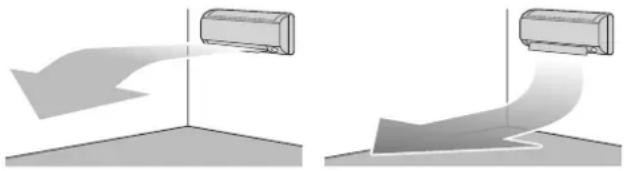
4.3.4 Comfort airflow operation
This operation can be used in heating or cooling operation mode. It will provide a comfortable wind that will NOT come in direct contact with people. The system automatically sets the fixed airflow position upward in Cooling and downward in Heating operation mode.
Cooling operation mode Heating operation mode

INFORMATION
Powerful and Comfort airflow operation CANNOT be used at the same time. The last selected function takes priority. If the vertical automatic swing is selected, Comfort airflow operation will be cancelled.
To start/stop Comfort airflow operation
1 Press to start.
Result: The flap position will change, this is displayed on the LCD, and the airflow rate is set to automatic.
| Mode Position of flap... | |
| Cooling/Drying | Up |
| Heating | Down |
2 Press to stop.
Result: The flap will return to the position from before the Comfort airflow mode; disappears from the LCD.
4.3.5 Powerful operation
This operation quickly maximizes the cooling/heating effect in any operation mode. You can get the maximum capacity.

INFORMATION
Powerful operation CANNOT be used together with Econo and Comfort airflow operation. The last selected function takes priority.
Powerful operation will NOT increase the capacity of the unit if it already operates at maximum capacity.
To start/stop Powerful operation
1 Press to start.
Result: is displayed on the LCD. Powerful operation runs for 20 minutes; after that, operation returns to the previously set mode.
2 Press to stop.
Result: disappears from the LCD.
Note: Powerful operation can be set only when the unit is running. If you press OFF, operation will be cancelled; disappears from the LCD.
4.3.6 Econo operation
This is a function which enables efficient operation by limiting the maximum power consumption value. This function is useful for cases in which attention should be paid to ensure a circuit breaker will not trip when the product runs alongside other appliances.

INFORMATION
- Powerful and Econo operation CANNOT be used at the same time. The last selected function takes priority.
Econo operation reduces power consumption of the outdoor unit by limiting the rotation speed of the compressor. If power consumption is already low, Econo operation will NOT further reduce power consumption.
To start/stop Econo operation
1 Press to start.
Result: is displayed on the LCD.
2 Press to stop.
Result: disappears from the LCD.
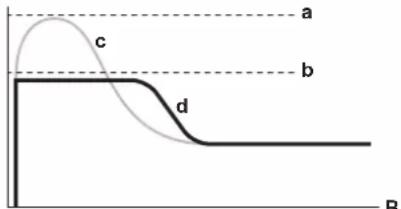
A
A Running current and power consumption
B Time
a Maximum during normal operation
b Maximum during Econo operation
c Normal operation
d Econo operation
- The diagram can be used for illustrative purposes only.
- The maximum running current and power consumption of the air conditioner in Econo operation varies with the connected outdoor unit.
4.3.7 OFF/ON timer operation
Timer functions are useful for automatically switching the air conditioner on/off at night or in the morning. You can also use OFF timer and ON timer in combination.

INFORMATION
Program the timer again in case of:
- A breaker has turned the unit off.
- A power failure.
- After replacing batteries in the user interface.
To start/stop ON timer operation
Use this feature if the unit is NOT operating and you want to start operation after a certain time.
1 Press ON
Result: ON is displayed on the LCD and the timer lamp lights up.
2 Press again if you want to change the time setting.

INFORMATION
Each time is pressed, the time setting advances by 1 hour. The timer can be set between 1 to 12 hours.
Example: If ON 2HR. is set when the unit is NOT operating, operation will start after 2 hours.
3 To cancel the setting, press.
Result: Ohnd the time setting disappear from the LCD and the timer lamp goes off.
To start/stop OFF timer operation
Use this feature if the unit is operating and you want to stop operation after a certain time.
1 Press . OFF
Result: Off displayed on the LCD and the timer lamp lights up.
2 Press again if you want to change the time setting.
INFORMATION
Each time OFF is pressed, the time setting advances by 1 hour. The timer can be set between 1 to 12 hours.
Example: If OFF SHR.is set when the unit is operating, operation will stop after 5 hours.
3 To cancel the setting, press.
Result: OFF and the time setting disappear from the LCD and the timer lamp goes off.
INFORMATION Night set mode
When the OFF timer is set, the air conditioner automatically adjusts the temperature setting (0.5^ up in cooling, 2.0^ down in heating) to prevent excessive cooling/heating and ensure a comfortable sleeping temperature.
To combine OFF timer and ON timer
1 To set the timers, refer to "To start/stop OFF timer operation" on page 7 and "To start/stop ON timer operation" on page 7.
Result: OFF and ON are displayed on the LCD.
Example:
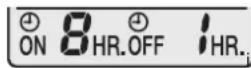
set when the unit is operating.
Result: Operation stops in 1 hour and then starts 7 hours later.
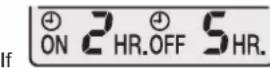
is set when the unit is NOT
Result: Operation starts in 2 hours and then stops 3 hours later.
5 Energy saving and optimum operation
INFORMATION
Even if the unit is turned OFF, it consumes electricity.
- When the power turns back on after a power break, the previously selected mode will be resumed.
CAUTION
NEVER expose little children, plants or animals directly to the airflow.
WARNING
Do NOT place objects below the indoor and/or outdoor unit that may get wet. Otherwise condensation on the unit or refrigerant pipes, air filter dirt or drain blockage may cause dripping, and objects under the unit may get dirty or damaged.
NOTICE
Do NOT use the system for other purposes. In order to avoid any quality deterioration, do NOT use the unit for cooling precision instruments, food, plants, animals, or works of art.
CAUTION
Do NOT operate the system when using a room fumigation-type insecticide. Chemicals could collect in the unit, and endanger the health of people who are hypersensitive to chemicals.
WARNING
Do NOT place a flammable spray bottle near the air conditioner and do NOT use sprays. Doing so may result in a fire.
Observe the following precautions to ensure the system operates properly.
- Prevent direct sunlight from entering a room during cooling operation by using curtains or blinds.
- Ventilate often. Extended use requires special attention to ventilation.
- Keep doors and windows closed. If the doors and windows remain open, air will flow out of your room causing a decrease in the cooling or heating effect.
- Be careful NOT to cool or heat too much. To save energy, keep the temperature setting at a moderate level.
- NEVER place objects near the air inlet or the air outlet of the unit. Doing so may cause a reduced heating/cooling effect or stop operation.
6 Maintenance and service
- Turn the breaker off when the unit is NOT used for longer periods of time. If the breaker is on, the unit consumes electricity. Before restarting the unit, turn the breaker on 6 hours before operation to ensure smooth running.
- Condensation may form if the humidity is above 80% or if the drain outlet gets blocked.
- Adjust the room temperature properly for a comfortable environment. Avoid excessive heating or cooling. Notice that it may take some time for the room temperature to reach the set temperature. Consider using the timer setting options.
- Adjust the air flow direction to avoid cool air from gathering on the floor or warm air against the ceiling. (Up during cooling or dry operation to the ceiling and down during heating operation.)
- Avoid direct air flow to room inhabitants.
- Operate the system within the recommended temperature range (26 28^ for cooling and 20 24^ for heating) to save energy.
6 Maintenance and service
6.1 Overview: Maintenance and service
The installer has to perform a yearly maintenance.
About the refrigerant
This product contains fluorinated greenhouse gases. Do NOT vent gases into the atmosphere.
Refrigerant type: R32
Global warming potential (GWP) value: 675

NOTICE
In Europe, the greenhouse gas emissions of the total refrigerant charge in the system (expressed as tonnes CO_2 equivalent) is used to determine the maintenance intervals. Follow the applicable legislation.
Formula to calculate the greenhouse gas emissions: GWP value of the refrigerant × Total refrigerant charge [in kg] / 1000
Please contact your installer for more information.

WARNING
The refrigerant inside the unit is mildly flammable, but normally does NOT leak. If the refrigerant leaks in the room and comes in contact with fire from a burner, a heater, or a cooker, this may result in fire, or the formation of a harmful gas.
Turn off any combustible heating devices, ventilate the room, and contact the dealer where you purchased the unit.
Do NOT use the unit until a service person confirms that the part from which the refrigerant leaked has been repaired.

WARNING
- Do NOT pierce or burn refrigerant cycle parts.
- Do NOT use cleaning materials or means to accelerate the defrosting process other than those recommended by the manufacturer.
- Be aware that the refrigerant inside the system is odourless.

WARNING
The appliance shall be stored in a room without continuously operating ignition sources (example: open flames, an operating gas appliance or an operating electric heater).

NOTICE
Maintenance MUST be done by an authorized installer or service agent.
We recommend performing maintenance at least once a year. However, applicable legislation might require shorter maintenance intervals.

DANGER: RISK OF ELECTROCUTION
To clean the air conditioner or air filter, be sure to stop operation and turn all power supplies off. Otherwise, an electric shock and injury may result.

WARNING
To prevent electric shocks or fire:
- Do NOT rinse the unit.
- Do NOT operate the unit with wet hands.
- Do NOT place any objects containing water on the unit.

CAUTION
After a long use, check the unit stand and fitting for damage. If damaged, the unit may fall and result in injury.

CAUTION
Do NOT touch the heat exchanger fins. These fins are sharp and could result in cutting injuries.

WARNING
Be careful with ladders when working in high places.
6.2 To clean the indoor unit and user interface

NOTICE
- Do NOT use gasoline, benzene, thinner polishing powder or liquid insecticide. Possible consequence: Discoloration and deformation.
- Do NOT use water or air of 40^ or higher. Possible consequence: Discoloration and deformation.
- Do NOT use polishing compounds.
- Do NOT use a scrubbing brush. Possible consequence: The surface finishing peels off.

DANGER: RISK OF ELECTROCUTION
Before cleaning, be sure to stop the operation, turn the breaker off or pull out the supply cord. Otherwise, an electric shock and injury may result.
1 Clean with a soft cloth. If it is difficult to remove stains, use water or a neutral detergent.
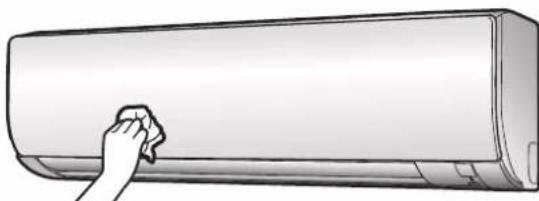
6.3 To clean the front panel
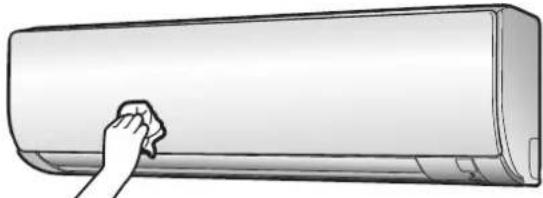
1 Clean the front panel with a soft cloth. If it is difficult to remove stains, use water or a neutral detergent.
6.4 To clean the air filters
1 Push the tab at the centre of each air filter, then pull it down.
2 Pull out the air filters.
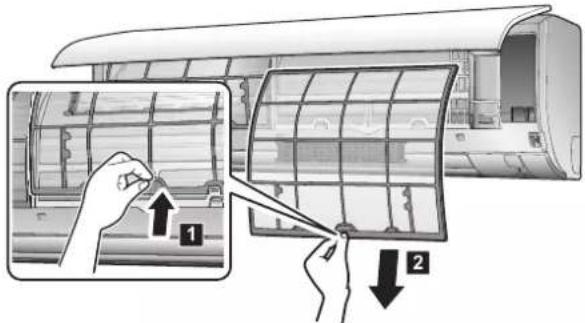
3 Remove the titanium apatite deodorizing filter and silver particle filter from the tabs.
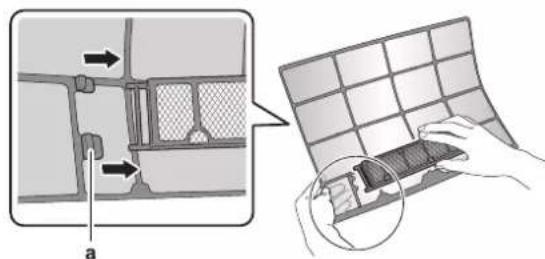
a Tab
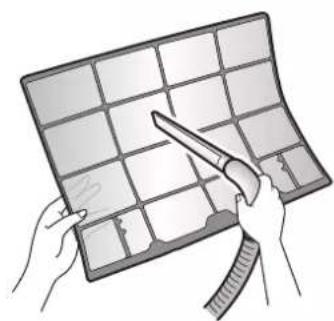
4 Wash the air filters with water or clean them with a vacuum cleaner.
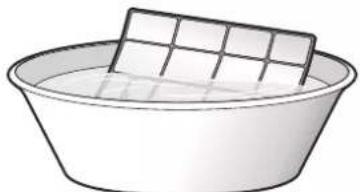
5 Soak in lukewarm water for about 10 to 15 minutes.

INFORMATION
- If the dust does NOT come off easily, wash the air filters with a neutral detergent diluted in lukewarm water. Dry the air filters in the shade.
- Be sure to remove the titanium apatite deodorizing and silver particle filters.
It is recommended to clean the air filters every 2 weeks.
6.5 To clean the titanium apatite deodorizing filter and the silver particle filter (Ag-ion filter)

INFORMATION
Clean the filter with water every 6 months.
1 Remove the titanium apalite deodorizing and silver particle filters from the tabs.
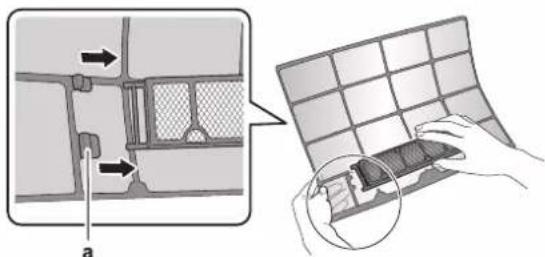
a Tabs
2 Remove the dust from the filter with a vacuum cleaner.
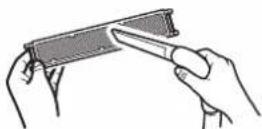
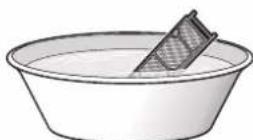
3 Soak the filter for 10 to 15 minutes in warm water. Do NOT remove the filter from the frame.
4 After washing, shake off remaining water and dry the filter in the shade. Do NOT wring out the filter when removing water.
6.6 To replace the titanium apatite deodorizing filter and the silver particle filter (Ag-ion filter)

INFORMATION
Replace the filter every 3 years.
1 Remove the tabs on the filter frame and replace the filter with a new one.
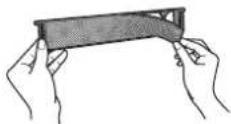

INFORMATION
- Do NOT throw away the filter frame, but use it again.
- Dispose of the old filter as non-flammable waste.
2 Remove the filter from the tabs and prepare a new filter.

INFORMATION
Dispose of the old filter as non-flammable waste.
6.7 To close the front panel
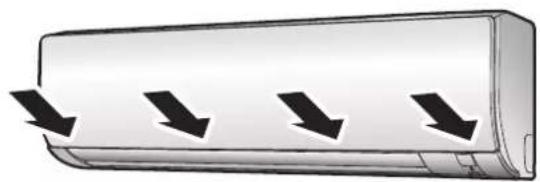
1 Gently press the front panel at both sides and at the center until it clicks.
6.8 To take following items into account before a long idle period
1 Set the mode to fan only by pressing dry the inside of the unit.
2 After operation stops, turn the breaker off.
3 Clean the air filters and replace them in their original position.
4 Remove the batteries from the user interface.

INFORMATION
It is recommended to have periodical maintenance performed by a specialist. For specialist maintenance, contact your dealer. Maintenance costs shall be borne by the customer.
In certain operating conditions the inside of the unit may get dirty after several seasons of use. This results in poor performance.
7 Troubleshooting
If one of the following malfunctions occur, take the measures shown below and contact your dealer.

WARNING
Stop operation and shut off the power if anything unusual occurs (burning smells etc.).
Leaving the unit running under such circumstances may cause breakage, electric shock or fire. Contact your dealer.
The system MUST be repaired by a qualified service person.
| Malfunction Measure | |
| If a safety device such as a fuse, a breaker or an earth leakage breaker frequently actuates or the ON/OFF switch does NOT properly work. | Turn OFF the main power switch. |
| If water leaks from the unit. Stop the operation. | |
| The operation switch does NOT work well. | Turn OFF the power supply. |
| If the user interface display indicates the unit number, the operation lamp flashes and the malfunction code appears. | Notify your installer and report the malfunction code. |
If the system does NOT properly operate except for the above mentioned cases and none of the above mentioned malfunctions is evident, investigate the system according to the following procedures.

INFORMATION
Refer to the user reference guide located on http:// www.daikineurope.com/support-and-manuals/productinformation/ for more troubleshooting tips.
If after checking all above items, it is impossible to fix the problem yourself, contact your installer and state the symptoms, the complete model name of the unit (with manufacturing number if possible) and the installation date (possibly listed on the warranty card).
7.1 Symptoms that are NOT system malfunctions
The following symptoms are NOT system malfunctions:
7.1.1 Symptom: A sound like water flowing is heard
- This sound is caused by the refrigerant flowing in the unit.
- This sound may be generated when water is flowing away from the unit during cooling or drying operation.
7.1.2 Symptom: A blowing sound is heard
This sound is generated when the direction of the refrigerant flow is changed (e.g. when switching from cooling to heating).
7.1.3 Symptom: A ticking sound is heard
This sound is generated when the unit slightly expands or contracts with changes in temperature.
7.1.4 Symptom: A whistling sound is heard
This sound is generated by the refrigerant flowing during defrost operation.
7.1.5 Symptom: A clicking sound during operation or idle time is heard
This sound is generated when the refrigerant control valves or electrical parts operate.
7.1.6 Symptom: A clapping sound is heard
This sound is generated when an external device sucks air out of the room (e.g. exhaust fan, extractor hood) while the doors and windows in the room are closed. Open the doors or windows, or turn off the device.
7.1.7 Symptom: White mist comes out of a unit (Indoor unit)
7.1.8 Symptom: The units can give off odours
The unit can absorb the smell of rooms, furniture, cigarettes, etc., and then emit it again.
7.1.9 Symptom: The outdoor fan rotates while the air conditioner is not in operation
- After operation has stopped. The outdoor fan continues to rotate for another 30 seconds for system protection.
- While the air conditioner is not in operation. When the outdoor temperature is very high, the outdoor fan starts to rotate for system protection.
7.2 Solving problems based on error codes
When a problem happens, an error code appears on the user interface. It is important to understand the problem and to take measures before resetting an error code. This should be done by a licensed installer or by your local dealer.
This chapter gives you an overview of all error codes and the content of the error code as it appears on the user interface.
For a more detailed troubleshooting guideline for each error, please see the service manual.
8 Disposal

NOTICE
Do NOT try to dismantle the system yourself: dismantling of the system, treatment of the refrigerant, oil and other parts MUST comply with applicable legislation. Units MUST be treated at a specialised treatment facility for reuse, recycling and recovery.
Inhaltsverzeichnis
GEFAHR:STROMSCHLAGGEFAHR
GEFAHR:STROMSCHLAGGEFAHR
m = 311
m = 311
1.1 Pnnpopopiecs ia to npov Evppao 68
2 PAnpOopOpiecs yia To ouoTnma 68
2.1 EawtepiKn oovda 68
2.1.1 Oboyn eowrepiKns povaas 69
2.2 PAnpoopoe iia to TnAeepioptipio 69
2.2.1 EApntnata: TnaeepioTnio 69
2.2.2 KaTaaan: Ooovn LCD mExepiopntpiou 69
2.2.3 Tia va aeitoupyneTe TO nAExeiipntio 70
3 Piv aTó Tn λειτoupyia 70
3.1 Ia va OTEpeewoETe To nAExeiipioTIOAOV Toixo 70
3.2 Tia va toTROBtHOeTE Tc MTATApIEc 70
3.3 Tia evaayn eau aouv Dapevaat kai Kkoiou 70
3.4 Tia va evepyotoinote TNV npoxn nAektpiokou peuatoC.... 70
4 Λειρουγία 71
Evikcs TPOpuAaeic aQaAeia:
OByiec aopaleiaic ts otioie cpietie va diaabaete piv ato np XpnoTou ouatmuatoC
Mopfn:EvtuTo (Otn Ouaekuaia TcE oWtepiKnc Movadac)
Evyεipidio λειToupyiα:
- Frphyoporos obnyos yia baoikxphon
Mopfn:EvtuTO (Otn OoKEuaOia TcS cOwTepiKc Jovadac)
- ObnyoC avaopac xpiotn:
AeTIOpeEic OOnyieC Bna-tna KAI YeviKa EvnepwTikc ATOIXEA ia BaoiKn XpOon KaXpOon iA PPOxwnPevouc
Mopn: Apxieia e Ψηφiaκι μoρπ Οην τοῦθείαι http:// www.daikineurope.com/support-and-manuals/product-information/
OI TEAEUTAEs AVaEwphoeis Tuv TApexoEvov OuvodetIKWv Eyypaewv Evexetai va eivai diaeoiues otnv totoea Web Tns Daikin stxopaacn eoou Tou Teviokou ncs Eykatataang ca.
Ta TpwtotuTt eyypapa TeKunpiwnc exouv ouvtaxei oAyyiKa. OAc ot UTOAOITE YAWOe cAtOTELOUV MTeaPaeis.
2.2.2 KaroTaon: Obov n LCD thxepiotnpiou
4.3.3 Katoovon po ncaepa
Note. Puθμiote tv KATEuθuvon ts pons tou αεpa ouφwva με tis πριησεισ σας.
Ti. To ouotnma kateuthetai np ton tou aepa diapopetiká, avaloyama e Tnv etiloyntou xhotn (kivnan n otahepn the). Auto to kavei metakivwvtacis opicovties aeidec (TTEpuyia) n TIC katakopupes aeidioc (Tpeoioc).
H movda a toppoppa tn mupwia tw womegaiv, tw einnawv, tw Toiapwv knt. kai katotnv tic aoBaaeei.
2.2.3 YnpaBHeHne HHTepeEcom
NOJb3OBaTeJIa
aPnemMHK CnHnAOB
1 HabeTe nepeTaTnK CnHaNoB Ha npHmHb BHyTpHeHrO 6noka (C83b OcyueCTBnaeTcHa paacToaHm He 60nee 7 M).
PeybtaT: NocynneHHe Ha BHTpeHHn 6NOK CnHnA nnon30BaTeBckoro INTEpceica cnpboKdaeTc3BykOM:
aNoIb3OBaTeBckn HHTeppeic
b BnHtB (npno6peTaTcNo MeCy ycTaHOBKn)
C DepeKaTeNb nonb3oBaTeNbckOrnHTepFeIca
1BbIbepe TaKoe MeTo,OTKya CnHnbl CMOrYT 6ecnpenrTCTBeHHo pacnpocTpHaTbC B HAnpaBHeHn 6Joka.
2 3akpenTe BnHTaMn DePkaTeIb Ha CteHe IIN B aHaIOrNCHOM MecTe.
3 PnDBeCte INHTeppeic nnonb3oBaTeJ K DepKaTeJIIO.
3.2 Bctabka 6aTapeek
Cpok cnjkb6b6aTaape CoCTabnEe npImepHo 1 ro.
1 CHMMNTe c 6aTapeHoro oTceKa KpbIiKy.
2 BcTaBbTe cpa3y o6e 6aTapeKm.
3 YctahOBNTe KpbilHKy Ha MeCTO.
3.3IpeeknoueHne eHHnU n3MepeHnTeMnepaTpybI (rpaDycblΦapeHreTa nnn Cenbcna)
PpeBapnteHbHe yCNoBn: 3Ty HAcTpoKy MOxHO CMeHHTb TOnbKO Torda, KOrHa 3KpaH DIncPiE BbIOaTcR NokaAHHN TEMpepatpbl.
1 OndHOBpeMeHHo HaxMnTe Ha TEMP ON npImepHo Ha 5cekyHd.
Pe3yIbTaT:HaCtpoKa n3MeHnTcra.
3.4 BkIIOUeHne 3JIeKTpOuNTaHnA
1 BkIIOHTe aTOMaT 3aunntbl.
Pe3ynbTat:BoaDyuHnA 3acNoHk BHyTpHeHrO 6NoKa OTKpoEtCn Cpa3y Je 3akPoETc, npHnB NxCoDHe NONoKeHne.
4 3Kcnpnyataua
4.1 Pa6oyn dnaana3OH
4.3.1 Iyck-OCTaHOBka CnCTeMbI yCTaHOBka HxKHOI TEMpePaTypbI
A:pa6oynpeXIM=ABTOMaT
:pa6oHnpeKm=cuoka
:pa6ouypejM o6orpeB
paobounpexnun = oxnaekdehne
pa6oyn peKIM = TOnbKO BeHTINRAU
88.8 C: BBIOD 3aDaHHoN TempepaTpyb Ha ekpan DnCnJIe.
1IyckOcyueCTBnEeTcHaxaTHeM OdHOJ n3 CneDyUux KhoNOK.
3 HaXMMTe, 105bIOCTaHOBHTb pa6Oly.
Peylbat: INdkaTop pa6oTb noraHcTe.
4.3.2 INHTeHCNBHOCTb BO3dyxOTOKa
1HaxMNTe,5ANBbIbpaTbOuINn3BapnaHTOB:
2 HactpoKy TaMepa MoXHO CMeHHTb NOBTOPHbIM HaxKaTneM Ha OFF

HHΦOPMALI
C KaKbIM HauKaTHeMa 3aTeBpeBpeMeHn yBeMnUBaTcRa Ha 1 qac. TaImeP MoKHo 3anporpaMMnpoBaTb Ha npomexyTok BpeMeHn OT 1 do 12 qacob.
Pnmupe: Pn aKtuaqnn OFF SHR.Bo Bpempaobt6noka TOT octaHOBNTc npctra 5 yacOB.
3UTo6bIc6pOuTb 3Tu HAcTpOuKy, HaxMnTe.
Pe3yIbTaT: OFF 3aHaHHe BpeMa IcHe3aHT c 3KpaHa KKd, a INHINKATOp TaHMepa RaCHET.

INHΦOPMALU
Houho npexnM
Korda TaHMeOpKIOUey, 3aHaHHa TeMnepaTypa perynpyetcABTOMaTHueckn (NOBbIaETc Ha 0,5^ B pexime OxnaKeHn n noHnKaTeC Ha 2,0°C npn pa6oTe Ha o6OrpeB) Bo n36eKaHne nepeoxnaKeHn nn neperpeBa n dnn noDdepKaHn TeMnpaTpbl, kOmΦopTHoI dI CHa.
YTo6bI OJHOBpeMeHHO 3aJeNCTBOBaTb TaIMep BbIKIOUeHnI TaIMep BKIOUeHnI
1 HaCtpoTe TaImeB B nopAke, n3noKeHHOM B naparpaPax
《Nyck-OCTaHOBka OTKnIOUeHnna CnCTEmbl NO TaIMepy》Ha
ctp. 97 n «Nyck-OCTaHOBka BKIOUeHnna CnCTEmbl No
TaIMepy》Ha cTp. 97.
PeznybTa:HaekpaHe KKIOBnBcTcCmBOJIbOFFON
Приимер:
2PnakTbauuONHR.OFFHR. BO BpempaOTo b6noka:
Peybta: onepaunn octaHabnaeTc 1 yac, a cnyc7 acob 3anyckaetc CHOba.
3 Pn aKTHBaun ON 2 HR.OFF 5HR. korgda 6nok HE pa6oTaet:
Pe3yIbT: onepaunocctaHabnaeTcpees 2 yaca, a cnyc7 3 acob 3anyckaetc CHOBA.
5 3koHOMnJ 3JIeKTpO3HeprnI n ONTMaJIbHbIe ycNoBnJa60TbI

NHΦOPMALU
- BIOK nOTpe6IaET 3JIeKTPo3HeprIIO daJke B nOIOXeHNn BblkI.
C BOCCTaHOBJIeHHeM NOJaH NJIeKTPoNtAHnI NOcJIe c50a CNTema BO3O6HOBJIeT pa60Ty B 3aJAAHHOM Do c50a peXnme.

IPEIOCTEPEKHEHNE
TeTN,paCTeHnI JXNBOThbIE HE DoJIKNbI HAXOINTBcN NOI npMbIM NOTOKOM BO3Dyxa N3 KOHNIOHEpa.

PNEpyNPEKDEHNE
HE pa3MeaIte noB BHTpeHHM n/nnn noD HapyKbIM 6bnokom npedMeTb, KOtOpBle MOryt 6bItb NOBpeXeHb BOIO. B pOtnHBOM cNyaae KOHDeHCat Ha 6nOke nn Tpybx xnaIadareHTa, rpa3b B 03dyuHOM fNlbtpre nn 3acop dpHeXaM OryT Bb3BaTb KaIInePaJeHne, YTO MOKeT npnbecTI K 3arp3HeHIO nn NOnOMke npedMeTOB, HaxoJdUxxCraNo 6bnokom.

IPIMMEAHNE
HE NOIb3yItecb CNTeMoB B cIeJx,OTJIuHbIX Oe npAmoro Ha3HaueHHa.Bo I36ExKaHHe CNKKeHHaQueCTBa pa6Otbl 6Ioka HE NoIb3yItecb IM dIra OxnaKeHHa BBICOKoToUHbIX IN3MePHTeBbHbIX npIN6OpOB, pOdyKTob NITAHnA, pAcTeHN, KINBOTbHbIX INpeDMeTOB NCKYcCTBa.

IPDEIOCTEPEXEHNE
HE BKNHouaHTe CNTeMy BO Bpempa6oTbI KOMHaTHORO HNCEKTHUINHO CpeCTBa KypntBHorO Tnna.3To MOXET PnBecTN K CKONJIeHNIO NcnapreMbx XIMNKATOB B 6Noke, UTO QPeBaTO yrpo30J 3DopOBbIO nuc c NOBblHeHHO YyBCTBnTeBnHOCTbIO K TakIM BeueCTBaM.

PENPYNPEKDEHNE
HE depKInTe pIOM c KOHdNcHOpem a3pO30JIbHbIe ynakOBKn C BOCnPaMeHraIOUIMmCRA BeJeCTBaMn H E IOJIb3yITeCb NylBBePn3aTOpAMn C OrHeONaCHbIM coDEpKIMbIM.3To MoKeT npVBecrN K Bo3ropaHIO.
YTO6bIOCTNUOBONTMaJIbHbIXXapakTePncTnKpa6OtblCnCTeMbI, Heo6xOJMoMo cO6NHOaTb onpeDeeneHHBe npabna.
-Пи pa6oTe cncTeMbI B peKIMe OXnaJdeHn He dOnyckaIte
ПОпаданЯВ NOMeUeHnne npRmbIX COINHeuHbIX NpyeI,
NcONlb3yIte 3aHaBeCKn INI XaJIIO3N.
-Периончесн npOBeTpNBaTe NOMEseHne. Пп INHTeHCNBHOJ 3KcNpyatauIN CNTeMbI OCObE BHMaHHe HxH0 yDeJIaTb BEHTnlaUIn.
-Деркinte OKHAи Дерп 3аКрытбИМ.Есп Oн ИТКрытБ,ЦКуяць BO3dIyXa CHN3NT 3ФФeKTHBHOCTb OXnaXdEHN INI NO6orpeBa nOmeUeHn.
-135E4AITEpeoxnaednH npeperpebnomeuenB ueJx 3KOHOMN 3NeKtpo3Heprn noDepkXBaIte TempepaTyP Ha cpeHem ypOBHe.
- Hn B KOem cnyae HE pa3meuauTe noCTopoHne npedmetb BO3JIe BO3dyXO3a6OpHNKOB IN BByIyCKHBIX OTBepCTNI 6Noka.3TO MOKeT pINBeCTNI K CHHXKeHHIO 3ΦΦeKTNUBHOCTNI O6OrpeBa IN OXJaXdEHHN CHHXKaETcR INI K NOLHOMY BByXOy CnCTEmbl N3 CTPOJ.
HaBpMaIpoDIOJXHbIXIPOCTOEB6IOKaOTKINOHTeero OT3NeKtpoNTAHn. Daxke Hepa6oTaOuN 6Iok noTpe6nAeT3NEKTPo3HePnIO,ecNJPiTahne OCTaETcNOkNIOpEHHBIM.
Ipeed 3anyckom 6loka noaTe Ha Hero nTuHne 3a 6 YacOB do Hauana pa60tbi -3TO oBecnueHT HauNyUwne ycNoBn Ipn pa60tbi 6loka.
-Пи Влжности BO3dya 60nee 80% И пи Засорен CINBHorO OTBepCTN B03MOxH0 O6pa3oBaHne KOHDeHCata.
-Пиустановке TemпepаТурь ВОЗдухВnomошенистарпесь co3ДаТь Han60еe komфорTHье усновя.Изberай Tepeoxлackdenя И=npерразь.ПOMHNTe O TOM,чTo TempepaTураВnomошени дocTINHTETaDAHHOHЛIMMbЧepes HeKOTOpoe Bpem.YI3yHTe BO3MOXHOCb IcNoJIb3OBAHnB BapnaHTOB yCTaHOBkTN TaIMepa.
-PerynpyTe HanpaBHeHne Bo3dyxToKa Bo 36eKaHne cKoPHeHn npoxnaDHoro Bo3dyxa y noJa, a Tennoro - y notOnka. (HanpaBraIte Bo3dyxBepx npn pa6Ote Ha oxnaJeHne nIn B peXmpe PocuIKn BHN3 npn pa6Ote Ha o6orpeB).
-Ⅲ6eraTe nprrMOBO3DeIcTBnI NOtOKA BO3dyXHa HaxoJxxCB NOMeUeHN IIOde.
- PekomeHdoBaHHbI TeMnepaTyhbl Dnana3OH 3Hepeoc6eperaoue EKcNlyataunn CNTEmb CoCTaBnreT 26~28°C B pexime oxnaJdeHn n 20~24°C npn pa6oTe Ha o6orpeB.
6 TexHnueckoe n Hnoe 06cIyXnBaHne
6.1 O63op:TexHnueckoe n Hnoe 06cnyxHBaHne
MohtaxHnK DoJnxH npOn3BOaNTb eXeOdHoe TexHueeckoe 06cnykuaHne.
O xlaadareHTe
3To H3dEne coepKNT BbIbIbIaIOUne NapHKnOBbI 3ΦΦeKT ΦTocOePkaUne ra3bI. HE BbIyckaIte ra3bI b aTMocfepy.
Tyn xnaaareHra: R32
3haeHne noTeHuaIra rnoabIbHoro noTeJIeHn (GWP): 675

ПРИМЕЧАНЕ
B Ebpone Inra paceta nepnoDnHocTn texnueckoro 06cnykBaHn NcNoNb3yIOT BeiunHy BbI6pocOB npHNKOBbIX ra30B o6uero KOnmecTba XnaaareHTA, 3aPapBHeHHOro B CNTeMy. 3Ta BeJInuHa BbipaxaetcR B TOHHX 3KBnBaIeHTa CO 2. Co6nOdaTe DeIcTBYIOoee 3aKOHOdaTeJIbCTBO.
ΦopMyna paçaTe BAENHnBb Bb6pocOB napHKnOBbIX ra3OB: 3NaueHne GWP xnaDareHTa × O6uee KOJNueCTBO 3anpaBHeHHoro xnaDareHTa [B Kr] / 1000
3a 60nee noDpo6Hoi HnFopMaueNe o6paauTecb B opraHn3aUIO, BblONHRABlyO MOHTax.

PNEpyNPExEHNHE
XJaIaReHT B 6nOke yMepeHNO rOpUy N o6bIuHO HE BbITEKaET. B Cnyuae yTeUKN B NOMeUeHN KONTAKT XJaIaReHTA C PnAmEHem RopeKIN, HArpeBaTeJEM IN KxOHHo PJIITOn MOKe IpNBecTN K Bo3ropaHIO INN O6pa3OBaHIO BpeHOrO ra3a.
BbIKIOHTe BCE orHeONacHbIe HarpeBaTeJIbHbIe ycTpoiCTBa, npoBeTpne NomeuEne H CBxNtEc b C dInepom, y KOTOPOro Bbl npno6pein arperat.
HE nonb3yntecb 6nokom do tex nop, noka cneuanaicct cepBnchOH cnjxkbI He noTBePNT BOCCTaHOBNEHHeNCnpaBHOCTN yJIOB, B KOToPbIX npOn3Owla yTeKaXnaDareHTA.

IPEyIPEKDEHNE
3APPEUAAETCnpoDJIbBaTbOTBepCTN B 3JEMeHTax KOHTypa XJaIaReHtAnoDBePraTb Nx BO3DeECTBIOOrH.
HE Donyckaetra pImeHHe NIObix uNCTaunx CpeCDTB ININ CNOCOBY yCKOeHn paMOpO3KN, NOMMO peKOMEHDoBAHHbIX n3ROTOBtEnEM.
- YUHTTE, YTO XnadaREH, KOToPBIM 3anpaBneHa cnCTema, 3anaXa HE nMeet.

IPEyIpyEKeJDEHNE
O60pyoBaHnpe pa3MeuAeTcB nOmeueHn 6e3 NOCTOHHo DeIcTBHyUxN IcTOHKnOB Bo3ropaHn (HaNP., OTKpblTorO orH, o60pyoBaHn, pa6ToaUeero Ha ra3e, nn DeIcTByUxN 3NeKtpoo6OrpeBaTeene).

ПИМЕЧАНЕ
Texnueckoe 06cnykBaHne MoKet npoBODtbcr TOJbKO yonHomOeHHbIM MOHTaXHHKOM nnn cneuaJIncTOM no 06cnykBaHIO.
Texnueckoe 6cnnykBaHne pekomehnyetc npoBOnt b He pexe pa3a B roD. Ppi 3TOM cneJeYt yecb, YTO DeiCTByUOUM 3aKHOHaTeNbCTBOM MOXET npedncbBaTcR COKpaueHHa NepnoDnHocTb Texo6cnykBaHna.

ONACHO! PNUCK IOPAXEHN 3JIKTPUQECKIM TOKOM
Ipeep oucctkO KOHnUHOhepa NIN BO3dyuHoro
fNtpa 063aTeNbHO ocTaHoBnTE KOHnUHOep N BbIKNoHTe BCE nCToCHNI 3NEKTPoNTaHn. B npOTNBOM Cnyae Bo3MOXhbl nopaxHe He 3NEKTPueckm Tokom Nn TpaBA.

IPIEpyIPEKJEHNE
YTo6bl npedotbpaTb nopaxHe 3JKeKtpuecknM TOKOM nn noxap:
HE npomBaIte 6nok ctpye BoDbl.
-HE 3Kcnpnyatpynte 6JOK C BnaxhblIM pykam.
HE yctaHabnBaTe HnKaKe npeDMeTb, cOePkaUne BODy,Ha 6Iok.

IPPEDOCTEPEXEHNE
Pocne dnteBho npoTb erno noKeHnHa KpEnKHO pame, a TaKe KpenKHe de Tane Ha npedmet nobpeXeHnra. TaKe NOBpeXeHnmoTnpBecnKnaDeHIO 6NoKa nCTaTb npuHNO TpaBMbl.

IPEINOCTEPEXEHNE
HE npikacaiTebc K pe6pam TenIoo6MeHHnka. 3TN pe6pa IMeOToUeHb OCTpbie Kpa, O KOtOpBle NERKO NOpe3aTbcra.

PENDEYNPEKDEHNE
PpnpoBedeHn BbICOThBix pa60T co6nIOaIte octopoxHOCTb.
6.2 Ynctka BHyTpeneHero 6Ioka n HHTeppeiCa NOJb3OBaTeJIa

PIMMEUHNE
HE noIb3yItec6eH3INHOM, KepocnHOM, pactBOpNTenMn, a6pa3NtBbIMMaTePnaanmXnKdMn INCEKTNUaMn. Bo3moxHoe cJeCTBne: BbUcBeTaHne n Deopmaua.
HE noJIb3yIteCb BOdo n BO3dyXOM, TEMnepaTypa KOToPbIX DoCTNraet 40^ .Bo3MOxHoe cJeDCTBHe: BbUcBETAHne N DeOpMaun.
HE noIb3yntecb noInpuyoUmm cpeDcTaMn.
HE noIb3yItecB JcctKIMN UeTKAMn.Bo3MOxHoe CneIcTBHe:OTCNoEHNIOBepXHOCTHOITDeKN.

ONACHOI PNCK IOPAXEHN 3JIKTPUeCKM TOKOM
Ipeed Hauanom YcCTKy 6eNTecb B Tom, yTo CnCTema BblknoheHa, a TtenceJIb N3BneueH n3 po3eKn. B npOTNBOM Cnyae MoKet npOn3oHTn nopaxHe He 3NEKTPnueCKM TOKOM JIN HaHeCEHne TpaMbI.
1YCTKc CneIyET npON3BOIDtB C NOMOJIb MO MANKO TKAHN. CmBaIte nTnA BDOJ HIN HeITpAlbHbIM MOIOUIM cpeDCTBOM.
6.3 Ynctka IInceBoN nAneJI
1 NnueByo naHEnb cIeDyET npOtnpaTb MmKoT KaNbIO. CmbBaIte nIHTa BOOn IIN HeITpAlbHbIM MOIOUIM cpeDCTBOM.
Sonuc: Calisma lambasi soner.
4.3.2 Hava debisi
