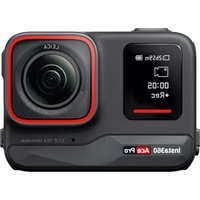
Ace Pro - Camcorder INSTA360 - Free user manual and instructions
Find the device manual for free Ace Pro INSTA360 in PDF.


| Product type | Camcorder / Action cam |
| Brand | Insta360 |
| Model | Ace Pro |
| Reference | CINSAAJA |
| Power supply | 5-9 V, 3 A max |
| Battery | Li-ion 1650 mAh, 6.35 Wh |
| Operating temperature | -20 °C to 40 °C |
| Charging temperature | 0 °C to 40 °C |
| Operating humidity | ≤ 80 % RH |
| Bluetooth | 2402-2480 MHz, < 10 dBm (E.I.R.P.) |
| Wi-Fi | 2.4 GHz / 5.1 GHz / 5.8 GHz, < 13 dBm (E.I.R.P.) |
| Cleaning | Soft dry cloth, no liquid products |
| Storage | Dry environment; remove battery if not used for long periods |
| Safety | Keep away from pacemakers (magnets); do not use non-official batteries |
| Water resistance | Only with battery and USB covers properly closed |
| Compliance | CE, UKCA, IC, FCC |
| Included accessories | Flexible adhesive mount, standard mount |
Frequently Asked Questions - Ace Pro INSTA360
User questions about Ace Pro INSTA360
0 question about this device. Answer the ones you know or ask your own.
Ask a new question about this device
Download the instructions for your Camcorder in PDF format for free! Find your manual Ace Pro - INSTA360 and take your electronic device back in hand. On this page are published all the documents necessary for the use of your device. Ace Pro by INSTA360.
USER MANUAL Ace Pro INSTA360
Please read this Disclaimer carefully. Using this product means that you acknowledge and accept the terms of this disclaimer. By using this product, you hereby acknowledge and agree that you are solely responsible for your own conduct when using this product and any consequences thereof. You agree to use this product only for proper and lawful purposes. You understand and agree that Arashi Vision Inc. (hereinafter referred to as 'Insta360') accepts no liability for any and all misuse, consequences, damages, injuries, penalties, or any other legal responsibility directly or indirectly incurred by your using this product and associated accessories. Before every use, make sure that your accessories are functioning properly. If there's any damage or irregularity, stop using them immediately. Within the scope of state laws and regulations, Insta360 reserves the right of final explanation and revision for the commitment.
Warnings
① This camera contains magnets. Make sure to keep it away from pacemakers and other devices to avoid interference.
② Before using the camera, ensure that: the battery is installed correctly, the Battery Cover and USB Cover are properly closed. The camera is not waterproof without these measures. In addition, ensure the camera is dry before removing the battery. If there is water in the Type-C port and TF card slot under the USB cover, open the USB cover, wipe it and let it dry naturally before use.
③ The camera should only be used in temperatures from -4^ to 104^ (-20^ to 40^)
④ Do not charge the battery immediately after use, as the battery temperature may be too high. It is advised to wait to until the battery cools to room temperature before charging. Charging the battery in environments above 104^ (40^) or below 32^ (0^) may lead to battery expansion, leakage, overheating, or battery damage.
⑤ The battery can be charged while installed in the camera, or via the Fast Charge Hub. Use a power adapter that complies with the charging specifications. Remember to disconnect the camera or battery after fully charged.
⑥ If the camera has not been used for three months or longer, the battery may be depleted. Please charge the camera to turn it on.
⑦ Do not leave the camera near heat sources such as a heater or cooker. Do not leave inside of a vehicle on hot days.
(8) Do not drop or strike the camera and do not place heavy objects on it.
⑨ Do not store or transport camera batteries together with metal objects such as watches, keys, and jewelry.
10 If the battery falls into water, place it in a safe open area and keep away from the battery until
it is completely dry. Do not use the battery again.
1 Do not use batteries that are deformed or show any signs of damage. Batteries cannot be disposed of together with household refuse. They must be placed in a designated recycling bin. Please abide by local regulations on battery recycling and dispose of the batteries contained in this product correctly.
Notes
① Dropping the camera may damage its internal components and cause it to perform abnormally.
② Keep the camera away from sand and dust.
③ Do not use in extreme weather conditions such as heavy storms.
④ Do not leave the camera or battery in an extremely hot or cold environment. Cold or high temperatures may temporarily shorten battery life or cause the camera to stop working.
⑤ Avoid dramatic temperature or humidity changes as condensation may form on or within the camera.
⑥ When using the Adhesive Mount, please attach the camera to dry, clean, flat surfaces only. The Flexible Adhesive Mount can be connected to a Standard Mount to install a camera. When engaging in high-speed or high-intensity environments, the Flexible Adhesive Mount should not be used with an extension pole, otherwise, your camera and accessories may fall off.
⑦ When using the Standard Mount in high-intensity action scenarios, ensure the camera is
secure and avoid violent impact to prevent it from falling or getting damaged.
To clean the camera, use only a soft dry cloth. Do not use any liquid cleaning products.
Store the camera in a dry environment.
If you are not planning to use the camera for a long time, it is recommended to remove the battery from the camera and store it separately.
It is prohibited to use batteries that are not officially supplied by Insta360. If you need to replace the battery, please purchase from the official Insta360 website or our recommended channels. Insta360 will not be responsible for battery accidents or product failures caused by the use of batteries not officially supplied by Insta360.
Specifications
| Name | Insta360 Ace Pro |
| Model | CINSAAJA |
| Input | 5-9V 3A Max |
| Bluetooth | Operation Frequency: 2402~2480MHz Transmitter Power (E.I.R.P.): < 10dBm |
| Wi-Fi | 2.4GHz WIFI: 2400~2483MHz Operation Frequency: 5.1GHz WIFI: 5150~5250MHz 5.8GHz WIFI: 5725~5850MHz |
| 2.4GHz WIFI: < 13dBm Antenna (E.I.R.P.): 5.1GHz WIFI: < 13dBm 5.8GHz WIFI: < 13dBm | |
| Battery | Capacity: 1650 mAh Energy: 6.35 Wh |
| Operating temperature -20 °C to 40°C | |
| Charging temperature 0 | °C to 40°C |
| Operating humidity ≤80%RH | |
简体中文
安全信息
免责声明
han 360' iHa Arashi Vision Inc. ( )ha Insta360' iHa Insta360' iHa Insta360' iHa Insta360' iHa Insta360' iHa Insta360' iHa Insta360' iHa Insta360' iHa Insta360' iHa Insta360' iHa Insta360' iHa Insta360' iHa Insta360' iHa Insta359' iHa Insta359' iHa Insta359' iHa Insta359' iHa Insta359' iHa Insta359' iHa Insta359' iHa Insta359' iHa Insta359' iHa Insta359' iHa Insta359' iHa Insta359' iHa Insta359' iHa INSTA359' iHa INSTA359' iHa INSTA359' iHa INSTA359' iHa INSTA359' iHa INSTA359' iHa INSTA359' iHa INSTA359' iHa INSTA359' iHa INSTA359' iHa INSTA359' iHa INSTA359' iHa INSTA359 'iHa INSTA359' iHa INSTA359' iHa INSTA359' iHa INSTA359' iHa INSTA359' iHa INSTA359' iHa INSTA359' iHa INSTA359' iHa INSTA359' iHa INSTA359' iHa INSTA359' iHa INSTA359' iHa INSTA
##
J ② J J J J J J J J J J J J J J J J J J J J J J J J J J J J J J J J J J J J J J J J J J J J J J J J J J J J J J J J J J J J J J J J J J J J J J J J J J J J J J J J J J J J
104 1-4 2 2 2 2 2 2 2 2 2 2 2 2 2 2 2 2 2 2 2 2 2 2 2 2 2 2 2 2 2 2 2 2 2 2 2 2 2 2 2 2 2 2 2 2 2 2 2 2 2 2 3.
JlI360 Jn Jn Jn Jn Jn Jn Jn Jn Jn Jn Jn Jn Jn Jn Jn Jn Jn Jn Jn Jn Jn Jn Jn Jn Jn Jn Jn Jn Jn Jn Jn Jn Jn Jn Jn Jn Jn Jn
360 LwJ J. J. J. J. J. J. J. J. J. J. J. J. J. J. J. J. J. J. J. J. J. J. J. J. J. J. J. J. J. J. J. J. J. J. J. J. J. J. J. J. J. J. J. J. J. J. J. J. J. J. J. Insta360 g o g o g o g o g o g o g o g o g o g o g o g o g o g o g o g o g o g o g o g o g o g o g o g o g o g o g o g o g o g o g o g o g o g o g o g o g o g o g o g o g o g o g o g o g o g o g o g o g o g o g
aBwIgIyIeJyIyIyIyIyIyIyIyIyIyIyIyIyIyIyIyIyIyIyIyIyIyIyIyIyIyIyIyIy
① nauuuiuunlUsuuuuaaunuauuauauauauauuuuuuuuuuuuuuuuuuuuuuuuuuuuuuuuuuuuuuuuuuuuuuuuuuuuuuuuuuuuuuuuuuuuuuuuuuuuuuuuuuuuuuuuuuuuuuuuuuuuuuuuuuuuuuuuuuuuuuuuuuuuuuuuuuuuuuuuuuuuuuuuuuuuuuuuuuuuuuuuuuuuuuuuuuuuuuuUU
② nəulənəv knsəaou: uunnaanaaevnn
Wuuaa=Wu USB qunauangnnaov naov=wnuunwunansikauanu 82
muaa USB uawu USB uiaa-kuovau
This equipment has been tested and found to comply with the limits for a Class B digital device, pursuant to Part 15 of the FCC Rules. These limits are designed to provide reasonable protection against harmful interference in a residential installation. This equipment generates uses and can radiate radio frequency energy and, if not installed and used in accordance with the instructions, may cause harmful interference to radio communications. However, there is no guarantee that interference will not occur in a particular installation. If this equipment does cause harmful interference to radio or television reception, which can be determined by turning the equipment off and on, the user is encouraged to try to correct the interference by one or more of the following measures:
-- Reorient or relocate the receiving antenna.
-- Increase the separation between the equipment and receiver.
-- Connect the equipment into an outlet on a circuit different from that to which the receiver is connected.
-- Consult the dealer or an experienced radio/TV technician for help.
This device complies with part 15 of the FCC Rules. Operation is subject to the following two conditions:
(1) This device may not cause harmful interference, and (2) this device must accept any interference received, including interference that may cause undesired operation.
Changes or modifications not expressly approved by the party responsible for compliance could void the user's authority to operate the equipment.
FCC SAR:
- The radiated output power of this device is below the FCC radio frequency exposure limits. Nevertheless, the device should be used in such a manner that the potential for human contact is minimized during normal operation.
The exposure standard for wireless devices employs a unit of measurement known as the Specific Absorption Rate, or SAR. The SAR limit set by the FCC is 1.6 W/Kg. Tests for SAR are conducted using standard operating positions accepted by the FCC with the device transmitting at its highest certified power level in all tested frequency bands. Although the SAR is determined at the highest certified power level, the actual SAR level of the device while operating can be well below the maximum value. This is because the device is designed to operate at multiple power levels so as to use only the power required to reach the network. In general, the closer you are to a wireless base station antenna, the lower the power output. To avoid the possibility of exceeding the FCC radio frequency exposure limits, human proximity to the antenna should be minimized.
For body worn operation, this model device has been tested and meets the FCC RF exposure. Guidelines when used with an accessory designated for this product or when used with an accessory that Contains no metal and that positions the handset a minimum of 5mm from the body.
- The maximum SAR value is 1.049W/kg when the device used 5mm close to user.
IC STATEMENT
This device complies with Industry Canada's licence-exempt RSSs. Operation is subject to the following two conditions:
(1) This device may not cause interference; and
(2) This device must accept any interference, including interference that may cause undesired operation of the device.
For body-worn operation, the device has been tested and meets the IC RF exposure, The maximum SAR value is 1.049W/kg when the device used 5mm close to user.
The device for operation in the band 5150-5250 MHz is only for indoor use to reduce the potential for harmful interference to co-channel mobile satellite systems.
Declaration of Conformity
Arashi Vision Inc. hereby declares that this product is in compliance with the essential requirements and other relevant provisions of Directive 2014/53/EU. A copy of the EU Declaration of Conformity is available online at https://www.insta360.com/euro-compliance
GB Compliance Statement
Arashi Vision Inc. hereby declares that this product is in compliance with the essential requirement and other relevant provisions of Radio Equipment Regulations 2017. A copy of the GB Declaration of Conformity is available online at http://www.insta360.com/euro-compliance
The device is restricted to indoor use when operated in the European Community using frequency 5150MHz~5250MHz to reduce the potential for interference.
| BE BG CZ DK DE EE | ||||
| IE EL ES FR HR IT | ||||
| CY | LV | LT | LU | HU MT |
| NL AT PL PT RO SI | ||||
| SK FI SE UK(NI) TR NO | ||||
| CH IS LI |

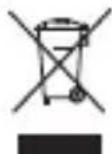
WEEE Directive
Correctly dispose of this product. This marking indicates that this product should not be disposed with other household wastes throughout the EU/UK. To prevent possible
harm to the environment or human health from uncontrolled waste disposal, recycle responsibly to promote the sustainable reuse of material resources. To safely recycle your device, please use return and collection systems or contact the retailer where the device was originally purchased.
WEEE-Richtlinie
5.2 GHz band is restricted to indoor use only
To find camera's Regulatory Information, please swipe down touch screen on your camera, then tap Settings > Certification.
NCC Compliance Notice


Brand : INSTA360
Model : Ace Pro
Category : Camcorder