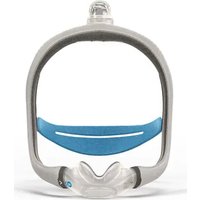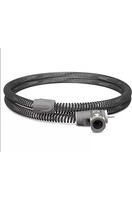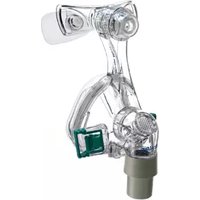
Mirage Micro - Respiratory medical device ResMed - Free user manual and instructions
Find the device manual for free Mirage Micro ResMed in PDF.


| Product type | Nasal mask for non-invasive ventilation |
| Brand | ResMed |
| Model | Mirage Micro |
| Available sizes | Small (S), Medium (M), Large (L), Large-Wide (LW), Extra-Large (XL) |
| Dimensions (rough, without headgear) | S: 140 mm (H) x 91 mm (W) x 93 mm (D) M, L, LW, XL: 155 mm (H) x 91 mm (W) x 98 mm (D) |
| Treatment pressure range | 4 to 20 cm H₂O |
| Dead space (size XL) | 128 ml (varies by size) |
| Resistance | 0.1 cm H₂O at 50 L/min; 0.7 cm H₂O at 100 L/min |
| Sound level (at mask) | 30 dBA with uncertainty of 3 dBA |
| Sound level (at 1 m) | 22 dBA with uncertainty of 3 dBA |
| Passive vent flow (at 20 cm H₂O) | 45 L/min |
| Materials | Latex-free, PVC-free, DEHP-free |
| Operating conditions | Temperature: +5°C to +40°C; Humidity: up to 95% RH (non-condensing) |
| Storage conditions | Temperature: -20°C to +60°C; Humidity: up to 95% RH |
| Daily cleaning | Wipe with a damp cloth and mild soap; rinse and air dry |
| Weekly cleaning | Disassemble completely and soak in warm soapy water; brush ventilation holes |
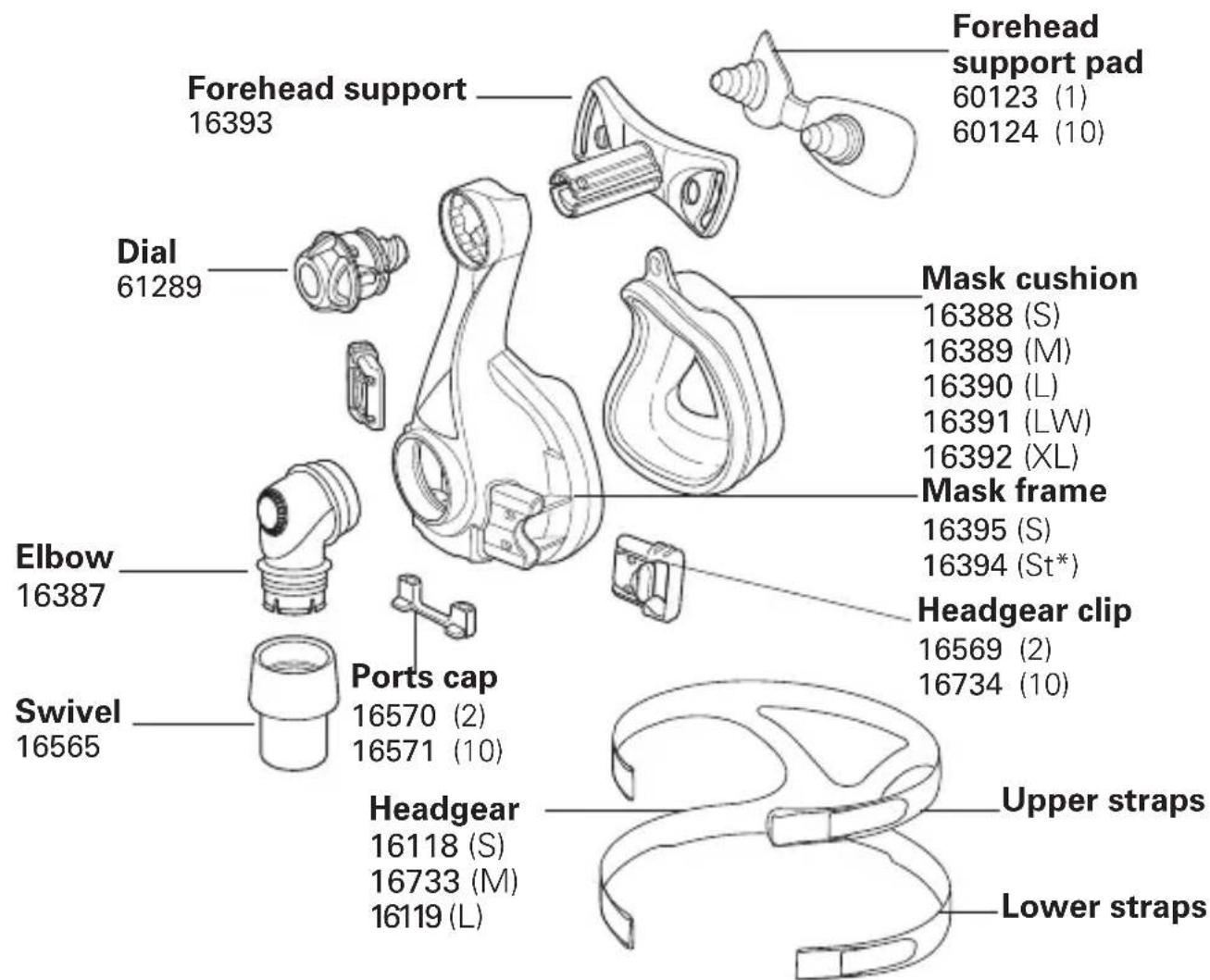
| Order references (examples) | Cushion: 16388 (S), 16389 (M), 16390 (L), 16391 (LW), 16392 (XL); Headgear: 16118 (S), 16733 (M), 6119 (L) |
| Intended use | Adult patients (>30 kg) under prescribed positive pressure; multiple use by a single patient at home or by multiple patients in medical settings |
| Device compatibility | ResMed devices with mask option "Standard" (or "Vista" for AutoSet CS™ 2) |
Frequently Asked Questions - Mirage Micro ResMed
User questions about Mirage Micro ResMed
0 question about this device. Answer the ones you know or ask your own.
Ask a new question about this device
Download the instructions for your Respiratory medical device in PDF format for free! Find your manual Mirage Micro - ResMed and take your electronic device back in hand. On this page are published all the documents necessary for the use of your device. Mirage Micro by ResMed.
USER MANUAL Mirage Micro ResMed
natural_image
Profile view of a person wearing a medical head-mounted device with a transparent visor (no visible text or symbols)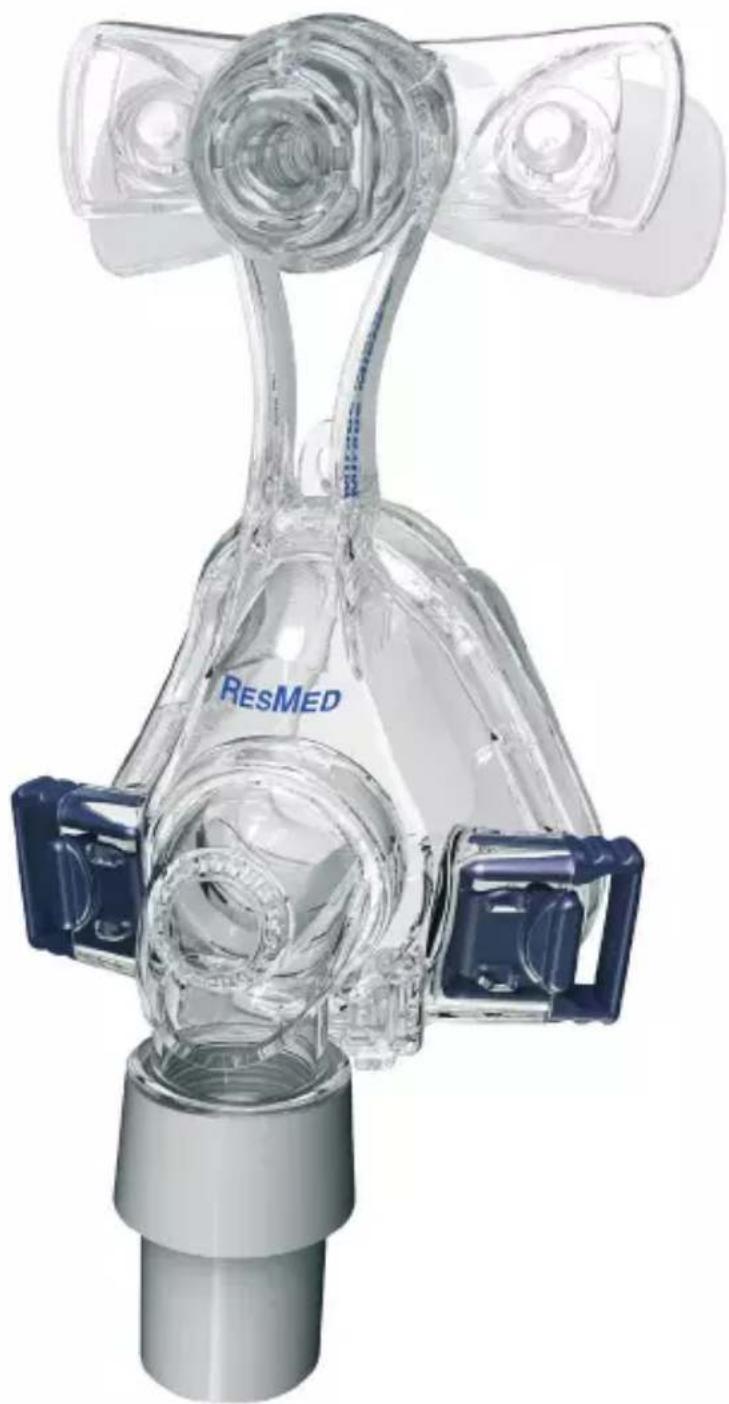
natural_image
3D rendering of a ResMed medical device with transparent glass and blue connectors (no text or symbols visible)RESMED Mirage Micro™
NASAL MASK
Thank you for choosing the Mirage Micro™.
Intended Use
The Mirage Micro channels airflow noninvasively to a patient from a positive airway pressure device such as a continuous positive airway pressure (CPAP) or bilevel system.
The Mirage Micro is:
- to be used by adult patients (>30 kg) for whom positive airway pressure has been prescribed.
- intended for single-patient re-use in the home environment and multipatient re-use in the hospital/institutional environment.
Before Using the Mask

WARNINGS
• The vent holes must be kept clear.
- Follow all precautions when using supplemental oxygen.
- Oxygen flow must be turned off when the flow generator is not operating, so that unused oxygen does not accumulate within the flow generator enclosure and create a risk of fire.
- At a fixed flow rate of supplemental oxygen flow, the inhaled oxygen concentration varies, depending on the pressure settings, patient breathing pattern, mask, point of application and leak rate.
- The technical specifications of the mask are provided for your clinician to check that they are compatible with the flow generator. If used outside specification or if used with incompatible devices, the seal and comfort of the mask may not be effective, optimum therapy may not be achieved, and leak, or variation in the rate of leak, may affect the flow generator function.
- Discontinue using the Mirage Micro if you have ANY adverse reaction to the use of the mask, and consult your physician or sleep therapist.
- Using a mask may cause tooth, gum or jaw soreness or aggravate an existing dental condition. If symptoms occur, consult your physician or dentist.
- Refer to your flow generator manual for details on settings and operational information.
Flow Generator Settings
Select 'Standard' (or 'Vista' for AutoSet CS ^TM 2) as the mask option when using the Mirage Micro with ResMed flow generators that have mask setting options. For a full list of compatible devices for this mask, see the Mask/Device Compatibility List on www.resmed.com on the Products page under Service & Support. If you do not have internet access, please contact your ResMed representative.
| Europe 1 | |
| Small (S) 16338 | |
| Medium (M) 16339 | |
| Large (L) 16340 | |
| Large-Wide (LW) 16341 | |
| Extra-Large (XL) 16342 |
| France | |
| Small (S) 16353 | |
| Medium and Large (M&L) 16354 | |
| Large-Wide and Extra-Large (LW&XL) | 16355 |
Elbow assembly (elbow, swivel): 16399
Fitting the Mask
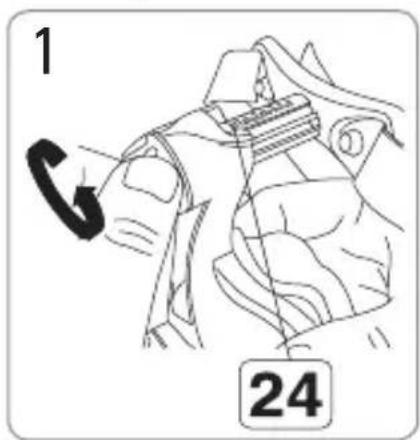
Turn the dial, so that the forehead support is fully extended.
natural_image
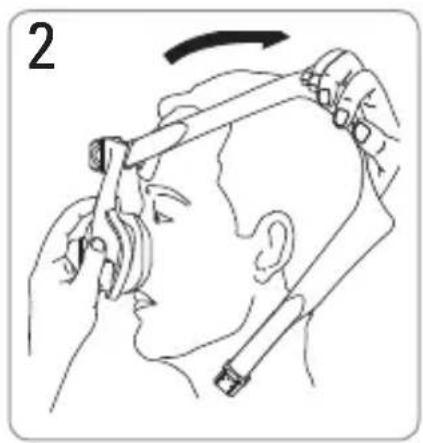
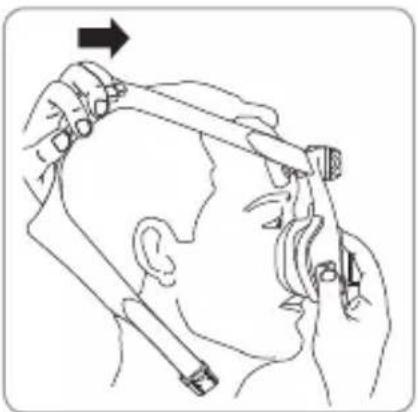
Illustration of a person using a hairpin to interact with another hand (no text or symbols present)Hold the mask over your nose and pull the headgear over your head.
natural_image
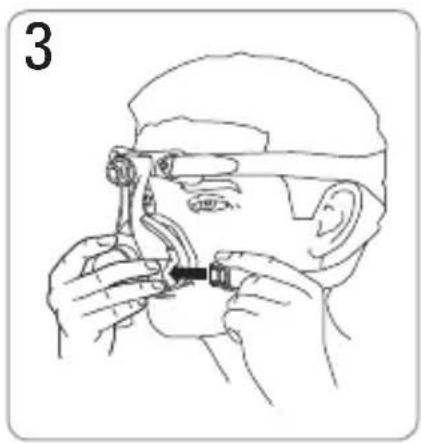
Line drawing of a person adjusting glasses with a tool (no text or symbols)Bringing the lower straps below your ears, connect the headgear clip to the the mask frame.
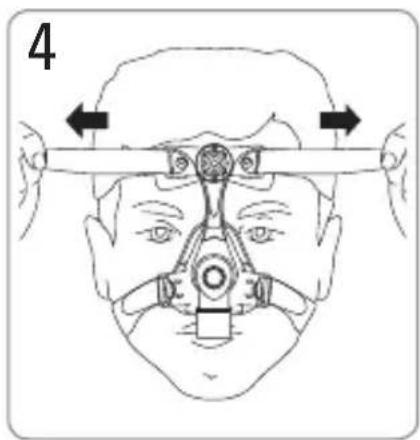
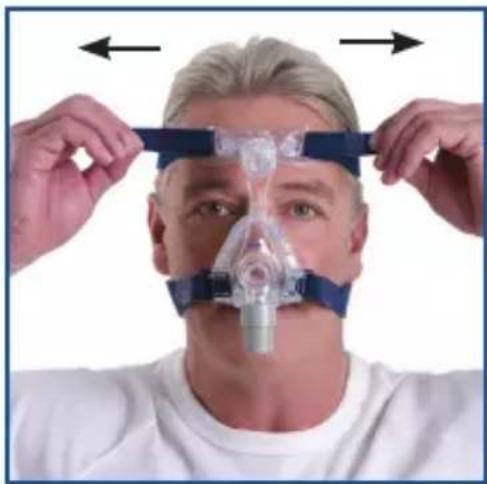
Unfasten the Velcro®, pull the upper headgear straps evenly until they are comfortable and firm, and reattach the Velcro.
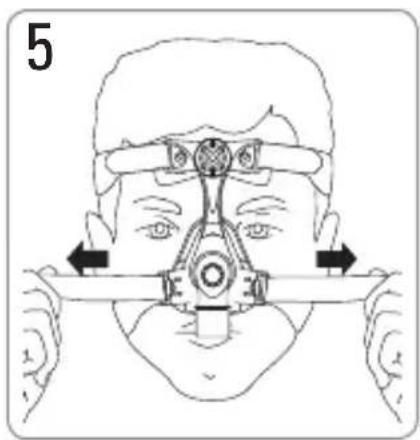
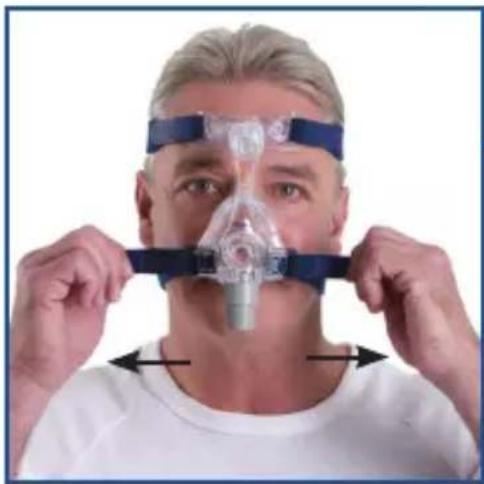
Repeat step 4 with the lower headgear straps.
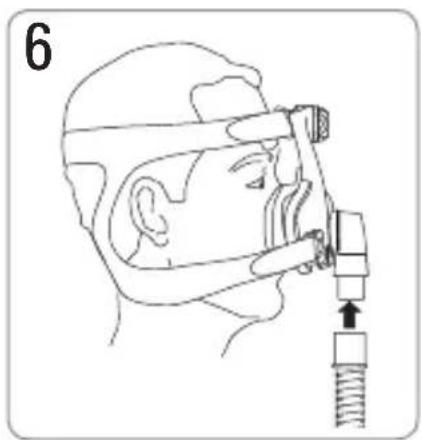
Connect the main air tubing to the swivel. Then connect the free end of the air tubing to your flow generator and turn the flow generator on.
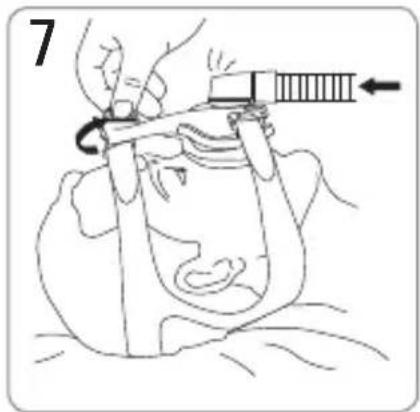
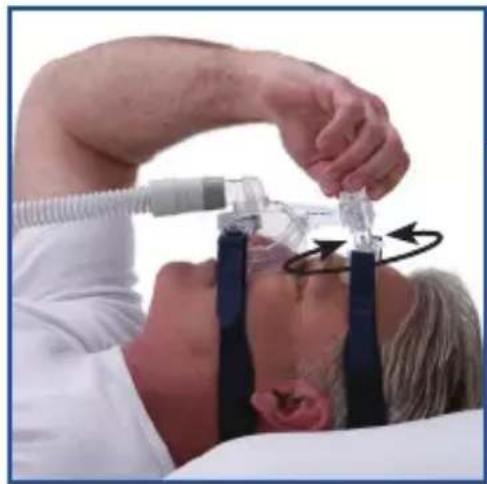
Lie down in your sleeping position. Adjust the dial until the mask is evenly positioned on your face. It should be comfortable, with an effective seal. Adjust the headgear straps if necessary.
natural_image
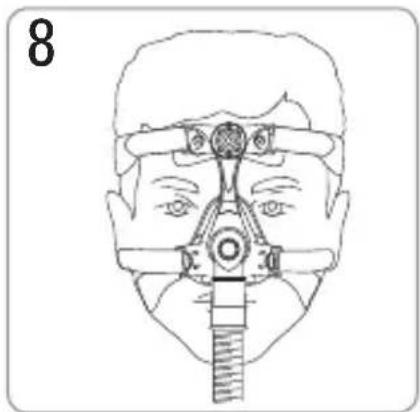
Line drawing of a human face with surgical hardware (no text or symbols)The fitted mask is shown above.
natural_image
Illustration of a person using a hairpin and comb, no text or symbols presentRemoving the Mask
Disconnect one of the headgear clips and pull the mask and headgear up over your head.
Disassembling the Mask
natural_image
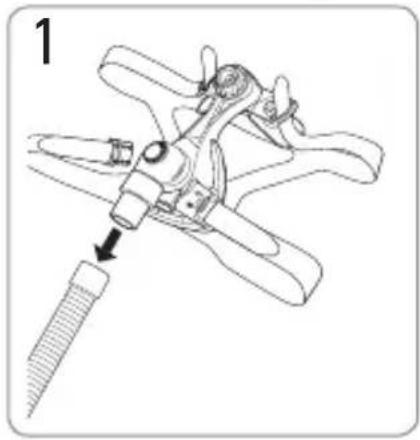
Technical line drawing of a mechanical tool with a screw inserted, showing no text or symbolsDetach the air tubing.
natural_image
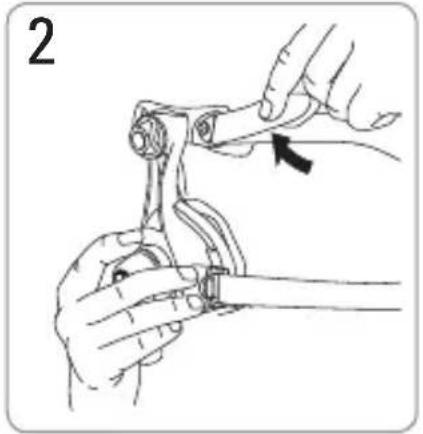
Illustration of hands using a tool to adjust or install a mechanical component, with no visible text or symbols.Unclip the headgear clips and unthread the upper headgear straps. It is not necessary to remove the headgear clips from the headgear.
natural_image
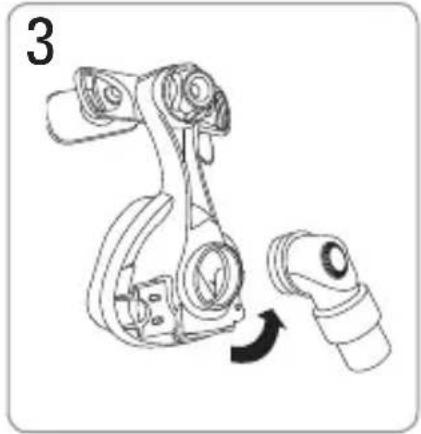
Line drawing of a robotic arm with a curved arrow indicating motion (no text or symbols)Remove the elbow assembly from the mask frame.
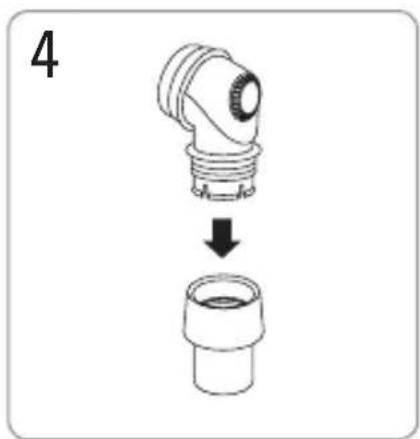
Remove the swivel from the elbow.
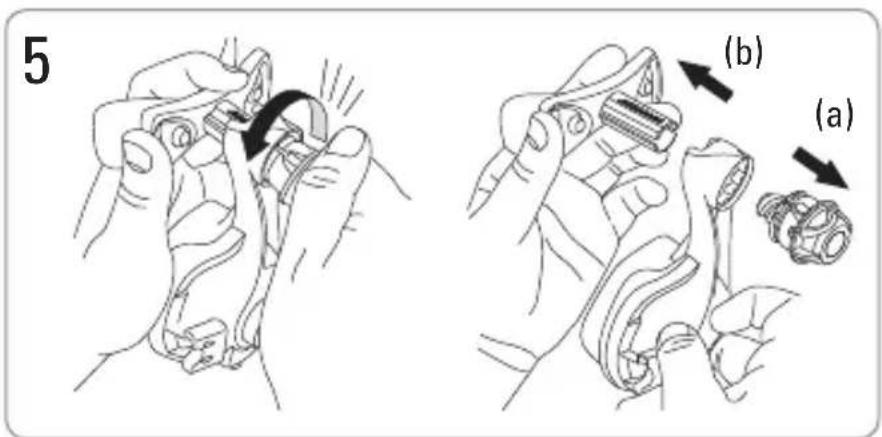
Note the position on the dial for the next time you use the mask. Unscrew and remove the dial (a) then pull the forehead support (b) out of the mask frame.

natural_image
Technical line drawing of a mechanical component with two views showing top and side views (no text or symbols)Remove the forehead support pads from the forehead support.
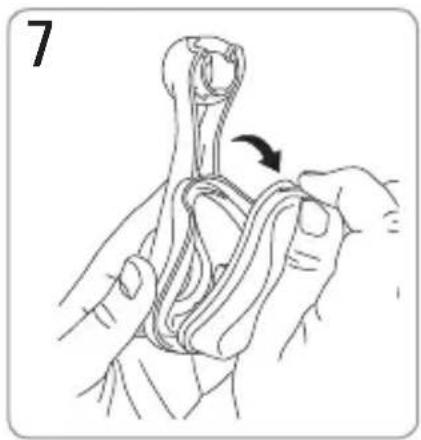
natural_image
Illustration of hands tying a rope knot, showing rope routing and angle marking (no text or symbols)Remove the cushion from the mask frame.
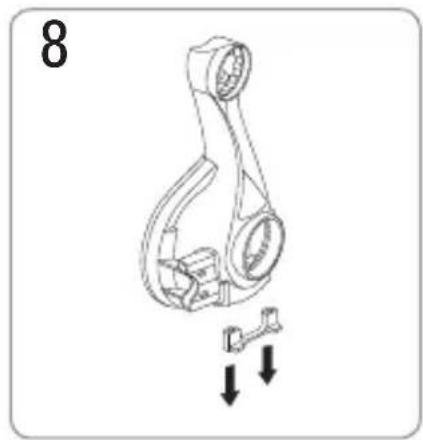
natural_image
Mechanical linkage diagram with two downward arrows indicating motion or force (no text or symbols)Remove the ports cap from the mask frame.
Cleaning the Mask in the Home
Notes:
• The mask and headgear can only be cleaned by handwashing.
- The headgear may be washed without removing the headgear clips.

WARNING
- Do not use aromatic-based solutions or scented oils (eg, eucalyptus or essential oils), bleach, alcohol or products that smell strongly (eg, citrus) to clean any of the mask components. Residual vapours from these solutions can be inhaled if not rinsed thoroughly. They may also damage the mask, causing cracks.
- Do not iron the headgear as the material is heat sensitive and will be damaged.
Daily/After Each Use
To optimise the mask seal, facial oils should be removed from the cushion before use.
Handwash the mask by gently rubbing in warm (30°C) water using mild soap or diluted dishwashing detergent.
If the vent requires cleaning use a soft bristle brush.
Rinse all components well with drinking quality water and allow them to air dry out of direct sunlight. Do not soak the mask.
Weekly
Handwash the headgear in warm (30°C) water using mild soap or diluted dishwashing detergent. Rinse well and allow it to air dry out of direct sunlight.
Reprocessing the Mask between Patients
This mask should be reprocessed when used between patients.
Cleaning, disinfection and sterilisation instructions are available from the ResMed website, www.resmed.com/masks/sterilization.
If you do not have internet access, please contact your ResMed representative.
Reassembling the Mask

natural_image
Mechanical assembly diagram showing a bracket with two upward arrows indicating motion or force (no text or symbols present)Insert the ports cap.
natural_image
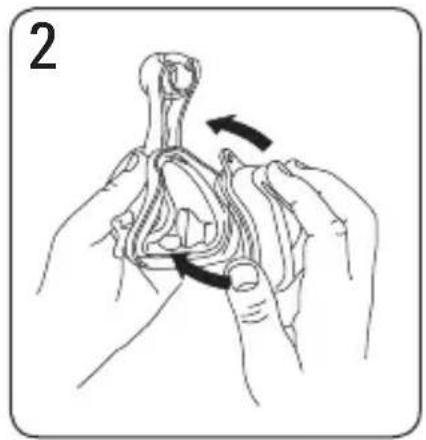
Illustration of hands performing a rope knot manipulation technique (no text or symbols)Insert the cushion into the mask frame. Ensure that the arrows at base of the cushion and mask frame are aligned.
natural_image
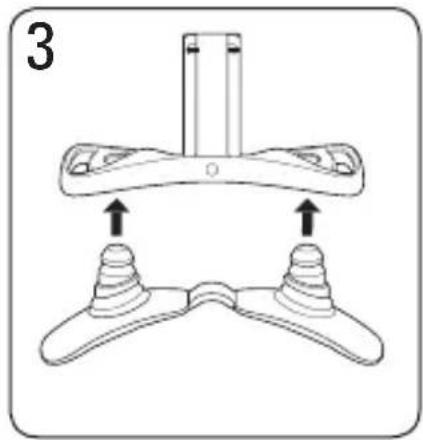
Diagram of a mechanical device with two base components and an upper component, showing directional arrows (no text or symbols)Push the forehead pads firmly into the forehead support.
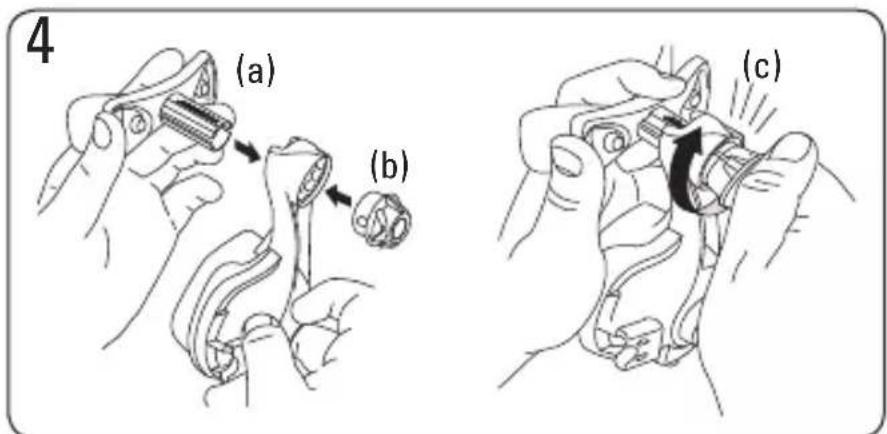
Insert the forehead support (a) into the mask frame and screw (b) the dial clockwise onto the pole. Turn the dial until it clicks (c). Ensure the dial sits flush against the frame.
natural_image
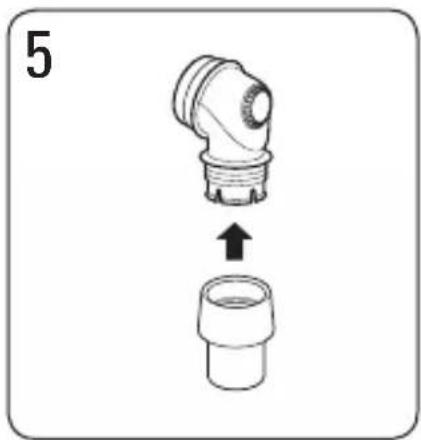
Diagram showing a mechanical component being lifted from a lower side, with no text or symbols present.Insert the swivel into the end of the elbow.
natural_image
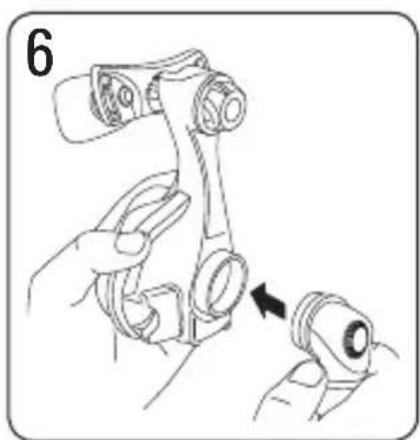
Illustration of a robotic arm with a hand holding the grip and a close-up of the base (no text or symbols)Insert the assembled elbow into the mask frame.
natural_image
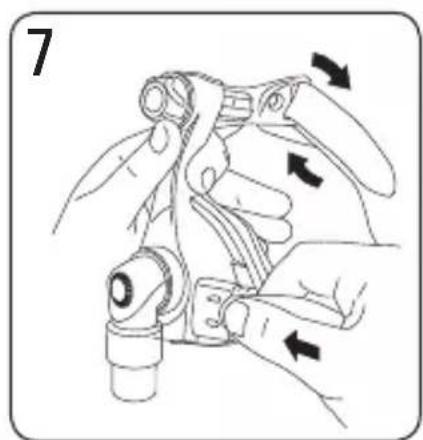
Illustration of hands using a tool to adjust or install a mechanical component, with arrows indicating motion direction (no text or symbols present)Reattach the top headgear straps by threading them through the loops.
Flexible PVC Tubing
Flexible PVC contains elements that can be detrimental to the materials of the mask. If flexible PVC tubing is used continuously, the attachment port should be inspected for cracking. Replace any parts that are damaged.
Troubleshooting
| Problem Possible reason Possible solution | ||
| Mask won’t seal properly or is uncomfortable | Mask may have been fitted incorrectly or is incorrectly adjusted. | Carefully follow instructions in “Fitting the Mask”. Check headgear and dial are not over-tightened. Extend dial to apply more force to upper lip. Shorten dial to increase force at nose bridge. |
| Mask is wrong size. Talk to your clinician. | ||
| Mask cushion is skewed in mask frame. | Check insertion of cushion and reinsert correctly according to the instructions in “Reassembling the Mask”. | |
| Mask cushion is misaligned or creased on face. | Ensure cushion is properly aligned according to the instructions in “Reassembling the Mask”. Make sure the cushion has no creases in it: undo headgear clip, check cushion and reposition the mask over your nose. | |
| Mask cushion may be dirty. | Clean cushion according to instructions in “Cleaning the Mask in the Home”. | |
| Mask is too noisy Mask is assembled incorrectly. | Reassemble mask. | |
| Dial inserted into mask frame before forehead support | Misassembly. Push dial base onto a hard surface until the dial comes out of the frame. | |
Technical Specifications
Note: The mask system does not contain latex, PVC or DEHP materials.
| Pressure-Flow Curve | The mask contains passive venting to protect against rebreathing. As a result of manufacturing variations, the vent flow rate may vary.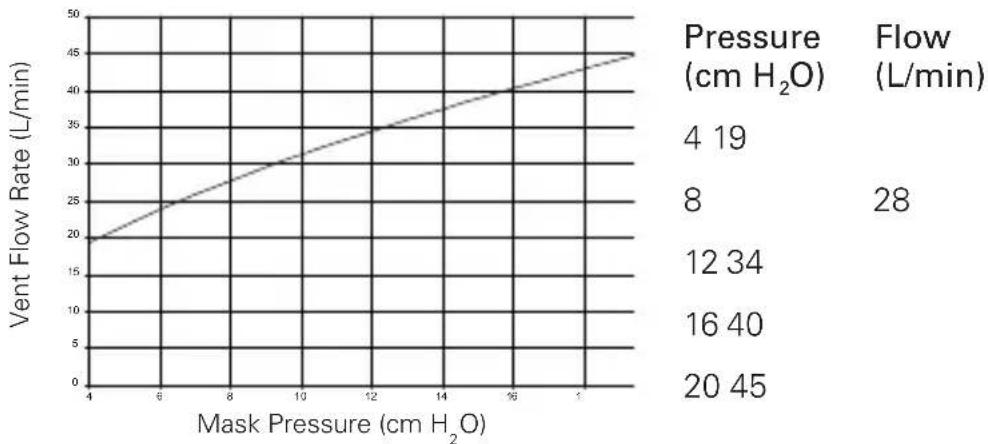 |
| Dead Space Information | The dead space of the mask varies according to cushion size. It is 128 mL for the Extra Large size. |
| Therapy Pressure | 4 to 20 cm H_2O |
| Resistance Drop in pressure measured (nominal)at 50 L/min: 0.1 cm H_2O at 100 L/min: 0.7 cm H_2O | |
| Sound DECLARED DUAL-NUMBER NOISE EMISSION VALUES inaccordance with ISO 4871. The A-weighted sound power levelof the mask is 30 dBA, with uncertainty 3 dBA. The A-weightedsound pressure level of the mask at a distance of 1 m is22 dBA, with uncertainty 3 dBA. | |
| Environmental Conditions | Operating temperature: +5°C to +40°COperating humidity: up to 95% relative humiditynon-condensingStorage and transport: -20°C to +60°CStorage and transport humidity: up to 95% relative humiditynon-condensing |
| Gross dimensions | S: 140 mm (H) x 91 mm (W) x 93 mm (D)M, L, LW, XL: 155 mm (H) x 91 mm (W) x 98 mm (D)Mask fully assembled – no headgear. |
Note: The manufacturer reserves the right to change these specifications without notice.
Storage
Ensure that the mask is thoroughly clean and dry before storing it for any length of time. Store the mask in a dry place out of direct sunlight.
Disposal
The Mirage Micro does not contain any hazardous substances and may be disposed of with your normal household refuse.
Symbols
Caution, consult accompanying documents; LOT Batch Code; REF Catalogue Number; Temperature limitation; Humidity limitation; Does not contain latex; Indicates a Warning or Caution and alerts you to a possible injury or explains special measures for the safe and effective use of the device.
Consumer Warranty
ResMed acknowledges all consumer rights granted under the EU Directive 1999/44/EG and the respective national laws within the EU for products sold within the European Union.
Mirage Micro™
NASENMASKE
natural_image
Illustration of a person using a hairpin on their head, showing motion with an arrow indicating direction (no text or symbols)natural_image
Line drawing of a person adjusting glasses with a small object (no text or symbols)natural_image
Illustration of a hand holding a syringe over a seated patient's abdomen, with no visible text or symbolsnatural_image
Line drawing of a person's head with medical equipment, no text or symbols presentnatural_image
Line drawing of a person using a hairpin to adjust head (no text or symbols)Abnehmen der Maske
natural_image
Technical line drawing of a mechanical clamp or tool with a threaded base and handle, no text or symbols presentnatural_image
Illustration of hands using a tool to adjust or install a mechanical component (no text or symbols present)natural_image
Line drawing of a robotic arm with a curved arrow indicating motion (no text or symbols)natural_image
Technical line drawing of a mechanical component with two views and downward arrows indicating motion (no text or symbols)natural_image
Illustration of hands tying a rope knot with an arrow indicating rotation (no text or symbols)natural_image
Mechanical linkage diagram showing a lever and two downward arrows indicating motion (no text or symbols)natural_image
Mechanical component diagram showing a housing and bracket assembly with upward arrows indicating motion (no text or symbols)natural_image
Illustration of hands manipulating a rope or cable with directional arrows indicating movement (no text or symbols)natural_image
Diagram of a mechanical component with two symmetrical supports and a central shaft, showing upward force arrows (no text or symbols)natural_image
Diagram showing a mechanical component with an upward arrow, no text or symbols presentnatural_image
Illustration of a robotic arm with a hand holding the joint, showing a close-up of the arm and a separate view (no text or symbols present)natural_image
Illustration of hands using a mechanical tool to adjust or install a component, with arrows indicating motion direction (no text or symbols present)natural_image
Illustration of a person using a medical or surgical tool on their head, with no visible text or symbols.natural_image
Line drawing of a person adjusting glasses with a tool (no text or symbols)natural_image
Line drawing of a person wearing a headlamp and holding a device, with arrows indicating motion direction (no text or symbols)natural_image
Line drawing of a person wearing a medical headlamp device (no text or symbols)natural_image
Illustration of a person using a hairpin to trim a head, with an arrow indicating direction (no text or symbols)Retrait du masque
natural_image
Technical line drawing of a mechanical clamp or bracket assembly with a threaded base and a tool inserted (no text or symbols)natural_image
Illustration of hands using a tool to adjust or install a mechanical component, with no visible text or symbols.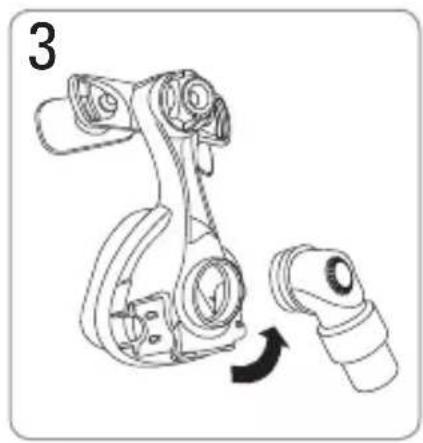
natural_image
Line drawing of a robotic arm with a curved arrow indicating rotation (no text or symbols)natural_image
Technical line drawing of a mechanical component with two views showing top and side views (no text or symbols)Retirez le tampon du support frontal.
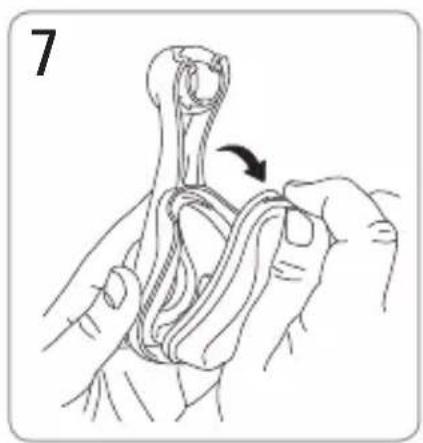
natural_image
Illustration of hands tying a knot with an arrow indicating rotation (no text or symbols)natural_image
Mechanical linkage diagram with two downward arrows indicating movement or assembly (no text or symbols)natural_image
Technical diagram of a mechanical component with two upward arrows indicating motion or assembly (no text or symbols present)natural_image
Illustration of hands performing a rope knotting technique with directional arrows (no text or symbols)natural_image
Diagram of a mechanical device with two base components and an upper component, showing upward force arrows (no text or symbols)natural_image
Diagram showing a mechanical component with an upward arrow, no text or symbols presentnatural_image
Illustration of a hand holding a mechanical device with a close-up view of the component being inserted (no text or symbols present)natural_image
Illustration of hands using a tool to adjust or install a mechanical component, with arrows indicating motion direction (no text or symbols present)natural_image
Illustration of a person using a hairpin to interact with another person's head (no text or symbols present)natural_image
Line drawing of a person adjusting a small electronic component (no text or symbols)natural_image
Illustration of a hand using a syringe to interact with a container, no text or symbols presentnatural_image
Line drawing of a person wearing a medical or surgical cap device (no text or symbols)natural_image
Illustration of a person using a hairpin to adjust their face (no text or symbols present)natural_image
Line drawing of a mechanical clamp or tool with a threaded end, showing a step to add a bolt (no text or symbols present)natural_image
Line drawing of hands using a tool to adjust or install a mechanical component (no text or symbols present)natural_image
Line drawing of a robotic arm with a curved arrow indicating motion (no text or symbols)natural_image
Technical line drawing of a mechanical component with two views and downward arrows indicating motion (no text or symbols)natural_image
Illustration of hands tying a rope knot with an arrow indicating the rope's direction (no text or symbols present)natural_image
Mechanical linkage diagram showing a lever and wrench assembly (no text or labels)natural_image
Mechanical component diagram showing a bracket with two upward arrows indicating motion or assembly (no text or symbols present)natural_image
Illustration of hands performing a rope knot or knotting technique with directional arrows indicating movement (no text or symbols)natural_image
Diagram of a mechanical component with two base supports and a central shaft, showing upward force arrows (no text or symbols)natural_image
Diagram showing a mechanical component with an upward arrow, no text or symbols presentnatural_image
Illustration of a hand holding a mechanical device with a close-up view of the component being inserted (no text or symbols present)natural_image
Illustration of hands using a mechanical tool to adjust or install a component, with arrows indicating motion direction (no text or symbols present)natural_image
Illustration of a person using a hairpin to interact with another person's head (no text or symbols present)natural_image
Line drawing of a person adjusting glasses with a tool (no text or symbols)natural_image
Line drawing of a person's face with medical equipment, no text or symbols presentnatural_image
Line drawing of a person using a hairpin to adjust the head (no text or symbols)Het masker afzetten
natural_image
Technical line drawing of a mechanical component with a threaded base and threaded end, showing a step indicator (no text or symbols present)natural_image
Illustration of hands using a tool to adjust or install a mechanical component (no text or symbols present)natural_image
Mechanical assembly diagram showing a robotic arm with a handle and base, no text or symbols presentnatural_image
Technical line drawing of a mechanical component with two views and downward arrows indicating motion (no text or symbols)natural_image
Illustration of hands tying a rope knot with an arrow indicating the knot's direction (no text or symbols present)natural_image
Mechanical component diagram showing a linkage mechanism with two downward arrows indicating motion or assembly (no text or symbols present)natural_image
Mechanical assembly diagram showing a bracket and mounting bracket with directional arrows indicating motion (no text or symbols)natural_image
Illustration of hands manipulating a rope or cable with directional arrows indicating movement (no text or symbols)natural_image
Technical illustration of a mechanical component with two base views and a central top section, showing upward force arrows (no text or symbols)natural_image
Diagram showing a mechanical component with an upward arrow, no text or symbols presentnatural_image
Illustration of hands assembling a mechanical component with a close-up view (no text or symbols)natural_image
Illustration of hands using a mechanical tool to adjust or install a component, with arrows indicating motion direction (no text or symbols present)See www.resmed.com for other ResMed locations worldwide.
Mirage Micro Nasal Mask
Protected by patents: AU 710733, AU 741003, AU 766623, AU 775051, AU 777033, AU 785376, AU 2003257271, CA 2261790, CA 2470671, CN 03821170.X, CN 200680002171.1, EP 0956069, EP 1187647, EP 1187648, EP 1187649, EP 1187650, EP 1314445, EP 1479406, EP 1582230, EP 1640034, HK 1057714, JP 3686609, JP 4354664, JP 4434961, JP 4474081, JP 4607913, NZ 513052, NZ 526165, NZ 526166, NZ 526167, NZ 526168, NZ 538698, NZ 570796, NZ 573101, NZ 573226, US 6112746, US 6119693, US 6357441, US 6374826, US 6439230, US 6463931, US 6532961, US 6557556, US 6581594, US 6581602, US 6634358, US 6691708, US 6823865, US 6860269, US 6871649, US 6997188, US 7011090, US 7159587, US 7926487, US 7178527, US 7188620, US 7216647, US 7234466, US 7243651, US 7600513, US 7610916, US 7669599, US 7802573, US 7856980. Other patents pending. Protected by design registrations: AU 304309, AU 319212, AU 319213, AU 319214, AU 319215, AU 319266, AU 319267, AU 319216, AU 319217, AU 319185, AU 319218, AU 320813, AU 320814, CN 200530117106.1, CN 200730331127.2, CN 200730331128.7, CN 200730331130.4, CN 200730331134.2, CN 200730331136.1, CN 200730331137.6, CN 200730331138.0, CN 200830120151.6, EU 366844, EU 823497, EU 940234, EU 959408, EU 970374, JP 1264474, JP 1332693, JP 1332694, JP 1332695, JP 1332696, JP 1332697, JP 1332698, JP 1349614, JP 1350173, JP 1350282, NZ 406357, NZ 410682, NZ 410683, NZ 410892, NZ 410022, NZ 411316, NZ 411317, NZ 411318, NZ 411319, NZ 411320, NZ 411321, NZ 411322, NZ 411323, NZ 411324, US D532512, US D547439, US D545960, US D594111, US D594112, US D594113, US D595840, US D597202, US D612932, US D614763. Others pending.
Mirage and Mirage Micro are trademarks of ResMed Pty Ltd. Mirage is registered in U.S. Patent and Trademark Office.
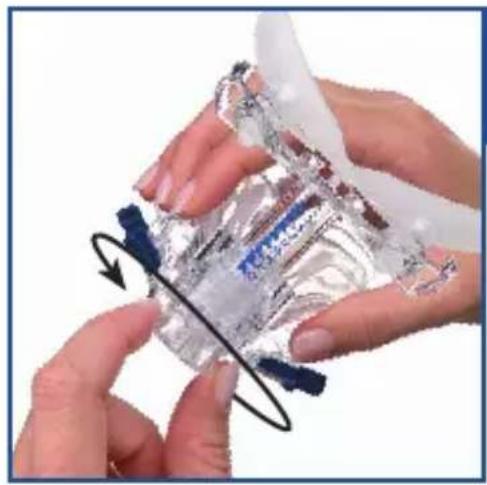
natural_image
Close-up of hands holding a transparent plastic bag with a black curved line indicating rotation (no text or symbols visible)1
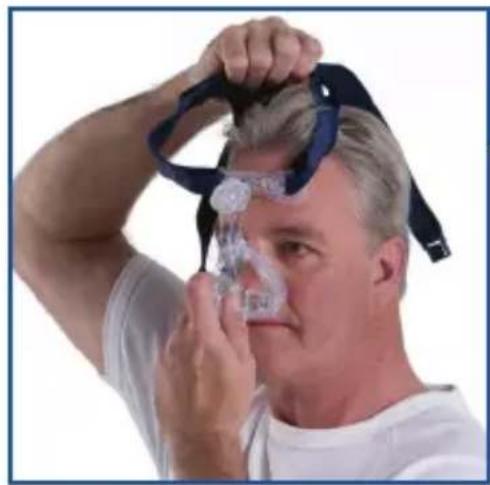
natural_image
Man adjusting a headband device with a blue strap (no visible text or symbols)2
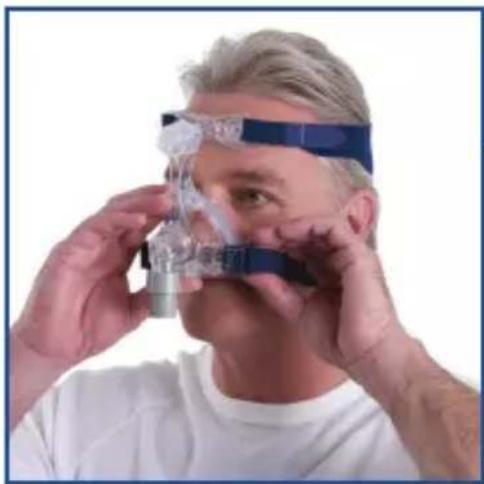
natural_image
Close-up of a person wearing a medical headband and mask, adjusting a transparent device (no visible text or symbols)3
natural_image
Person adjusting a medical device with blue and black straps, showing head and face alignment (no text or symbols visible)4
natural_image
Person adjusting a medical device with a headband and blue straps, no visible text or symbols5
natural_image
Person undergoing medical procedure with CTU device and tubing (no visible text or symbols)6
618334/1 2020-05
MIRAGE MICRO
USER
EUROPE 1

618334