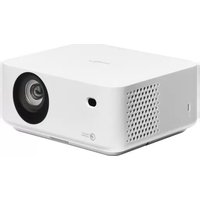
ML1080 - Projector OPTOMA - Free user manual and instructions
Find the device manual for free ML1080 OPTOMA in PDF.


User questions about ML1080 OPTOMA
0 question about this device. Answer the ones you know or ask your own.
Ask a new question about this device
Download the instructions for your Projector in PDF format for free! Find your manual ML1080 - OPTOMA and take your electronic device back in hand. On this page are published all the documents necessary for the use of your device. ML1080 by OPTOMA.
USER MANUAL ML1080 OPTOMA
natural_image
Line drawing of a portable electronic device with circular vent and control panel (no text or symbols)TABLE DES MATIÈRES
SÉCURITÉ .... 4
IEC 60825-1:2014, EN 60825-1:2014+A11:2021, EN 50689:2021 CLASS 1 CONSUMER LASER PRODUCT RISK GROUP 2, Complies with 21 CFR 1040.10 and 1040.11 except for conformance as a Risk Group 2 LIP as defined in IEC 62471-5:Ed.1.0. For more information see Laser Notice No. 57, dated May 8, 2019.
IEC 60825-1:2014 等級1重射產品RG2危險等級
IEC 60825-1:2014 1类激光产品RG2危险等级
RG2

This Class B digital apparatus complies with Canadian ICES-003.
text_image
CAUTION ELECTRIC SHOCK Keep ground wire connectednatural_image
3D rendering of a projected television projector with front panel and display screen (no text or symbols on the device itself)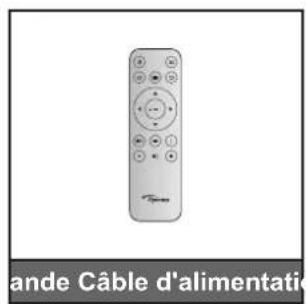
natural_image
Line drawing of a USB cable with connector (no text or symbols)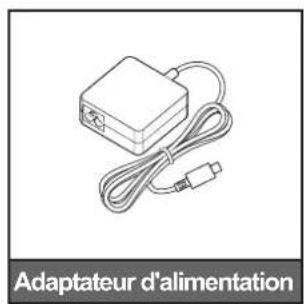
https://www.optoma.com/support/download
natural_image
Cable HDMI cable with two connectors, no text or symbols visible on the diagram itself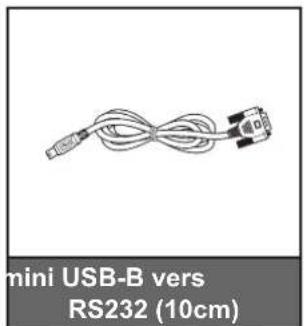
text_image
mini USB-B vers RS232 (10cm)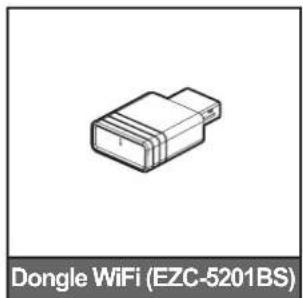
natural_image
Isometric illustration of a Dongle WiFi (EZC-5201BS) connector (no text or symbols on the diagram itself)Remarque :
natural_image
Diagram of a sewing machine needle with red arrows indicating force or movement (no text or symbols)CONFIGURATION ET INSTALLATION
flowchart
graph TD
    A[" gaming Device 1"] --> B[" Router 1"]
    C[" Gaming Device 2"] --> B
    D[" Gaming Device 3"] --> B
    E[" Gaming Device 4"] --> B
    F[" Gaming Device 5"] --> G[" Audio System 6"]
    H[" Gaming Device 6"] --> I[" USB 7"]
    J[" Gaming Device 7"] --> K[" USB 8"]
    L[" Gaming Device 8"] --> M[" USB 9"]
    N[" Gaming Device 9"] --> O[" USB 10"]
    P[" Gaming Device 10"] --> Q[" USB 11"]
    R[" Gaming Device 11"] --> S[" USB 12"]
    T[" Gaming Device 12"] --> U[" USB 13"]
    V[" Gaming Device 13"] --> W[" USB 14"]
    X[" Gaming Device 14"] --> Y[" USB 15"]
    Z[" Gaming Device 15"] --> AA[" USB 16"]
    AB[" Gaming Device 16"] --> AC[" USB 17"]
    AD[" Gaming Device 17"] --> AE[" USB 18"]
    AF[" Gaming Device 18"] --> AG[" USB 19"]
    AH[" Gaming Device 19"] --> AI[" USB 20"]
natural_image
Diagram of a device casing with a blue arrow indicating a component or insertion, showing no text or symbols.natural_image
Diagram showing a mechanical or fluidic component with arrows indicating motion or force direction (no text or symbols)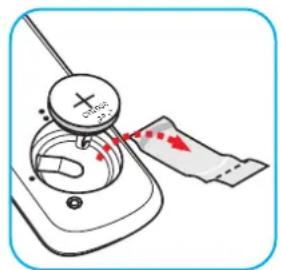
natural_image
Illustration of a hand turning a device with a magnifying glass and red arrows indicating motion (no text or symbols)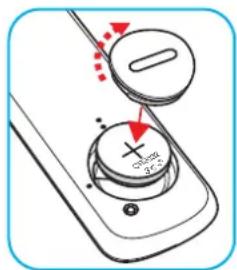
text_image
Diagram of a remote control interface with labeled buttons and directional arrows indicating action or movementMISE EN GARDE :
text_image
Hind's music BT Make here again at Echino's Newertext_image
Enter OptomaUTILISER LE PROJECTEUR
text_image
Device Name PJ-AJKL4 Plug in USB WiFi change Enable Bluetooth in setting menu Connect your phone to projector Click back to save audio modetext_image
Device Name PJ-AJKL4 ● Plug in USB WIFI dongle ● Enable Bluetooth in setting mems ● Connect your phone to projector Click back to leave audio modeUTILISER LE PROJECTEUR
text_image
10s Screen will be turned off. Press back key to leave audio mode.text_image
Searching for accessories... Before pairing your Bluetooth devices, make sure they're in pairing mode Press BACK to exit accessory adding. Bluetooth 2884 Bluetooth Optoma 1080P 50CCSF 99BACKtext_image
Quick Join! Optoma Room 1 2 3 4 Optoma Room App Download https://www.optoma.com/creativecast/ Or by scanning code Launch APP or Connect by Web: http://192.168.43.1 Get connected in 3 easy steps 1: Same Network Optoma Room 2: Connect to Optoma Room 3: Enter Login Code 1234 iOS/ Mac Users Screen Mirroring Creative CastRemarque :
text_image
Optoma Storage Internal Storage / 52.9% 7.5 GB free from 16 GB Cloud Storage Download Collections Images Videos Document Music Alarms Dec 31 1969 Android Dec 31 1969 CollaVision Jun 11 2023 DCIM Dec 31 1969 Download Dec 31 1969 Movies Dec 31 1969 Music Dec 31 1969 Notifications Dec 31 1969 Pictures Dec 31 1969 Podcasts Dec 31 1969 qcache Dec 31 1969 Ringtones Dec 31 1969 ZeasnDownload Jun 17 2023INFORMATIONS SUPPLÉMENTAIRES
LPCM(IEC 60958 PCM[30,31]
| HDMI 2.1 (4K) | |||
| B0/Timing établi B0/Timing standard B0/Timing détaillé B1/Mode vidéo B1/Timing détaillé | |||
| Résolution ; V/H Hz | Résolution ; V Hz Ratio | Résolution ; V Hz Résolution ; Ratio ; V Hz Résolution ; V Hz | |
| 720 x 400 @70/31.5Hz | 1280 x 1024 @60Hz 5:4 1920 x 1080 à 60Hz 640 x 480p 4:3 @60Hz 1920 x 1080 à 240Hz | ||
| 640 x 480 @60/31.5Hz | 1280 x720 @120Hz 16:9 720(1440) x 576i 4:3 @50Hz 2560 x 1440 à 120Hz | ||
| 640 x 480 @67/34.9Hz | 1600 x 1200 @60Hz 4:3 720(1440) x 576i 16:9 @50Hz | ||
| 640 x 480 @72/37.9Hz | 1280 x 720 @60Hz 16:9 720(1440) x 480i 4:3 @60Hz | ||
| 640 x 480 @75/37.5Hz | 1024 x 768 @120Hz 4:3 720(1440) x 480i 16:9 @60Hz | ||
| 800 x 600 @56/35.1Hz | 1280 x 800 @60Hz 16:10 720 x 576p 4:3 @50Hz | ||
| 800 x 600 @60/37.9Hz | 720 x 576p 16:9 @50Hz | ||
| 800 x 600 @72/48.1Hz | 720 x 480p 4:3 @60Hz | ||
| 800 x 600 @75/46.9Hz | 720 x 480p 16:9 @60Hz | ||
| 1024 x 768 @60/48.4Hz | 1280 x 720p 16:9 @50Hz | ||
| 1024 x 768 @70/56.5Hz | 1280 x 720p 16:9 @60Hz | ||
| 1024 x 768 @75/60Hz | 1920 x 1080i 16:9 @60Hz | ||
| 1280 x 1024 @75/80Hz | 1920 x 1080i 16:9 @50Hz | ||
| 1152 x 870 @75/67.6Hz | 1920 x 1080p 16:9 @24Hz | ||
| 1920 x 1080p 16:9 @30Hz | |||
| 1920 x 1080p 16:9 @50Hz | |||
| 1920 x 1080p 16:9 @60Hz | |||
| 3840 x 2160p 16:9 @24Hz | |||
| 3840 x 2160p 16:9 @25Hz | |||
| 3840 x 2160p 16:9 @30Hz | |||
| 3840 x 2160p 16:9 @50Hz | |||
| 3840 x 2160p 16:9 @60Hz | |||
| 4096 x 2160p 256:135 @24Hz | |||
| 4096 x 2160p 256:135 @30Hz | |||
| 4096 x 2160p 256:135 @50Hz | |||
| 4096 x 2160p 256:135 @60Hz | |||
| 1920 x 1080p 16:9 @120Hz | |||
| 3840 x 2160 16:9 @120Hz | |||
| 4096 x 2160 256:135 @120Hz | |||
| 1920 x 1080p 16:9 @25Hz | |||
INFORMATIONS SUPPLÉMENTAIRES
USB-C (HDMI 2.0) (4K)
Date / Format audio
LPCM(IEC 60958 PCM[30,31]
| USB-C (HDMI 2.0) (4K) | |||
| B0/Timing établi B0/Timing standard B0/Timing détaillé B1/Mode vidéo B1/Timing détaillé | |||
| Résolution ; V/H Hz | Résolution ; V Hz; Ratio | Résolution ; V Hz Résolution ; Ratio ; V Hz Résolution ; V Hz | |
| 720 x 400 @70/31.5Hz | 1280 x 1024 @60Hz 5:4 1920 x 1080 à 60Hz 640 x 480p 4:3 @60Hz Sans objet | ||
| 640 x 480 @60/31.5Hz | 1280 x720 @120Hz 16:9 720(1440) x 576i 4:3 @50Hz | ||
| 640 x 480 @67/34.9Hz | 1600 x 1200 @60Hz 4:3 720(1440) x 576i 16:9 @50Hz | ||
| 640 x 480 @72/37.9Hz | 1280 x 720 @60Hz 16:9 720(1440) x 480i 4:3 @60Hz | ||
| 640 x 480 @75/37.5Hz | 1024 x 768 @120Hz 4:3 720(1440) x 480i 16:9 @60Hz | ||
| 800 x 600 @56/35.1Hz | 1280 x 800 @60Hz 16:10 720 x 576p 4:3 @50Hz | ||
| 800 x 600 @60/37.9Hz | 720 x 576p 16:9 @50Hz | ||
| 800 x 600 @72/48.1Hz | 720 x 480p 4:3 @60Hz | ||
| 800 x 600 @75/46.9Hz | 720 x 480p 16:9 @60Hz | ||
| 1024 x 768 @60/48.4Hz | 1280 x 720p 16:9 @50Hz | ||
| 1024 x 768 @70/56.5Hz | 1280 x 720p 16:9 @60Hz | ||
| 1024 x 768 @75/60Hz | 1920 x 1080i 16:9 @60Hz | ||
| 1280 x 1024 @75/80Hz | 1920 x 1080i 16:9 @50Hz | ||
| 1152 x 870 @75/67.6Hz | 1920 x 1080p 16:9 @24Hz | ||
| 1920 x 1080p 16:9 @30Hz | |||
| 1920 x 1080p 16:9 @50Hz | |||
| 1920 x 1080p 16:9 @60Hz | |||
| 3840 x 2160p 16:9 @24Hz | |||
| 3840 x 2160p 16:9 @25Hz | |||
| 3840 x 2160p 16:9 @30Hz | |||
| 3840 x 2160p 16:9 @50Hz | |||
| 3840 x 2160p 16:9 @60Hz | |||
| 4096 x 2160p 256:135 @24Hz | |||
| 4096 x 2160p 256:135 @30Hz | |||
| 4096 x 2160p 256:135 @50Hz | |||
| 4096 x 2160p 256:135 @60Hz | |||
| 1920 x 1080p 16:9 @120Hz | |||
| 1920 x 1080p 16:9 @25Hz | |||
MAC
| Résolution | V [Hz] |
| 640 x 480 | 60 |
| 720 x 576 | 50 |
| 800 x 600 | 60 |
| 1024 x 768 | 60/120 |
| 1280 x 720p | 60/120 |
| 1920 x 1080p | 24/25/30/50/60/120 |
| 3840 x 2160 | 24/25/30 |
| 4096 x 2160 | 24/30 |
INFORMATIONS SUPPLÉMENTAIRES
text_image
69.00 68.00 -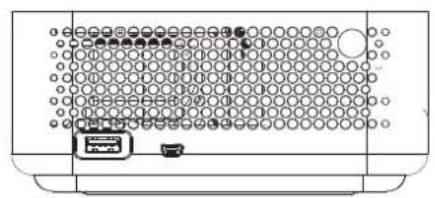
natural_image
Front view of a computer rack with a grid-patterned panel and a small device (no visible text or symbols)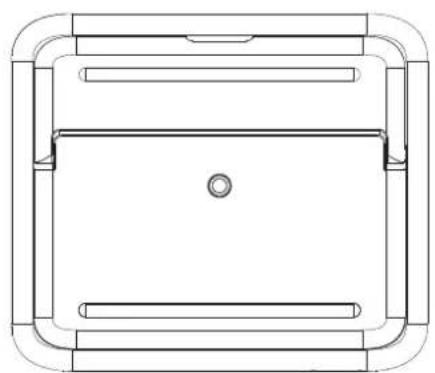
natural_image
Technical line drawing of a rectangular frame with internal compartments and a central hole (no text or symbols)Unité : mm
text_image
Enter OptomaOptoma Technology, Inc. 888-289-6786
47697 Westinghouse Drive. 510-996-4794
Fremont, Ca 94539 services@optoma.com
Canada
Optoma Technology, Inc. 888-289-6786
47697 Westinghouse Drive. 510-996-4794
Fremont, Ca 94539 services@optoma.com
Amérique Latine
Optoma Technology, Inc. 888-289-6786
47697 Westinghouse Drive. 510-996-4794
Fremont, Ca 94539 services@optoma.com
Europe
1 Bourne End Mills
Hemel Hempstead
Hertfordshire
HP1 2UJ
https://www.optoma.com/kr/
Japon
https://www.optoma.com/jp/
Taiwan
https://www.optoma.com/tw/
Chine
Room 2001, 20F, Building 4,
No.1398 Kaixuan Road,
Changning District
Shanghai, 200052, Chine
Australie
https://www.optoma.com/au/
+86-21-62947376 +86-21-62947375
www.optoma.com.cn