
ZU607T - Projector OPTOMA - Free user manual and instructions
Find the device manual for free ZU607T OPTOMA in PDF.


| Product type | DLP laser projector |
| Brand | OPTOMA |
| Model | ZU607T |
| Native resolution | WUXGA (1920 x 1200) |
| Brightness | 6000 ANSI lumens |
| Contrast ratio | 1,000,000:1 (dynamic) |
| Light source | Phosphor laser, lifespan 20,000 h (normal) |
| Dimensions (W x D x H) | 424 x 387 x 160 mm |
| Weight | 15.5 kg |
| Power supply | 100-240 V AC, 50/60 Hz |
| Power consumption | 560 W (max), 0.5 W (standby) |
| Video inputs | HDMI (x2), VGA, DisplayPort, 3G-SDI, HDBaseT |
| Network connectivity | Ethernet RJ45, RS232, USB |
| Key features | Keystone correction, motorized zoom, motorized focus, 360° rotation |
| Noise level | 37 dB (normal), 32 dB (eco) |
| Maintenance and cleaning | Air filter cleaning every 500 h, side access |
| Security | Kensington lock, password, laser safety (Class 1) |
| Spare parts and repairability | Repairability index 7.2/10 (available parts: fan, power supply, motherboard) |
| General information | Professional projector for meeting rooms, auditoriums, home cinema |
Frequently Asked Questions - ZU607T OPTOMA
User questions about ZU607T OPTOMA
0 question about this device. Answer the ones you know or ask your own.
Ask a new question about this device
Download the instructions for your Projector in PDF format for free! Find your manual ZU607T - OPTOMA and take your electronic device back in hand. On this page are published all the documents necessary for the use of your device. ZU607T by OPTOMA.
USER MANUAL ZU607T OPTOMA
natural_image
Line drawing of a portable projector with control panel and display (no text or symbols)TABLE DES MATIÈRES
SÉCURITÉ .... 4
IEC 60825-1:2014, EN 60825-1:2014+A11:2021, EN 50689:2021 CLASS 1 CONSUMER LASER PRODUCT RISK GROUP 2, Complies with 21 CFR 1040.10 and 1040.11 except for conformance as a Risk Group 2 LIP as defined in IEC 62471-5:Ed.1.0. For more information see Laser Notice No. 57, dated May 8, 2019. IEC 60825-1:2014 等級1雷射產品RG2危險等級 IEC 60825-1:2014 1类激光产品RG2危险等级
This Class B digital apparatus complies with Canadian ICES-003.
natural_image
Illustration of a projector device with a labeled projection (no text or symbols on the device itself)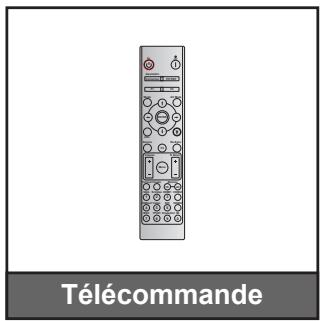
natural_image
Line drawing of a person sitting in a chair watching TV, with a monitor on a desk and a wall-mounted screen visible (no text or symbols)natural_image
Line drawing of a person sitting in a chair facing a wall-mounted device, no text or symbols presentnatural_image
Line drawing of a person sitting in a chair watching a projector screen (no text or symbols)natural_image
Line drawing of a person sitting in a chair facing a wall-mounted device, no text or symbols presentnatural_image
Circular diagram showing six different kitchen appliances arranged in a ring, with no text or symbols present.natural_image
Pure diagram of a server rack with no text or symbols, featuring a red X symbol crossed out (no readable text or labels)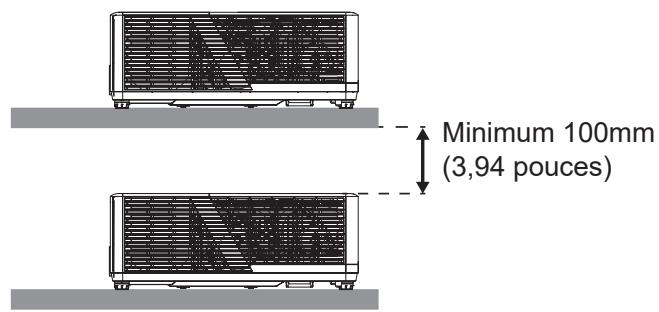
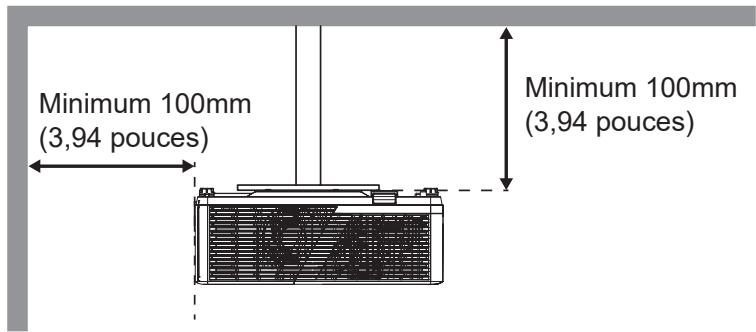
natural_image
Technical line drawing of a washing machine with control knobs and fan (no text or symbols)UTILISER LE PROJECTEUR
UTILISER LE PROJECTEUR
État du système
UTILISER LE PROJECTEUR
UTILISER LE PROJECTEUR
LPCM(IEC 60958 PCM[30,31]
INFORMATIONS SUPPLÉMENTAIRES
Optoma Technology, Inc.
47697 Westinghouse Drive.
Fremont, Ca 94539
888-289-6786
510-996-4794
services@optoma.com
Canada
Optoma Technology, Inc.
47697 Westinghouse Drive.
Fremont, Ca 94539
888-289-6786
510-996-4794
services@optoma.com
Amérique Latine
Optoma Technology, Inc.
47697 Westinghouse Drive.
Fremont, Ca 94539
888-289-6786
510-996-4794
services@optoma.com
Europe
1 Bourne End Mills
Hemel Hempstead
Hertfordshire
HP1 2UJ
Royaume-Uni
www.optoma.eu
service@tsc-europe.com
France
Bâtiment E
81-83 avenue Edouard Vaillant
92100 Boulogne Billancourt, France
+31 (0) 36 8200 250
+31 (0) 36 548 9052
+33 1 41 46 12 20
+33 1 41 46 94 35
savoptoma@optoma.fr
Espagne
C/ José Hierro, 36 Of. 1C 28529 Rivas
https://www.optoma.com/kr/
Japon
https://www.optoma.com/jp/
Taiwan
https://www.optoma.com/tw/
Chine
Room 2001, 20F, Building 4,
No.1398 Kaixuan Road,
Changning District
Shanghai, 200052, Chine
Australie
https://www.optoma.com/au/
+86-21-62947376
+86-21-62947375
www.optoma.com.cn
Brand : OPTOMA
Model : ZU607T
Category : Projector