
ZX300 - Projector OPTOMA - Free user manual and instructions
Find the device manual for free ZX300 OPTOMA in PDF.


| Type of product | DLP projector |
| Brand | OPTOMA |
| Model | ZX300 |
| Native resolution | XGA (1024 x 768) |
| Brightness | 3000 ANSI lumens |
| Contrast ratio | 20 000:1 |
| Light source | Lamp, lifespan up to 5000 hours (economic mode) |
| Dimensions (W x D x H) | 31.5 x 22.5 x 10.5 cm |
| Weight | 2.8 kg |
| Power supply | 100-240 V AC, 50-60 Hz |
| Power consumption | 280 W (normal mode) |
| Video inputs | HDMI, VGA, Composite, S-Video |
| Audio input | 3.5 mm jack |
| Audio output | Built-in speaker 2 W |
| Connectivity | USB (service) |
| Keystone correction | Vertical ± 40° |
| Zoom | Digital, 1.1x |
| Main functions | Preset image modes, multilingual OSD menu, standby |
| Maintenance | Clean the air filter every 500 hours; replace the lamp after use |
| Security | Kensington lock, security password |
| Spare parts | Replacement lamp, air filter |
| Repairability | User-replaceable lamp |
Frequently Asked Questions - ZX300 OPTOMA
User questions about ZX300 OPTOMA
0 question about this device. Answer the ones you know or ask your own.
Ask a new question about this device
Download the instructions for your Projector in PDF format for free! Find your manual ZX300 - OPTOMA and take your electronic device back in hand. On this page are published all the documents necessary for the use of your device. ZX300 by OPTOMA.
USER MANUAL ZX300 OPTOMA
natural_image
Line drawing of a projector with front panel and side ports (no text or symbols)TABLE DES MATIÈRES
SÉCURITÉ .... 4
IEC 60825-1:2014, EN 60825-1:2014+A11:2021, EN 50689:2021 CLASS 1 CONSUMER LASER PRODUCT RISK GROUP 2, Complies with 21 CFR 1040.10 and 1040.11 except for conformance as a Risk Group 2 LIP as defined in IEC 62471-5:Ed.1.0. For more information see Laser Notice No. 57, dated May 8, 2019. IEC 60825-1:2014 等級1雷射產品RG2危險等級 IEC 60825-1:2014 1类激光产品RG2危险等级

"WARNING: MOUNT ABOVE THE HEADS OF CHILDREN." Additional warning against eye exposure for close exposures less than 1 m.
This Class B digital apparatus complies with Canadian ICES-003.
natural_image
Line drawing of a cable VGA connector with connectors and cables (no text or symbols on the diagram itself)Accessoires en option
Remarque :
natural_image
Line drawing of a person sitting in a chair watching a small screen on a desk (no text or symbols)natural_image
Line drawing of a person sitting in a chair facing a projector mounted on a wall, enclosed in a rectangular frame (no text or symbols)natural_image
Line drawing of a person sitting in a chair watching a projector screen (no text or symbols)natural_image
Line drawing of a person sitting in a chair watching a projector mounted on a wall, with no text or symbols present.natural_image
Circular diagram showing six identical washing machines arranged in a ring, with red arrows indicating rotation or cycle (no text or symbols)natural_image
Exterior view of a double boiler with red prohibition symbol (no text or labels)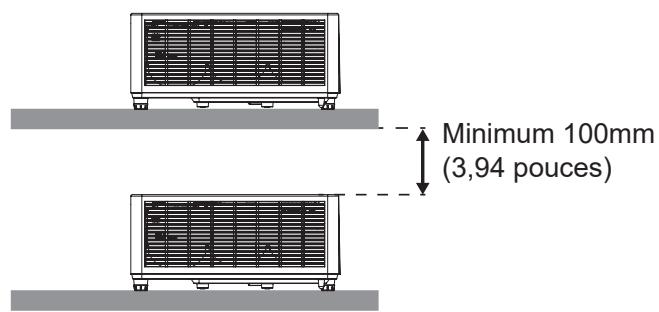
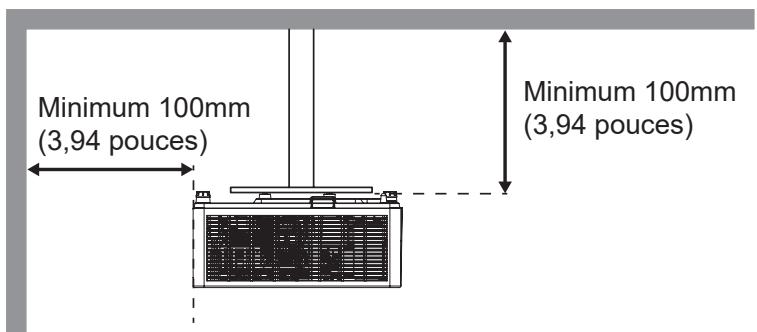
UTILISER LE PROJECTEUR
Marche
CONFIGURATION ET INSTALLATION
Remarque :
INFORMATIONS SUPPLÉMENTAIRES
natural_image
Technical line drawing of a rectangular panel with internal grid structure (no text or symbols)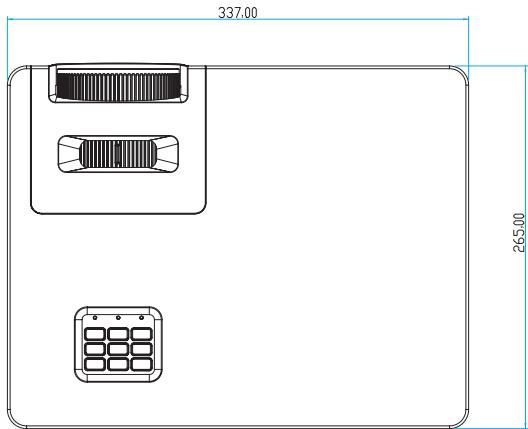
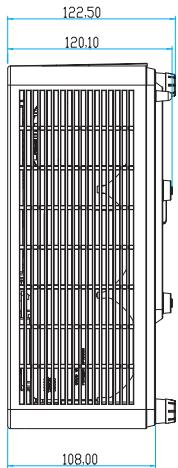
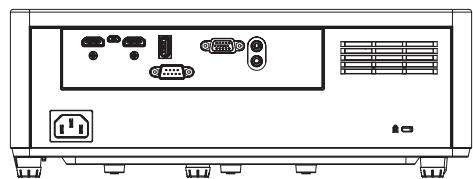
natural_image
Front view of a computer monitor unit with ports, connectors, and ventilation slots (no text or symbols visible)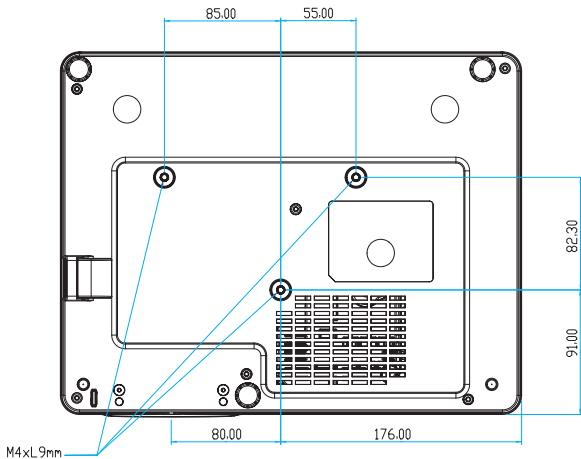
Unité :mm
Brand : OPTOMA
Model : ZX300
Category : Projector