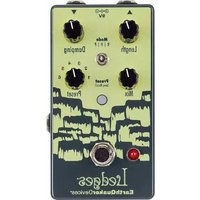
LedgeS - Audio effect pedal EarthQuaker Devices - Free user manual and instructions
Find the device manual for free LedgeS EarthQuaker Devices in PDF.


| Product Type | Audio Effect Pedal |
| Brand | EarthQuaker Devices |
| Model | LedgeS |
| Dimensions (approx.) | 6.5 x 3.5 x 1.5 inches |
| Weight (approx.) | 0.5 kg |
| Power Supply | 9 V DC, center negative, 2.1 mm |
| Power Consumption | DC current, isolated recommended |
| Reverb Modes | Room (R), Hall (H), Plate (P) |
| Controls | Length, Damping, Mix |
| Presets | 6 slots, save and recall |
| Expression Input | TRS 3.5 mm, assignable |
| Bypass | Buffered bypass with reverb trails |
| Switching Technology | Flexi-Switch® (momentary or latching) |
| Input Impedance | 1 MΩ |
| Output Impedance | 100 Ω |
| Maintenance | Wipe with a dry cloth, avoid liquids |
| Safety | Do not use with voltage higher than 9 V |
| Repairability | Limited lifetime warranty, repair by manufacturer |
| General Information | Handmade in Akron, Ohio, USA |
Frequently Asked Questions - LedgeS EarthQuaker Devices
User questions about LedgeS EarthQuaker Devices
0 question about this device. Answer the ones you know or ask your own.
Ask a new question about this device
Download the instructions for your Audio effect pedal in PDF format for free! Find your manual LedgeS - EarthQuaker Devices and take your electronic device back in hand. On this page are published all the documents necessary for the use of your device. LedgeS by EarthQuaker Devices.
USER MANUAL LedgeS EarthQuaker Devices
Tri-Dimensional Reverberation Machine

TABLE OF CONTENTS
4 English
8 Español
12 Français
16 Deutsch
21 Italiano
26 Polskie
30 Čeština
34 日本語
Hey you! Yeah you. Get over here. There you go ... a little closer, a little closer, a few more steps up and ... voilà! Pretty sweet up here, isn't it? Don't be nervous, your fear of heights need not apply here, even at this altitude. This is a different kind of ledge we're so majestically standing upon. Just breathe in the fresh air and fix your gaze upon this wonderful masterpiece before you that is the EarthQuaker Devices Ledges ® Reverb.
Now we know you're wondering what this compact and impeccably designed stomp box has in store, because you're a curious person, and we like that about you. Well, this here is a three-mode reverb with the ability to save and recall six presets and user-assignable expression control with loads of customizable options. If you're looking for that classic, standard reverb tone from the players and songs you love without any other effects, then this is your pedal. If you want to push the limits and take it further to sonic reaches that only you can uncover, then this is also your pedal. It's everything you've ever wanted and needed out of a reverb and it's the reason we brought you all the way up to this towering tone precipice.
The three switchable modes each deliver a unique blend of reverb, but are connected through a spectrum where the Room (R) reverb's longest setting is the Hall (H) reverb's shortest setting, the Hall reverb's longest setting is the Plate's (P) shortest setting, and the Plate's longest setting just keeps on going. That's why it's dubbed the infinity plate. Makes sense. At the shortest Length setting, the Room mode achieves a small, boxy room sound that gradually gets bigger as you turn it up. In Hall mode, as you increase the Length setting, it morphs into a Cathedral™-style reverb that becomes really big, boomy and echoey with distant reflections.
Turn up Length in Plate mode to get bouncy reflections that recycle and reverberate forever. The rest is in your hands, so you do you.
For lovers of amp-style reverb, such as yourself, we made this pedal with you in mind. Dial this baby in to go from an '80s slapback reverb mix to a bigger room spring reverb with the twist of the dials. The Mix knob lets you control how much your signal is affected, while the Length knob controls the size of the reverb. The Damping knob subtly mutes the high frequency reflections of the reverb, which you'll hear clearly by adjusting your gain. When EQD founder Jamie Stillman set out to make this classic, all-encompassing reverb, he created about 700 circuit settings, and these were the three that he meticulously selected. The man basically resonates reverb when he walks in a room now. Our office walls are still shaking.
And let's not forget that you have six, count 'em, six presets available at your disposal. Simply select a number with the switchable knob and then engage the Save on the center button and dial in this sucker to your heart's content. A quick Recall on the same button and you have all of your personalized reverb sounds with the tap of your toe. And the best part is that you can assign an expression pedal to each of the three controls and then save it all in the presets. So go wild! Now that you've gotten the gist of this we can finally climb down from up here. Hey, I can see my house!
Each Ledges pedal is handcrafted on the highest peaks of the extreme altitude of Akron, Ohio, USA, where they are then transported down for delivery by carrier falcon.
MODE R: ROOM REVERB

LENGTH
Sets the length of the reverb, from small to large room.

DAMPING
Tames the treble in the reverb reflections.

MIX
Adjusts the level of the reverb.
MODE H: HALL REVERB

LENGTH
Sets the length of the reverb, from hall to cathedral style reverb.

DAMPING
Tames the treble in the reverb reflections.

MIX
Adjusts the level of the reverb.
MODE P: PLATE REVERB

LENGTH
Sets the length of the reverb, from large plate to mega plate with nearly infinite reflections.

DAMPING
Tames the treble in the reverb reflections.

MIX
Adjusts the level of the reverb.
GLOBAL FEATURES
Ledges has two operating modes which are indicated by the color of the Save/Recall switch.

GREEN = LIVE MODE
The pedal will operate exactly where the controls are set, and any changes will have no effect on the presets unless saved. The Save/Recall switch will stay static green.

RED = PRESET MODE
Ledges will operate in a stored preset mode which is selected using the Preset rotary switch. The physical settings of the controls will be ignored. The Save/Recall switch will stay static red.

LEDGES COMES FACTORY SET TO START UP IN LIVE MODE.
PRESETS
Ledges has six available preset slots for you to save and recall your favorite settings. The settings for each of the three controls, the mode switch and the expression jack assignment can be saved and recalled in any of the slots.
Saving a preset
- Turn the Preset rotary switch to the desired location you wish to save your preset.
- Dial in the settings you want to save. Remember; expression pedal assignment and the selected Mode can also be saved!
- Hold the Save/Recall switch down until the LED flashes between green and red and then release.
- Your preset is now saved!
Recalling a preset
Select the desired preset you wish to use with the Preset selector switch and do one of the two following actions:
- When the pedal is activated and the effect is in use, hold down the footswitch for at least 0.75 seconds, and it will switch from Live Mode to Preset Mode. You can switch between Live and Preset mode on the fly! Or:
- Tap the lighted Save/Recall switch. The switch LED will turn from green to red, indicating you are now in preset mode. Tap again and the switch LED will turn from red to green indicating you are in live mode.
Editing/Overwriting a preset
- Once in Preset Mode (the lighted Save/Recall switch LED will be red), make the desired changes to any of
the controls in the selected preset. The Save/Recall switch LED will begin to flash red, indicating a change has been made to the stored preset. Any controls that are not changed will remain as previously saved.
- Hold the Save/Recall switch down until the LED flashes between green and red and then release.
- The Save/Recall switch LED will return to static red and the previous preset has been overwritten.
Helpful preset tips
- Different EXP assignments can be saved in each preset!
- Presets can be stored and overwritten when Ledges is in Live Mode or Preset Mode.
- To make changes to an existing preset, you must first be in Preset Mode before making the desired changes.
- There is no undo for preset saving, so make sure you are not overwriting your favorite sound, especially when you are saving presets from Live Mode!
EXPRESSION CONTROL
Use any TRS expression pedal to take control over the Length, Damping or Mix! Ledges ships with the EXP jack mapped to the Damping control. Follow these steps to reassign the EXP functionality:
- Insert the expression pedal TRS plug into the EXP jack.
- Place the expression pedal in the toe down position.
- Turn the panel control on the Ledges that you wish to put under control of the expression pedal. It doesn't matter how far or which direction you turn the control.
- Put the expression pedal in the heel down position.
- This control is now assigned to the EXP jack and can be used with an expression pedal!
Helpful expression assignment tips
- If you turn the control that is assigned to the EXP jack while the expression pedal is plugged in, the panel control will override the expression pedal setting. The expression pedal will reassume control the next time it is used.
- Different EXP assignments can be saved in each preset.
- You can use Control Voltage with the EXP jack! The CV range is 0 to 3.3v.
TRS expression pedal wiring
Tip......Wiper
Ring ....+3.3V
Sleeve ...... Ground
FLEXI-SWITCH® TECHNOLOGY
This device features Flexi-Switch Technology! This relay-based, true bypass switching style allows you to simultaneously use momentary and latching-style switching.
- For standard latching operation: Tap the footswitch once to activate the effect and then tap again to bypass.
- For momentary operation: With the effect off, hold the footswitch down for as long as you'd like to use the effect. Once you release the switch, the effect will be bypassed.

NOTE: HOLDING THE BYPASS SWITCH DOWN WHILE LEDGES IS ACTIVATED WILL SWITCH INTO THE SELECTED PRESET MODE!
Ledges is buffered bypass with tails. Power is required to pass signal.
POWER REQUIREMENTS
Current Draw 80 mA
This device takes a standard 9 volt DC power supply with a 2.1mm negative center barrel. We recommend using a pedal-specific, transformer-isolated, wall-wart power supply or a power supply with multiple isolated-outputs. Pedals will make extra noise if there is ripple or unclean power. Switching-type power supplies, daisy chains and non-pedal specific power supplies do not always filter dirty power and may result in unwanted noise.

DO NOT RUN AT HIGHER VOLTAGES!
TECH SPECS
Input Impedance ....1 MΩ
Output Impedance.....100 Ω
WARRANTY
This device has a limited lifetime warranty. If it breaks, we will fix it. Should you encounter any issues, please visit www.earthquakerdevices.com/support.
Consommation....80 mA
Punta (Tip)......Wiper
Anello (Ring)....+3.3V
Manica (Sleeve)....Terra
TECNOLOGIA FLEXI-SWITCH®
NON OPERARE MAI CON TENSIONI PIÙ ELEVATE!
SPECIFICHE TECNICHE
Impedenza d'ingresso .....1 MΩ
Impedenza d'uscita....100 Ω
GARANZIA
WWW.EARTHQUAKERDEVICES.COM

- TABLE OF CONTENTS
- MODE R: ROOM REVERB
- LENGTH
- DAMPING
- MIX
- MODE H: HALL REVERB
- MODE P: PLATE REVERB
- GLOBAL FEATURES
- GREEN = LIVE MODE
- RED = PRESET MODE
- PRESETS
- SAVING A PRESET
- RECALLING A PRESET
- EDITING/OVERWRITING A PRESET
- HELPFUL PRESET TIPS
- EXPRESSION CONTROL
- HELPFUL EXPRESSION ASSIGNMENT TIPS
- TRS EXPRESSION PEDAL WIRING
- FLEXI-SWITCH® TECHNOLOGY
- NOTE: HOLDING THE BYPASS SWITCH DOWN WHILE LEDGES IS ACTIVATED WILL SWITCH INTO THE SELECTED PRESET MODE
- POWER REQUIREMENTS
- DO NOT RUN AT HIGHER VOLTAGES
- TECH SPECS
- WARRANTY
- TECNOLOGIA FLEXI-SWITCH®
- SPECIFICHE TECNICHE
- GARANZIA
Brand : EarthQuaker Devices
Model : LedgeS
Category : Audio effect pedal