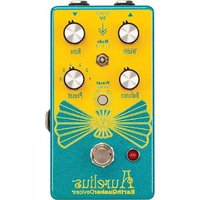
Aurelius - Effect pedal EarthQuaker Devices - Free user manual and instructions
Find the device manual for free Aurelius EarthQuaker Devices in PDF.



| Product Type | Modulation effect pedal (Chorus, Vibrato, Rotary) |
| Brand | EarthQuaker Devices |
| Model | Aurelius |
| Power Supply | 9 V DC center negative, 2.1 mm, 100 mA (estimated) |
| Dimensions (estimated) | 12.5 x 7 x 5 cm |
| Weight (estimated) | 400 g |
| Effect Modes | Vibrato (V), Chorus (C), Rotary (R) |
| Presets | 6 programmable slots |
| Expression Control | Yes, for Width, Rate or Balance via TRS pedal (0-3.3 V) |
| Switching | Flexi-Switch® (true relay bypass, momentary or latching) |
| Input Impedance | 500 kΩ |
| Output Impedance | 100 Ω |
| Manufacturing | Handmade in Akron, Ohio, USA |
| Warranty | Limited lifetime warranty |
| Cleaning and Maintenance | Use a dry, soft cloth. Do not use solvents. |
| Safety | Do not use with voltage higher than 9 V DC. Use an isolated power supply. |
| Repairability | Technical support at www.earthquakerdevices.com/support |
Frequently Asked Questions - Aurelius EarthQuaker Devices
User questions about Aurelius EarthQuaker Devices
0 question about this device. Answer the ones you know or ask your own.
Ask a new question about this device
Download the instructions for your Effect pedal in PDF format for free! Find your manual Aurelius - EarthQuaker Devices and take your electronic device back in hand. On this page are published all the documents necessary for the use of your device. Aurelius by EarthQuaker Devices.
USER MANUAL Aurelius EarthQuaker Devices
Welcome, fellow frequency chaser! Kudos to you for referring to the official manual of this majestic Device rather than diving into its powers blindly. Or equally likely, traveling down a YouTube pedal demo rabbit hole where you eventually find yourself watching a tutorial on how to make gnocchi from scratch at 3am. We can tell you're a true tone aficionado, which is why we're going to be straight with you: you're about to embark on a magical journey with this mighty Aurelius™ pedal in front of you.
This is not simply your run of the mill chorus pedal. This compact, beautifully cased wonder is a three-mode chorus with six programmable presets and expression control. Choose from Vibrato Mode, Chorus Mode, and Rotary Mode and manipulate their Width, Rate, and Balance to achieve your ideal sound. Shift seamlessly from one mode to another to cop a blend that is all your own. One simple tap of the Preset (“Save/Recall”) switch and you can summon up to six settings of your choosing at will. Feeling pretty powerful now, aren’t you?
Inspired by the 1970s CE-1 Chorus Ensemble pedal, this digital unit has been tirelessly tweaked and fine-tuned to give you an all-encompassing chorus and vibrato experience like nothing else. We even took it way back to the 1940s and the advent of the Leslie speaker to boldly capture the sound of its rotating baffle system for the Rotary mode. We studied the way that the horn and the rotor moved on Leslie speakers and emulated the phasing and speeds of the low frequency oscillator, but we exaggerated the hell out of them to make it sonically suitable for guitar, bass or your instrument of choice.
And by popular demand, like many of our pedals, we've equipped this with an expression control so you can use any TRS expression pedal to manipulate the Width, Rate or Balance. Put it in Vibrato Mode and you'll have a really subtle chorus with a seasick vibrato and alternate quickly between the two seamlessly. And that's only one mode. The possibilities are endless. Think about it.
This world of chorus in a box will fit on any pedalboard and is so intuitive that you most likely won't have to refer to this manual ever again. So, if we don't see you back here, it's been a pleasure and good luck with the gnocchi.
Each and every Aurelius is hand crafted in Akron, Ohio, USA and is inspected by the spirit of speaker innovator Donald Leslie.
This mode is a familiar traditional chorus type effect that leans towards vibrato with a triangle LFO modulating a short delay line. When the Balance control is turned fully clockwise, the dry signal is removed and the effect becomes a pitch vibrato.

WIDTH
Controls the amplitude of the LFO and determines how wide the pitch modulation will sweep.

RATE
Adjusts the speed of the LFO.

BALANCE
In Mode V, the Balance control adjusts the amount of pitch modulation that is blended in with the dry signal. When the Balance control is turned fully clockwise, the dry signal is removed and the effect becomes a pitch vibrato.
MODE C: CHORUS/FLANGER
Mode C is a blend of chorus and flanger. It has more warmth and slower rates than Mode V and uses a sine wave LFO to modulate the delay line. The Width control plays a major role in this mode and determines which type of modulation is more prominent.

WIDTH
Controls the amplitude of the LFO and determines how wide the pitch modulation will sweep. Higher Width settings have a more pronounced flanging effect. When the Width control is turned past the center point, feedback is gradually added and makes the flanging effect more prominent.

RATE
Controls the speed of the LFO.

BALANCE
In Mode C, the Balance control adjusts the level of the modulated signal. Turn clockwise for a more pronounced effect.
MODE R: ROTARY CHORUS
Mode R is a rotary chorus effect modeled after the sound of a Leslie speaker cabinet. This effect combines both amplitude and frequency modulation for a Doppler effect.

WIDTH
Controls the amplitude of the LFO and determines how wide the pitch modulation will sweep. Lower settings accentuate the lower “woofer” frequencies and higher settings accentuate the upper “horn” frequencies.

RATE
Controls the speed of the LFO.

BALANCE
In Mode R, the Balance control adjusts the wet/dry balance of the signal. Turn clockwise for a more pronounced and pulsing sub frequency effect.
Aurelius has two operating modes which are indicated by the color of the Save/Recall switch LED.

GREEN = LIVE MODE
In Live Mode, the pedal will operate exactly where the controls are set and any changes will have no effect on the presets unless saved. The Save/Recall switch LED will stay static green.

RED = PRESET MODE
In Preset Mode, stored presets are selected using the Preset switch, and the physical settings of the controls will be ignored. The Save/Recall switch LED will stay static red.

AURELIUS COMES FACTORY SET TO START UP IN LIVE MODE.
PRESETS
Aurelius has six available preset slots for you to save and recall your favorite settings. The settings for each of the three controls, the Mode switch and the expression jack assignment can be saved and recalled in any of the slots.
Saving a preset:
- Turn the Preset switch to the desired location you wish to save your preset.
- Dial in the settings you want to save. Remember; expression pedal assignment and the selected Mode can also be saved!
- Hold the Save/Recall switch down until the LED flashes between green and red and then release.
- Your preset is now saved!
Recalling a preset:
Select the desired preset you wish to use with the Preset selector switch and do one of the two following actions:
- When the pedal is activated and the effect is in use, hold down the footswitch for at least 0.75 seconds, and it will switch from Live Mode to Preset Mode. You can switch between Live and Preset mode on the fly! Or:
- Tap the lighted Save/Recall switch. The switch LED will turn from green to red, indicating you are now in preset mode. Tap again and the switch LED will turn from red to green indicating you are in live mode.
Editing/Overwriting a preset:
- Once in Preset Mode (the lighted Save/Recall switch LED will be red), make the desired changes to any of the controls in the selected preset. The Save/Recall switch LED will begin to flash red, indicating a change has been made to the stored preset. Any controls that are not changed will remain as previously saved.
- Hold the Save/Recall switch down until the LED flashes between green and red and then release.
- The Save/Recall switch LED will return to static red and the previous preset has been overwritten.
Helpful preset tips:
- Different EXP assignments can be saved in each preset!
- Presets can be stored and overwritten when Aurelius is in Live Mode or Preset Mode.
- To make changes to an existing preset, you must first be in Preset Mode before making the desired changes.
- There is no undo for preset saving, so make sure you are not overwriting your favorite sound, especially when you are saving presets from Live Mode!
Use any TRS expression pedal to take control over the Width, Rate or Balance! Aurelius ships with the EXP jack mapped to the Rate. Follow these steps to reassign the EXP functionality:
- Insert the expression pedal TRS plug into the EXP jack.
- Place the expression pedal in the toe down position.
- Turn the panel control on the Aurelius that you wish to put under control of the expression pedal. It doesn't matter how far or which direction you turn the control.
- Put the expression pedal in the heel down position.
- This control is now assigned to the EXP jack and can be used with an expression pedal!
Helpful expression assignment tips:
- If you turn the control that is assigned to the EXP jack while the expression pedal is plugged in, the panel control will override the expression pedal setting. The expression pedal will reassume control the next time it is used.
- Different EXP assignments can be saved in each preset.
- You can use Control Voltage with the EXP jack! The CV range is 0 to 3.3v.
TRS expression pedal wiring:
Tip ......Wiper
Ring......+3.3V
Sleeve ...... Ground
FLEXI-SWITCH® TECHNOLOGY
This device features Flexi-Switch Technology! This relay-based, true bypass switching style allows you to simultaneously use momentary and latching-style switching.
- For standard latching operation: Tap the footswitch once to activate the effect and then tap again to bypass.
- For momentary operation: With the effect off, hold the footswitch down for as long as you'd like to use the effect. Once you release the switch, the effect will be bypassed.

NOTE: HOLDING THE BYPASS SWITCH DOWN WHILE AURELIUS IS ACTIVATED WILL SWITCH INTO THE SELECTED PRESET MODE!
Since the switching is relay-based, it requires power to pass signal.
POWER REQUIREMENTS
Current Draw....75 mA
This device takes a standard 9 volt DC power supply with a 2.1mm negative center barrel. We recommend using a pedal-specific, transformer-isolated, wall-wart power supply or a power supply with multiple isolated-outputs. Pedals will make extra noise if there is ripple or unclean power. Switching-type power supplies, daisy chains and non-pedal specific power supplies do not always filter dirty power and may result in unwanted noise.

DO NOT RUN AT HIGHER VOLTAGES! YOU HAVE BEEN WARNED.
TECH SPECS
Input Impedance....500 kΩ Output Impedance....100 Ω
WARRANTY
This device has a limited lifetime warranty. If it breaks, we will fix it. Should you encounter any issues, please visit www.earthquakerdevices.com/support.
Consommation....75 mA
Punta (Tip)......Wiper
Anello (Ring)....+3.3V
Manica (Sleeve)......Massa
TECNOLOGIA FLEXI-SWITCH®
WWW.EARTHQUAKERDEVICES.COM