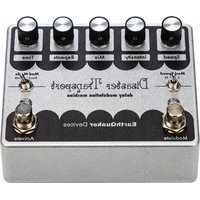
Disaster Transport - Effect machine EarthQuaker Devices - Free user manual and instructions
Find the device manual for free Disaster Transport EarthQuaker Devices in PDF.



| Product Type | Digital delay effect pedal with modulation |
| Brand | EarthQuaker Devices |
| Model | Disaster Transport |
| Power Supply | 9 V DC, center negative, 2.1 mm, current draw approx. 100 mA |
| Delay Time | Approx. 30 ms to 600 ms |
| Modulation | LFO with Ramp waveform, Speed control (slow/medium/fast) and Intensity |
| Modulation Modes | Bend (chorus type) and Stretch (pitch stretching) |
| Mod Speed Switch | 3 positions: slow (S), medium (M), fast (F) |
| Mod Mode Switch | 2 positions: Bend and Stretch |
| Controls | Speed, Intensity, Mix, Repeats, Time |
| Footswitches | Modulate (modulation on/off) and Activate (effect bypass) with Flexi-Switch® technology (momentary/latching) |
| Switching Technology | Relay true bypass with Flexi-Switch® |
| Input Impedance | 1 MΩ |
| Output Impedance | 1 kΩ |
| Warranty | Limited lifetime warranty |
| Maintenance | Clean with a dry cloth; avoid liquids and extreme temperatures |
| Safety | Use only the recommended power supply; do not open the housing |
| Country of Manufacture | United States (Akron, Ohio) |
Frequently Asked Questions - Disaster Transport EarthQuaker Devices
User questions about Disaster Transport EarthQuaker Devices
0 question about this device. Answer the ones you know or ask your own.
Ask a new question about this device
Download the instructions for your Effect machine in PDF format for free! Find your manual Disaster Transport - EarthQuaker Devices and take your electronic device back in hand. On this page are published all the documents necessary for the use of your device. Disaster Transport by EarthQuaker Devices.
USER MANUAL Disaster Transport EarthQuaker Devices
The Original Delay Modulation Machine
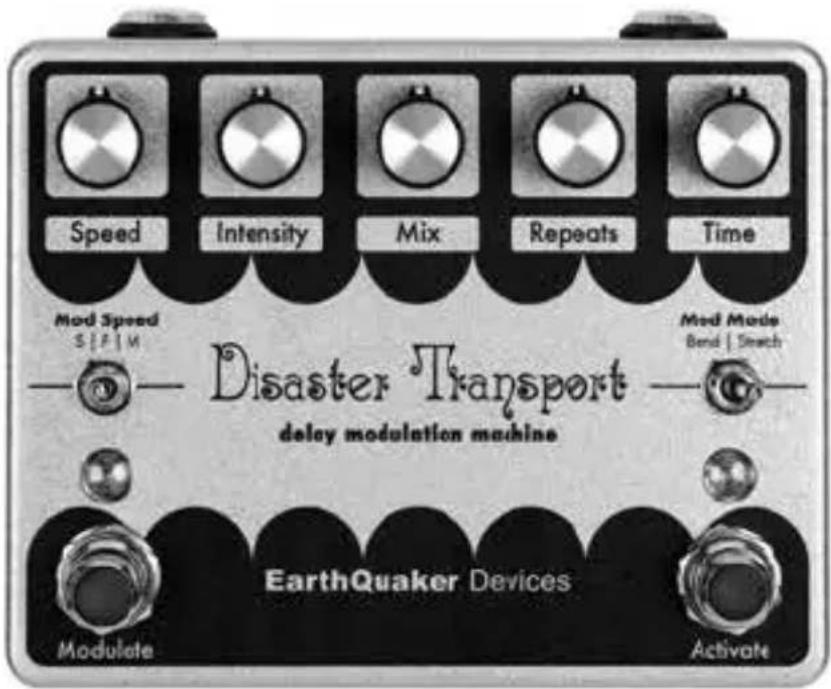
TABLE OF CONTENTS
4 English
7 Español
11 Français
15 Deutsche
19 Italiano
23 Polskie
27 Čeština
Behold! The newest incarnation of one of our most beloved pedals ever, the Disaster Transport. And don't be confused, the name isn't talking about that one Uber experience you had where the driver reeked like a dumpster of diapers, missed all of the exits, and talked your ear off about his ex-wife. We're talking Disaster Transport OG – an analog-voiced digital delay that can teleport your sound into the stratosphere.
We initially set out to recreate the original Disaster Transport pedal in its earliest form, but the OG of EQD, Jamie Stillman, couldn't resist tinkering and improving the whole thing, so you just got upgraded, my friend. In doing so, we redesigned the delay line to reduce the noise floor and improve the quality of the delay. We boosted the output with a cleaner mixing section; it's now filtered to sound more like an analog delay than any of the previous versions. This delay pedal sits perfectly in the background with more of an evolved ambiance to it, but it can be dialed in for more of a dramatic effect of your choosing.
For those of you well versed in the pedal's celebrated history, you might notice some differences on this beautifully sparkly box. We've added a Mod Mode switch that allows you to choose between bending (Bend) and stretching (Stretch) the modulation wave. The Bend setting offers a subtler vibe closer to a traditional chorus sound, while the new Stretch option gives you loads of pitch-stretching modulation to run wild with.
The other difference you probably spotted with your eagle eye is the Mod Speed three-position toggle switch that offers Slow (S), Fast (F), and Medium (M) settings. The Slow setting is excruciatingly slow and can produce bizarrely animated gradual climbs and steep drop offs. The Fast setting can go from a rapid chorus to an intense vibrato, while the Medium setting is the most traditional rate similar to the classic Memory Man circuit with a nice range to it.
The newly designed enclosure features knobs to control the Speed, Intensity, Mix, Repeats, and Time, with Modulate and Activate switches, making this a highly customizable pedal to get the delay sound of your dreams. Thanks to the ramp modulation circuitry, you can turn the delay time down and start to use feedback and modulation at a higher setting to harness a bizarre modulator and achieve subtle to wild chorus-type effects. Or set your delay time how you want to set it and use your modulation rates to set your tempo, so you can strum or pluck to the climbs and drop offs to match your riffs. The possibilities are endless. So, without further delay, enjoy this del... Well, err. We kinda painted ourselves into a corner there. Anyway, enjoy this pedal!
Each Disaster Transport is organically grown in the farmlands of Akron, Ohio, USA, using only the finest soil and fertilizer until they are perfectly ripe for picking.

SPEED
Controls the speed of the modulation. The Speed operates in three ranges (Slow/Fast/Medium) selected by the Mod Speed toggle switch. The Disaster Transport OG uses a Ramp wave for the modulation. You'll find this to be much more intense than most modulated delays. Think of it as a traditional Triangle wave that falls off a cliff in mid-cycle, creating a drastic pitch bend in its wake. Or don't and just think about whatever you want.

INTENSITY
Controls how much the LFO modulates the delay time. More subtle chorus type effects are achieved with less intensity and more intensity will yield wild pitch stretching and bending. The overall modulation style can be made more or less subtle by using the Mod Mode toggle switch to select Bend or Stretch.

MIX
Sets the volume level for the delay signal. Hear more of what you just played 30-600ms ago by turning this up.

REPEATS
Controls the intensity of delay feedback from no repeats at zero to self-oscillation at max. Let the past pile up on you until it implodes.

TIME
Sets the delay time from around 30ms at zero to 600ms at max. Everyone needs more time; all we can offer you is about 600ms worth.

MOD SPEED
Three position toggle switch that sets the range in which the Rate operates.

MOD MODE
Two position toggle switch to choose the modulation style. Bend is more of a traditional chorus type modulation and Stretch is a wilder pitch stretching modulation.

MODULATE
This footswitch features Flexi-Switch® Technology and turns the modulation on and off.

ACTIVATE
This footswitch features Flexi-Switch® Technology and turns the effect on and off.
This device features Flexi-Switch Technology! This relay-based, true bypass switching style allows you to simultaneously use momentary and latching-style switching.
- For standard latching operation: Tap the footswitch once to activate the effect and then tap again to bypass.
- For momentary operation: With the effect off, hold the footswitch down for as long as you'd like to use the effect. Once you release the switch, the effect will be bypassed.
Since the switching is relay-based, it requires power to pass signal.
POWER REQUIREMENTS
Current Draw....35 mA
This device takes a standard 9 volt DC power supply with a 2.1mm negative center barrel. We recommend using a pedal-specific, transformer-isolated, wall-wart power supply or a power supply with multiple isolated-outputs. Pedals will make extra noise if there is ripple or unclean power. Switching-type power supplies, daisy chains and non-pedal specific power supplies do not always filter dirty power and may result in unwanted noise.

DO NOT RUN AT HIGHER VOLTAGES!
TECH SPECS
Input Impedance....1 MΩ
Output Impedance.... 1 kΩ
WARRANTY
This device has a limited lifetime warranty. If it breaks, we will fix it. Should you encounter any issues, please visit www.earthquakerdevices.com/support.
Consommation....35 mA
WWW.EARTHQUAKERDEVICES.COM

Brand : EarthQuaker Devices
Model : Disaster Transport
Category : Effect machine