C.A 6630 - Measuring equipment CHAUVIN ARNOUX - Free user manual and instructions
Find the device manual for free C.A 6630 CHAUVIN ARNOUX in PDF.


User questions about C.A 6630 CHAUVIN ARNOUX
0 question about this device. Answer the ones you know or ask your own.
Ask a new question about this device
Download the instructions for your Measuring equipment in PDF format for free! Find your manual C.A 6630 - CHAUVIN ARNOUX and take your electronic device back in hand. On this page are published all the documents necessary for the use of your device. C.A 6630 by CHAUVIN ARNOUX.
USER MANUAL C.A 6630 CHAUVIN ARNOUX
text_image
I + M MEMORY : Memory Erase I + HOLD : Comparator Erase CHAUVIN ARNOUNC C.A 6630 Capacity Battery Tester MCC2 +1 -0.005 °C 1 (0 x 1) PASS WARNING FAIL REL SET V-RANGE HOLD Ω-RANGE M MEMORY READFRANÇAIS ENGLISH DEUTCH ITALIANO ESPAÑOL
4 CARRYING OUT A MEASUREMENT 30
4.1 PREPARATION....30
4.2 OPERATING THE INSTRUMENT 30
4.3 ZERO ADJUSMENT (REL).... 31
5 USING THE COMPARATOR FUNCTION....32
5.1 COMPARATOR....32
5.2 SETTING THE COMPARATOR PARAMETERS 32
5.3 COMPARATOR RESULTS.... 33
5.4 ACTIVATING / DEACTIVATING THE COMPARATOR FUNCTION ..... 33
6 USING THE MEMORY STORE FUNCTION....34
6.1 MANUAL STORAGE (999 LOCATIONS) 34
6.1.1 Storing measurement data in the memory.... 34
6.1.2 Reading stored data 34
6.2 CONTINUOUS DATA STORAGE: DATA LOGGER MODE (9600 LOCATIONS) 34
6.3 ERASING STORED DATA 34
7 MAINTENANCE....35
7.1 REPLACING THE BATTERIES 35
7.2 STORING THE INSTRUMENT 35
7.3 CLEANING.... 35
7.4 METROLOGICAL CHECKS....36
7.5 REPAIR....36
7.6 WARRANTY 36
8 TO ORDER....37
You have just purchased a C.A 6630 battery tester, and we thank you for your confidence.
For best results with your instrument:
- read this user's manual carefully before starting or using the C.A 6630 for the first time.
• comply with the safety procedures and instructions.
MEANING OF SYMBOLS USED ON THE INSTRUMENT:
 | Selective sorting of wastes for the recycling of electrical and electronic equipment within the European Union. In conformity with directive DEEE 2012/19/EU: this equipment must not be treated as household waste. |
 | WARNING, risk of DANGER! The operator agrees to refer to these instructions whenever this danger symbol appears. |
 | The CE marking guarantees conformity with European directives. |
 | Caution! Risk of electric shock. The voltage of the parts identified by this symbol may be ≥ 120 Vdc. For safety reasons, this symbol is displayed when such a voltage is generated. |
 | Equipment protected throughout by double or reinforced insulation. Equipment protected by double insulation. |
 | Alternating current |
OPERATING AND SAFETY INSTRUCTIONS
- Observe the recommended operating conditions: temperature, humidity, altitude, degree of pollution, etc.
- Use only accessories supplied with the instrument and compliant with the safety standards in force.
- Use only batteries of the recommended type and rating to power the instrument, failure to do so may damage the instrument and render the warranty void.
- Switch the instrument off when not in use.
- Before opening the instrument, check that all the terminals are disconnected and that the instrument is switched off.
- All repairs and metrological checks must be carried out by only qualified approved personnel.

- Do not measure DC voltages greater than 50V, failure to do so may damage the instrument and render the warranty void.
- Do not measure AC voltages, failure to do so may damage the instrument and render the warranty void.
- After carrying out measurements on a high-voltage battery and before carrying out further measurements, short-circuit the measurement cords to eliminate any DC capacitive charge, liable to damage a low-voltage battery.
1 GENERAL DESCRIPTION
1.1 THE TESTER
- This battery tester is designed to measure the internal resistance and the open-circuit voltage of acid/lead, nickel/cadmium, lithium/ion, and nickel/metal batteries.
- Its double display unit allows simultaneous reading of the internal resistance and of the voltage.
- For the internal resistance measurement, this tester uses the 4-wire method. This method eliminates the resistance of the measurement cords as a factor and so gives more precise results.
- To interpret the result and detect deterioration of a battery rapidly, this tester has 99 reference values (comparator function). The measurement result is thus compared to the theoretical value.
2 DESCRIPTION
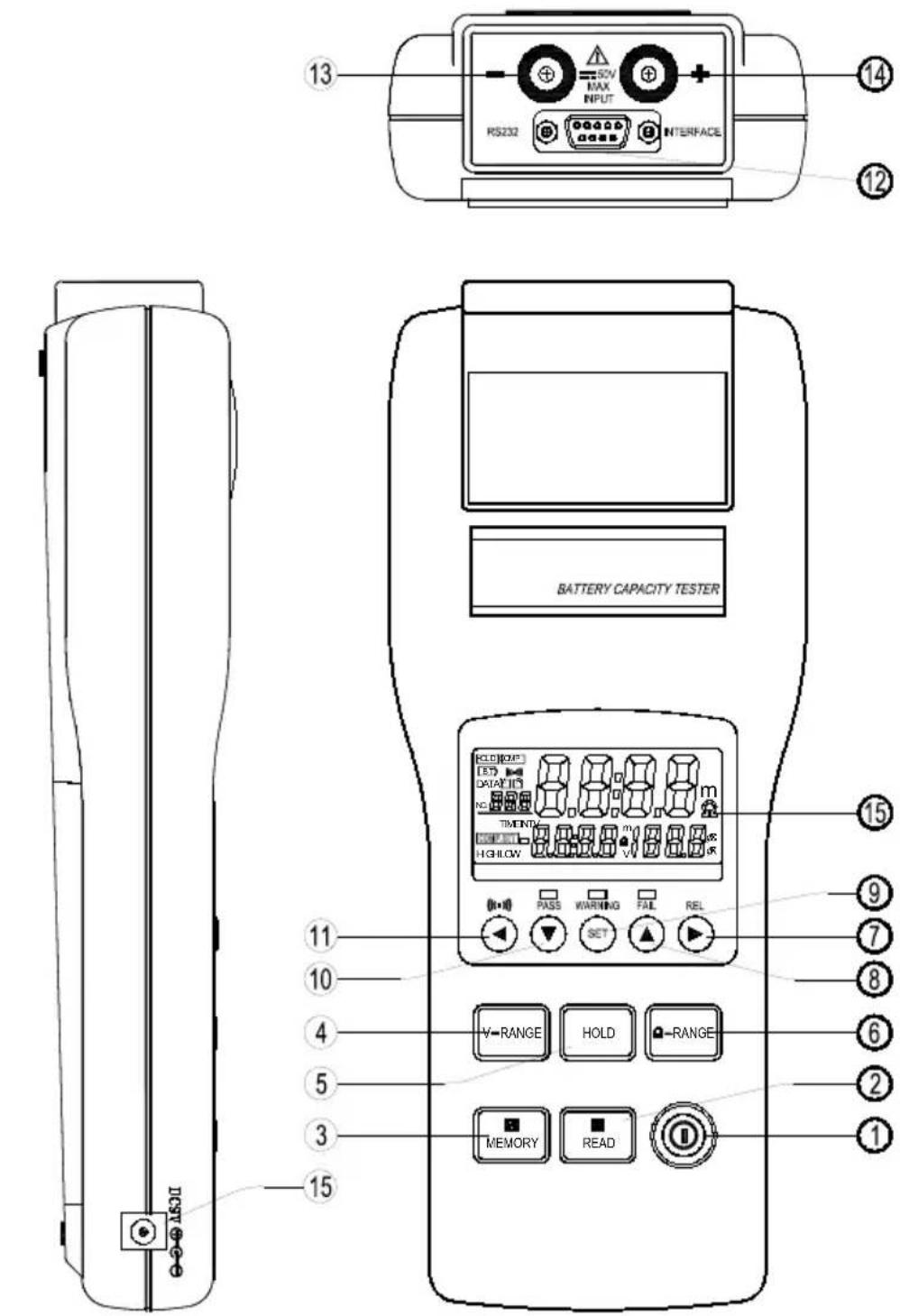
2.1 THE TESTER
text_image
RS232 INTERFACE BATTERY CAPACITY TESTER 13 14 12 15 11 10 4 5 3 15 HKEY-O-0-0| 1 | I | On/Off button |
| 2 | R READ | Read stored data |
| 3 | M MEMORY | - Store measurement results in memory- If pressed for 2s: activation/deactivation of the data logger mode |
| 4 | V-RANGE | Selection of voltage range (4V, 40V) |
| 5 | HOLD | - Activation/deactivation of the HOLD function- If pressed for 2s: programming of the time interval between recordings in data logger mode |
| 6 | Ω - RANGE | Selection of resistance range (40mΩ, 400mΩ, 4Ω, 40Ω) |
| 7 | REL | - Moves the cursor to the right- Zero adjustment of result (lead compensation) |
| 8 | ▲ | Increments the displayed value |
| 9 | SET | - Activation/deactivation of the comparator function- If pressed for 2s: access to the parameter settings of the 99 comparators |
| 10 | ▼ | Decrements the displayed value |
| 11 | ← | - Moves the cursor to the left- Activation/deactivation of the warning beep |
| 12 | RS-232 | Communication interface |
| 13 | Input - | Input for connection of the black measurement lead |
| 14 | Input + | Input for connection of the red measurement lead |
2.2 DISPLAY UNIT

text_image
HOLD COMP BT ((t·1)) DATA M R NO. 4 1 m INTV TIME COMP.SET HIGH LOW 2 v 3| 1 | Displays the resistance measured or the resistance limit settings of the comparator function |
| 2 | Displays the voltage measured or the voltage limit settings of the comparator function |
| 3 | Number of the comparator activated (of the 99 programmed). |
| 4 | Number of the memory location. |
SYMBOLS
| mΩ | unit of resistance |
| V | unit of voltage |
 | HOLD function activated: the result remains held on the display unit |
 | comparator function activated |
 | low battery level indicator |
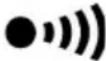 | warning beep activated |
 | activation of manual memory Read mode |
 | activation of manual Memory storage mode |
| [4WEZ] | data logger mode in use; this symbol flashes each time a sample is stored. |
| INTV | sets parameters of data logger mode: time interval between 2 samples (1~255s) |
 | activation of comparator parameter settings |
| HIGH | high resistance and voltage limits of the comparator |
| LOW | low resistance limit of the comparator |
LEDS
These are lit when the measurement result is compared to a comparator.
| PASS(green LED) | indicates that the battery tested is OK (lies within the limits of the comparator). |
| WARNING(yellow LED) | indicates that the battery tested is in an intermediate condition (deteriorating). |
| FAIL(red LED) | indicates that the battery tested is deteriorated |
3 SPECIFICATIONS
3.1 GENERAL SPECIFICATIONS
• Resistance measurement by the 4-wire AC method.
• Capacity of the battery to be tested: 0 to 500 Ah.
- LCD screen with two display units, information and/or warning symbols and result rating LEDs.
- The instrument switches off automatically after 30 minutes without using keys.
• Zero adjustment function: compensation of circuit, voltage displayed 0 V.
- Comparator function: the parameters of 99 comparators can be set and recorded in the instrument (high and low resistance limits and adjustment of voltage threshold point).
- Upon comparison of the measured result with the selected comparator, the rating LEDs light up, and are accompanied where appropriate by a warning beep.
- Possibility of storing measurement results: 999 locations for manual storage and 9600 locations for the automatic storage of samples in data logger mode.
- Short-circuit voltage on terminals: 3.5Vpp max.
- Operating conditions: 0 °C to +40 °C with 80% relative humidity (RH) (no condensation)
- Storage conditions: -10 °C to +50°C with 80% relative humidity (RH) (no condensation)
• Power supply to the instrument / battery: 6 x 1.5V batteries (AA type)
• Maximum demand: 1.0VA
- Operating battery life: 7 hours (approx.).
• Maximum operating altitude: 2000m.
• Dimensions: 250mm x 100mm x 45mm
• Weight: approx. 500g (batteries included)
3.2 ELECTRICAL SPECIFICATIONS
The measurement accuracy depends on the measurement conditions.
- The accuracy of measurements is guaranteed under the following conditions:
- Temperature: 23^ ± 5^
- Humidity: 80% RH maximum (without condensation)
- Zero adjustment: after adjustment of the zero / compensation for each range.
• Resistance measurement:
- Temperature coefficient: (±0.1% of reading ± 0.5 digits) / °C
- Frequency of measurement current: 1kHz ± 10%
- Measurement voltage: 1.5mVAC
| Range | Resolution | Measurement current | Accuracy |
| 40mΩ | 10μΩ | 37.5mA approx. | ±(1% of reading ± 8 digits) |
| 400mΩ | 100μΩ | 3.75mA approx. | |
| 4Ω | 1mΩ | 375μA approx. | |
| 40Ω | 10mΩ | 37.5μA approx. |
• Voltage measurement:
- Temperature coefficient ( ±0.1% of reading ±0.5 digits) / ^ C
- Maximum voltage on the inputs: 50VDC maximum, no AC voltage
- Maximum voltage between inputs and earth: 60VDC and AC maximum.
| Range | Resolution | Accuracy |
| 40 V | 1 mV | ±(0.1% of reading ± 6 digits) |
| 40 V | 10 mV |

Do not apply voltages greater than those specified above to the input als of the instrument, as this is liable to damage the instrument.
4 CARRYING OUT A MEASUREMENT
4.1 PREPARATION
To ensure your safety, the following safety procedures must be observed when using your C.A 6630:
- before opening the instrument to replace the batteries, disconnect the measurement leads from the battery being tested.
- do not mix old and new batteries, nor batteries of different types and specifications
- note and observe the polarity of the batteries before inserting them in the instrument
- do not short-circuit or damage used batteries or expose them to a naked flame. As this may cause them to explode.
- connect the red measurement lead to the "+" terminal of the instrument and the black measurement lead to the "-" terminal of the instrument
- switch the C.A 6630 on by pressing key
- connect the red contact tip to the positive terminal of the battery to be tested and the black contact tip to the negative terminal of the battery to be tested.
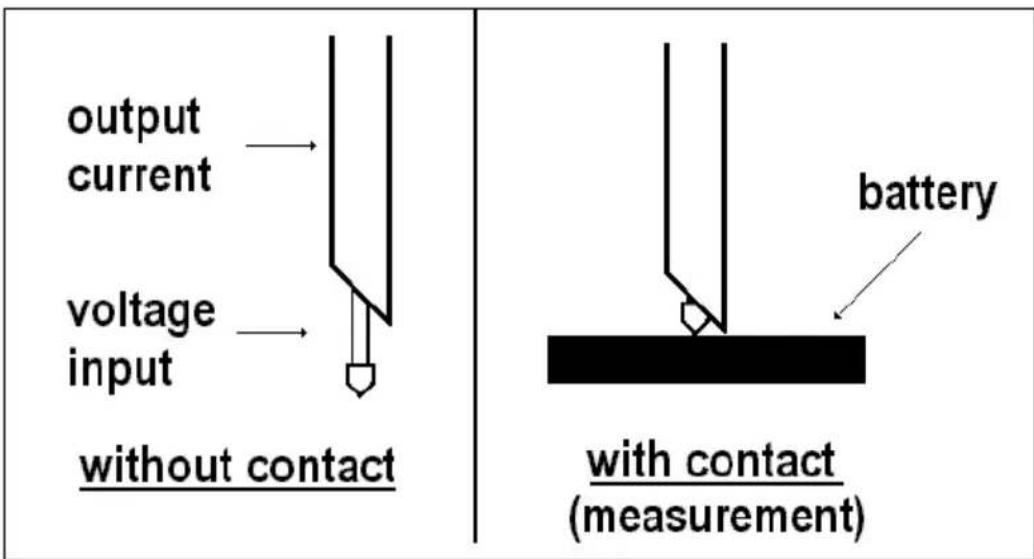
text_image
output current voltage input without contact battery with contact (measurement)- select the resistance and voltage ranges using the V-RANGE and Ω-RANGE keys.
- read the measurement results (resistance and DC voltage) directly on the display unit.
Remarks:
- if the reading is Outside the Limits for the range (resistance and voltage), "OL" lights.
- in case of malfunction of the AC test current, “----” is displayed.
4.3 ZERO ADJUSMENT (REL)
The zero adjustment (or measurement lead compensation) function serves to quantify the influence of the measurement leads and deduct it from the measurement results.
The results of the zero adjustment will then be taken as the measurement zero (origin).
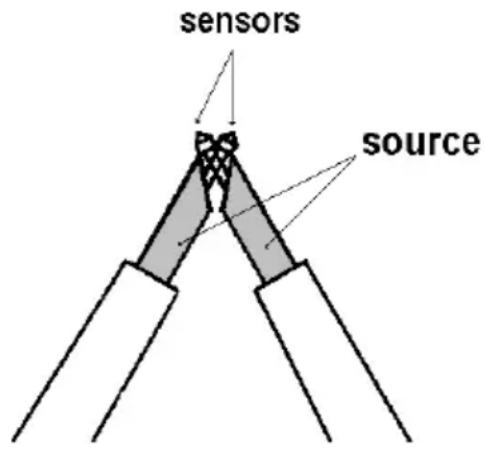
text_image
sensors source- short-circuit the red and black measurement contact tips as shown opposite
- press the REL key: R is then displayed and the resistance and voltage values are set to zero
- the connections to the battery to be tested can now be carried out.
Warning:
The lead compensation applies only to the measurement range selected beforehand and only until the instrument is switched off.
5 USING THE COMPARATOR FUNCTION
5.1 COMPARATOR
The comparator function enables you to compare the measured values to programmed reference values (high and low limits for the internal resistance and a high limit for the battery voltage level).
This comparison offers an evaluation of the measurement result, indicated by the lighting of one of the LEDs (PASS, WARNING, FAIL) and the possible activation of a warning beep.
5.2 SETTING THE COMPARATOR PARAMETERS
99 comparators or reference values can be parameterised and stored.
To parameterise a comparator:
- switch the C.A 6630 on by pressing the key Ⓘ.
-
press the SET key for 2 seconds.[COMP.SET] is then displayed to allow access to the comparator parameter setting mode:
-
use the ▲ and ▼ keys to select the number of the comparator (between 01 and 99).
-
once a comparator number has been selected, adjust the limit values using the ▶ key:
-
1st press: low resistance limit – the first 2 digits flash
- use the Ω -RANGE key to select the range
- use the ▲ & ▼ keys to set the values of these 2 digits
• 2nd press: low resistance limit – the last 2 digits flash
- use the ▲ & ▼ keys to set the values of these 2 digits
- 3rd press: high resistance limit – the first 2 digits flash
- use the Ω -RANGE key to select the range
- use the ▲ & ▼ keys to set the values of these 2 digits
• 4th press: high resistance limit – the last 2 digits flash
- use the ▲ & ▼ keys to set the values of these 2 digits
- 5th press: high voltage limit – the first 2 digits flash
- use the V-RANGE key to select the range
- use the ▲ & ▼ keys to set the values of these 2 digits
- 6th press: high voltage limit – the last 2 digits flash
- use the ▲ & ▼ keys to set the values of these 2 digits
To programme the parameters of the next comparator, repeat steps 3 & 4 of the procedure above.
To exit from the parameter set mode, press the SET key.
5.3 COMPARATOR RESULTS
Interpreting the comparator results:
Low resistance limit High resistance limit
| Resistance Voltage | Low value | intermediate value | high value |
| Low valuehigh voltagelimitHigh value | WARNING LED + beepWarning ! | WARNING LED + beepWarning ! | FAIL LED + beepBattery Not OK! |
| PASS LEDBattery OK ! | WARNING LED + beepWarning ! | FAIL LED + beepBattery Not OK! |
5.4 ACTIVATING / DEACTIVATING THE COMPARATOR FUNCTION
- press SET to activate the comparator function. COMP is displayed, indicating that the comparison will be made once the measurement has been carried out.
- the comparator used is the last one selected before the instrument was last switched off. To select another one from among the 99 possible, press ▲ and ▼.
- to activate the warning beep accompanying the WARNING and FAIL ratings of the comparator, press ●))) This same symbol appears on the display unit. To deactivate it, press ● again.
- to deactivate the comparator function, press SET again.
6 USING THE MEMORY STORE FUNCTION
6.1 MANUAL STORAGE (999 LOCATIONS)
6.1.1 Storing measurement data in the memory
To store a measurement result in the memory: after the measurement has been carried out, press M MEMORY; "DATA M NO XXX" is then displayed for 1 second, indicating the number of the location where the result has been stored.
6.1.2 Reading stored data
To read stored data, press the R READ key; "DATA R NO XXX" is then displayed. To select the location, press ▲ and ▼. To exit the memory read mode, press R READ again.
6.2 CONTINUOUS DATA STORAGE: DATA LOGGER MODE (9600 LOCATIONS)
-
press the HOLD key for 2 seconds: INTV is then displayed.
Adjust the time interval (from 1 to 255 seconds) between 2 samples using the ▲ and ▼ keys.
To exit this program, press SET. -
to activate the data logger mode, press the M MEMORY key for 2 seconds: M is then displayed and flashes each time a sample is stored.
-
to stop the data logger mode, press the M MEMORY key.
Warning: the data recorded in data logger mode cannot be read directly from the C.A 6630 itself. The recorded measurements must be transferred firstly to a PC (software supplied with the instrument).
6.3 ERASING STORED DATA
When the memory is full, "Full" is displayed, indicating that further storage is impossible.
To erase the stored data:
- switch the C.A 6630 off by pressing Ⓐ key.
- then hold the M MEMORY key down while switching the C.A 6630 back on (① key). Clr is then displayed to confirm the deletion of the stored data.
7 MAINTENANCE

For maintenance, use only the specified spare parts. The manufacturer be held liable for any accidents that occur following maintenance and carried out by anyone other than its after-sale service department or ed repair and maintenance professionals.
7.1 REPLACING THE BATTERIES
The appearance of the BT symbol on the display unit indicates that the battery charge is too low for carrying out further measurements.
The batteries must then be replaced: 6 x 1.5V batteries (AA type).
Battery replacement procedure:
- disconnect all measurement leads
- switch the instrument off
- open the battery compartment on the rear panel of the instrument (1 screw to be unscrewed)
- replace the used batteries with new batteries of equivalent specifications
- close the battery compartment
7.2 STORING THE INSTRUMENT
If the instrument is to be stored for a period of more than 2 months, remove the batteries.
7.3 CLEANING
It is imperative that the instrument be disconnected from any source of electricity. Use a soft cloth, dampened with soapy water. Rinse with a wet cloth and dry quickly using a dry cloth or pulsed dry air. Do not use alcohol, hydrocarbons, or other solvents.
7.4 METROLOGICAL CHECKS

As with all measuring and testing instruments, a periodic check is necessary.
We recommend you have this instrument checked at least once a year. For checks and calibration services, contact our COFRAC-accredited metrology laboratories or your local MANUMESURE agency.
Information and contact address available upon request from:
Tel. 02.31.64.51.55 - Fax 02.31.64.51.09. (France).
7.5 REPAIR
For all repairs before or after expiry of warranty, please return the device to your distributor.
7.6 WARRANTY
Except as otherwise stated, our warranty is valid for twelve months starting from the date on which the equipment was sold. Extract from our General Conditions of Sale provided on request.
The warranty does not apply in the following cases:
- Inappropriate use of the equipment or use with incompatible equipment;
- Modifications made to the equipment without the explicit permission of the manufacturer's technical staff;
- Work done on the device by a person not approved by the manufacturer;
- Adaptation to a particular application not anticipated in the definition of the equipment or not indicated in the user's manual;
- Damage caused by shocks, falls, or floods.
8 TO ORDER
C.A 6630 Battery tester
Delivered with:
• 1 set of 2 x 1m measurement leads with retractable contact tip ends,
• 1 software to read the data measured by the instrument in real time,
• 1 apparatus/PC connecting lead.
Replacement parts:
Set of leads for C.A 6630
(set of 2 x 1m measurement leads with retractable contact tip ends)
For the accessories and spares, consult our web site:
www.chauvin-arnoux.com
INHALT
1 ZUSAMMENFASSUNG......41
1.1 DER TESTER....41
2 BESCHREIBUNG 42
2.1 DER TESTER 42
2.2 ANZEIGE 44
3 SPEZIFIKATIONEN....46
Unit 1 Nelson Court – Flagship Square-Shaw Cross Business Park
Dewsbury – West Yorkshire – WF12 7TH
Tel: 01924 460 494 - Fax: 01924 455 328
MIDDLE EAST - Chauvin Arnoux Middle East
P.O. BOX 60-154 - 1241 2020 JAL EL DIB (Beirut) – LEBANON
Tel: (01) 89 04 25 - Fax: (01) 89 04 24
CHINA - Shanghai Pu-Jiang - Enerdis Instruments Co. Ltd
3 F, 3 rd Building - N° 381 Xiang De Road - 200081 SHANGHAI
Tel: +86 21 65 21 51 96 - Fax: +86 21 65 21 61 07
USA - Chauvin Arnoux Inc - d.b.a AEMC Instruments
15 Faraday Drive - Dover NH 03820
Tel: (800) 945-2362 - Fax: (603) 742-2346
www.chauvin-arnoux.com