AirStretch - Massage device Belena - Free user manual and instructions
Find the device manual for free AirStretch Belena in PDF.


User questions about AirStretch Belena
0 question about this device. Answer the ones you know or ask your own.
Ask a new question about this device
Download the instructions for your Massage device in PDF format for free! Find your manual AirStretch - Belena and take your electronic device back in hand. On this page are published all the documents necessary for the use of your device. AirStretch by Belena.
USER MANUAL AirStretch Belena
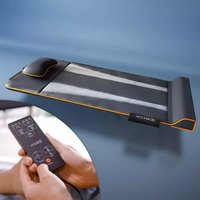
Delivery contents: 1 x Belena AirStretch, 1 x Adapter
Description of parts:
a.Mat
b. Flexible headboard
c. Height adjuster
d. Remote/Hand-held control
e. Remote control pouch
f. Adapter
g. Adapter connection
FR
- Please read the following information carefully before using your massage device in order to ensure trouble-free operation and optimal efficiency. Please retain these instructions for future reference!
- Before plugging in, check that the adapter is not damaged in any way. To avoid electric shock, do not plug or unplug the adapter with wet hands.
- In order to avoid damaging the appliance, never drag or pull it by the cord to move it.
- To avoid electric shock, do not use this product in a humid environment.
- The appliance should only ever be used by one person at a time.
- An appliance should never be left unattended when plugged in.
- Repairs should only ever be carried out by authorized specialist personnel. Improper use and unauthorized repairs are not permitted for safety reasons, and render the warranty invalid. In such circumstances, contact our customer service for advice beforehand.
- Avoid contact with water, high temperatures, moisture and direct sunlight.
- The power cord must never be damaged, modified, bent excessively, pulled strongly, twisted or knotted.
- Never use damaged cables or plugs, or loose sockets.
- Never use while sleeping.
- Unplug the appliance's power cable when not in use and during cleaning.
- Only use with the included power adapter.
- Accessories not included in the scope of delivery must not be used.
- This appliance may only be used by children aged 8 years and over if they are supervised or have been instructed in the safe use of the appliance and understand the dangers associated with its use. Cleaning and maintenance should not be performed by children unless they are 8 years of age or older and under adult supervision. The appliance and its connecting cables are to be kept away from children younger than 8 years. This appliance may only be used by persons with reduced physical, sensory or mental capacities or lack of experience and/or knowledge if they have been supervised or instructed in the safe use of the appliance and can understand the hazards arising therefrom. Children must never be allowed to play with the device.
- If you have concerns about your specific circumstances (e.g. pregnancy, cardiac pacemaker, physical limitations), consult your doctor before using the device.
- If you feel any unexpected discomfort during use, cease use immediately.
GETTING TO KNOW YOUR BELENA AIRSTRETCH:
The Belena AirStretch is equipped with several power air chambers and a heating function. The air chambers ensure pleasant-but-intensive stretching. This form of passive movement may initially be uncomfortable for persons who are new or not used to this type of stretching. Give yourself and your body time, find the lying position and program that are right for you. After a few uses, you will begin to feel the soothing, relaxing effect of the Belena AirStretch, and soon won't want to be without it.
The Belena AirStretch has 4 programs (PROGRAM): Invigorate, Stretch, Twist and Flow
- You can focus on 3 body areas (PART): shoulders, middle back & hips.
- You can select from 3 intensity levels: low intensity, medium intensity, high intensity.
The timer can be set to 10/20/30 minutes. - The heat function HEAT can be switched on if desired
PLEASE READ BEFORE USE:
- In order to prevent excessive irritation of the muscles and nerves, the recommended usage time of 30 minutes per application should not be exceeded.
- A break of at least one hour is recommended after each application.
- It is recommended that no more than 3 applications per day are performed.
- After an application, remain in a lying position for a few minutes, before slowly getting up.
- We recommend wearing comfortable, breathable, close-fitting clothing during use.
PREPARING THE MAT:
- Open the zipper on the mat, roll it out, and place it on a flat, solid surface, such as the floor.
- The flexible head section can be adjusted to your own specifications using a Velcro fastener on the underside of the mat. You can determine whether you prefer using it with or without the headboard.
- If you perform the application on the floor, you can also use a blanket or fitness mat as an underlay.
- Plug the thin end of the adapter into the cable, which is situated underneath the remote control pouch, then plug the network adapter into a suitable socket. The device is now ready for use.
SUITABLE CLOTHING:
We recommend wearing comfortable, breathable, close-fitting clothing during use. Remove your shoes and all jewellery.
YOU'RE READY TO GO!
Lie on your back on the Belena AirStretch.
MAKE SURE YOUR BUTTOCKS ARE AS CLOSE TO THE LOWEST BUMP AS POSSIBLE. THEN ADJUST THE HEADBOARD SO THAT YOU LIE COMFORTABLY.
POSSIBLE LYING POSITIONS:
The Belena AirStretch is designed for people of almost all sizes and shapes. By changing the position of your arms and legs, you can additionally influence the effectiveness of the application; your perception of the intensity may also be affected. If the position in which you are lying is uncomfortable, change it until you feel comfortable. To do this, slide upward or downward slightly on the mat through small movements. In the table you will find some tips on how you can optimize your lying comfort, and thus the application. You can incorporate a leg pillow into the application as support. Go through the different lying positions slowly and carefully.
!! Please note that different lying positions may be best suited to different application types. In most cases, it takes at least 5-10 applications to find your own ideal lying position. !!
SETTING UP WITH THE MAT TURNED ON:
Please note that you will only be able to find the optimal position AFTER you start the program. Position yourself up optimally, and restart the program from the beginning if necessary.
| Current flexibility Recommended leg position Recommended arm position | |||
| Position 1 Rather inflexible & "stiff" | Characteristics: tense back and hamstring muscles. | Knees bent, feet flat on the floor, behind the mat. | Place your hands on your sides or stomach. |
| Position 2 Limited flexibility | Characteristics: slight recurring tension. | Straightened legs, with a pillow placed below them. | Place your hands on your sides or stomach. |
| Position 3 Good flexibility | Characteristics: It is easy for you to touch your toes while standing. | Straight legs, no additional pillow. Place your hands on your sides or stomach. | |
| Position 4 Very flexible | You are looking for relaxation & well-being. | Straight legs, no additional pillow. Spread your arms out or stretch them above your head. | |
Now take the remote/hand-held control in your hand and select your application.
INFO: The device always automatically starts at the lowest intensity level. Only increase the intensity once you have become sufficiently familiar with all programs at the lowest intensity level. The effect is different for every person, and therefore it is important that you take enough time and allow several applications to work their magic on you. Give yourself and your body enough time (at least 5-10 applications) to become accustomed to the stretching.
HAND-HELD CONTROL - FUNCTIONS OF THE BUTTONS AND APPLICATIONS IN DETAIL:
ON/OFF:Turns the device on and off.
Press the ON/OFF button to turn on the device; the indicator light will turn on.
All buttons are now active. The default mode is the ENERGIZE mode, and the default intensity is "Low intensity".
The countdown starts; the default timer is 10 minutes. After 10 minutes of operation, the application stops, and the device switches off and returns to standby mode.
You can also pause the application at any time: to do this, press the "Pause" button.
If you want to stop the device before the 10 minutes have elapsed, press the "ON/OFF" button.
BASIC SETTINGS:
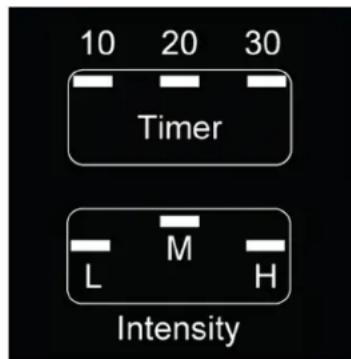
TIMER / Setting the time:
After turning on the device, press the TIMER button to adjust the time setting if required. It can be adjusted in increments of 10 minutes. 20 mins 30mins 10 mins The corresponding indicator light will light up.
INTENSITY/Setting the intensity:
After switching on the device, press the INTENSITY button to customize the intensity of your application: Low intensity Medium intensity High Intensity Low intensity. The corresponding indicator light will turn on.
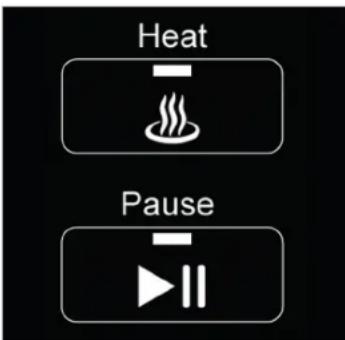
HEAT/Heat function:
After turning on the device, you can press the HEAT button to activate the heating function. Its indicator light will be on. Press this button again to turn off the heat function; the indicator light will also turn off.
PAUSE:
When the device is in operation, press the PAUSE button to pause the application. The device freezes in the current action state. With the exception of this button and the ON/OFF button, all other buttons are deactivated. Press the PAUSE button again to continue the application.
PROGRAMS & TARGETED AREA APPLICATIONS
You can optionally choose between 4 different preset programs (PROGRAM) OR select specific body areas (PART) for your application:
PROGRAMS:
INFO: The device will always automatically start at the lowest intensity level.
Only increase the intensity and duration once you have become sufficiently familiar with all programs at the lowest intensity level. You can switch the heat function on or off at any time during use.
!! OPTIMAL POSITIONING ON THE MAT:
Please note that you will only be able to optimally position your body AFTER you start the application. When you feel the movement of the air chambers, you can change your position accordingly through small movements, sliding slightly upward or downward.
If necessary, restart the program from the beginning to fully enjoy the benefits of the application.
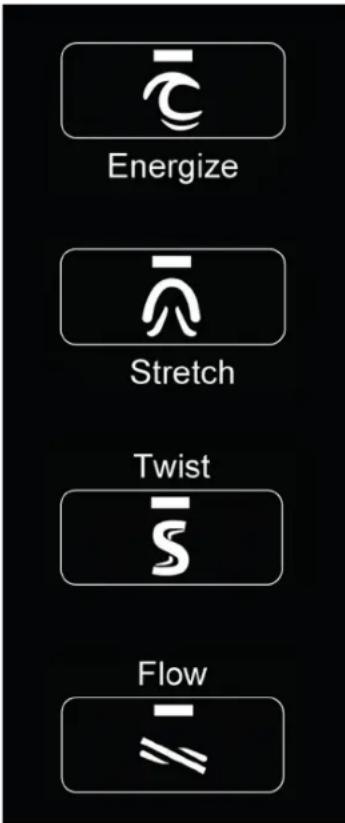
ENERGIZE / Invigorating program:
First turn on the device, then press the ENERGIZE button to start the application. The intensity is automatically set to the lowest level, and the indicator light lights up.
STRETCH / Stretching:
First turn on the device, then press the STRETCH button to start the stretch mode. The intensity is automatically set to the lowest level, and the indicator light turns on.
TWIST:
After turning on the device, press the TWIST button to start the twist mode. The intensity will be adjusted to middle level automatically, and the indicator light will turn on.
FLOW/Flow:
After turning on the device, press the FLOW button to begin the flow mode. The intensity will be adjusted to middle level automatically, and the indicator light will turn on.
A pleasantly invigorating and revitalizing program that stimulates the muscles and joints in your upper body, gently revitalizing it.
An intensive stretching program that thoroughly stretches and loosens your muscles, connective tissue and fascia in your upper body. Ideal for those with a sedentary profession.
A professional stretching program that gently rotates your body in critical areas to relieve possible tension in the hips, shoulders and lower back.
A pleasant and flowing air cushion massage that constantly moves gently across your body.
This can, after several applications, lead to optimized elasticity and mobility.
TARGETED AREA APPLICATIONS:
PART:
After switching on the device, use the PART button to select a specific body area:
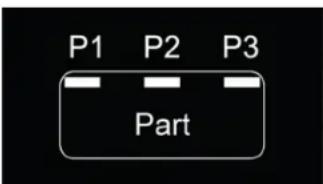
| Press the PART button 1 time Shoulder area Indicator light P1 turns on | |
| Press the PART button 2 times Middle back/chest Indicator light P2 lights up | |
| Press the PART button 3 times Hip zone Indicator Light P3 lights up |
STORAGE AND CLEANING:
After use, pull the adapter out of the socket, roll up the massage mat again, carefully close the zip, and store in a cool, dry place to save space. Place the remote control in the side pouch provided.
Cleaning: Use a soft cloth, with a little mild cleaning fluid added if necessary, to wipe the product surface and control panel. Then wipe dry with a soft cloth. Do not use corrosive cleaners such as benzene or thinals to clean the device, otherwise the colour of the upholstery will fade. The product should never be entirely immersed in water or other liquids when cleaning.
FR
REMARQUES IMPORTANTES ET CONSIGNES DE SECURITÉ
PROGRAMMI E APPLICATIONI MIRATE
Output: 12V==2.5A30W
HU
Muszaki adatok:
Keszulek
Bemenet: 12V = 2.5A
Teljesitmény: 30 W
Intrare: 12V = 2.5A
Putere: 30 W
Alimentare / adaptor:
Intrare: 100-240V~50/60Hz 0,8A
Iesire:12V=2,5A30W
PL
Dane techniczne:
Urzadzenie:
Wejsie:12V=2.5A
Moc:30W
Zasilacz sieciowy
Entrada: 12V = 2.5A
Potencia: 30 W
Transformador de corrente / adaptor:
Entrada: 100-240V~50/60Hz 0,8A
Salida: 12V = 2,5A30W
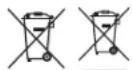
EN: This symbol means that such electrical equipment or batteries must not be disposed of with normal household waste. You are legally obliged to hand in such items - free of charge - to a public collection point or distributor created collection point for the recycling of electrical devices and expired bottles and batteries within the scope of the Electrical and Electronic Equipment Act that are not encapsulated by or fixed into the appliance, and can be removed or separated from the appliance by non-destructive means, for disposal at the end of their service life. Use rechargeable batteries instead of single-use batteries wherever possible. The recovery and recycling of old appliances makes an important contribution to protecting our environment. Improper disposal can result in toxic substances being released into the environment, which can have harmful effects upon people, animals and plants. Betters with an increased pollutant content are also marked with the following symbols: Cd = cadmium, Hg = mercury, Pb = lead. Consumers are themselves responsible for deleting any personal data from appliances. Here are some best practices and recommendations to extend the life of your batteries and enable their reuse:
-
Charge your batteries correctly and fully to maximize their lifespan. If necessary, fully discharge it using a suitable appliance before recharging it.
-
Consider the possibility of using rechargeable batteries. These can be reused and recharged multiple times, reducing the quantity of battery waste.
office@mediashop-group.com | www.mediashop.tv
DE | AT | CH: 08003763606 - kostenlose Servicehotline
ROW: +4312676967