
MICRON - Cooker EDILKAMIN - Free user manual and instructions
Find the device manual for free MICRON EDILKAMIN in PDF.



| Product Type | Pellet Stove |
| Brand | Edilkamin |
| Model | MICRON |
| Nominal power | 7 kW |
| Reduced power | 2.1 kW |
| Nominal efficiency | 91% |
| Fuel | Wood pellets diameter 6 mm |
| Hopper capacity | 15 kg |
| Autonomy min/max | 8 / 24 hours |
| Consumption min/max | 0.5 / 1.6 kg/h |
| Heatable volume | 180 m³ |
| Weight with packaging | 125 kg |
| Power supply | 230 V~ +/-10%, 50 Hz |
| Average power consumption | 120 W |
| Power consumption at ignition | 400 W |
| Flue pipe diameter | 80 mm (male) |
| Air intake diameter | 40 mm (male) |
| Safety | Thermocouple, differential pressure switch, safety thermostat |
| Coating | Ceramic (cream white, burgundy, grey) or sheet metal |
| Operating mode | Manual, automatic, chronothermostat |
| Daily maintenance | Cleaning the crucible and emptying the ash drawer |
Frequently Asked Questions - MICRON EDILKAMIN
User questions about MICRON EDILKAMIN
0 question about this device. Answer the ones you know or ask your own.
Ask a new question about this device
Download the instructions for your Cooker in PDF format for free! Find your manual MICRON - EDILKAMIN and take your electronic device back in hand. On this page are published all the documents necessary for the use of your device. MICRON by EDILKAMIN.
USER MANUAL MICRON EDILKAMIN
UK Installation, use and maintenance
FLUE OUTLET
TO ALLOW CONNECTION OF THE FLUE OUTLET FROM THE RIGHT SIDE AND FROM THE TOP, IT IS NECESSARY TO REMOVE THE RIGHT METAL SIDE AND THE REAR PANEL.
CONNECTION OF THE FLUE OUTLET FROM THE TOP

AIR INTAKE
fig. 19
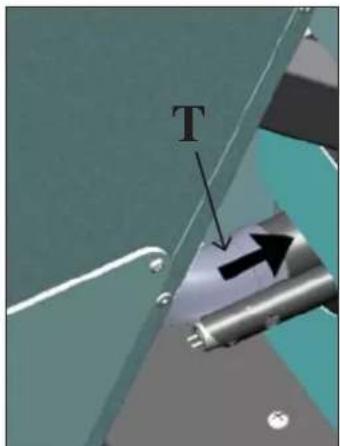
fig. 20
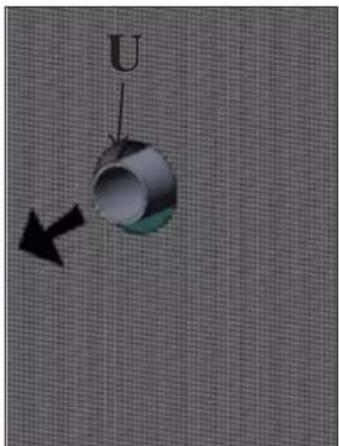
fig. 21
ASSEMBLY
LINING WITH CERAMIC FRONTS
Fig. 1
fig.1
INSTRUCTIONS FOR USE
SYNOPTIC PANEL


MAINTENANCE
TIPS FOR POSSIBLE PROBLEMS
Thank you for buying one of our products and congratulations.
Before you start using it, we suggest you read this technical information sheet carefully: it will help you get the best use out of the product and ensure that you always use it in complete safety.
For any further information or requirements, please contact the DEALER where you bought the product or visit our website www.edilkamin.com and see the DEALERS section.
NOTE
- After removing the product from the packaging, check that the contents are intact and complete (elbow joint, rosette, "cold-hand" handle, wall bracket kit, covering, warranty booklet, glove, technical information CD/sheet, spatula and dehumidifying salts).
In the case of anomaly, please contact the dealer where you bought the product immediately, presenting a copy of the guarantee booklet and the official purchase receipt or invoice.
- Starting up/testing
This must be carried out by an EDILKAMIN authorised Technical Assistance Centre (TAC) otherwise the guarantee shall not be effective. The start-up as described by standard UNI 10683 consists of a series of checks carried out when the stove is completely installed to ensure the correct functioning of the system and its compliance with standards.
The nearest Assistance Centre can be found by telephoning the toll-free number or by visiting the site www.edilkamin.com.
- the manufacturer shall accept no liability whatsoever from any damage deriving from use in the case of incorrect installation, incorrect maintenance or incorrect use of the product.
- the warranty number, necessary for identifying the stove, is indicated:
- on the upper part of the packaging
- in the guarantee booklet placed inside the combustion chamber
- on the plate affixed to the inside of the stove;
This documentation must be kept for identification, together with the official purchase receipt or invoice. This data must be given when you ask for information and must be made available in the case of any maintenance work;
- the details presented are graphically and geometrically indicative.
OPERATING PRINCIPLE
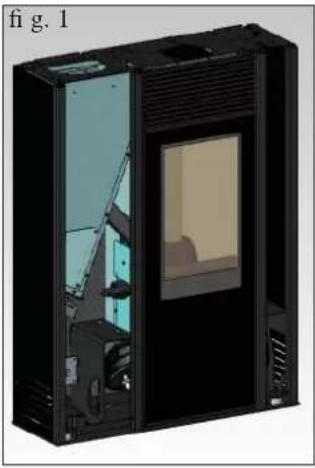
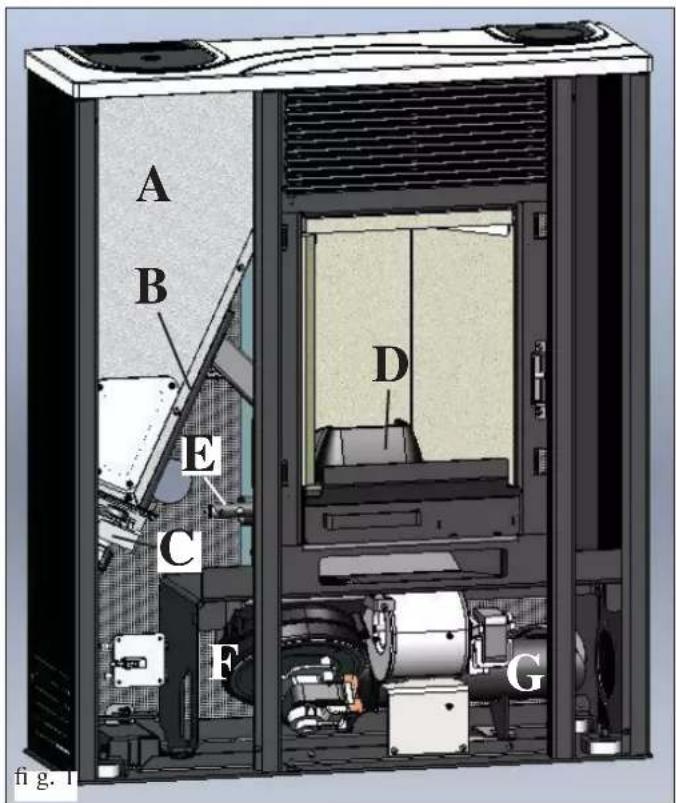
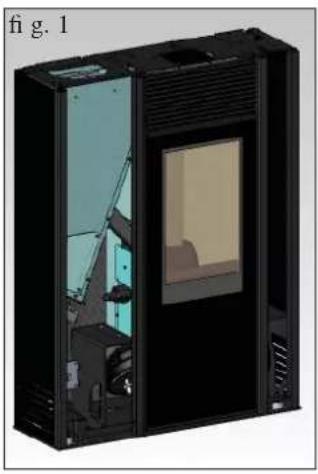
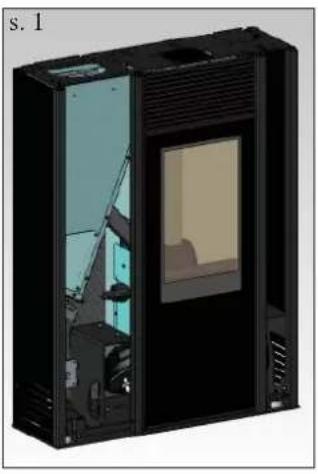
The MICRON stove is designed to produce hot air through the electronically-controlled combustion of wood pellet fuel. Its operation is described below (the letters refer to Figure 1).
The fuel (pellets) is taken from the hopper (A) and, using a screw (B) operated by a gear motor (C), is sent to the crucible (D).
The pellets are lit by hot air produced by an electrical element (E) sucked into the crucible through a smoke extractor fan (F).
The smoke produced by combustion is extracted from the combustion chamber by the same fan (F) and expelled from the vent (G) which can be connected to the back, the right side or the top of the stove (see page 25).
The combustion chamber, lined with Vermiculite, is closed at the front by a ceramic glass door (use the special "cold-hand" handle to open the door).
The quantity of fuel, the extraction of the smoke and the input of air for combustion are regulated by a motherboard equipped with software, to obtain a high combustion efficiency and low emissions.
The stove has a serial socket for optional wire connection (code 640560) to remote controlled ignition devices (chrono-thermostats etc.).
The ceramic outer covering is available in three colour variants: cream, burgundy and grey.
SAFETY INFORMATION
Hot air is introduced into the installation environment through a grille located in the upper part of the front; the same environment is also heated by radiation from the mouth of the combustion chamber.
- The only risks deriving from the use of the stove are linked to not respecting the installation rules, direct contact with live electrical parts (internal parts), contact with flames or hot parts (glass, pipes, hot air outlet) or to the introduction of foreign substances.
- If any component does not function correctly, the stove has safety devices that guarantee it will switch off; in such cases, allow the stove to switch itself off without intervening.
- To function correctly, the stove must be installed according to the indications given on this sheet and the door must not be opened during operation: combustion is managed automatically, no action is necessary.
- For fuel, use only wood pellets with a diameter of 6 mm.
- Under no circumstances may foreign substances be placed in the combustion chamber or the pellet hopper.
- The flue (the duct connecting the smoke output vent of the stove to the chimney) must not be cleaned with flammable products.
- The parts of the combustion chamber and the pellet hopper must be vacuumed only when COLD.
- The glass can be cleaned when it is COLD with a special product applied with a cloth.
- Do not clean when hot.
- Make sure the stove is installed and switched on for the first time by an Edilkamin authorised TAC (Technical Assistance Centre) according to the indications given on this sheet; otherwise the guarantee will not be valid.
- During operation of the stove, the discharge pipes become very hot (do not touch them without the special glove).
- Do not place non-heat-resistant objects next to the stove.
- NEVER use flammable liquids to light the stove or to revive hot embers.
- Do not block ventilation into the room where the stove is installed, and do not block the air intake of the stove itself.
- Do not allow the stove to get wet, and do not place wet hands anywhere near the electrical parts.
- Do not insert reductions into the smoke discharge pipes.
- The stove must be installed in a room with an adequate fire-prevention system, and it must also be provided with all systems (input and discharge) required by the stove for safe operation.
- If necessary, clean the smoke passage by extracting the Vermiculite combustion chamber after removing the brackets.
- If the stove does not light, do NOT repeat ignition before having emptied the crucible.
- ATTENTION: PELLETS REMOVED FROM THE CRUCIBLE MUST NOT BE PLACED BACK INTO THE HOPPER.
FRONT BACK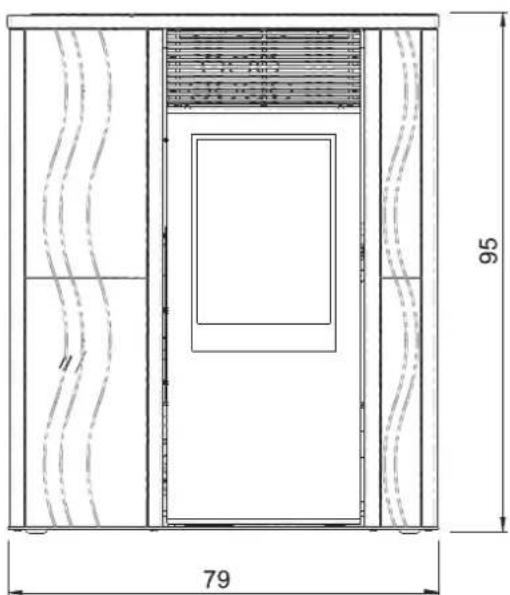
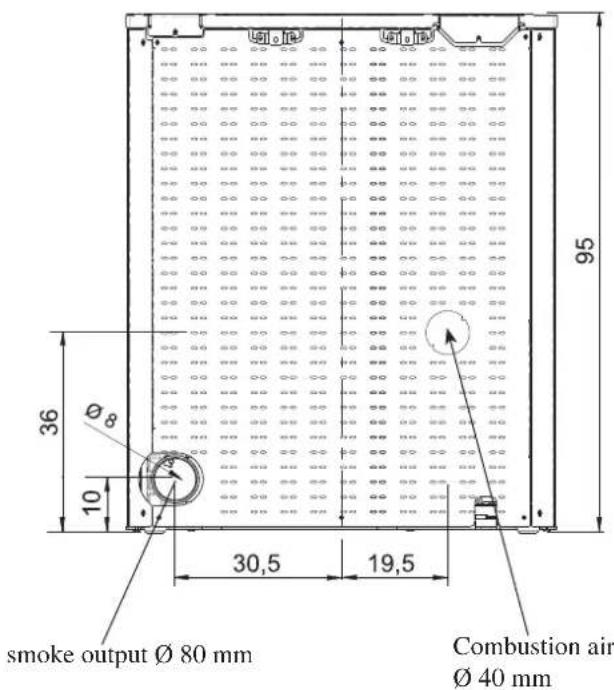
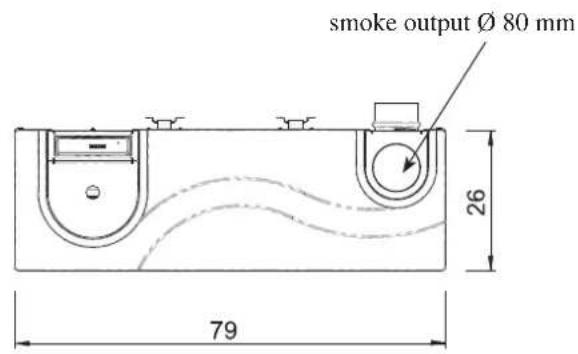
SIDES VIEW FROM ABOVE right left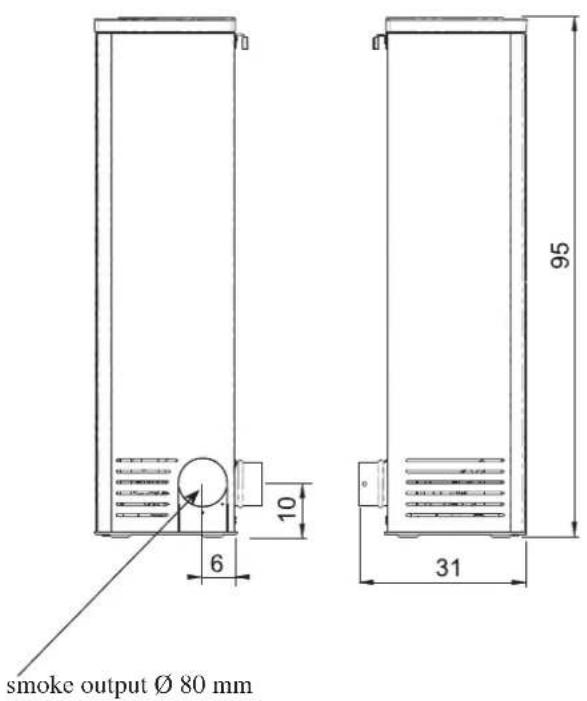
ELECTRONIC APPARATUS
SERIAL PORT
The stove has a serial port RS232, to which an optional on-off control device, such as a thermostat, can be installed by the TAC (Technical Assistance Centre) using a special cable (code 640560).
The serial socket is inside the stove, on the left side.
BACKUP BATTERY
The motherboard has a backup battery (type CR 2032, 3 volts).
Failure of the battery is due to normal wear and tear (and is not a manufacturing defect).
For more information, contact the TAC (Technical Assistance Centre) which carried out the first ignition.
SAFETY DEVICES
• THERMOCOUPLE:
Positioned on the smoke discharge, it measures the temperature.
According to the set parameters, it controls ignition, operation and switching off.
• DIFFERENTIAL PRESSURE SWITCH:
Positioned in the smoke-aspiration area, it is triggered in the case of a depression in the circuit (e.g. obstructed flue).
• SAFETY THERMOSTAT:
This intervenes if the temperature inside the stove is too high.
It blocks pellet loading causing the stove to go out.
FEATURES
| THERMO-TECHNICAL FEATURES | ||
| Nominal power 7kW | ||
| Nominal power effi ciency 91 % | ||
| CO emission (13% O2 ) nominal power 0,013 % | ||
| Mass of smoke nominal power | 4,8 r/s | |
| Reduced power 2,1 kW | ||
| Reduced power effi ciency 93 % | ||
| CO emission (13% O2 ) reduced power 0,025 % | ||
| Mass of smoke reduced power 2,6 r/s | ||
| Maximum smoke overheating 140 °C | ||
| Minimum draught 12 / 5 Pa | ||
| Min/max autonomous operation | 8 / 24 | hours |
| Min/max fuel consumption | 0,5 / 1,6 | kg/h |
| Pellet hopper capacity | 15 | kg |
| Heatable volume * | 180 m 3 | |
| Weight inc. packaging | 125 | kg |
| Diameter of smoke duct (male) | 80 mm | |
| Diameter of air intake duct (male) | 40 mm | |
* The volume which can be heated is calculated assuming the use of pellets with p.c.i. of at least 4300 Kcal/kg, insulation of the house pursuant to Italian law 10/91 and successive amendments and a heat requirement of 33 Kcal/m³ hour. * It is important to also take into consideration the position of the stove in the environment to be heated.
N.B.
1) take into consideration that external appliances can cause disturbances. 2) warning: activity on live components, maintenance and/or checks must be carried out by qualified personnel.
(Before carrying out any maintenance, disconnect the appliance from the mains electricity)
| ELECTRICAL FEATURES | ||
| Power supply | 230Vac +/- 10% 50 Hz | |
| Average power consumption | 120 | W |
| Power consumption during ignition 400 | W | |
| Motherboard protection * | Fuse F4 AL, 250 Vac | |
The above data are indicative.
EDILKAMIN s.p.a. reserves the right to modify products without notice to improve their performance.
INSTALLATION
If information is not expressly indicated, please refer to the local standards for your country. In Italy, please refer to the standard UNI 10683, and to any regional or local public-health regulations.
In the case of installation in a multiple-tenancy building, contact the building manager before installation.
CHECK OF COMPATIBILITY WITH OTHER DEVICES
The stove must NOT be installed in the same room as extractor fans, type B heating appliances, or other appliances which can compromise correct operation.
See standard UNI 10683.
CHECK THE ELECTRICAL CONNECTION (the socket must be in an easily accessible position)
The stove is provided with a wire for the electricity supply to be connected to a 230V 50 Hz socket, preferably with a magnetothermal switch. If the electricity socket is not easily accessible, place a switch upstream of the stove (to be provided by the customer).
Voltage variations of more than 10% can damage the stove. The electricity system must comply with standards; in particular, check the efficiency of the earth circuit.
The diameter of the power supply line must be adequate for the power required by the stove.
An inefficient earth circuit can cause malfunctioning of the stove, for which Edilkamin will accept no responsibility.
FIRE PREVENTION SAFETY DISTANCE
If the wall is flammable (wood), adequate insulation in non-flammable material must be fitted.
The flue pipe must be adequately insulated, since it reaches high temperatures.
Every object on either side of the stove in flammable and/or heat sensitive material must be kept at least 20 cm from the stove, or it must be suitably insulated with non-flammable insulating material; under no circumstances must any object be placed less than 80 cm from the front of the stove, since it will be directly subjected to the radiation of heat from the combustion chamber.
AIR INTAKE VENT
An air intake vent connected with the external environment must be installed behind the stove; it must have an inner diameter of at least 80 cm² to guarantee sufficient air intake for combustion.
The air intake vent must be connected to the inlet provided on the back of the stove (see page 26).
SMOKE DISCHARGE
The discharge system must only serve the stove (the smoke must not be discharged into a flue also used for other stoves/fireplaces etc.).
The smoke is discharged through the 8 cm-diameter vent positioned on the back, right/left side or top of the stove.
The smoke discharge must be connected to the external environment by steel pipes with EN 1856 certification. The pipe must be hermetically sealed.
The pipes must be sealed, and if necessary insulated, with materials resistant to high temperatures (silicon or mastics for high temperatures).
The only horizontal stretch allowed can be 2 m long. There must be no more than two bends, with a maximum angle of 90° (in relation to the vertical piece).
A vertical stretch and a wind-proof terminal (reference UNI 10683) are required (unless the flue is inserted into a chimney). If the flue runs outside the building, adequate insulation is necessary. If the flue is inserted into a chimney, the chimney must be suitable for solid fuel, and if it is larger than Ø 150 mm, pipes with a suitable diameter and in suitable material (e.g. steel Ø 80 mm) must be fitted inside the chimney.
It must be possible to inspect all sections of the smoke duct.
Chimneys and flues to which solid fuel burning appliances are connected must be cleaned at least once a year (check the relative standards in your country).
If they are not checked and cleaned regularly, there is an increased risk of the chimney catching fire. In such a case, do not attempt to put out the fire with water; empty the pellet hopper. Contact specialist personnel before re-igniting the stove.
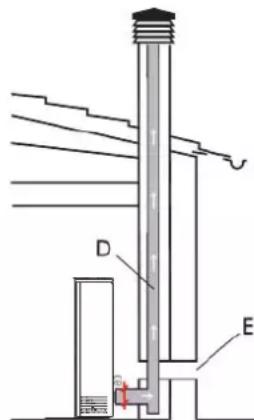
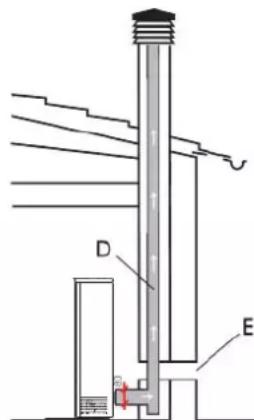
TYPICAL CASES Fig. 1 Fig.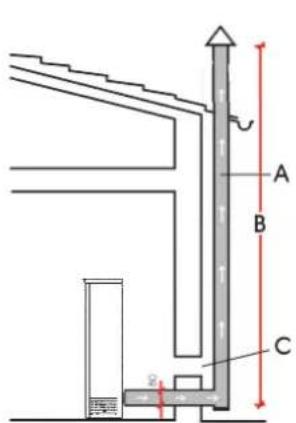
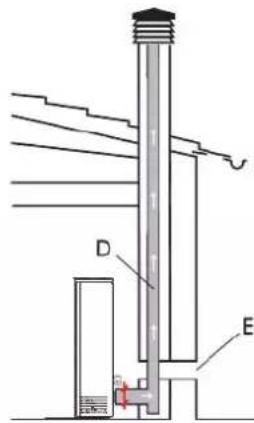
A: flue in insulated steel B: minimum height 1.5 m and, in any case, above the level of roof guttering C-E: vent for the intake of air from the external environment (minimum internal diameter 80 cm²) D: steel flue inserted into an existing masonry chimney
CHIMNEY POT
The basic features are:
- internal section at the base equal to that of the flue
- output section no less than double that of the flue
- position in full wind, above the roof ridge and beyond the reflux area.
INSTALLATION
SMOKE OUTPUT
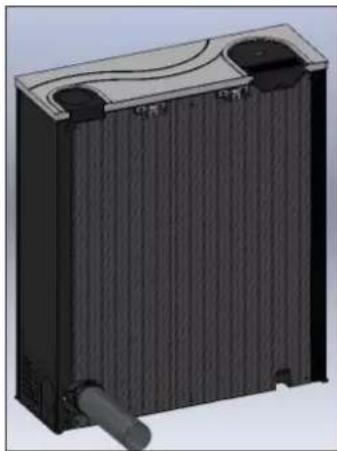
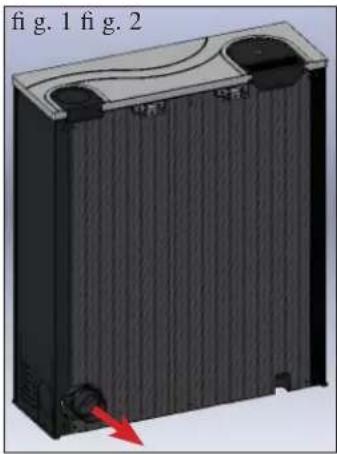
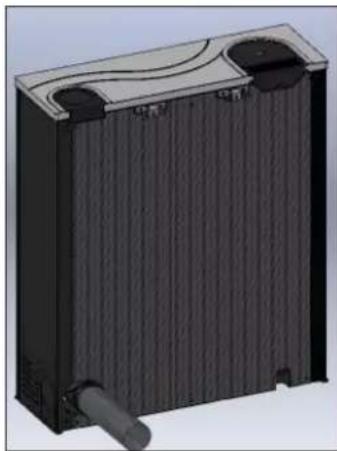
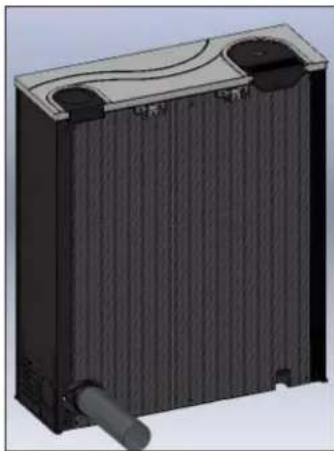
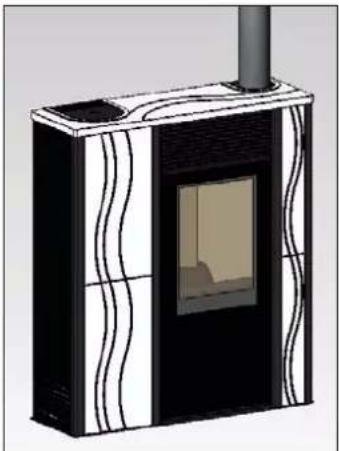
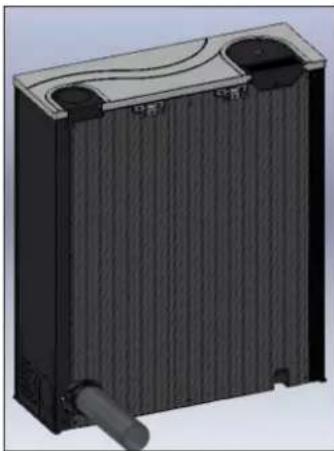
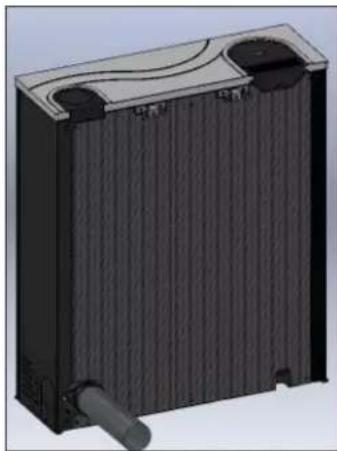
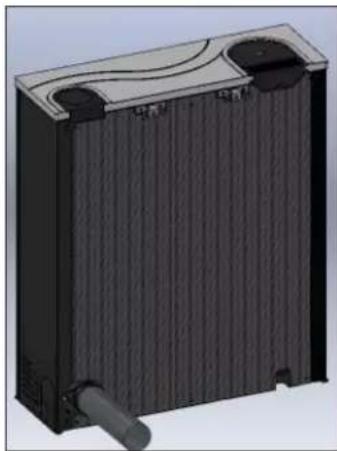
MICRON is designed for the connection of the smoke output on the back, right side and top of the stove.
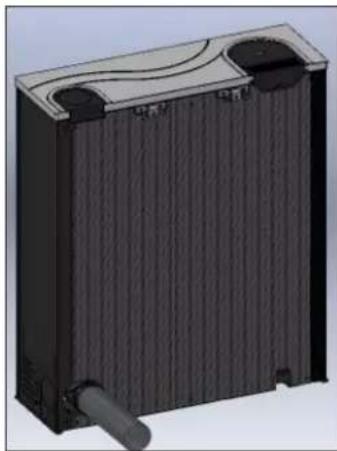
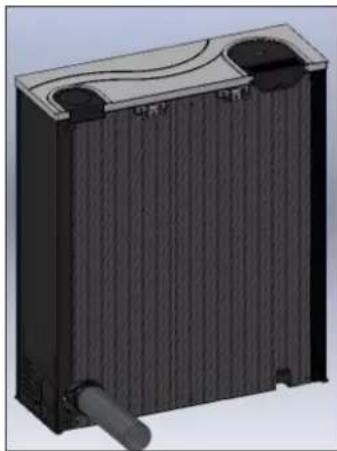
The stove is delivered ready for the output of the flue from the back (fig. 1-2).
REAR SMOKE OUTPUT CONNECTION
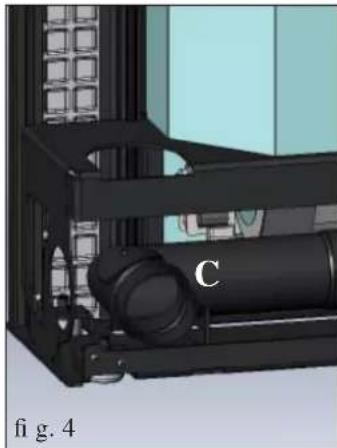
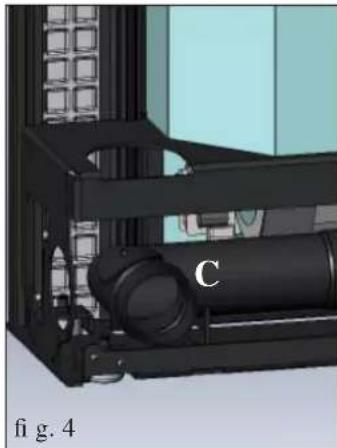
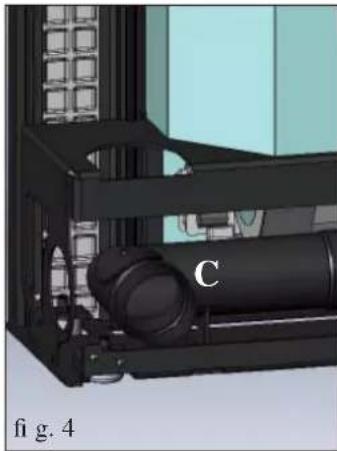
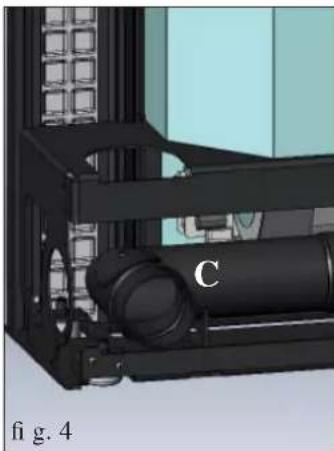
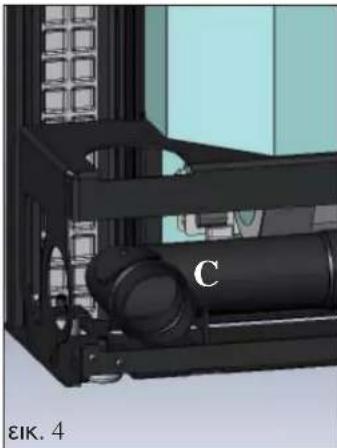
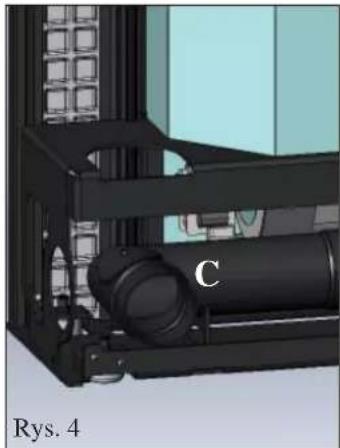
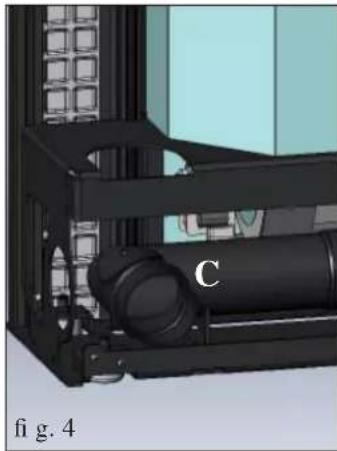
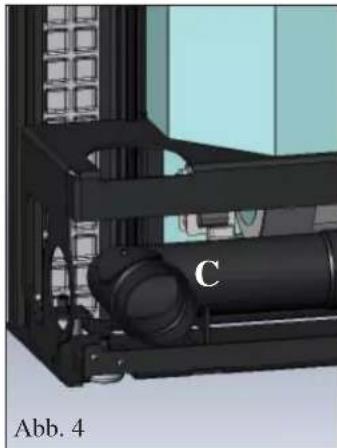
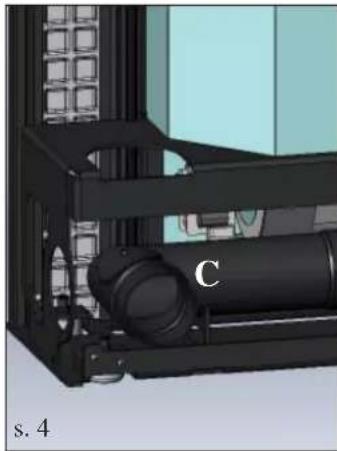
Connect the rear smoke-output pipe (not supplied) to the elbow joint (C - fig. 4) with a band (not supplied).
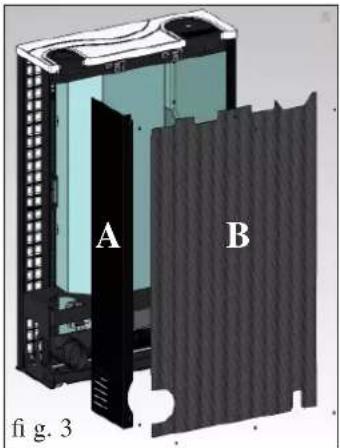
TO ALLOW THE CONNECTION OF THE SMOKE OUTPUT FROM THE RIGHT SIDE AND TOP IT IS NECESSARY TO REMOVE THE RIGHT METAL SIDE AND THE REAR PANEL.
Proceed as follows:
- Take off the right metal side by removing the 2 screws (A - fig. 3).
- Take off the rear panel by removing the 6 screws (B - fig. 3).
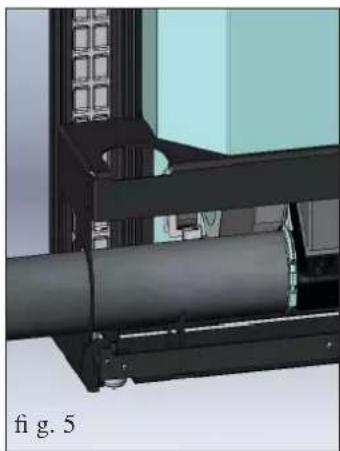
Connect the smoke output pipe (not supplied) to the smoke extractor unit vent (fig. 5) with the band provided.
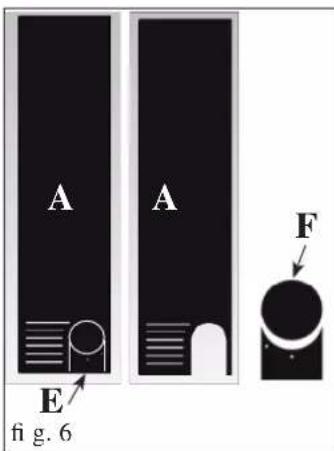
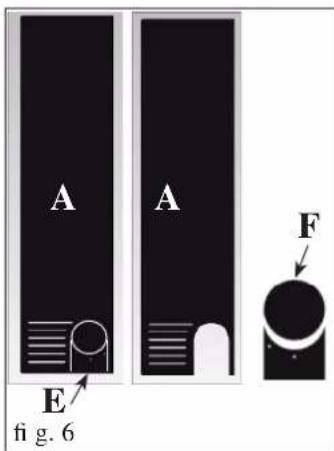
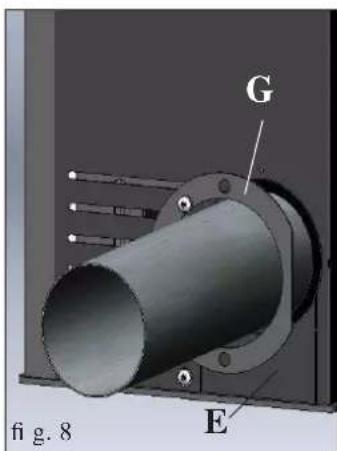
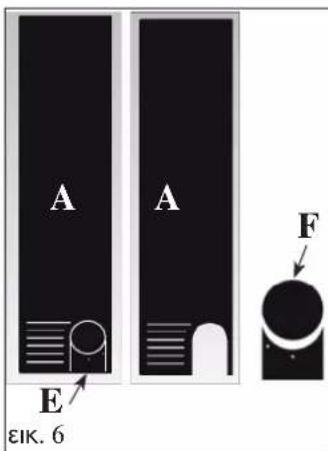
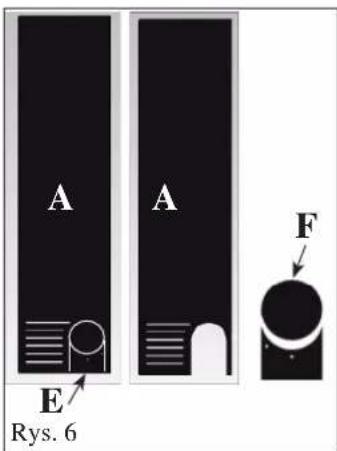
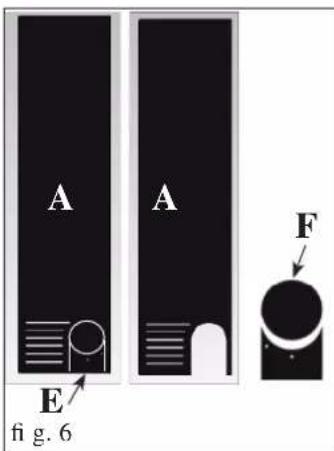
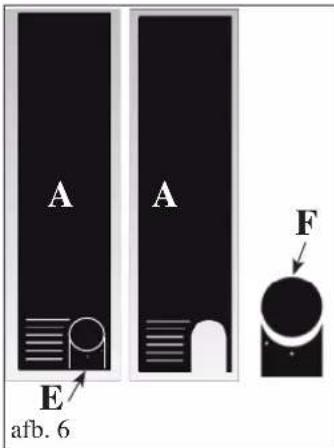
Remove the pre-cut diaphragm (E - fig. 6) from the metal side (A), previously removed, to allow the smoke output pipe (not provided) to pass through.
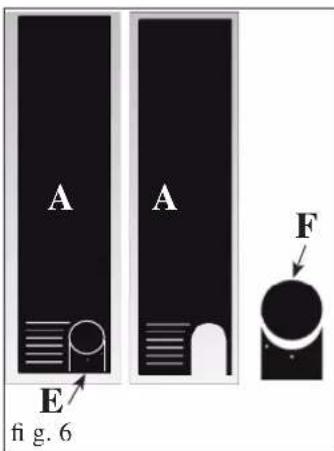
From the diaphragm (fig. 6) remove portion F (fig. 6).
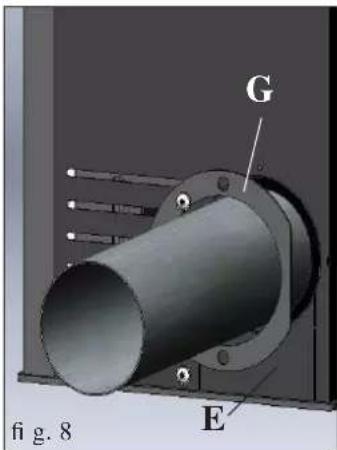
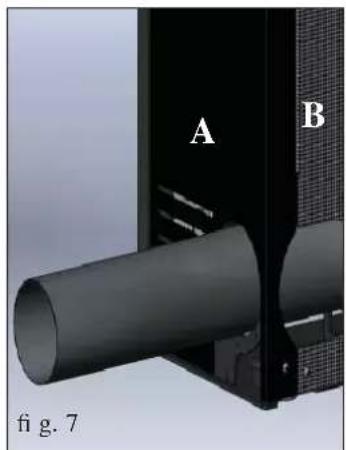
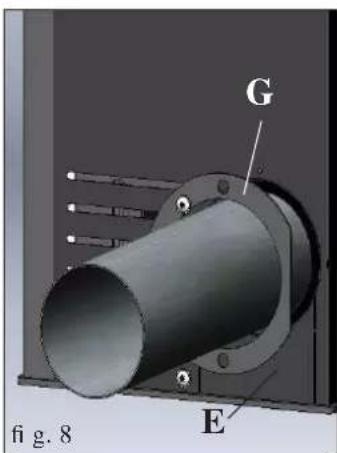
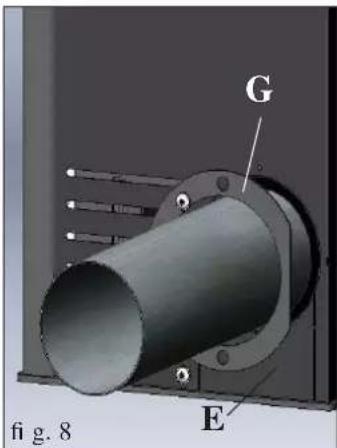
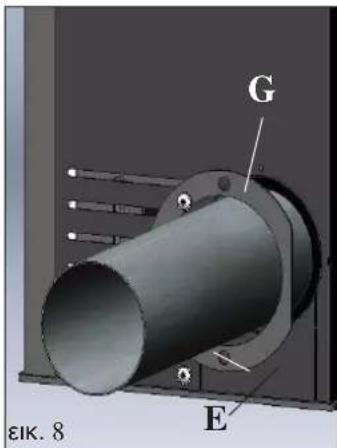
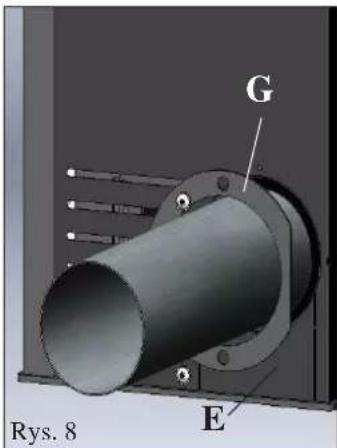
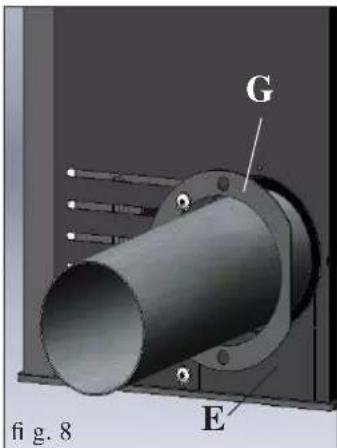
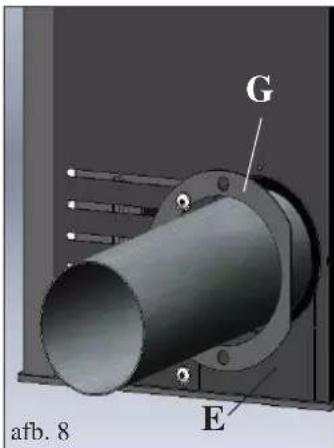
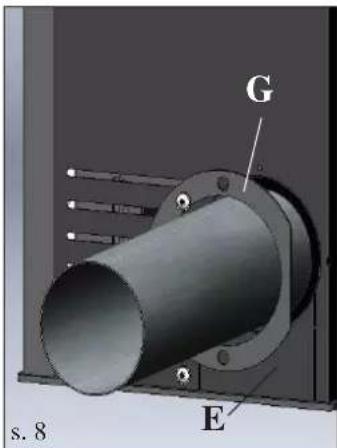
Replace the metal side A (fig. 7), the rear panel B (fig. 7) and the diaphragm (E) without portion F (fig. 8).
Complete the operation by applying the closure rosette provided G (fig. 8) using the screws provided.
N.B. The rosette and the metal side must be fitted after the flue has been definitively fixed.
TOP SMOKE OUTPUT CONNECTION
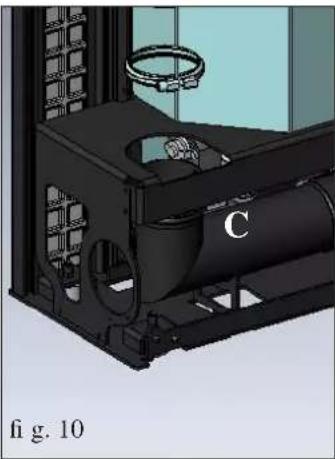
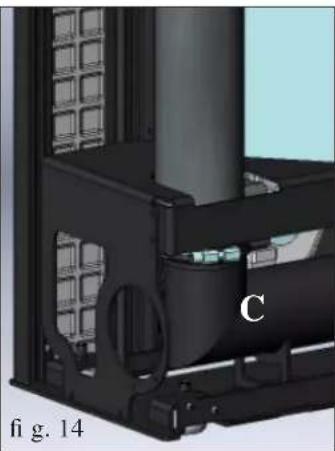
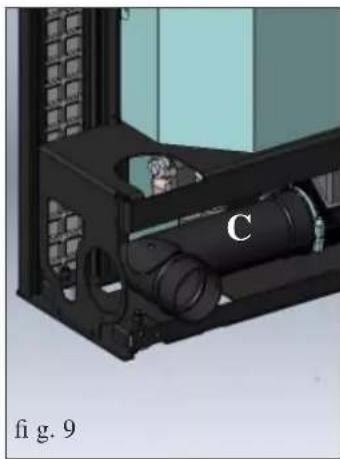
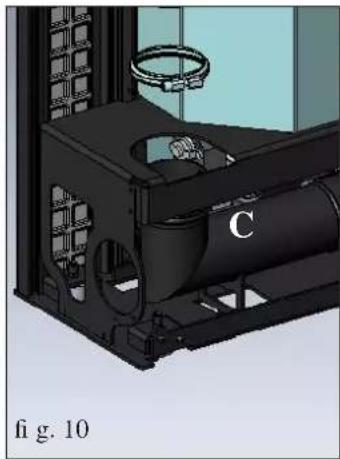
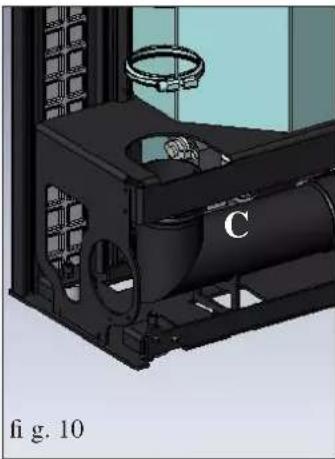
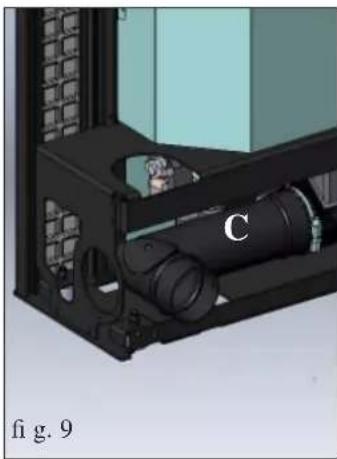
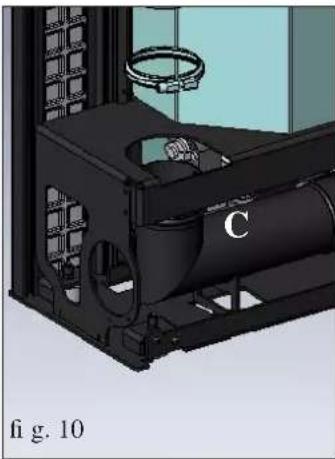
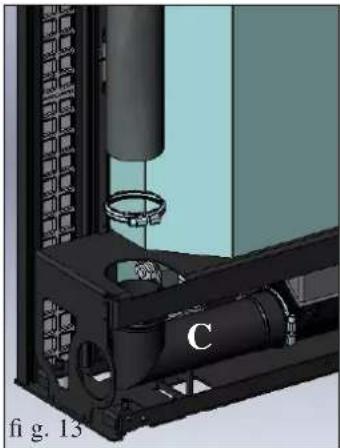
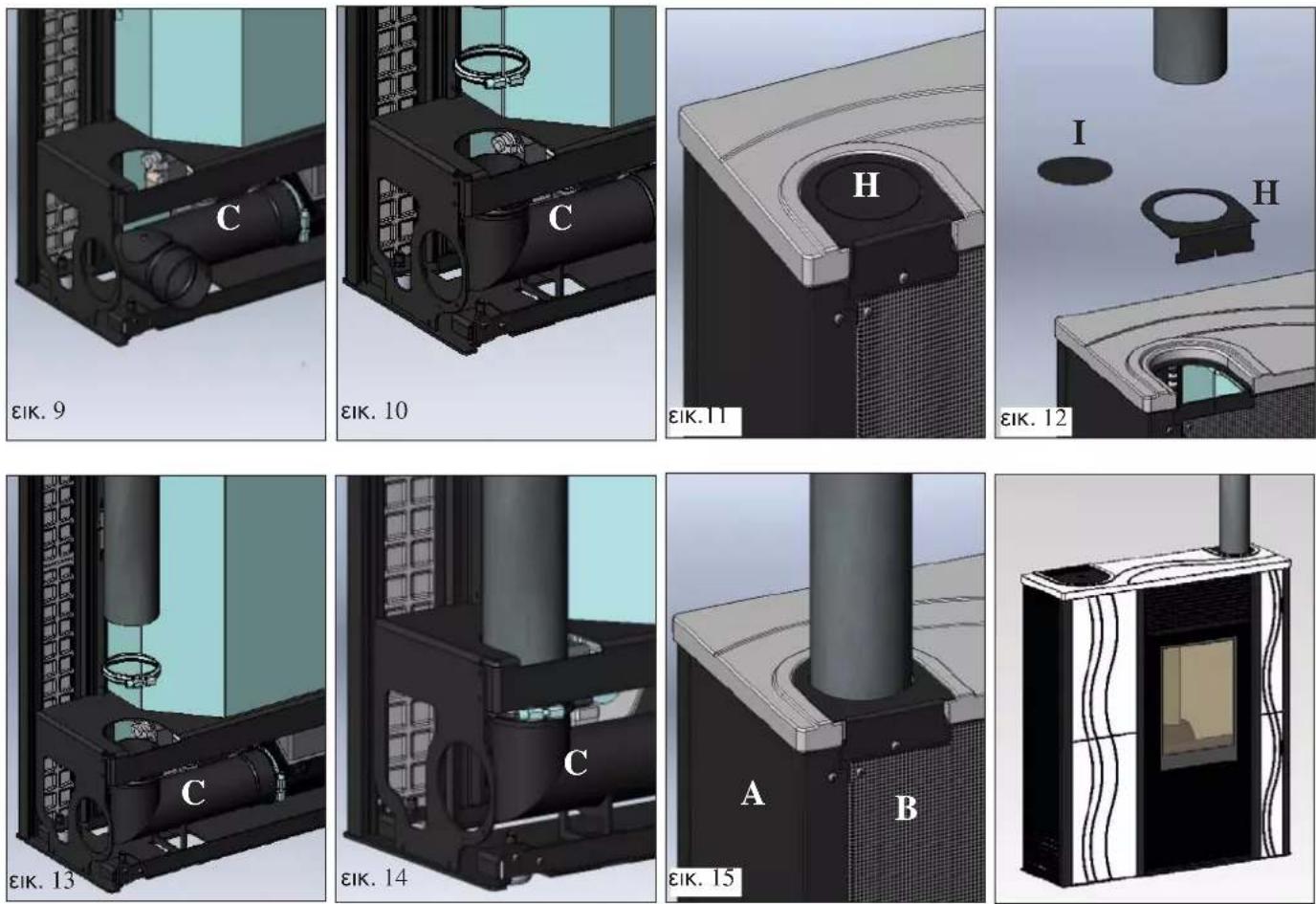
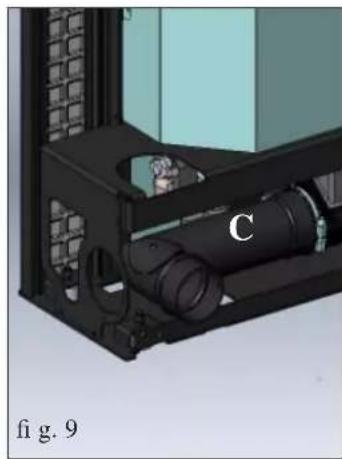
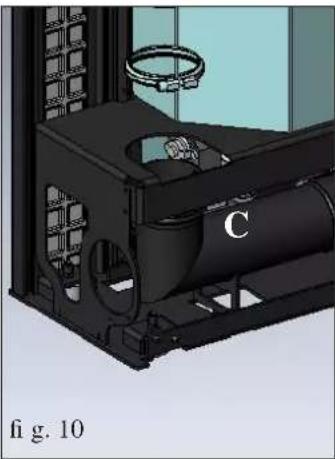
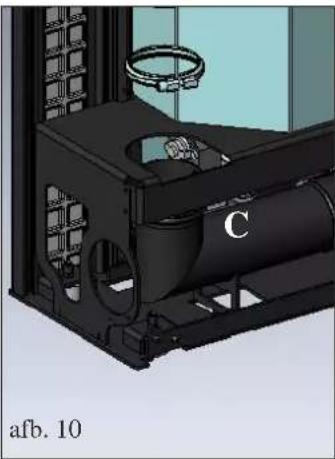
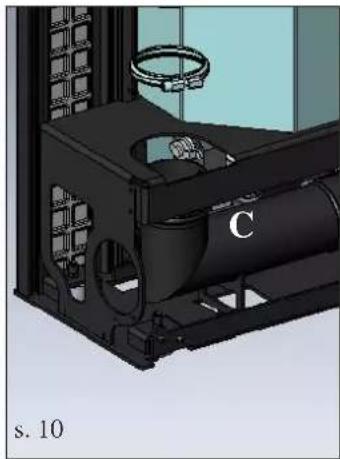
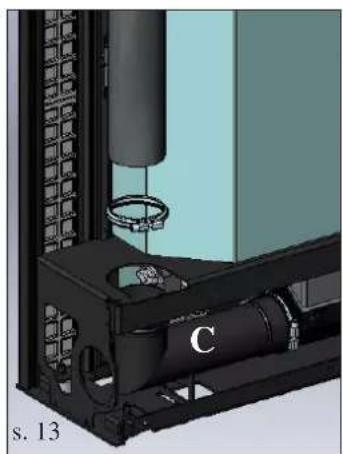
Loosen the locking band of the elbow joint (C - fig. 9-10) and rotate upwards 90°.
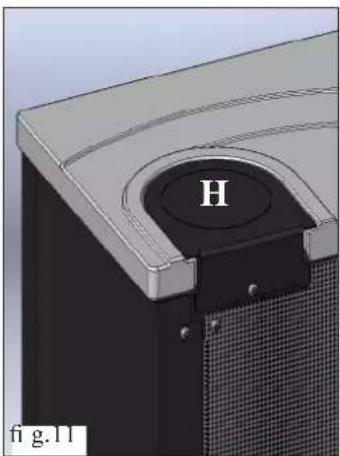
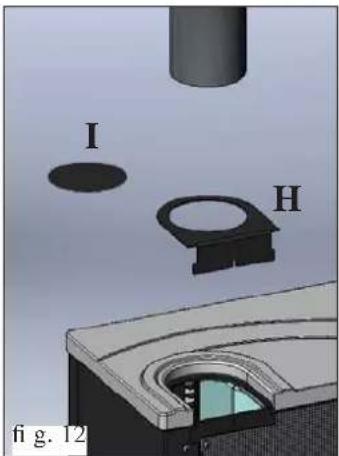
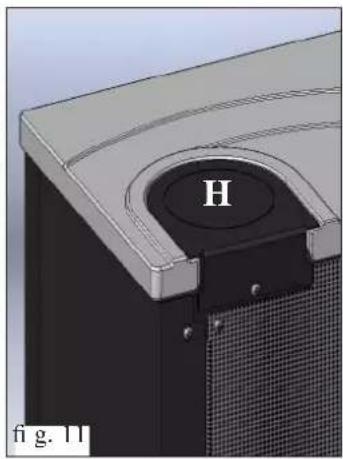
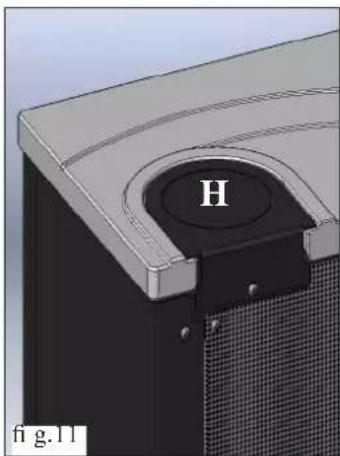
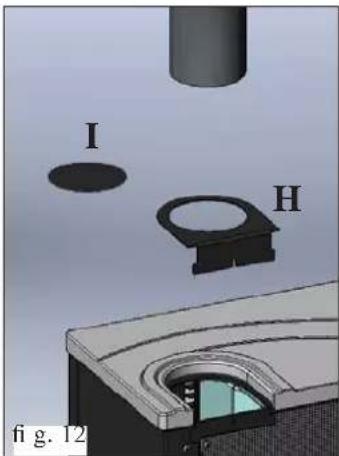
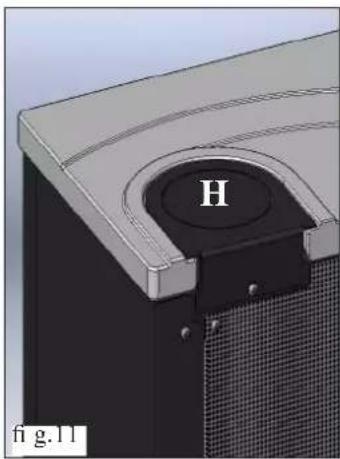
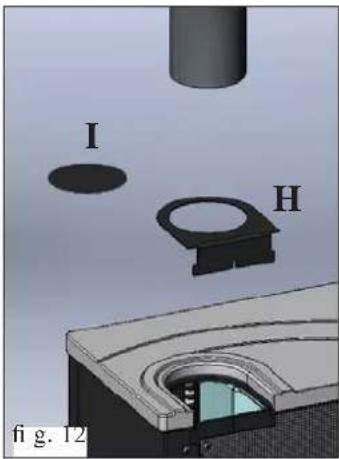
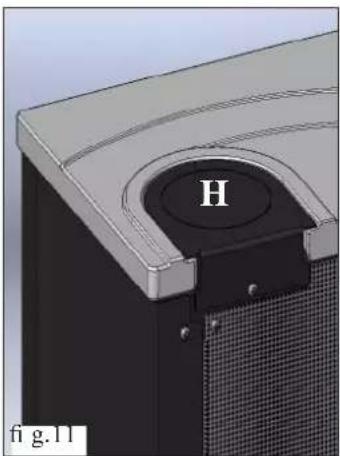
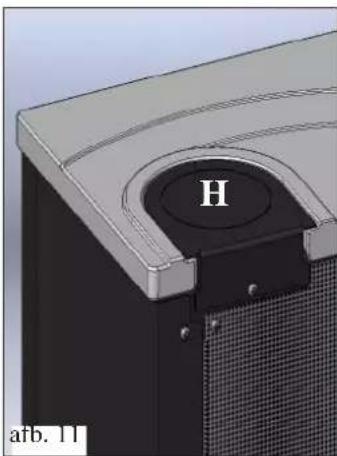
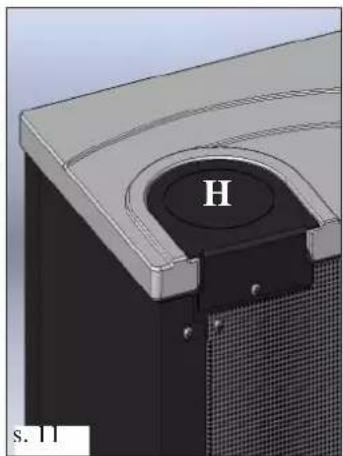
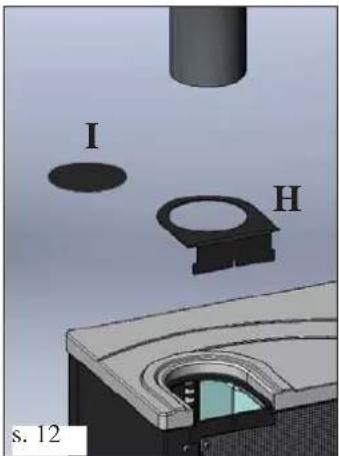
Remove the metal cover from the top (H - fig. 11) fixed with a screw.
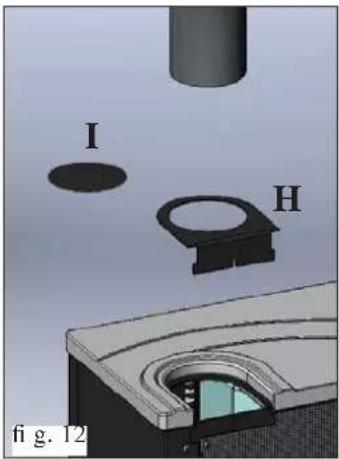
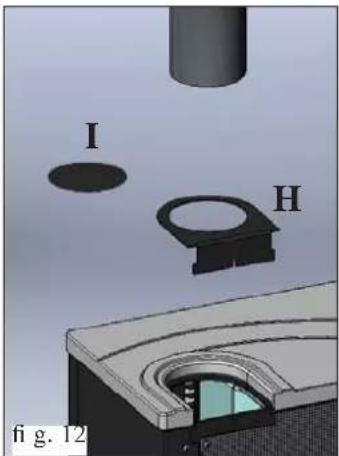
Remove the pre-cut diaphragm (I - fig. 12) to allow the smoke output pipe (not provided) to pass through.
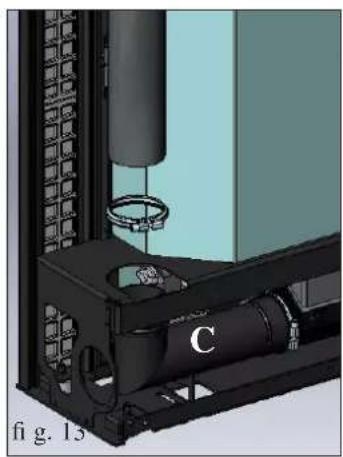
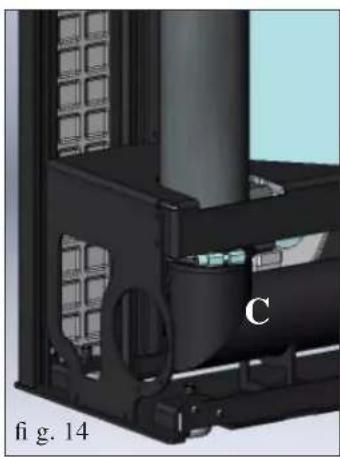
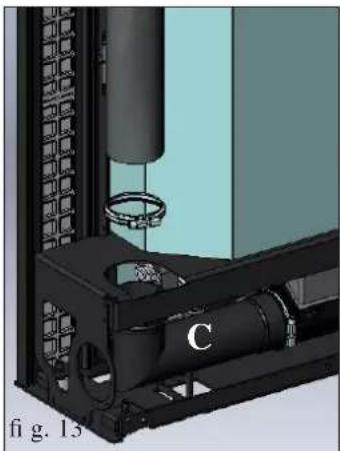
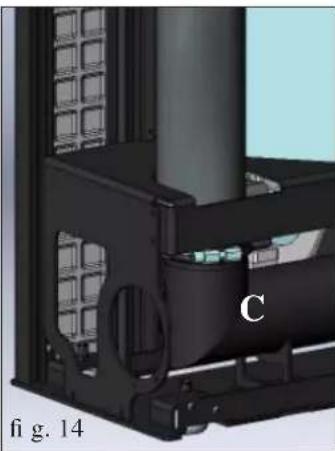
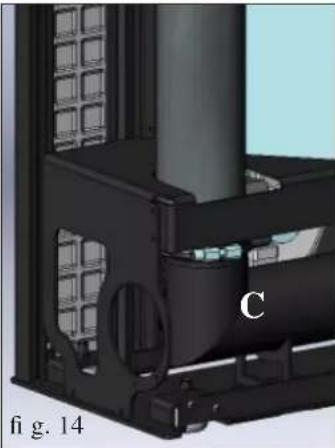
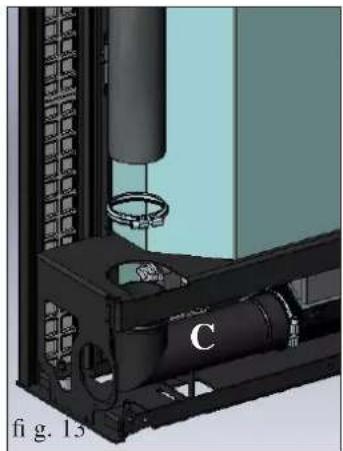
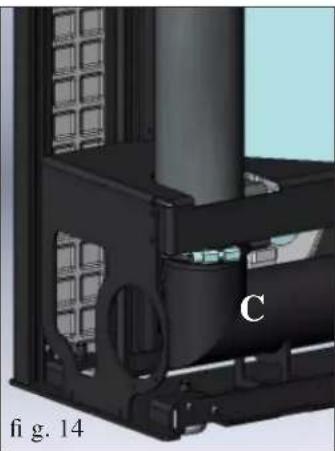
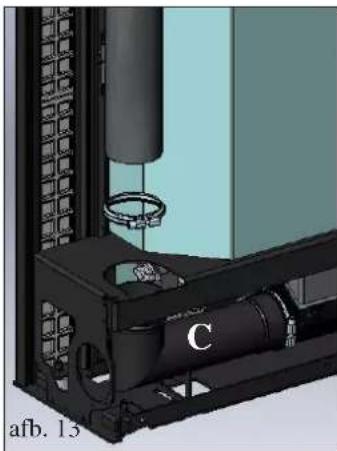
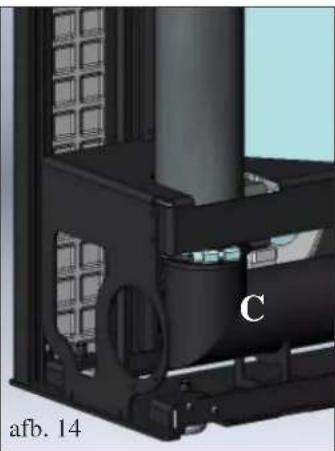
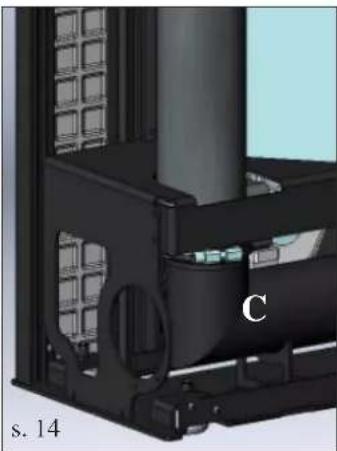
Replace the cover (H) and insert the smoke output pipe (not supplied) from above, fitting it on the elbow joint (C - fig. 13-14) with the band provided.
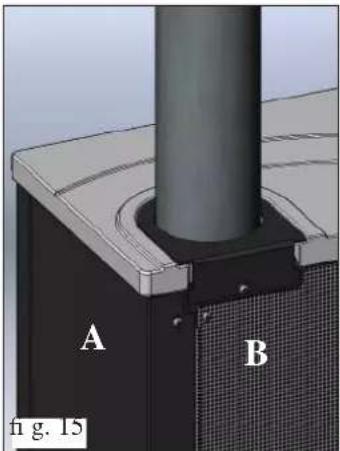
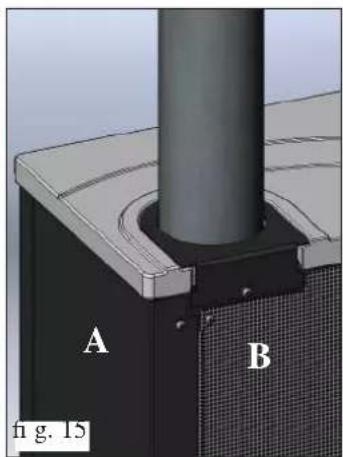
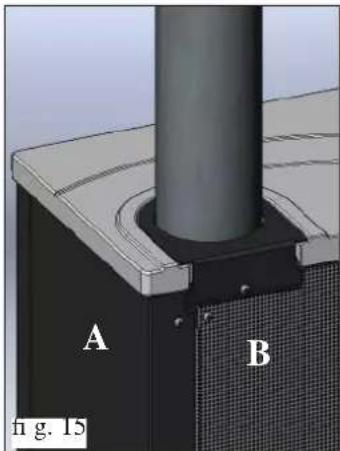
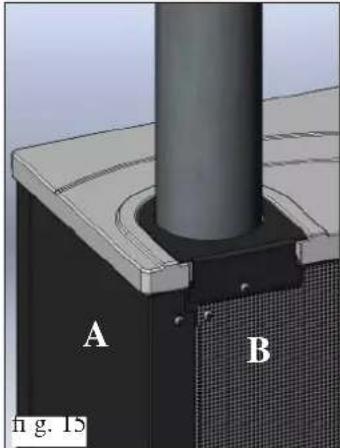
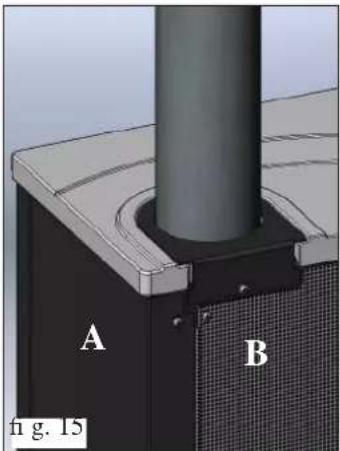
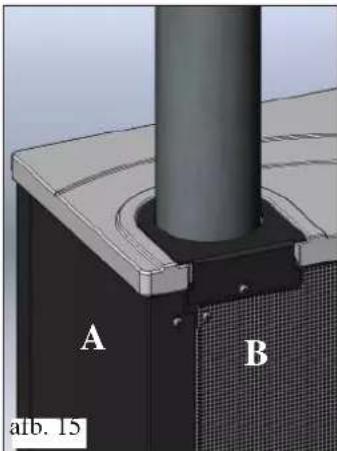
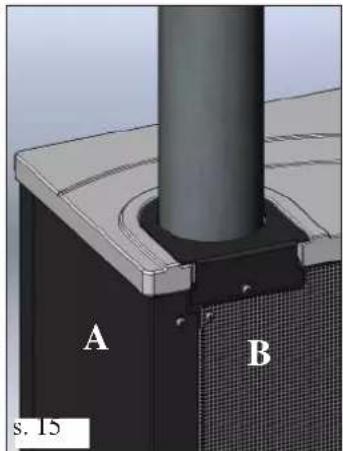
Complete the operation by replacing the metal side (A - fig. 15) and the rear panel (B - fig. 15).
INSTALLATION
AIR INTAKE VENT
An air intake vent connected with the external environment must be installed behind the stove; it must have an inner diameter of at least 80 cm² to guarantee sufficient air intake for combustion.
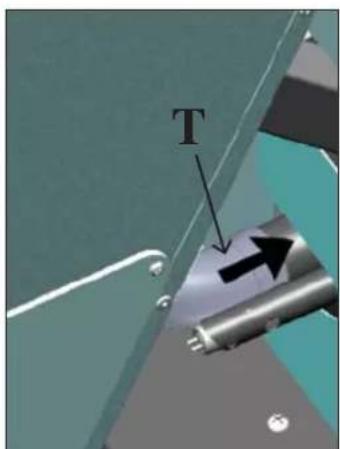
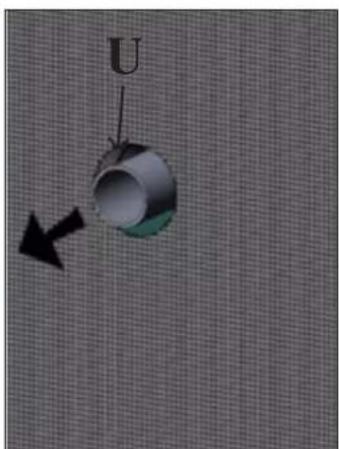
There is a hole closed by a cover on the rear of the stove for the connection of the duct (S - fig. 18).
Remove the cover (S) and, acting from the left portion of the front of the stove (still with the casing panel removed), fit a corrugated aluminium tube (not supplied) on the external air intake duct (T - fig. 19-20).
Turn the tube on itself and make it pass through the hole (U - fig. 21) in the back to reach the outside.
If the stove is mounted on the wall, it is necessary to prepare an air intake connected with the outside.
In this case it is necessary to protect the air intake with a mesh that provides a free section of at least 12 cm2 .
The tube must be less than 1 metre in length and have no bends.
It should also end with a 90° section pointing downwards or wind protection.
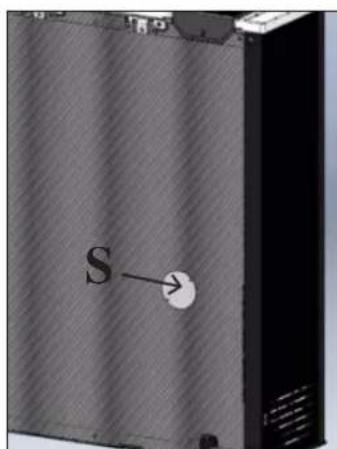
fig. 18
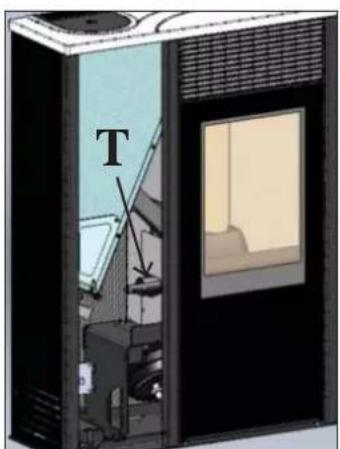
fig. 19
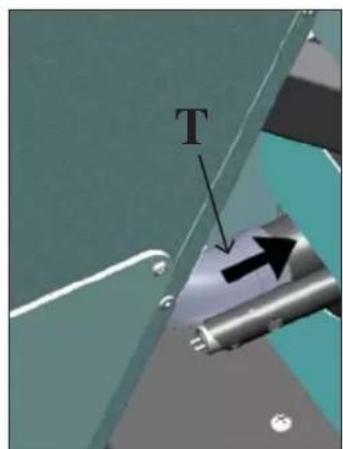
fig. 20
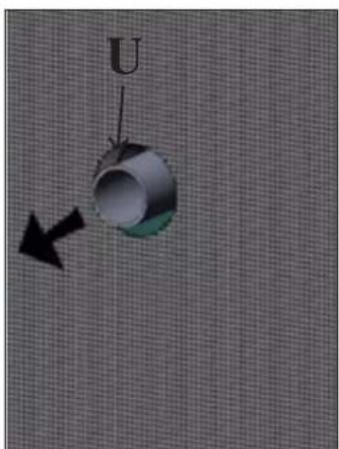
fig. 21
ASSEMBLY
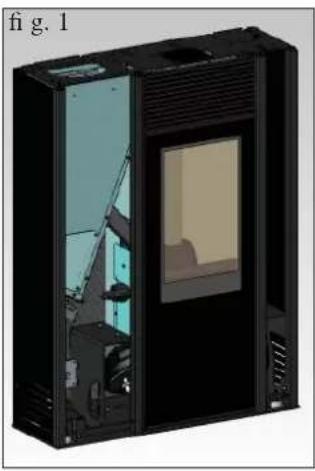
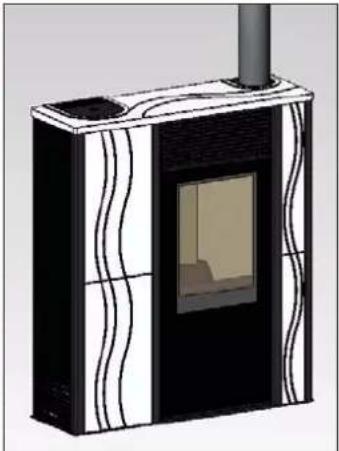
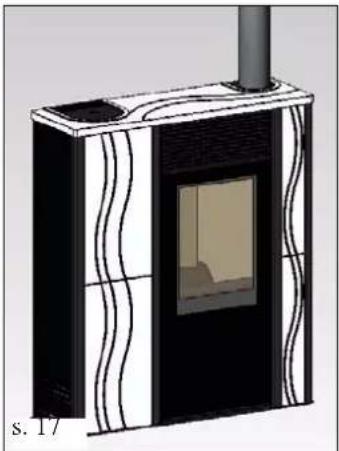
CASING WITH FRONT CERAMIC COVER
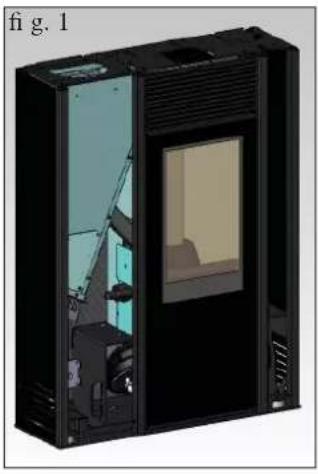
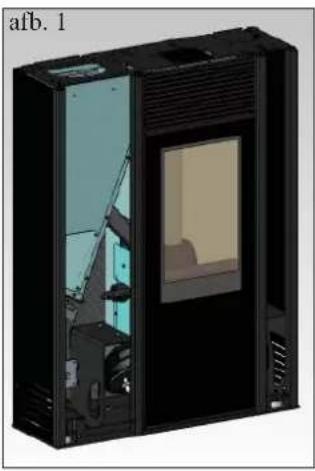
Fig. 1
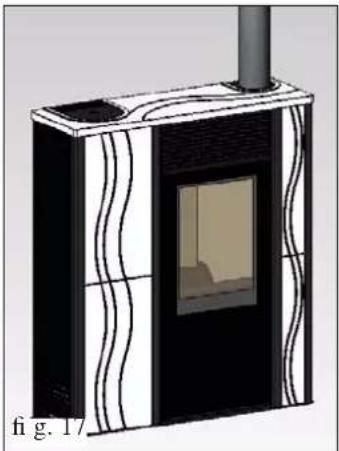
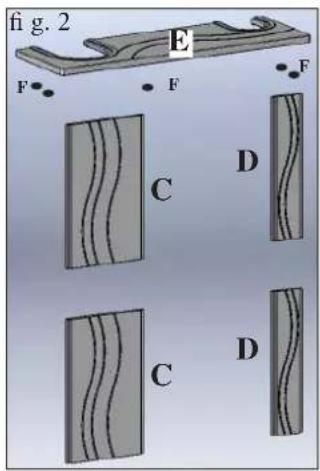
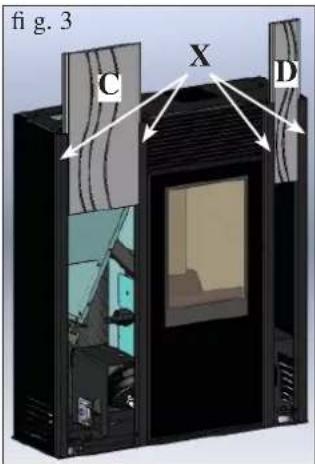
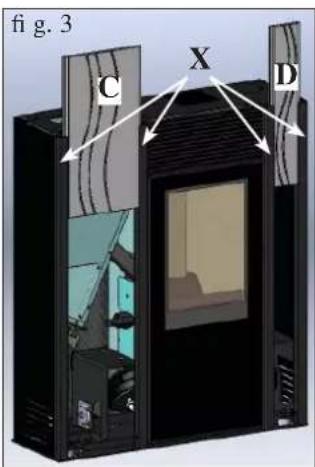
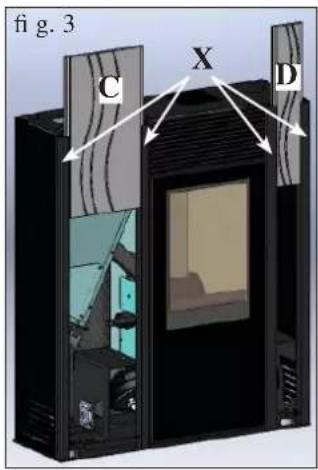
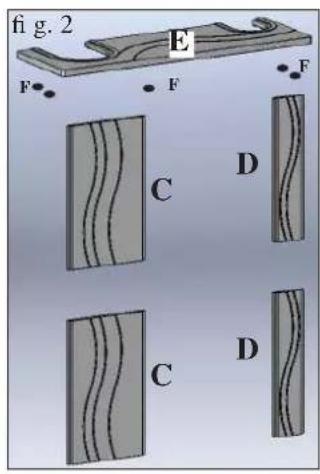
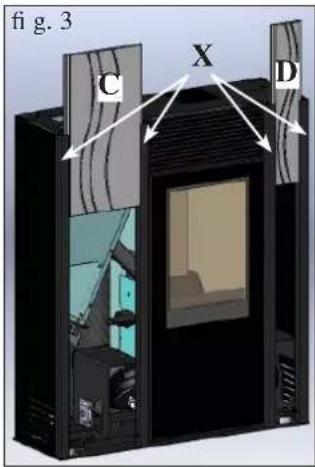
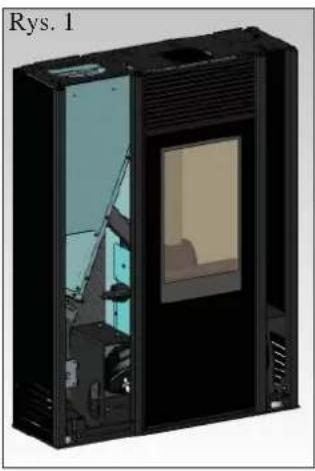
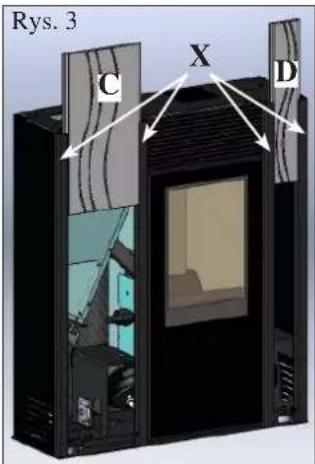
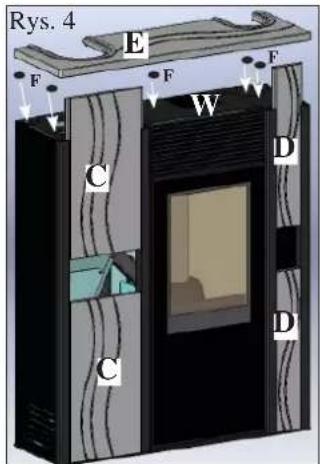
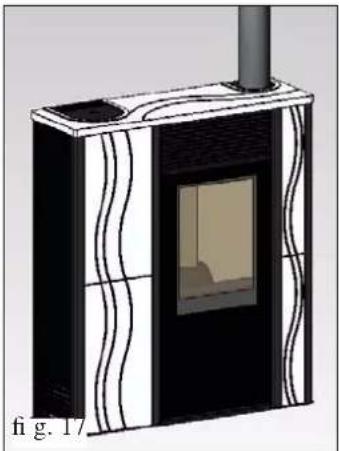
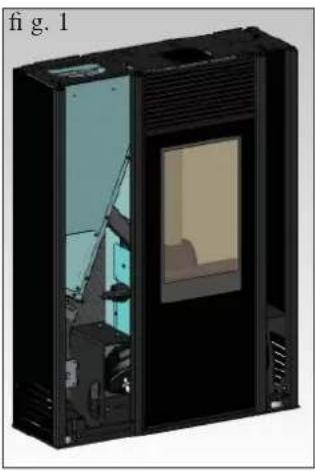
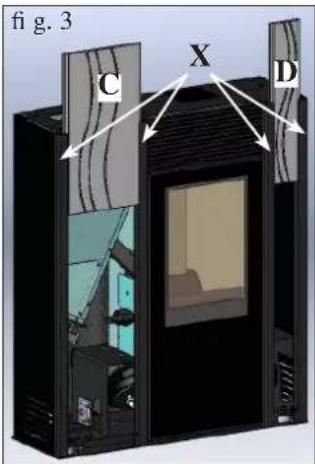
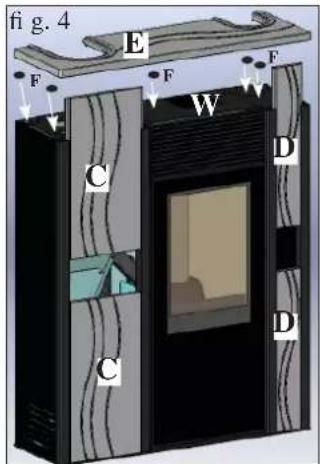
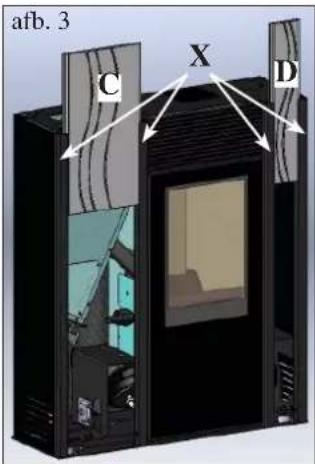
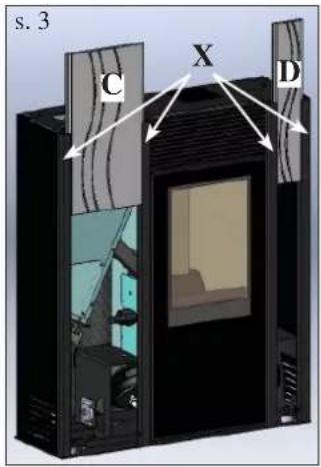
The stove is supplied with metal sides and aluminium profiles (X - fig. 3) already mounted while the pieces below are packaged separately.
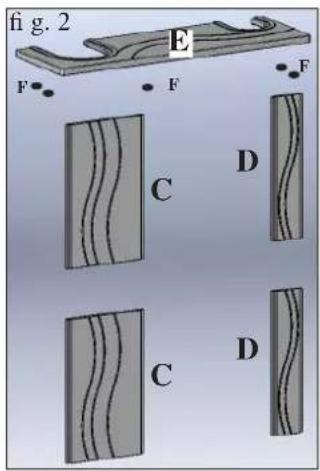
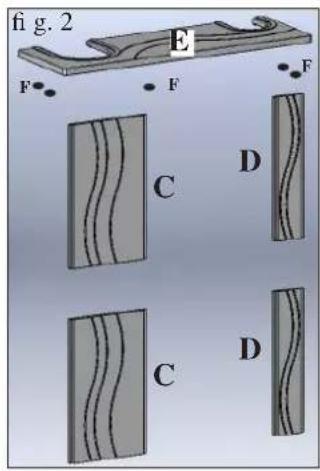
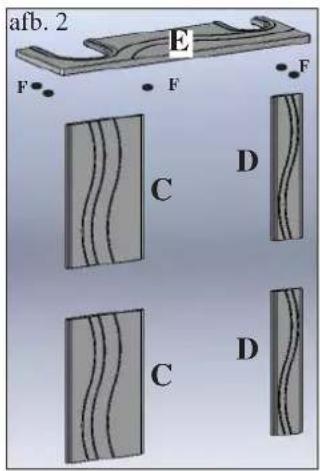
Fig. 2
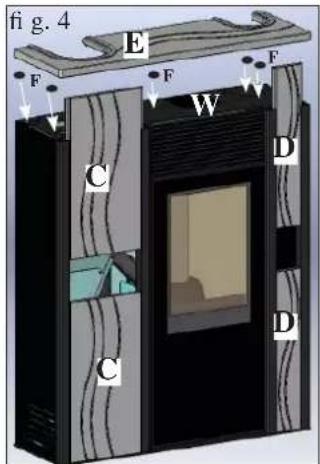
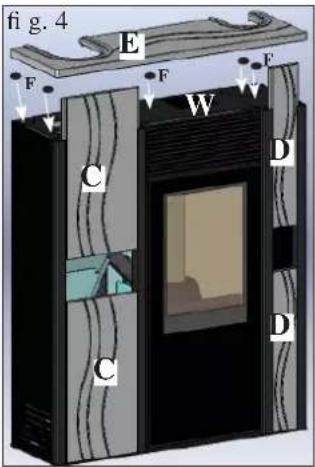
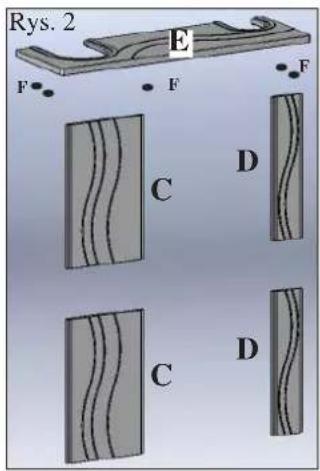
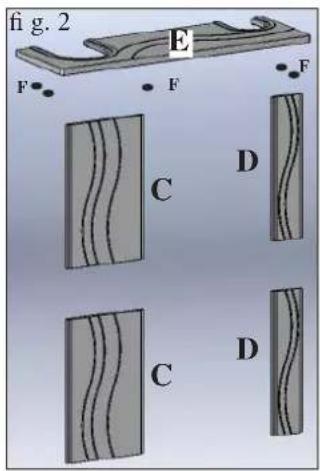
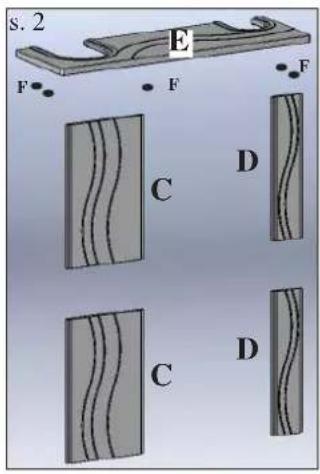
• 2 left ceramic front pieces (C) • 2 right ceramic front pieces (D) • 1 ceramic top (E) • 5 rubber pads (F)
To fit, proceed as follows:
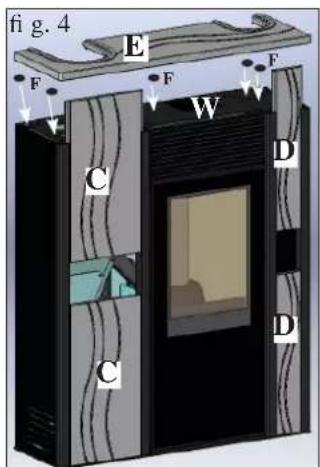
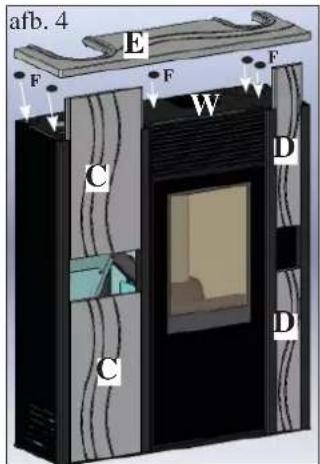
Fig. 3/4
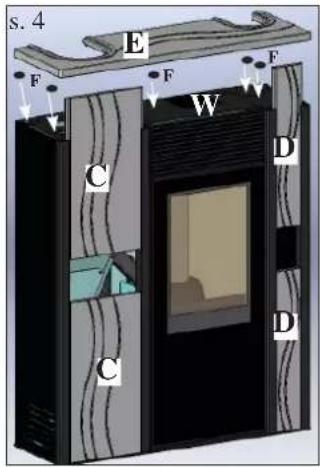
Slide the two pairs of right (D) and left (C) ceramic front pieces into the aluminium profiles (X).
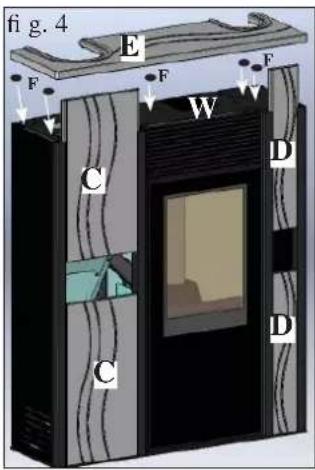
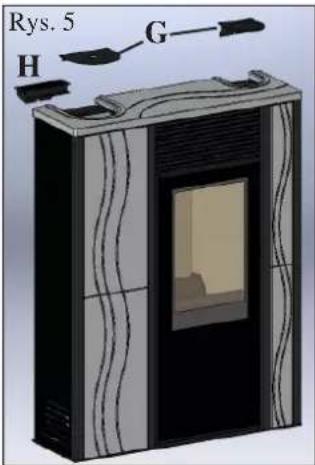
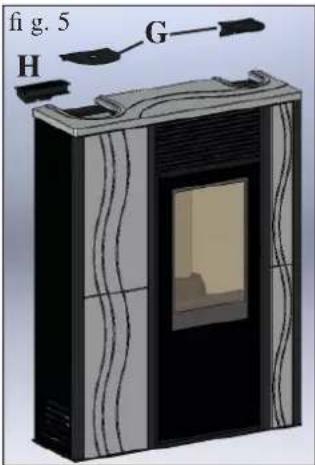
Fig. 4/5
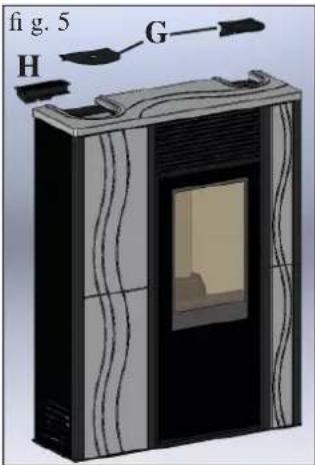
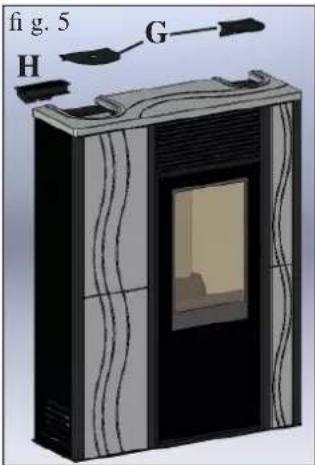
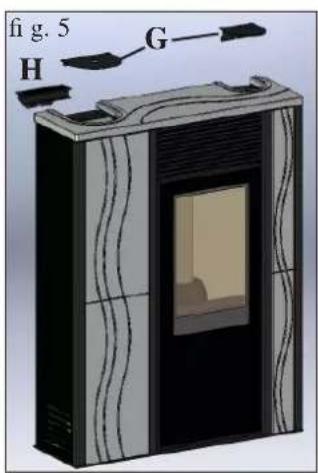
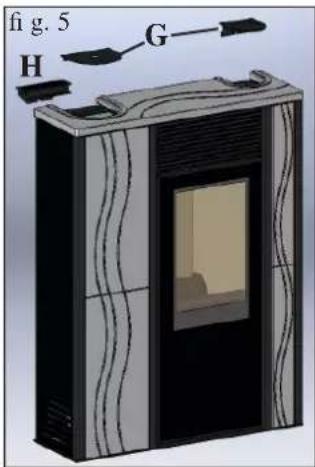
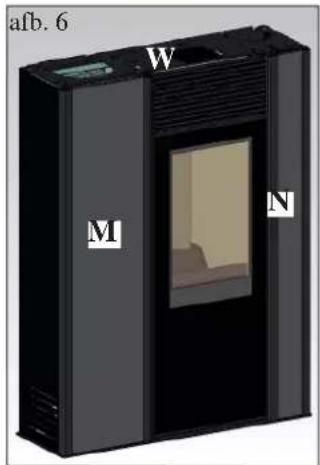
Apply the rubber pads (F) in the holes provided on the metal top (W).
Place the ceramic top (E) on the rubber pads.
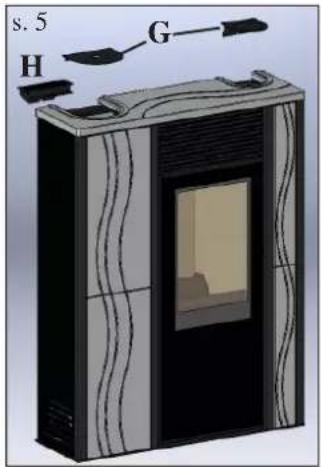
Apply the metal support, complete with synoptic panel (H) and the two sheet-metal covers (G).
COVERING WITH SHEET-METAL FRONT PIECES
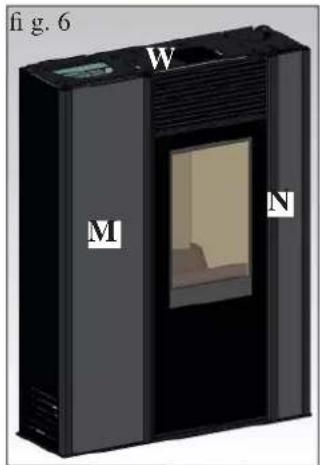
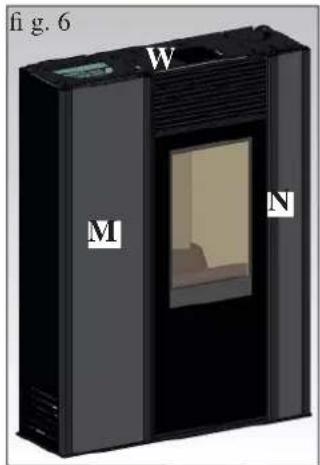
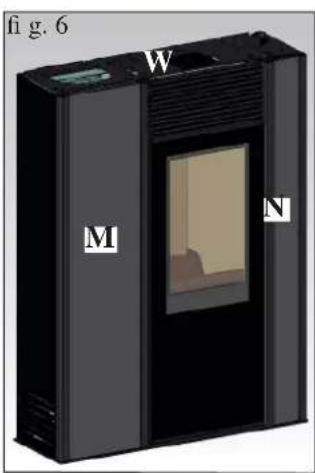
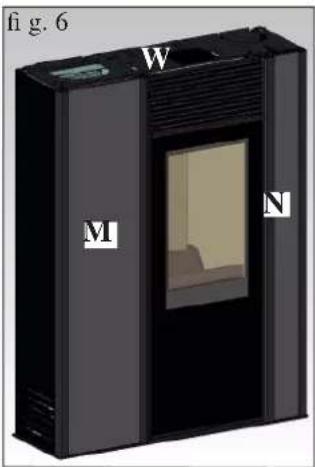
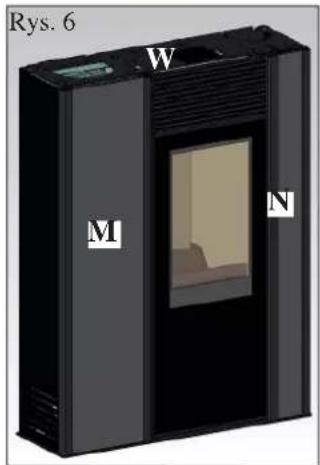
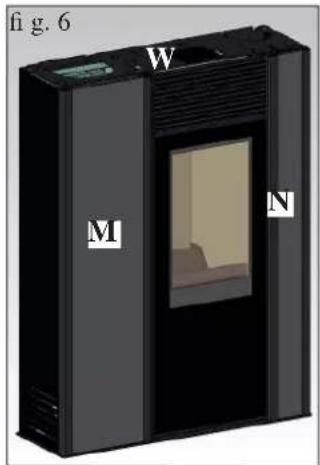
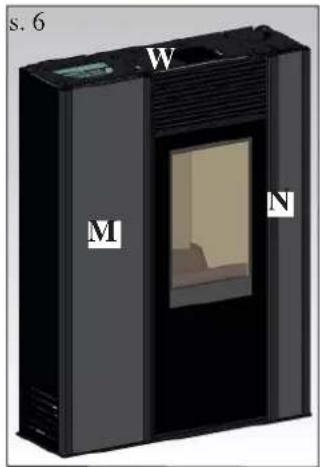
For this version, the stove is delivered with the sheet-metal front pieces already mounted (M - N - fig. 6).
For the remaining assembly steps, proceed as for the version with ceramic front pieces.
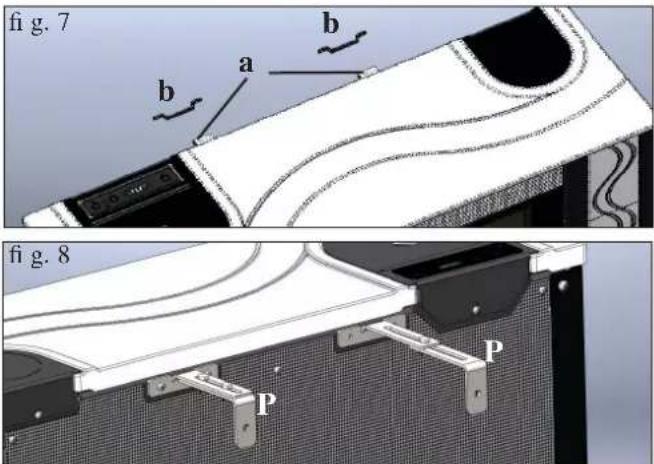
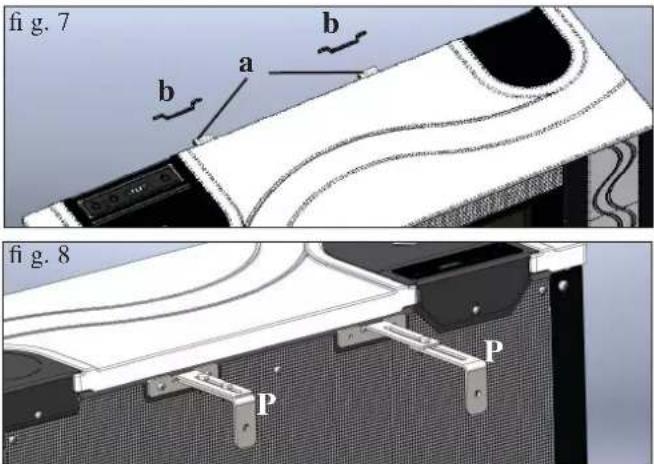
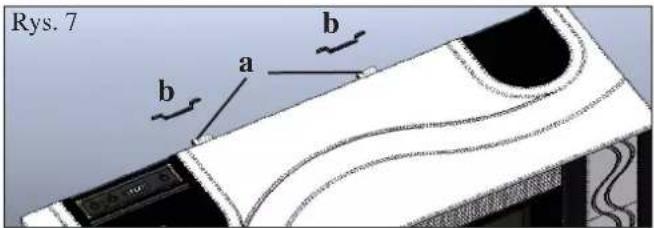
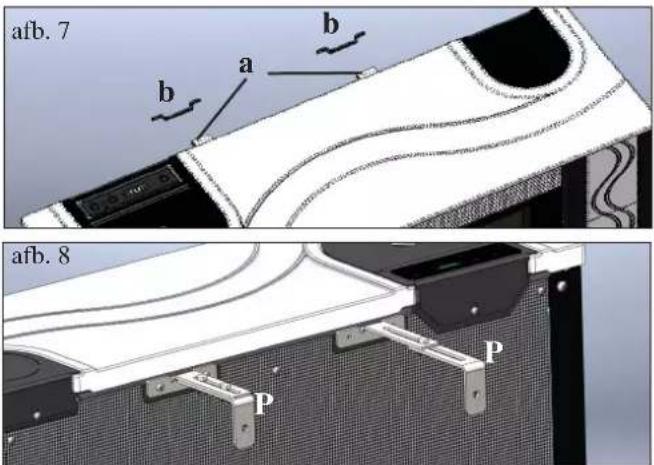
Fig. 7
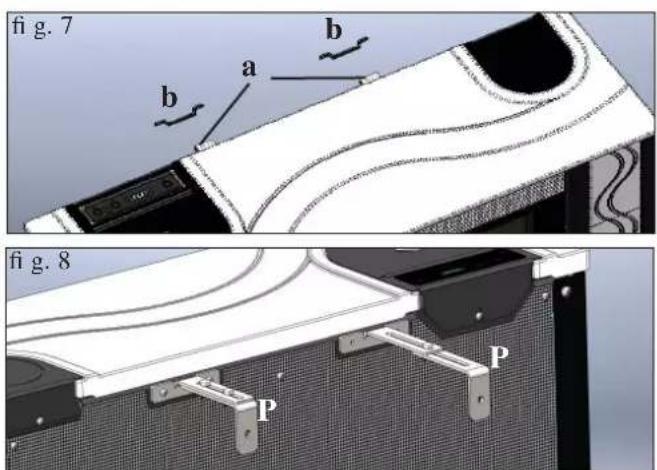
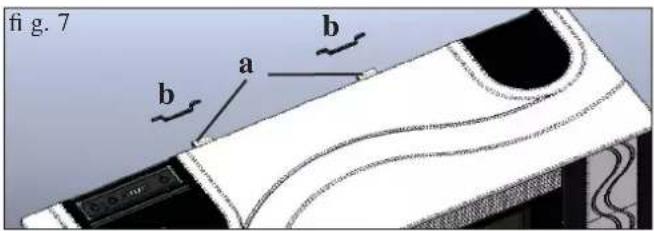
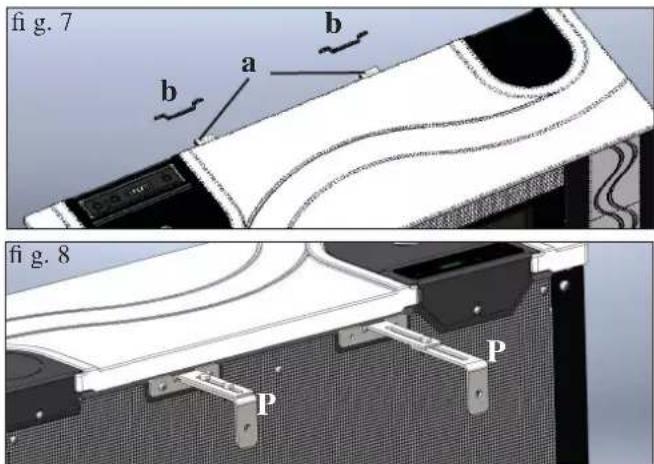
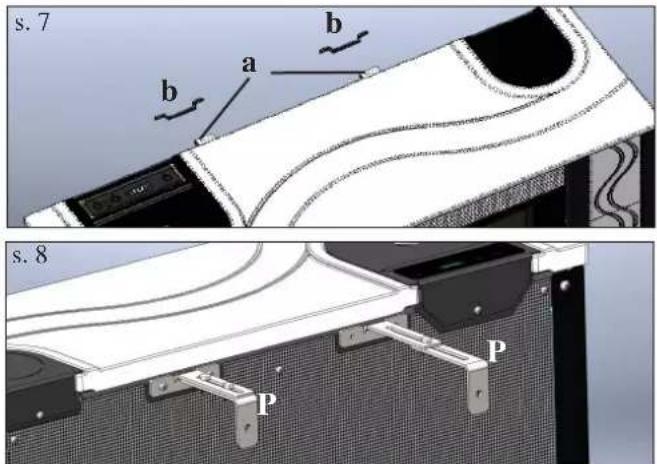
Fix the stove to the wall using the square pieces (a) and brackets (b) provided, or use alternative systems that ensure its stability.
Fig. 8
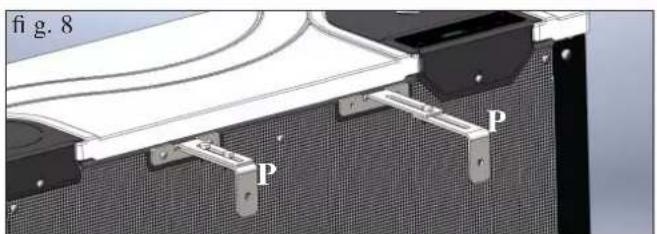
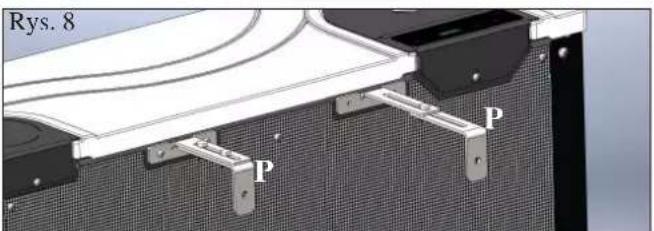
You can also use the wall mounting bracket kit (P) provided, which allows you to install the stove at a distance from the wall: a minimum of 9 cm to a maximum of 17 cm.
INSTRUCTIONS FOR USE
First Ignition/Testing by the Edilkamin Authorised Technical Assistance Centre (TAC)
Start-up must be carried out as prescribed by standard UNI 10683.
This standard indicates the checks to be carried out during installation, aimed at ensuring the correct operation of the system.
Edilkamin technical assistance (TAC) will also calibrate the stove based on the type of pellets and the installation conditions.
Start-up by the TAC is necessary for the validity of the guarantee.
The first few times the stove is lit, there may be a slight smell of paint; this will soon disappear.
Before lighting the stove, check:
=> Correct installation. => The electricity supply. => The closure of the door, which must be air-tight. => The cleaning of the crucible. => The indication of stand-by mode on the display (date, power or temperature flashing on and off).
LOADING THE PELLETS INTO THE HOPPER
Remove the metallic cover in order to fill the hopper* (fig. 1).
ATTENTION:
If loading the stove during operation, and therefore while hot, use the special glove provided.
NOTES ON FUEL
MICRON is designed and programmed to burn wood pellets with a diameter of about 6 mm.
Pellets are fuel in the form of small cylindrical elements produced by highly compressed sawdust without the addition of glues or other foreign substances.
It is sold in 15 kg bags.
ONLY pellets must be burnt in the stove, otherwise it will NOT function correctly.
If any other material is used (including wood), which can be detected by laboratory analysis, the guarantee shall not be valid.
EDILKAMIN has designed, tested and programmed its own products in order to guarantee best performance with pellets of the following features:
diameter: 6 millimetres
maximum length: 40 mm
maximum humidity: 8 %
heat yield: at least 4300 kcal/kg
The use of pellets with other features requires specific calibration of the stove, similar to that carried out by the TAC (Technical Assistance Centre) when the stove is lit for the first time.
The use of unsuitable pellets can cause: decreased efficiency; functioning anomalies; close-down due to clogging; soiled glass; non-combustion; ...
A simple analysis of the pellets can be carried out by visual examination:
Good: smooth, regular length, little dust.
Poor: with longitudinal and transversal cracks, dusty, variable length, presence of foreign bodies.
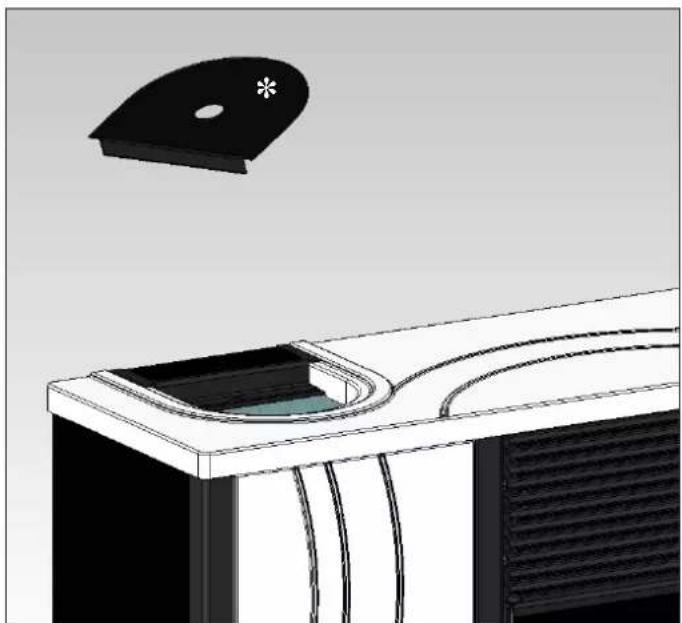
fig.1
INSTRUCTIONS FOR USE
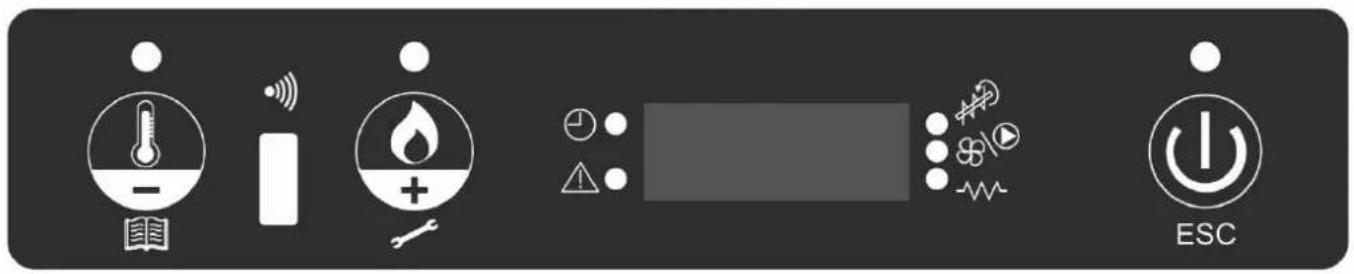
SYNOPTIC PANEL


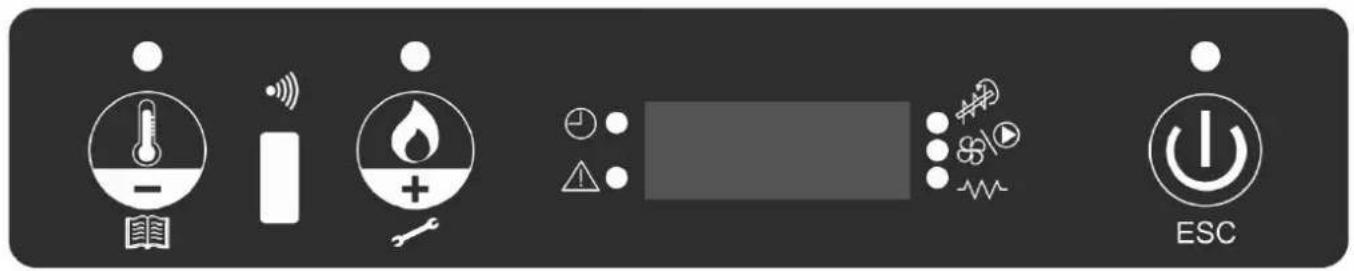
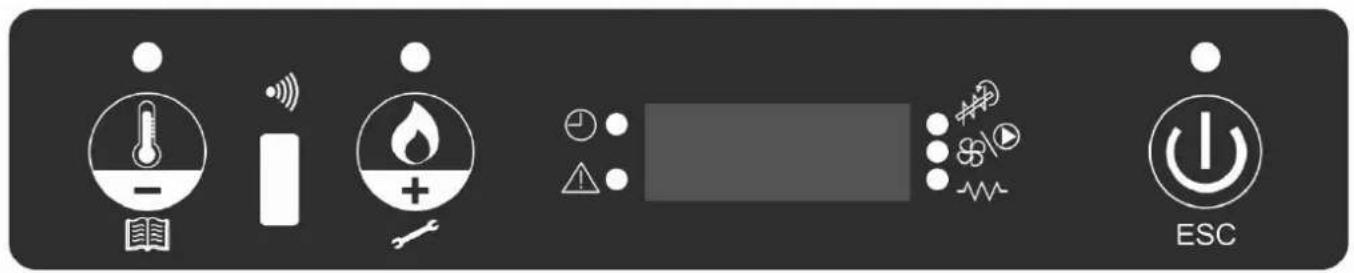
Key to set the desired room temperature or to enter the menu (set ambient temp.)

Key for setting the power of the stove (set power)

On/off or confirm/quit menu key

Indicates that the chrono-thermostat has been programmed for automatic ignition at set times

Indicates an alarm condition

Indicates the functioning of the pellet-loading gear motor

This indicates the functioning of the fan

Indicates functioning spark plug
MENU DESCRIPTION
- To access the menu press the 📄 key for 2 seconds (the LED switches off).
Pressing the Key or the Key scrolls the following menu:
| M1 | Set clock |
| M2 | Set time programme |
| M3 | Adjust vent 1 |
| M4 | (does not appear at display in this model) |
| M5 | Language |
| M6 | Stand-by |
| M7 | Screw loading |
| M8 | Stove status |
| M9 | Technical calibrations (TAC) |
| MA | Type of pellets (TAC) |
| Mb | Quit |
• To confirm the desired menu press the E&C key. - To go back to the previous menu press the key for 3 seconds. • To exit the menu press the ⏻ key for 6 seconds.
SWITCH ON/SWITCH OFF
To switch on/switch off the stove, press the tray for 3 seconds.
LED on: stove on
LED flashing: stove on or in alarm mode
LED off: stove off
OPERATING
The stove has two operating modes:
- MANUAL:
In MANUAL operating mode, the water temperature at which the stove must operate is set independently from the temperature of the room in which it is installed.
To select MANUAL mode, press the key (the LED will light up).
Pressing the key 11 increases the temperature until the message 'MAN' appears on the display (above 40°).
- AUTOMATIC
In AUTOMATIC mode, it is possible to set the desired temperature of the room where the stove is installed.
When the desired environmental temperature (SET ROOM TEMPERATURE) is reached, the stove will automatically switch to power 1 mode.
To set the desired room temperature, press (The LED comes on); the operating temperature at that moment will be
displayed; using the key, the temperature can be changed as desired.
Ventilation is always correlated to the power in use, so it cannot be varied.
INSTRUCTIONS FOR USE
VENTILATION ADJUSTMENT
This function allows you to manage the ventilation speed.
It can be set to AUTO mode, which automatically adjusts the ventilation speed according to the power of the stove, or you can set the ventilation speed according to the amount of hot air or to the desired noise level of the product.
To activate the function, press the key for 2 seconds and press the play until the display shows the message “M3 Adjust vent 1”.
Press the ⏻ and set the desired ventilation speed using the keys and
To confirm your choice, press the key.
SCREW LOADING (only if the stove is completely without pellets)
To load the screw, enter the MENU by pressing the key for 2 seconds; then press the key until the message “M5 first load” appears on the display.
Press the key 🤒 to confirm, and then the key 🔊 to activate the function. This operation must only be carried out when the stove is off and completely cold.
Note: during this phase, the smoke extractor fan will remain on.
STAND-BY FUNCTION
This automatic function allows turning off of the stove when the temperature rises by 0.5\ °C higher than that requested, after a set time of 10 minutes (which can be altered by the TAC during installation).
The message "GO STBY" will appear on the display, indicating the minutes remaining before switch-off.
This function is available in both 'AUTOMATIC' mode and in the case of an external thermostat.
If the environmental temperature falls to 2 °C below the set threshold, the stove will start up again (setting modifiable by the TAC during installation).
To activate the function, press the key 🖱️ for about 3 seconds; the message “M1 set clock” will appear on the display; press the key 🖱️ until the message “M4 stand by” appears on the display, then confirm by pressing the key 🖱️.
Press the key to select "ON", then confirm by pressing the key.
To quit the menu "M4 stand by", press the key 🔊 for about 6 seconds.
SETTING THE DATE AND TIME
Press the key 📁 for about 2 seconds; the message “M1 set clock” will appear on the display; then confirm by pressing the key 📁. The following data will appear in sequence: Day of the week, hour, minutes, day, month, year; these can be changed by pressing
the key. To confirm, press the key.
To quit the menu "M1 set clock", press the key 🤒 for about 6 seconds.
EXTERNAL THERMOSTAT
This must be connected by the blue wire (code 640560, optional) to the serial port positioned on the back of the stove; it must have a clean, normally open contact (e.g. in the case of an environmental thermostat):
- Open contact = Environmental temperature reached
- Closed contact = Environmental temperature not reached
To select ‘E-T’ (external thermostat) mode, press the key 📁 (the LED will light up). Pressing the key 📁 will lower the temperature until the message ‘E-T’ (external thermostat) appears on the display (below 6°).
Note: When the stove is off, the external thermostat cannot switch the stove on or off. If you want to switch the stove on or off
outside the set time or outside the 'E-T' (external thermostat) setting, you must always do so using the key
INSTRUCTIONS FOR USE
CHRONO-THERMOSTAT FOR DAILY/WEEKLY PROGRAMMING
There are 3 types of programming (daily, weekly, weekend), each of which is independent of the others and thus many combinations are possible according to the user's requirements (time programming is in 10 minute steps).
Press the key for 2 seconds; the message “M1 set clock” will appear on the display (and the LED will go out).
Press the key 🖱️ until the message “M2 set chrono” appears on the display; confirm by pressing the key 🖼️ To visualise the 3
programming modes (daily, weekly, weekend) press the key 🖱 or the key 🔒 and confirm by pressing the

Scroll down the following menu (default setting is OFF):
- M2-1: enables the chrono-thermostat
- M2-2: daily programme
- M2-3: weekly programme
- M2-4: weekend programme
- M2-5: Quit
Choose the desired menu and confirm by pressing the key

To set the stove to switch on and off and for time changes, press the key or the key, then confirm by pressing the key.
To quit the programme, press the key 1.0 for about 6 seconds.
Daily programming:
Possibility of switching the stove on and off twice throughout the day, repeated every day:
Example: start1 10:00 stop1 12:00 start2 18:00 stop2 22:00
Weekly programming:
Possibility of switching the stove on and off 4 times during the day, and to choose the days of the week. For example:
| start1 06:00 stop1 08:00 start2 07:00 stop2 10:00 start3 14:00 stop3 17:00 start4 19:00 stop3 22:00 | |||
| Monday onTuesday onWednesday offThursday onFriday onSaturday offSunday off | Monday offTuesday offWednesday onThursday offFriday offSaturday offSunday off | Monday onTuesday onWednesday offThursday offFriday offSaturday onSunday on | Monday onTuesday onWednesday onThursday onFriday onSaturday onSunday on |
Weekend programming:
Possibility of switching the stove on and off twice during the weekend:
Example: start1 week-end 07:00 stop1 week-end 11:30
Example: start2 week-end 14:20 stop2 week-end 23:50
MAINTENANCE
Before carrying out any maintenance, disconnect the appliance from the mains electricity.
Regular maintenance is the basis of good functioning of the stove.
IF YOU DO NOT PROVIDE FOR THE NECESSARY MAINTENANCE, the stove will not function correctly.
In the case of problems due to lack of maintenance, the guarantee will not be valid.
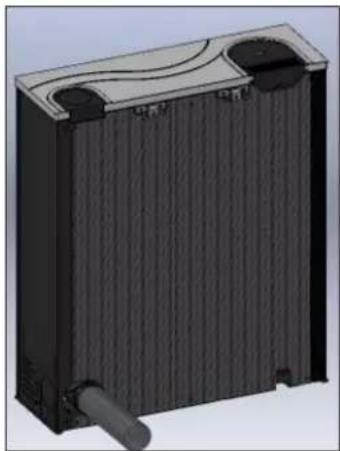
FOR EASE OF ACCESS TO ALL ELECTRO-MECHANICAL COMPONENTS, JUST REMOVE THE LEFT FRONT CERAMIC COVERING BY PULLING UPWARDS, AFTER REMOVING THE TOP (see page 27).
DAILY MAINTENANCE
Operations to be carried out with the stove off, cold, and disconnected from the electricity supply.
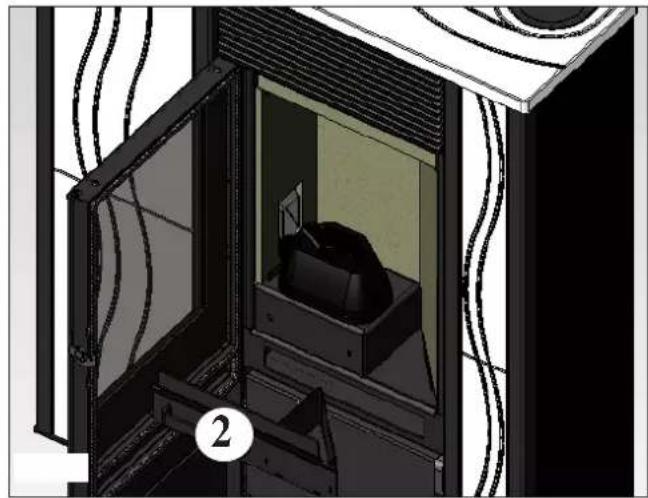
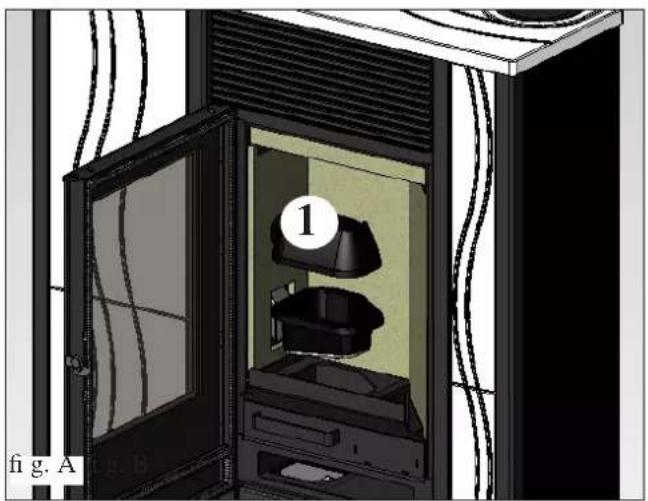
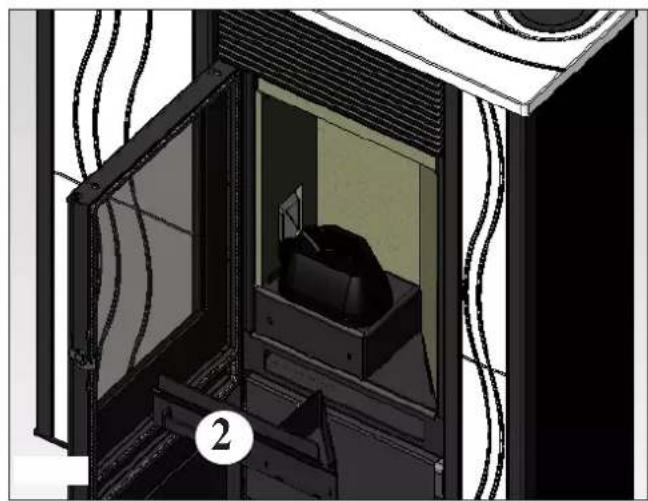
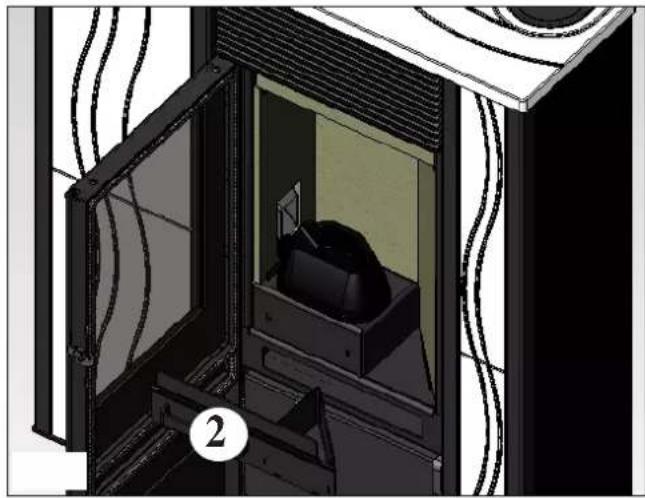
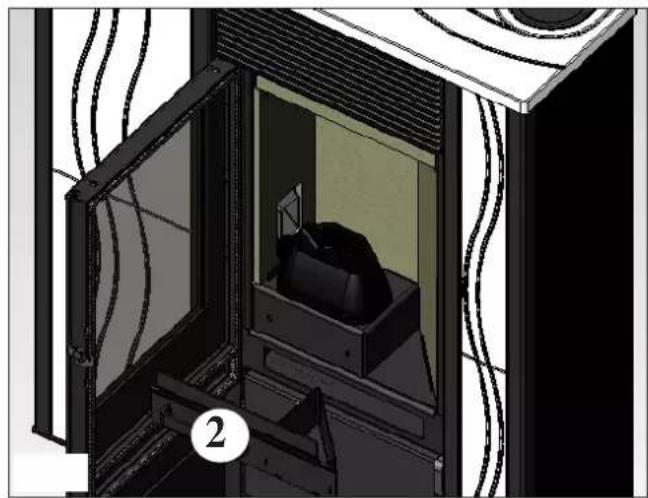
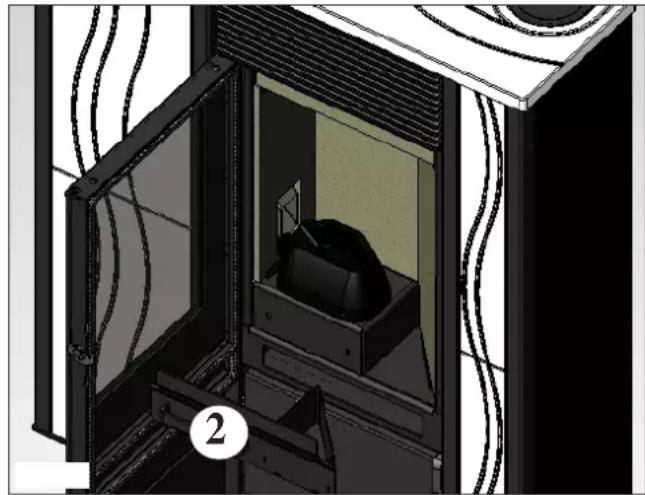
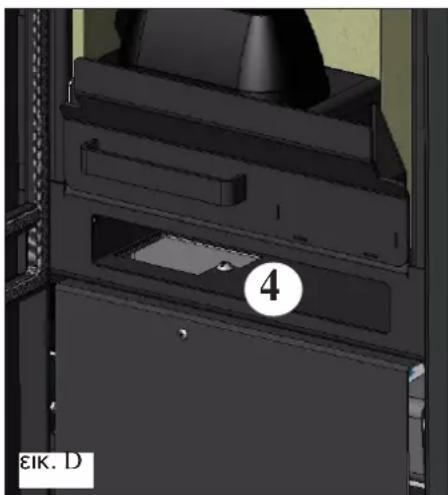
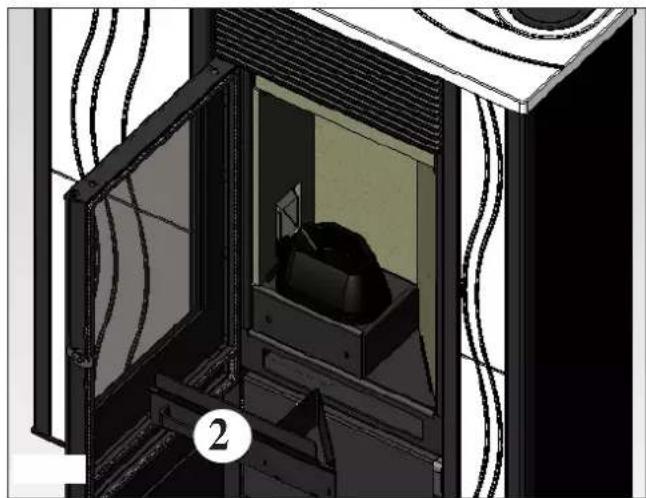
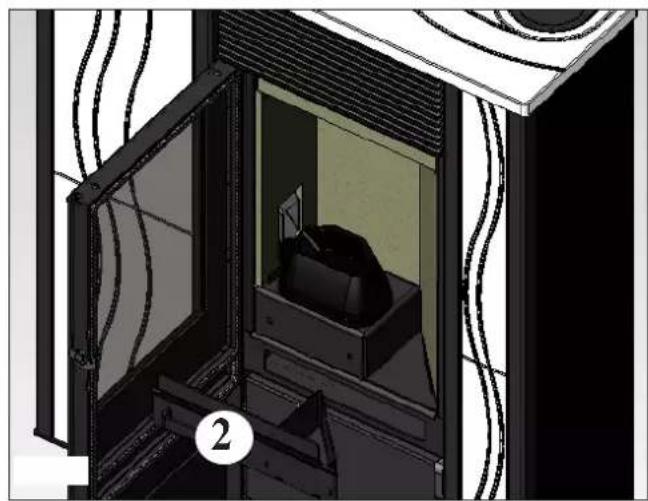
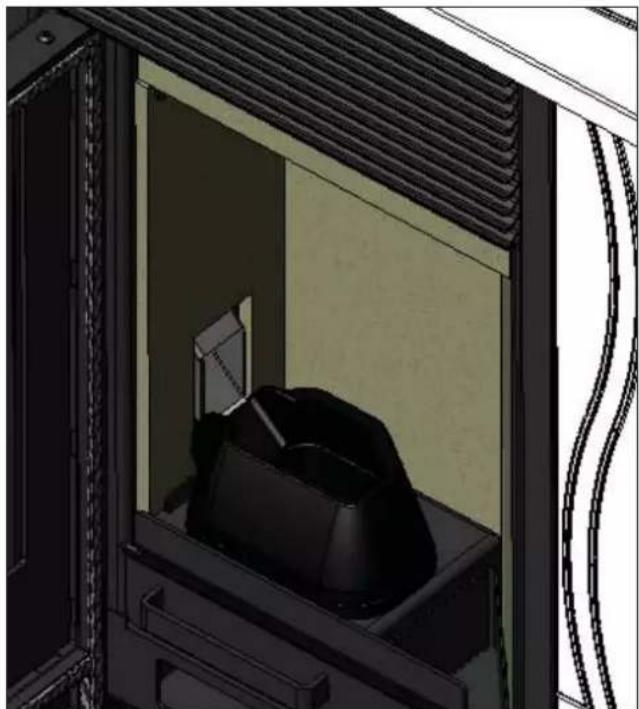
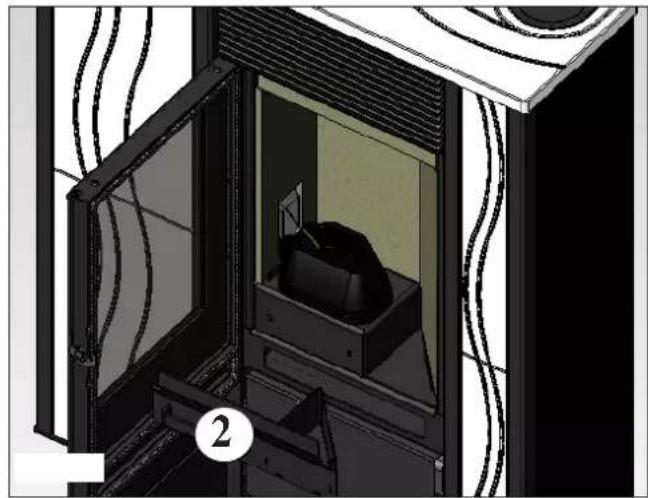
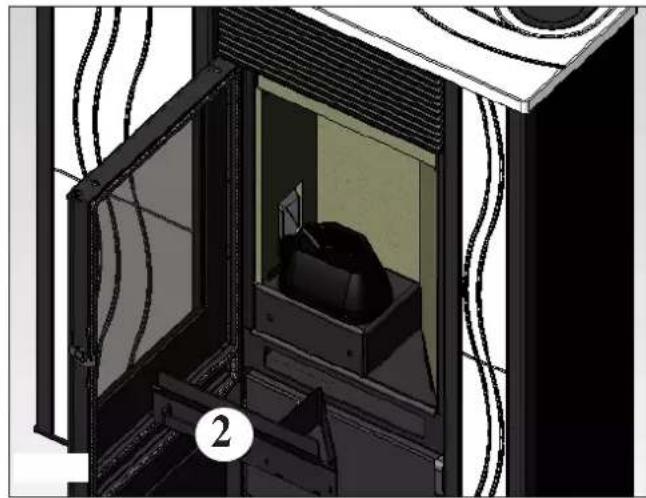
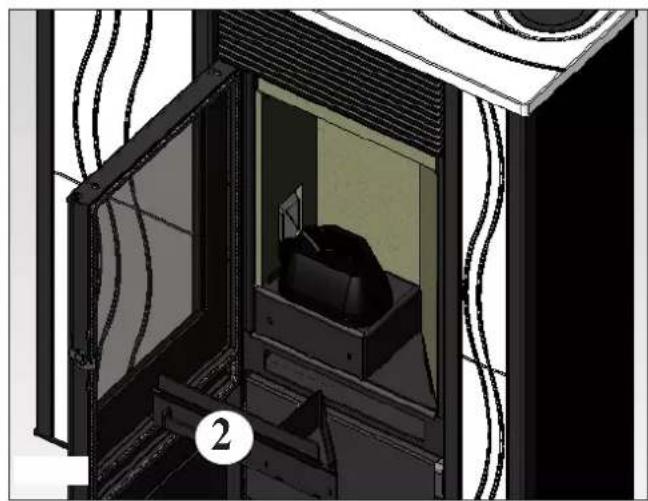
• To be carried out with the aid of a vacuum cleaner (see options on page 35). • The whole procedure takes only a few minutes. - Open the door, remove the crucible (1 - fig. A) and tip out the residues into the ash tray (2 - fig. B). • DO NOT TIP THE RESIDUES INTO THE PELLET HOPPER. - Extract and empty the ash tray (2 - fig. B) into a non-flammable container (it could contain ash which is still hot and/or hot embers). • Vacuum the inside of the combustion chamber, the combustion surface, and the area around the crucible where ash falls. - Remove the crucible (1 - fig. A) and remove encrustations with the spatula provided; remove any debris clogging the holes. • Vacuum the crucible chamber, clean the edges where the crucible comes into contact with its seat. - If necessary, clean the glass (when cold).
Never vacuum hot ash; it will damage the vacuum cleaner and is a domestic fire risk.
WEEKLY MAINTENANCE
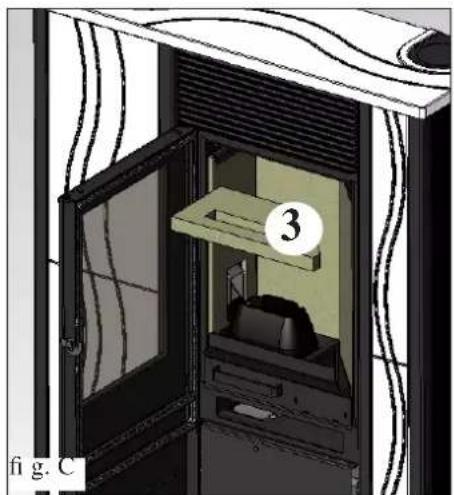
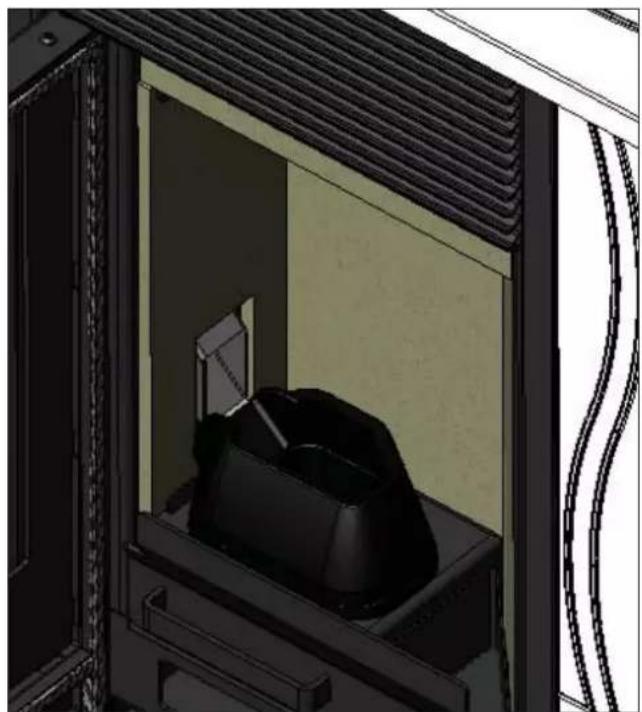
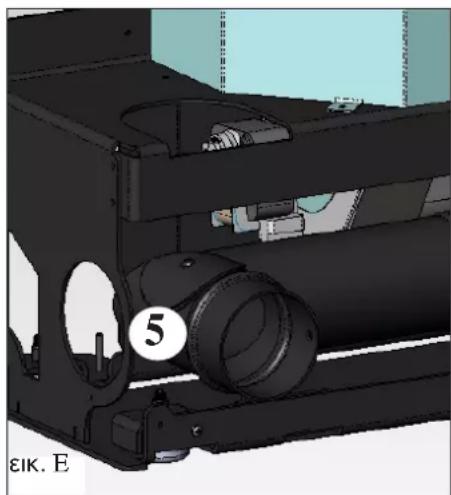
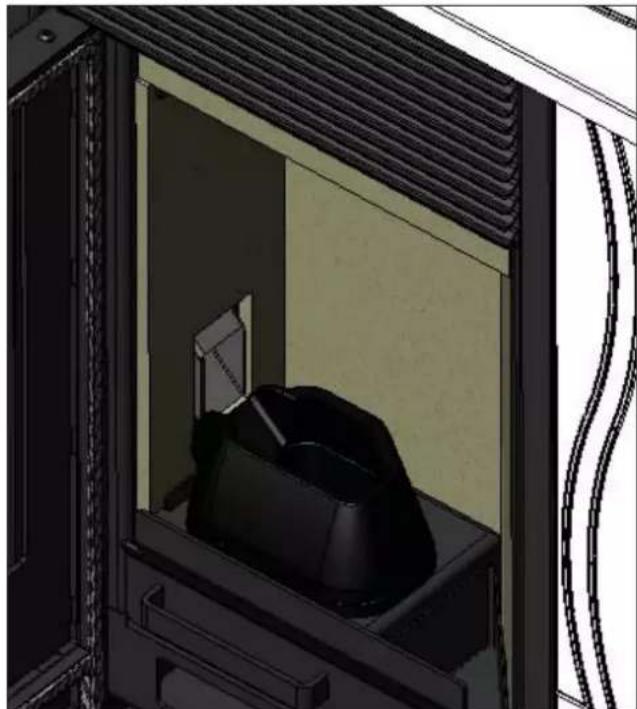
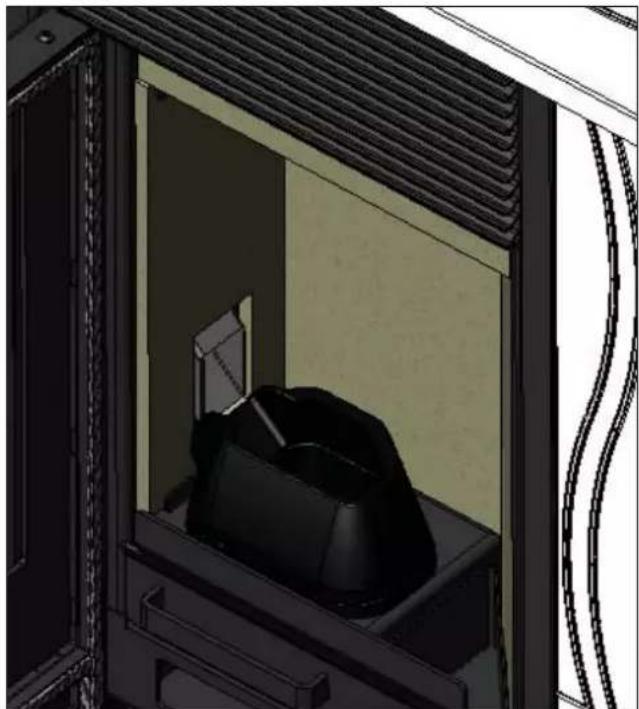
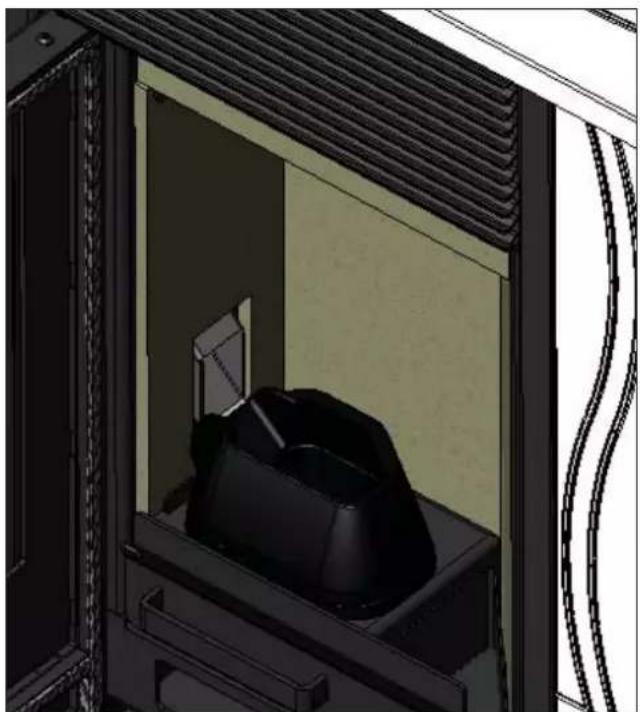
- Remove the ceiling (3 - fig. C) and tip any residue into the ash tray (2 - fig. B). • Empty the pellet hopper and vacuum the bottom.
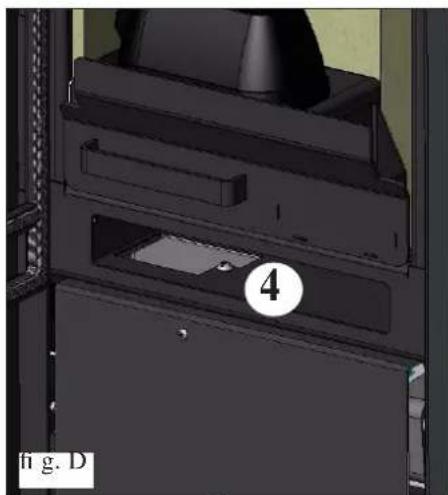
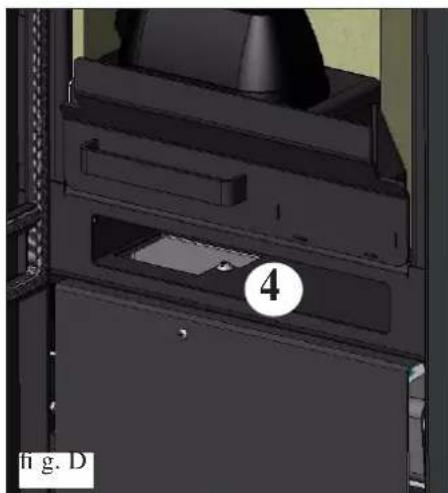
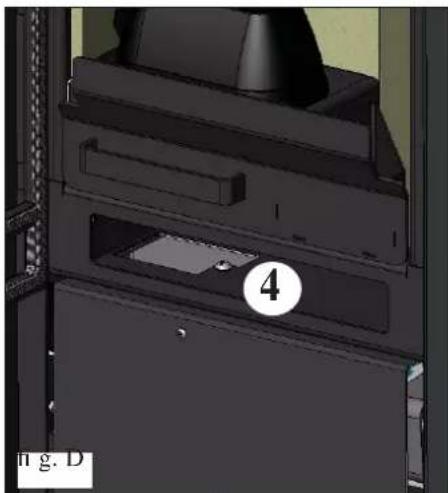
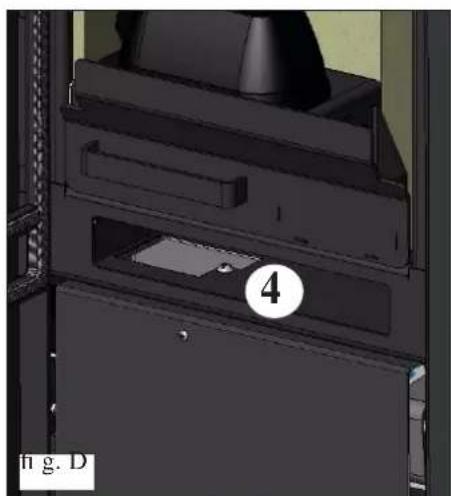
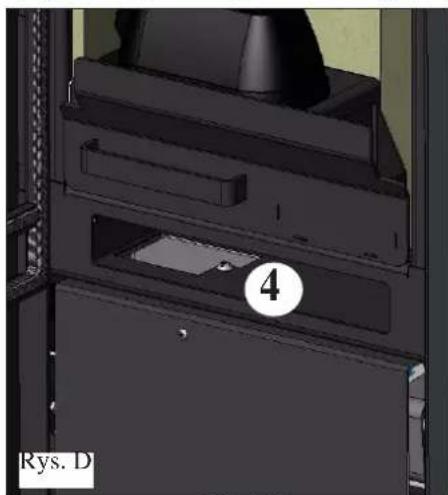
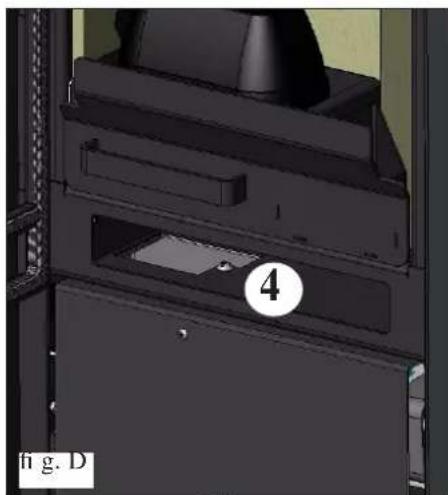
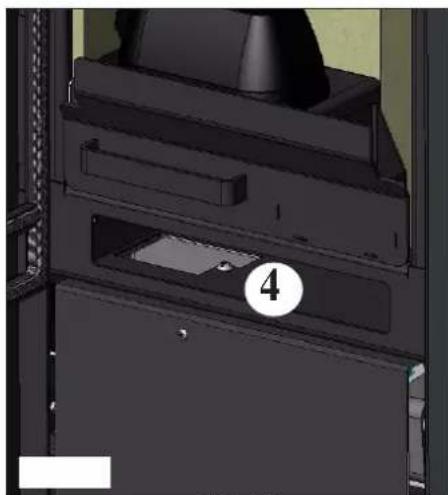
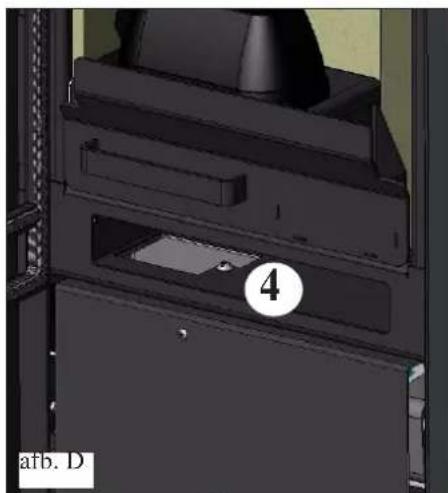
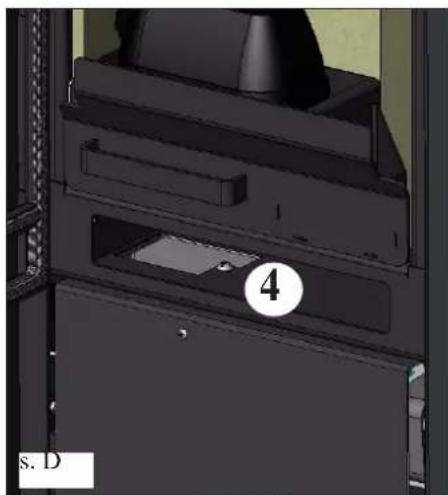
- Clean the combustion chamber and the compartment below (4 - fig. D).
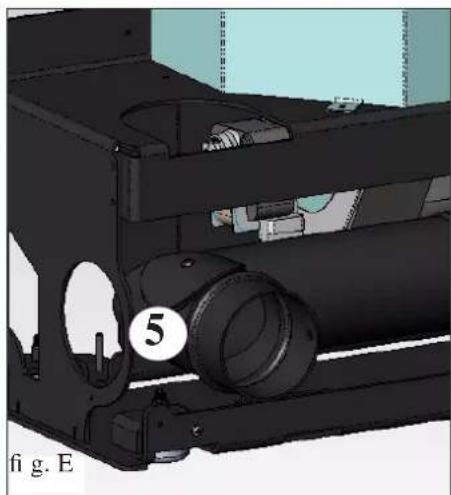
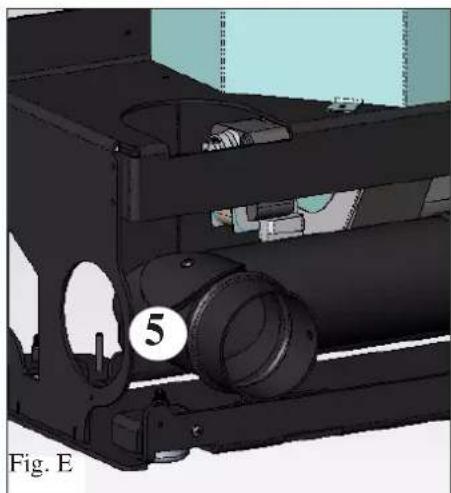
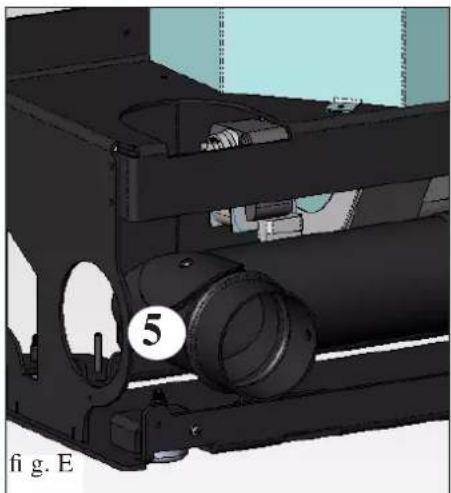
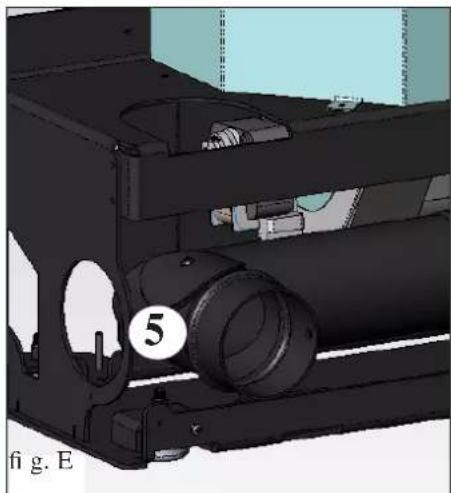
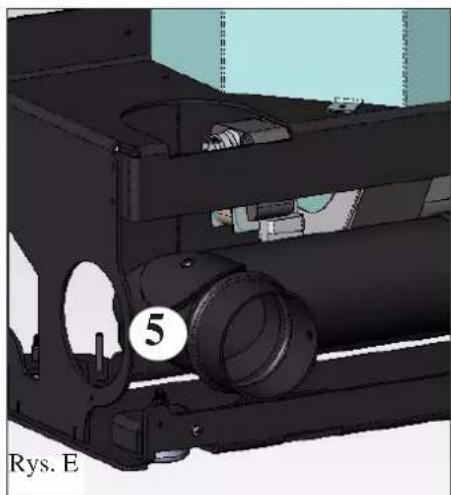
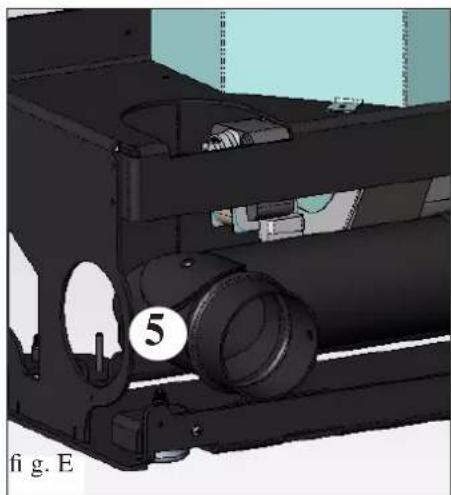
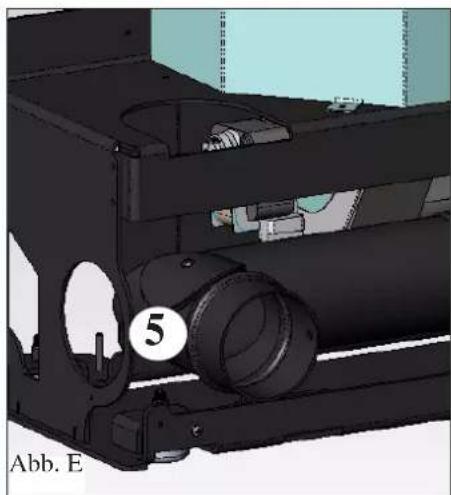
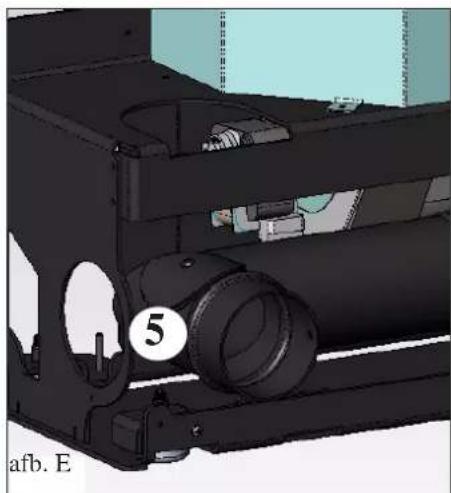
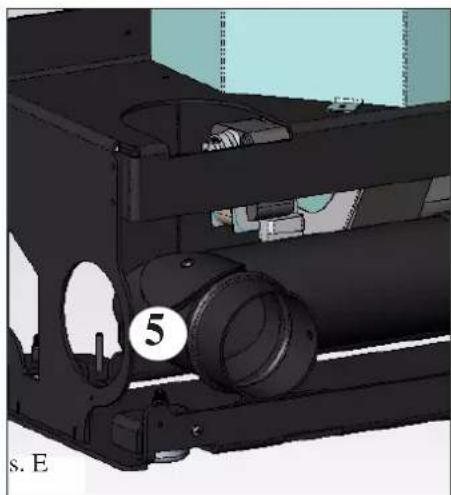
- Clean the inspection opening on the smoke elbow joint (5 - Fig. E).
MAINTENANCE
SEASONAL MAINTENANCE (by the TAC - technical assistance centre)
It consists of:
• General cleaning, inside and out - Accurate cleaning of the exchange pipes inside the hot air output grill located in the upper part of the front of the stove - Thorough cleaning and removing encrustation of the crucible and the relative chamber - Cleaning fans/extractors, mechanical check on play and fixings - Cleaning of the flue (replacement of the gasket on the flue pipe) - Cleaning of the smoke duct - Cleaning of the smoke extractor fan, cleaning of the pressure switch, check on the thermocouple. - Cleaning, inspection and removal of encrustations on the ignition resistance chamber, replacement of the same if necessary - Cleaning/check of the synoptic panel - Visual inspection of the electric wires, of the connections and of the power-supply wire - Cleaning of the pellet hopper and check on play of the screw-gear motor group - Replacement of the door gasket - Test of functioning, screw loading, ignition, operation for 10 minutes and switching off.
If the stove is used very frequently, it is advisable to clean the flue every 3 months.
ATTENTION!!
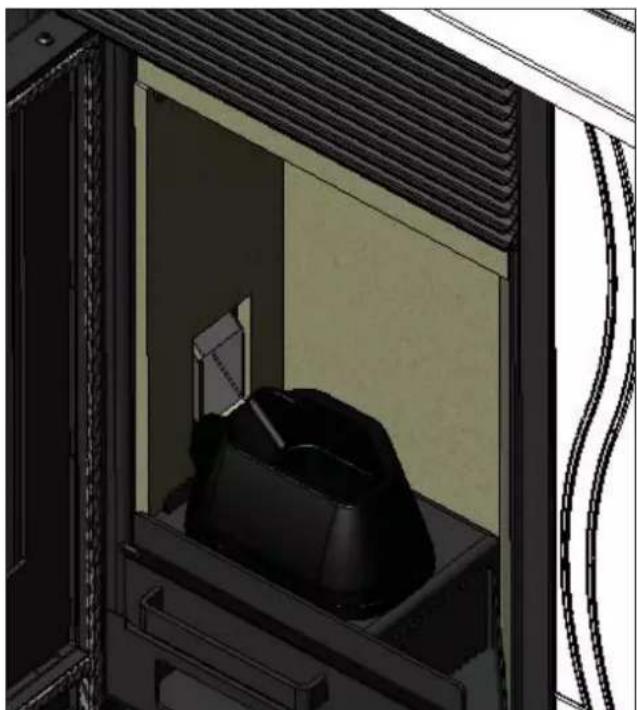
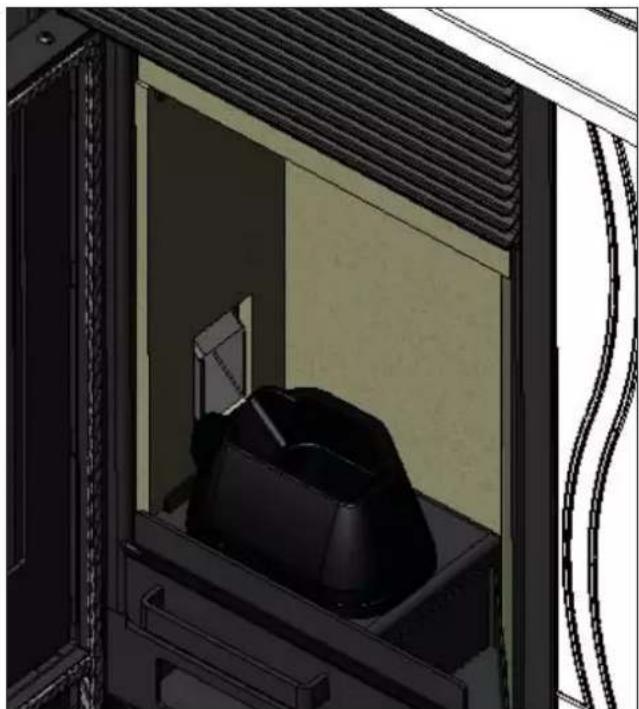
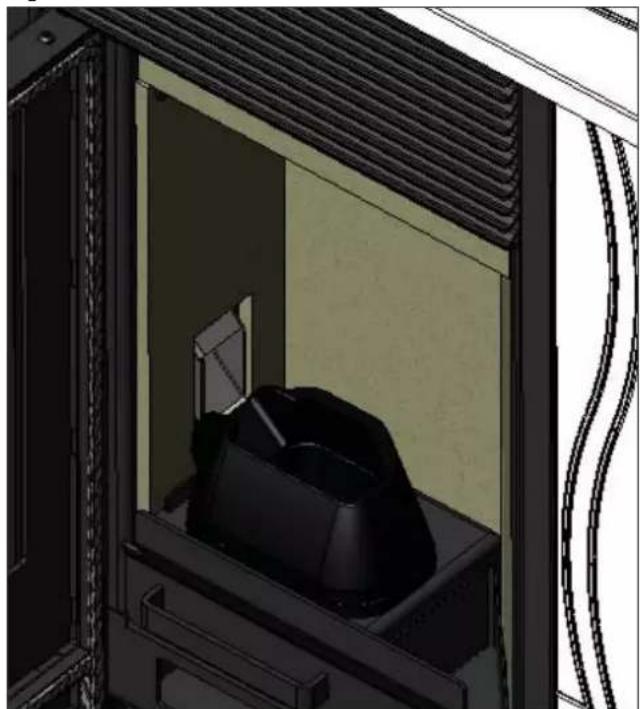
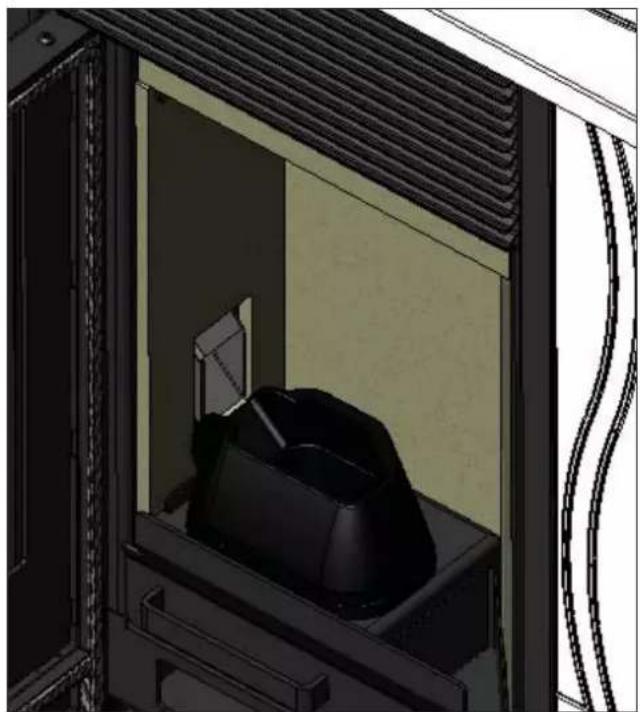
After normal cleaning, incorrect attachment of the upper part of the crucible (A) (fig. 1) with the lower part of the crucible (B) (fig. 1) can compromise stove functioning.
Therefore, before igniting the stove, make sure that the two parts of the crucible are correctly attached as indicated in (fig. 2) without any ash or unburnt fuel on the contact edges.
We remind you that using the stove without cleaning the melting pot may cause a sudden ignition of gas inside the combustion chamber with the consequent breaking of the glass.
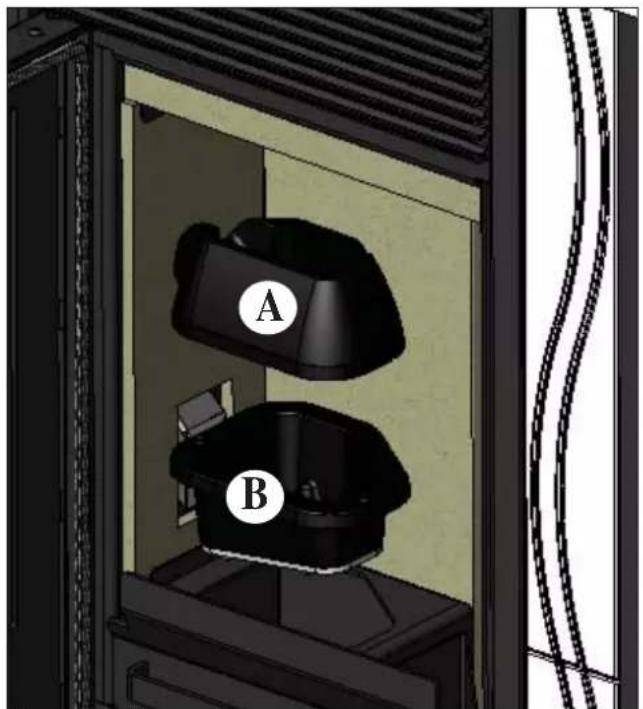
fig. 1 fig. 2
ADVICE IN CASE OF PROBLEMS
In the case of problems, the stove will switch off automatically, and an indication of the cause will appear on the display (see the various messages below).
Never pull out the plug when the stove is switching off automatically because of a failure.
In the case of automatic switch-off, the stove must be allowed to complete the entire procedure (15 minutes with an
acoustic signal), after which it can be restarted by pressing the key.

However, do not restart the stove until you have found out the cause of the error and until you have CLEANED/EMPTIED the crucible.
SIGNALS OF POSSIBLE CAUSES OF AN ERROR, TIPS AND SOLUTIONS:
AL1 black out (this is not a stove error) (this takes place if there is no electricity for more than 5 seconds)
The stove has a 'black out' function. If the electricity supply is off for less than 5 seconds, the stove will switch on again, returning to the function in progress before it switched off.
If the electricity supply is off for more than 5 seconds, the stove will go into 'black out' alarm, with consequent cooling phase.
The possible causes are listed below:
| Stove status before black-out Interruption of less than 10 seconds Interruption of more than 10 seconds | ||
| OFF OFF OFF | ||
| PRE-LOAD BLACK OUT BLACK OUT | ||
| IGNITION BLACK OUT BLACK OUT | ||
| START-UP START-UP STAND-BY THEN RE-IGNITION | ||
| OPERATING OPERATING STAND-BY THEN RE-IGNITION | ||
| FINAL CLEANING FINAL CLEANING FINAL CLEANING | ||
| STAND-BY | STAND-BY | STAND-BY |
| ALARM | ALARM | ALARM |
| ALARM RECORD | ALARM RECORD | ALARM RECORD |
AL2 broken smoke temp. probe (when the stove can no longer read the smoke temperature)
- Broken thermocouple • Detached thermocouple
- Smoke temperature out of range
AL3 hot smoke (when the temperature of the smoke exceeds the safety threshold)
- Blocked chimney • Incorrect installation
- Stove obstructed
- Too many pellets loaded, check pellet feed regulation (TAC)
NOTE: the "hot smoke" message appears when the first alarm threshold of 250° is exceeded, triggering automatic stove regulation; only when the temperature of 270° is reached does the stove go into alarm mode and switches itself off.
AL4 fan fault (when the motor of the smoke extractor fan breaks down)
- Smoke extraction motor blocked • Revolution counter breakdown
- Smoke motor breakdown
- Smoke motor thermostat triggered
AL5 ignition failure (when the smoke temperature does not reach the minimum threshold during the ignition phase)
• Probable spark plug failure - Dirty crucible or too many pellets • The pellets are finished - Check the pellet safety thermostat (automatic reset) - Blocked chimney
AL6 no pellets (when the pellets are finished)
• There are no more pellets in the hopper • A gear motor failure • The screw/pellet duct is blocked - Too few pellets loaded, check pellet feed regulation
AL7 thermal safety (when the safety thermostat, situated in contact with the hopper, is triggered by the overheating of the pellet hopper)
- Pellet overloading
AL8 no depression (when there is insufficient draught in the cold air aspiration pipe)
- Blocked cold air pipe • Pressure switch failure
- Blocked silicon pipe
CHECK LIST
To be used as an addition to the complete reading of the technical sheet
Assembly and installation
• Start-up carried out by an authorised TAC which issues the guarantee and the maintenance logbook - Ventilation of the room • The flue/chimney must only receive the discharge from the stove • The flue must have: no more than 2 bends no more than 2 metres of horizontal sections • a chimney pot above the reflux area • discharge pipes in suitable material (stainless steel is recommended) - if the pipes pass through or near any flammable materials (e.g. wood), all fire-prevention precautions must be taken.
Use
• The pellets must be of good quality and not damp • The crucible and the ash pan must be clean and correctly positioned • The door must be securely closed • The crucible must be well inserted into its seat
REMEMBER to ALWAYS VACUUM THE CRUCIBLE BEFORE IGNITION If the stove does not light, do NOT repeat ignition before having emptied the crucible.
CLEANING ACCESSORIES
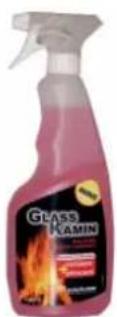
GlassKamin (code 155240)
Useful for cleaning the ceramic glass.
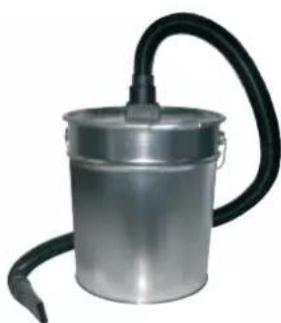
Ash vacuum cleaner without motor (code 275400)
Useful for cleaning the combustion chamber.
Dear Sir/Madam
FLUE GAS OUTLET
AIR INTAKE
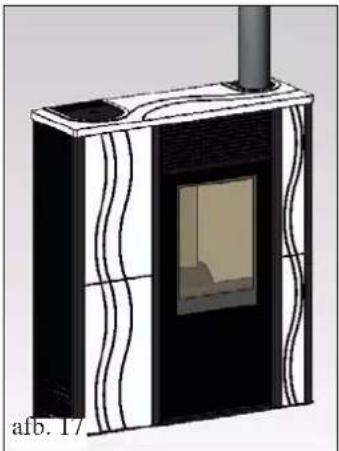
fig.17
ASSEMBLY
CLADDING WITH CERAMIC FRONTS
fig.1
INSTRUCTIONS FOR USE
SYNOPTIC PANEL


WEEKLY MAINTENANCE
MAINTENANCE
fig. 1 fig. 2
TIPS FOR POSSIBLE PROBLEMS
Ash vacuum drum without motor
(code 275400)
FLUE OUTLETS

INSTALLATION
AIR INTAKE
fig. 17
ASSEMBLY
CLADDING WITH FRONT CERAMIC PARTS
fig. 1
INSTRUCTIONS FOR USE
SYNOPTIC PANEL

key to program the desired room temperature or to enter the menu (set room temp.)

WEEKLY MAINTENANCE
MAINTENANCE
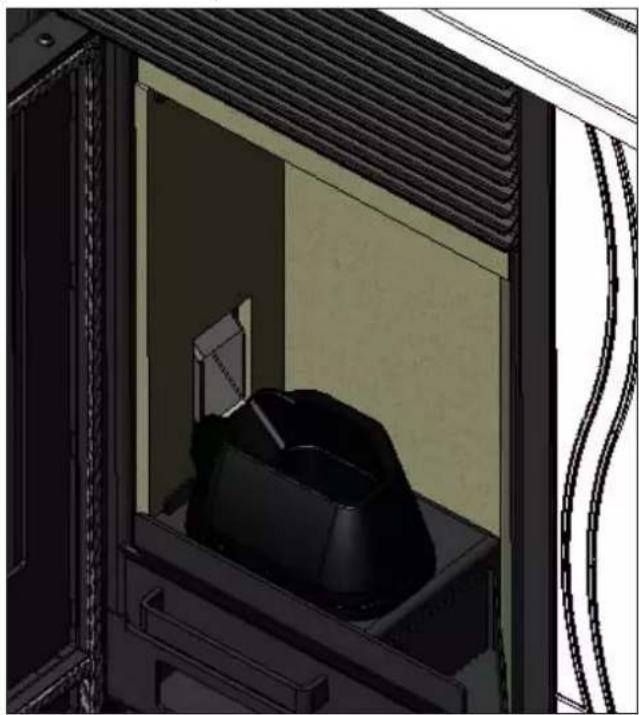
fig. 1 fig. 2
TIPS FOR POSSIBLE PROBLEMS
FLUE GAS OUTLET
INSTALLATION
AIR SUPPLY
fig. 16 fig. 17
ASSEMBLY
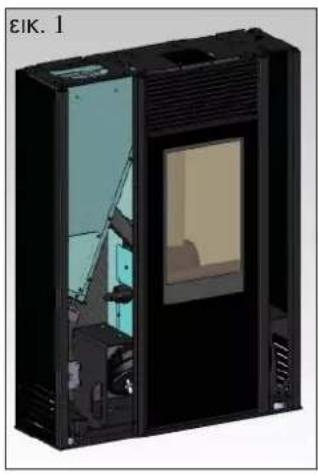
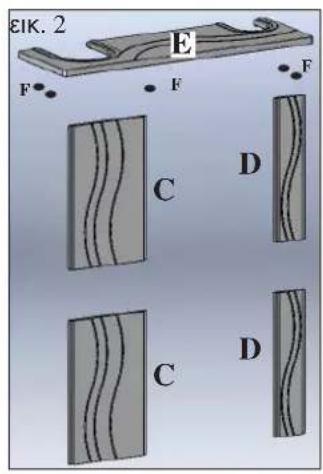
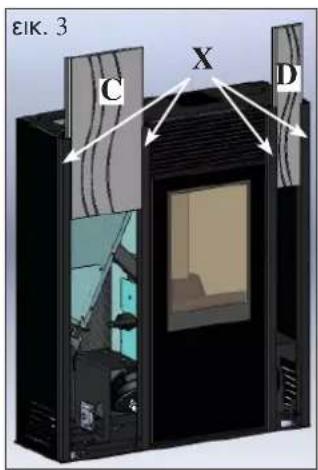
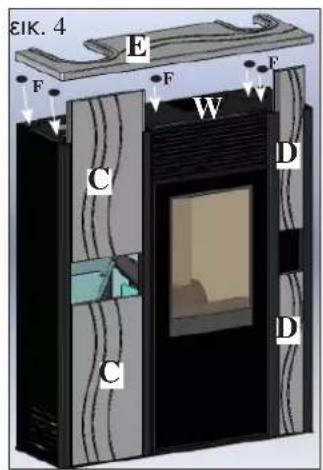
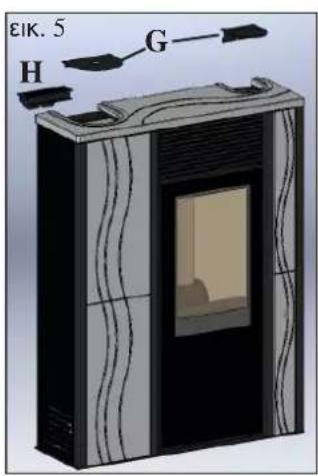
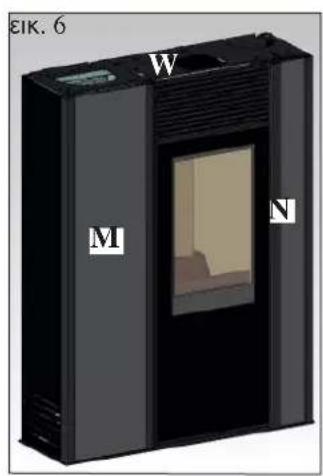
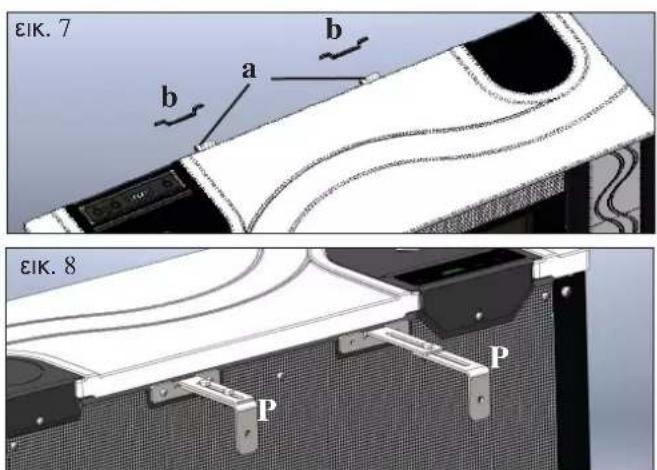
fig. 1

MAINTENANCE
fig. 1 fig. 2
FLUE GAS DISCHARGE
TO ALLOW CONNECTION OF THE FLUE GAS DISCHARGE PIPE ON THE RIGHT SIDE OF THE STOVE AND FROM THE TOP, IT IS NECESSARY TO REMOVE THE METAL SIDE WALL AND THE REAR PANEL.
Proceed as follows:
CONNECTION OF THE FLUE GAS DISCHARGE FROM THE TOP OF THE STOVE
INSTALLATION
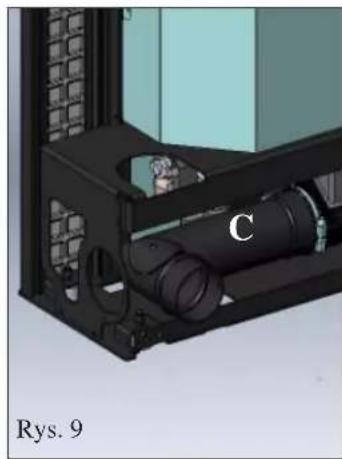
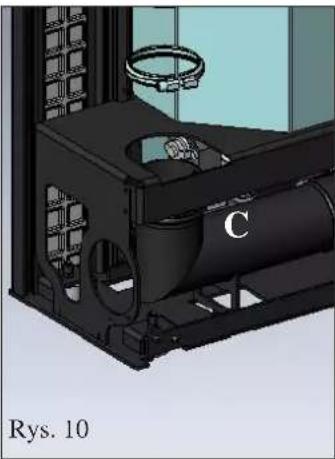
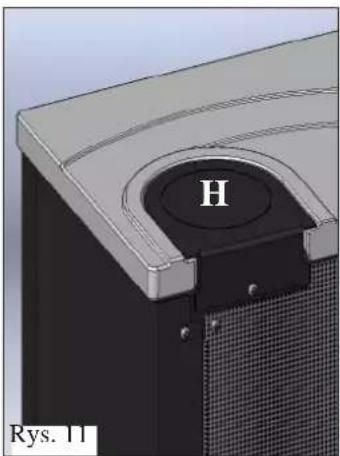
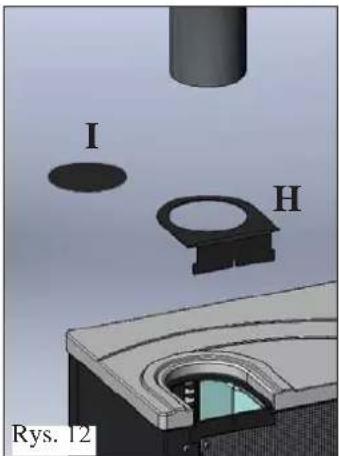
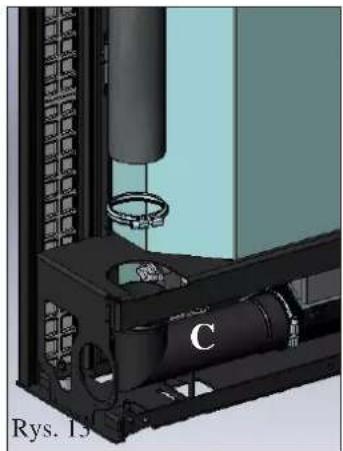
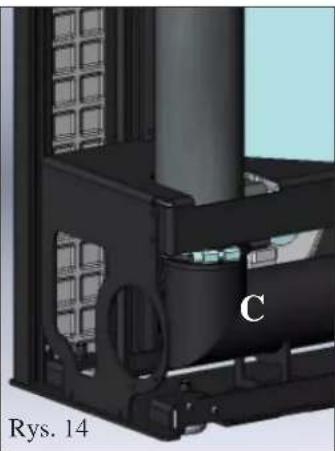
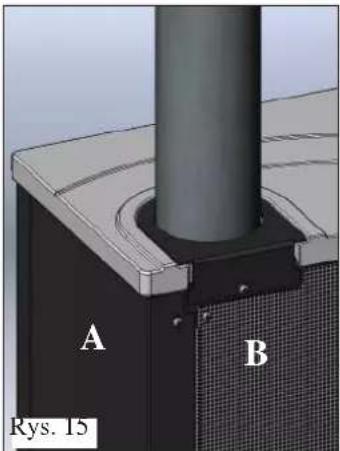
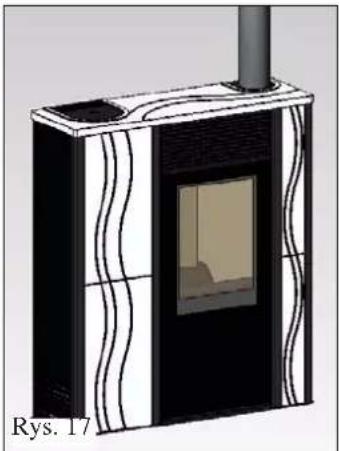
Fig. 19
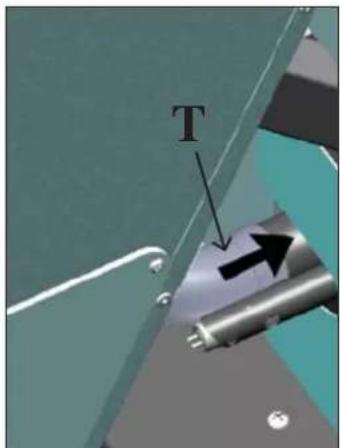
Fig. 20
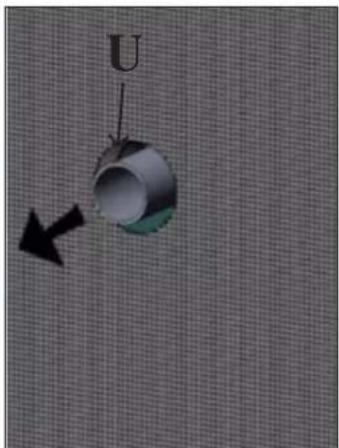
Fig. 21
FRAME ASSEMBLY
FRAME WITH CERAMIC FRONT
Fig. 1
Fig. 1
OPERATING INSTRUCTIONS
SYNOPTIC PANEL

M2-2 Daily Programmer
WEEKLY MAINTENANCE
MAINTENANCE
Fig. 1 Fig. 2
TROUBLESHOOTING
DECLARATION OF CONFORMITY
FLUE GAS OUTLET
Proceed as follows:
Remove portion F (fig. 6) of diaphragm E (fig. 6).
INSTALLATION
AIR INTAKE
fig. 19
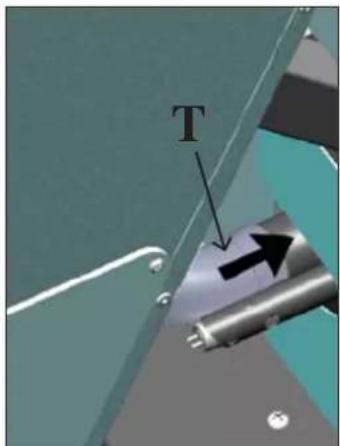
fig. 20
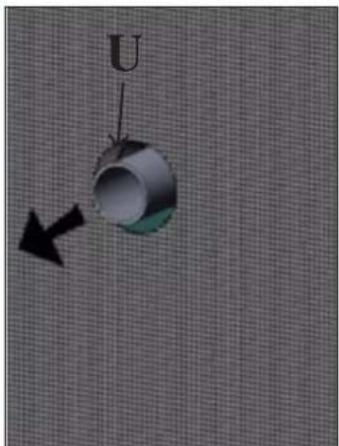
fig. 21
ASSEMBLY
LINING WITH CERAMIC FACADES
Fig. 1
fig. 1
OPERATING INSTRUCTIONS
SYNOPTIC PANEL


DAILY/WEEKLY PROGRAMMABLE CHRONOTHERMOSTAT
WEEKLY MAINTENANCE
MAINTENANCE
fig. 1 fig. 2
TIPS IN CASE OF POSSIBLE PROBLEMS
Proceed as follows:
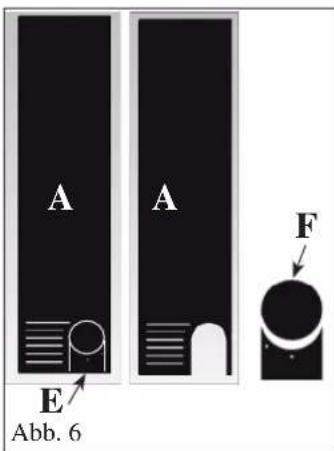
Fig. 19
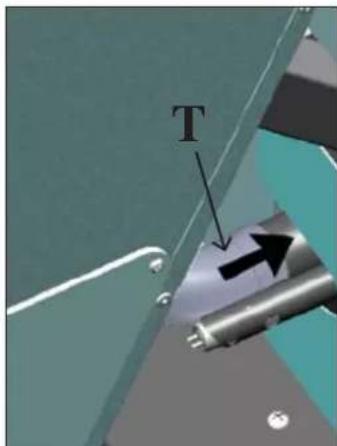
Fig. 20
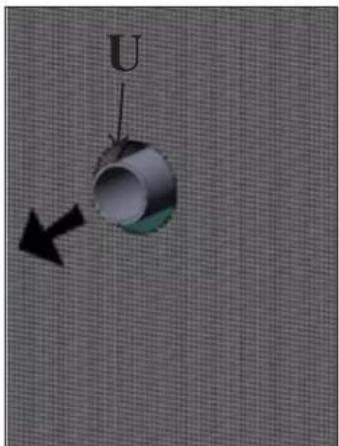
Fig. 21
MOUNTING
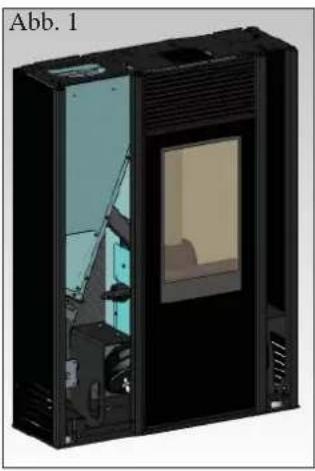
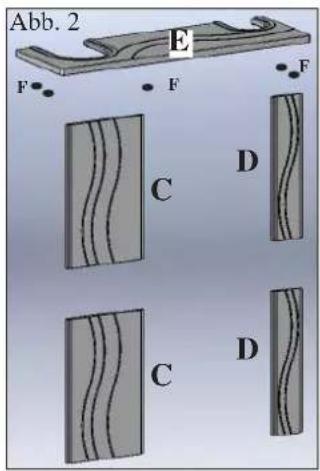
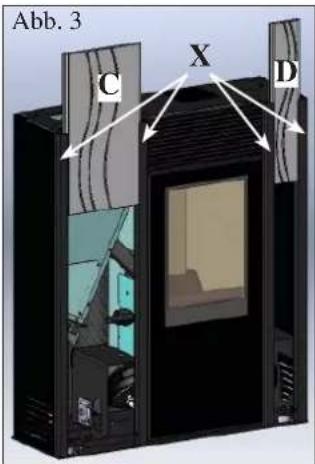

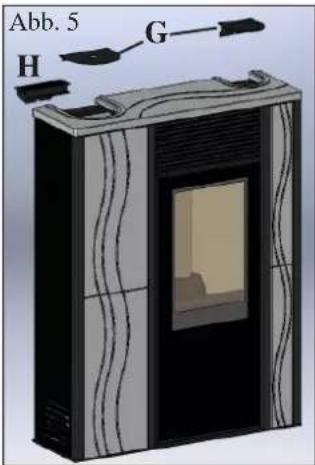
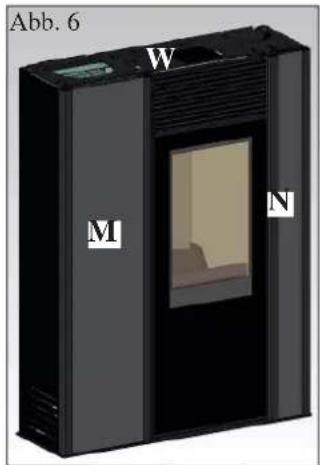
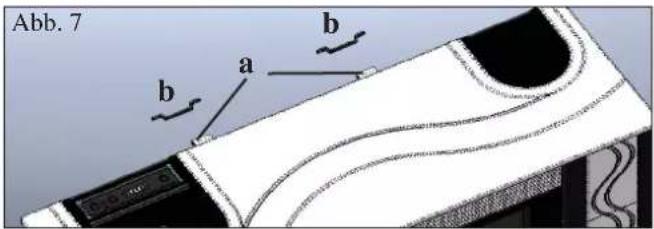
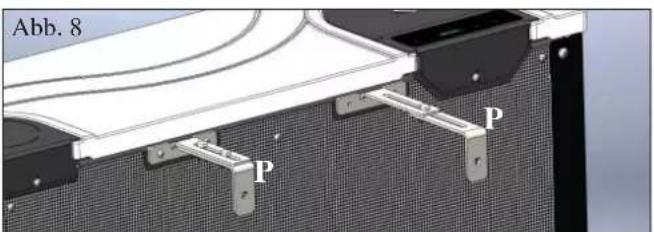
Fig. 1

MAINTENANCE
Fig. 1 Fig. 2
TROUBLESHOOTING
FLUE GAS DISCHARGE
FOR CONNECTING THE FLUE GAS DISCHARGE PIPE ON THE RIGHT SIDE OR AT THE TOP, THE METAL SIDE ELEMENT ON THE RIGHT AND THE REAR PANEL MUST BE REMOVED.
Proceed as follows:

AIR SUPPLY
fig. 19
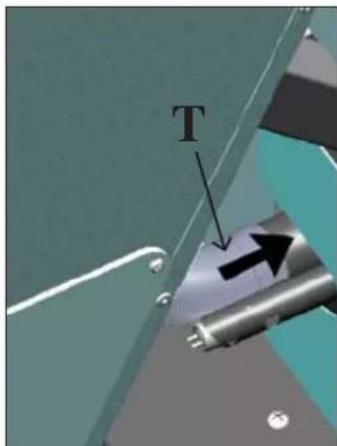
fig. 20
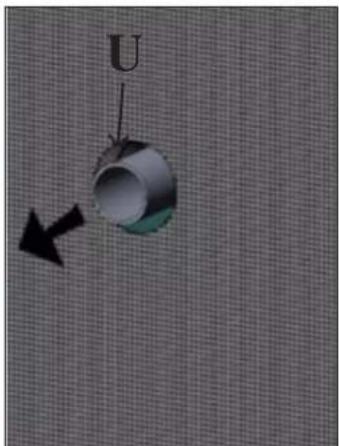
fig. 21
ASSEMBLY

CASING WITH CERAMIC FRONT ELEMENTS
Fig. 1
fig. 1
NOTE on the fuel.

Weekend programming:
WEEKLY MAINTENANCE
MAINTENANCE
Fig. 1 Fig. 2
ADVICE FOR POSSIBLE PROBLEMS
Ash vacuum
without motor
(code 275400)
FLUE GAS EXHAUST
To do this:
- Remove the metal right side by unscrewing the 2 screws (A - Fig. 3).
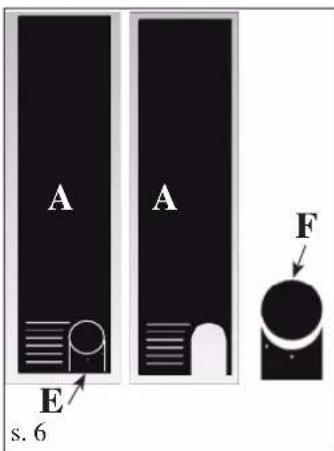
From the cover E (Fig. 6) remove the cut-out part F (Fig. 6).
Reinstall the metal side A (Fig. 7), the back panel B (Fig. /) and the cover E without the cut-out part F (Fig. 8).
AIR CONNECTION
p. 19
p. 20
p. 21
ASSEMBLY
FRONT CERAMIC CLADDING
S. 1
The stove is delivered with metal sides and aluminum profiles (X - s. 3) already installed. The elements described below are supplied separately.
S.2
s. 1
INSTRUCTIONS FOR USE
SYNOPTIC PANEL

button for setting the desired temperature or for accessing the menu (room temperature set)

button for adjusting power/temperature (power set)

WEEKLY MAINTENANCE
MAINTENANCE
SEASONAL MAINTENANCE (performed by CTP)
Includes:
S. 1 S. 2
TIPS FOR TROUBLESHOOTING
Ash vacuum cleaner without motor (code 275400)

- FLUE OUTLET
- TO ALLOW CONNECTION OF THE FLUE OUTLET FROM THE RIGHT SIDE AND FROM THE TOP, IT IS NECESSARY TO REMOVE THE RIGHT METAL SIDE AND THE REAR PANEL
- CONNECTION OF THE FLUE OUTLET FROM THE TOP
- AIR INTAKE
- ASSEMBLY
- LINING WITH CERAMIC FRONTS
- INSTRUCTIONS FOR USE
- SYNOPTIC PANEL
- MAINTENANCE
- TIPS FOR POSSIBLE PROBLEMS
- OPERATING PRINCIPLE
- SAFETY INFORMATION
- ELECTRONIC APPARATUS
- SERIAL PORT
- BACKUP BATTERY
- SAFETY DEVICES
- THERMOCOUPLE
- DIFFERENTIAL PRESSURE SWITCH
- SAFETY THERMOSTAT
- FEATURES
- N.B
- INSTALLATION
- CHECK OF COMPATIBILITY WITH OTHER DEVICES
- CHECK THE ELECTRICAL CONNECTION (THE SOCKET MUST BE IN AN EASILY ACCESSIBLE POSITION)
- FIRE PREVENTION SAFETY DISTANCE
- AIR INTAKE VENT
- SMOKE DISCHARGE
- CHIMNEY POT
- SMOKE OUTPUT
- REAR SMOKE OUTPUT CONNECTION
- TO ALLOW THE CONNECTION OF THE SMOKE OUTPUT FROM THE RIGHT SIDE AND TOP IT IS NECESSARY TO REMOVE THE RIGHT METAL SIDE AND THE REAR PANEL
- TOP SMOKE OUTPUT CONNECTION
- CASING WITH FRONT CERAMIC COVER
- COVERING WITH SHEET-METAL FRONT PIECES
- FIRST IGNITION/TESTING BY THE EDILKAMIN AUTHORISED TECHNICAL ASSISTANCE CENTRE (TAC)
- LOADING THE PELLETS INTO THE HOPPER
- ATTENTION
- NOTES ON FUEL
- HEAT YIELD: AT LEAST 4300 KCAL/KG
- MENU DESCRIPTION
- SWITCH ON/SWITCH OFF
- OPERATING
- MANUAL
- AUTOMATIC
- VENTILATION ADJUSTMENT
- SCREW LOADING (ONLY IF THE STOVE IS COMPLETELY WITHOUT PELLETS)
- STAND-BY FUNCTION
- SETTING THE DATE AND TIME
- EXTERNAL THERMOSTAT
- CHRONO-THERMOSTAT FOR DAILY/WEEKLY PROGRAMMING
- DAILY PROGRAMMING
- WEEKLY PROGRAMMING
- WEEKEND PROGRAMMING
- DAILY MAINTENANCE
- WEEKLY MAINTENANCE
- SEASONAL MAINTENANCE (BY THE TAC - TECHNICAL ASSISTANCE CENTRE)
- ADVICE IN CASE OF PROBLEMS
- SIGNALS OF POSSIBLE CAUSES OF AN ERROR, TIPS AND SOLUTIONS
- CHECK LIST
- TO BE USED AS AN ADDITION TO THE COMPLETE READING OF THE TECHNICAL SHEET
- ASSEMBLY AND INSTALLATION
- USE
- CLEANING ACCESSORIES
- FLUE GAS OUTLET
- CLADDING WITH CERAMIC FRONTS
- FLUE OUTLETS
- CLADDING WITH FRONT CERAMIC PARTS
- AIR SUPPLY
- FLUE GAS DISCHARGE
- TO ALLOW CONNECTION OF THE FLUE GAS DISCHARGE PIPE ON THE RIGHT SIDE OF THE STOVE AND FROM THE TOP, IT IS NECESSARY TO REMOVE THE METAL SIDE WALL AND THE REAR PANEL
- CONNECTION OF THE FLUE GAS DISCHARGE FROM THE TOP OF THE STOVE
- FRAME ASSEMBLY
- FRAME WITH CERAMIC FRONT
- FIG
- OPERATING INSTRUCTIONS
- M2-2 DAILY PROGRAMMER
- TROUBLESHOOTING
- DECLARATION OF CONFORMITY
- LINING WITH CERAMIC FACADES
- DAILY/WEEKLY PROGRAMMABLE CHRONOTHERMOSTAT
- TIPS IN CASE OF POSSIBLE PROBLEMS
- MOUNTING
- FOR CONNECTING THE FLUE GAS DISCHARGE PIPE ON THE RIGHT SIDE OR AT THE TOP, THE METAL SIDE ELEMENT ON THE RIGHT AND THE REAR PANEL MUST BE REMOVED
- CASING WITH CERAMIC FRONT ELEMENTS
- NOTE ON THE FUEL
- ADVICE FOR POSSIBLE PROBLEMS
- FLUE GAS EXHAUST
- AIR CONNECTION
- FRONT CERAMIC CLADDING
- S
- SEASONAL MAINTENANCE (PERFORMED BY CTP)
- INCLUDES
- TIPS FOR TROUBLESHOOTING
Brand : EDILKAMIN
Model : MICRON
Category : Cooker