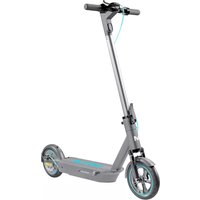
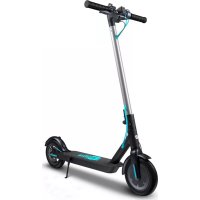
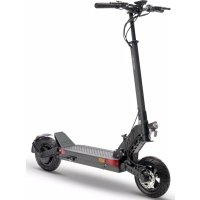
USER MANUAL Scooty 10 Plus Motus
text_image
Labeled diagram of an electric scooter with numbered components for identification
natural_image
Line drawing of a scooter with wheels and side-mounted sensors, shown from front and side views (no text or symbols)
natural_image
Line drawing of a scooter with attached cable, alongside three circular insets showing hand positioning and seat placement (no text or symbols)
6. KONSERWACJA I GWARANCJA
6.1 Przechowywanie
Thank you for purchasing a Motus product. Please read the operating instructions before using this product
The package contains:
1x Motus Scooty scooter 10
1x Charger and power cord
1x Adjustment key
8x Screws for steering bar
2x Screws for foot stand (spare)
1x Operating instructions
1x Tube for pumping wheels
2. SAFETY
There is a risk when riding any type of vehicle. Do you remember your cycling lessons? Probably at the beginning it was a safe place and someone helped you with this. You started slowly.
This technique should be used here as well. If you follow the instructions in this manual as well as the warnings contained in it, you will be able to learn how to drive. Read and understand this operating manual and exercise caution when driving.
EN
WARNING!
If the battery is weak, as indicated by the battery meter on screen, do not drive. This may cause the vehicle to stop and inconsequences of falling down.
Check the laws and regulations regarding the places and the legal way of using the vehicle. You must comply with the regulations rights to vehicles and pedestrians.
Avoid obstacles and slippery surfaces that can cause loss of balance or road holding, resulting in a fall.
Do not exceed a maximum weight of 120 kilograms with a backpack and other items carried. Exceeding the maximum weight may result in injury to the driver and damage to the vehicle.
Young children should not drive this vehicle. It should be assessed whether the driver has the necessary coordination, driving strength and maturity to drive. Only children over 16 years of age should be allowed to drive this vehicle.
Do not lift the vehicle off the ground when it is turned on. Do not turn in the air. This will cause the wheels to rotate freely, which may cause injury or damage to objects in the environment.
Do not modify the vehicle. Modifications may affect vehicle operation and, as a consequence, result in injury and / or damage to the vehicle. Modifications will void the limited warranty.
Do not operate the vehicle under the influence of drugs, alcohol or other intoxicants.
This product is a consumer product, so commercial use is not covered by warranty.
3. ASSEMBLY
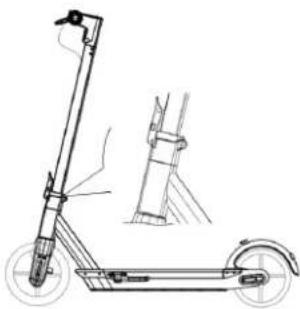
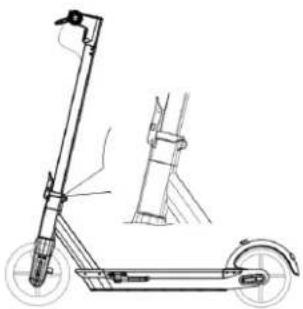
- Unfold the tube of the folding structure.
- Close the folding mechanism clamp.
- Place the handlebar handle horizontally.
- Use a suitable wrench to tighten the steering wheel bolts.
- In order to screw the kickstand to the device, you need to unscrew 2 screws from the scooter platform (the necessary Allen keys are included in the set), then fi t the kickstand and screw it to the platform frame
natural_image
Line drawing of a scooter with wheels and a side-mounted sensor, shown from front and side (no text or symbols)
4. START
4.1 Schemes
Scheme 1A:
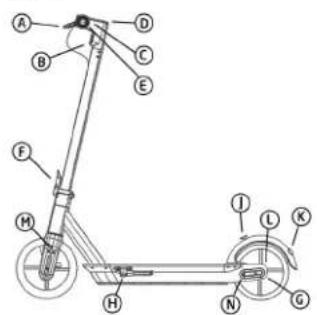
A – Brake handle, B – Front light, C – throttle grip, D – Screen, E – Bell, F – Folding mechanism, G – Motor, H – Charging socket, J – Hook, K – Rear light, L – Disc brake, M - front shock absorber, N - rear shock absorber
text_image
Labeled diagram of a scooter or scooter with numbered parts for identification

text_image
A
Anch mph mph
ECO D S
B
C
D
E
F
Scheme 1A: Electric Scooter Motus Scooty 10 Plus Scheme 1B: Display
Scheme 1B:
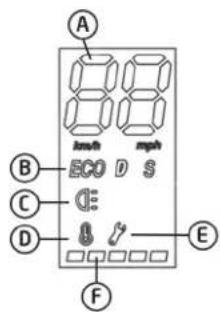
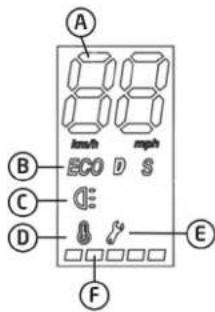
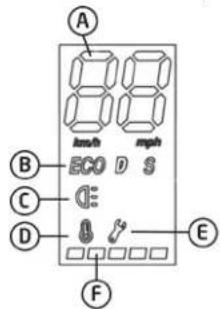
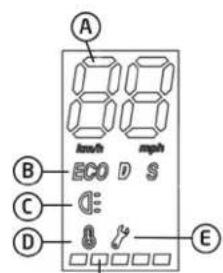
A -Speed indicator in km/h; B – Gears – ECO up to 5km/h; D up to 15 km/h; S up to 20 km/h – to change press the power button briefly; C – Lights – to turn on, press the power button twice quickly; D – Warning about wrong
temperature for the device – The recommended temperature is between -5^ and 30^ ; E – Information about the fault; F – Battery charge status – each dot accounts for about 20% of the battery capacity
4.2 Unfolding
Unfold the tube of the folding structure. Close the folding mechanism clamp.
4.3 Folding and transport
Before folding, make sure that the device is switched off, open the locking lever, bend the footrest and connect it to the steering wheel part to the rear fender hook. After folding, hold on to the belt to transport as shown. To avoid the risk of damaging the rear fender, support the scooter chassis.
4.4 Battery charging
The device has a built-in lithium-ion battery. Before the first one vehicle use, the battery should be fully charged. Please ensure clean and a dry room to charge the battery. Connect one end vehicle power cable. Connect the other end to a grounded power outlet. Do not disconnect the charger until it is fully charged battery.

natural_image
Line drawing of a scooter with attached cable, shown in three sequential views (no text or symbols)
If charging is completed, be sure to close the lid. Avoid completely draining the battery, it's better to charge it while it's still in them power supply. It is forbidden to disassemble the battery compartment. Repair only at the manufacturer's offi cial service center.
4.5 The driver's weight must exceed 45 kg
To guarantee safety against children, all drivers must weigh over 45 kg. If the driver's weight is less than 45 kg, the vehicle can operate incorrectly.
EN
4.6 Battery level
The battery level is displayed at the position marked in Scheme 1B with the letter F.
The driving range will decrease during the winter because battery performance will quickly decreases in low temperature conditions. For example at temperature -15 °C battery performance is halved compared to performance in room temperature. To ensure battery life during winter, it should be charged and unloaded at least once a month.
NOTE: If the vehicle slows down drastically and the wheels start shaking, it will meant that the battery level is very low. Then you should immediately release and get off the vehicle safely. Then turn off the vehicle. In that situation, do not drive the vehicle until recharged battery.
5. DRIVING GUIDELINES
5.1 Preparation
Make sure you have a comfortable outfit before starting your first ride informal or sporty and flat footwear. You should take care more space and make sure there aren't any larger ones obstacles. It is recommended to put on protectors to protect against accidents.
If you notice that you need more air in the wheels, use a pump to adjust the pressure. NOTE: Excessive pressure may cause wheel breakage. Driving without air in the wheels can also damage the wheel. The optimum tire inflation level is 3.8 Bar.
BRAKE ADJUSTMENT: If you think the brakes are too strong, use a wrench counterclockwise hexagon, to loosen the screws on the pressure plate on the brake seat. Release the brake hose to slightly shorten the exposed length and tighten the platen screws. If you think the brake is too loose, release the screws on the pressure plate, pull the brake cable to slightly extend its length and then lock the screws on the pressure plate.
IMPORTANT: At first the brakes may rub slightly, This is normal. After traveling a few km, the brake will adapt and the friction will disappear.

text_image
Diagram illustrating scooter safety instructions with labeled steps and visual examples of motion and gear movement.
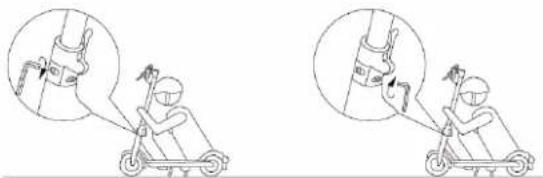
ADJUSTMENT OF THE FOLDING MECHANISM
If you think the steering wheel is not stable enough, use a suitable wrench to tighten the screws on the folding mechanism.
natural_image
Illustration of two scooter safety instructions showing hand positioning and joint insertion (no text or symbols)
5.2 Start driving
Make sure the folding mechanism is fully secured.
Step 1. Start the vehicle by pressing the power button. After at the moment the vehicle will be ready for use.
Step 2. Place the feet on the platform correctly. Push away to enter scooter in motion and press the throttle control. Steer the vehicle by keeping center of gravity to maintain balance. Remember not to make sudden movements of the body.
Step 3. Press the throttle grip (Diagram 1A: C) down to accelerate.
Step 4. Press the brake handle (Diagram 1A: A) down to brake.
Step 5. Getting off the vehicle: stop before leaving the vehicle.
5.3 Land and purpose
- The vehicle is designed to ride on smooth and flat surfaces. To prevent loss of adhesion, always keep it caution when driving and learn to recognize and avoid slippery, wet and loose surfaces, slopes and holes in the road and
other obstacles.
- Stop and get off the vehicle to walk across the dangerous surfaces or terrain.
- Wheels must be able to stick to the surface to ensure drivers maintaining an upright position. Slip occurs when the wheels lose traction, which could potentially cause you to lose control of the vehicle and consequently fall. Sudden maneuvers and driving on slippery, loose or rough roads pavement may cause loss of traction.
- Remember that the maximum distance covered on one full distance battery charge decreases as the user's weight and incline increase area. It also depends on pavement conditions and weather conditions.
6. MAINTENANCE AND WARRANTY
6.1 Storage
The vehicle should be stored in a dry place. When the vehicle remains unused Charge and discharge the battery every month to maintain life battery.
6.2 Cleaning
To clean the device, use a damp cloth. If you want to scrape dirt, use a soft brush and then a damp cloth. Hold the skid during cleaning and make sure you cover the charging port, to avoid problems with electronic components. Do not use alcohol, gasoline, kerosene or other volatile or corrosive substances chemical ingredients. This can damage both the appearance and the interior scooter structure. Do not use a pressure or running gun water.
6.3 Warranty
The warranty will void in the following situations:
- Failure resulting from improper use.
- Defect caused by unauthorized modifications, dismantling or repairs.
- Accidental damage or malfunction resulting from inadequate storage.
- Warranty / proof of purchase not corresponding to the product.
- Damage to the surface.
- Dismantled parts that do not match the description in this manual service.
- Damage or malfunction caused by long journeys in the rain or wetting water or a dusty surface.
7. PRECAUTIONS
7.1 We present the following precautions for understanding and use the product safely.
- This Product is not a toy and only persons over 16 years old can use it.
- Wear protectors before using this product.
- Stop the vehicle immediately when the battery light turns off. Next connect the charger to charge the battery.
- The vehicle has IPX4 protection, which means that it can be used in wet conditions way. We do not recommend driving on wet roads and in the rain. So maybe damage the scooter and will not be covered by the warranty. Do not drive this product on an uneven surface because this may cause you to lose your balance and consequently fall. recommended use the vehicle always and only on a smooth surface. Definitely We recommend learning to drive this product before actually using it him. The driver must be accompanied by another person during the first ride, to prevent an accident.
Always look ahead when driving this vehicle to prevent it accidents.
For safety reasons, we strongly advise against driving this vehicle at high speed
8. APPLICATION
The Motus Scooty scooter can be connected to a dedicated app. To download and install the app, use the Google Play shop or Appstore. Note: The version of the application may have been updated. Follow the instructions of the current version of the app, and for up-to-date information visit: http://motusxd.pl/.
APP MY SCOOTY



INHALTSVERZEICHNIS
natural_image
Line drawing of a scooter with wheels and a handle, shown from front and side views (no text or symbols)
4. ERSTE SCHRITTE
4.1 Diagramme
text_image
Labeled diagram of a scooter with numbered parts for identification
Schema 1A: Motus Scooty 10 Plus Roller
text_image
A
B
C
D
E
F
Eco D S
mph
mph
Schema 1B: Anzeige
natural_image
Line drawing of a scooter with attached cable, shown in three circular insets (no text or symbols)
natural_image
Two line drawings of a scooter with gear and motion arrows, showing internal components (no text or symbols)
text_image
Illustration showing two steps of a scooter climbing a cable, with magnified views highlighting the motion direction.
5.2 Fahren Sie los
L'emballage contient:
1x Motus Scooty scooter 10
natural_image
Line drawing of a scooter with extended ladder and wheels, shown in technical sketch (no text or symbols)

text_image
Labeled diagram of an electric scooter with numbered components for identification
Schéma 1A: Motus Scooty 10 Plus
text_image
A
B
C
D
E
F
Eco D S
mph
mph
Schéma 1B: Visualiser
Schéma 1B:
natural_image
Line drawing of a scooter with attached cable, shown in three sequential views (no text or symbols)
text_image
Diagram illustrating scooter safety instructions with labeled diagrams and hand positions
AJUSTEMENT DU MÉCANISME DE PLIAGE
text_image
Illustration showing two steps of a person using a scooter, with magnified views highlighting the motion and detail.
natural_image
Line drawing of a scooter with extended boom and wheels, showing front and side views (no text or symbols)
4. ZAČÍNÁME
4.1 Schémata
text_image
Technical diagram of a mechanical linkage system with labeled components A through N and directional arrows indicating motion or force.
natural_image
Line drawing of a scooter with attached cable, shown in three sequential views (no text or symbols)
text_image
Diagram illustrating scooter safety instructions with labeled diagrams and hand gestures
NASTAVENÍ SKLADACÍHO MECHANISMU
text_image
Illustration showing two steps of a person using a scooter, with magnified views highlighting the motion and detail.
5.2 Zahajte jízdu
natural_image
Line drawing of a scooter with extended boom and wheels, showing front and side views (no text or symbols)
4.1 Schémy
text_image
Labeled diagram of an electric scooter with numbered parts for identification

text_image
A
mm/h mph
ECO D S
B
C
D
E
F
Schéma 1B: MonitorSchéma 1A: Kolobežka
natural_image
Line drawing of a scooter with motion indicators and three circular insets showing interior compartments (no text or symbols)
Ak je nabíjanie ukončené, nezabudnite zatvorit kryt. Vyvarujte sa úplnému vybitiu batérie, je lepšie ju nabít, keď je ešte v batérii ich napájanie. Je zakázané rozoberat priehradku na batérie. Opravy vykonávajte iba v ofi cialnom servisnom stredisku výrobcu.
4.5 Hmotnost' vodiča musí prekročit' 45 kg Viotus Scooty 10 Plus
text_image
Diagram illustrating scooter safety instructions with labeled diagrams and arrows indicating motion paths
NASTAVENIE MECHANIZMU ZLOŽENIA
natural_image
Illustration of a person using a scooter to lift a stick, showing correct and incorrect motion (no text or symbols)
5.2 Štartovat'
text_image
Labeled diagram of an electric scooter with numbered components for identification

text_image
A
km/h mph
ECO D S
B
C
D
E
F
Схема 1А: Скутер Motus Scooty 10 Plus Схема 1В: дисплей
natural_image
Line drawing of a scooter with attached cable, shown in three sequential views (no text or symbols)
text_image
Diagram illustrating scooter motion with labeled components and directional arrows, showing gear movement and wheel assembly.
natural_image
Illustration of a person using a scooter to lift a cable, showing the motion and assembly steps (no text or symbols)
5.2 Начать движение
natural_image
Line drawing of a scooter with extended legs and wheels, showing structural components (no text or symbols)
4. NOTIUNI DE BAZĂ
4.1 Diagrame
text_image
Diagram of an electric scooter with labeled parts including body, wheels, and suspension components
Schema 1A: Scooter Motus Scooty 10 Plus
text_image
A
B
C
D
E
F
Eco D S
mph
Schema 1B: Expune
natural_image
Line drawing of a scooter with attached cable, alongside three circular insets showing interior compartments (no text or symbols)
natural_image
Two line drawings of a scooter with motion capture insets showing internal dynamics (no text or symbols)
REGLAREA MECANISMULUI DE PLATARE
text_image
Illustration showing two steps of a person using a scooter, with magnified views highlighting the motion and detail.
natural_image
Technical line drawing of a scooter with wheels and suspension components (no text or symbols)
4. AZ ELSŐ LÉPÉSEK
4.1 Diagramok
text_image
Labeled diagram of a scooter with numbered parts for identification
Ábra 1A: Motus Scooty 10 Plus
text_image
A
B ECO D S
C
D E
F
Ábra1B: Képernyő
natural_image
Line drawing of a scooter with motion indicators and three circular insets showing interior compartments (no text or symbols)
text_image
Diagram showing two scooter safety instructions with labeled diagrams and hand gestures
A HAJTÓ MECHANIZMUS BEÁLLÍTÁSA
text_image
Illustration showing two steps of a scooter being lifted, with magnified views highlighting the motion and component.
text_image
Labeled diagram of a scooter with numbered parts for identification
Esquema 1A: Motus Scooty 10 Plus

text_image
A
km/h mph
ECO D S
B
C
D
E
F
natural_image
Line drawing of a scooter with attached cable, alongside three circular insets showing interior compartments (no text or symbols)
text_image
Diagram illustrating scooter motion with labeled components and directional arrows, showing hand positioning and wheel movement.
AJUSTE DEL MECANISMO PLEGABLE
text_image
Illustration showing two steps of a person using a scooter, with magnified views highlighting the motion and change.
5.2 COMIENCE A CONDUCIR
text_image
Labeled diagram of a scooter with numbered parts for identification
Schema 1A: Motus Scooty 10 Plus Schema 1B: Display

natural_image
Line drawing of a scooter with wheels and a side-mounted sensor, shown in technical sketch (no text or symbols)

text_image
A
mph
mph
ECO D S
B
C
D
E
F
text_image
Diagram showing scooter usage instructions with three circular insets illustrating different modes of the scooter.
natural_image
Two line drawings of a scooter with motion capture insets showing internal dynamics (no text or symbols)
REGOLAZIONE DEL MECCANISMO PIEGHEVOLE
text_image
Illustration showing two steps of a person using a scooter, with magnified views highlighting the motion and detail.
(Waste electrical and electronic equipment)
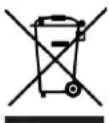
(Applies to the European Union and other European countries with separate collection systems and electronic products)
This marking on the product, accessories of literature indicates that at the end of use this product should not be disposed of with household waste.
To prevent possible harm to the environment or human health from uncontrolled waste disposal, please separate these items from other types of waste and recycle them responsibly and reuse of materials.
For more information on ehere and how environmentally safe recycling of these household users should contact either the retailer where they purchased this prodct, or their local government.
Business users should contact their supplier and check the terms and conditions of the purchase contract. This product and its electronic accessories should not be mixed with other commercial waste for disposal.
(Applicable in the European Union and other European countries eith separate battery return systems)
This mark on the battery, the packaging or in the instructions means that after usage of batteries, the product may not be disposed of with other household waste.

here marked, the chemical symbols - Hg, (d or < b), Indicate that the battery contains mercury, cadmium or lead above the levels in directive E 2006/66. If batteries are not properly disposed of these substance can cause harm to human health or the environment.
To protect the environment and to promote material reuse, please separate batteries from other types of waste and recycle them through your local return system.
Risc of Death or Serious Injury
WARNING - To reduce the risc of injury, user must read Instruction manual. Whenever you ride this vehicle, you risc injury due to loss of control, collision and falling. In order to ride safely, you must read and follow all instructions and warnings in the user manual.
WŁAŚCIWA UTYLIZACJA
ETSI EN 301.489-17 V3.2.4:2020
EN 61000-3-2:2013+A1:2019
EN IEC 63000:2018
natural_image
Completely black image with no visible content, text, or symbols.