
Pro 11 - Electric scooter Motus - Free user manual and instructions
Find the device manual for free Pro 11 Motus in PDF.


| Product Type | Electronic Device |
| Brand | Motus |
| Model | Pro 11 |
| Dimensions (L x W x H) | 200 x 150 x 50 mm |
| Weight | 0.5 kg |
| Power Supply | 5V DC, 1A (USB) |
| Power Consumption | 5W max |
| Battery Type | Li-ion, 2000 mAh |
| Charging Time | 2-3 hours |
| Operating Time | Up to 10 hours |
| Connectivity | Bluetooth 5.0 |
| Controls | Buttons and touch panel |
| Display | LED indicators |
| Audio Output | 3.5mm jack, built-in speaker |
| Microphone | Built-in |
| Operating Temperature | 0°C to 40°C |
| Storage Temperature | -10°C to 60°C |
| Housing Material | ABS plastic |
| Protection Class | IP54 (splash and dust resistant) |
| Certifications | CE, FCC, RoHS |
| Included Accessories | USB cable, user manual |
Frequently Asked Questions - Pro 11 Motus
User questions about Pro 11 Motus
0 question about this device. Answer the ones you know or ask your own.
Ask a new question about this device
Download the instructions for your Electric scooter in PDF format for free! Find your manual Pro 11 - Motus and take your electronic device back in hand. On this page are published all the documents necessary for the use of your device. Pro 11 by Motus.
USER MANUAL Pro 11 Motus


Składanie
Krok 1. Wyłącz
Krok 2. Odblokuj zacisk
Krok 3. Złóż ramę


4. Rozpoczęcie
3.1 Sterowanie
a. Przycisk zasilania
Opony
Pamiętaj o:
6. KONSERWACJA I GWARANCJA
6.1 Przechowywanie
- Introduction ...... 12
- Security 12
- Assembly 12
- Getting started 13
- Driving Guide .... 14
- Maintenance and warranty 16
- Specification....17
Thank you for purchasing a Motus PRO product. Please read the operator's manual carefully before driving.
The package contains:
- Motus PRO 11
- Charger and power cable
- Fixing tool
- User manual and warranty card
2. Security
Read and understand this Manual and drive carefully.
If the battery is low, as indicated by the battery level, do not drive. Charge the battery and then start driving.
Check the laws and regulations for where and how the vehicle is legal to use. Comply with the laws relating to vehicles and pedestrians.
Avoid obstacles and slippery surfaces that can cause you to lose balance or grip the road and fall.
Do not exceed the maximum weight of 150 kilograms with the backpack and other transported items. Exceeding the maximum weight may result in injury to the driver and damage to the vehicle.
Young children should not drive this vehicle. It should be assessed whether the driver has the necessary coordination, strength and maturity for driving. Only people over the age of 14 should be allowed to ride this vehicle.
Do not modify the vehicle. Modifications may affect the operability of the vehicle and consequently cause personal injury and / or damage to the vehicle. Modifications will void the limited warranty. You must not operate the vehicle while under the influence of drugs, alcohol or other intoxicants.
This product is a consumer product, so commercial use is not covered under warranty.
ENG
3. Assembly
Unfolding
- Unlock the clamp
- Raise the frame
- Lock the clamp


Folding
Step 1. Turn off
Step 2. Unlock the clamp
Step 3. Fold the framew

4. Getting started
3.1 Controls
a. Power button
Press and hold the power switch for more than 3 seconds to turn on the LED screen. The device will turn off automatically if it is not moved within 90 seconds.
b. Acceleration and speed
After turning on the device, press the power button. L1 will appear on the screen, indicating gear 1 (up to 20 km / h). Press the power button again and the screen will show L2 indicating gear 2 (20 - 40 km / h). Press the power button again and the screen will display L3 indicating gear 3 (40 - 100 km / h). Hold down the power button for 2-3 seconds and the front light will turn on.
To enter the acceleration menu, press the Power key repeatedly until P12 is displayed, then press the MODE key to lock the option. Use the power button to decrease acceleration and the MODE button to increase acceleration from 1 to 5. The higher the number, the greater the acceleration.
d. Display
After turning on the power, the display shows the total distance traveled by the device (ODO). Press the power button to display the distance traveled since power-on (TRIP); press the power button again, the battery voltage will be displayed. When TRIP is displayed, holding the MODE key for three seconds will reset the TRIP data.
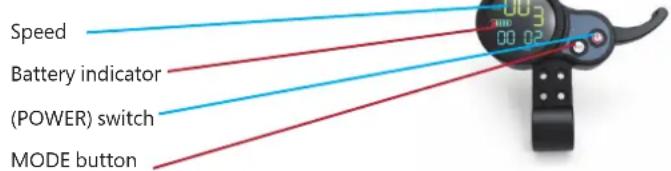
Throttle Thanks to the shifter, the user can control the speed depending on the current situation.

Handle - grab the handles to steer the device. Do not take your hands off the steering wheel while driving.
e. Battery charge level.
The number of bars indicates the battery charge status. Note: Charge the battery when only one bar appears on the display, as over discharging may damage the battery.
4.2 Battery properties and charging
Charging
-
Connect the charger to an AC mains.
-
Connect the Electric Scooter to the charger.
-
Full charging takes approximately 10-12 hours
-
The ideal charging temperature is 5-40 °C. If the cells' temperature is out of range, the battery management system will stop the charging process.
Battery properties
- Balanced charging protection: The construction of the battery is designed to automatically balance the voltage of the internal cells and thus protect the battery.
- Overcharge Protection: Overcharging can seriously damage the battery. After the battery is fully charged, the charging process will be automatically interrupted by the control board.
- Charging temperature: The battery may be damaged or malfunctioning if it is charged in an ambient temperature below 5 degrees Celsius or above 40 degrees Celsius.
- The ideal charging temperature is 5-40 °C. If the cells' temperature is out of range, the battery management system will stop the charging process.
Battery properties
- Balanced charging protection: The construction of the battery is designed to automatically balance the voltage of the internal cells and thus protect the
ENG
battery.
- Overcharge Protection: Overcharging can seriously damage the battery. After the battery is fully charged, the charging process will be automatically interrupted by the control board.
- Charging temperature: The battery may be damaged or malfunctioning if it is charged in an ambient temperature below 5 degrees Celsius or above 40 degrees Celsius.
- Overcurrent protection: an overcurrent during the charging process can seriously damage the battery. When the charging current is greater than 8V, the battery will stop charging.
- Over-discharge protection: Over-discharge can seriously damage the battery. When the voltage drops to 110V, the battery will shut down.
- Short circuit protection: in the event of a short circuit, the battery will switch to output to prevent damage.
- Auto Sleep: When powered on, the battery will go into sleep mode to save power if no load is applied within 20 minutes.
Battery Level
The driving range will decrease during winter because the battery performance is fast it decreases under low temperature conditions. For example, in temperature -5°C battery performance is half the performance in room temperature. To ensure battery life during the winter, it should be charged and uncharged at least once a month.
4.3 Weight and age of the driver.
For safety, all drivers must weigh over 50 kg. If the driver's weight is less than 50 kg, the vehicle may not work properly. The vehicle should not be driven by a person under the age of 14.
5. Driving Guide
5.1 Preparation
a. Vehicle preparation
Disc brake adjustment

If the brake is too tight, use an M5 Allen key to loosen the disc brake holder bolt counterclockwise and shorten the brake cable, and then tighten the bolt firmly; if the brake is too loose, just loosen the bolt and lengthen the brake cable, then tighten the bolt tightly.
Steering wheel adjustment

If the handlebar shakes while driving, tighten the clamp nuts and secure it.
Tires
Tubular tires are installed in the scooter. Always check the tire condition and air pressure before riding. The correct air pressure in the tires ranges from 2.5
to 4.5 Bar depending on the weight of the user.
| Rider Weight Front Wheel Rear Wheel | ||
| 50-70 kg | 30-40 psi2,07-2,76 bar | 40-50 psi2,76-3,45 bar |
| 70-90 kg | 40-45 psi2,76-3,10 bar | 45-55 psi3.10-3.79 bar |
| 90-100 kg | 45-50 psi3.10-3.45 bar | 50-60 psi3,45-4,14 bar |
| above 100 kg | 50-55 psi3,45-4,14 bar | 60-65 psi4,14-4.48 bar |
Transfer

Carry the scooter with one or two hands at the steering wheel as shown in the
picture.
b. Driving lessons and general rules of using the device
While studying, you may fall and get injured. Please wear a helmet and protective gear as pictured throughout your study.
Remember about:

-
Necessary protective equipment, such as helmet, gloves, elbow pads and hip belt;
-
Driving on uneven and wet surfaces, such as unpaved roads, rocky roads, roads with ice and ponds, is prohibited;
-
Driving on the road with a slope of more than 20° is forbidden;
-
It is forbidden to use by persons under 14 years of age;
-
It is forbidden to use by people under the influence of drugs, alcohol or people with limited ability to act and react;
-
Driving on cold winter days is not recommended;
-
Driving on rainy days is prohibited;
-
For charging, first connect the cable to the electric scooter charging socket before connecting to the mains;
It takes a lot of practice to learn safe driving skills. Driving the vehicle unskil-
ENG
led or not following these instructions while using the product could result in injury or property damage to the driver or others. The manufacturer is not responsible for any personal injury or property damage caused by the use of this product.
5.2 Driving start
Make sure the folding mechanism is fully secured.
Step 1. Start the vehicle by pressing the power button. After
5.3 Land and destination
- Always behave to prevent loss of grip
caution when driving and learn to recognize and avoid slippery, wet ones and loose surfaces, slopes and potholes and other obstacles. - Stop and get off the vehicle to cross the road surface on foot or terrain.
- Wheels must be able to hug the ground to ensure keeping the driver upright. Skidding occurs when the wheels lose grip with the potential to lose control of the vehicle and consequently fall. Sudden maneuvers and driving on slippery, loose or bumpy roads surfaces may cause a loss of grip.
- Remember that the maximum distance traveled on one full battery charge decreases with increasing user weight and inclination terrain. It also depends on road conditions and weather conditions.
6. MAINTENANCE AND WARRANTY
6.1 Storage
The vehicle must be stored in a dry place. When the vehicle is unused please charge and discharge the battery every month to keep the service life battery.
6.2 Cleaning
To clean the device, use a damp cloth. If you want to scrape dirt, use a soft brush and then a damp cloth. Use the kickstand when cleaning and make
sure you cover the charging port,
to avoid problems with electronic components.
Do not use alcohol, gasoline, kerosene or any other volatile or corrosive substances chemical ingredients. This can damage both the appearance and the interior structure of the scooter. Also, do not use a pressurized or running gun water.
6.3 Warranty
The warranty will become invalid in the following situations:
- Fault due to misuse.
- Defect caused by unauthorized modifications, disassembly or repairs.
- Accidental damage or failure due to inappropriate storage.
- Warranty / proof of purchase not corresponding to the product.
- Damage to the surface.
- Dismantled parts not as described in this manual handling.
-
Damage or malfunction from long rides in the rain or from getting wet water or a dusty surface.
-
DEVICE SPECIFICATION
| Motor type Brushless | |
| Motor power [W] 2x1600 | |
| Battery capacity [ah] 32 (LG) | 72V |
| Wheel size [inches] 11 | |
| Tires Tube | |
| Type of brake 2x hydraulic disc (HYD) | |
| Frame material Forged aluminium | |
| Maximum speed [km/h] 100 | |
| Maximum range [km] 100 | |
| Waterproof IP44 | |
| Maximum lifting capacity [kg] | 150 |
| Tension AC 110V-240V | |
| Charging time [h] 10 - 12 | |
| Weight [kg] 60 | |
| Display LCD | |
| Display functions ODO, TRIP, Battery, Voltage, gears | |
| Suspension type | Spring |
| Device dimensions [cm] | 142*27*63cm (fold) |
Cesky jazyk
CI piny ui.ivatelsky manual je k dispozici na www.motusxd.pl
Deutsche Sprache
(Waste electrical and electronic equipment)

(Apples to the European Union and other European countries with separate collection systems and electronic products)

This marking on the product, accessories of literature indicates that at the end of use this product should not be disposed of with household waste.
To prevent possible harm to the environment or human health from uncontrolled waste disposal, please separate these items from other types of waste and recycle them responsibly and reuse of materials.
For more information on ehere and how environmentally safe recycling of these household users should contact either the retailer where they purchased this product, or their local government.
Business users should contact their supplier and check the terms and conditions of the purchase contract. This product and its electronic accessories should not be mixed with other commercial waste for disposal.
(Applicable in the European Union and other European countries with separate battery return systems)
This mark on the battery, the packaging or in the instructions means that after usage of batteries, the product may not be disposed of with other household waste.

here marked, the chemical symbols - Hg (d or < b). Indicate that the battery contains mercury, cadmium or lead above the levels in directive E 2006/66. If batteries are not properly disposed of these substance can cause harm to human health or the environment.

To protect the environment and to promote material reuse, please separate batteries from other types of waste and recycle them through your local return system.
Rise of Death or Serious Injury
WARNING - To reduce the risk of injury, user must read instruction manual. Whenever you ride this vehicle, you risk injury due to loss of control, collision and falling. In order to ride safely, you must read and follow all instructions and warnings in the user manual.
WŁAŚCIWA UTYLIZACJA

- ROZPOCZĘCIE
- PAMIĘTAJ O
- KONSERWACJA I GWARANCJA
- 6.1 PRZECHOWYWANIE
- SECURITY
- ENG
- ASSEMBLY
- GETTING STARTED
- DRIVING GUIDE
- 5.2 DRIVING START
- 5.3 LAND AND DESTINATION
- MAINTENANCE AND WARRANTY
- 6.1 STORAGE
- 6.2 CLEANING
- 6.3 WARRANTY
- (WASTE ELECTRICAL AND ELECTRONIC EQUIPMENT)
- RISE OF DEATH OR SERIOUS INJURY
- WŁAŚCIWA UTYLIZACJA
Brand : Motus
Model : Pro 11
Category : Electric scooter