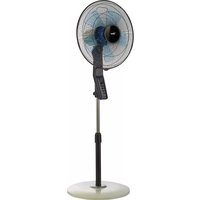
VP455T - Fan Bimar - Free user manual and instructions
Find the device manual for free VP455T Bimar in PDF.


| Product type | Stand fan |
| Brand | Bimar |
| Model | VP455T |
| Adjustable height | Yes, by telescopic column |
| Vertical tilt | Yes, adjustable up-down |
| Oscillation | Yes, left-right |
| Number of speeds | 3 (low, medium, high) |
| Ventilation modes | Normal, Silent, Natural (intermittent) |
| Timer | From 0.5 h to 7.5 h in 0.5 h increments |
| Remote control | Yes, with CR2032 battery, range 4 m |
| Control panel | Integrated on the stand, with Power, Speed, Mode, Timer, Swing buttons |
| Base type | Round base with counterweight |
| Protection grilles | Removable front and rear grilles |
| Blade | Removable, 3 blades |
| Power supply | Mains 220-240 V, 50 Hz |
| Power consumption | Approx. 45 W (estimated) |
| Standby consumption | ~0.5 W |
| Dimensions (max height) | Approx. 130 cm |
| Base diameter | Approx. 35 cm |
| Net weight | Approx. 4.5 kg |
| Maximum noise level | Approx. 55 dB(A) (estimated) |
| Intended use | Indoor, domestic, ambient temperature < 40°C |
| Materials | ABS plastic, metal for column and motor |
| Maintenance | Clean with a slightly damp soft cloth, no abrasives |
| Electrical class | Class II (double insulation) |
| Included accessories | Remote control, CR2032 battery, aroma diffuser (optional) |
Frequently Asked Questions - VP455T Bimar
User questions about VP455T Bimar
0 question about this device. Answer the ones you know or ask your own.
Ask a new question about this device
Download the instructions for your Fan in PDF format for free! Find your manual VP455T - Bimar and take your electronic device back in hand. On this page are published all the documents necessary for the use of your device. VP455T by Bimar.
USER MANUAL VP455T Bimar
natural_image
Four different types of laboratory or mechanical devices with no visible text or symbols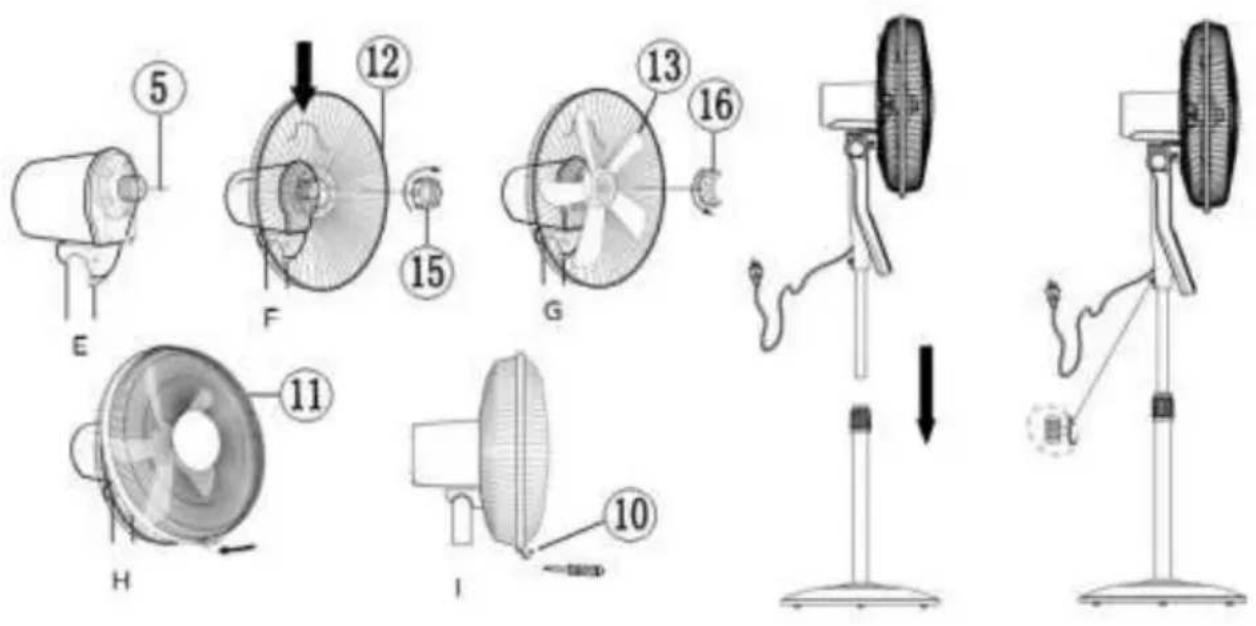
natural_image
Two labeled diagrams (A and B) showing a mechanical or electronic component with a tool inserted, no visible text or symbols.line
| Time (sec.) | Velocity | |-------------|----------| | 0 | H | | 5 | M | | 10 | L | | 15 | H | | 20 | M | | 25 | L | | 30 | H |line
| Time (sec.) | Velocity | | ----------- | -------- | | 1 | 0 | | 2 | 0 | | 3 | 0 | | 4 | 0 | | 5 | 0 | | 6 | 0 | | 7 | 0 | | 8 | 0 | | 9 | 0 | | 10 | 0 | | 11 | 0 | | 12 | 0 | | 13 | 0 | | 14 | 0 | | 15 | 0 | | 16 | 0 | | 17 | 0 | | 18 | 0 | | 19 | 0 | | 20 | 0 | | 21 | 0 | | 22 | 0 | | 23 | 0 | | 24 | 0 | | 25 | 0 | | 26 | 0 | | 27 | 0 | | 28 | 0 | | 29 | 0 | | 30 | 0 | | 31 | 0 | | 32 | 0 | | 33 | 0 |Scan the qr code to see the quick "functioning" guide
Please read these instructions carefully before using the appliance, and instruct other persons using it, too, if necessary. Keep the manual handy for future use.
If when reading these instructions manual certain parts should be difficult to understand, or if there is any confusion, contact the company indicated on the last page before using the product.

This symbol indicates that the appliance is a class II appliance. This means the plug on the power cord is not earthed
GENERAL NOTICES
- This device is intended for home use only, to ventilate do not use it for any other purpose. Any other use is to considered inappropriate and therefore dangerous. manufacturer cannot be held responsible for any damage caused by inappropriate, improper or irresponsible use for repairs made to the product by unauthorised person. - Examples of devices for domestic use are appliances used in the home, which can be used for typical homes even by non-experts:
- in shops, offices and other such places of work;
- in agricultural businesses or similar;
- by clients in hotels, motels and other residential ty environments
- bed and breakfast type environments
- Do not insert any tool, or your fingers, into the grille pin the blades.
- Do not use the device at room temperatures above 40
- This appliance can be used by children aged 8 years and persons with reduced physical, sensory or mercapabilities or lack of experience and knowledge if the supervised or if they have been given instructions conc the use of the appliance in a safe way and if they under the hazards involved. Children must not play with appliance. Cleaning and user maintenance must not be performed by children without supervision.
- This appliance can be used by children aged 8 and older persons with reduced physical, sensory or mental capacity lack of experience and knowledge if they are proposed to supervised or if they have received instructions regarding safe use of the appliance and have understood the related dangers. Children should not play with the appliance. And maintenance should not be performed by children and older than 8 years of age and are supervised.
- The appliance must be kept out of children’s reach.
- Warning: when using electrical appliances, the basic safety precautions must always be observed to avoid risks of electric shocks and physical injury.
- Do not use the appliance if it is not operating correctly damaged; if in doubt, contact professionally qualified personnel.
- Make sure that the fan is working correctly: if not, turn appliance off and have it checked by professionally qu personnel.
- Do not move the appliance when it is running.
- If the appliance is not in use, unplug it from the plug p
- Always unplug the appliance before you assemble, disassemble or clean the appliance.
- Do not leave the appliance exposed to the weather (su etc.).
- Do not touch the appliance with wet hands or feet.
- Do not pull on the cord to move the appliance.
- Do not pull on the cord or the appliance itself to disco plug from the plug point.
- If the power cord is damaged, it must be replaced by t manufacturer, its service agent or similarly qualified pe order to avoid risks.
- This appliance must not be operated by means of an e-timer or a separate remote control system, to avoid the fire if the device is covered and / or is positioned incoming must also not be used together with another device that automatically turn on the unit, thus avoiding the risk of to people, animals or property.
- If the appliance breaks or there is a malfunction, switch appliance and have it checked by qualified personnel; I carried out by unauthorised personnel may be dangerous nullify the guarantee.
- Ensure that the fan is switched off from the supply ma before removing the guard.
INSTALLATION
- After removing the packing materials, check the integrity of the appliance; if you are unsure, do not use it and ask for qualified professional help. The packing materials (plastic bags, polystyrene foam, nails, etc.) must be kept out the reach of children because they are potential sources of danger. Attention: any stickers or advertising material applied to the grid removed before using the appliance. The manufacturer declines all responsibility in case this is not safe working practices will be respected.
- Before connecting the appliance, check that the voltage values shown on the data plate correspond to those of the electricity supply network. In the event of incompatibility between the electric outlet and the plug of the appliance, have the outlet replaced with another more suitable type by professionally qualified personnel, who will make sure that the section of the wires of the outlet is appropriate for the absorbed power of the heater. In general, the use of adapters or extension cords is not recommended; if their use is indispensable, they must conform to existing safety standards and their current capacity (amperes) must not be less that the maximum of the appliance.
- The power socket must be easy to reach so the plug can be removed quickly in case of emergency.
- To not place the appliance near sinks or other container of liquids (minimum distance of 2 meters) to avoid the risk of it falling in.
- Do not place the appliance near an open flame, cooking or other heating appliance.
- Keep the fan far away from fabrics (curtains, etc.) or unstable materials that could obstruct the air intake grille; make sure that the front is free of unstable materials (dust, etc.).
- Make sure that the electric cord is not touching rough, hot or moving surfaces and not twisted or wrapped around the appliance.
- Stand the appliance on a horizontal, flat surface or table; do not stand on a inclined plane (the appliance could upset).
ASSEMBLY
Before assembling the fan, make sure it is unplugged from the socket.
The appliance can only be used once correctly assembled in all its parts, complete with counterweight base, protective grills, propeller.
Proceed as shown and use the images for reference.
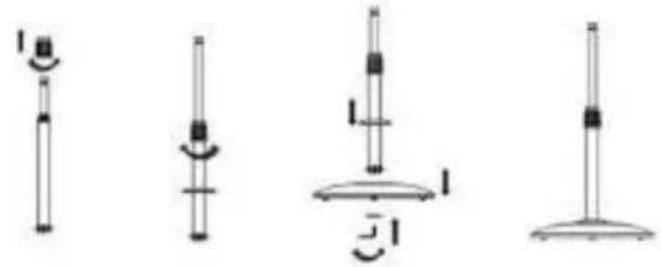
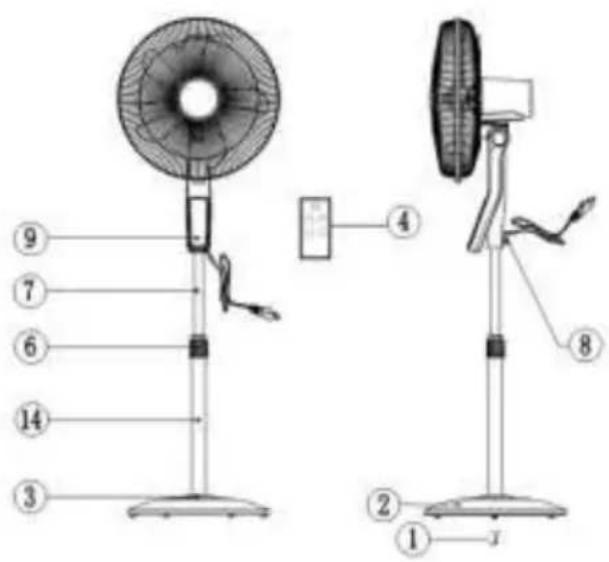
A. Unscrew and remove the ring nut (6) from the column, insert the ring (3), and tighten the ring nut again.
B. Set the column (14) in place on the base and secure it using the "L" screw with washer (1) while also engaging the counterweight.
C. Make sure column and base and counterweight are firmly coupled.
D. Unscrew the ring nut (15) and the ring nut (16) (turn clockwise) from the motor body.
E. Insert the rear grill (12) into the motor body, make sure the handle is at the top and lock it using the ring nut (15).
F. Insert the propeller (13) onto the drive shaft (5) and lock it with the ring nut (16) (turn counter clockwise and tighten).
G. To fasten the front grill, it is best to place the main unit on a smooth even floor. Couple the front grill (11) to the rear (12) and hold in place with plastic ring, (a fixing screw is good at the bottom) and secure fastening by tightening screw (10).
H. At the end of the operation, check that the protective grills are firmly coupled and attached to the motor.
natural_image
Four different types of mechanical or electrical components with no visible text or symbols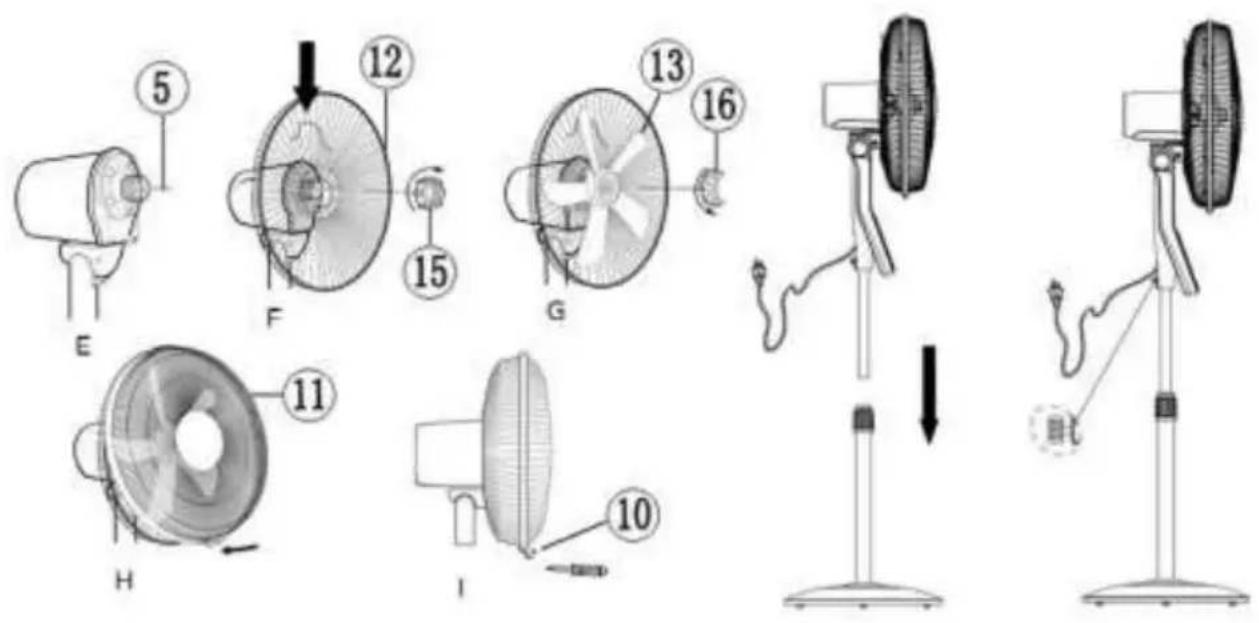
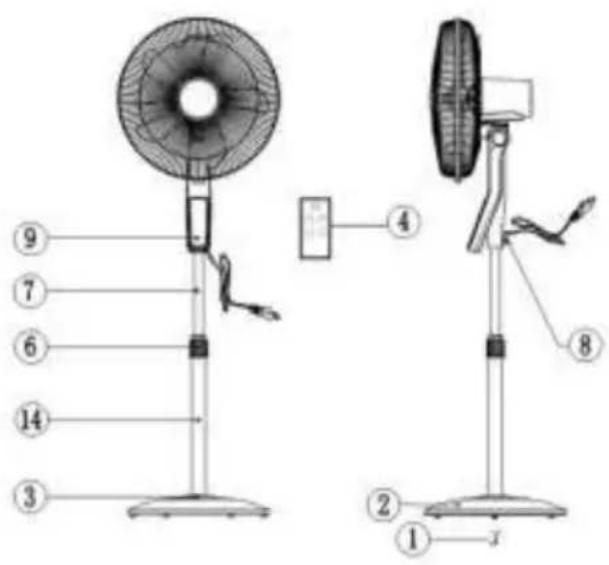
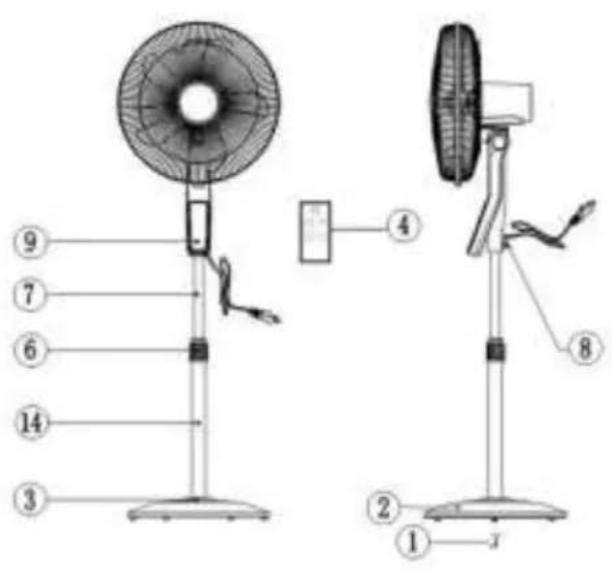
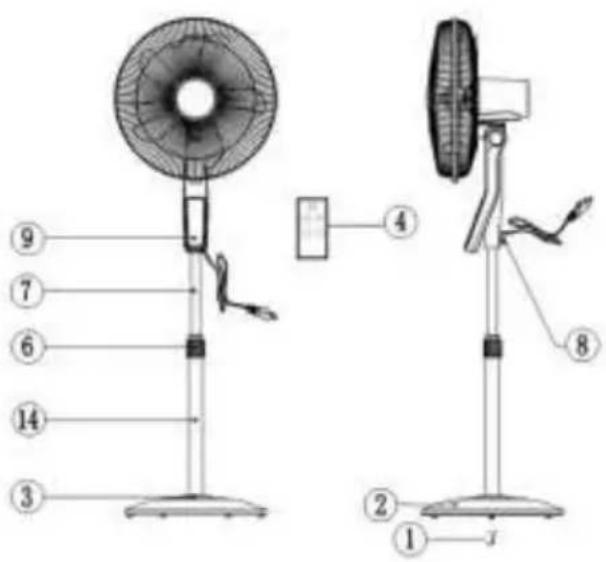
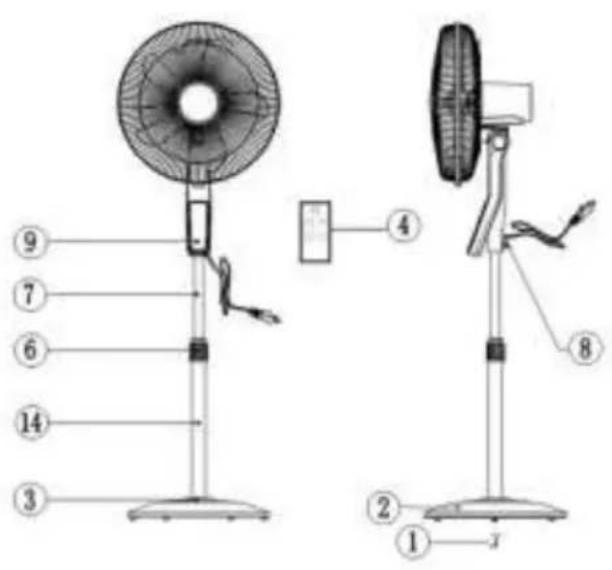
1) "L" screw
2) Base with counterweight
3) Ring
4) Remote controller
5) Drive shaft
6) Rod fixing ring nut
7) Adjustable hose
8) Floor fixing screw
9) Control panel
10) Plastic ring screw
11) Front grill / protective screen
12) Rear grill
13) Propeller
14) Column
15) Rear grill fixing ring nut
16) Fan fixing ring nut
Control panel
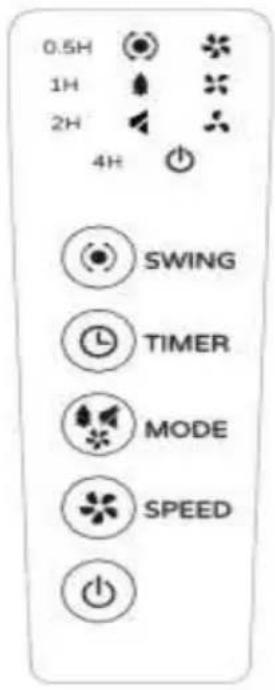
Remote controller
USE
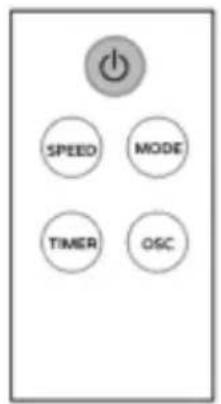
Warning: The fan can only be used if properly assembled in good condition. The fan functions are operated with both the keypad of the control panel and the remote control which must be pointed at the front (maximum distance of about 4m) towards the control panel.
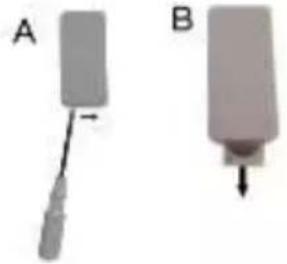
To replace the "CR2032" battery, move the tab to the centre (using a small screwdriver) and simultaneously remove the battery holder. Replace the battery (while checking correct polarity), and close the battery holder. Remove the battery for long periods of inactivity of the remote control.
natural_image
Two labeled diagrams (A and B) showing a mechanical component with a downward arrow, no text or symbols present.The fan has the following setting and control elements:
- Stand-by-ON button "": To turn the fan on or turn it off in standby mode
- Ventilation: the three speeds are selected by pressing the “I SPEED” button: the symbol corresponding to the selected speed will light up: (= min; = med; = max).
- Mode: the three modes are selected by pressing the “MODE” button:
-
Normal: constant ventilation
-
Silent: constant and silent ventilation (symbol "×")
-
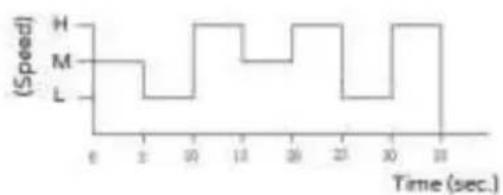
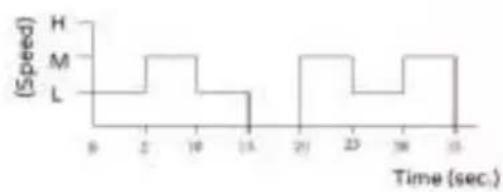
Natural: intermittent ventilation (symbol “”), as shown in the diagrams shown here.
Maximum speed selected
line
| Time (sec.) | Speed | |-------------|-------| | 0 | 0 | | 2 | 0 | | 30 | 10 | | 18 | 10 | | 30 | 10 | | 31 | 10 | | 32 | 10 | | 33 | 10 | | 34 | 10 | | 35 | 10 | | 36 | 10 | | 37 | 10 | | 38 | 10 | | 39 | 10 | | 40 | 10 | | 41 | 10 | | 42 | 10 | | 43 | 10 | | 44 | 10 | | 45 | 10 | | 46 | 10 | | 47 | 10 | | 48 | 10 | | 49 | 10 | | 50 | 10 | | 51 | 10 | | 52 | 10 | | 53 | 10 | | 54 | 10 | | 55 | 10 | | 56 | 10 | | 57 | 10 | | 58 | 10 | | 59 | 10 | | 60 | 10 | | 61 | 10 | | 62 | 10 | | 63 | 10 | | 64 | 10 | | 65 | 10 | | 66 | 10 | | 67 | 10 | | 68 | 10 | | 69 | 10 | | 70 | 10 | | 71 | 10 | | 72 | 10 | | 73 | 10 | | 74 | 10 | | 75 | 10 | | 76 | 10 | | 77 | 10 | | 78 | 10 | | 79 | 10 | | 80 | 10 | | 81 | 10 | | 82 | 10 | | 83 | 10 | | 84 | 10 | | 85 | 10 | | 86 | 10 | | 87 | 10 | | 88 | 10 | | 89 | 10 | | 90 | 10 | | 91 | 10 | | 92 | 10 | | 93 | 10 | | 94 | 10 | | 95 | 10 | | 96 | 10 | | 97 | 10 | | 98 | 10 | | 99 | 10 | | 100 | 10 |Medium speed selected
line
| Time (sec.) | Speed | |-------------|-------| | 0 | H | | 2 | M | | 15 | L | | 20 | H | | 23 | M | | 30 | L |Minimum speed selected
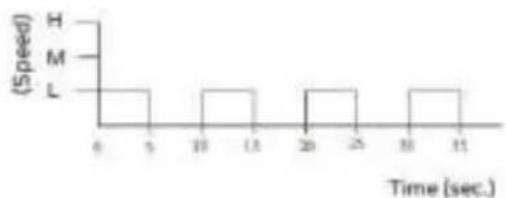
line
| Time (sec.) | Speed | |-------------|-------| | 0 | 0 | | 5 | 0 | | 10 | 0 | | 15 | 0 | | 20 | 0 | | 25 | 0 | | 30 | 0 | | 35 | 0 |Timer: sets the operating time at which the unit shuts down. Press the "TIMER" button repeatedly: each press changes the time in 12 hour intervals (from 12 hour to 712 hours), and the selected duration will be shown on the control panel. To deactivate the timer, press the button until the timer turns off.
- Swing (right-left): press the “SWING” button, turn it on (symbol on) or turn it off (symbol off), “”.
- Vertical tilt (high-low): This is selected by tilting the motor body to the desired direction (high-horizontal-low).
- Height adjustment: unscrew the ring nut (6); raise or lower the main unit to the desired height and then lock the ring nut.
To operate the fan, plug it into a socket: the “” symbol will light up (indicating
the standby status); press the “button to activate the fan and select the desired functions.
To deactivate the unit, press the " ⏻ " button: the symbol " ⏻ " will remain lit. To turn off the appliance, unplug it from the socket.
CLEANING AND MAINTENANCE
Attention: before normal cleaning, remove the plug from the socket.
- Clean the body with soft, slightly damp, cloth; do not use abrasive or corrosive products.
- Do not immerse any part of the fan in water or other liquid: if this should happen, do not put your hand in the liquid, but first remove the plug from the socket.
Carefully dry the appliance and make sure that all the electrical parts are dry: in the case of doubt, ask for professionally qualified help.
- It is essential that the motor's air holes be kept from dust and lint.
- Periodically check the electric cord for damage; its replacement requires a special tool: contact an authorized service center, also for any repairs.
- If the fan will not be used for long periods, it must be protected from dust and humidity; we recommend storing it in its original packaging.
- Should you decide not to use the appliance any more, we recommend making it inoperative by cutting the power cord (after making sure you have disconnected the plug from the socket) and make dangerous parts harmless if children are allowed to play with them (such as the blade).
- The batteries of the remote control must be disposed of in the appropriate containers; dispose of them in compliance with current law.
IMPORTANT INFORMATION FOR CORRECT DISPOSAL OF THE PRODUCT IN ACCORDANCE WITH EC DIRECTIVE 2011/65/EC.
At the end of its working life, the product must not be disposed of as urban waste. It must be taken to a special local authority differentiated waste collection centre or to a dealer providing this service. Disposing of a household appliance separately avoids possible negative consequences for the environment and health deriving from inappropriate disposal and enables the constituent materials to be recovered to obtain significant savings in energy and resources.
As a reminder of the need to dispose of household appliances separately, the product is marked with a crossed-out wheeled dustbin.

natural_image
Five different types of mechanical or electrical components with no visible text or symbols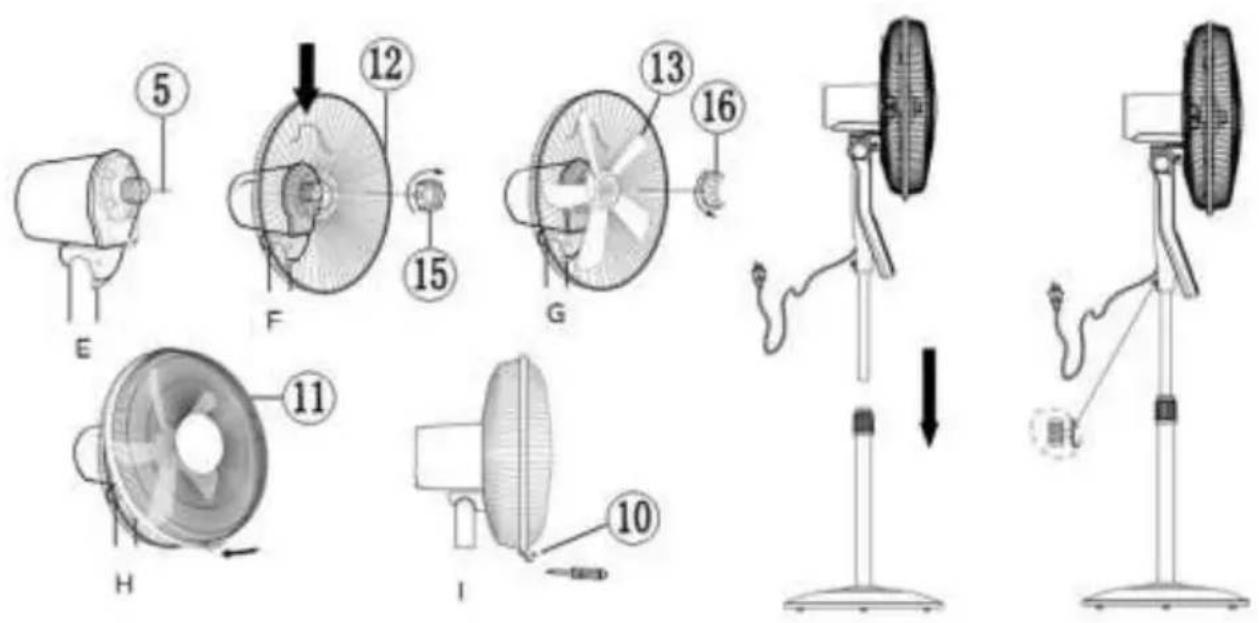
natural_image
Five different mechanical or electrical component diagrams with no visible text or symbols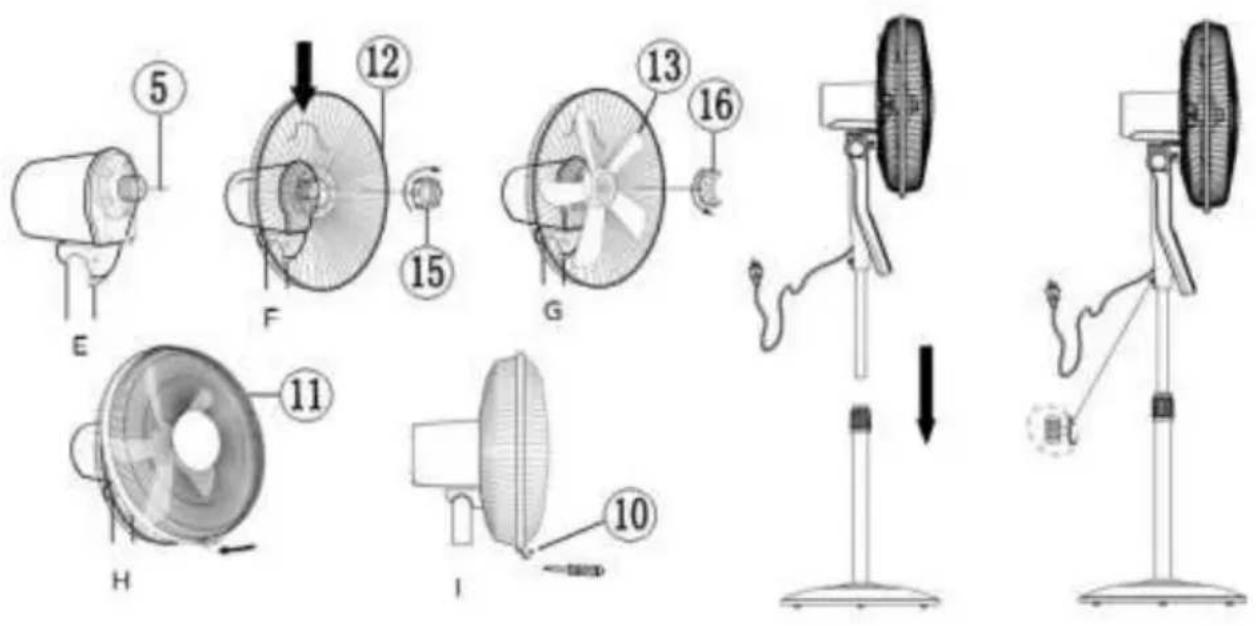
line
| Time (sec.) | Speed | |-------------|-------| | 0 | H | | 2 | M | | 3 | L | | 10 | H | | 11 | M | | 20 | L | | 25 | H | | 30 | M | | 10 | L |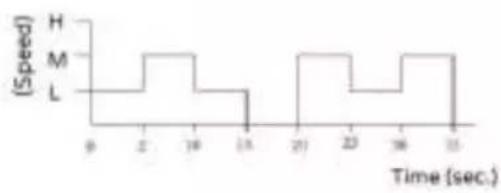
line
| Time (sec.) | Speed | |-------------|-------| | 0 | H | | 2 | M | | 16 | L | | 33 | | | 33 | |natural_image
Five different types of laboratory glassware or test tube designs, shown in vertical and horizontal configurations with no visible text or symbols.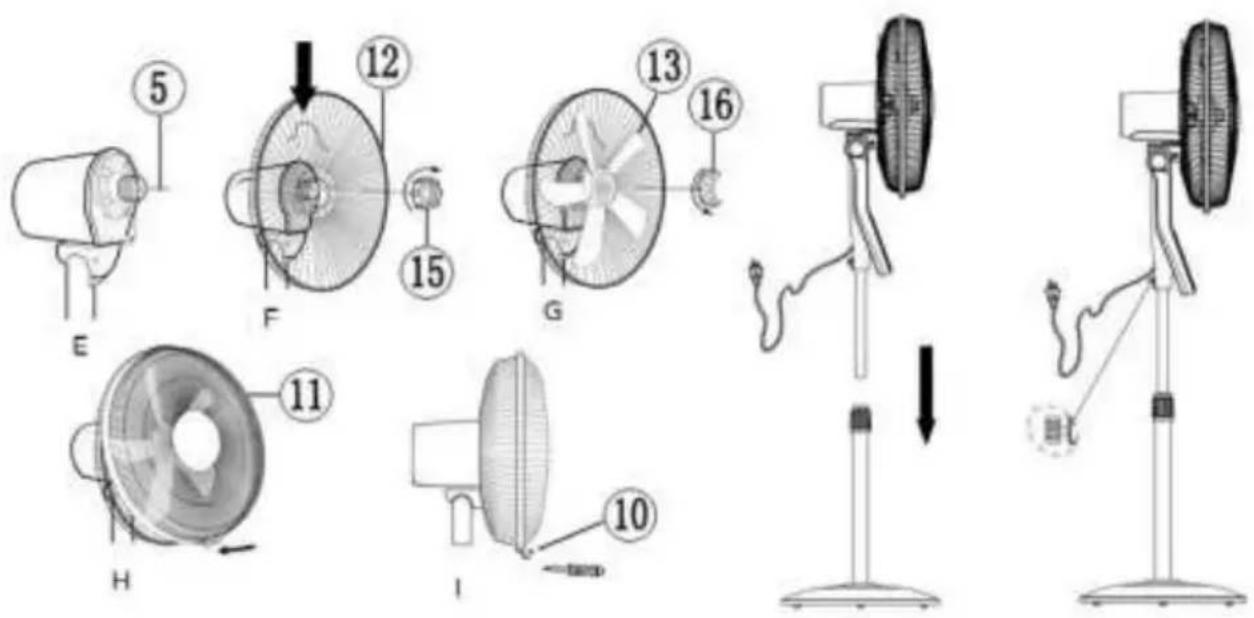
line
| Time (sec.) | Speed | | ----------- | ----- | | 0 | H | | 10 | M | | 20 | L |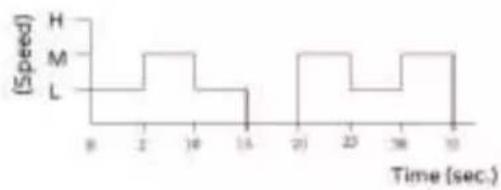
line
| Time (sec.) | Speed | |-------------|-------| | 0 | H | | 2 | M | | 16 | L | | 14 | L | | 20 | H | | 23 | M | | 18 | L | | 10 | H |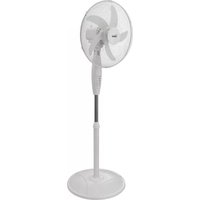
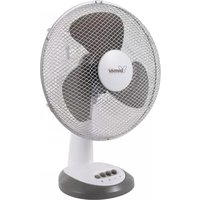

Brand : Bimar
Model : VP455T
Category : Fan