VPC100 - Fan Bimar - Free user manual and instructions
Find the device manual for free VPC100 Bimar in PDF.


Pick your language and provide your email: we'll send you a specifically translated version.
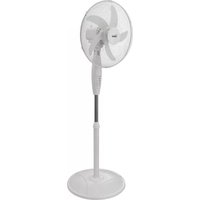
| Product type | Tower fan |
| Brand | Bimar |
| Model | VPC100 |
| Height | 100 cm |
| Dimensions (H x W x D) | 100 x 30 x 30 cm |
| Weight | 3.5 kg |
| Power supply | 220-240 V, 50 Hz |
| Power consumption | 50 W |
| Number of speeds | 3 speed settings |
| Control type | Electronic control panel |
| Remote control | Yes, included |
| Oscillation | Automatic horizontal oscillation |
| Timer | Up to 7 hours |
| Airflow | High airflow for room ventilation |
| Noise level | Low noise operation |
| Safety features | Protective grille, stable base |
| Cleaning and maintenance | Wipe with a damp cloth; removable grille for easy cleaning |
| Spare parts | Available from Bimar service centers |
| Repair | Accessible motor and components for hassle-free repairs |
| General | Suitable for home and office use |
Frequently Asked Questions - VPC100 Bimar
How do I clean my Bimar VPC100 fan?
To clean the fan, first unplug it. Use a soft, damp cloth to wipe the external surfaces and the grille. For deeper cleaning, remove the front grille and wash it with mild soap and water. Make sure all parts are completely dry before reassembling.
Can I use the VPC100 fan outdoors?
No, this fan is designed for indoor use only. Exposure to rain, moisture, or extreme temperatures can damage the motor and create a safety hazard. Keep it in a dry, well-ventilated room.
How does the remote control work?
The remote control operates the fan via infrared signals. Point it directly at the fan's control panel receiver from a distance of up to 5 meters. Insert two AAA batteries (not included) to power the remote. If the fan does not respond, replace the batteries or check for obstacle obstruction.
How do I set the timer?
Press the Timer button on the control panel or remote to cycle through the available timer increments, typically 1 to 7 hours. The fan will automatically turn off after the selected time. To cancel the timer, set it to 0 or press the timer button until no indicator is lit.
The fan is making unusual noise, what should I do?
First, turn off and unplug the fan. Check if the blades are blocked by debris or if the grille is loose. Ensure the fan is on a flat, stable surface. If the noise continues, the motor bearings may need lubrication or the fan may require service by a qualified technician.
How do I change the speed settings?
Press the Speed button to cycle through the three speed levels: low, medium, and high. The corresponding indicator light on the control panel will show the active speed. Use the remote control for the same function.
Does the VPC100 fan have an oscillation function?
Yes, this model features automatic horizontal oscillation. Press the Oscillation button on the remote control or control panel to activate or deactivate the sweeping motion, which helps distribute air evenly across the room.
What should I do if the fan does not turn on?
Check that the power cord is securely plugged into a working electrical outlet. Verify the outlet has power by testing another device. Also, press the Power button on the control panel or remote. If the fan still does not work, the internal fuse or motor may be damaged, and you should contact Bimar customer support.
Can I store the fan disassembled?
The VPC100 is designed to be stored as a compact tower. If you need to store it in a small space, you can remove the grille and wash it. Keep the fan in a dry, cool place and avoid placing heavy objects on top of it.
Is the fan safe for children's rooms?
The fan includes a protective grille that prevents finger access, making it safe for children when placed on a stable surface. However, always supervise young children near electrical appliances and keep the remote control out of their reach to avoid accidental settings changes.
User questions about VPC100 Bimar
0 question about this device. Answer the ones you know or ask your own.
Ask a new question about this device
No questions yet. Be the first to ask one.
Download the instructions for your Fan in PDF format for free! Find your manual VPC100 - Bimar and take your electronic device back in hand. On this page are published all the documents necessary for the use of your device. VPC100 by Bimar.
USER MANUAL VPC100 Bimar


Manual assistant
Powered by Anthropic
Waiting for your message
Product information
Brand : Bimar
Model : VPC100
Category : Fan