GHS37 - Projection screen Duronic - Free user manual and instructions
Find the device manual for free GHS37 Duronic in PDF.



| Product Type | Hydroponic Growing System |
| Brand | Duronic |
| Model | GHS37 |
| Number of Plants | 7 |
| Water Tank Capacity | 4 L |
| Input Voltage | 100V-240V / 50-60Hz |
| Output Voltage | 24V |
| Power | 25 W |
| Light Type | Specific Spectrum LED |
| Dimensions (L x W x H) | 350 x 140 x 168-503 mm |
| Weight | 1.35 kg |
| Operating Temperature | -15°C to 55°C |
| Light Cycles | Normal (14h on / 10h off), Short (12h/12h), Long (16h/8h), Continuous 24h |
| Water Level Alarm | Yes, audible beep |
| Box Contents | 1 growing system, 1 adapter, 7 seed kits (baskets and sponges), 2 nutrient bottles (A and B) |
| Usage | Indoor only |
| Warranty | 1 year |
| Maintenance and Cleaning | Unplug before cleaning, use a dry cloth, do not immerse |
| Safety | Do not use outdoors, avoid moisture, use with 220-240V mains |
| Power Supply | European plug with 3A fuse |
Frequently Asked Questions - GHS37 Duronic
User questions about GHS37 Duronic
0 question about this device. Answer the ones you know or ask your own.
Ask a new question about this device
Download the instructions for your Projection screen in PDF format for free! Find your manual GHS37 - Duronic and take your electronic device back in hand. On this page are published all the documents necessary for the use of your device. GHS37 by Duronic.
USER MANUAL GHS37 Duronic
Creative Consumer Electronics
natural_image
Technical line drawing of a device with a top handle and internal grid layout (no text or symbols)GHS37 - Grow Light Hydroponic Box
PLEASE READ ALL THE INSTRUCTIONS BEFORE USE

duronic.com

duronic

@duronicmedia

Duronic

@duronicmedia
DURONIC
Contents
English Manual 5
PLEASE READ THIS MANUAL CAREFULLY AND RETAIN FOR FUTURE REFERENCE
- For indoor household/domestic use only. Do not use outdoors.
- Do not operate this appliance if the power cable or plug is damaged. If either is damaged return it to Duronic for service or repair by professional technician.
- Avoid placing the lamp in direct sunlight.
- Keep the light and electronic components away from moisture.
- If any water is spilled or splashed over any electrical part, thoroughly dry all cables and any parts that have gotten wet.
- When not using this grow box, store in a safe place. Do not place heavy things on top of it.
- Do not use in the presence of corrosive gas – use in a well-ventilated room.
- Please ensure the mains power supply is 220-240V / 50Hz.
- Never try to replace parts and repair the lamp by yourself.
- When adding or emptying water, ensure your hands are dry before attempting to reconnect the power adapter into the mains socket.
- Plant nutrient solution should be stored safely out of the reach of children.
- Do not consume the plant solution. If you accidentally consume some, please seek medical advice.
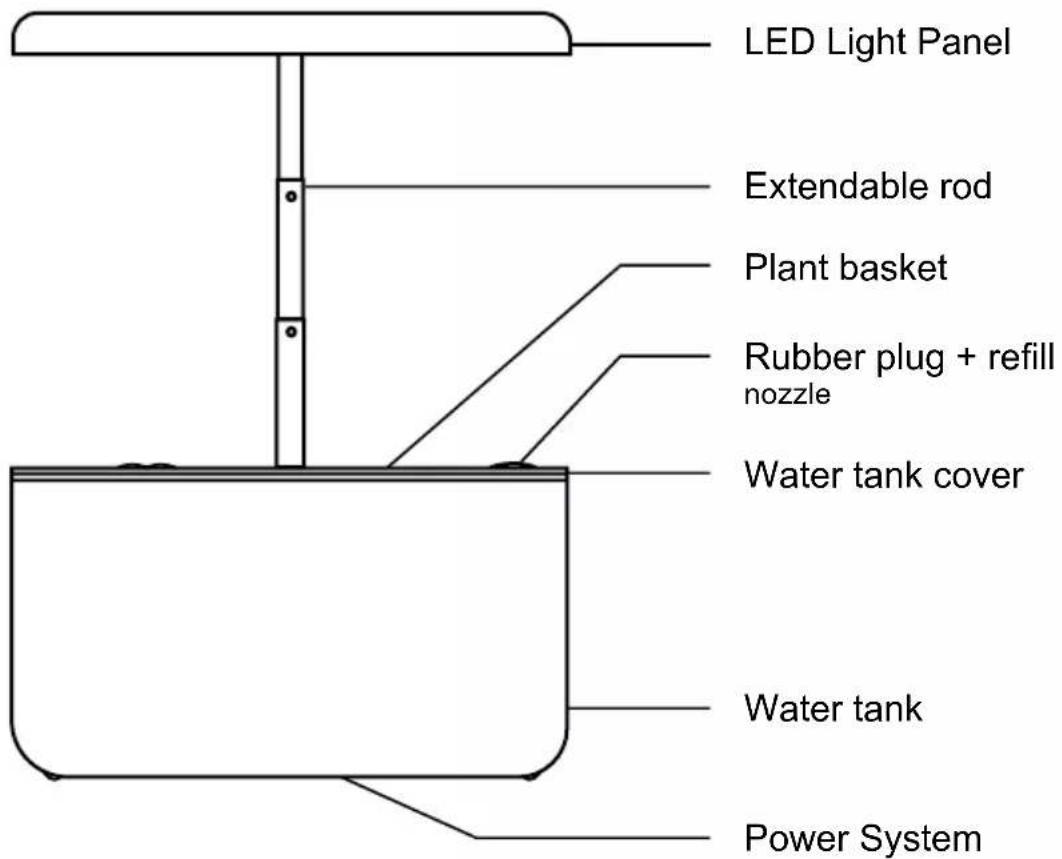
GHS37 Grow Box Components
Specifications
| Model Number GHS37 | |
| Item Type Grow Light Hydroponic Box | |
| Number of Plants 7 | |
| Water Tank Capacity 4L (1 water tank) | |
| Rated Voltage Input: 100V-240V/50-60HZOutput: 24V | |
| Power 25W | |
| LED Light Specific Spectrum | |
| Dimensions 350x140x168-503 mm | 13.78x5.51x6.61-19.8 inch |
| Weight 1.35kg | |
| Working Temperature -15°~ 55° | |
DURONIC
Key Prompts and What They Mean
- When the power adapter is plugged into the grow box and switched on at the mains socket, the system will sound a long "beep" to indicate it is ready to work.
- After the machine runs for several days, the water level in the tank will naturally fall. When the water level is no longer sufficient for the plants to grow, the machine will sound a long "beep" to let you know. If this happens, please refill the tank to the correct amount. Once you have done this the alarm will automatically stop beeping.
- When the system is working normally with the light on, a shorter "beep" will sound when you press any button. If the mode is being changed, the light brightness will correspond accordingly.
-
If a button on the panel is pressed when the machine is turn on and the light is off, the machine will make a short "beep" sound. If it does not make a beep when a button is pressed, it is likely that the system is not switched on properly. If this occurs, try the following:
-
Check if the machine is connected to the mains power supply.
- If the machine is connected to power but in a dormant standby state, press the power button to test it. When the power button is pressed in the dormant state, the light will go off after 3 blinks.
Box Contents
Before using your grow box, please check that you have everything you need:
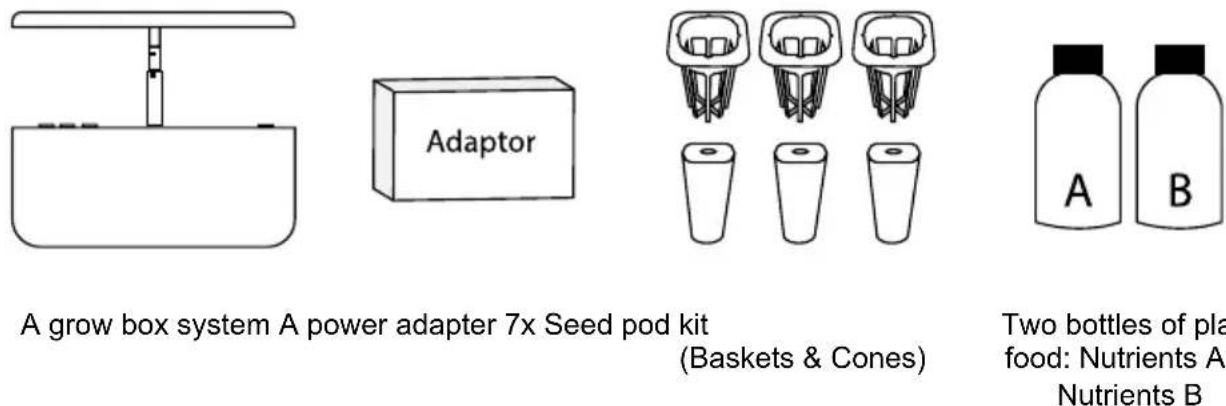
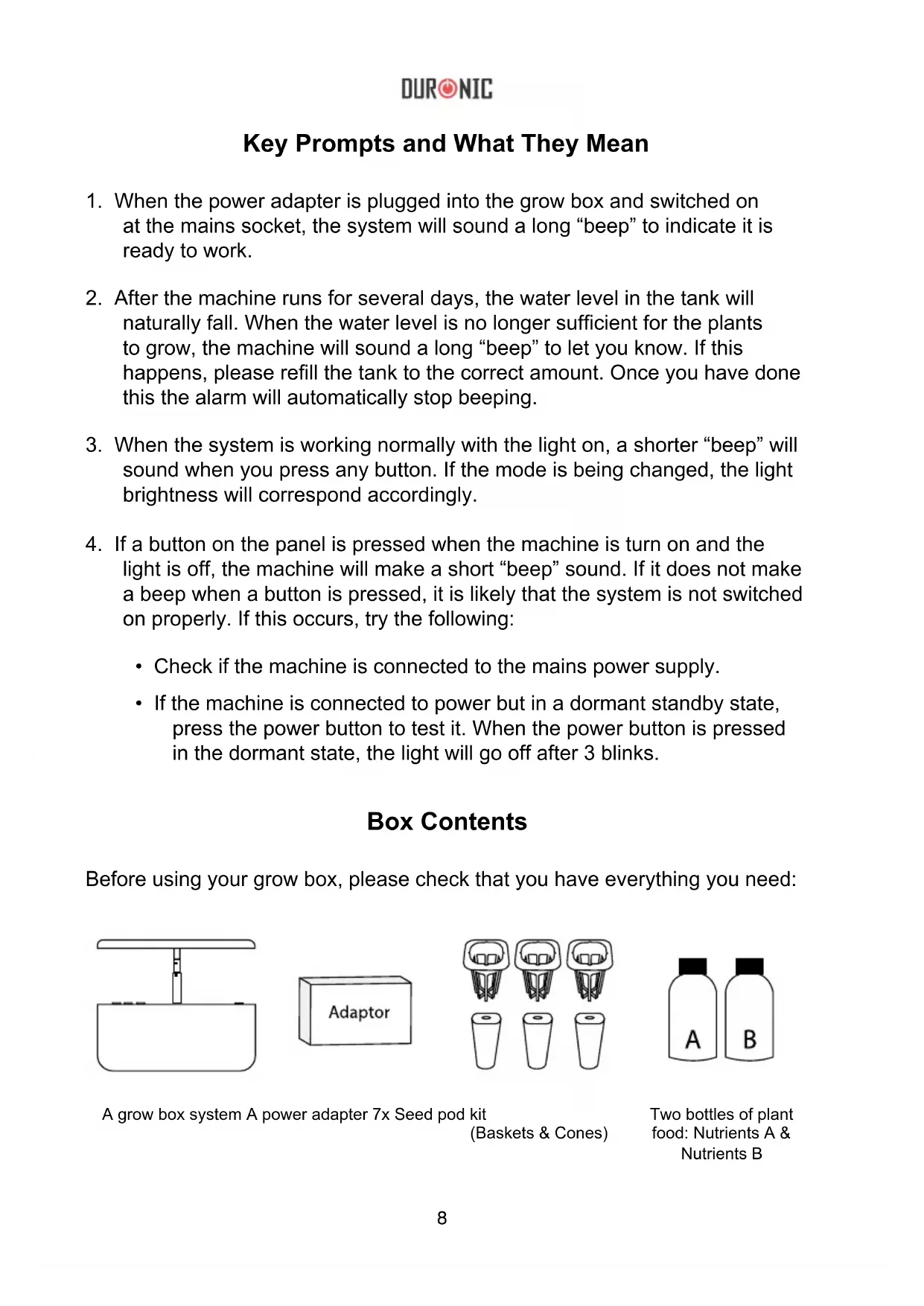
A grow box system A power adapter 7x Seed pod kit
(Baskets & Cones)
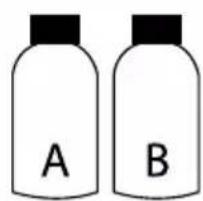
Two bottles of plant food: Nutrients A & Nutrients B
Set Up Instructions
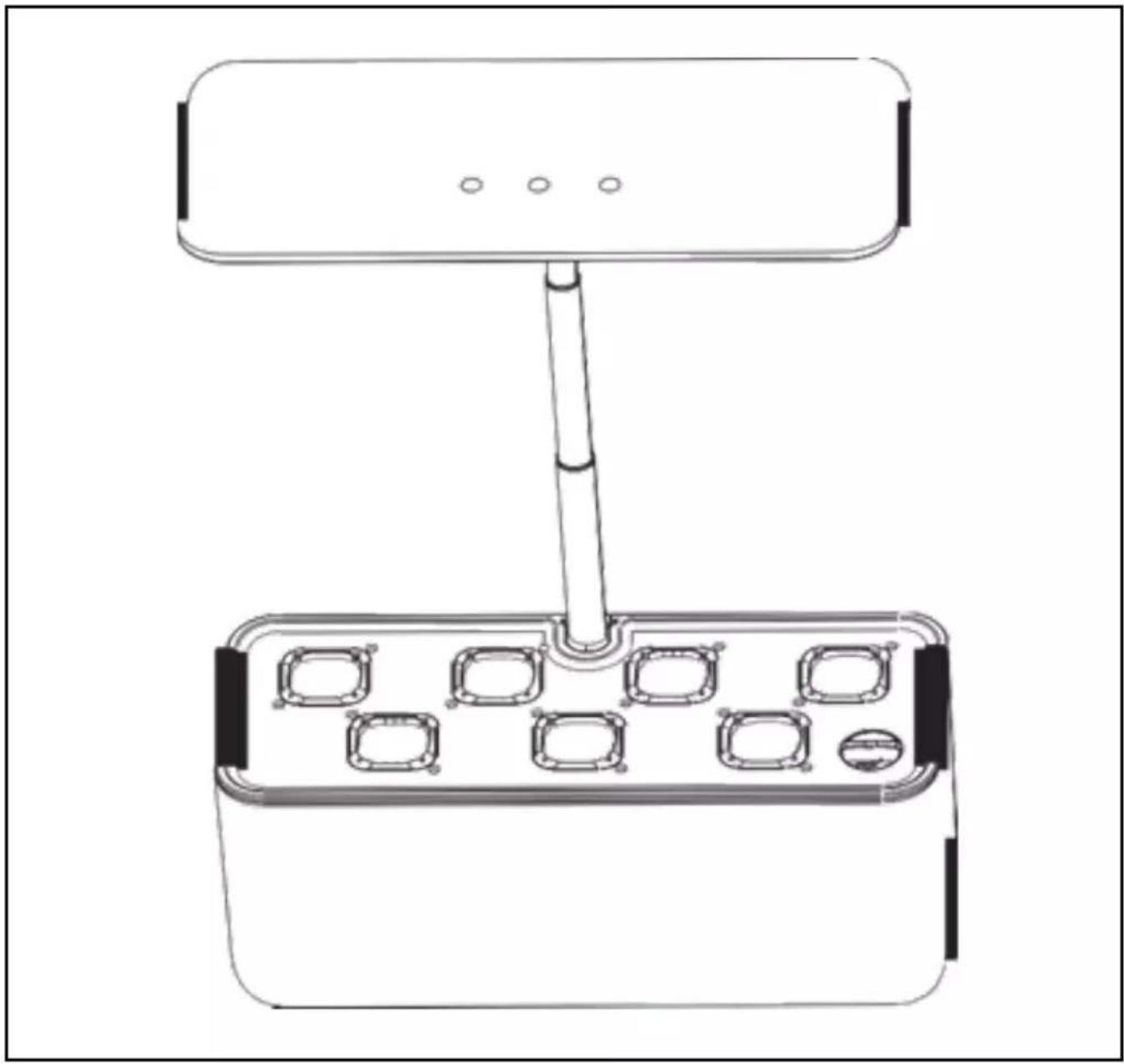
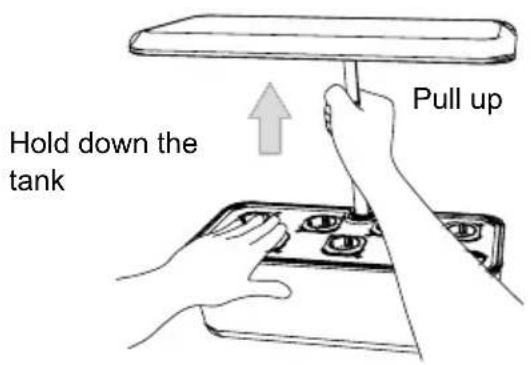
- Using one hand on the extendable rod, and one hand holding the water tank down, gently pull the rod upwards to extend it higher. Do not use the light panel to extend the rod.
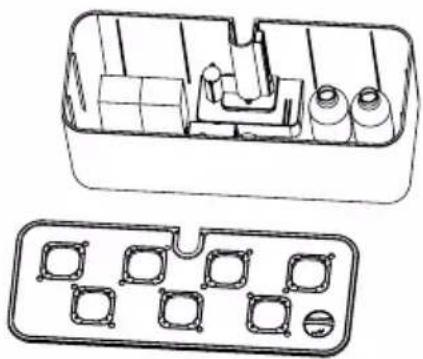
- Remove the water tank cover and take the accessories out of the tank; power adapter, planting package and 2 bottles of nutrients.
natural_image
Technical line drawing of a mechanical component with internal parts and mounting holes (no text or symbols)- To wash your water tank before use, first you will need to remove the tank cover and then gently pull out the light panel.
natural_image
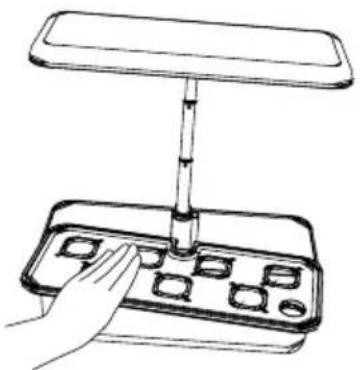
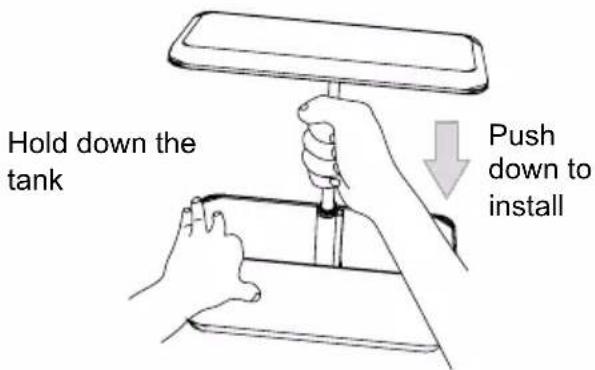
Line drawing of a hand using a tool to press a tray with buttons (no text or symbols)- After washing and drying the tank, you can reinstall the LED light panel using one hand while holding the water tank down with the other hand.
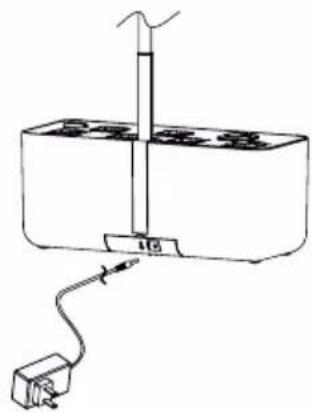
- Assemble the power system at the bottom of the water tank. When it is all assembled and ready for planting, plug the power adapter into the socket.
When the power is properly connected, the system will make a "beep" noise, letting you know it is ready to use.
natural_image
Simple line drawing of a laboratory setup with a vertical tube, base, and connected electrical outlet (no text or symbols)Preparing the Nutrient Solution
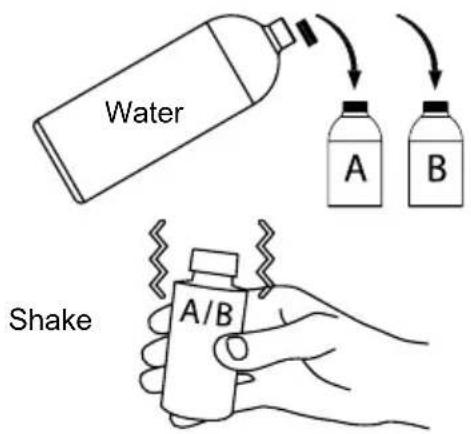
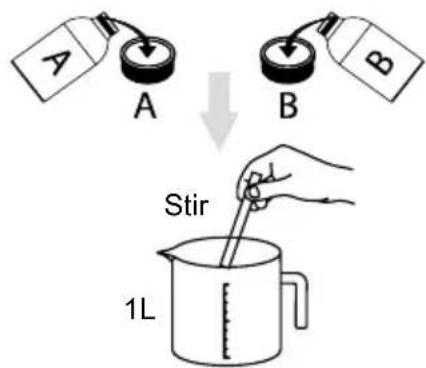
- Fill bottle 'A' with water, put the lid on and shake to fully mix the contents until fully dissolved. Repeat the same with bottle 'B'.
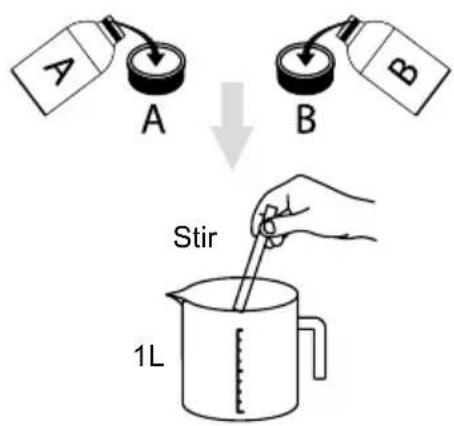
- Using the measuring caps, add 5ml of each solution to 1 litre of water. Stir or shake well to combine it all together.
Planting Instructions
- Prepare the nutrient solution as shown above.
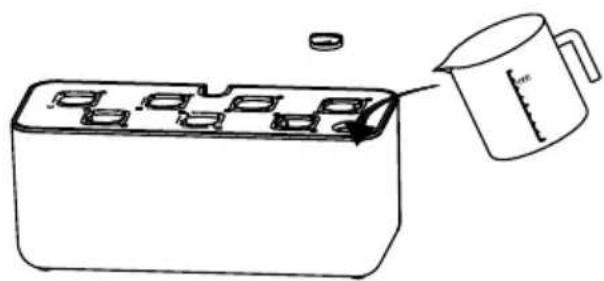
- Remove the grow box lid and pour the mixed solution into the plant pot. Place the plant pot lid back on top.
natural_image
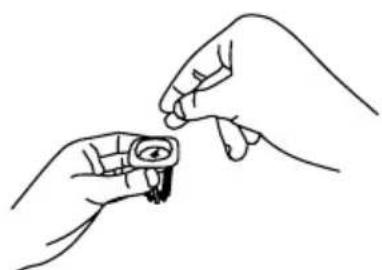
Line drawing of a container with multiple compartments and a measuring cup pouring liquid into it (no text or symbols)- Soak the seeds in warm water for about an hour before planting. Place a sponge into each basket. Sow the seeds properly in each plant basket, then place the baskets into the spaces on the grow box lid.
natural_image
Line drawing of two hands holding a small object with an eye symbol (no text or symbols present)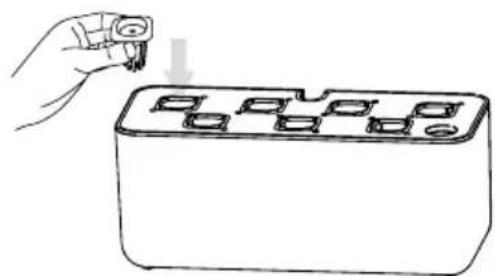
natural_image
Line drawing of a hand holding a small electronic component with a grid of square slots (no text or symbols)Using the Control Panel

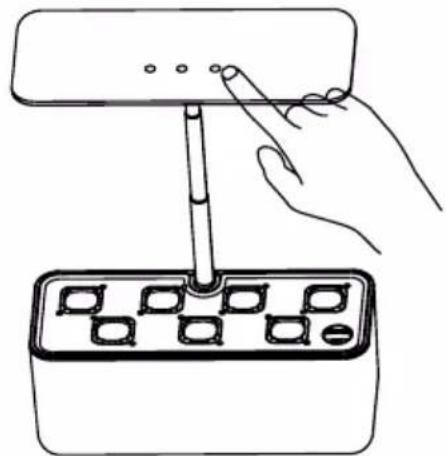
NORMAL CYCLE: 14 hours on / 10 hours off

Press this button and the system will be switched on. It will sound a “beep” and run in ‘normal cycle’ mode. This means the LED light panel will light up for 14 hours. It will then switch off for 10 hours. The following day it will repeat this pattern: 14hrs on / 10hrs off.
natural_image
Line drawing of a hand using a tool to press or install a component into a tray (no text or symbols)
SHORT CYCLE: 12 hours on / 12 hours off

If you press this button, the system will sound a “beep” and enter the ‘short cycle’ mode. The LED panel on the top will reduce the intensity of the light and will start a cycle of 12 hours on / 12 hours off.

LONG CYCLE: 16 hours on / 8 hours off

If you press this button, the system will sound a “beep” and enter ‘long cycle’ mode. The LED panel on the top will increase the intensity of the light and will start a cycle of 16 hours on / 8 hours off.
Setting the Mode
From the moment the system is connected and switched on at the plug, the power button will luminate and the lamp will be in 'standby mode'.
When you select a mode, it will turn on the lamp and activate a 24-hour clock to coincide with the cycle of the mode you have chosen. Depending on the time you first selected the mode, this will be the same time that the light turns on every day thereafter.
For instance, if you select the ‘normal mode’ at 10am for the first use, the system will run the cycle of 14 hours lights on and then 10 hours lights off. It will then automatically turn back on at 10am the following day, and the cycle will continue for as long as desired until the unit is either turned off into ‘standby mode’ or switched off at the plug.
24 Hour Light-On Setting
If you wish to keep the light working all day long (for a whole 24 hours), hold the power button down for 3 seconds.
The light will blink 3 times, then the whole system and lights will switch on and stay on for 24 hours. After this time elapses, the system will automatically revert back to ‘standby mode’.
If you activate this 24-hour light mode while the lamp is currently working, it will keep the lamp lit constantly until the end of the programmed cycle and then revert back to the mode you had been using previously.
Care and Maintenance
Before cleaning ensure the lamp is unplugged from the mains socket.
Do not submerge this lamp in water or any other liquid. Do not use corrosive cleaning products on it.
To clean, simply use a dry cloth to dust and clean the lamp.
Storing the Nutrient Mixture
- The dry unmixed nutrient particles have a storage life of 2 years if kept in an unopened bottle in a cool dry place away from direct sunlight.
- The mixed nutrient mix (with water already added) has a storage life of 5 months if stored away from sunlight.
DURONIC
Warranty
1 Year Guarantee from Shine-Mart Ltd, Trademark owners of Duronic Products. NOTE: THESE STATEMENTS DO NOT AFFECT YOUR STATUTORY RIGHTS AS A CONSUMER
This product has been manufactured under the strictest or quality control procedures, and using the highest quality of materials, to ensure excellent performance and reliability. It will give very good and long lasting service, provided it is properly used and maintained. The product is guaranteed for 1 years from the date of original purchase. If any defect arises due to a faulty materials or poor workmanship, the faulty product must be returned to the original place of purchase. Refund or replacement is at the discretion of that company. Duronic Products are offered with a 1 year guarantee under the following conditions:
- The product must be returned to the retailer with original proof of purchase.
- The product must be installed and used in accordance with the instruction's contained in this operating manual.
- It must be used only for domestic purposes.
- It does not cover wear and tear, malicious damage, misuse, neglect, inexpert repairs or consumable parts.
- Shine-Mart Ltd has no responsibilities for accidental or consequential loss or damage.
- Shine-Mart Ltd are not liable to carry out any type of servicing work, under the guarantee
- Valid in the UK only
This product is fitted with CE:1363 plug and fuse Imported by Shine-Mart Ltd, RM3 8SB

Information on waste Disposal for Consumers of
Electrical & Electronic Equipment.
This mark on a product and/or accompanying documents indicates that when it is to be disposed of, it must be treated as Waste Electrical & Electronic Equipment, (WEEE).
Any WEEE marked products must not be mixed with general household waste, but kept separate for the treatment, recovery and recycling of the materials used.
For proper treatment, recovery and recycling; please take all WEEE marked waste to your Local Authority Civic waste site, where it will be accepted free of charge.
If customers dispose of Waste Electrical & Electronic Equipment correctly, they will be helping to save valuable resources and preventing any potential negative effects upon human health and the environment, of any hazardous materials that the waste may contain.
Follow Us





natural_image
Technical line drawing of a mechanical component with internal parts and mounting holes (no text or symbols)natural_image
Line drawing of a hand using a tool to press a tray with small square buttons (no text or symbols)natural_image
Simple line drawing of a simple electrical apparatus with a vertical rod and connected plug (no text or symbols)Préparer la solution nutritive
natural_image
Line drawing of a container with multiple compartments and a measuring cup pouring liquid into it (no text or symbols)natural_image
Line drawing of two hands holding a small object, possibly a tool or device, with no visible text or symbols.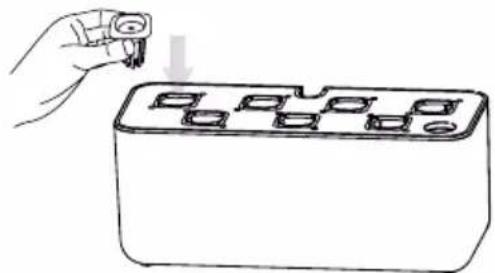
natural_image
Line drawing of a hand inserting a plug into a rectangular electronic device with multiple ports (no text or symbols)natural_image
Line drawing of a hand using a tool to press or install a component into a tray (no text or symbols)
natural_image
Simple line drawing of a container with a rod inserted into top, no text or symbols presentnatural_image
Three identical line drawings of a mechanical component with three views, each showing a central pin and a base (no text or symbols)7x Netztöpfe
Nährstoffe
A &
Nährstoffe
B
Aufstellanleitung
natural_image
Technical line drawing of a mechanical component with internal parts and mounting holes (no text or symbols)natural_image
Line drawing of a hand using a tool to press or install a tray with buttons (no text or symbols)natural_image
Simple line drawing of a scientific apparatus with a vertical tube and connected components (no text or symbols)Pflanzanleitung
natural_image
Simple line drawing of a container with internal compartments and a measuring cup pouring liquid into it (no text or symbols)natural_image
Line drawing of two hands holding a small object with an eye symbol (no text or symbols present)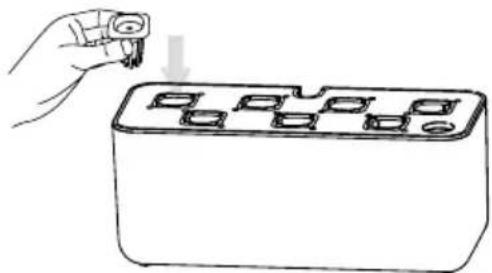
natural_image
Line drawing of a hand inserting a plug into a rectangular electronic component with multiple pins (no text or symbols)Systemsteuerung

natural_image
Line drawing of a hand using a tool to press or install a device into a grid-patterned base (no text or symbols)
natural_image
Three identical line drawings of mechanical components with no text or symbolsnatural_image
Technical line drawing of a mechanical component with internal parts and mounting holes (no text or symbols)natural_image
Line drawing of a hand using a tool to press a tray with small square buttons (no text or symbols)natural_image
Simple line drawing of a laboratory setup with a vertical tube and connected tubing (no text or symbols)natural_image
Line drawing of a container with internal compartments and a measuring cup pouring liquid into it (no text or symbols)natural_image
Line drawing of two hands holding a small object with an eye symbol (no text or symbols present)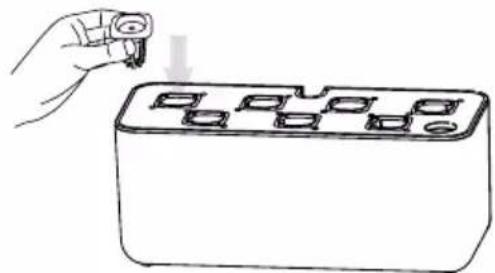
natural_image
Line drawing of a hand inserting a small object into a rectangular device with multiple square holes (no text or symbols)DURONIC
Panel de control


CICLO NORMAL: 14 h. encendido, 10 h. apagado
natural_image
Line drawing of a hand using a tool to press or install a component into a tray (no text or symbols)
CICLO CORTO: 12 h. encendido, 12 h. apagado

natural_image
Illustration of laboratory equipment including a syringe, a adaptor box, and three labeled vials (A and B) with no visible text or symbols.natural_image
Technical line drawing of a mechanical component with internal parts and mounting holes (no text or symbols)natural_image
Line drawing of a hand using a tool to press a tray with buttons (no text or symbols)natural_image
Simple line drawing of a laboratory setup with a vertical tube, base, and connected electrical outlet (no text or symbols)natural_image
Simple line drawing of a container with internal compartments and a measuring cup pouring liquid into it (no text or symbols)natural_image
Line drawing of two hands holding a small object with an eye symbol (no text or symbols present)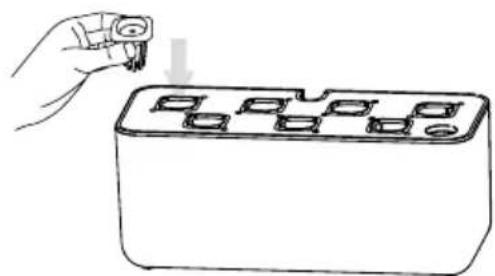
natural_image
Hand holding a small electronic component with a button, placed on top of a rectangular device (no text or symbols visible)DURONIC
natural_image
Line drawing of a hand using a tool to press or install a device into a grid-patterned case (no text or symbols)
CICLO CORTO: 12 ore on / 12 ore off

natural_image
Simple line drawing of a container with a vertical rod and a top platform (no text or symbols)natural_image
Three identical diagrams of a bucket with handles, each showing a different shape and a small circular object (no text or symbols)natural_image
Technical line drawing of a mechanical component with internal parts and mounting holes (no text or symbols)natural_image
Line drawing of a hand using a tool to press a tray with buttons (no text or symbols)natural_image
Simple line drawing of a laboratory setup with a vertical tube and connected tubing (no text or symbols)natural_image
Line drawing of a container with internal compartments and a measuring cup pouring liquid into it (no text or symbols)natural_image
Line drawing of two hands holding a small object, possibly an eye or magnifying glass (no text or symbols)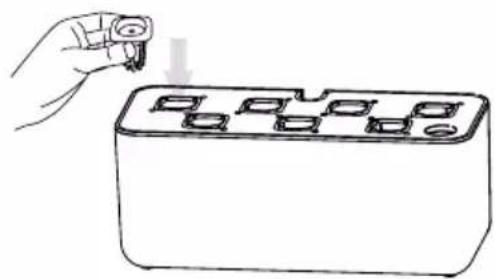
natural_image
Line drawing of a hand holding a small object into a rectangular block with multiple square holes (no text or symbols)natural_image
Line drawing of a hand inserting a plug into a tray with a grid of square buttons (no text or symbols)
natural_image
Technical line drawing of a mechanical component with internal parts and mounting holes (no text or symbols)natural_image
Hand inserting a component into a tray with buttons (no text or symbols visible)natural_image
Simple line drawing of a laboratory setup with a vertical tube, base, and connected electrical outlet (no text or symbols)Preparing the Nutrient Solution
natural_image
Simple line drawing of a container with internal compartments and a measuring cup pouring liquid into it (no text or symbols)natural_image
Line drawing of two hands holding a small object with an eye symbol (no text or symbols present)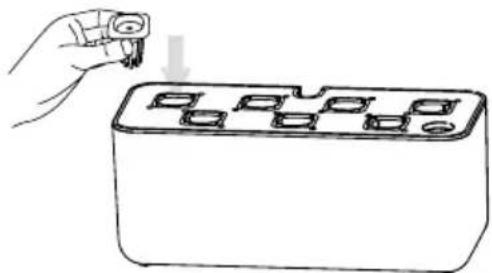
natural_image
Line drawing of a hand inserting a plug into a rectangular device with multiple ports (no text or symbols)natural_image
Line drawing of a hand using a tool to press or install a device into a grid-patterned base (no text or symbols)