
GPS 17X NMEA 2000 - GPS Receiver GARMIN - Free user manual and instructions
Find the device manual for free GPS 17X NMEA 2000 GARMIN in PDF.



| Product type | GPS receiver / high-sensitivity GPS antenna for NMEA 2000 network |
| Brand | GARMIN |
| Model | GPS 17x NMEA 2000 |
| Dimensions | 91.6 mm diameter × 49.5 mm height |
| Weight | 201 g |
| Power supply | 8-33 VDC unregulated, 40 mA at 12 VDC |
| Power consumption | 40 mA at 12 VDC (NMEA 2000 load: 1 LEN = 100 mA) |
| GPS accuracy | 10 m (95%) standard; 3-5 m (95%) differential (WAAS/EGNOS) |
| Speed accuracy | 0.05 m/s steady state |
| Operating temperature | -30 °C to 80 °C |
| Waterproof rating | IEC 529 IPX7 (immersion proof) |
| Housing material | Impact-resistant plastic alloy, hermetically sealed |
| Mounting | Surface, pole (25 mm diameter, 14 threads/25 mm) or under deck (fiberglass only) |
| Network connection | NMEA 2000 via T-connector and 2 m drop cable included |
| NMEA 2000 PGN transmitted | 059392, 060928, 126208, 126464, 126992, 126996, 129025, 129026, 129029, 129539, 129540 |
| NMEA 2000 PGN received | 059392, 059904, 060928, 126208 |
| Certifications | NMEA 2000 certified, CE (directive 1999/5/EC) |
| Package contents | GPS 17x antenna, mounting brackets (surface, pole, under deck), mounting hardware, NMEA 2000 T-connector, 2 m drop cable, installation instructions |
| Maintenance | Clean with a soft dry cloth. Avoid solvents. Periodically check seal integrity. |
| Safety | Wear protective equipment during installation (drilling). Do not mount near radar or VHF antenna. Respect minimum distances. |
| Repairability | Spare parts not listed. Contact Garmin support for repairs. |
Frequently Asked Questions - GPS 17X NMEA 2000 GARMIN
User questions about GPS 17X NMEA 2000 GARMIN
0 question about this device. Answer the ones you know or ask your own.
Ask a new question about this device
Download the instructions for your GPS Receiver in PDF format for free! Find your manual GPS 17X NMEA 2000 - GARMIN and take your electronic device back in hand. On this page are published all the documents necessary for the use of your device. GPS 17X NMEA 2000 by GARMIN.
USER MANUAL GPS 17X NMEA 2000 GARMIN
The Garmin GPS 17x NMEA 2000 high-sensitivity GPS antenna provides position information to your existing NMEA 2000 network. If you do not have an existing NMEA 2000^® network on your boat, you will need to install one. For more information about NMEA 2000, visit www.garmin.com.
The GPS 17x antenna must be properly installed according to the following instructions. You need the appropriate fasteners, tools, and mounts listed in each section. These items are available at most marine dealers. Always wear safety goggles, ear protection, and a dust mask when drilling, cutting, or sanding. When drilling or cutting, always check what is on the opposite side of the surface.
If you experience difficulty installing the unit, seek the assistance of a professional installer or contact Garmin Product Support by phone at 913/397.8200 or 800/800.1020. Go to www.garmin.com/support/ for more information. In Europe, contact Garmin (Europe) Ltd. at 44/0870.8501241.
WARNING: See the Important Safety and Product Information guide in the product box for product warnings and other important information.
Product Registration
Help us better support you by completing our online registration at www.garmin.com /registration/.
For future reference, write the serial number assigned to your GPS 17x in the space provided. It is located on a sticker on the back of the unit.
Serial number
Packing List and Accessories
Before installing your unit, confirm that your package includes the following items. If any parts are missing, contact your Garmin dealer immediately.
Standard Package
GPS 17x Antenna
Surface-mount bracket
- Pole-mount bracket
Under-deck mount bracket
- Mounting hardware (screws and adhesive pads)
NMEA2000T-connector
NMEA 2000 drop cable 6.5 ft. (2 m)
Installation instructions
Optional Accessories
Additional NMEA 2000 network components
Tools Needed
- Drill
- Drill bit— 1^1 / 8 in (3.2mm)
- Drill bit— ^3/4 in (19 mm) pole-mount cable-hole
- Hole saw, 1 in (25 mm)—surface-mount cable-hole
- Screwdriver—surface mount screws
Center punch and hammer (to mark surface-mount pilot holes) - Countersink bit (when mounting on fiberglass)
- Marine sealant (for some mounting options)
Step 1: Mount the GPS 17x Antenna
You can surface mount the GPS 17x antenna, attach it to a standard 1 in. OD pipe-threaded-pole marine mount (14 threads-per-inch—not included), or even install the antenna under fiberglass.
Select a suitable location for the GPS 17x antenna on your boat. To ensure the best reception, mount the GPS 17x antenna in a location that has a clear, unobstructed view of the sky in all directions.
- Avoid mounting the GPS 17x antenna where it is shaded by the superstructure of the boat, a radome antenna, or mast.
- On a sailboat, avoid mounting the GPS 17x antenna high on the mast, to prevent inaccurate speed readings caused by excessive heeling.
- The GPS 17x antenna provides more-stable readings when located nearer to water level.
- Mount the GPS 17x antenna at least 3 ft. (1 m) away from (preferably above) the path of any radar beam or a VHF radio antenna.
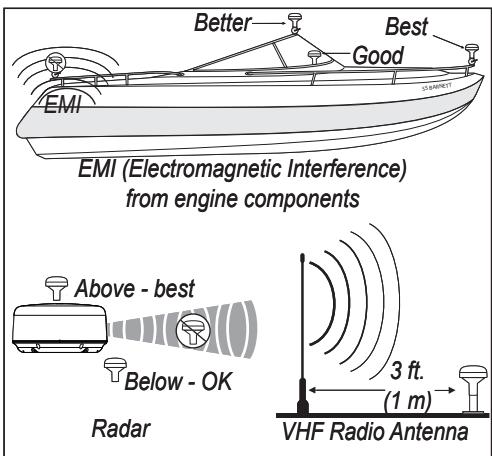
GPS 17x Placement Considerations
Temporarily secure the antenna in the preferred mounting location and test it for correct operation. If you experience interference with other electronics, try a different location. When you verify correct operation, permanently mount the antenna.
Surface-mounting the GPS 17x Antenna
1 Use the surface-mount bracket as your mounting template.
- Use a center punch to mark the three screw locations on the surface.
- Use a pencil to trace the cable-hole in the center of the bracket.
-
Set the surface-mount bracket aside. Do not drill through the surface-mount bracket.
-
Drill the three 1 1/8 in. (3.2) pilot holes.

NOTE: If you are mounting the GPS 17x on fiberglass, it is recommended to use a countersink bit to drill a clearance countbore through the top gelcoat layer (but no deeper). This will help to avoid cracking in the gelcoat layer when the screws are tightened.
- Use a 1 in. (25 mm) hole saw to cut the cable hole in the center.
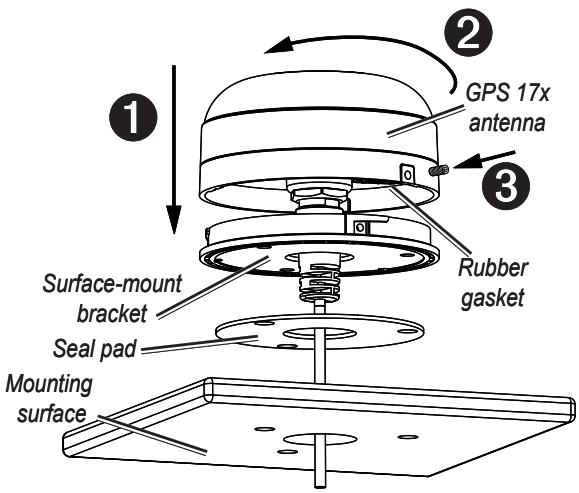
- Place the seal pad on the bottom of the surface-mount bracket. Make sure that the screw holes align.
- Use the included M4 screws to attach the surface-mount bracket to the mounting surface.
- Route the NMEA 2000 cable through the 1 in. (25 mm) cable hole and connect it to the GPS 17x.
- Make sure the large gasket is in place on the bottom of the GPS 17x antenna, place the antenna on the surface-mount bracket ①, and twist it clockwise to lock it in place ②.
- Secure the antenna to the mounting bracket with the included M3 set screw ③.
- Route the NMEA 2000 cable away from sources of electronic interference, and connect it to your NMEA 2000 network.
Pole Mounting the GPS 17x Antenna
With the pole-mount adapter attached to the GPS 17x, you can install the GPS 17x on a standard 1 in. OD pipe-threaded-pole marine mount (14 threads per inch—not included). You can run the NMEA 2000 cable through the pole or outside the pole.
To mount the GPS 17x with the cable run outside the pole:
- Route the NMEA 2000 drop cable through the pole-mount adapter, and place the cable in the vertical slot along the base of the pole-mount adapter.
- Thread the pole-mount adapter onto a standard 1 in. OD pipe-threaded-pole marine mount (14 threads per inch—not included). Do not overtighten the adapter.
- Connect the NMEA 2000 drop cable to the GPS 17x antenna.
- Place the GPS 17x antenna on the pole-mount adapter ① and twist it clockwise to lock it in place ②.
- Secure the antenna to the adapter with the included M3 set screw ③
- (Optional) With the GPS 17x installed on the pole mount, fill the remaining gap in the vertical cable slot with a marine sealant.
- Attach the marine mount to the boat if it is not already attached.
- Route the cable away from sources of electronic interference, and connect it to your NMEA 2000 network.
To mount the GPS 17x with the cable run through the pole:
- Position a standard 1 in. OD pipe-threaded-pole vertical cable marine mount (14 threads per inch—not included) in the preferred location, and mark the approximate center of the pole.
- Drill a hole using a 3/4 in. (19 mm) drill bit for the cable to pass through.
- Fasten the marine mount to the boat.
- Thread the pole-mount adapter onto the pole. Do not overtighten the adapter.
- Route the NMEA 2000 drop cable through the pole and connect it to the GPS 17x antenna.
- Place the GPS 17x antenna on the pole-mount adapter ① and twist it clockwise to lock it in place ②.
- Secure the antenna to the adapter with the included M3 set screw ③.
- (Optional) With the GPS 17x installed on the pole mount, fill the vertical cable slot with a marine sealant.
- Route the cable away from sources of electronic interference, and connect it to your NMEA 2000 network.
Under-deck-mounting the GPS 17x Antenna
The GPS 17x can be mounted under a fiberglass surface with the included adhesive pads. The GPS 17x will not acquire satellite signals through metal—you can only use the under-deck
mount under a fiberglass surface.
- Determine the location on the fiberglass surface where you want to mount the GPS 17x.
- Place the adhesive pads on the underdeck mounting bracket.
- Place the GPS 17x in the under-deck mounting bracket.
- Adhere the under-deck mounting bracket to the mounting surface.
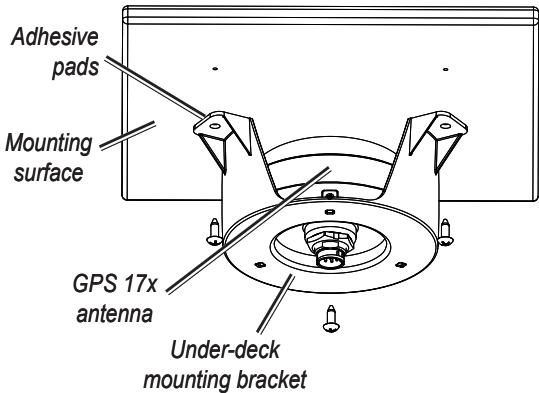
- Secure the under-deck mount to the mounting surface with screws. Use extreme care to ensure that the screws do not penetrate the upper surface of the deck.
- Connect the power/data cable to the GPS 17x.
- Route the cable away from sources of electronic interference, and connect it to your NMEA 2000 network.
Step 2: Connect the GPS 17x Antenna to Your NMEA 2000 Network
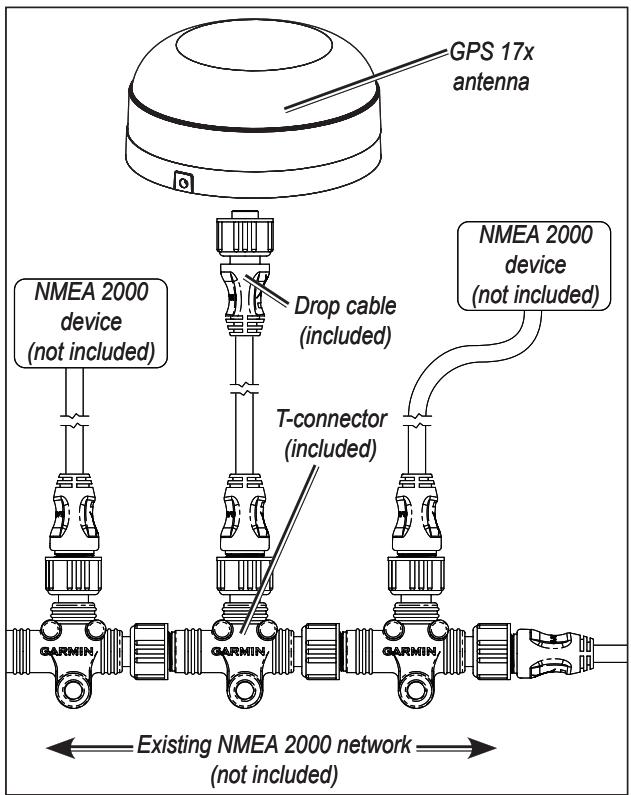
The GPS 17x is packaged with a NMEA 2000 T-connector and a NMEA 2000 drop cable. You will use these two components to connect the GPS 17x to your existing NMEA 2000 network. If you do not have an existing NMEA 2000 network, you will need to install a NMEA 2000 network on your boat. For more information on NMEA 2000, visit www.garmin.com.
To connect the GPS 17x to your existing NMEA 2000 network:
- Determine an appropriate location to connect the GPS 17x to your existing NMEA 2000 backbone.
- Disconnect one side of a NMEA 2000 T-connector from the backbone nearest to the location where you want to connect the GPS 17x antenna.
If you need to extend the NMEA 2000 backbone, connect an appropriate NMEA 2000 backbone extension cable (not included) to the side of the T-connector you disconnected.
- Connect an included T-connector in the NMEA 2000 backbone.
- Route an included drop cable from the GPS 17x antenna to the top of the T-connector you added to your NMEA 2000 network.
If the included drop cable is not long enough, you can add a drop cable extension up to 13 ft. (4 m). If more cable is needed, add an extension to your NMEA 2000 backbone, based on the NMEA 2000 guidelines.
Step 3: Update Your Chartplotter
To ensure compatibility with the GPS 17x, upgrade your Garmin chartplotter with the latest software. For more information, visit http://www8.garmin.com/support/download.jsp.
Specifications Physical
Dimensions: 3^19 / 32 in. (91.6mm) Diameter × 1^15 / 16 in
(49.5 mm) High
Weight: 7.1 oz. (201 g)
NMEA 2000 drop cable: 19 ft, 8 in (6 m)
Temperature range: -22°F (-30°C) to 176°F (80°C)
Case Material: Fully gasketed, high-impact plastic alloy, waterproof to IEC 529 IPX7 standards
Power
Power input source: 9-16 Vdc
unregulated
Input current: 40 mA at 12 Vdc
NMEA 2000 Load Equivalency Number (LEN): 3 (150 mA)
Accuracy
GPS: <33 ft. (10 m) 95% typical
DGPS: 10-16 ft. (3 - 5m) 95%
typical (WAAS/EGNOS accuracy.)
Velocity: 0.05 meter/sec steady state
NMEA 2000 PGN Information
| Transmit | Receive | ||
| 059392 | ISO Acknowledgment | 059392 | ISO Acknowledgment |
| 060928 | ISO Address Claim | 059904 | ISO Request |
| 126208 | NMEA - Command/Request/Ac-knowledge Group Function | 060928 | ISO Address Claim |
| 126464 | Transmit/Receive PGN List Group Function | 126208 | NMEA - Command/Request/Ac-knowledge Group Function |
| 126992 | System Time and Date | ||

The GPS 17x is NMEA 2000 certified
Declaration of Conformity (DoC)
Hereby, Garmin, declares that this GPS 17x is in compliance with the essential requirements and other relevant provisions of Directive 1999/5/EC.
To view the full Declaration of Conformity, see the Garmin Web site for your Garmin product: www.garmin.com/products/gps17x/. Click Manuals, and then select the Declaration of Conformity link.

Software License Agreement
BY USING THE GPS 17x, YOU AGREE TO BE BOUND BY THE TERMS AND CONDITIONS OF THE FOLLOWING SOFTWARE LICENSE AGREEMENT. PLEASE READ THIS AGREEMENT CAREFULLY.
Garmin grants you a limited license to use the software embedded in this device (the "Software") in binary executable form in the normal operation of the product. Title, ownership rights, and intellectual property rights in and to the Software remain in Garmin.
You acknowledge that the Software is the property of Garmin and is protected under the United States of America copyright laws and international copyright treaties. You further acknowledge that the structure, organization, and code of the Software are valuable trade secrets of Garmin and that the Software in source code form remains a valuable trade secret of Garmin. You agree not to decompile, disassemble, modify, reverse assemble, reverse engineer, or reduce to human readable form the Software or any part thereof or create any derivative works based on the Software. You agree not to export or re-export the Software to any country in violation of the export control laws of the United States of America.
GPS 17x NMEA 2000® - Instructions d'installation
© 2009 Garmin Ltd. or its subsidiaries
Garmin International, Inc.
1200 East 151^st Street, Olathe, Kansas 66062, USA
Garmin (Europe) Ltd.
Liberty House, Hounsdown Business Park, Southampton, Hampshire, SO40 9LR UK
Garmin Corporation
No. 68, Jangshu 2^nd Road, Sijhih, Taipei County, Taiwan
www.garmin.com
Part Number 190-00886-10 Rev. B