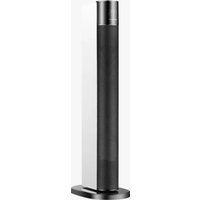
EHC2200 - Heating EAS Electric - Free user manual and instructions
Find the device manual for free EHC2200 EAS Electric in PDF.



| Product type | Portable electric heater |
| Brand | EAS Electric |
| Model | EHC2200 |
| Power supply | 220-240 V ~ 50 Hz |
| Maximum power | 2200 W |
| Minimum power (indicative) | 1200 W |
| Operating modes | Smart, low heat, medium heat, high heat, fan, gentle fan |
| Temperature setting | 5 °C to 35 °C in 1 °C increments |
| On/Off timer | 0-24 hours |
| Oscillation | Yes, on/off button |
| Remote control | Yes, functions identical to control panel |
| Display | Digital screen with automatic shutdown after 1 minute |
| Automatic shutdown | After 12 hours of inactivity (excluding timer mode) |
| Child lock | Yes, activation/deactivation by long press on + and - |
| Tip-over protection | Yes, displays code E3 |
| Overheat protection | Yes, displays code FF if ambient temperature > 50 °C |
| Sensor fault detection | Yes, codes E1 (short circuit) and E2 (open circuit) |
| Cleaning and maintenance | Soft dry or damp cloth (mild soapy water). Do not use abrasive products. Motor lubrication not necessary. |
| Compliance with standards | ErP 2009/125/EC, RoHS 2011/65/EU, EMC 2014/30/EU, LVD 2014/35/EU |
| Warranty | 2 years (Spain, repair labor and parts) |
Frequently Asked Questions - EHC2200 EAS Electric
User questions about EHC2200 EAS Electric
0 question about this device. Answer the ones you know or ask your own.
Ask a new question about this device
Download the instructions for your Heating in PDF format for free! Find your manual EHC2200 - EAS Electric and take your electronic device back in hand. On this page are published all the documents necessary for the use of your device. EHC2200 by EAS Electric.
USER MANUAL EHC2200 EAS Electric
MANUEL D'INSTRUCTIONS
MANUAL DE INSTRUÇÉS

2 DATOS TECNICOS
3 INDICACIONES DE SEGURIDAD
4 VISTA GENERAL DEL APARATO Y TECLAS DE CONTROL
7 LIMPieZA Y CUIDADO
8 INDICACIONES PARA LA RETIRADA DEL APARATO
9 PARÁMETROS TÉCNICOS
10 GARANTÍA COMERCIAL
Estimado cliente,
Congratulations on purchasing this equipment. Please read this manual carefully and take care of the following hints to avoid damages. Any failure caused by ignoring the mentioned items and cautions mentioned in the instruction manual are not covered by our warranty and any liability. Should any changes be made to this manual, the latest version will be updated on our website.
IMPORTANT: This product is only suitable for well insulated spaces or occasional use.
TECHNICAL DATA
| Item number | 8436567809862 |
| Power supply 220-240 V~ 50 | Hz |
| Power max. 2200 W |
SAFETY INSTRUCTIONS
Read the safety instructions carefully and keep them for future reference. To prevent the risk of fire, electric shock, burns and other injuries, it is important to take basic measures when using equipment.
In order to avoid overheating, do not cover the heater.
If the supply cord is damaged, it must be replaced by the manufacturer or its service agent or a similarly qualified person in order to avoid a hazard.
- This appliance can be used by children aged from 8 years and above and persons with reduced physical, sensory or mental capabilities or lack of experience and knowledge if they have been given supervision or instruction concerning use of the appliance in a safe way and understand the hazards involved. Children shall not play with the appliance. Cleaning and user maintenance shall not be made by children without supervision.
- The heater must not be located immediately below a socket-outlet.
- Do not use this heater in the immediate surroundings of a bath, a shower or a swimming pool.
- Children of less than 3 years should be kept away unless continuously supervised.
- Children aged from 3 years and less than 8 years shall only switch on/off the appliance provided that it has been placed or installed in its intended normal operating position and they have been given supervision or instruction concerning use of the appliance in a safe way and understand the hazards involved. Children aged from 3 years and less than 8 years shall not plug in, regulate and clean the appliance or perform user maintenance.
PRODUCT OVERVIEW

Display

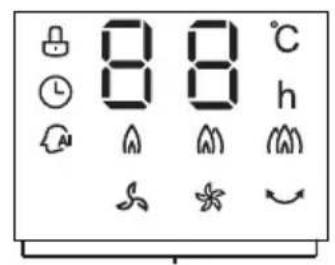
Display screen
| Key | Function Description |
| On/off ◎ | On the idle mode, press on-off key to enter the power-on mode, the warmer starts working and the whole machine runs under the previous remembered mode and temperature. On the power-on mode, press on-off key to enter the idle mode, the warmer stops working. (Note: On the heating mode, draught fan will operate for 15 seconds at low wind speed after power off.) |
| Heating level ≈ | After power-on, the warmer is in the intelligent mode by default. Repeatedly press the "Mode" key, the warmer shifts in circular order among Intelligent mode > low warm wind > high warm wind > strong warm wind > breeze > gentle breeze. |
| + and - | On the working state, press "+" or "-" keys to set the working temperature. The temperature setting range is 5°C - 35°C and every temperature value is of 1°C difference. The machine confirms and displays the set temperature value if without operation within 3 seconds after the setting. After room temperature reaches the set temperature, display screen blinks for 10 seconds and heating unit stops working; when temperature is below the set temperature, machine restarts to heat. In low warm wind, high warm wind, and strong warm wind modes, it can be set to without temperature control, whose display icon is "-". |
| Timer ① | In the power-on mode, press this key to select the timed shutdown setting. The timing indicator lightsup, the temperature display icon lights off, and display screen blinks and shows the rest time of last setting. Press "+" or "-" keys to set shutdown time, the setting range is 0~24 hours. The machine confirms the time and quits the timing setting state if without pressing within 5 seconds. If the set time is 0, it means cancelling the timing setting; if the set time is not 0, the machine shuts down automatically, enter the idle mode and turns off the timing icon when reaching the set time. Set again the time after time setting, and the machine is retimed. In the idle mode, press this key to set timing power-on, of the same operation as timing shutdown. The time unit of the timer is hour. |
| Sway key | In the power-on mode, press this key to start swaying, and press again to stop swaying. |
Light screen off function
When the machine is on the working state, the screen automatically lights off and operating mode icon retains up if without operation within 1 minute. Press at the same time the key and “-” key for 2 seconds to close the light screen off function. Press again at the same time the key and “-” key for 2 seconds to open the light screen off function.
Temperature sensor short circuit and open circuit protection
In whatever mode, when short circuit or open circuit protection occurs to the temperature sensor, digital screen displays E1 or E2 and blinks unceasingly, any key does not work, and buzzer rings for 10 times.
Safety protection
In the power-on mode, when room temperature Th exceeds 50^ , the system closes all outputs, the digital screen displays "FF" and blinks at the frequency of 1 time per second, any key does not work, and only power-off can quit protection.
Toppling over protection function
No matter in power-on or power-off mode, when the machine topples over, the system immediately shuts down all heating components and displays "E3", any key does not work.
Close key fancy light and buzzer
In the power-on mode, press at the same time the "timing key" and "mode key" for 2 seconds to close key fancy light and buzzer output. Repeat this action to open them.
Children lock function
No matter in power-on or power-off mode, press "+" and "-" keys simultaneously for the first time for 2 seconds to open the children lock function. Repeat this action to close it.
Automatic power-off function
Screen displays "--" if the heater is not under Temperature Control mode. When the timer function is off, the heater will automatically shut off with no operation during 12 hours.
Remote-control unit
The use of remote-control unit: Key function is consistent with machine body control panel.
Intelligent mode
In the Intelligent mode, press "+" and "-" keys to set wanted temperature. When environment temperature is lower than set temperature (by more than 2^ ), the product heats in high warm wind mode; when environment temperature is close to the set temperature (by less than 2^ or more), the product heats on low warm wind mode; when environment temperature is higher than set temperature, the product stops heating.
CLEANING AND MAINTENANCE
- Light accumulated dust may be removed from the heater with a soft cloth. Wipe the exterior surfaces of the heater occasionally with a cloth moistened (not dripping wet) with a solution of mild detergent and water. Dry the case thoroughly with a soft dry cloth before operating the heater.
- The fan motor is lubricated by the factory, and will require no further lubrication.
- No other user maintenance is required or recommended. If service is required, send your heater to the nearest authorized service depot.
- Store heater in a clean and dry place when not in use.
REMEMBER - Portable electric heaters are designed for spot heating, or as a supplementary heat source. They are not intended to be main sources of heat during the normal heating season.
Note: There may be trace of smoke or odour when unit is first operated. Do not be near the heating coil during the manufacturing process. It will quickly evaporate, and should not reoccur.
DISPOSAL CONSIDERATIONS
Your product contains batteries covered by the European Directive. 2006/66/ EC, which cannot be disposed of with normal household waste. Please check local rules on separate collection of batteries. The correct disposal of batteries helps prevent potentially negative consequences on the environment and human health.

DISPOSAL: Do not dispose of this product as unsorted municipal waste. It is necessary to collect this waste separately for special treatment.
According to the European directive 2012/19/EU on waste electrical and electronic equipment (WEEE), household appliances cannot be disposed of in the normal municipal waste bins; they have to be collected separately to optimise the recovery and recycling of their constituent components and materials and to reduce the impact on human health and the environment.
The crossed-out wheeled bin symbol is marked on all products to remind the consumer of the obligation to separate them for separate collection. The consumer should contact the local authority or the retailer for information regarding the correct disposal of their appliance.

Declaration of conformity
Manufacturer: EAS Electric Smart Technology, S.L. P.I. Codonyers. C/Principal, 4 46220 Picassent (Valencia) SPAIN
This product complies with the following European directives:
2009/125/CE (ErP)
2011/65/EU (RoHS)
2014/30/UE (EMC)
2014/35/UE (LVD)
| Model identifier(s): | EHC2200 | ||||
| Item Symbol Value Unit | Item | Unit | |||
| Heat output | Type of heat input, for electric storage local space heaters only | ||||
| Nominal heat output | Pnom | 2,2 | kW | manual heat charge control, with integrated thermostat | no |
| Minimum heat output (indicative) | Pmin | 1,2 | kW | manual heat charge control with room and/or outdoor temperature feedback | no |
| Maximum continuous heat output | Pmax,c | 2,25 | kW | electronic heat charge control with room and/or outdoor temperature feedback | no |
| Auxiliary electricity consumption | fan assisted heat output | no | |||
| At nominal heat output (fan motor) | elmax | 2,2. | kW | Type of heat output/room temperature control | |
| At minimum heat output (fan motor) | elmin | 1,2 | kW | single stage heat output and no room temperature control | no |
| In standby mode | eSB | 0,00042 | kW | Two or more manual stages, no room temperature control | no |
| with mechanic thermostat room temperature control | no | ||||
| with electronic room temperature control | yes | ||||
| electronic room temperature control plus day timer | no | ||||
| electronic room temperature control plus week timer | no | ||||
| Other control options (multiple selections possible) | |||||
| room temperature control, with presence detection | no | ||||
| room temperature control, with open window detection | no | ||||
| with distance control option | no | ||||
| with adaptive start control | no | ||||
| with working time limitation | no | ||||
| with black bulb sensor | no | ||||
| Contact details | P.I. Codonyers. C/Principal, 4 46220 Picassent (Valencia) SPAIN | ||||
COMMERCIAL GUARANTEE CONDITIONS
This appliance has a two-year repair guarantee, from the date of sale, against all malfunctions originating from manufacturing, including labor and spare parts. To justify the purchase date, it will be mandatory to present the invoice or purchase receipt. This guarantee will only be effective in Spain.
GUARANTEE EXCLUSIONS
- Remote controls, drain intake rubbers, dockings and door seals, weather stripping.
- Damage to enamels, paints, nickel plating, chrome plating, oxidation or other types of aesthetic parts or components that do not affect the internal functioning of the appliance.
- Damage to wear parts due to use, corrosion or oxidation, whether caused by normal use of the appliance or accelerated deterioration due to unfavorable environmental or climatic circumstances. Not suitable for outdoor use.
- Damage to fragile pieces of glass, glass ceramic, plastics, handles, baskets, doors or light bulbs when their failure or breakage is not attributable to a manufacturing defect.
- Faults produced by fortuitous causes or accidents of force majeure, or as a consequence of abnormal, negligent or inappropriate use of the device.
- Civil liabilities of any nature.
- Consequential damage to the appliance as long as it has not been caused by an internal malfunction.
- Maintenance or upkeep of the appliance: periodic reviews, adjustments and greases.
- Faults that accessories and complements, adapters, external cables, bags, spare parts of all kinds, lamps, as well as any part considered consumable by the manufacturer, may suffer.
- Faults caused by incorrect or illegal installation, inadequate ventilation, lack of grounding in the home, power disturbances, inappropriate modifications or use of non-original spare parts.
- Appliances used in industrial applications or for commercial purposes.
-
Appliances with illegible or altered serial number.
-
Defects or breakdowns produced as a result of fixes, repairs, modifications, or disassembly of the installation of the device by the user or by a technician not authorized by the manufacturer, or as a result of manifest non-compliance with the manufacturer's instructions for use and maintenance.
-
During the warranty period it is essential to keep all manuals together with the equipment. If the equipment is sold, donated or given away, the manual and all related documents must be given to the new user. If any of these are lost, their replacement cannot be claimed.
-
Faults that have their origin or are a direct or indirect consequence of: contact with liquids, chemicals and other substances, as well as conditions derived from the climate or the environment: earthquakes, fires, floods, excessive heat or any other external force, such as insects, rodents and other animals that may have access to the interior of the machine or its connection points.
-
Damages derived from terrorism, riot or popular tumult, legal or illegal demonstrations and strikes; facts of actions of the Armed Forces or the State Security Forces in times of peace; armed conflicts and acts of war (declared or not); nuclear reaction or radiation or radioactive contamination; vice or defect of the goods; facts classified by the Government of the Nation as "national catastrophe or calamity".
Design and specifications are subject to change without prior notice for product improvement.

EAS ELECTRIC
www.easelectric.es

2 FICHE TECHNIQUE
3 CONSIGNES DE SECURITÉ
4 APERCU DE L'APPAREIL
7 NETTOYAGE ET ENTRETIEN
8 CONSEILS POUR LE RECYCLAGE
9 FICHE DE DONNÉES PRODUIT
10 GARANTIE COMMERCIALE
Chere cliente, cher client,
Fabricant: EAS Electric Smart Technology, S.L. P.I.
Codonyers. C/Principal, 4 46220 Picassent (Valencia)
ESPANA
EXCLUSIONS DE LA GARANTIE
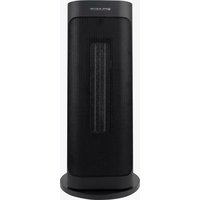
- Estimado cliente,
- SAFETY INSTRUCTIONS
- PRODUCT OVERVIEW
- Display
- Light screen off function
- Temperature sensor short circuit and open circuit protection
- Safety protection
- Toppling over protection function
- CLEANING AND MAINTENANCE
- DISPOSAL CONSIDERATIONS
- Declaration of conformity
- COMMERCIAL GUARANTEE CONDITIONS
- GUARANTEE EXCLUSIONS
- EAS ELECTRIC
- EXCLUSIONS DE LA GARANTIE
Brand : EAS Electric
Model : EHC2200
Category : Heating