MC30YVM - Air purifier DAIKIN - Free user manual and instructions
Find the device manual for free MC30YVM DAIKIN in PDF.

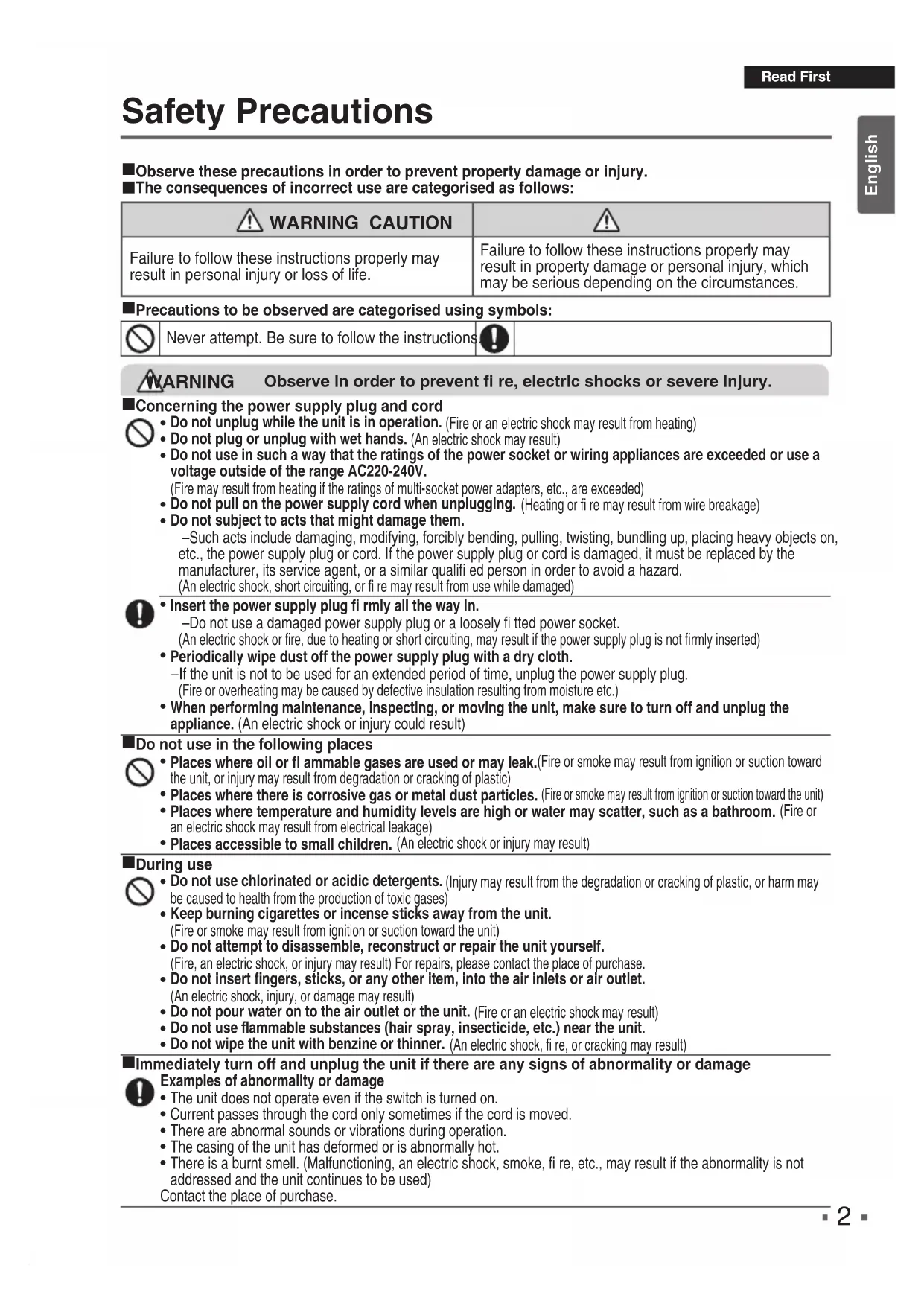


| Product type | Air purifier |
| Brand | Daikin |
| Model | MC30YVM |
| Dimensions (H x W x D) | 450 x 270 x 270 mm |
| Weight | 5.8 kg |
| Power supply | 1Ph, 220-240 V, 50/60 Hz |
| Power consumption (Turbo / Standard / Silent) | 25 W / 15 W / 8 W |
| Noise level (Turbo / Standard / Silent) | 37 dB / 27 dB / 19 dB |
| Airflow rate (Turbo / Standard / Silent) | 180 m³/h / 120 m³/h / 60 m³/h |
| Coverage area | 23 m² (according to JEM1467 standard, Turbo setting) |
| CADR (Cigarette smoke) | 180 m³/h (tested according to JEM1467 Appendix C) |
| Purification function | Air purification with discharge diffusion |
| Operating modes | Silent, Standard, Turbo |
| Additional modes | Sleep mode (8 h), Child lock, Brightness adjustment |
| Filters | Pre-filter (washable), Dust collection filter (replaceable ~10 years), Deodorizing filter (vacuum only) |
| Pre-filter maintenance | Clean every 2 weeks (vacuum or wash with water) |
| Dust collection filter maintenance | Vacuum only (do not wash with water) |
| Deodorizing filter maintenance | Vacuum only (do not wash with water) |
| Spare part | Dust collection filter BAFP500A (approximately every 10 years) |
| Safety device | Automatic shutdown if part is detached |
| Power cord length | 1.8 m |
| Country of manufacture | Malaysia |
Frequently Asked Questions - MC30YVM DAIKIN
User questions about MC30YVM DAIKIN
0 question about this device. Answer the ones you know or ask your own.
Ask a new question about this device
Download the instructions for your Air purifier in PDF format for free! Find your manual MC30YVM - DAIKIN and take your electronic device back in hand. On this page are published all the documents necessary for the use of your device. MC30YVM by DAIKIN.
USER MANUAL MC30YVM DAIKIN
Floor standing or desktop type
Model
MC30YVM
Air Purifi er OPERATION MANUAL

STREAMER
- Thank you for purchasing this air purifi er.
- Please read the operation manual carefully and follow it for correct use.
- Please read the "Safety Precautions" section before use. ▶Page 2,3 Please keep the operation manual in a safe place for later reference.
Contents
Read First

Safety Precautions 2
Names of Parts and Operations 4
Preparation Before Operation 6
Operation
Using the Air Purifying Operation 9
Changing the Airflow Rate 9
Useful Functions
Operating the Unit in a MODE 10
SLEEP MODE
Using the Child Proof Lock 11
Adjusting Indicator Lamp Brightness 11
Advanced Settings
Streamer Output Settings 12
Maintenance
Maintenance 13
Separately Sold Part /
When Not Using the Unit for Long Time Periods 15
Troubleshooting
About the Indicator Lamps 16
FAQs 17
Troubleshooting 18
Specifications 21
The English text is the original instruction.
Other languages are translations of the original instructions.
Safety Precautions
■Observe these precautions in order to prevent property damage or injury.
■The consequences of incorrect use are categorised as follows:
| WARNING CAUTION | ! |
| Failure to follow these instructions properly may result in personal injury or loss of life. | Failure to follow these instructions properly may result in property damage or personal injury, which may be serious depending on the circumstances. |
■Precautions to be observed are categorised using symbols:

Never attempt. Be sure to follow the instructions


ARNING
Observe in order to prevent fi re, electric shocks or severe injury.
■Concerning the power supply plug and cord

- Do not unplug while the unit is in operation. (Fire or an electric shock may result from heating)
- Do not plug or unplug with wet hands. (An electric shock may result)
- Do not use in such a way that the ratings of the power socket or wiring appliances are exceeded or use a voltage outside of the range AC220-240V.
(Fire may result from heating if the ratings of multi-socket power adapters, etc., are exceeded)
- Do not pull on the power supply cord when unplugging. (Heating or fire may result from wire breakage)
- Do not subject to acts that might damage them.
—Such acts include damaging, modifying, forcibly bending, pulling, twisting, bundling up, placing heavy objects on, etc., the power supply plug or cord. If the power supply plug or cord is damaged, it must be replaced by the manufacturer, its service agent, or a similar qualified person in order to avoid a hazard.
(An electric shock, short circuiting, or fire may result from use while damaged)

- Insert the power supply plug firmly all the way in.
-Do not use a damaged power supply plug or a loosely fitted power socket.
(An electric shock or fire, due to heating or short circuiting, may result if the power supply plug is not firmly inserted)
• Periodically wipe dust off the power supply plug with a dry cloth.
-If the unit is not to be used for an extended period of time, unplug the power supply plug.
(Fire or overheating may be caused by defective insulation resulting from moisture etc.)
- When performing maintenance, inspecting, or moving the unit, make sure to turn off and unplug the appliance. (An electric shock or injury could result)
■Do not use in the following places

- Places where oil or fl ammable gases are used or may leak.(Fire or smoke may result from ignition or suction toward the unit, or injury may result from degradation or cracking of plastic)
- Places where there is corrosive gas or metal dust particles. (Fire or smoke may result from ignition or suction toward the unit)
- Places where temperature and humidity levels are high or water may scatter, such as a bathroom. (Fire or an electric shock may result from electrical leakage)
- Places accessible to small children. (An electric shock or injury may result)
During use

- Do not use chlorinated or acidic detergents. (Injury may result from the degradation or cracking of plastic, or harm may be caused to health from the production of toxic gases)
- Keep burning cigarettes or incense sticks away from the unit.
(Fire or smoke may result from ignition or suction toward the unit)
- Do not attempt to disassemble, reconstruct or repair the unit yourself.
(Fire, an electric shock, or injury may result) For repairs, please contact the place of purchase.
- Do not insert fingers, sticks, or any other item, into the air inlets or air outlet.
(An electric shock, injury, or damage may result)
- Do not pour water on to the air outlet or the unit. (Fire or an electric shock may result)
- Do not use flammable substances (hair spray, insecticide, etc.) near the unit.
- Do not wipe the unit with benzine or thinner. (An electric shock, fire, or cracking may result)
Immediately turn off and unplug the unit if there are any signs of abnormality or damage

Examples of abnormality or damage
- The unit does not operate even if the switch is turned on.
- Current passes through the cord only sometimes if the cord is moved.
- There are abnormal sounds or vibrations during operation.
- The casing of the unit has deformed or is abnormally hot.
- There is a burnt smell. (Malfunctioning, an electric shock, smoke, fire, etc., may result if the abnormality is not addressed and the unit continues to be used)
Contact the place of purchase.
Safety Precautions

CAUTION Observe in order to prevent short circuiting, injury or property damage.
During use

- Small children or immobile persons (due to illness or injury) should not operate the unit by themselves.
◆ For EU:
This appliance can be used by children aged from 8 years and above and persons with reduced physical, sensory or mental capabilities or lack of experience and knowledge if they have been given supervision or instruction concerning use of the appliance in a safe way and understand the hazards involved.
Children shall not play with the appliance. Cleaning and user maintenance shall not be made by children without supervision.
◆ For other than EU:
This appliance is not intended for use by persons (including children) with reduced physical, sensory or mental capabilities, or lack of experience and knowledge, unless they have been given supervision or instruction concerning use of the appliance by a person responsible for their safety.
– Children should be supervised to ensure that they do not play with the appliance.
- Persons who are heavily intoxicated or have taken sleep medication should not operate the unit.
(An electric shock, injury or poor health may result)
- Do not use products that contain fine powder, such as cosmetics, near the unit.
(An electric shock or malfunctioning may result)
- Do not operate the unit when fumigating insecticide is in use.
- After using insecticide, make sure to sufficiently ventilate the room before operating the unit.
(Harm may be caused to health from an outflow of accumulated chemical compounds from the outlet)
- Do not use near a smoke detector.
– If out flowing air flows in the direction of a smoke detector, the response of the smoke detector may be delayed or it may fail to detect smoke.

- Frequently ventilate the room when using the unit together with combustion-based heating devices.
– Usage of this product is not a substitute for ventilation. (Potential cause of carbon monoxide poisoning)
This product cannot eliminate carbon monoxide.
- If the unit is placed within reach of a pet, be careful that the pet does not urinate on the unit or chew on the power supply cord. (Fire, an electric shock, or injury may result)
■Concerning the unit body

- Do not obstruct the air inlets or air outlet with laundry, cloth, curtains, etc.
(Overheating or fi re may result from poor circulation)
- Do not climb, sit or lean on the unit. (Injury may result from falling or toppling)
■When moving the unit

- When picking up the unit to move it, handle the unit with caution.
- Make sure to always hold the unit using the correct grips. Do not hold the unit using the grip on the deodorising filter unit. (Injury may result from falling)

CJOR002EU
Precaution During Use
Other consideration
Do not use this product for special purposes such as in the preservation of works of art, academic texts/materials, etc.
(Degradation of preserved items may result)
Names of Parts and Operations

CAUTION
Do not lift up the unit holding the grip on the deodorising fi Iter unit. (May lead to falling over)


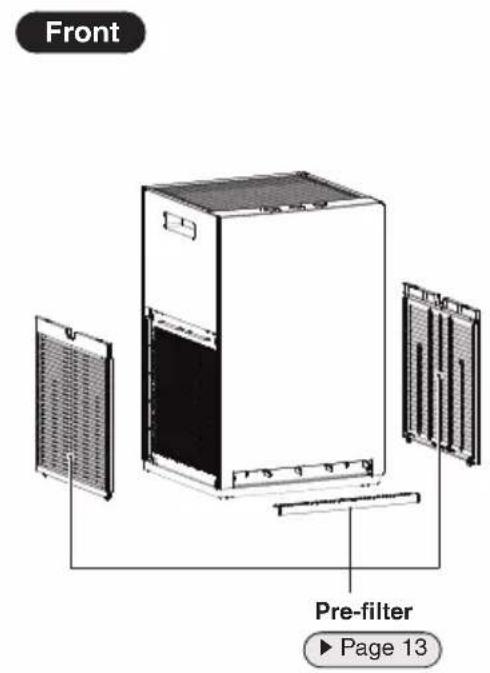
Names of Parts and Operations
![Operating/Indicator panel When a lamp is blinking ▶Page 16 ON-OFF lamp [blue] Lamp will light up when the power is ON. Streamer lamp [blue] Light up when the Streamer is active Child Proof Lock lamp [blue] Lamp will be light up when the Child Proof Lock active. FAN lamps [blue] Indicates the active…](/content/2026/04/650576/images/2bf0416a2453144cd74763b8ba2822292b52c57ef615afabf98debfdd240a39d.jpg)
① About the Child Proof Lock Lamp
- When Child Proof Lock is activated, operations will be restricted. When any button is pressed, a tone (3 short beeps) will sound, preventing misoperation by small children. ▶Page 11
② About the Streamer lamp
- The lamp lights up when the Streamer is operating. The Streamer operation is time controlled.
- If the hissing sound generated by the Streamer discharge or the smell of ozone bothers you, set Streamer output to low. ▶Page 12
Operating/Indicator panel
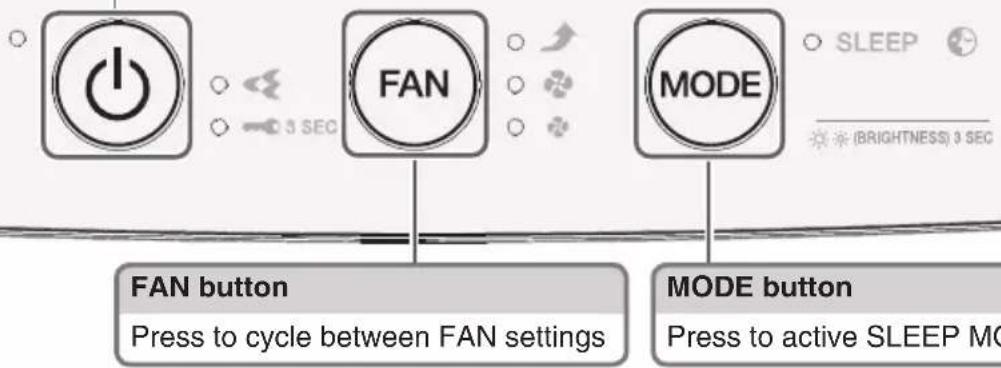
ON-OFF button
Press to turn the power ON or OFF
Accessories
Operation manual ... 1

Deodorising fi Iter ....1
Attach to the unit before operation.
Preparation Before Operation
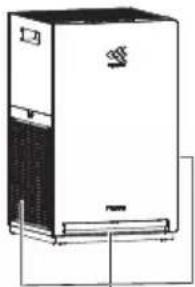
1 Positioning the unit
Before installation, peel off the tape fi xing the power supply cord to the bottom of the unit and draw out the power supply cord.
Power supply cord
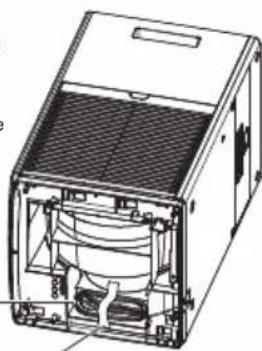
Tape (blue)

Pointers for good positioning
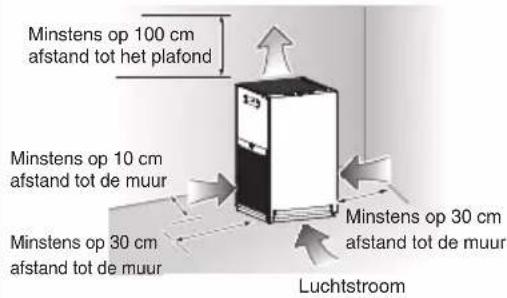
- Choose a position from where airflow can reach all areas of the room.
- Place on a stable surface. If the unit is placed on an unstable surface, vibrations from the unit may be amplified.
- If you find that interference from the power circuit inside the unit or cables caused interference on your TV screen or static noise to be emitted from nearby radios or stereos, move the unit to at least 2m away from the device. Keep cordless phones and radio-controlled clocks away from the unit also.
Attention
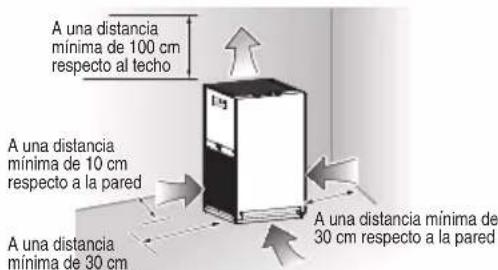
- To avoid staining of walls, position the unit in accordance with the positioning measurements in the illustration. However, note that since this unit draws in dirty air, certain types of wall may become stained even if the measurements are adhered to. In such cases, be sure to maintain sufficient distance between the unit and the wall.
- When used for a long period of time in the same location, the floor and surrounding walls may get stained as air is drawn into air inlets near the base of the unit. It is recommended to clean the unit periodically.
Preparation Before Operation
Do not use in the following places
■ Do not expose to direct sunlight.
(Discolouration may result)
- Do not position near combustion-based heating and other high temperature devices.
(Discolouration or deformation may result)
Do not expose to places where chemicals and pharmaceuticals are used such as hospitals, factories, laboratories, beauty salons, and photographic laboratories.
(Volatilised chemicals and solvents may degrade mechanical parts and lead to malfunction)
- Do not expose to high levels of electromagnetic waves such as near an electromagnetic cooker, speakers, etc.
The unit may not function correctly.
■ Do not expose to soot (conductive dust) released by candles, aromatic candles, etc.
The performance of the filters may be impaired, causing the room to become dirty due to the build-up of dust that is not captured.
- Do not use cosmetics etc., containing silicone* near the unit.
* Hair care products (split ends coating agents, hair mousse, hair treatment agents etc.), cosmetics, antiperspirants, antistatic agents, waterproof sprays, lustering agents, glass cleaners, chemical wiping cloths, wax, etc.
- If an insulator such as silicone adheres to the needle of the Streamer unit, the Streamer discharge may not be generated.
- The dust collection fi Iter may become clogged up resulting in reduced air purifying capacity.
- Do not use an ultrasonic humidifier or similar appliance near the unit.
The dust collection filter may become clogged up resulting in reduced air purifying capacity.

About Streamer discharge
In some cases the air outlet may emit a slight odour as trace amounts of ozone are generated. However, the amount is negligible and is not harmful to your health.
This product cannot eliminate the toxic substances in tobacco smoke (carbon monoxide etc.)
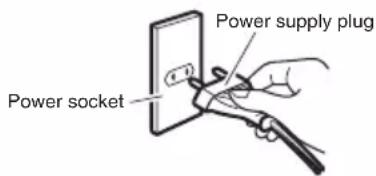
2 Insert the power supply plug into the socket
- Insert the power supply plug to ON the unit.
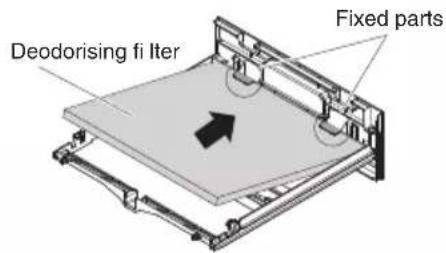
3 Attaching the deodorising filter

CAUTION
Carry out these steps before inserting the power supply plug.
1. Remove the deodorising filter unit from the main unit. ▶Page 14
Deodorising filter unit

Back side of the deodorising filter unit
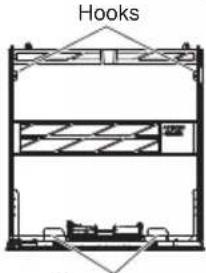
Fixed parts
2. Remove the deodorising filter from the bag.
As your hands may become dirty due to dust from the deodorising filter, be sure to wear gloves and wash your hand after the process.

3. Attach the deodorising filter.
① Set the deodorising filter under the fixed parts. (2 places)
② While spreading the protrusions on the hooks of the deodorising filter unit, push the deodorising filter in and set it under the hooks in 2 places to attach.
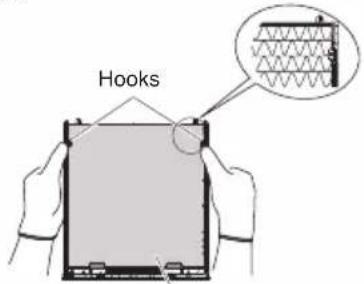
Deodorising fi Iter
(Back side of deodorising fi Iter unit)
③ Double check that the deodorising filter is set under the hooks.
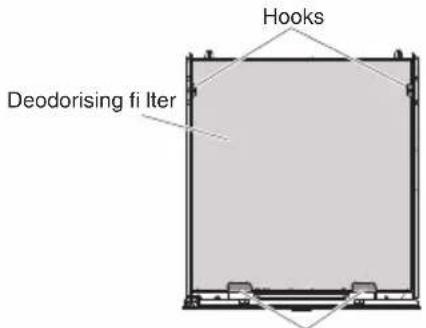
Fixed parts
(Back side of deodorising fi Iter unit)
4. Install the deodorising filter unit into the main unit. ▶ Page 14
- When starting operation, if the MODE lamp blinks, the deodorising filter is not properly attached.
- Observe local waste separation rules when disposing of the filter bag and desiccant.





Using the Air Purifying Operation (turning operation ON/OFF)
Cleans the air in the room.
Press

• ON-OFF lamp [blue] lights up.
- Press again to turn OFF.

Attention
- Do not move the unit, or attach or remove parts to/from the unit while it is in operation. Breakage or malfunctioning may result.
Note
- At the time of purchase, the unit is set to Turbo fan.
- When the unit is unplugged or turned OFF, it will operate with the settings last used the next time it is turned ON.
- Operation settings cannot be changed for about 2 seconds immediately after the power supply plug is inserted.
Changing the Airflow Rate
Select the desired FAN setting.

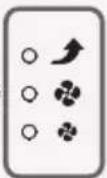
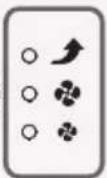
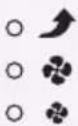
The symbols varies in accordance with the FAN setting.
Press

• Each press cycles between the FAN lamps [blue].
![graph LR A["(Quiet)"] --> B["(Standard)"] B --> C["(Turbo)"] style A fill:#f9f,stroke:#333 style B fill:#f9f,stroke:#333 style C fill:#ccf,stroke:#333](/content/2026/04/650576/images/a0087b210cc0007d9c340355b0e40aacec240161d2d5f662e321fb5cb70f329a.jpg)
About FAN settings

Quiet
A gentle breeze is emitted. To quickly eliminate odours from a room, it is recommended that the FAN be set to Standard or above, otherwise, deodorising capacity is reduced.

Turbo
The ambient air is quickly purified using maximum airflow. Recommended for use whilst you are cleaning up a room.
Useful Functions

Operating the Unit in a MODE
Select the MODE according to your needs.

• Each press will activate and deactivate SLEEP MODE [blue].
SLEEP
MODE Usage and Function
| SLEEP MODE | Provide a quieter and comfortable sleep experience. |
| 1 FAN setting will operates at Quiet fan to provide the less noise condition.2 FAN lamp and Streamer lamp will turn OFF.3 This mode will operates for 8 hours.4 After 8 hours, it will end automatically and switch back to the previous settings. |
Note
- Press (FAN) will terminate SLEEP MODE.
- When the SLEEP MODE is terminated, it will switch back to the previous fan speed.
Useful Functions

Using the Child Proof Lock
Button operation is restricted, preventing misoperation by small children.
Hold down

for about 3 seconds.
- Hold down ⏻ for about 3 seconds again to turn off Child Proof Lock.
- When Child Proof Lock is active, operations will be restricted. When any button is pressed, only a tone (3 short beeps) will sound, preventing misoperation by small children.
Note
- If the unit is unplugged when Child Proof Lock is active, Child Proof Lock will turned off.
- The Child Proof Lock lamp [blue] lights up when the function is active.
Adjusting Indicator Lamp Brightness
Indicator lamp brightness is adjustable.
Hold down MODE for about 3 seconds.
- Hold down MODE for about 3 seconds again to cycle between settings.

Note
- This function is useful if the lamps bothers you during sleep hours etc.
- The ON-OFF lamp does not turn off even if the brightness is set to OFF. This lamp will be set to DIM.
- If the FAN or MODE is pressed when brightness is set to OFF, brightness will change to DIM and return to OFF after about 10 seconds.
Advanced Settings

If the hissing sound generated by the Streamer discharge or the smell of ozone bothers you
*Setting at time of purchase
Streamer Output Settings
Regular* Low
Hold down and for about 3 seconds with the power supply plug inserted and the unit turned off.
• Each time ⏻ and MODE are held down for about 3 seconds, the setting switches between Regular and Low.
[When the setting is changed to Low]
A short beep sound and the Streamer lamp blinks for about 5 seconds.

Blinking
[When the setting is changed to Regular]
A short beep sound and the Streamer lamp lights up for about 5 seconds.

Lit up
■Operation status of Streamer
| FAN setting\Streamer output setting | Regular Low | ||
| FAN | Quiet | ON-OFF** | OFF |
| Standard ON-OFF** | |||
| Turbo ON ON | |||
**The Streamer operation status ON-OFF means that the Streamer turns ON and OFF depending on the time control.
Note
- It is recommended that the Streamer be set to Regular as deodorising capacity is reduced when set to Low.
- Settings are remembered even if the unit is unplugged.
Outflow grille
■ Cleaning the air outlet (When dirt becomes and issue)
Clean the air outlet with a soft brush.
* Exercise caution not to have dust fall inside the air purifi er.
* If covered in dust, wipe up dust with a soft damp cloth.
- Do not use a hard brush etc. (Breakage may result)

Unit
When dirt becomes an issue Wipe
- Wipe up dirt with a soft damp cloth.
- When dirt buildup is severe, wet a cloth with kitchen-use neutral detergent and wipe up the dirt.
- Do not use a hard brush etc. (Damage may result)
Pre-fi Iter(Front/Left-side/Right-side)
About every 2 weeks
Vacuum clean
Wash/Rinse

- After removing any dust using a vacuum cleaner, remove and wash the fi liter with water and then leave it in shade to dry off.
- Use a soft brush when cleaning the spaces in the grid.
Attention
- Do not use a cotton bud or hard brush etc. (Partial breakage of the filter may result)
- Do not apply heavy force. (Partial breakage/damage of the filter may result)
- When dirt buildup is severe, leave the part soaking in lukewarm or room temperature water mixed with kitchen-use neutral detergent, thoroughly rinse off the detergent and leave the part in shade to dry off.
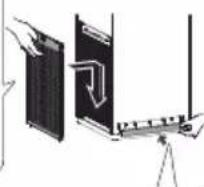
Removing
Grip the indent in the pre-fi iter and pull.
Grip the center of the pre-fi iter resting your thumb against the unit.
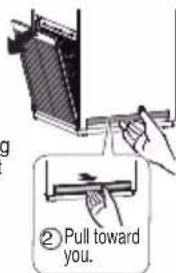
Attaching
Insert the hooks (2 places) into the unit and press until a catching sound is heard.

Reverse side
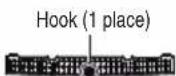
Insert the hook (1 place) into the unit. Push both ends until securely attached.
Viewed from above
Caution:
For removing the pre-fi iter (front), use 3 fi ngers to pull towards you to prevent unavoidable damage of fi iter mesh.


WARNING
- Do not use petrol, benzine, thinner, polishing compound, paraffin, alcohol, etc. (An electric shock, fi re, or cracking may result)
- Do not wash the main body of the unit with water. (An electric shock, fire, or malfunctioning/breakage may result)
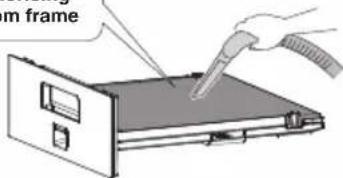
Deodorising fi Iter unit

When concerned about odours or dirt
Vacuum clean
Do not use water
- Remove from the unit together with the frame and remove dust using a vacuum cleaner.
- If odour becomes an issue, leave the part in a shaded, breezy area. (about 1 day)
- Do not scrub the surface.
- Do not use water when cleaning. (If water is used, the part will lose its shape and become unusable.) ▶ Page 17
Do not detach the deodorising fi Iter from frame
Removing
Hold the lever and grip of the deodourising filter unit and remove.

Attaching
Fully insert the deodorising filter unit.
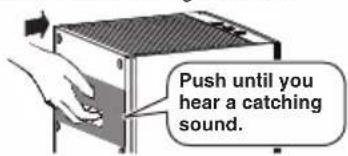
- If the deodorising filter unit is removed or incorrectly installed, the MODE lamp will blink.
Dust collection fi Iter

When concerned about dirt
Vacuum clean
Do not use water
- Remove dust on the fi liter from the face without tag using a vacuum cleaner. (Please be careful because the fi liter is easily damage.)
- If the fi liter is damaged or pores are enlarged, dust will pass through the fi liter and this caused the capacity for dust collection to be reduced.
About every 10 years
Replace
About part replacement timing
- Replacement timing depends on usage patterns and the location of the unit. If the unit is used daily in a home where 5 cigarettes are smoked a day, the fi liter should be replaced about every 10 years. (Calculation based on testing method of Japan Electrical Manufacturers Association JEM1467 standard.) If the impurity content of the ambient air is high, the fi liter will need more frequent replacement. If the fi liter is failing to perform, it is time to replace it.
About purchasing and disposal
• Refer to "Separately Sold Part".
▶ Page 15
Removing
① Remove the deodorising fi lter unit.
② Pull the tag upward.
③ Hold the lower part of the dust collection fi Iter and lift it out.
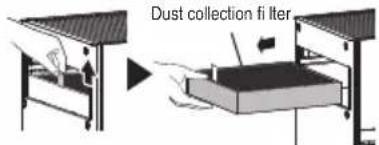
Attaching
① Install the new dust collection filter, being careful of the orientation.
Side with tag and markings should face outward and arrow should point up

② Attach the deodorising fi Iter unit.
Attention
- Make sure that the dust collection filter and deodorising filter unit are attached to the unit when the unit is operating. If these parts are not attached when the unit is operated, breakage/malfunctioning may result.
- Follow the advice below to prevent discolouration or deformation.
— If detergent was used, make sure to wipe it up thoroughly so none remains.
- If hot water is used, make sure that it is 40°C or less.
— Do not leave parts to dry in direct sunlight.
— Do not dry parts using a dryer.
- Do not apply fire to parts.
- If using a vacuum cleaner, make sure to not apply force to or knock the part. (Damage may result)
Separately Sold Part
Contact the place of purchase.
Replacement part
Dust collection fi Iter (1 piece)
Model: BAFP500A

- Replace about every 10 years.
- Failure to clean parts properly could result in:
- Reduced air purifying capacity.
- Reduced deodorising capacity.
- Emission of odours.
- Observe local waste separation rules when disposing of the dust collection filter (made of polyester and polypropylene).
■ Disposal requirements
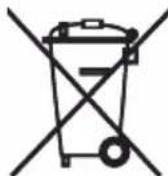
Your product and the batteries supplied with the controller are marked with this symbol. This symbol means that electrical and electronic products and batteries shall not be mixed with unsorted household waste.
For batteries, a chemical symbol can be printed beneath the symbol. This chemical symbol means that the battery contains a heavy metal above a certain concentration.
Possible chemical symbols are:
■Pb: lead (>0.004%)
■Hg: mercury (>0.0005%)
Disposal of this product must be done in accordance with relevant local and national legislation.
Units and waste batteries must be treated at a specialized treatment facility for re-use, recycling and recovery.
By ensuring correct disposal, you will help to prevent potential negative consequences for the environment and human health.
Please contact the installer or local authority for more information.
When Not Using the Unit for Long Time Periods
-
Remove the power supply plug.
-
Clean the parts. ▶ Page 13, 14
- In particular, components cleaned with water should be completely dry. (Mould may result from remaining moisture)
- Cover the air outlet and other openings with a plastic bag or similar to prevent dust entry, and store the unit upright in a dry place.
(Malfunctioning/breakage may result from storing the unit upside down or on its side)
Operating/Indicator panel
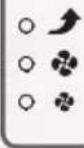
Check the indicator lamps and respond as indicated below.






○ SLEEP

(BRIGHTNESS) J SEC
| Indicator lamp Cause/Solution | ||
| MODE lamp is blinking.☀SLEEP ⬤ | This lamp blinks if the deodorising fi lter unit has been detached or is not attached properly.→Attach the deodorising fi lter unit properly. ►Page 14 | |
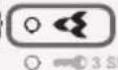
| Streamer lamp is blinking.☀◀ | It is time to replace the Streamer unit.→Contact the place to purchase. | |
| ON-OFF Lamp Blinking.☀️ | An electrical component is faulty.→Contact the place of purchase. | |
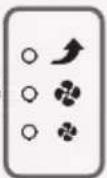
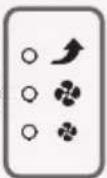
| All 3 FAN lamps are blinking simultaneously.☀️ ↗ | Are the pre-fi liters and dust collection fi lter attached?These lamps may blink if the unit is operated without a part attached | ■ If all parts are attachedAn electrical component is faulty.→ Contact the place of purchase. |
| ■ If one or more components are not attachedRemove the power supply plug, reattach the parts and then turn the unit on again. | ||
| Is there a buildup of dust on the pre-fi lter? | ■ If there is no dust buildupAn electrical component is faulty.→ Contact the place of purchase. | |
| ■ If there is a dust buildupRemove the power supply plug, clean the pre-fi lter and then turn the unit on again. ►Page 13 | ||
| Is the air outlet blocked? | ■ If the air outlet is not blockedAn electrical component is faulty.→ Contact the place of purchase. | |
| ■ If the air outlet is blockedRemove any obstacles blocking the air outlet and then turn the unit on again. | ||
| These lamps may blink if there is a sudden drop in voltage. | ||
| If none of the conditions above occurs,→ Contact the place of purchase. It is recommended to unplug the unit until the service agent is arrive. | ||
Please check the following before contacting us.
Q: Can the dust collection fi Iter be cleaned?
A: If dirt buildup is severe, please clean with a vacuum cleaner or replace it.
Do not attempt to clean it with water, as this may result
in reduced performance of dust collection fi Iter.
▶ Page 14

Q: The dust collection fi Iter easily turns black...
A: The blackening does not affect dust collection performance.
However, it can be replaced if it is an issue.
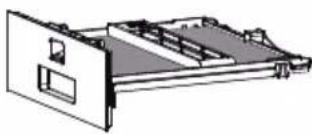
Q: Can the deodorising filter be cleaned with water? Or should it be replaced?
A: It cannot be cleaned with water.
(If water is used, the part will lose its shape and become unusable.)
If you have inadvertently washed it with water, consult the place of purchase.
Remove the deodorising filter unit from the main body and vacuum off dust with a vacuum cleaner.
It is not necessary to replace the fi Iter.
If odour becomes an issue, leave the part in a shaded, breezy area. (about 1 day)
▶ Page 14
Troubleshooting
■Before making an inquiry or a request for repair, please check the following.
If the problem persists, contact the place of purchase.
In the event of malfunction during operation
If the indicator lamps light up abnormally, or become inoperable, due to a lightning strike etc., remove the power supply plug, wait at least 5 seconds then reinsert the power supply plug and turn the unit on again.

Not a problem
This case is not a problem.

Check
Please check again before requesting repairs.
■Unit does not respond
| Phenomenon Check points | |
| No response even if [IMAGE] is pressed | To protect the system, the unit may stop operating after sudden large voltage fl ectuations.If operating at the time, operation will resume automatically once voltage returns to normal.Voltage range protection: 198V-264V |
■Sounds can be heard
| Phenomenon Check points | |
| Hissing sound during operation | While the Streamer is operating, the Streamer unit will emit a hissing sound when conducting Streamer discharge.Depending on usage, the sound may fall in volume or change to a crackling, whirring, or guzzling sound. However, this is normal.If the sounds are an issue, try moving the unit to a different location. ▶Page 12 |
| Whistling and fl uttering sound during operation | Is there a buildup of dust on the pre-fi Iters?→Clean this part. ▶Page 13Is the dust collection fi Iter clogged up?→Depending on usage conditions, the dust collection fi Iter may become clogged up, shortening its service life.▶Page 7Replace the dust collection fi Iter. ▶Page 14 |
| Operating sound is loud | Is the dust collection fi Iter attached properly?→If it is not properly attached, operating sounds may become louder. ▶Page 14 |
■Indicator lamps
| Phenomenon Check points | |
| Indicator lamps do not light upIndicator lamps turn off about 10 seconds after the unit is turned on | Is indicator lamp brightness set to OFF?→If indicator lamp brightness is set to OFF, all lamps except the ON-OFF lamp will remain off.→If indicator lamp brightness is set to OFF, after the unit is turned on, the brightness of the indicator lamps will be DIM for about 10 seconds and then turn OFF. ▶Page 11 |
Troubleshooting
| Phenomenon Check points | |
All the FAN lamps are blinking together.   | Are the pre-filters and dust collection filter attached?These lamps may blink if the unit is operated without a part attached.[If one or more parts are not attached]→ Remove the power supply plug, reattach the parts and then turn the unit on again.[If all parts are attached]An electrical component is faulty.→ Contact the place of purchase.Is there a buildup of dust on the pre-fi Iters?[If there is a dust buildup] ▶Page 13→ Remove the power supply plug, clean the pre-fi Iters and then turn the unit on again.[If there is no dust buildup]An electrical component is faulty.→ Contact the place of purchase.Is the air outlet blocked?[If the air outlet is blocked]→ Remove any obstacles blocking the air outlet and then turn the unit on again.[If the air outlet is not blocked]An electrical component is faulty.→ Contact the place of purchase. |
| The lamps may blink if there is a sudden voltage fluctuation.The lamps will return to their previous condition once voltage returns to normal.Voltage range protection: 198V – 264V. | |
| If none of the conditions above occurs,→ Contact the place of purchase. It is recommended to unplug the unit until the service agent is arrive. | |
| Sometimes the Streamer lamp does not light up | The Streamer may stop operation depending on the time control.Streamer lamp turns off when the Streamer stop operating. |
| The Streamer lamp blinks | Streamer is recommended to be replaced.→ Contact the place of purchase. |
| The MODE lamp blinks | Is the deodorising fi Iter unit attached?→ Attach the deodorising fi Iter unit. ▶Page 14 |
■ Air purifying function
| Phenomenon Check points | |
| Air purifying capacity is reduced | Is the unit positioned in a place where airfl ow cannot reach or surrounded by obstacles?Choose a position that is obstacle-free and from where airfl ow can reach all areas of the room.Is the pre-filters or dust collection filter dirty?→Clean these parts. ▶Page 13, 14 |
| The air outlet is emitting an odour | Is the deodorising fi lter dirty?→Clean these parts. ▶Page 14In some cases the air outlet may emit a slight odour as trace amounts of ozone are generated. However, the amount is negligible and is not harmful to your health.Is the room fi lled with odours due to cooking or several people smoking together etc?→The odour will gradually fade as the unit operates.Have you moved the unit from another room?→The unit may emit the odour of the room in which it was used previously. Let the unit run a while longer.Is there anything in the room that is giving off an odour continuously?(Paint, new furniture, wallpaper, sprays, cosmetics, chemicals)→As continuously emitted odours cannot be completely eliminated, you should ventilate the room at the same time or run the unit in a well-ventilated room for a short while. |
| No air is being emitted | Is the air outlet or an air inlet blocked?If they are not blocked, the fan motor is faulty.→Contact the place of purchase. |
Other
| Phenomenon Check points | |
| The fan stops midway through unit operation | Are the pre-filters and dust collection filter attached before the unit is operated?The fan is confi gured to stop in order to protect electrical components if a part is not properly attached.If a part is not attached, unplug the unit and attach all parts before turning the unit on again. |
| The sound of Streamer discharge can no longer be heard | Streamer operation is dependent on time control.Page 12 |
| There is interference on our TV screen | Is the TV or radio positioned within 2m of the unit, or is an indoor antenna positioned near the unit?Are the power supply cord or antenna cable of the TV or radio routed near the unit?Keep the unit as far as possible from the TV, radio, or antenna. |
| Just inserting the power plug causes operation to start | Did you disconnect the power plug during a power failure, or when a sudden voltage fl ectuation occurred, to move the unit or disconnect the power plug during the last operation?The auto-restart function automatically resumes operation. |
Specifications
| Model name MC30YVM | |||
| Power supply 1Ph, 220-240/220-230V, 50/60 Hz | |||
| Operation mode | Air Purifying | ||
| Turbo Standard Quiet | |||
| Power consumption (W) 25 15 8 | |||
| Operating sound (dB) 37 27 19 | |||
| Airflow rate (m3/h) 180 120 60 | |||
| Coverage area (m2) | 23*146*2 | ||
| CADR (m3/h) 180 | *3 | ||
| Unit dimensions (mm) | 450(H) x 270(W) x 270(D) | ||
| Weight (kg) | 5.8 | ||
| Power supply cord length (m) | 1.8 | ||
Made in Malaysia
- These specification values are applicable to both 50Hz 220–240V and 60Hz 220–230V.
- This appliance is designed to be used in residential or commercial areas.
- A-weighted emission sound pressure level is below 70 dB (A).
*1. Coverage area was calculated in accordance with JEM1467. (when FAN setting is "Turbo")
*2. Coverage area was calculated in accordance with NRCC-54013 standard using cigarette smoke CADR that was tested according to JEM1467. (when FAN setting is “Turbo”)
*3. CADR value was tested accordance to JEM 1467 Appendix C.
Inhalt
Achtung




○ SLEEP

(BRIGHTNESS) J SEC
Störungssuche
Attention
Crochets (1 emplacement)

Vue de dessus
Avertissement :



○ SLEEP

(BRIGHTNESS) J SEC
Voyant Lumineux Cause/Solution
WAARSCHUWING OPGELET

Lamp AAN-UIT [blauw]
FAN
![DAIKIN MC30YVM - Lamp AAN-UIT [blauw] - 1](/content/2026/04/650576/images/23704835b44ece3a78cdb9342e6932d35e766829edb423a9044c7013c8812dac.jpg)
MODE
![DAIKIN MC30YVM - Lamp AAN-UIT [blauw] - 2](/content/2026/04/650576/images/b4b96dc034a78fcfee455c4c00e0f6252ea2ae609b7598b3204b09b72330886d.jpg)
Lamp Kinderbeveiliging [blauw]
Geurfi Iter ....1
Aandacht
Verwijderen
② Bevestig de geurfi ltereenheid correct.
Aandacht
- Cover the air outlet and other openings with a plastic bag or similar to prevent dust entry, and store the unit upright in a dry place.


3 SEC

Indicatorlamp Oorzaak/oplossing
▶Pagina 14
Problemen oplossen
Cinta (azul)
Atención
Extracción
Atención





○ SLEEP

(BRIGHTNESS) 8 SEC
Página 14
Filtro deodorante ....1
Nastro (azzurro)

Precauzione
Fissaggio


○ SLEEP

(BRIGHTNESS) 3 SEC

Αφαιρεση



○ SLEEP

(BRIGHTNESS) 3 SEC
▶ Σελίδα 14
Filtr do usuwania zapachów ...1
Uwaga




○ SLEEP

(BRIGHTNESS) J SEC
Внимание




○ SLEEP

(BRIGHTNESS) 3 SEC
▶Стр. 14
FAN
MODE
○ SLEEP

(BRIGHTNESS) 3 SEC
Koku giderici fi ltre .....1

Dikkat




○ SLEEP

(BRIGHTNESS) 3 SEC
▶ Sayfa 14
Sorun giderme
FAN


MODE
○ SLEEP

(BRIGHTNESS) 3 SEC
Fita adesiva (azul)

Pré-fi Itro
Peças fi xas
Atenção





○ SLEEP

(BRIGHTNESS) J SEC
Página 14
- In the event that there is any conflict in the interpretation of this manual and any translation of the same in any language, the English version of this manual shall prevail.
- The manufacturer reserves the right to revise any of the specification and design contain herein at any time without prior notification.
- All images are for illustration purposes only.
DAIKIN MALAYSIA SDN. BHD.
Lot 60334, Persiaran Bukit Rahman Putra 3, Taman Perindustrian Bukit Rahman Putra, 47000 Sungai Buloh, Selangor Darul Ehsan, Malaysia.
DAIKIN EUROPE N.V.
For manufacturing use only
3P664949-7
- AIR PURIFI ER OPERATION MANUAL
- CONTENTS
- READ FIRST
- OPERATION
- USEFUL FUNCTIONS
- ADVANCED SETTINGS
- MAINTENANCE
- TROUBLESHOOTING
- SAFETY PRECAUTIONS
- ARNING
- OBSERVE IN ORDER TO PREVENT FI RE, ELECTRIC SHOCKS OR SEVERE INJURY
- CAUTION OBSERVE IN ORDER TO PREVENT SHORT CIRCUITING, INJURY OR PROPERTY DAMAGE
- DURING USE
- CONCERNING THE UNIT BODY
- WHEN MOVING THE UNIT
- PRECAUTION DURING USE
- OTHER CONSIDERATION
- NAMES OF PARTS AND OPERATIONS
- CAUTION
- ① ABOUT THE CHILD PROOF LOCK LAMP
- ② ABOUT THE STREAMER LAMP
- OPERATING/INDICATOR PANEL
- ON-OFF BUTTON
- ACCESSORIES
- PREPARATION BEFORE OPERATION
- 1 POSITIONING THE UNIT
- POINTERS FOR GOOD POSITIONING
- ATTENTION
- DO NOT USE IN THE FOLLOWING PLACES
- ABOUT STREAMER DISCHARGE
- 2 INSERT THE POWER SUPPLY PLUG INTO THE SOCKET
- 3 ATTACHING THE DEODORISING FILTER
- REMOVE THE DEODORISING FILTER UNIT FROM THE MAIN UNIT. ▶PAGE 14
- REMOVE THE DEODORISING FILTER FROM THE BAG
- ATTACH THE DEODORISING FILTER
- INSTALL THE DEODORISING FILTER UNIT INTO THE MAIN UNIT. ▶ PAGE 14
- USING THE AIR PURIFYING OPERATION (TURNING OPERATION ON/OFF)
- PRESS
- NOTE
- CHANGING THE AIRFLOW RATE
- ABOUT FAN SETTINGS
- OPERATING THE UNIT IN A MODE
- USING THE CHILD PROOF LOCK
- HOLD DOWN
- ADJUSTING INDICATOR LAMP BRIGHTNESS
- STREAMER OUTPUT SETTINGS
- OUTFLOW GRILLE
- CLEANING THE AIR OUTLET (WHEN DIRT BECOMES AND ISSUE)
- UNIT
- WHEN DIRT BECOMES AN ISSUE WIPE
- PRE-FI ITER(FRONT/LEFT-SIDE/RIGHT-SIDE)
- ABOUT EVERY 2 WEEKS
- REMOVING
- ATTACHING
- WARNING
- DEODORISING FI ITER UNIT
- WHEN CONCERNED ABOUT ODOURS OR DIRT
- VACUUM CLEAN
- DUST COLLECTION FI ITER
- WHEN CONCERNED ABOUT DIRT
- ABOUT EVERY 10 YEARS
- ABOUT PART REPLACEMENT TIMING
- ABOUT PURCHASING AND DISPOSAL
- SEPARATELY SOLD PART
- REPLACEMENT PART
- DISPOSAL REQUIREMENTS
- WHEN NOT USING THE UNIT FOR LONG TIME PERIODS
- Q: CAN THE DUST COLLECTION FI ITER BE CLEANED
- Q: THE DUST COLLECTION FI ITER EASILY TURNS BLACK
- Q: CAN THE DEODORISING FILTER BE CLEANED WITH WATER? OR SHOULD IT BE REPLACED
- NOT A PROBLEM
- CHECK
- SPECIFICATIONS
- INHALT
- ACHTUNG
- STÖRUNGSSUCHE
- WAARSCHUWING OPGELET
- LAMP AAN-UIT [BLAUW]
- LAMP KINDERBEVEILIGING [BLAUW]
- AANDACHT
- VERWIJDEREN
- PROBLEMEN OPLOSSEN
- ATENCIÓN
- EXTRACCIÓN
- PRECAUZIONE
- FISSAGGIO
- ΑΦΑΙΡΕΣΗ
- UWAGA
- ВНИМАНИЕ
- DIKKAT
- SORUN GIDERME
- ATENÇÃO
- DAIKIN MALAYSIA SDN. BHD
- DAIKIN EUROPE N.V
Brand : DAIKIN
Model : MC30YVM
Category : Air purifier