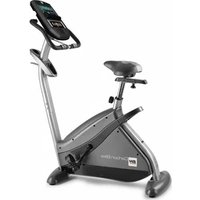
Carbon Bike TFT H8705TFT - Exercise bike BH FITNESS - Free user manual and instructions
Find the device manual for free Carbon Bike TFT H8705TFT BH FITNESS in PDF.


User questions about Carbon Bike TFT H8705TFT BH FITNESS
0 question about this device. Answer the ones you know or ask your own.
Ask a new question about this device
Download the instructions for your Exercise bike in PDF format for free! Find your manual Carbon Bike TFT H8705TFT - BH FITNESS and take your electronic device back in hand. On this page are published all the documents necessary for the use of your device. Carbon Bike TFT H8705TFT by BH FITNESS.
USER MANUAL Carbon Bike TFT H8705TFT BH FITNESS
natural_image
Line drawing of a stationary exercise bike with a mounted headplate and side-mounted legs (no text or symbols)Instrucciones de montaje y utilización Instructions for assembly and use Instructions de montage et utilisation Montage und gebrauchsanleitung Instruções de montagem e utilização Istruzioni di montaggio e uso Montage-en gebruiksinstrukties
Fig 1
text_image
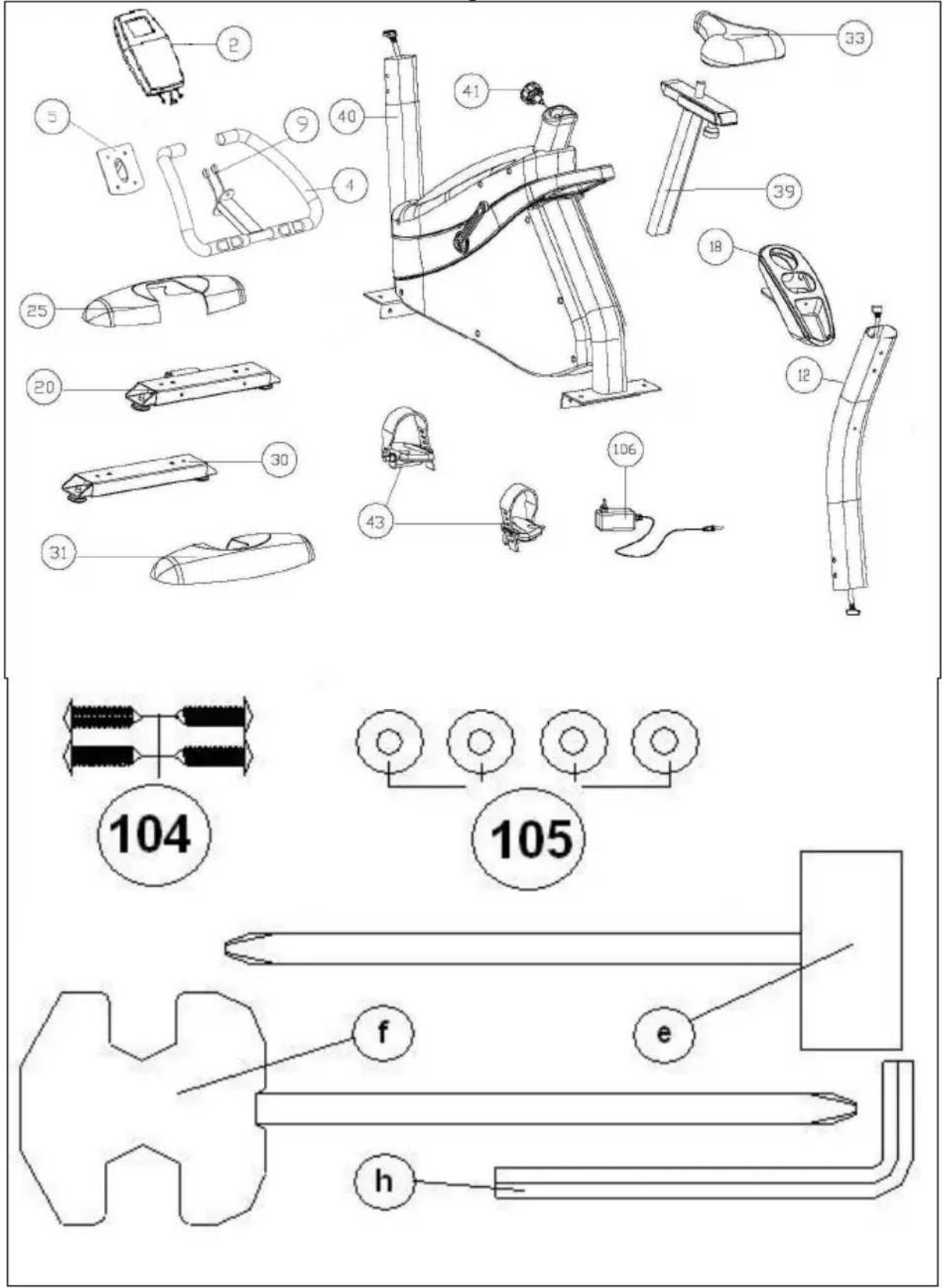
Technical diagram of a mechanical device with numbered parts and labeled parts (104, 105)Fig 2
text_image
25 26 27 20 104 40 BHFig 3
text_image
BEH 40 26 27 30 105 104 31Fig 4
text_image
43-L 43-R 40Fig 5
text_image
Technical diagram of a stationary exercise machine with numbered components and an inset showing internal wiring connections.Fig 6
text_image
Technical diagram showing a mechanical component with numbered parts and an arrow indicating assembly or transformation.Fig 7
text_image
Technical diagram showing mechanical assembly steps with numbered components and directional arrows indicating motion or movement.Fig 8
text_image
Technical diagram illustrating the assembly of a stationary exercise machine with numbered components and exploded views.Fig 9
natural_image
Technical diagram of a mechanical device with rotational arrows indicating motion (no text or symbols)Fig 10
natural_image
Line drawing of a mechanical device with a hand holding a clamp, no text or symbols presentFig 11
text_image
BH k m 106Español
AVISO IMPORTANTE DE SEGURIDAD PRECAUCIONES
This bicycle has been designed and constructed to provide maximum safety. Nevertheless, certain precautions should be taken when using exercise equipment.
Read the whole manual before assembling and using the bicycle. It provides you with important information about assembly, safety and use of the machine.
The following safety precautions should also be observed:
1 Keep children away from this equipment at all times. DO NOT leave them unsupervised in the room where this bicycle is kept.
2 It can only be used by one person at a time.
3 If you experience dizziness, nausea, chest pains or any other symptom while using this appliance STOP the exercise. SEEK MEDICAL ATTENTION IMMEDIATELY
4 Use the appliance on a level, solid surface. DO NOT use the bicycle outdoors or close to water.
5 Keep your hands well away from any of the moving parts.
6 Wear clothing suitable for doing exercise. Do not use baggy clothing that might get caught up in the bicycle. Always wear running shoes or trainers when using the machine. Make sure all laces/cords are tied correctly
7 This appliance must only be used for the purposes described in this manual. DO NOT use accessories that are not recommended by the manufacturer.
8 Do not place sharp objects near the machine.
9 Disabled people should not use the machine without the assistance of a qualified person or a doctor.
10 Do warm up stretching exercises before using the equipment.
11 Do not use the bicycle if it is not working correctly.
Caution: Consult your doctor before beginning to use the bicycle. This advice is especially important for those over 35 or suffering from health problems.
Keep these instructions safe for future use.
GENERAL INSTRUCTIONS
1 This appliance has been tested and it complies with standard EN957 under class H.B., suitable for semi-professional use User maximum weight 120kg. Braking is independent of speed.
2 Parents and/or those responsible for children should always take their curious nature into account and how this can often lead to hazardous situations and behaviour resulting in accidents. Under no circumstances should this appliance be used as a toy.
3 The owner is responsible for ensuring that anyone who uses the machine is duly informed about the necessary precautions.
1. ASSEMBLY INSTRUCTIONS The assistance of a second person is advisable for the assembly work.
Take the unit out of its box and make sure that all of the pieces are there: (40) Main body; (12) handlebar stem; (20) Stabiliser bar with wheels; (30) Stabiliser bar with adjustable blocks; (2) Monitor with handlebar (4); (25) and (31) Saddle post covers; (33) Saddle; (43L) Left pedal; (43R) Right pedal; (41) Saddle height adjustment knob; (106) Mains transformer; Bag of screws containing: (104) Self tapping screw ST4.0x14; (105) Flatwashers M4x16; (e) Double ended spanner; (f) Box spanner with screwdriver; Allen key 6 mm.
2. FITTING THE STABILISER BARS
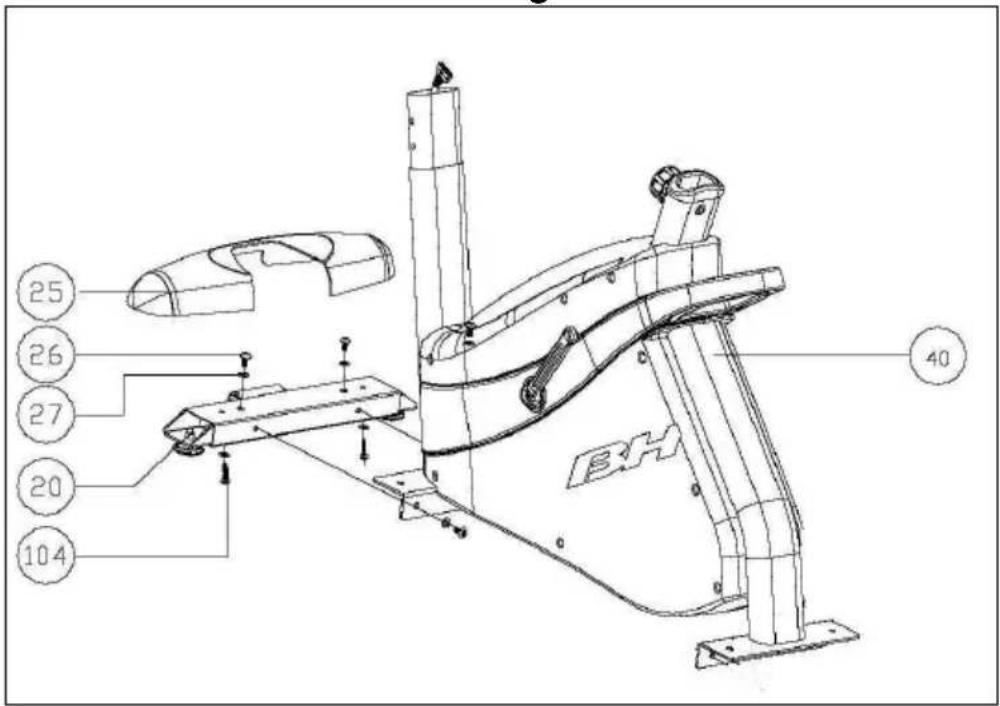
Rest the main body on a wad of packaging, as shown in figure 2 (this will help with the assembly work). Take hold of the front stabiliser bar fitted with wheels (20).
Remove the bolts (12) and their nuts and washers. Now line up the two red dots, as shown in figure 2, and refit the bolts (12), nuts and washers. Tighten securely.
Next, take the finish trim piece for stabiliser (25) and rest it on the stabiliser bar with wheels (20) that you have just assembled. Attach the trim to the bottom using the plastic threaded screws (104) and flat washers (105).
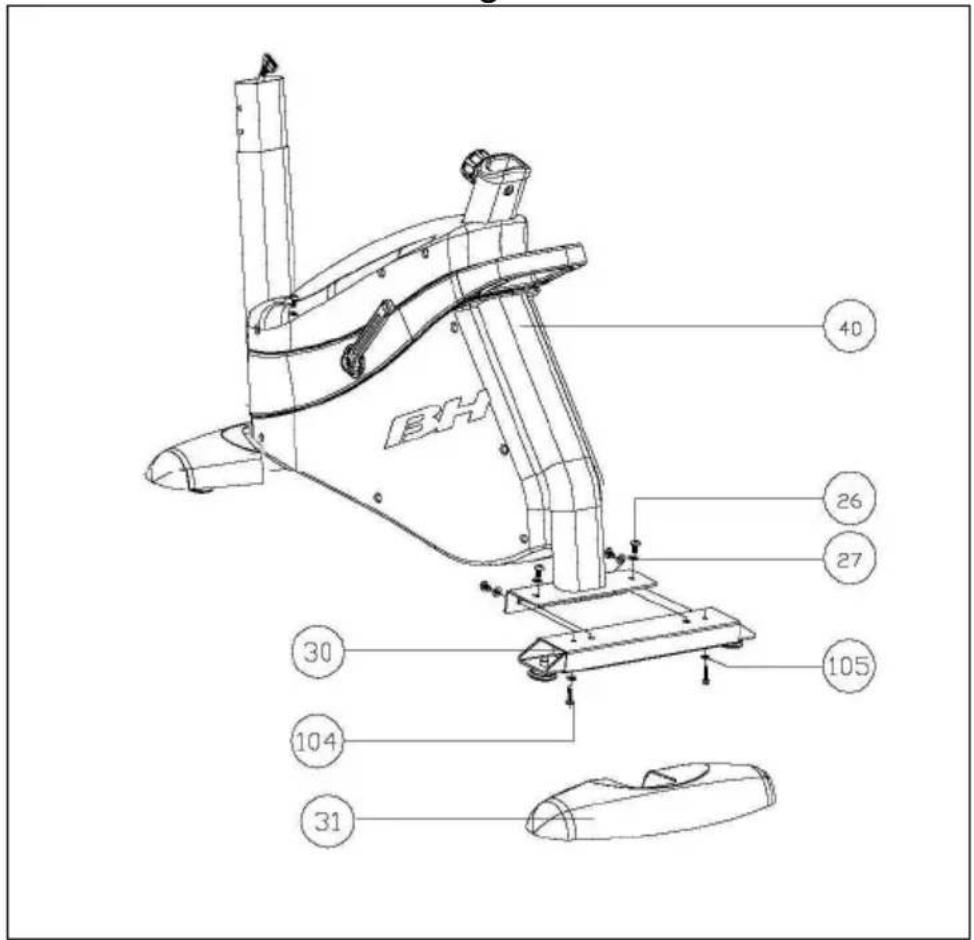
Next, rest the main body on a wad of packaging material (this makes assembly easier). Take the rear stabiliser with adjustable feet (30) and position it on the machine's rear stand, insert the bolts (12) with the flat washers and nuts, tighten securely.
Then take the finish trim piece for stabiliser (25) and rest it on the stabiliser bar with wheels (20) that you have just assembled. Attach the trim to the bottom using the plastic threaded screws (104) and flat washers (105), figure 3.
3. ATTACHING THE PEDALS
The assembly instructions for the pedals must be followed to the letter, fitting these incorrectly could damage the screw thread on the pedal or the crank. Right and left refer to the position that the user adopts when sitting on the saddle to do the exercises.
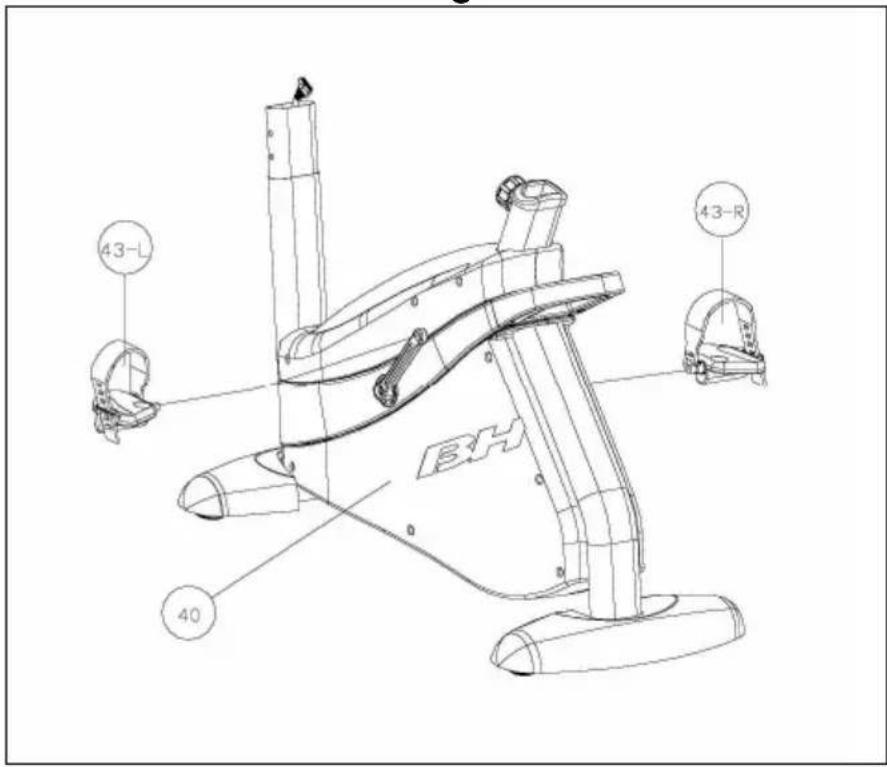
The right-hand pedal, marked with the letter (43R), screws onto the right-hand crank (44R), also marked with an (43R), in a clockwise direction. Tighten securely, figure 4.
The left-hand pedal, marked with the letter (43L), screws onto the left-hand crank, also marked with an (43L), in an anti-clockwise direction. Tighten securely figure 4.
4. FITTING THE HANDLEBAR STEM
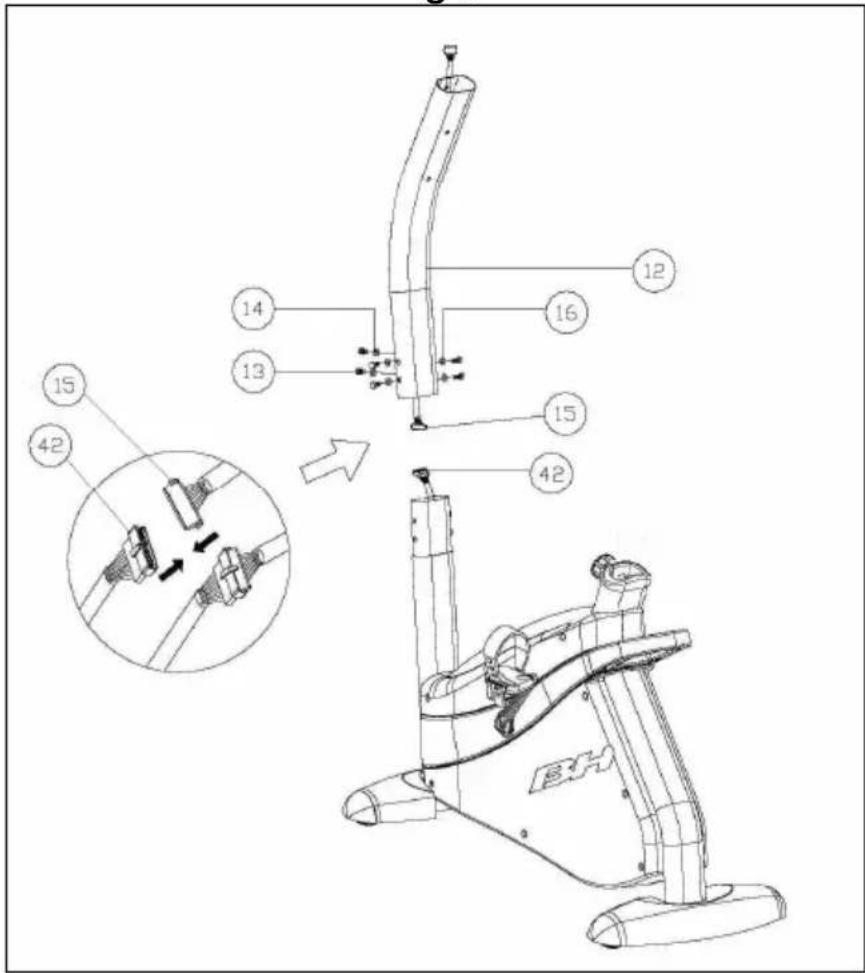
Connect the two terminals (15 and 42) figure 5, coming out of the handlebar stem (12) and the main body (40).
Insert the handlebar stem (12) onto the boss on the main body (40) taking care not to pinch the cables.
Fit the bolts (40) and flat washers, as shown in figure 5, align the handlebar stem and hand tighten.
5. FITTING THE BOTTLE HOLDER
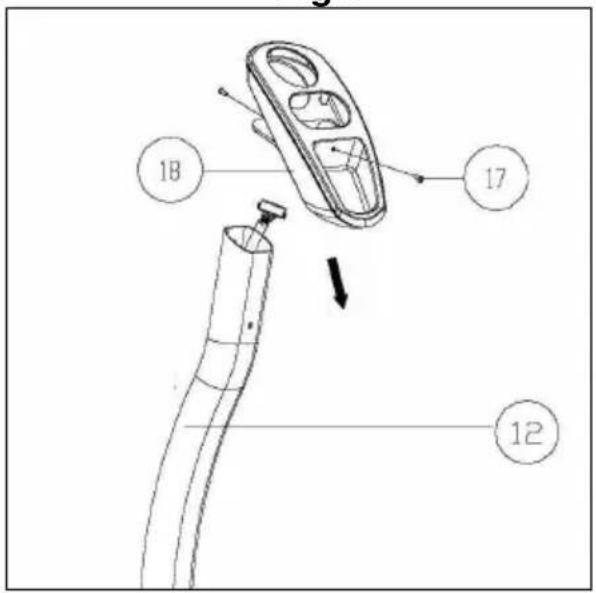
Take the bottle holder (18), insert it in through the top of the handlebar (12), Fig. 6.
Next, release the screws (17) on the handlebar (12), position the bottle holder and secure it by using the screws (17) removed previously.
6. INSTRUCTIONS FOR FITTING THE SADDLE
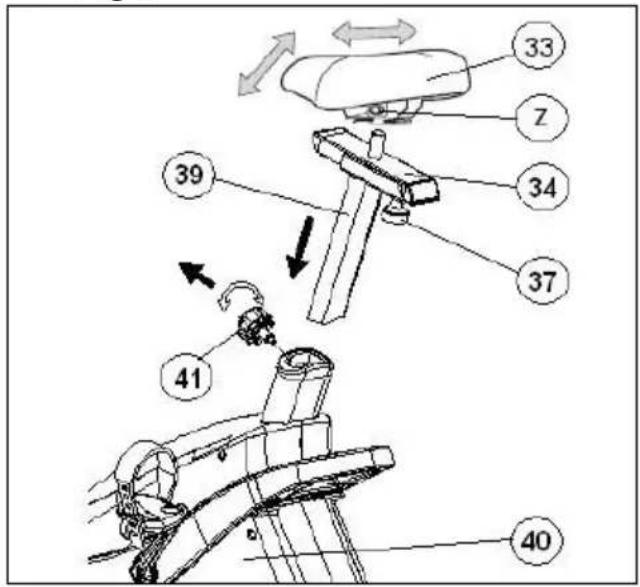
In order to raise or lower the saddle post (39), figure 7, first loosen off the control knob (41) on the saddle post a little by turning it in an anticlockwise direction.
Pull the control knob back and without releasing it, move the saddle post up or down. Next, take the horizontal tube for the saddle (18) and attach the saddle (33) to it, figure 7, tighten the nuts (Z).
VERTICAL ADJUSTMENT.
In order to raise or lower the saddle post, first loosen off the control knob (41) on the saddle post a little by turning it in an anticlockwise direction, pull the control knob back and without releasing it, move the saddle post up or down, figure 7. When it is at the right height release the knob and it will lock into a hole on the saddle post. Tighten it up by turning the control knob (41) in a clockwise direction.
HORIZONTAL ADJUSTMENT.
To adjust the saddle's horizontal position, loosen the control knob (37) on the saddle's horizontal bar and move the saddle, along with the bar, into the desired position, then tighten the control knob securely, figure 7.
TILTING THE SADDLE.
The saddle can be tilted backward or forward. Loosen off nut (Z) shown in figure 7, located under the saddle, tilt the saddle into the desired position and then retighten the nut securely.
Do not adjust the tilt of the saddle while you are still sitting on it.
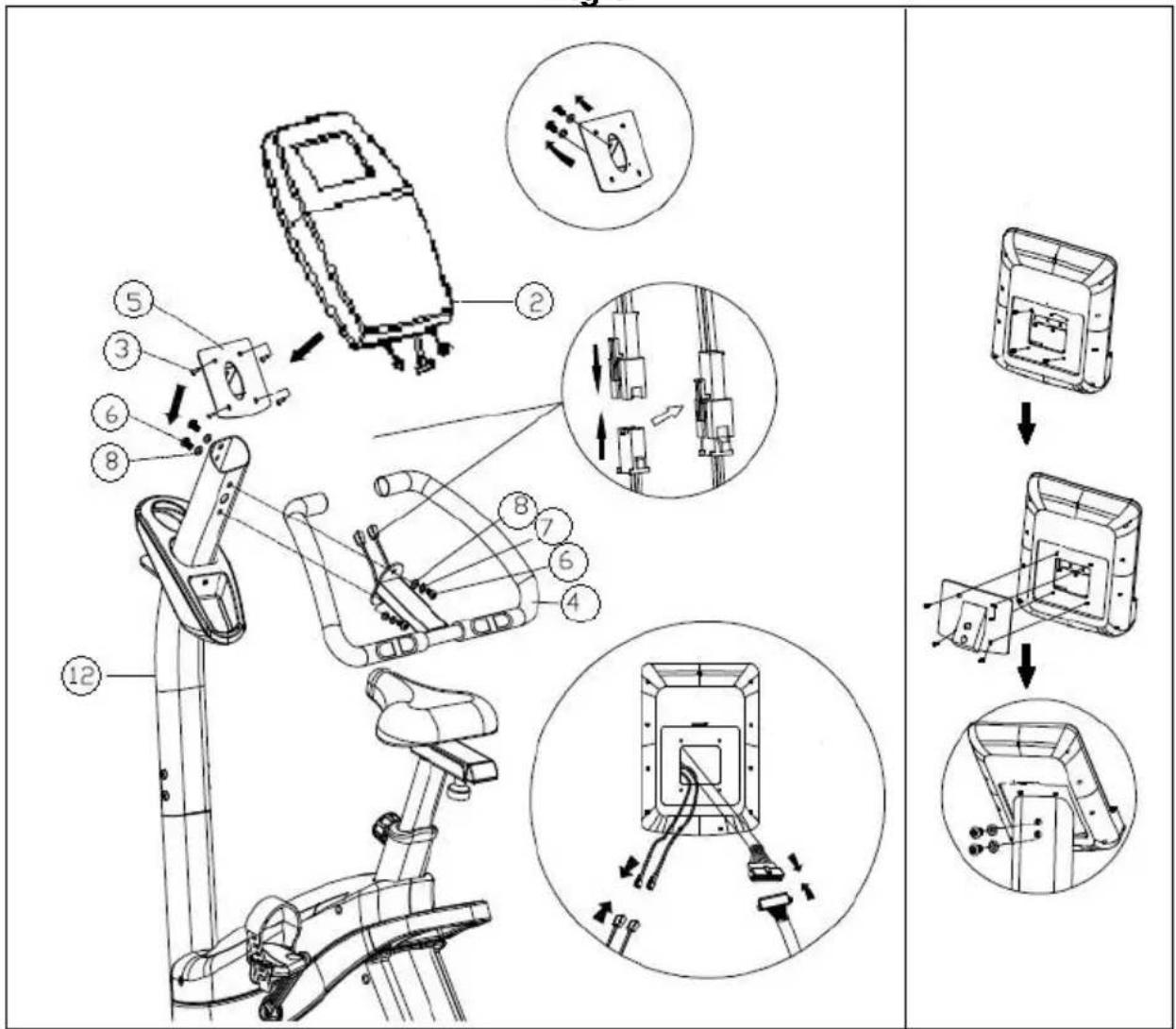
7 FITTING THE HANDLEBAR.-
Line the handlebar (4) up with the lower holes on the main post (12), passing the hand-grip cables through the inside of the holder in the direction indicated by the arrow, as shown in Fig.8, and pulling them out through the upper hole of the post. Next, take screw (6) and flat washer (7) (8), loosened previously and screw them onto the bottom of the handlebar (4).
8. FITTING THE MONITOR
Release screws (3), Fig.8, at the back of the monitor.
Next, slide the front of the monitor onto the plate (5) in the direction of the arrow, Fig.8, push the cables down into the main post making sure not the pinch any of the cables.
Replace the screws (3) removed previously.
Bring the monitor (2) to the handlebar stem (12) figure 8, connect the two terminals coming out of the handlebar stem (12) and the monitor (2), figure 8. Insert the monitor (2) onto the handlebar stem (12), as shown in figure 8, making sure not to pinch any of the cables. Fit the bolts (6) along with the flat washers, making sure that the handlebar is aligned correctly, securely tighten all of the bolts on the handlebar stem including the bolts at the base which were left hand tight in point 4.
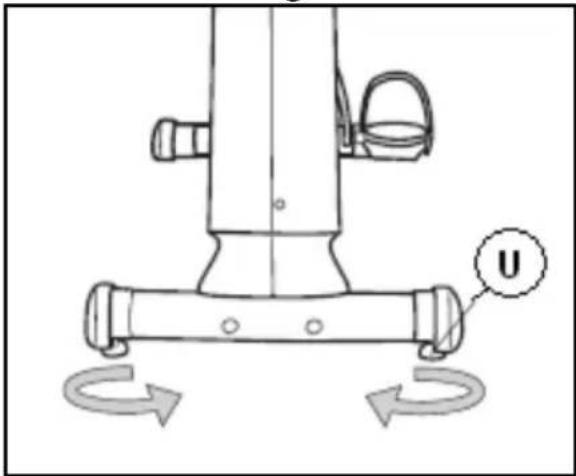
LEVELLING
Once the unit has been placed into its final position, make sure that it sits flat on the floor and that it is level. This is achieved by screwing the adjustable foot (U) up or down, figure 9.
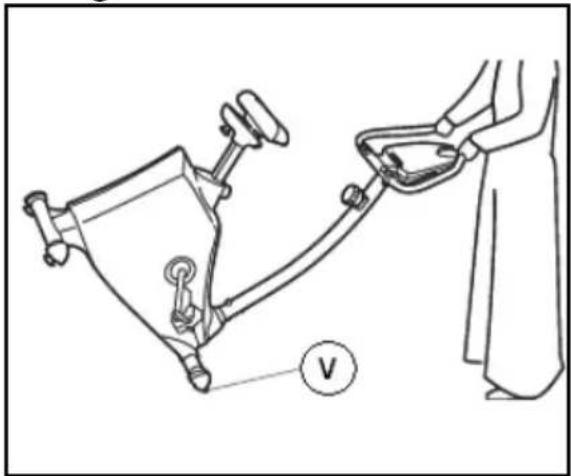
MOVEMENT & STORAGE.
The unit is equipped with wheels (V) to make it easier to move about. The two wheels at the front of the unit make it easier to place the unit in any chosen position, as shown in the figure 10. Store it in a dry place, preferably not subject to changes in temperature.
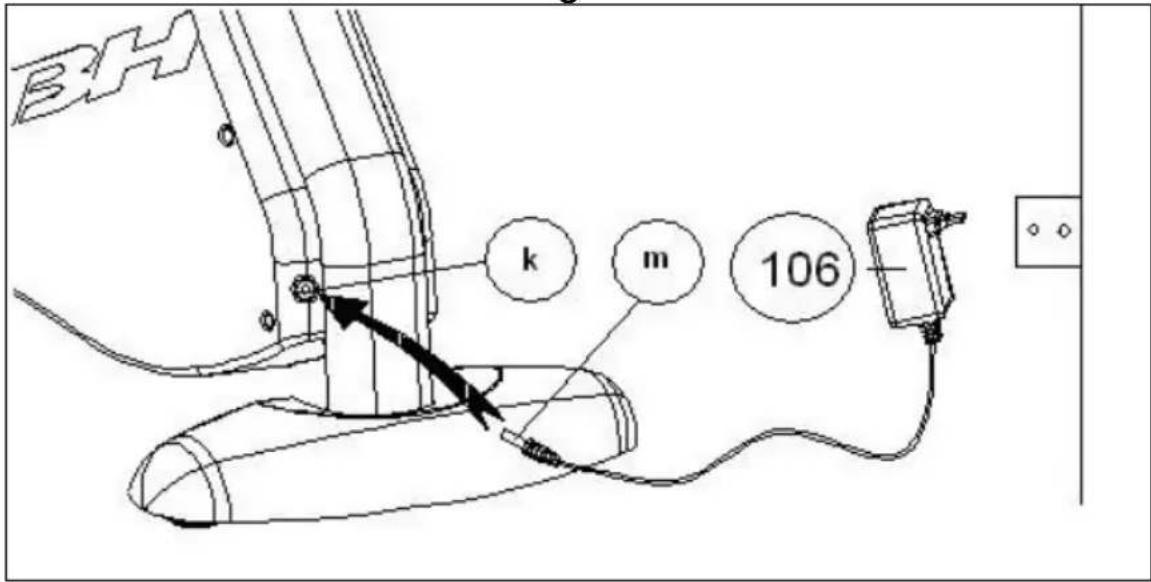
MAINS CONNECTION
Insert the jack (m) on the transformer (106) into the connection hole (k) on the main body (40) (bottom, rear of the machine) and then plug the transformer into a 220 V mains supply, Figure 11.
Do not hesitate to get touch with the Technical Assistance Service if you have any queries by phoning customer services (see last page in manual)
BH RESERVES THE RIGHT TO MODIFY THE SPECIFICATIONS OF ITS PRODUCTS WITHOUT PRIOR NOTICE
Français
IMPORTANTES CONSIGNES DE SÉCURITÉ PRÉCAUTIONS
DoppelmaulSechskant-schlüssel; (f)
Kombi-Schraub-schlüssel; (h)
Inbusschlüssel 6 mm.
2. MONTAGE DER RAHMENROHRE
text_image
Technical diagram of a mechanical device with numbered components and labeled parts (G02, G03, G07, etc.)To order replacement parts: State the part code and Quantity
text_image
Technical diagram of a mechanical device with numbered components and labeled parts (G02, G03, G07, etc.)To order replacement parts: State the part code and Quantity
Toll free: +1 866 325 2339
No.80, Jhongshan Rd.,
Daya Dist.,
Taichung City 42841,
Taiwan. R.O.C.
Tel.: +886 4 25609200
Fax: +886 4 25609280
e-mail: info@bhfitness.pt
BH SERVICE PORTUGAL
Tel.: +351 234 729 510
Fax: +351 234 729 519
e-mail: info@bhfitness.pt
BH FITNESS MEXICO
Block A, NO.68, Branch Lane
455, Lane 822,
Zhen Nan RD., Li Zi Yuan,
Putuo, Shanghai 200331, P.R.C.
Tel: +86-021-5284 6694
Fax:+86-021-5284 6814
e-mail: info@i-bh.cn
BH Germany GmbH
Grasstrasse 13
45356 ESSEN
GERMANY
Tel: +49 2015 997018
e-mail:
technik@bhgermany.com
BH FITNESS UK
Tel: 02037347554
e-mail:
sales.uk@bhfitness.com
AFTER SALES – UK
Tel.: 02074425525
e-mail:
service.uk@bhfitness.com
BH FITNESS FRANCE
SAV FRANCE
Tel : +33 0810 000 301
Fax : +33 0810 000 290
savfrance@bhfitness.com
BH SE RESERVA EL DERECHO A MODIFICAR LAS ESPECIFICACIONES DE SUS PRODUCTOS SIN PREVIO AVISO.
SPECIFICATIONS MAY BE CHANGED WITHOUT PRIOR NOTICE DUE TO OUR PROGRAMME OF CONTINUOUS PRODUCT DEVELOPMENT.
BH SE RÉSERVE LE DROIT DE MODIFIER LES SPECIFICATIONS DE SES PRODUITS SANS PRÉAVIS.