VenenWalker EMS AST-300S - Massage device VitalMaxx - Free user manual and instructions
Find the device manual for free VenenWalker EMS AST-300S VitalMaxx in PDF.

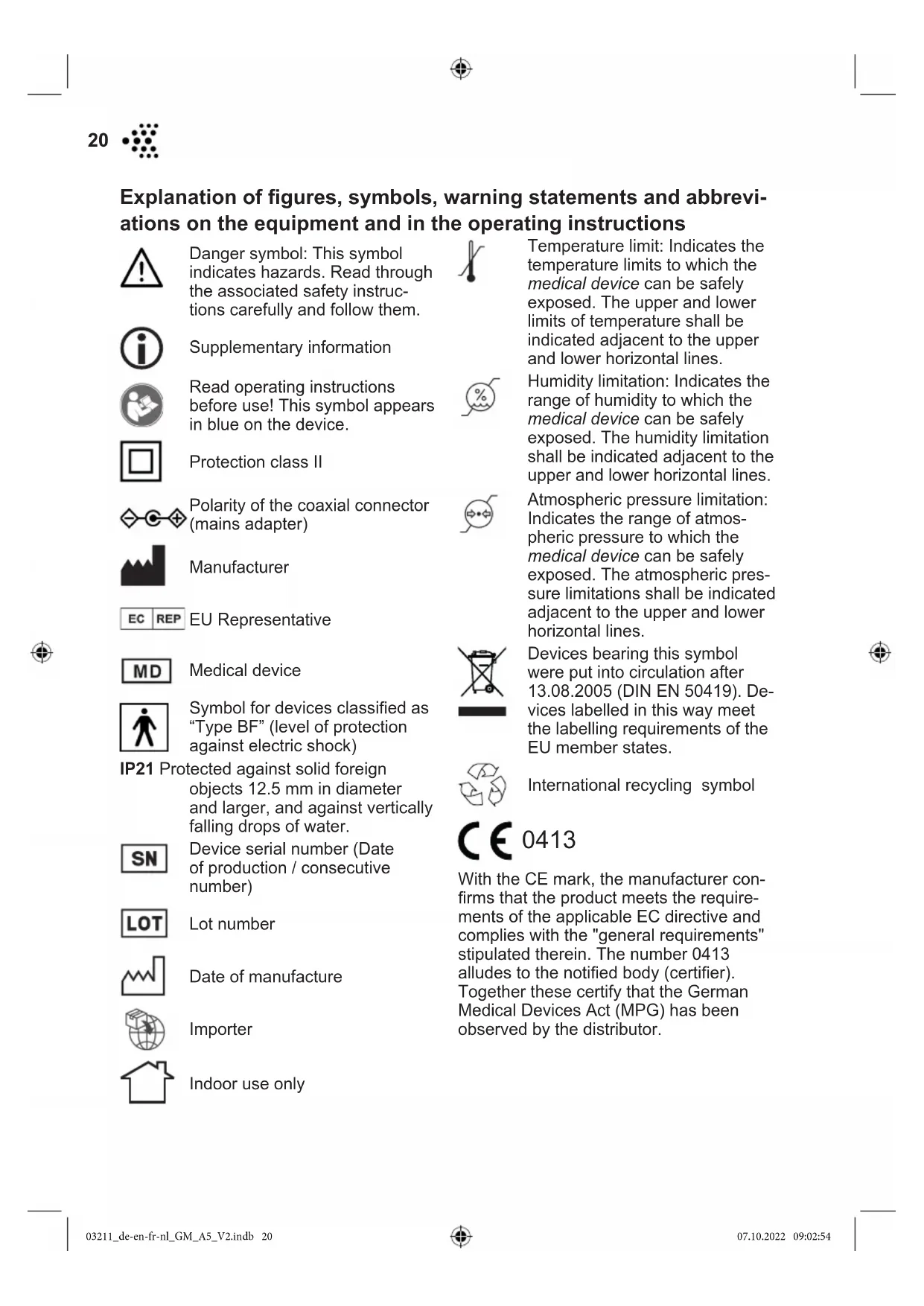


| Product type | Electrical muscle stimulator (EMS) for feet and calves |
| Brand | VitalMaxx |
| Model | VenenWalker EMS AST-300S |
| Power supply | Mains adapter 100-240 V ~ 50/60 Hz, output 5 V DC 1000 mA (included) + CR2032 battery (3 V) for remote control |
| Number of massage modes | 25 |
| Intensity levels | 99 |
| Automatic timer | 25 minutes |
| Main functions | Foot massage by vibration zones, EMS stimulation of calves via adhesive electrodes, wireless remote control |
| Massage types | Acupuncture, kneading, percussion, shiatsu, cupping, etc. (25 programs) |
| Pulse frequency | 0 – 200 Hz |
| Pulse duration | 115 μs |
| Max. output voltage | 72 V |
| Protection class | II |
| Applied part type | BF |
| Protection rating | IP21 |
| Operating temperature | +10 °C to +40 °C |
| Storage temperature | -25 °C to +70 °C |
| Operating humidity | 30% – 75% RH |
| Operating atmospheric pressure | 860 – 1060 hPa |
| Package contents | Main unit, mains adapter, 4 EMS electrodes, 2 electrode cables, remote control, CR2032 battery, instruction manual |
| Maintenance and cleaning | Clean the massage zones and electrodes with a damp cloth (no hot water, no chemicals). Do not immerse. |
| Safety | Do not use during pregnancy, pacemaker, epilepsy, on wounds or insensitive areas. Stop in case of irritation. |
| Repairability | Do not open the device. Contact customer service in case of malfunction. |
| Customer service | www.venenwalker.com or +49 (0) 38851 314337 (Mon-Fri, 8am-12pm) |
Frequently Asked Questions - VenenWalker EMS AST-300S VitalMaxx
User questions about VenenWalker EMS AST-300S VitalMaxx
0 question about this device. Answer the ones you know or ask your own.
Ask a new question about this device
Download the instructions for your Massage device in PDF format for free! Find your manual VenenWalker EMS AST-300S - VitalMaxx and take your electronic device back in hand. On this page are published all the documents necessary for the use of your device. VenenWalker EMS AST-300S by VitalMaxx.
USER MANUAL VenenWalker EMS AST-300S VitalMaxx
Operating instructions
Mode d'emploi
Gebruiksaanwijzing
AST-300S
text_image
leitung tructions oi wijzingDE EN FR NL
DE ab Seite 3
EN from page 19
Accompanying Documents
Software-Version: MC0188F-REV-V1.0
Shenzhen OSTO Technology Company Limited
No.43, Longfeng road, Xinsheng community, Longgang street, Longgang district, 518116 Shenzhen City, Guangdong Province, China
Modellnummer: EE-0501000DPE
Eingang: 100–240V \~ 50/60 Hz; 0,2–0,05A
Shenzhen OSTO Technology Company Limited
No.43, Longfeng road, Xinsheng community, Longgang street, Longgang district, 518116 Shenzhen City, Guangdong Province, China
Explanation of figures, symbols, warning statements and abbreviations on the equipment and in the operating instructions _ 20
Signal words 21
Function and Intended Application of the Device 21
When May the Device Not Be Used? 22
Safety Notices 22
At a Glance 25
Items Supplied 26
Inserting / Changing the Battery 26
Use 27
Cleaning and Storage 29
Troubleshooting 30
Disposal 31
Technical specifications 32
Customer service 33
Other Information 33
Accompanying Documents 67

IMPORTANTNOTICES! PLEASE KEEP FOR REFERENCE!
Before using the device for the first time, please read through these operating instructions carefully and keep them for future reference and other users. They form an integral part of the device.
The manufacturer and importer do not accept any liability if the information in these operating instructions is not complied with.

Explanation of figures, symbols, warning statements and abbreviations on the equipment and in the operating instructions

Danger symbol: This symbol indicates hazards. Read through the associated safety instructions carefully and follow them.

Supplementary information

Read operating instructions before use! This symbol appears in blue on the device.

Protection class II
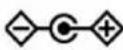
Polarity of the coaxial connector (mains adapter)

Manufacturer
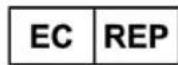
EU Representative

Medical device

Symbol for devices classified as "Type BF" (level of protection against electric shock)
IP21 Protected against solid foreign objects 12.5 mm in diameter and larger, and against vertically falling drops of water.

Device serial number (Date of production / consecutive number)

Lot number

Date of manufacture

Importer

Indoor use only

Temperature limit: Indicates the temperature limits to which the medical device can be safely exposed. The upper and lower limits of temperature shall be indicated adjacent to the upper and lower horizontal lines.

Humidity limitation: Indicates the range of humidity to which the medical device can be safely exposed. The humidity limitation shall be indicated adjacent to the upper and lower horizontal lines.

Atmospheric pressure limitation: Indicates the range of atmospheric pressure to which the medical device can be safely exposed. The atmospheric pressure limitations shall be indicated adjacent to the upper and lower horizontal lines.
Devices bearing this symbol were put into circulation after 13.08.2005 (DIN EN 50419). Devices labelled in this way meet the labelling requirements of the EU member states.

International recycling symbol

0413
With the CE mark, the manufacturer confirms that the product meets the requirements of the applicable EC directive and complies with the "general requirements" stipulated therein. The number 0413 alludes to the notified body (certifier). Together these certify that the German Medical Devices Act (MPG) has been observed by the distributor.
Signal words
Signal words indicate hazards if the associated notices are not followed.
DANGER – high risk, results in serious injury or death
WARNING – medium risk, may result in serious injury or death
CAUTION – low risk, may result in minor or moderate injury
NOTICE – may result in risk of damage to material
Dear Customer,
We are delighted that you have opted for the VenenWalker® EMS. The VenenWalker® EMS is a certified medical device which can help you prevent venous diseases and reduce the risk of spider veins and varicose veins. If you have a medical indication, please consult your doctor before use.
If you have any questions about the VenenWalker® EMS, contact the customer service department via our website www.venenwalker.com or contact us from Mon – Fri by calling the following service number: +49 (0) 38851 314337
* Calls to German landlines are subject to your provider's charges.
We wish you every success when using the VenenWalker ^® EMS.
Function and Intended Application of the Device
■ The principle of our electronic muscle stimulator (EMS) is that the low-frequency current stimulates painful areas of the human body and causes muscle contractions or relaxation. Muscle relaxation involves a large amount of blood entering. When muscles contract, the blood, which contains metabolic products, is sent out. This repeats itself, which can help accelerate blood flow and relieve pain, swelling, fatigue, aches and pains, and other symptoms.
■ The expected purpose of our electronic muscle stimulator is to relieve or reduce human muscle pain, swelling, pain from tiredness and to promote blood circulation.
■ The main unit of this device is intended to be used on feet. The EMS pads can be used to treat calves.
■ The device is suitable for domestic use.
■ The device is for personal use only and is not intended for commercial applications.
■ Use the device only for the intended purpose and as described in the operating instructions. Any other use is deemed to be improper.
■ The warranty does not cover faults caused by incorrect handling, damage or attempted repairs. The same applies to normal wear and tear.
22

When May the Device Not Be Used?
■ Children, people who are sleeping or unconscious and animals must not be treated with the device.
■ Do not use the device if you have a fever, physical illness or dental problems.
■ Do not use the device while you are connected to medical equipment, e.g. an ECG machine.
■ Do not use during a pregnancy or menstruation.
■ Do not use under the influence of alcohol.
■ The following people may use the device only following consultation with a doctor:
—people who are fitted with a pacemaker or other medical implants,
—people with heart disease or who suffer from epilepsy,
—people who have calf pain,
—people who suffer from circulation problems or thrombosis,
—people who suffer from severe diabetes,
- people who have undergone an operation for which the treatment is not yet complete,
—people under the influence of medication,
- people who belong to a risk group or who have concerns about their health.
■ Do not use the device in the vicinity of or on:
-head
–regions which have recently been operated on or are scarred,
-injuries and areas of swelling,
—acne, birthmarks and warts,
-injured, inflamed, (sun-)burnt, irritated or very sensitive skin,
-bones and joints,
—the rib cage close to your heart,
-the genital area,
-body parts with no feeling.
If you are unsure whether the device may be used, consult a responsible doctor.
Safety Notices
■ This system is not designed to be used by individuals (including children) with limited sensory or mental abilities or those without sufficient experience and / or knowledge, unless they are supervised by someone responsible for their safety or have received instructions from them on how to use the system.
■ Children must not play with the device.
■ Cleaning may not be carried out by children.
■ Children must be supervised to ensure that they do not play with the device. There is a danger of injury from incorrect use.
■ The device must always be disconnected from the mains power when it is left unattended and before cleaning it.

■ Only ever use the device with the mains adapter which is supplied (EE-0501000DPE).
■ Do not make any modifications to the device. It does not have any parts which can be serviced by the user. If the device or the connection are damaged, they must be repaired or replaced by the manufacturer, customer service department or a similarly qualified person (e.g. specialist workshop) in order to avoid any hazards.

DANGER – Danger of Electric Shock!
■ Do not use this device near a bathtub, shower or any vessel containing water.
■ Never immerse the device and the connection in water or other liquids and ensure that these components cannot fall into water or become wet.
If the device falls into water while it is connected to the mains power, pull the plug out of the plug socket immediately! Only after this should you retrieve the device from the water.
■ Never touch the device and the connection with wet hands when the device is connected to the mains power.
■ Do not use the device if it has malfunctioned or fallen into water. Have it checked in a specialist workshop before using it again.
■ Use and store the device only in closed rooms.
■ Do not use and store it in rooms with high humidity.

WARNING – Danger of Injury!
- Keep the packaging material away from children and animals. There is a danger of suffocation.
■ Make sure that all cables are always kept out of the reach of young children and animals. There is a danger of strangulation.
■ Make sure that the cables do not present a trip hazard when they are connected.
■ The device may only be used by people who are able to operate the control panel of the device.
■ Do not use the device if you are attached to high-frequency surgical devices or are in the vicinity of such devices or high-frequency commercial equipment.
■ Do not use the device in the immediate vicinity of devices which operate using high frequency electromagnetism, short waves or microwaves. Maintain a minimum gap of 1 metre.
■ The device must not be used near a mobile phone. Do not use a mobile phone while using the device.
■ If you experience an unpleasant feeling while using the device, stop using it immediately!
24

■ Stop using the device if you experience skin redness or discolouration that lasts for more than 24 hours.
In the event of damage / faults (e.g. unusual noises, odour or smoke development), switch the device off immediately and pull the mains plug out of the plug socket.
■ Danger of burns from battery acid!
- Batteries can be deadly if swallowed. The battery and remote control should therefore be kept out of the reach of children and animals. If a battery is swallowed, immediate medical attention must be sought.
- If the battery has leaked, do not allow your skin, eyes and mucous membranes to come into contact with the battery acid. Wear protective gloves if necessary. If you touch battery acid, rinse the affected areas with abundant clear water straight away and seek medical assistance immediately.
NOTICE – Risk of Damage to Material and Property
■ Use and store the device and the EMS pads at room temperature. Do not expose them to extreme temperatures, temperature fluctuations, fire, heat sources and direct sunlight for a prolonged period. Please refer to the chapter entitled “Technical specifications” for details.
- Keep the device and the EMS away from magnetic fields.
■ Protect the device and accessories from impacts.
■ Do not place any heavy objects on the device or its accessories. Never sit or stand on the device.
■ Use only original accessories from the manufacturer in order to guarantee that there is no interference that may prevent the device from working and to avoid possible damage.
■ Only connect the mains adapter to a plug socket that is properly installed and matches the rating plate of the mains adapter. The plug socket must also be readily accessible so that the connection to the mains can quickly be isolated.
■ Only use suitable extension cables.
■ Make sure that the cables are not crushed, bent or laid over sharp edges and do not come into contact with hot surfaces.
■ The device must be switched off when removing the cables.
■ Always pull the mains adapter and never the mains cable to disconnect the device from the mains power.
■ Do not connect the device to a plug socket during a thunderstorm.
- Keep sharp and pointed objects away from the device to ensure that it is not damaged.
At a Glance
text_image
23 MIN 17 16 15 SOLE MODE BODY 23 8 9 10 11 12 VENEN WALKER® EMS MODE 24 19 20 21 22 MODE1 Handle
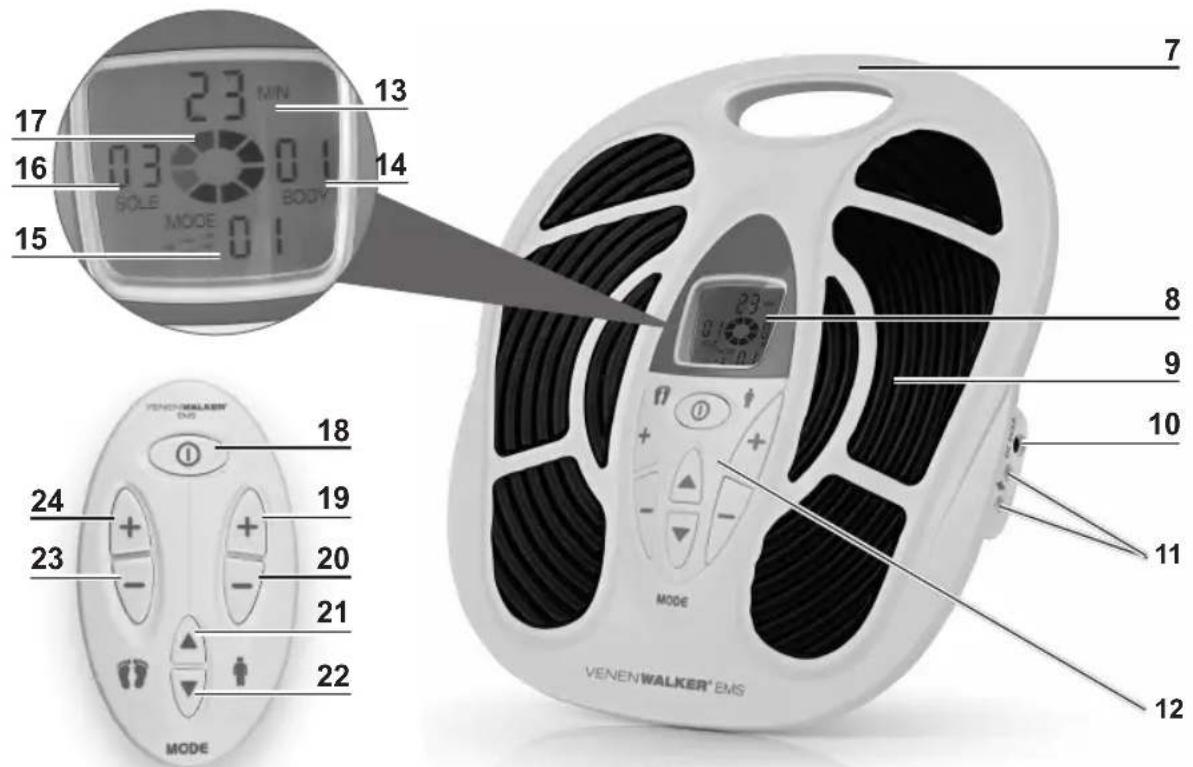
2 Display
3 Massage area
4 Socket for mains adapter
5 Sockets for electrode cables
6 Control buttons (matching the buttons of the remote control)
7 Display: remaining time in minutes
8 BODY Display: intensity of EMS pads
9 MODE Display: massage mode
10 SOLE Display: intensity of massage areas
11 Symbol for device in operation
12 ☑ on / off button – press for 2 seconds to switch device on or off
13 + button: increase intensity of EMS pads
14 - button: reduce intensity of EMS pads
15 ▲button: select a massage mode: go to the next massage mode
16 ▼ button: select a massage mode: go to the previous massage mode
17 – button: reduce intensity of massage areas
18 + button: increase intensity of massageareas
Items Supplied
text_image
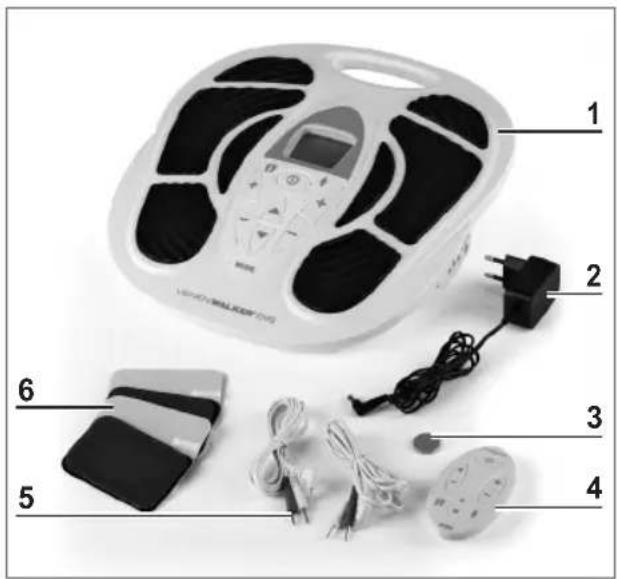
1 2 3 4 5 61 Main unit 1 x
2 Mains adapter 1 x
3 Battery CR 2032
4 Remote control 1 x
5 Electrode cable 2 x
6 EMS pads 4 x
- Operating instructions (1 x)
Check the items supplied for completeness and the components for transport damage. If you find any damage, do not use the device but contact our customer service department.
Remove any possible films, stickers or transport protection from the device. Never remove the rating plate and any possible warnings!
Inserting / Changing the Battery
Before using it for the first time, a CR2032 button cell (3 V) must be inserted into the remote control.
Before inserting the battery, check whether the contacts in the remote control and on the battery are clean, and clean them if necessary.
- Open the battery compartment on the back of the remote control: Pull off the battery compartment cover.
- If necessary remove any used battery and insert a new battery (3 V, CR2032 button cell) into the battery compartment and press it down. The positive pole must be facing upwards.
- Insert the battery compartment cover. You must feel it engage.
Replace the battery if the power of the remote control starts to wane.
Use

PLEASE NOTE!
■ Always check the device for damage and wear before putting it into operation. It may only be used if it is undamaged and does not display any signs of wear and tear.
■ Unwind the mains cable fully before connecting the device.
■ Portable RF communications equipment (including peripheral devices such as antenna cables and external antennas) should be no closer than 30 cm (12 inches) from any part of the device, including the cables specified by the manufacturer. Otherwise, the performance of this device might be affected.
- Keep the device away from other electronic devices during use in order to avoid malfunction. If the device is exposed to electromagnetic interference, the display might flicker or other malfunctions might occur.
■ No pressure should be exerted on the device as this will stop the massage and the device could be damaged. Only ever use the device while sitting down! Do not stand on the device.
■ Do not use straight after eating.
■ The device should not be used before going to sleep. Massages have a stimulating effect, which may lead to problems getting to sleep.
■ Do not use the EMS pads on your face, head or the area of the thyroid glands.
■ Do not bend the EMS pads.
For reasons of hygiene, the device should only be used by one person and cleaned after each use (see the "Cleaning and Storage" chapter). Keep the massage areas and the EMS pads clean.
■ The EMS pads and the massage areas must not come into contact during use with metal parts.
■ Never stick two EMS pads to each other.
■ Do not touch the adhesive surface of the EMS pads with your fingers in order not to impair their adhesive properties.
■ The skin may feel warm during the treatment. This is normal and not a cause for concern.
■ We explicitly point out that with some people skin irritations or hypersensitivity may occur as a result of the electrical muscle stimulation. In this case, stop using the device immediately and consult a doctor if necessary.
EMS stands for electrical muscle stimulation. The main unit (1) is used to stimulate the feet. In addition, you can use the EMS pads (6) to treat the calves.
Beginners should treat one muscle for no more than 15 minutes a day to prevent over-stimulation!
Advanced users can use the device for up to 25 minutes a day on each muscle. We recommend no more than 2 units per day, with a rest phase of at least 4 hours between the units.
28

Set-up/Foot Massage
- Place the main unit (1) on the floor.
- Connect the barrel connector of the mains adapter (2) to the socket for mains adapter (10) on the main unit.
- Plug the mains adapter into a plug socket.
- Adopt a comfortable seated position in a chair or on a sofa and place your feet barefoot and without exerting pressure on the massage areas (9). You must be barefoot for the device to work.
- Control the device by pressing the buttons on the main unit or the remote control (4) (see the "Operating the Device").
Massage With EMS Pads
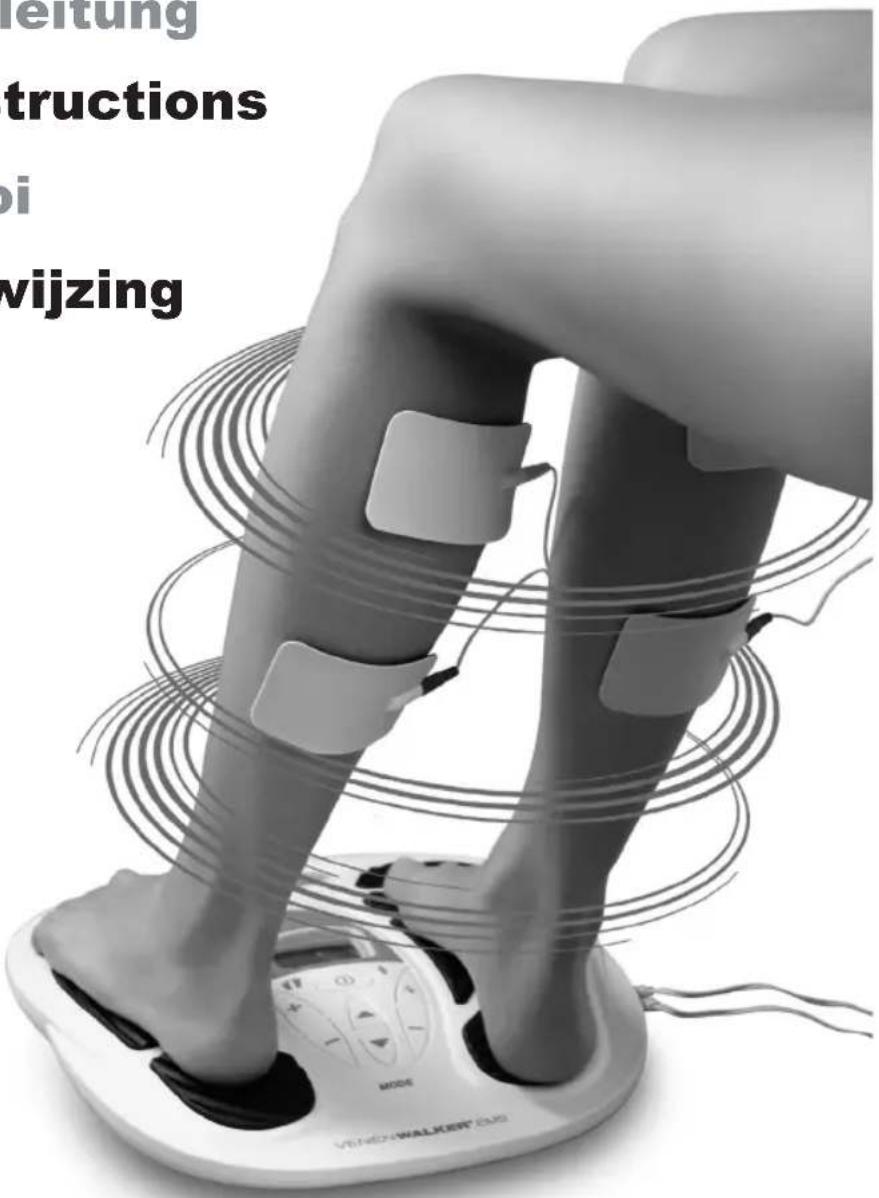
The EMS pads (6) ^* are used to treat the calves (see the “EMS Pads Usage Examples” section).
- Clean and dry your calves.
- Connect two EMS pads to the poles of the electrode cable (5). Both electrodes must be used for the device to work.
- Plug the connector of the electrode cable into the socket (11) on the main unit (1).
- Repeat that with the other EMS pad pair if you wish to use them all.
- Peel the protective films off the EMS pads and stick them onto the area being treated. Stick one EMS pad onto the beginning of the muscle and the other onto the end of the muscle. Do not overlap the EMS pads! Keep the protective films!
- Control the device by pressing the buttons on the main unit or the remote control (4) (see the "Operating the Device").
Operating the Device
Control the device by repeatedly pressing the buttons on the main unit (1) or on the remote control (4). The activated functions and levels are shown on the display (8).
- Switch on the device. To do this, press the button ⏻ (18) for about 2 seconds. The display will light up.
- Select a massage mode by repeatedly pressing the button ▲ (21) or ▼ (22). There are 25 modes (see below).
- To start stimulation of your feet press the button + (24) or press the button + (19) if you are using the EMS pads.
- Press repeatedly the button + to increase the intensity to the level where stimulation still feels pleasant. Use the button - (20 or 23) to reduce the intensity if necessary.

After each change of mode, the intensity is automatically set to level 0 and needs to be increased.
- To switch off the device, hold down the button ① for approximately 2 seconds.

The device switches off automatically after 25 minutes.
* The electrode pads have passed the biocompatibility test. The test report shows that they do not cause skin irritation.

- After use, pull the mains adapter out of the plug socket and disconnect the mains cable from the device.
- Disconnect the electrode cables from the device.
- Clean the massage areas and the EMS pads after each use (see the "Cleaning and Storage" chapter).
Modes
1 Acupuncture, Pushing
2 Acupuncture
3 Acupuncture, Kneading
4 Acupuncture, Tapping
5 Scraping
6 Squeezing
7 Massage
8 Pushing, Massage
9 Pushing, Squeezing
10 Acupuncture, Squeezing
11 Acupuncture, Hammering
12 Kneading
13 Thumping
14 Scraping, Pressing
15 Cupping
16 Body Shaping
17 Hammering
18 Massage, Tapping
19 Pushing
20 Rolling, Pounding
21 Squeezing
22 Stronger Tapping
23 Acupuncture therapy, Massage
24 Shiatsu
25 Rolling, Kneading
Cleaning and Storage

PLEASE NOTE!
■ Before all cleaning activities, remove the mains adapter from the socket, disconnect all cables from the device and take off the EMS pads from the electrode cables.
■ Do not use hot water, any soap or chemical cleaning agents to clean the EMS pads.
■ Do not use any sharp or abrasive cleaning agents or cleaning pads to clean any parts of the device. These may damage the surfaces.
- Allow all parts to dry completely before they are stored away. Allow to dry in the air only or wipe with a cloth. Never use a hair drier or similar for drying purposes!
- To clean the used EMS pads (6) carefully dab off the dirt with a clean damp sponge or cloth. Do not rub too much or do not use too much water in order not to impair their adhesive properties. Allow the EMS pads to dry in the air. Cover them with the protective films when they are completely dry.
- Wipe down the massage areas (9) and if necessary the remaining parts of the device with a clean, damp cloth. A mild cleaning agent may also be used for more stubborn dirt. Dry off before storing away.
- Store in a cool, dry place that is protected from direct sunlight and cannot be accessed by children or animals.
- Remove the battery from the remote control (4) if you will not be using it for a lengthier period of time.


Troubleshooting
If the device does not work properly, check whether you are able to rectify the problem yourself. If the problem cannot be solved with the steps below, contact our customer service department.

Do not attempt to repair an electrical device yourself!
The EMS pads (6) do not stick.
The protective films are still on the EMS pads.
▶ Peel the protective films off the EMS pads.
The EMS pads are dirty.
▶ Clean them. Follow the instructions in the “Cleaning and Storage” chapter.
The device does not work.
The device is not being supplied with power.
▶ Check whether
- the barrel connector is inserted correctly in the socket for mains adapter (10).
- the mains adapter (2) is inserted in the plug socket.
-the plug socket is defective.
-the fuse of the mains connection is inserted.
There is too much weight on the device.
▶ Reduce the weight on the device.
If the EMS pads (6) are used, they are not connected correctly to the device.
▶ Connect both EMS pads to the poles of the electrode cable (5). Then, plug the connector of the electrode cable into the socket (11) on the main unit (1).
The EMS pads (6) are not placed on correctly.
▶ Correct the fit. The whole of the surface of the EMS pads must be in contact with the skin. There must not be any hairs, clothing, jewellery etc. in between.
The device does not react to the remote control (4).
The battery of the remote control is too weak.
▶ Replace the battery (see the "Inserting / Changing the Battery" chapter).
There are obstructions between the device and remote control (no visual contact).
▶ Point the remote control directly at the device.
The stimulation is too weak.
There is not enough moisture between the massage areas (9) and the surface of the skin.
▶ Make sure you are barefoot.
The EMS (6) pads are dirty.
▶ Clean them. Follow the instructions in the “Cleaning and Storage” chapter.
The EMS pads (6) are not placed on correctly.

▶ Correct the fit. The whole of the surface of the EMS pads must be in contact with the skin. There must not be any hairs, clothing, jewellery etc. in between. Do not overlap the EMS pads!
The skin becomes red and irritated.
The device has been used for too long.
▶ Stop using the devBeginners should treat one muscle for no more than 15 minutes and advanced users up to 25 minutes day to prevent overstimulation!
With some people skin irritations or hypersensitivity may occur as a result of the electrical muscle stimulation.
▶ Stop using the device immediately and consult a doctor if necessary.
Disposal

Dispose of the packaging material in an environmentally friendly manner so that it can be recycled.

Batteries must not be disposed of along with the domestic waste. Consumers are legally obliged to dispose of batteries separately. Batteries can be handed in free of charge at a collection point of the local authority/district or in retailers so that they can be disposed of in an environmentally friendly way and valuable raw materials can be recovered. If they are not disposed of properly, toxic ingredients may escape into the environment and cause harm to the health of humans, animals and plants. Only hand in batteries when they are discharged. If possible, use rechargeable batteries rather than single-use batteries.

The adjacent symbol (crossed-out bin underlined) means that used devices should not be disposed of in the domestic waste, but should instead be taken to special collection and return systems. Owners of used devices must remove any used batteries from the used device and dispose of them separately (see also the section on battery disposal).
Owners of used devices from private households can take them free of charge to the collection points of the public waste disposal authorities or the disposal points which are set up by manufacturers and distributors under the Electrical Equipment Act. Businesses which market electrical and electronic devices are also obliged to take back used devices.

Technical specifications
This equipment belongs to Type BF of class II according to clause 5.
Reference article no.
for customer service: 03211
ID of operating instructions: Z 03211 M GM V2 1022 md
Date of operating instructions: 07.10.2022
Device
Product name: VenenWalker ^® EMS
Model number: AST-300S
Intensity levels: 99
Timer: 25 minutes
Massage modes: 25
Voltage supply: 5V DC
Current consumption: 1000 mA
Power: <1W during operation, <0.05W in stand-by mode
Electric shock protection class: Type BF
Output waveform: Square wave
Pulse duration: 115 μS
Pulse repetition frequencies: 0–200 Hz
Effect of load impedance: 1 kΩ
Max. amplitude of output voltage: 72V
Software version: MC0188F-REV-V1.0
Temperature range: Operation: +10 – +40 °C Storage/transportation: -25 – +70 °C
Air pressure: Operation: 860 – 1060 hPa Storage/transportation: 70 – 106 hPa
Air humidity (RH): Operation: 30 – 75% Storage/transportation: max. 90%
Mains Adapter
Manufactured for
Shenzhen OSTO Technology Company Limited
No.43, Longfeng road, Xinsheng community, Longgang street, Longgang district, 518116 Shenzhen City, Guangdong Province, China
Model number: EE-0501000DPE
Input: 100–240V \~ 50/60 Hz; 0.2–0.05A
Output: 5V DC; 1000mA
Protection class: II
Type of protection: IP20
∅ efficiency in operation: >69%
Power consumption on no-load: <0.3W
Efficiency on low load (10 %): >69%
Remote Control
Power supply: 3V (1 x button cell CR2032)
CE 0413

Customer service
If you have any questions about the VenenWalker® EMS, contact the customer service department via our website www.venenwalker.com or contact us by calling the following service number:
+49 (0) 38851 314337* (Mon - Fri, 8 am - 12 midday)
* Calls to German landlines are subject to your provider's charges.
Other Information

VenenWalker® EMS is manufactured by:
Shenzhen OSTO Technology Company Limited
No.43, Longfeng road, Xinsheng community, Longgang street, Longgangdistrict
518116 Shenzhen City, Guangdong Province
China
EC REP
European Authorised Representative:
Share Info GmbH
Heerdter Lohweg 83
40549 Düsseldorf
Germany

Importer:
Globalmind Consumer Electronics GmbH
All rights reserved.
Sommaire
-les parties intimes,
▶ Retirer les films de protection.
Shenzhen OSTO Technology Company Limited
No.43, Longfeng road, Xinsheng community, Longgang street, Longgang district, 518116 Shenzhen City, Guangdong Province, Chine
Shenzhen OSTO Technology Company Limited
No.43, Longfeng road, Xinsheng community, Longgang street, Longgang district, 518116 Shenzhen City, Guangdong Province, Chine
WAARSCHUWING – Verwondingsgevaar!
Shenzhen OSTO Technology Company Limited
No.43, Longfeng road, Xinsheng community, Longgang street, Longgang district, 518116 Shenzhen City, Guangdong Province, China
Modelnummer: EE-0501000DPE
Ingang: 100–240 V \~ 50/60 Hz; 0,2–0,05A
Shenzhen OSTO Technology Company Limited
No.43, Longfeng road, Xinsheng community, Longgang street, Longgang district, 518116 Shenzhen City, Guangdong Province, China
Accompanying Documents
The appliance is complied with the following emission and immunity standard, and test level:
| Guidance and manufacturer's declaration - electromagnetic immunity | |||||||
| Immunity test | IEC 60601 test level | Compliance level | |||||
| Electrostatic discharge (ESD)IEC 61000-4-2 | ±8 kV contact±2 kV, ±4 kV, ±8 kV, ±15 kV air | ±8 kV contact±2 kV, ±4 kV, ±8 kV, ±15 kV air | |||||
| Electrical fast transient/burstIEC 61000-4-4 | ±2 kV for power supply lines±1 kV signal input/output100 kHz repetition frequency | ±2 kV for power supply linesNot Applicable100 kHz repetition frequency | |||||
| SurgeIEC 61000-4-5 | ±0.5 kV, ±1 kV differential mode±0.5 kV, ±1 kV, ±2 kV common mode | ±0.5 kV, ±1 kV differential modeNot Applicable | |||||
| Voltage dips, short interruptions and voltage variations on power supply i nput linesIEC 61000-4-11 | 0 % UT; 0,5 cycle. At 0°, 45°, 90°, 135°, 180°, 225°, 270° and 315°.0 % UT; 1 cycle and 70 % UT;25/30 cycles; Single phase: at 0°.0 % UT; 250/300 cycle | 0 % UT; 0,5 cycle. At 0°, 45°, 90°, 135°, 180°, 225°, 270° and 315°.0 % UT; 1 cycle and 70 % UT;25/30 cycles; Single phase: at 0°.0 % UT; 250/300 cycle | |||||
| Power frequency magnetic fieldIEC 61000-4-8 | 30 A/m50Hz/60Hz | 30 A/m50Hz/60Hz | |||||
| Conduced RFIEC61000-4-6 | 3 V0,15 MHz - 80 MHz6 V in ISM and amateur radiobands between 0,15 MHz and 80 MHz80 % AM at 1 kHz | 3 V0,15 MHz - 80 MHz6 V in ISM and amateur radiobands between 0,15 MHz and 80 MHz80 % AM at 1 kHz | |||||
| Radiated RFIEC61000-4-3 | 10 V/m80 MHz - 2,7 GHz80 % AM at 1 kHz | 10 V/m80 MHz - 2,7 GHz80 % AM at 1 kHz | |||||
| NOTE UT is the a.c. mians voltage prior to application of the test level. | |||||||
| Guidance and manufacturer's declaration - electromagnetic immunity | |||||||
| Radiated RF IEC61000-4-3 (Test specifications for ENCLOSURE PORT IMMUNITY to RF wireless communications equipment) | Test Frequency (MHz) | (MHz) | Service | Modulation | Modulation (W) | Distance (m) | IMMUNITY TEST LEVEL (V/m) |
| 385 | 380-390 | TETRA 400 | Pulse modulation 18 Hz | 1,8 | 0.3 27 | ||
| 450 | 380-390 | GMRS 460, FRS 460 | FM ± 5 kHz deviation 1 kHz sine | 2 | 0.3 | 28 | |
| 710 | 704-787 | LTE Band 13, 17 | Pulse modulation 217 Hz | 0,2 | 0.3 | 9 | |
| 745 | |||||||
| 780 | |||||||
| 810 | 800-960 | GSM 800/900, TETRA 800,iDEN 820,CDMA 850,LTE Band 5 | Pulse modulation 18 Hz | 2 | 0.3 | 28 | |
| 870 | |||||||
| 930 | |||||||
| 1720 | 704-787 | GSM 1800; CDMA 1900; GSM 1900; DECT; LTE Band 1, 3,4, 25; UMTS | Pulse modulation 217 Hz | 2 | 0.3 | 28 | |
| 1845 | |||||||
| 1970 | |||||||
| 2450 | 2 400-2 570 | Bluetooth, WLAN, 802.11 b/g/n, RFID 2450, LTE Band 7 | Pulse modulation 217 Hz | 2 | 0.3 | 28 | |
| 710 | 5 100-5 800 | WLAN 802.11 a/n | Pulse modulation 217 Hz | 0,2 | 0.3 | 9 | |
| 745 | |||||||
| 780 | |||||||
| Guidance and manufacturer's declaration – electromagnetic emissions | |
| Emissions | Compliance |
| RF emissionsCISPR 11 | Group 1 |
| RF emissionsCISPR 11 | Class [B] |
| Harmonic emissionsIEC 61000-3-2 | Not Applicable |
| Voltage fluctuations/flicker emissionsIEC 61000-3-3 | Not Applicable |
EMC Warning
The VenenWalker® EMS is suitable for home healthcare environments.
Warning: Don't near active HF surgical equipment and the RF shielded room of an ME system for magnetic resonance imaging, where the intensity of EM disturbances is high.
Warning: Use of this equipment adjacent to or stacked with other equipment should be avoided because it could result in improper operation. If such use is necessary, this equipment and the other equipment should be observed to verify that they are operating normally.
Warning: Use of accessories, transducers and cables other than those specified or provided by the manufacturer of this equipment could result in increased electromagnetic emissions or decreased electromagnetic immunity of this equipment and result in improper operation.
Warning: Portable RF communications equipment (including peripherals such as antenna cables and external antennas) should be used no closer than 30 cm (12 inches) to any part of the VenenWalker® EMS, including cables specified by the manufacturer. Otherwise, degradation of the performance of this equipment could result.
If the equipment is subjected to electromagnetic interference, the screen may flash etc, please move to a place where there is no electromagnetic interference to solve this problem.