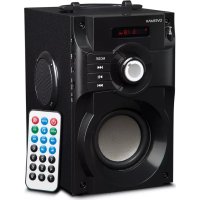
Soundbeat Box - Speaker Overmax - Free user manual and instructions
Find the device manual for free Soundbeat Box Overmax in PDF.


| Product Type | Portable Speaker |
| Brand | Overmax |
| Model | Soundbeat Box |
| Dimensions (approx.) | 20 × 10 × 10 cm |
| Weight (approx.) | 1 kg |
| Power Supply | Rechargeable battery via USB (cable included) |
| Battery Life | 2 to 8 hours depending on usage |
| Connectivity | Bluetooth, AUX 3.5 mm, USB, MicroSD/TF |
| Supported Audio Formats | MP2, MP3, WMA, AAC, MP4, WAV |
| Playback Modes | Bluetooth, FM Radio, USB, MicroSD, AUX |
| Main Functions | Recording, Karaoke (2 microphone inputs), LED lighting, TWS (stereo pairing) |
| Microphone Inputs | 1 × 6.3 mm, 1 × 3.5 mm |
| Remote Control | Included (with functions: on/off, mode, volume, tracks, equalizer, keys 0-9) |
| Maintenance and Cleaning | Wipe with a soft, dry cloth. Do not use chemical products. |
| Safety | Do not expose to water, heat, direct sunlight. Do not open or repair yourself. |
| Spare Parts and Repairability | Contact Overmax after-sales service (pomoctechniczna@overmax.pl). Do not open the casing. |
| General Information | Compliant with European directives. Recycling at end of life (WEEE). |
Frequently Asked Questions - Soundbeat Box Overmax
User questions about Soundbeat Box Overmax
0 question about this device. Answer the ones you know or ask your own.
Ask a new question about this device
Download the instructions for your Speaker in PDF format for free! Find your manual Soundbeat Box - Overmax and take your electronic device back in hand. On this page are published all the documents necessary for the use of your device. Soundbeat Box by Overmax.
USER MANUAL Soundbeat Box Overmax
natural_image
Black portable electronic device with colorful LED lighting array, no visible text or symbols on bodyA

B
Wprowadzenie
PL
Drogi Kliencie!
Thank you for placing trust in us and choosing Overmax.
Thanks to the use of high-quality materials and modern solutions, we provide you with a product perfect for everyday use. We are convinced that the product will satisfy your requirements as it has been manufactured with utmost care. Before you start using the product, please read this manual carefully.
Should you have any remarks or questions concerning the product, please do not hesitate to contact us: pomoctechniczna@overmax.pl
DEVICE INFORMATION
Supported formats: MP2, MP3, WMA, AAC, MP4, WAV
Battery life: 2 - 8 hours
WARNINGS
- Keep the product away from moist areas, high temperatures, oils, or other liquids.
- Do not expose the product to direct sunlight or rain.
- Set an appropriate volume to avoid hearing damage. Excessive volume may cause hearing damage.
- If you do not use the product for a long time, charge it at least once every three months to maintain battery life.
- Do not open, modify, or repair the product by yourself. Any interference may void the manufacturer's warranty.
- Keep the product away from children to avoid the risk of electric shock.
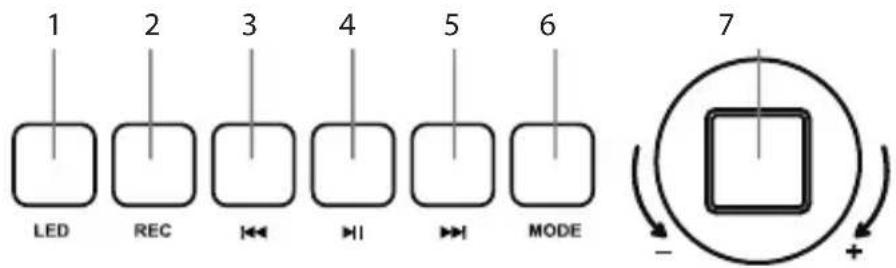
FUNCTION DESCRIPTION (FIG. A)
- LED backlight
- Recording
- Previous track / previous channel
- Play / Pause
- Next track / next channel
- Mode switch / Pairing
- Volume adjustment / Reverb adjustment
- On / Off
- USB port
- MicroSD / TF card port
- AUX port
- Charging indicator
- USB charging port
- MIC2 3.5mm port
- MIC1 6.3mm port
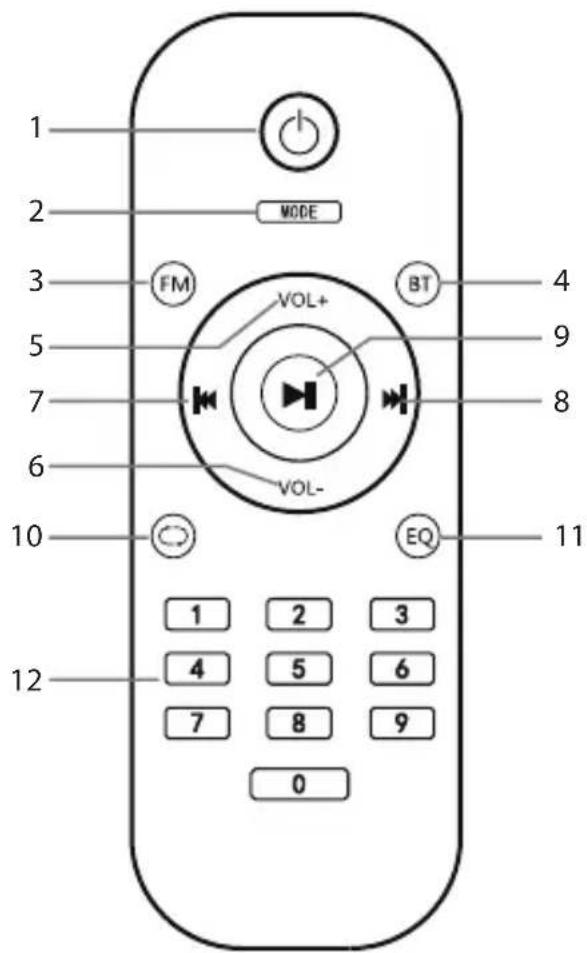
REMOTE CONTROL (FIG. B)
- On / Off
- Mode switch
- FM radio
- Bluetooth
- Increase volume
- Decrease volume
- Previous track / previous channel
- Next track / next channel
- Play / Pause
- Replay
- Equalizer
- 0-9 buttons
MODES AND FUNCTIONS
LED backlight
Press the LED button (1, Fig. A) to turn on the backlight. Press and hold to turn off.
Bluetooth
Turn on the speaker. On your mobile device, go to Bluetooth settings and search for available devices. Soundbeat Box will appear on the list - select this device from the list to connect. A successful pairing process will be signaled by a short sound signal. If unsuccessful, turn off and on the speaker and try to connect again. After a successful pairing process, your mobile device will automatically connect to the speaker.
Recording
To use the recording function, insert a microSD/TF card into the device's microSD/TF port (10, Fig. A). Press and hold the recording function button (2, Fig. A) to start recording.
FM Radio
Turn on the speaker. Use the mode switch button to select the radio mode. To begin automatic search of available radio stations, press and hold the button ▶||. The stations will be automatically saved. To switch between stations, use ▶← button. To begin manual search of radio stations, press and hold ▶← button. Saved radio stations can also be selected using the 0-9 buttons (12, Fig. B).
Playing from an external device
-
Turn on the speaker, and then connect the external device to the AUX port (11, Fig. A).
-
Press the mode switch button (6, Fig. A). The speaker will start playing music from the device.
Playing from a microSD/TF card
- Turn on the speaker and insert the card into the microSD/TF port (10, Fig. A).
- Press the mode switch button (6, Fig. A). The speaker will start playing music from the card.
- Tracks can also be selected using the 0-9 buttons (12, Fig. B).
Playing from an external drive
- Turn on the speaker and connect the external drive to the USB port (9, Fig. A).
- Press the mode switch button (6, Fig. A). The speaker will start playing music from the drive.
- Tracks can also be selected using the 0-9 buttons (12, Fig. B).
Karaoke
- To use the karaoke function, connect a microphone to the karaoke port (15, Fig. A).
- To reduce background sound while using the microphone, press the play/pause button twice on the device (4, Fig. A) or remote (9, Fig. B).
- To reduce the voice of the playing song, press the mode switch button twice on the device (6, Fig. A) or remote (2, Fig. B).
TWS Speaker Pairing (True Wireless Stereo)
To pair two speakers, press the pairing button (6, Fig. A). This feature allows music to be played from two speakers at the same time.
Charging
To charge the device's battery, connect the USB cable to the speaker's port (13, Fig. A) and charger, and then connect it to a power source. The charging indicator (12, Fig. A) will light up red - the device is charging. The indicator will turn green - the device is fully charged.
TROUBLESHOOTING
| Problem Solution | |
| Speaker cannot be paired with mobile device despite multiple attempts. | Ensure that the speaker and mobile device are in Bluetooth mode. Limit the number of mobile devices nearby when attempting pairing. Disconnect any previously connected devices from the speaker. |
| Sound is too quiet or distorted in Bluetooth mode. | Check the volume on the mobile device. |
| Sound is interrupted. Reduce the distance between the speaker and mobile device. Remove any obstacles between the speaker and device. | |
| Play/pause button does not work. | Ensure that you are playing music from the original software provided with the mobile device. Some non-original players may not be compatible with the speaker. |
The pictures are for illustration purposes only, the actual appearance of the products may differ from that shown in the pictures.
Einführung
EN: The product complies with requirements of EU directives.
Pursuant to the Directive 2012/19/EU, this product is subject to selective collection. The product must not be disposed of along with domestic waste as it may pose a threat to the environment and human health. The worn-out product must be handed over to the electrics and electronics recycling center.