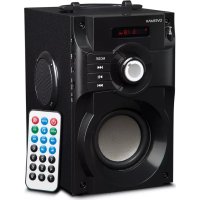
SoundBeat 2.0 - Speaker Overmax - Free user manual and instructions
Find the device manual for free SoundBeat 2.0 Overmax in PDF.


| Product type | Portable speaker |
| Brand | Overmax |
| Model | SoundBeat 2.0 |
| Power supply | Micro USB 5V port |
| Battery | Built-in rechargeable lithium |
| Operating modes | Bluetooth, FM radio, AUX, micro SD card, USB |
| Wireless connectivity | Bluetooth |
| Audio inputs | AUX (3.5 mm jack), USB, micro SD |
| FM radio | Yes, with automatic and manual search |
| Remote control | Yes (included) |
| Control buttons | On/off, mode, volume, play/pause, navigation |
| Charging | Every 3 months if unused |
| Material | Not specified (probably plastic) |
| Dimensions | Approximately 20 x 10 x 10 cm (estimated) |
| Weight | Approximately 500 g (estimated) |
| Maintenance and cleaning | Clean with a soft, dry cloth. Avoid moisture. |
| Safety | Protect from moisture, heat, oils. Do not disassemble. Keep out of reach of children. |
| Spare parts and repairability | Not disassemblable. No spare parts available. |
| General information | Compliant with EU directives. Separate recycling (WEEE). |
Frequently Asked Questions - SoundBeat 2.0 Overmax
User questions about SoundBeat 2.0 Overmax
0 question about this device. Answer the ones you know or ask your own.
Ask a new question about this device
Download the instructions for your Speaker in PDF format for free! Find your manual SoundBeat 2.0 - Overmax and take your electronic device back in hand. On this page are published all the documents necessary for the use of your device. SoundBeat 2.0 by Overmax.
USER MANUAL SoundBeat 2.0 Overmax
natural_image
Black outdoor baby electronic device with digital display and speaker control buttons (no visible text or symbols)OVERMAX
You • unlimited
SOUNDBEAT 2.0
PL
Thank you for purchasing our product. Before you use the product for the first time, please read this manual carefully to get familiar with all its functions. The manual must be kept for future reference.
Safety information
- Store the loudspeaker away from humid areas, high temperature, oil and other liquids.
- Do not expose the product to direct sunlight and rain.
- Set a suitable volume to avoid hearing impairment.
- If you do not use the product for a long time, charge it at least once per three months in order to avoid damage to lithium battery.
- It is forbidden to disassemble, repair or open the product.
- Keep out of the reach of children to avoid electric shock or suffocation.
Description of functions:
EN
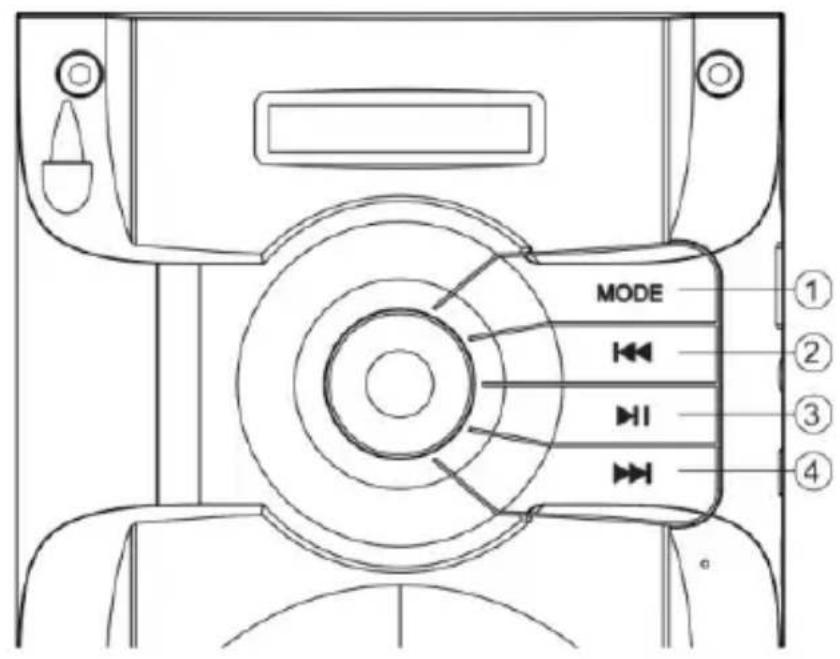
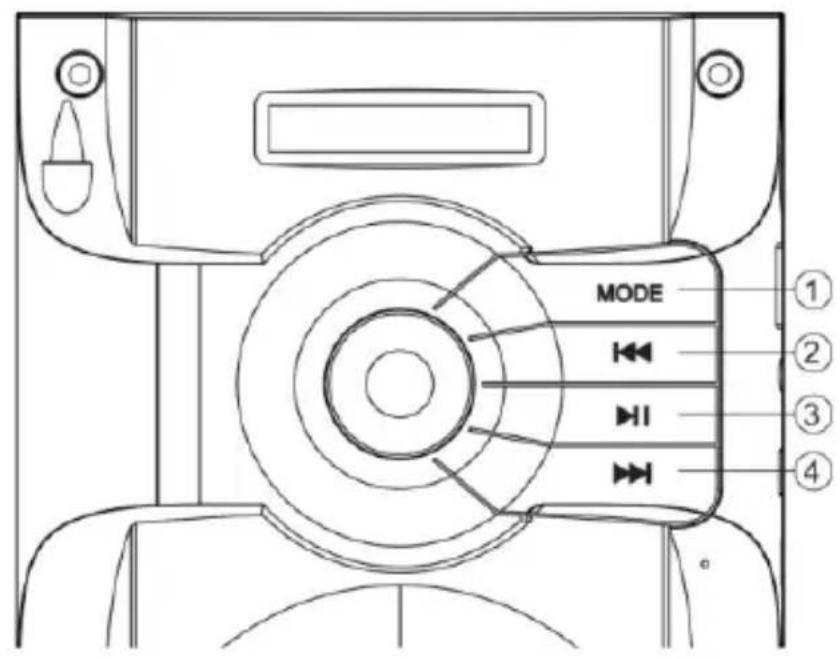
- „Mode” button serves to switch modes of the speaker: bluetooth, radio FM and input devices, i.e. pendrive, micro SD card and AUX
- Previous (track/station)
- Play/pause
- Next (track/station)
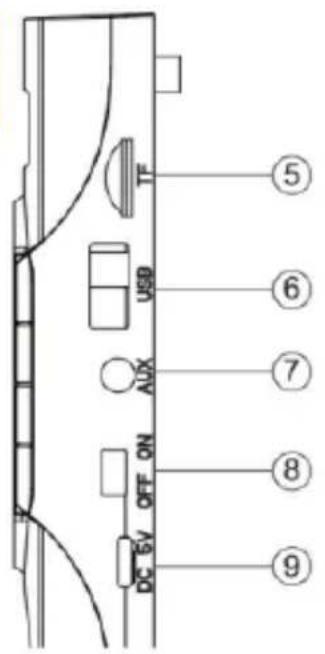
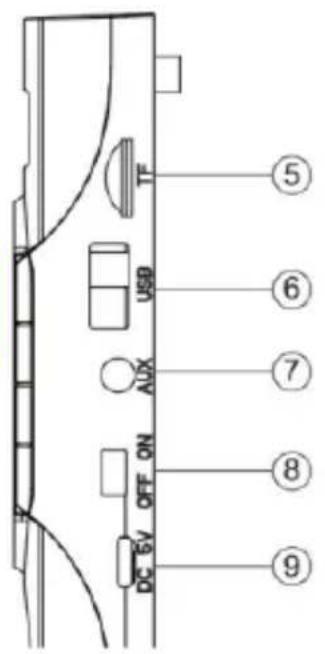
- Micro SD slot
- USB port
- AUX port
- ON/OFF
- DC port micro USB 5V
Remote control functions:
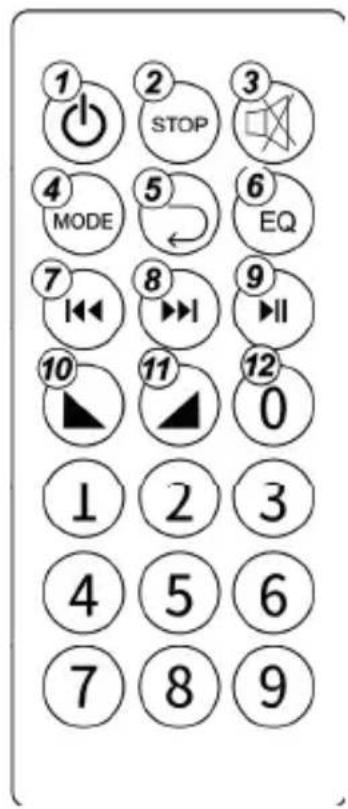
- Standby
- Stop
- Mute
- Switch mode
- Replay
- Equalizer
- Short press for previous track/frequency. Under FM, long press for manually search of FM
- Short press for next track/frequency. Under FM, long press for manually search of FM.
- Short press for play/pause; Under FM, Long press for automatically search of FM and memory
- Volume down
- Volume up
- Number button from 0-9
MODES:
„Mode” button serves to switch modes of the speaker: bluetooth, Radio FM and input devices, i.e. pendrive, micro SD card and AUX.
BLUETOOTH MODE:
To activate bluetooth mode, switch the loudspeaker on. Use “Mode” button to select bluetooth. In the device you wish to use to connect to the loudspeaker, activate bluetooth function and find the device called Soundbeat 2.0. Select the device from the list of devices to make a connection. Once the pairing process has been completed successfully, the device is ready for transmitting sound.
EN
RADIO MODE:
To activate radio FM mode, switch the loudspeaker on. Use „Mode” button to select Radio. To search for available radio stations automatically, click and hold ▶Stations will be saved automatically. To switch stations, click or ▶. To start searching radio stations manually, click and hold
AUX MODE:
To activate AUX mode, switch the loudspeaker on. Use „Mode“ button to select AUX. Once you have selected this mode, sound will be played through AUX port.
SD MODE
To activate SD mode, switch the loudspeaker on. Use “Mode” button to select SD. Once you have selected this mode, sound will be played from previously installed micro SD memory card.
CHARGING:
To charge the battery, connect micro USB cable to the loudspeaker port, and then connect it to source of power supply 5V.
Please be advised that pictures are for reference only, the real design of products may differ from the pictures presented.
SOUNDBEAT 2.0
Description of functions:
IT
EN: The product complies with requirements of EU directives.
Pursuant to the Directive 2012/19/EU, this product is subject to selective collection. The product must not be disposed of along with domestic waste as it may pose a threat to the environment and human health. The worn-out product must be handed over to the electrics and electronics recycling center.
BrandLine Group Service – Support
List of Authorized Service Centers: Lista autoryzowanych centrów serwisowych Liste der autorisierten Service-Center: Elenco dei centri di assistenza autorizzati: Liste des centres de service autorisés : Lista de centros de servicio autorizados: Lijst met erkende servicecentra:
www.overmax.eu/en/service
Software updates are available on our website www.overmax.eu in "Technical support" tab.