
TIE20301 - Coffee maker BOSCH - Free user manual and instructions
Find the device manual for free TIE20301 BOSCH in PDF.
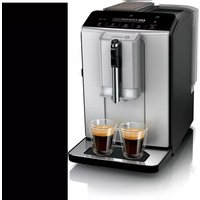


| Product Type | Automatic Coffee Machine |
| Brand | Bosch |
| Model | TIE20301 |
| Dimensions (H x W x D) | 38.3 x 25.1 x 43.3 cm |
| Weight | Approximately 8-9 kg |
| Power Supply | 220-240 V ~, 50/60 Hz, 1300 W |
| Maximum Pump Pressure | 15 bar |
| Water Tank Capacity | 1.3 L |
| Bean Container Capacity | Approx. 250 g |
| Grinder Type | Ceramic / Steel |
| Power Cord Length | 100 cm |
| Beverage Functions | Espresso, Coffee, Cappuccino, Latte Macchiato, Milk Froth, Double Cup |
| Customizable Settings | Coffee Intensity, Beverage Volume, Froth Duration, Grind Level |
| Cup Warmer | Yes (optional, depending on equipment) |
| Maintenance Programs | Calc'nClean (automatic descaling and cleaning) |
| Cleaning | Removable brewing unit, removable milk frother, drip tray, coffee grounds container |
| Water Filter | Compatible (optional accessory) |
| Safety | Automatic shut-off, safety lock, frost protection |
| Spare Parts Available | Cleaning/descaling tablets, water filter, maintenance kit, milk frother |
| After-Sales Service | Available with product number (E-Nr) and manufacturing number (FD) |
Frequently Asked Questions - TIE20301 BOSCH
User questions about TIE20301 BOSCH
0 question about this device. Answer the ones you know or ask your own.
Ask a new question about this device
Download the instructions for your Coffee maker in PDF format for free! Find your manual TIE20301 - BOSCH and take your electronic device back in hand. On this page are published all the documents necessary for the use of your device. TIE20301 by BOSCH.
USER MANUAL TIE20301 BOSCH
Therefore, m = 3/11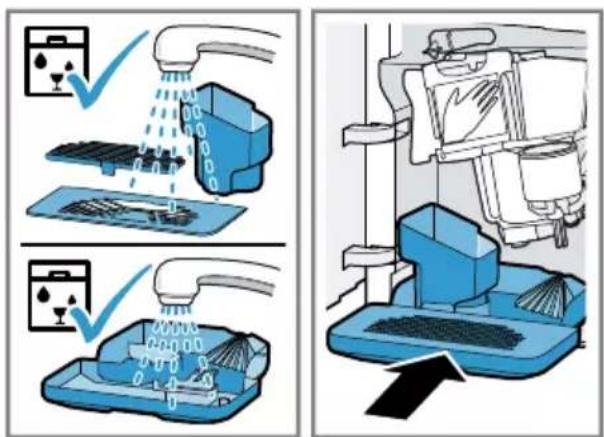
17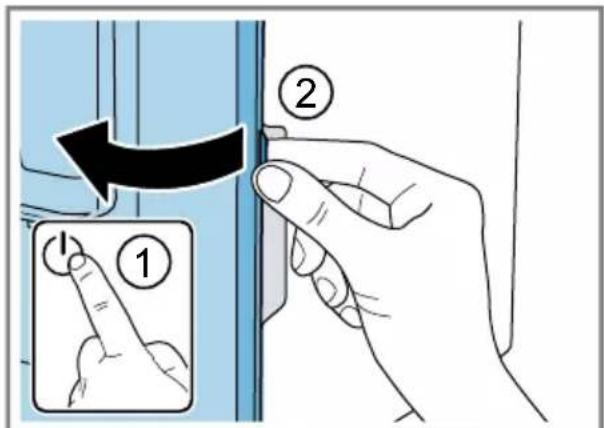
19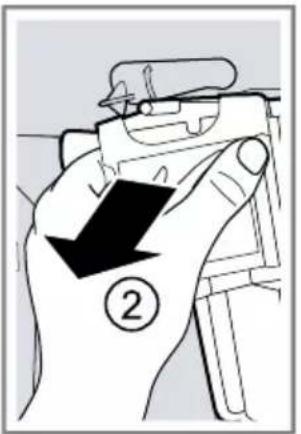
Therefore, m = 3/11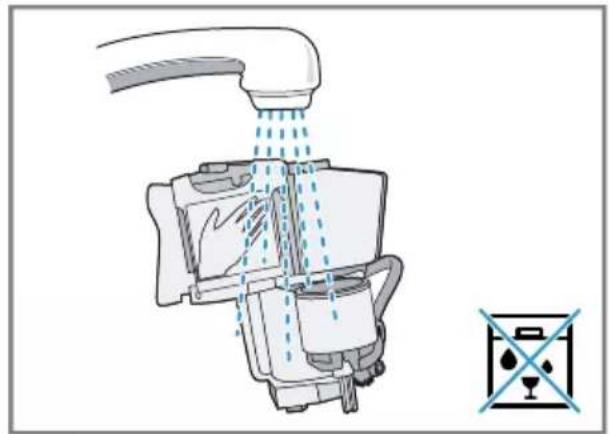
21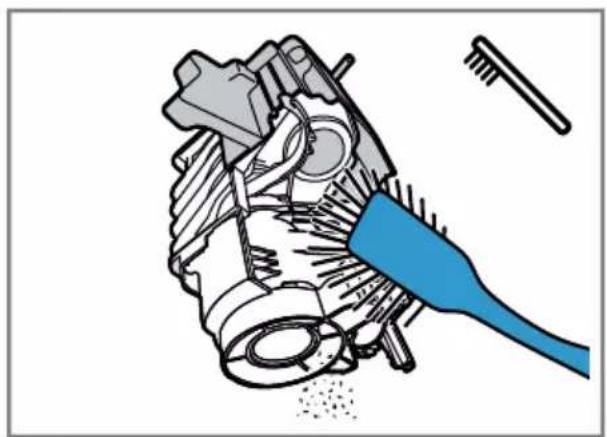
Therefore, m = 3/11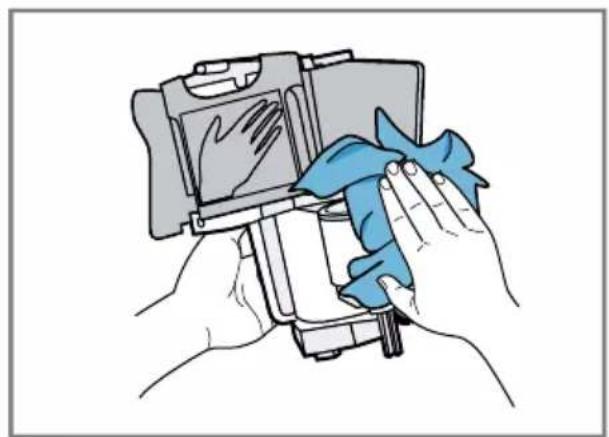
23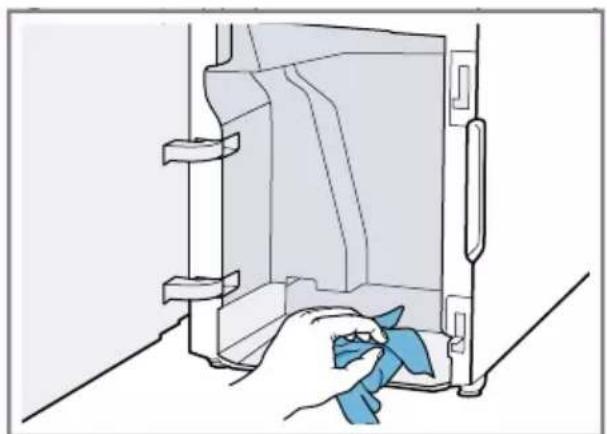
24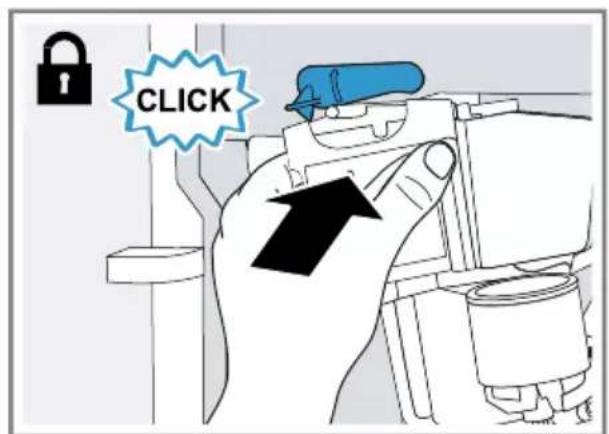
25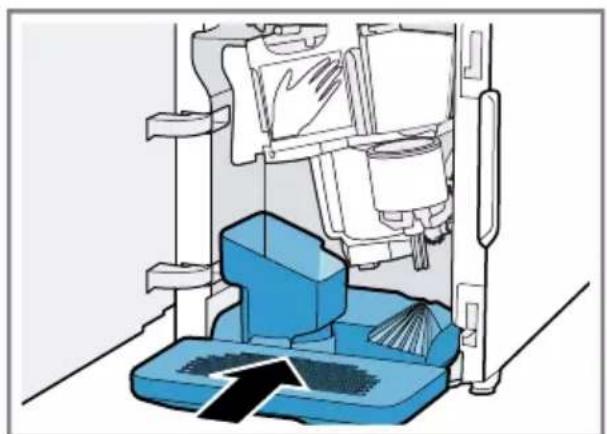
Further information and explanations are available online:
Table of contents
1 Safety 37
1.1 General information 37 1.2 Intended use 37 1.3 Restriction on user group 37 1.4 Safety information 37
2 Environmental protection and saving energy 41
2.1 Disposing of packaging 41 2.2 Tips for saving energy 41
3 Installation and connection.... 41
3.1 Scope of delivery 41 3.2 Installing and connecting the appliance 41
4 Familiarising yourself with your appliance. 42
4.1 Appliance 42 4.2 Control panel 42 4.3 Display 43
5 Accessories 43
6 Before using for the first time .. 44
6.1 Preparing and cleaning the appliance 44 6.2 Performing initial start-up 44 6.3 General information 44 6.4 Water filter 45
7 Basic operation 46
7.1 Switching the appliance on or off 46 7.2 Dispensing beverages 46 7.3 Dispensing a coffee drink made from fresh beans 46
7.4 Dispensing drinks with milk .... 46 7.5 Dispensing a coffee drink with milk 47 7.6 Frothing up milk 47 7.7 Drink settings 47
8 Grinder 48
8.1 Adjusting the grinding level.... 48 9 Cup heater 1 49 9.1 Activating and deactivating the cup heater 1 49
10 Basic settings 49
10.1 Changing the basic settings 49 10.2 Overview of basic settings 50
11 Cleaning and servicing. 50
11.1 Dishwasher-safe components 51 11.2 Cleaning agent 51 11.3 Cleaning the appliance 52 11.4 Cleaning the drip tray and coffee dregs container 52 11.5 Cleaning the milk frother 52 11.6 Cleaning the brewing unit 53 11.7 Cleaning brewing unit 53 11.8 Service programmes 54
12 Troubleshooting 56
13 Transportation, storage and disposal 61
13.1 Activating frost protection 61 13.2 Disposing of old appliance 61
en
14 Customer Service 61 14.1 Product number (E-Nr.) and production number (FD) 62 15 Technical specifications 62

1 Safety
Observe the following safety instructions.
1.1 General information
- Read this instruction manual carefully.
- Keep the instruction manual and the product information safe for future reference or for the next owner.
- Do not connect the appliance if it has been damaged in transit.
1.2 Intended use
Only use this appliance:
for preparing hot drinks. - in private households and in enclosed spaces in a domestic environment. - up to an altitude of max. 2000 m above sea level.
1.3 Restriction on user group
This appliance may be used by children aged 8 or over and by people who have reduced physical, sensory or mental abilities or inadequate experience and/or knowledge, provided that they are supervised or have been instructed on how to use the appliance safely and have understood the resulting dangers.
Do not let children play with the appliance.
Children must not perform cleaning or user maintenance unless they are at least 8 years old and are being supervised.
Keep children under the age of 8 years away from the appliance and power cable.
1.4 Safety information
WARNING - Risk of suffocation!
Children may put packaging material over their heads or wrap themselves up in it and suffocate.
- Keep packaging material away from children.
- Do not let children play with packaging material.
en Safety
Children may breathe in or swallow small parts, causing them to suffocate.
- Keep small parts away from children.
- Do not let children play with small parts.
WARNING - Risk of electric shock!
Incorrect installation is dangerous.
- Connect and operate the appliance only in accordance with the specifications on the rating plate.
- Connect the appliance to a power supply with alternating current only via a properly installed socket with earthing.
- The protective conductor system of the domestic electrical installation must be properly installed.
If the appliance or the power cord is damaged, this is dangerous.
- Never operate a damaged appliance.
- Never operate an appliance with a cracked or fractured surface.
- Never pull on the power cord to unplug the appliance. Always unplug the appliance at the mains.
- If the appliance or the power cord is damaged, immediately unplug the power cord or switch off the fuse in the fuse box.
- Call customer services. (see page 61)
Incorrect repairs are dangerous.
- Repairs to the appliance should only be carried out by trained specialist staff.
- Only use genuine spare parts when repairing the appliance. If the power cord of this appliance is damaged, it must be replaced by the manufacturer, the manufacturer's Customer Service or a similarly qualified person in order to prevent any risk.
An ingress of moisture can cause an electric shock.
- Never immerse the appliance or the power cord in water.
- Liquids must not be spilled on the appliance plug connection.
- Only use the appliance in enclosed spaces.
- Never expose the appliance to intense heat or humidity.
- Do not use steam- or high-pressure cleaners to clean the appliance.
WARNING - Risk of fire!
The appliance will become hot.
- Ventilate the appliance adequately.
- Never operate the appliance in a cabinet.
It is dangerous to use an extended power cord and non-approved adapters.
- Do not use extension cables or multiple socket strips.
- Only use adapters and power cords approved by the manufacturer. If the power cord is too short and a longer one is not available, please contact an electrician to have the domestic installation adapted.
WARNING - Risk of burns!
Some parts of the appliance become very hot.
- Never touch hot appliance parts. After use, allow hot appliance parts to cool down before touching.
WARNING - Risk of scalding!
Freshly prepared drinks are very hot.
- Leave drinks to cool down if necessary.
- Do not let escaping liquids or steam come into contact with your skin.
WARNING - Risk of injury!
Improper use of the appliance may endanger the user.
- To avoid injuries, only use the appliance for its intended purpose. Trapped fingers when closing the appliance door.
- Be careful of your fingers when closing the appliance door. The grinder rotates.
- Never reach into the grinder.
en Safety
WARNING - Danger: Magnetism!
The appliance contains permanent magnets. These may affect electronic implants, e.g. pacemakers or insulin pumps.
- People with electronic implants must stand at least 10cm away from the appliance.
- This minimum distance of 10cm must also be observed for the water tank when removed.
WARNING - Risk of harm to health!
Soiling on the appliance may be harmful to health.
To ensure hygiene, follow the cleaning instructions for the appliance.
2 Environmental protection and saving energy
2.1 Disposing of packaging
The packaging materials are environmentally compatible and can be recycled.
- Sort the individual components by type and dispose of them separately.
2.2 Tips for saving energy
If you follow these instructions, your appliance will use less power.
Set the interval for automatic switchoff to the smallest value.
- If the appliance is not being used, it will switch itself off earlier.
→ "Basic settings", Page 49
Do not interrupt the dispensing process prematurely.
- The amount of water or milk that is heated is used optimally.
Descale the appliance regularly.
Limescale deposits increase the appliance's energy consumption.
3 Installation and connection
3.1 Scope of delivery
After unpacking all parts, check for any damage in transit and completeness of the delivery.
Note: Different accessories are enclosed depending on the appliance model. This accessory is shown in a frame with a dashed line.
-> Fig. 1
| A | Fully automatic coffee machine |
| B | Milk frother |
| C | User manual |
| D | Cleaning tablet1 |
| E | Descaling tablet1 |
| F | Water filter1 |
1 Depending on the appliance specifications
3.2 Installing and connecting the appliance
ATTENTION!
Risk of damage to the appliance. If the appliance is not started up correctly, it may be damaged.
- Use the appliance in frost-free rooms only.
- If the appliance has been transported or stored below 0°C, wait 3 hours at room temperature before starting it up. After plugging in, always wait approx. 5 seconds.
- Place the appliance on a level, water-resistant surface that is capable of bearing its weight.
- Using the mains plug, connect the appliance to an earthed socket that has been correctly installed.
4 Familiarising yourself with your appliance
4.1 Appliance
You can find an overview of the parts of your appliance here.
Note: Individual details and colours may differ, depending on the appliance model.
-> Fig. 2
1 Water tank 2 Cover for water tank 3 Cup heater 4 Display 5 Rotary selector for grinder setting 6 On/off button
1 Depending on the appliance specifications
4.2 Control panel
You can use the control panel to configure all functions of your appliance and to obtain information about the operating status.
| (1) | Switch the appliance on or off. |
| Espresso | Dispense espresso. |
| Coffee | Dispense coffee Display navigation <" back without saving |
| 1 Depending on the appliance spe-cifications | |
| 7 | Aroma lid |
| 8 | Bean container |
| 9 | Control panel |
| 10 | Milk frother holder |
| 11 | Brewing unit |
| 12 | Rating plate |
| 13 | Milk frother |
| 14 | Outlet system |
| 15 | Brewing chamber door |
| 16 | Drip tray |
| 17 | Drip pan |
| 18 | Filling state indicator, mechanical |
| 19 | Drip grate |
| 20 | Coffee dregs container |
1 Depending on the appliance specifications
| Cappuccino | Dispense cap-puccino Display navigation ↓ down |
| Latte Macchiato | Dispense lattemacchiato Display navigation"ok" confirm andsave |
| Milk | Froth milk. |
| ∅ | Strength → "Adjusting the coffeestrength", Page 47 |
| 1Depending on the appliance specifications | |
| calc'n Clean | Start service pro- gramme. → Page 54 |
| 1 Depending on the appliance spe- cifications | |
| Simultaneously dis- pense 2 cups of es- presso or caffe crema. → Page 48 | |
| Switch the cup heater¹ on or off. | |
| 1 Depending on the appliance spe- cifications |
Display
| Lights up and display shows message | Fill the water tank Water tank missing Change the water filter |
| ■ is lit ■ is flashing | Empty trays Close the brewing chamber door |
| LEDs are lit | ready for use dispensing underway waiting for operation, e.g. with Calc'nClean not available |
4.3 Display
The display shows the selected drinks, settings and setting options, as well as messages about the appliance's operating status.
The display shows additional information and action steps. The information is hidden after a short period or by
pressing a button. The action steps are hidden when they have been completed.
Note: If no display language is available in your national language, select a display language that is available, e.g. English.
5 Accessories
Use original accessories. These have been made especially for your appliance.
| Accessories Retail Customer service |
| Cleaning tablets TCZ8001A 00312096 |
| Descaling tablets TCZ8002A 00312093 |
| Water filter TCZ7003 17000705 |
| Microfibre cloth - 00460770 |
| Care set TCZ8004A 00312107 |
6 Before using for the first time
Prepare the appliance for use.
6.1 Preparing and cleaning the appliance
Remove the protective foils and clean the appliance and individual parts. Follow the illustrated instructions at the beginning of this manual.
ATTENTION!
Unsuitable beans can block up the grinder.
- Only use pure, roasted bean mixes that are suitable for use in fully automatic coffee or espresso machines.
- Do not use glazed coffee beans.
- Do not use caramelised coffee beans.
- Do not use coffee beans that have been treated with additives containing sugar.
- Do not add ground coffee.
→ Fig. 3 - 10
Note: Fill the water tank each day with fresh, cold, non-carbonated water.
Tip: To keep the coffee beans at their best, store them in a sealed container in a cool place.
You can keep the coffee beans in the bean container for several days without them losing their aroma.
6.2 Performing initial start-up
After connecting the appliance to the power supply, configure the settings for the language selection. The language selection step only appears when the machine is switched on for the first time.
- Press to switch on the appliance.
- The display will show the language that is preset.
- Press the button (Cappuccino) repeatedly until the display shows the required language.
- To confirm that you want to use these settings, press the "ok" button (Latte Macchiato). The appliance is rinsed. When the display shows "Choose beverage", the appliance is ready for use.
Tip: You can change the language at any time.
→ "Basic settings", Page 49
6.3 General information
Please bear this information in mind so that you can get the best out of your appliance.
Notes
The appliance has been programmed at the factory with standard settings for optimum operation. The grinder has been factory-set for optimum operation. If coffee is only dispensed drop by drop or is too thin and with too little crema, you can adjust the grinding level when the grinder is running. → "Adjusting the grinding level", Page 48. During operation water droplets may form at the ventilation slits. If you do not perform any actions on the appliance for a certain period, it will switch off automatically. You can change the duration in the basic settings.
- For technical reasons steam can escape from the appliance.
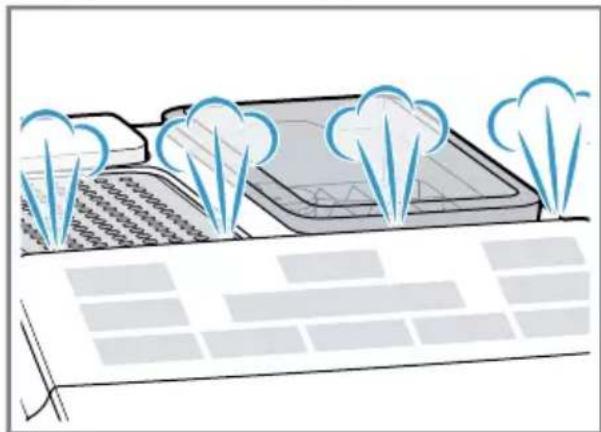
If you press a button, a signal tone sounds. You can deactivate the signal tone in the basic settings.
Tip: Check and set the water hardness before using your appliance.
Note
The first beverage will not yet have its full aroma if:
- You are using the appliance for the first time. You have run a service programme.
- You have not used the appliance for a long time.
Do not drink the beverage.
Tip: You will get a stable, fine-pored crema after you have started up your appliance and dispensed a few cups.
6.4 Water filter
You can use a water filter to minimise limescale deposits and reduce impurities in the water.
Inserting or replacing a water filter
If you have to change the inserted water filter, lights up on the display.
ATTENTION!
Possible damage to the appliance due to limescale build-up.
- Change the water filter in good time.
- Change the water filter after 2 months at the latest. Observe the display messages.
Requirement: The appliance is switched on.
- Press and hold buttons and calc'n Clean simultaneously for at least 3 seconds.
- Press button Grpncino display shows "W. hardness".
- Confirm with "ok" button Latte Macchiato.
- Press button "Carpuncino display shows "Water filter".
- Confirm with "ok" button Latte Macchiato.
The display shows "Filter act."
- Immerse the water filter in a glass of water with the opening facing up and press the sides together lightly until no more air bubbles rise to the surface.
See Fig. 7
- Set the water hardness on the aroma ring of the water filter.
- Press the water filter firmly into the empty water tank.
See Fig. 8
You can find out the water hardness from your local water supplier.
- Fill the water tank with water up to the max mark.
- Insert water tank into the appliance.
- Place a container with a capacity of at least 1.0 l under the outlet.
Basic operation
- Press the "ok" button Latte Macchiato to save the setting and start rinsing.
Water will now flow through the filter. 12. Press "<" button Coffee to exit the menu. 13. Empty the container.
The appliance is ready to use.
Removing the water filter
You can also operate your appliance without a water filter.
- Remove the water filter.
- Set the water hardness.
-> "Basic settings", Page 49
Tips
- You should also change your water filter for reasons of hygiene.
- With a water filter you need to descale your appliance less frequently. If you use a water filter, your coffee will be more flavoursome.
- The water filter can be purchased from retailers or customer service.
→ "Accessories", Page 43
7 Basic operation
7.1 Switching the appliance on or off
Press O
When the appliance is switched on or off, it will rinse itself automatically. When switched off, the appliance will emit steam into the drip tray for cleaning. The appliance will not rinse itself if the appliance is still warm when switched on or if no beverage was dispensed before it was switched off.
7.2 Dispensing beverages
Find out how to prepare a drink of your choice.
WARNING
Risk of scalding!
Freshly prepared drinks are very hot.
- Leave drinks to cool down if necessary.
- Do not let escaping liquids or steam come into contact with your skin.
7.3 Dispensing a coffee drink made from fresh beans
- Place a cup under the outlet system.
- To set the coffee strength, press the button repeatedly.
- Press button Espanso Coffee
The coffee is brewed and then dispensed into the cup.
Tip: To stop the current dispensing step early, press the Esecco Coffee button.
7.4 Dispensing drinks with milk
You can make coffee drinks with milk or froth up milk.
WARNING
Risk of burns!
The milk frother gets very hot.
- Let the milk frother cool down before you touch it.
ATTENTION!
Milk residues can dry on surfaces and are difficult to remove.
Clean the milk frother after each use.
Tips
- You can also use plant-based alternatives to milk, e.g. soya milk. The quality of the milk froth depends on the type of milk or plant-based alternative used.
7.5 Dispensing a coffee drink with milk
You can choose between cappuccino and latte macchiato.
- Fill a large cup or a large glass with approx. 100 ml milk for cappuccino or approx. 150 ml milk for latte macchiato.
- Place the cup or glass under the outlet system.
- Slide the outlet system and milk frother right down.
- To set the coffee strength, press the button repeatedly.
- Press button Cappuccino Latte Macchiato.
The milk is first frothed up in the cup or glass. The coffee is then brewed and dispensed into the cup or the glass.
Tip: To stop the current dispensing step early, press the Cappuccino Latte Macchiato button.
7.6 Frothing up milk
- Fill a large cup or a large glass with approx. 100 ml milk.
- Place the cup or glass under the outlet system.
- Slide the outlet system and milk frother right down.
- Press the Milk button.
The milk is frothed up.
Note: To stop the dispensing process early, press the Milk button.
7.7 Drink settings
Prepare a drink according to your taste.
Adjusting the coffee strength
Before making a drink, you can adjust the coffee strength.
To adjust the coffee strength, press the button repeatedly.
| * | Very mild |
| ** | Mild |
| *** | Normal |
| **** | Strong |
| ***** | Very strong |
| ***** | aromalntense1 |
| 1 | Depending on the model |
Note: The coffee strength selected is then active for all drinks made with coffee.
Adjusting the filling level
You can adjust the filling level of your drinks.
- Place a cup under the outlet system.
- Press and hold button Espresso or Coffee for 3 seconds.
Dispensing takes place, with the button selected flashing. The display shows the progress. → Fig. 11
- Once the required filling level is reached, press the button selected to stop.
Notes
The new filling level is only apparent when the next drink is dispensed. - You can set the filling level between 25-60 ml for espresso or 80-200 ml for coffee.
- The appliance always brews a minimum quantity of approx. 25 ml for espresso and approx. 80 ml for coffee.
Tip: You can change the settings at any time.
-> "Basic settings", Page 49
Adjusting the frothing time
You can adjust the frothing time of your drinks.
- Fill a large cup or a large glass with approx. 100 ml milk for cappuccino or approx. 150 ml milk for latte macchiato.
- Place the cup or glass under the outlet system.
- Slide the outlet system and milk frother right down.
- Press and hold button Cappuccino, Latte Macchiato or Milo 3 seconds. The milk is frothed up, and the button selected flashes. The display shows the progress. -> Fig. 11
- Once the required frothing time is reached, press the button selected to stop.
Notes
- You can set a limited time depending on the drink.
- Setting the frothing time has no impact on the filling level.
Tip: You can change the settings at any time.
-> "Basic settings", Page 49
Dispensing two cups at once
Depending on your beverage, you can make 2 cups at the same time.
- Press the button.
The display shows "Double cup on" for 5 seconds.
- Place two cups on the left and right under the outlet system.
- Press button Espresso or Coffee
The LED in the button pulses. - The drink is prepared in 2 steps. The beans are ground in 2 grinding operations. - The drink is brewed and then runs into the cup. 4. Wait until the process is complete. 5. To switch off the double cup function, press the button.
Notes
You can set the double cup function for expressly. Coffee If you have set the double cup function, you cannot dispense other drinks. If you do not press any other button within 90 seconds, the appliance automatically switches to the "Double cup off" setting.
8 Grinder
Your appliance has an adjustable grinder, which you can use to customise the grinding level of your coffee beans.
8.1 Adjusting the grinding level
Set the desired grinding level while the coffee beans are being ground.
WARNING
Risk of injury!
The grinder rotates.
- Never reach into the grinder.
ATTENTION!
Risk of damage to the grinder. The grinder may be damaged if the grinding level is not set properly.
- Only set the grinding level when the grinder is running.
- Select the grinding level using the rotary selector step by step.
Grinding level Setting
Fine grinding level for lightly roasted beans
Turn rotary selector anticlockwise.

Coarse grinding level for dark-roasted beans
Turn rotary selector clockwise.

The grinding level setting only takes effect after the second cup.
Tip: If the coffee is only dispensed drop by drop, set a coarser grinding level.
If the coffee is too thin with too little crema, set a finer grinding level.
9 Cup heater
You can use the cup heater to preheat your cups.
9.1 Activating and deactivating the cup heater
WARNING Risk of burns!
The cup heater can become very hot.
- Never touch the cup heater 1 while hot.
- Allow the hot cup heater 1 to cool down before touching it.
Tip: Place the cups with their base on the cup heater to warm them to optimum effect 1 .
To activate or deactivate the cup heater, press the button.
10 Basic settings
You can configure the basic settings for your appliance to meet your needs and call up additional functions.
10.1 Changing the basic settings
- Press and hold buttons and calc'n Clean simultaneously for at least 3 seconds.
- Press button reappuccino peatedly until the display shows the required setting.
- Confirm with "ok" button Latte Macchiato.
- Press the button to change the setting for cappuccino.
- Confirm with "ok" button Latte Macchiato.
- The display shows "Settings saved".
Cleaning and servicing
- Press "<" button to exit the menu.
Note: If you do not press any other button within 90 seconds, the appliance switches to the select beverage setting without saving.
Tip: You can change the settings at any time.
-> "Basic settings", Page 49
10.2 Overview of basic settings
You can find an overview of the basic settings here.
| Setting Selection Description | ||
| Language See selection on the appliance | Set menu language. Changes are immediately displayed. | |
| Factory reset Select the required language. | Restore settings to the factory settings. Note: The appliance rinses and deletes all individual settings. | |
| W. hardness ▪ "W. hardness" 1, 2, 3, 4 Water filter H2O-Softener | Set the appliance to the local water hardness. Tip: Ask your local water supplier about the water hardness. Note: If a water softening system is installed in your house, select "H2O-Softener". | |
| Auto Stand-by See selection on the appliance | Set how long the appliance should wait after preparing the last beverage before automatically switching itself off. | |
| Sound ▪ Sound on ▪ Sound off | Switch the tones on or off. | |
11 Cleaning and servicing
To keep your appliance working efficiently for a long time, it is important to clean and maintain it carefully.
11.1 Dishwasher-safe components
Here you can find an overview of the components you can clean in the dishwasher.
ATTENTION!
Some components are sensitive to heat and may be damaged if they are cleaned in a dishwasher.
- Follow the operating instructions of the dishwasher.
- Only clean dishwasher-safe components in the dishwasher. Only use programmes that do not heat the components above 60°C
Suitable:
Drip plate, drip grate, coffee dregs container, mechanical fill level indicator, milk frother
Not suitable:
Water tank, water tank lid, aroma lid, brewing unit, drip tray
11.2 Cleaning agent
Only use suitable cleaning agents.
ATTENTION!
Unsuitable cleaning products may damage the surfaces of the appliance.
- Do not use harsh or abrasive detergents.
- Do not use cleaning agents containing alcohol or spirits.
- Do not use hard scouring pads or cleaning sponges.
Unsuitable cleaning and descaling agents may damage the appliance.
- Do not use pure citric acid, vinegar or any vinegar-based agents to descale the appliance.
- Do not use descaling agents containing phosphoric acid. Only use cleaning tablets and descaling tablets that have been specially developed for the appliance. → "Accessories", Page 43
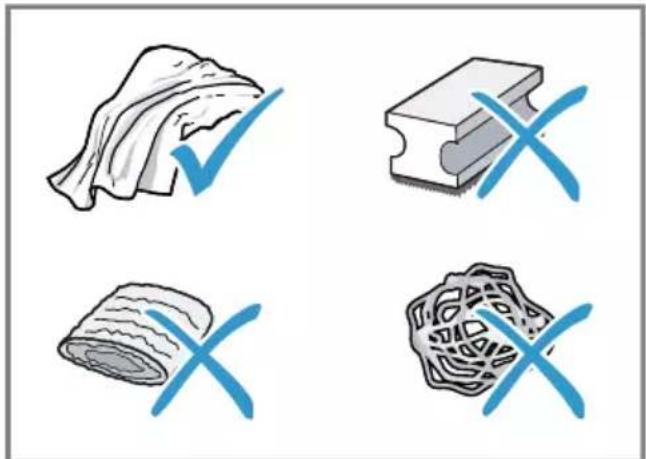
Tips
- Wash new sponge cloths thoroughly to remove any salt adhering to them. Salt can cause rust film to develop on stainless steel surfaces. Always remove any residues of limescale, coffee, milk and cleaning/descaling solutions immediately to prevent corrosion.
11.3 Cleaning the appliance

WARNING
Risk of electric shock!
An ingress of moisture can cause an electric shock.
- Never immerse the appliance or the power cord in water.
- Liquids must not be spilled on the appliance plug connection.
- Do not use steam- or high-pressure cleaners to clean the appliance.

WARNING
Risk of burns!
Some parts of the appliance become very hot.
- Never touch hot appliance parts. After use, allow hot appliance parts to cool down before touching.
- Disconnect the appliance from the mains power supply.
- Clean the housing, the high-gloss surfaces and the control panel with a microfibre cloth.
- Clean the outlet system with a soft, damp cloth after beverages have been dispensed.
- Rinse the water tank with fresh, clean water.
- If the appliance has not been used for a long time, e.g. after a holiday, clean the entire appliance, including moving parts such as the brewing unit or water tank.
Note: The appliance will rinse itself automatically if you switch it on when it is cold or switch it off after it has dispensed coffee. The system is therefore self-cleaning.
11.4 Cleaning the drip tray and coffee dregs container
Clean and empty the drip tray and coffee dregs container every day to prevent deposits. Follow the illustrated instructions at the beginning of this manual.
→ Fig. 12 - 16
11.5 Cleaning the milk frother
Clean the milk frother after each use to remove residues and ensure its proper function.
WARNING
Risk of burns!
The milk frother gets very hot.
- Let the milk frother cool down before you touch it.
- Fill a glass half-full with water and place under the outlet system.
- Push the milk frother right down.
- Press the Milk button.
Milk system is cleaned.
- Push the milk frother right up and allow it to cool down.
- Remove the milk frother and clean it thoroughly.
- Attach the milk frother again.
Note: To stop the process early, press the Milk button.
Tip: You can clean the milk frother in the dishwasher. After rinsing, remove the detergent residues thoroughly from the milk frother.
11.6 Cleaning the brewing unit
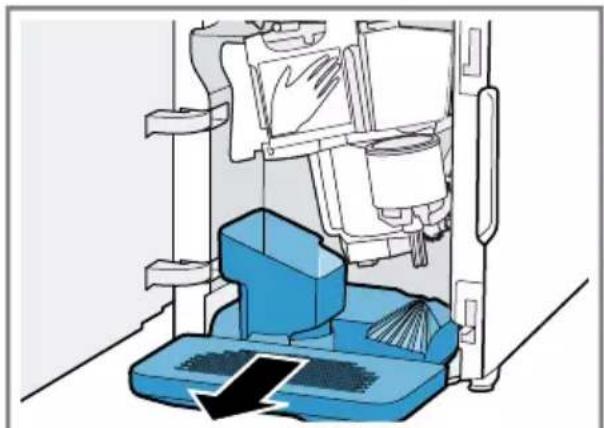
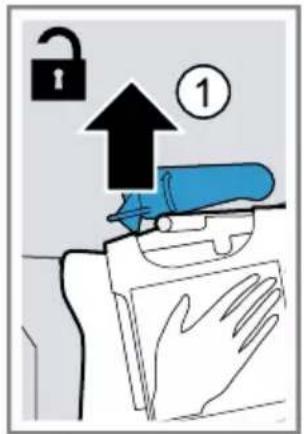
In addition to automatic rinsing, also remove and clean the brewing unit regularly. Follow the illustrated instructions at the beginning of the manual.
WARNING
Risk of burns!
Some parts of the appliance become very hot.
- Never touch hot appliance parts. After use, allow hot appliance parts to cool down before touching.
ATTENTION!
The brewing unit may be damaged by improper cleaning.
Do not use washing-up liquid. - Do not use cleaning agents containing vinegar or acids. - Do not clean in the dishwasher.
→ Fig. 17 - 26
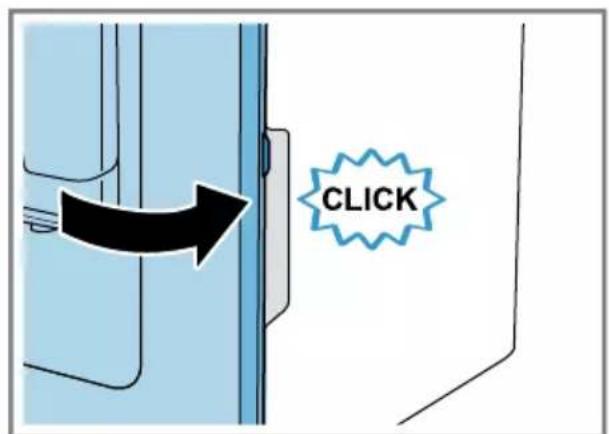
Note: The door can only be closed if the brewing unit and drip tray are inserted correctly.
11.7 Cleaning brewing unit
In addition to the automatic rinsing process, regularly remove and clean the brewing unit.
WARNING
Risk of burns!
Some parts of the appliance become very hot.
- Never touch hot appliance parts. After use, allow hot appliance parts to cool down before touching.
ATTENTION!
The brewing unit may be damaged by improper cleaning.
- Do not use washing-up liquid.
- Do not use cleaning agents containing vinegar or acids.
- Do not clean in the dishwasher.
1. Use the switch to turn the appliance off.
- Open the brewing chamber door. (See Fig. 17)
- Remove the drip tray with the coffee dregs container.
(See Fig. 18)
- Push the red lever upwards.
Hold the brewing unit by the handle and carefully pull forwards and out. → Fig. 19
- Clean the brewing unit thoroughly under warm running water.
→ Fig. 20
- Remove all coffee residues.
→ Fig. 21
- Dry the brewing unit thoroughly.
→ Fig. 22
- Clean the appliance interior with a damp cloth and remove any coffee residues.
- Leave the brewing unit and the appliance interior to dry. → Fig. 23
- Hold the brewing unit by the handle.
- Push the red lever upwards.
- Position the brewing unit under the lever and slide it back as far as it will go.
→ Fig. 24
The lever will click into place.
- Insert the drip tray with the coffee dregs container. → Fig. 25
Cleaning and servicing
10. Close the brewing chamber door. → Fig. 26
Note: The door can only be closed if the brewing unit and drip tray are inserted correctly.
11.8 Service programmes
The Calc'n Clean button lights up and the display shows "Calc'nClean required!" depending on the water hardness and use of your appliance. Use the programme to descale and clean your appliance.
ATTENTION!
Improper cleaning and descaling or a delay in doing so may damage the appliance.
Perform Calc'nClean according to the instructions immediately. - Only put cleaning tablets in the duct of the brewing unit. - Do not put descaling tablets or other products in the duct of the brewing unit.
Notes
If you do not descale and clean the appliance in good time, the appliance is locked and the display shows "Device locked". - To unlock the appliance, run the service programme.
Tip: Before you start the service programme, remove, clean and re-insert the brewing unit. Clean the milk frother.
Start Calc'nClean
The process takes approx. 40 minutes.
- Press and hold the calc'n Clean button for at least 5 seconds. The symbol lights up.
- Open the door.
- Remove and empty the drip tray and coffee dregs container.
- Remove and clean the brewing unit.
- Put a cleaning tablet into the duct of the brewing unit and re-insert the brewing unit.
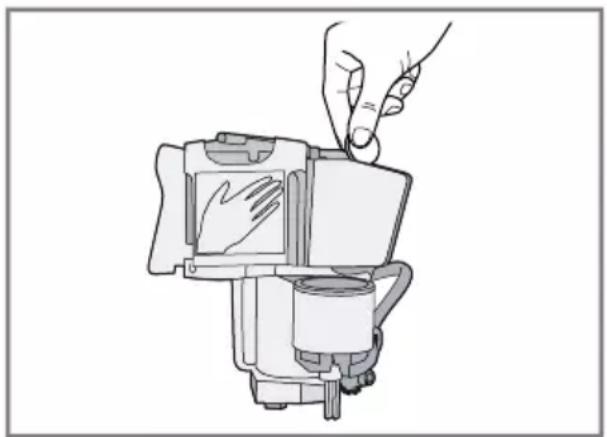
- Insert the drip tray and coffee dregs container again and close the door. The symbol lights up.
- If there is a water filter, remove it.
- Fill the empty water tank with lukewarm water up to the 0.5 l mark and dissolve one Siemens descaling tablet in it.
- Re-insert the water tank and place a container with approx. 1 l capacity under the outlet system.
- When calc'n Clean flashes, press the calc'n Clean button.
- The programme starts, cleans and descales the appliance. The process takes approximately 20 minutes. The symbol lights up.
- Empty the container and open the door.
- Empty the drip tray and re-insert it. 13. Close the door and place the container under the outlet system again. The symbol lights up.
14. Clean the water tank.
If you have removed the water filter, re-insert the water filter.
- Fill the water tank with fresh, cold, non-carbonated water up to the max mark. 16. When calc'n Clean flashes, press the calc'n Clean button.
- The programme starts, cleans and rinses the appliance. calc'n Clean pulses. The symbol lights up.
17. Remove and empty the drip tray and coffee dregs container. 18. Clean the drip tray and the coffee dregs container and re-insert them in the appliance. The programme has ended and the appliance is ready for operation again.
Resetting a service programme
If the service programme is interrupted, e.g. by a power cut, calc'n Clean and will light up.
- Clean the water tank. If you have removed the water filter, re-insert the water filter.
- Fill the water tank with fresh, cold, non-carbonated water up to the max mark.
- Press the calc'n Clean button.
- The service programme starts and rinses the appliance. The process takes approximately 2 minutes.
- Empty the drip tray, clean it and re-insert.
- Close the door. The programme has ended and the appliance is ready for operation again.
12 Troubleshooting
You can rectify minor faults on your appliance yourself. Read the troubleshooting information before contacting after-sales service. This will avoid unnecessary costs.

WARNING
Risk of electric shock!
Incorrect repairs are dangerous.
- Repairs to the appliance should only be carried out by trained specialist staff.
- Only use genuine spare parts when repairing the appliance.
- If the power cord of this appliance is damaged, it must be replaced by the manufacturer, the manufacturer's Customer Service or a similarly qualified person in order to prevent any risk.
Fault Cause and troubleshooting
| Appliance no longer responds. | Appliance has a fault. 1. Pull out the mains plug and wait 60 seconds. 2. Re-insert the mains plug. |
| Appliance only dis-penses water, not cof-fee. | Empty bean container is not detected by the appli- ance. ► Pour in coffee beans. |
| Beans are too oily and are not falling into the grinder. ► Gently tap the bean container. ► Change the coffee variety. ► Do not use oily beans. ► Clean the empty bean container with a damp cloth. | |
| Brewing unit is not inserted properly. ► Slide the brewing unit right back. | |
| Coffee or milk froth quality varies widely. | Build-up of limescale in the appliance. ► Descale the appliance. |
| Coffee is not dis-pensed or has slowed to a trickle. | Grinding level is set too fine. ► Set a coarser grinding level. → "Adjusting the grinding level", Page 48 |
| Set quantity is not reached. | Heavy build-up of limescale in the appliance. ► Descale the appliance. |
| Air is in the water filter. 1. Immerse the water filter in water with the opening facing upwards until no more air bubbles escape. 2. Reinsert the filter. | |
| Appliance is soiled. | |
| Fault Cause and troubleshooting | |
| Coffee is not dis-pensed or has slowed to a trickle. | Clean the brewing unit.→ "Cleaning brewing unit", Page 53 |
| Set quantity is not reached. | Descale and clean the appliance. |
| Residues of limescale remover are blocking the water tank.1. Remove the water tank.2. Clean the water tank thoroughly. | |
| Coffee strength is set too high.Reduce the coffee strength. | |
| Milk or milk-based drinks are too hot. | There is too little milk in the glass or cup.1. Use more milk. |
| Milk froth is too thin, and there is a loud suction noise. | 2. Change the frothing time. |
| Milk or milk-based drinks are too cold. | There is too much milk in the glass or cup.1. Use less milk.2. Change the frothing time. |
| Milk in the glass or cup is too cold.Use lukewarm milk. | |
| Coffee has no crema. Type of coffee is not optimal. | Use a coffee variety with a higher proportion of Robusta beans.Use beans with a darker roast. |
| Beans are no longer fresh.Use fresh beans. | |
| Grinding level is not appropriate for coffee beans.Adjust the grinder to a finer setting.→ "Adjusting the grinding level", Page 48 | |
| Coffee is too acidic. Grinding level is set too coarse. | Adjust the grinder to a finer setting.→ "Adjusting the grinding level", Page 48 |
| Type of coffee is not optimal.Use a coffee variety with a higher proportion of Robusta beans.Use beans with a darker roast. | |
| Coffee is too bitter. Grinding level is set too fine. | Set a coarser grinding level.→ "Adjusting the grinding level", Page 48 |
| Type of coffee is not optimal. | |
| Coffee is too bitter. ▶ Change the coffee variety. | |
| Coffee tastes burnt. Grinding level is set too fine. ▶ Set a coarser grinding level. → "Adjusting the grinding level", Page 48 | |
| Type of coffee is not optimal. ▶ Change the coffee variety. | |
| Milk froth quality var-ies widely. | Milk froth quality depends on the type of milk or plant-based alternative used. ▶ Optimise the result through the selection of the milk or vegetable-based drink type. |
| Appliance is not dis-pensing milk froth. | Heavy build-up of limescale in the appliance. ▶ Descale the appliance. |
| Milk frother is soiled. ▶ Clean the milk frother in the dishwasher. | |
| Milk frother is not inserted in the milk. 1. Use more milk. 2. Check whether the milk frother is inserted in the milk. 3. Slide the outlet system down completely. | |
| Appliance is not dis-pensing drinks. | Air is in the water filter. 1. Immerse the water filter in water with the opening facing upwards until no more air bubbles escape. 2. Reinsert the filter. ▶ Firmly press the water filter straight down into the tank connection. |
| Residues of limescale remover are blocking the water tank. 1. Remove the water tank. 2. Clean the water tank thoroughly. | |
| There is dripping wa-ter on the inner floor of the appliance. | Drip tray was removed too soon. ▶ Wait a few seconds after the last drink was dispensed before removing the drip tray. |
| Brewing unit cannot be removed. | Locking device cannot be released, brewing unit is jammed. ▶ Switch the appliance off and back on after 3 minutes. |
| Grinder won't start. Appliance is too hot. ▶ Disconnect the appliance from the mains. 1. Wait 1 hour so the appliance can cool down. 2. Wait 1 hour so the appliance can cool down. | |
| Display shows "Fill water tank" despite the water tank being full. | Water tank is wrongly inserted. • Insert the water tank correctly. |
| Carbonated water is in the water tank. • Fill the water tank with fresh tap water. | |
| Float is stuck in the water tank. 1. Remove the water tank. 2. Clean the water tank thoroughly. | |
| New water filter was not rinsed as per instructions. 1. Rinse the water filter according to the instructions. 2. Place the water filter into operation. | |
| Air is in the water filter. 1. Immerse the water filter in water with the opening facing upwards until no more air bubbles escape. 2. Reinsert the filter. | |
| Water filter is old. • Insert a new water filter. | |
| Limescale deposits in the water tank are blocking the system. 1. Clean the water tank thoroughly. 2. Start the Calc'nClean service programme. | |
| Display shows "Clean brewing unit". | Brewing unit is soiled. • Clean the brewing unit. → "Cleaning brewing unit", Page 53 |
| Mechanism of brewing unit is stiff. • Clean the brewing unit. → "Cleaning brewing unit", Page 53 | |
| Display shows "Incorrect voltage". | There are problems with the power supply. • Only operate the appliance at 220 - 240 V. |
| Display shows "Calc'nClean required!" very frequently. | Decalcified water still contains small amounts of lime. 1. Insert a new water filter. 2. Set the corresponding water hardness. |
| Incorrect or too little descaling agent used. • When descaling, only use suitable tablets. | |
| Appliance cannot be operated. Change displays. | Appliance is in demo mode. 1. To deactivate demo mode, press and hold the Ⓞ button for at least 5 seconds. 2. Remove the water tank. 3. Fill the water tank with fresh water. 4. Re-insert the water tank. |
| Display shows "Close door" despite the fact that the door is closed. | Door is not properly closed. Press the door firmly shut. |
| Appliance is too hot. 1. Disconnect the appliance from the mains. 2. Wait 1 hour so the appliance can cool down. | |
| Display shows "Empty trays" despite the fact that the drip tray is empty. | Appliance is switched off and does not detect emptying. 1. Switch the appliance on, and remove the drip tray. 2. Re-insert the drip tray. |
| Display shows "Fill water tank" and LEDs flashing. | Water tank is missing or wrongly inserted. Insert the water tank correctly. |
| Pipe system in the appliance is dry. Fill the water tank with fresh, cold, non-carbonated water. | |
| Air is in the water filter. 1. Immerse the water filter in water with the opening facing upwards until no more air bubbles escape. 2. Reinsert the filter. | |
| Display shows "Device too cold". | Ambient temperature is too cold. Operate the appliance at temperatures over 5 °C. |
| Display shows "Restart appliance". LEDs flashing. | Brewing unit is heavily soiled or cannot be removed. Restart the appliance. Clean the brewing unit. → "Cleaning brewing unit", Page 53 |
| Display shows "Restart appliance". No LED is lit. | Appliance has a fault. Restart the appliance. |
| Display shows "Clean/ fill water tank"; calc'n Clean and light up. | Descaling process has been interrupted. Proceed as described in section → "Resetting a service programme", Page 55. |
13 Transportation, storage and disposal
13.1 Activating frost protection
Protect your appliance from frost during transport and storage.
ATTENTION!
Residues of liquid in the appliance may damage it during transport or storage.
- Empty the pipe system before transport or storage.
Requirements
The appliance is ready to use. The water tank has been filled.
- Place a large container under the outlet system and push the milk frother down.
- Press and hold the Milk button for at least 5 seconds. The LED in the button flashes, and the appliance heats up.
- When steam escapes from the milk frother, remove the water tank.
- Allow the appliance to cool down and wait until the display shows "Water tank empty".
- Use to switch the appliance off.
- Empty the water tank and the drip tray and thoroughly clean the appliance.
- Disconnect the appliance from the mains power supply.
You can now transport or store the appliance.
Note: The brewing unit is now secured and you cannot remove it.
13.2 Disposing of old appliance
Valuable raw materials can be reused by recycling.
- Unplug the appliance from the mains.
- Cut through the power cord.
- Dispose of the appliance in an environmentally friendly manner. Information about current disposal methods are available from your specialist dealer or local authority.
This appliance is labelled in accordance with European Directive 2012/19/EU concerning used electrical and electronic appliances (waste electrical and electronic equipment - WEEE). The guideline determines the framework for the return and recycling of used appliances as applicable throughout the EU.
14 Customer Service
Function-relevant genuine spare parts according to the corresponding Ecodesign Order can be obtained from Customer Service for a period of at least 7 years from the date on which your appliance was placed on the market within the European Economic Area.
Note: Under the terms of the manufacturer's warranty the use of Customer Service is free of charge.
en Technical specifications
Detailed information on the warranty period and terms of warranty in your country is available from our after-sales service, your retailer or on our website.
If you contact Customer Service, you will require the product number (E-Nr.) and the production number (FD) of your appliance.
The contact details for Customer Service can be found in the enclosed Customer Service directory or on our website.
14.1 Product number (E-Nr.) and production number (FD)
You can find the product number (E-Nr.) and the production number (FD) on the appliance's rating plate.
Make a note of your appliance's details and the Customer Service telephone number to find them again quickly.
15 Technical specifications
| Voltage 220- | 240 V ~ |
| Frequency 50 / 60 Hz | |
| Connection rating 1300 W | |
| Maximum static pump pressure | 15 bar |
| Maximum capacity of water tank (without filter) | 1,3 l |
| Maximum capacity of bean container | ≈250 g |
| Length of the power cable | 100 cm |
| Appliance height 38,3 cm | |
| Appliance width 25,1 cm |
| Appliance depth 43,3 cm |
| Weight, empty ≈8-9 kg |
| Type of grinder Ceramic/steel |
WARNING - Risk of suffocation!
WARNING - Risk of fire!
WARNING - Risk of suffocation!
Children may wrap themselves in packaging material or put it over their heads and suffocate.
Keep children away from packaging material. Do not let children play with packaging material.
WARNING - Risk of fire!
The appliance becomes hot.
Ensure sufficient ventilation for the appliance. ▶ It is strictly forbidden to use the appliance in a cabinet.
WARNING - Risk of scalding!
Keep the device away from very hot objects.
If necessary, let the device cool down. Avoid contact of the released liquid and steam with the skin.
WARNING - DANGER OF POISONING!
Fully automatic coffee machine

Capsule

Operating instructions

Tablet for cleaning

Tablet for descaling

Water filter
1 Depending on the configuration
3.2 Installation and connection of the device
ATTENTION!
Danger of damage to the device. Incorrect operation may damage the device.
Recommendation: Before using the device, check and set the water hardness.
Note
The appliance does not yet have the full aroma if:
you use the appliance for the first time; you have performed a service program; the appliance has not been used for a long time.
Do not drink this drink.
Recommendation: A stable, fine-pored consistency is achieved after the appliance has been put into operation and a few cups have been prepared.
6.4 Water filter
The water filter reduces the formation of scale and also significantly improves the water from impurities.
Installing or replacing the water filter
If the installed water filter needs to be replaced, the display lights up
ATTENTION!
Possible damage to the appliance as a result of scale formation.
Replace the water filter in a timely manner. Replace the water filter no later than after 2 months. Observe the messages on the display.
Requirement: The appliance is switched on.
- Press and hold the button for at least 3 seconds.
- Press the Cappuccino button until "W. hardness" appears on the display.
- Confirm by pressing the "ok" button for Latte Macchiato.
- HaximaiTe KhoNky Cappuccino Ka Ha DnCnnee He NoBNTcay "Water filter".
- Повпердente нажатиem "ok" Конки Latte Macchiato. Ha niscnnee oTo6paKaetcra "Filter act."
- Norpuy3nTe fNlBtp DnRA BOJb OTBepCTHe M BBePbX B CTAkAH BOJb IN CJIeRka CxHMaIte 6OKOBbIe NOBepXHOCTn FInbTp a, NOKa He NepeCTaHyT BbIXOHTb Ny3bIpbKn BO3dYxa.
→Pc.7
ru CtaHdapThoe ynpabJeHne
- C nOMOuHnactpoeHOro KOBua ΦnIbTp a dnn BODbl HacTpoNTe JxecT-KoCTb BObl.
- BCTaBbTe, npOuHo npKab, HnIbTp DnA BoDbl B nycToH pe3epByap DnA BoDbl. →Pnc. 8
BbMOKeTe y3HaTb JHeCTKOCTb BODbI B MeCTHO BODOCHA6kaIOUeN OprAHn3a- cHn.
- 3aene Te Body B pe3epByap dIy BoDbI DO OTMeTkn «max»
- BCTaBbTe pe3epByap IJIЯ BOdbl B npn-6op.
- NocTaBbTe NOd INcneHcep EMKoCTb 06beMOM He MeHee 1 I.
- To6bI coXpaHnTb yCTaHOBky n 3anyCTnTb npOcecc npOMbIBKN, HaxMMTe "ok" KhoNkY Latte Macchiato.
Boda teueT uee3 fnilbtp.
- Press "<" to select coffee, to change the menu.
- Empty the container.
The appliance is ready for operation.
Removing the water filter
Your appliance can also operate without a water filter.
1. Remove the water filter. 2. Adjust the water hardness. -> "Basic settings", page 226
Recommendations
The water filter must also be replaced for hygienic reasons. If the filter is used, the appliance must be descaled more frequently. Using the water filter improves the taste of coffee-based drinks. The water filter can be purchased in stores or through customer service.
-> "Accessories", page 219
7 Standard operation
7.1 Switching the appliance on and off
Press 0
When switching on and off, the appliance performs an automatic rinse. When switching off, the appliance releases steam for cleaning. If the appliance is still hot when switching on, or if a drink was not prepared before switching off, the rinse is not performed.
If necessary, let the drink cool down. Avoid contact of the escaping liquids and steam with the skin.
7.3 Preparing a coffee drink from fresh coffee beans
- NocTaBbTe yawky noD nncpeHcep.
- HaximaiTe KhoNky 0ДЯ NaCTpoiKn KpeNoCTn KoΦe.
- HaxMMte KhoNky Espritso nn Cofee
Kofoe3aBapnBaetcH 3aTeM HAnnBaetcB YAshky.
PekomeHaa: TTo6bl npexKeBpeMeHHO 3aKOHHTb TeKyuNn 3tan npiroTOBneHHra, HaxMMte KhoNky Essso nn Coffee
7.4 ПпгOTOBЛЕнne HaNTKOB C MOJOKOM
BbIMoKeTe npHroTOBHTb KoFeHbIe HAnNTKn C MOJOKOM NIN BCNEHHTb MoJOKO.

PPEyIeHne
Onachoctb oXora!
KanyuHaTop cnIbHo HArpeBaetc.
OCTaTKM OJOKa MOryT 3acoxHyTb, INx 6y- Det Tpydno ydaHtB.
OuHaaTe KaanyHaTOp nocJe KaJdo-TO HcNoIb3OBaHn.
PekomeHdaqun
BbIMoKTe BMeCTO MOJOKa TaKHe HcIIOJIb3OBaTb HAnITKN I3 paCTHTeJIbHOrO cbIPb,HaNPImep,IN3 CON. KaueCTBO MOLOOHON HeHbI 3aBNCHT OT BnDa HcNoJIb3yEmOro MOJOKa HnHaNITKa n3 pAcTnteJIbHOrCbIpB.
BbIMoKeTe BbIbpaTb KaanyuHNo nn NaTte MaKNaTo.
- Pour the milk into a large cup or a large glass (approx. 100 ml) for a cappuccino, or approx. 150 ml of milk for a latte macchiato.
- Place the cup or glass under the dispenser.
- Lower the dispenser and the cappuccino maker all the way down.
- Press the button ① to adjust the coffee strength.
- Press the Cappuccino or Latte Macchiato button. The milk is frothed in the cup or glass. Then the coffee is brewed and poured into the cup or glass.
Recommendation: To stop the current preparation step prematurely, press the Cappuccino or Latte Macchiato button.
7.6 Frothing milk
- Pour approx. 100 ml of milk into a large cup or a large glass.
- Place the cup or glass under the dispenser.
- Lower the dispenser and the cappuccino maker all the way down.
- Press the Milk button.
The milk is frothed.
Note: To stop the preparation of the drink prematurely, press the Milk button.
7.7 Adjusting drinks
Prepare the drink to your taste.
The strength of the coffee
Before preparing the drink, you can set the coffee strength.
Press the 0 button to change the coffee strength.
You can change the amount of the drink to be prepared.
Standard control
- Place a cup under the spout.
- Hold down the Espresso or Coffee button for 3 seconds.
During preparation of the drink, the selected button flashes. The progress is shown on the display. → Pnc 11
- When the required amount of drink is reached, touch the button to stop the process.
Settings
The new set amount of drink is implemented only starting with the next preparation of the drink. You can set the amount for espresso 25-60 ml and for coffee 80-200 ml. The appliance brews the minimum amount: for espresso approx. 25 ml and for coffee approx. 80 ml.
Recommendation: You can change the settings at any time.
→ "Basic settings", page 226
You can change the duration of milk frothing.
- Pour into a large cup or large glass approx. 100 ml of milk for cappuccino or approx. 150 ml of milk for latte macchiato.
- Place the cup or glass under the dispenser.
- Immerse the dispenser and cappuccinatore into the milk.
- Press and hold the Cappuccino, Latte Macchiato or Milk button for 3 seconds.
The milk is frothed, the selected button lights up. The process is shown on the display. → Psc 11
- When the required frothing duration is reached, release the button to stop the process.
Application
You can set a duration limit depending on the type of milk. Setting the frothing duration does not affect the amount of drink.
Recommendation: You can change the settings at any time.
→ "Basic settings", page 226
You can set the function to prepare two cups at once only for espresso or coffee. If you have set the function to prepare two cups at once, you cannot prepare other drinks.
If you do not press any button within 90 seconds, the appliance automatically returns to the "Double cup off" setting.
8 Coffee grinder
The appliance is equipped with an adjustable coffee grinder, which allows you to individually set the degree of grinding of the coffee beans.
8.1 Setting the grinding degree
During the grinding of coffee beans, set the lower grinding degree.

WARNING
Risk of injury!
The coffee grinder rotates.
Do not touch the internal parts of the coffee grinder.
ATTENTION!
Risk of damage to the coffee grinder
If the grinding degree is set incorrectly, the coffee grinder may be damaged.
Set the grinding degree only when the coffee grinder is running. The grinding degree is set by turning the rotary switch.
Grinding degree setting
Fine grinding for light roasted beans
Turn the switch counterclockwise.
Grinding degree setting
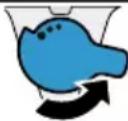
Coarse grinding for dark roasted beans
Rotate the switch clockwise.

The degree of assistance setting only takes effect after the second press.
Recommendation: If coffee comes out in individual drops, set a coarser grind.
If coffee comes out with cream and little crema, set a finer grind.
9 Warming cups
Cups can be warmed using the cup warmer.
9.1 Switching the cup warmer on and off
WARNING Risk of burns!
The cup warmer becomes very hot.
Never touch the hot cup warmer - let it cool down before contact with the hot cup warmer.
Recommendation: For optimal warming, place cups upside down on the cup warmer.
10 Basic settings
To switch the cup warmer on or off, press the button.
10 Basic settings
You can adjust the basic settings of the appliance according to your needs and call up additional functions.
Do not look directly at the light source.
The "Clean/fill water tank" message is displayed, press Clean.
The cleaning process is interrupted.
Perform the actions described in the section
ightarrow "Reset service program", page 231.
13 Transport, storage, and disposal
13.1 Activating frost protection
During transport and storage, protect your device from low temperatures.
CAUTION!
Residual liquid in the device can cause damage during transport or storage.
Before transporting or storing, drain the liquid system.
Requirements
The device is ready for operation. The reservoir is filled.
- Place a large container under the dispenser and lower the drain valve.
- Hold the Milk button pressed for at least 5 seconds. The button lights up and the device heats up.
- Korda n3 kanyuHaTopa NaHcET BbIXO-DnTb nap, CHMNTe pe3epByap dJa BO-Dbl.
- Wait until the descaling process is complete and the "Water tank empty" indicator appears.
- Turn off the appliance with the power button.
- Empty the water tank into a sink, thoroughly clean the appliance.
- Disconnect the appliance from the power supply. Now you can transport the appliance or store it.
Note: The brew unit is now locked and cannot be removed.
13.2 Disposal of the old appliance
Disposal in accordance with environmental regulations ensures the possibility of recycling valuable raw materials.
- Pull the power plug out of the socket.
- Cut the power cord of the appliance.
- Dispose of the appliance in accordance with environmental regulations.
Information about possible disposal methods can be obtained from your specialized retailer, as well as from local or municipal authorities.
This appliance is marked in accordance with European Directive 2012/19/EU on waste electrical and electronic equipment (WEEE). These regulations define the rules for the return and recycling of old appliances applicable within the European Union.
14 Customer service
Important for the functioning of the appliance: original spare parts that comply with the EU Directive on eco-design of energy-using products can be ordered from our customer service for at least 7 years from the date of purchase of your appliance within the European Economic Area.
Note: During the fulfillment of warranty obligations, the manufacturer's work is performed by the service department free of charge.
For detailed information on the warranty period and warranty conditions in your country, please contact our service department, your dealer, or visit our website.
When contacting the service department, please quote the model number (E-Nr.) and the factory number (FD) of the appliance.
The address and telephone number of the service department can be found in the enclosed list of service departments or on our website.
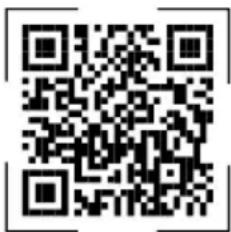
For access to customer service contacts, you can also use the QR code data.
https://www.bosch-home.ru
Importer/Organization accepting quality claims: BSH Home Appliances (BSH Hausgeräte)
Republic of Kazakhstan, Almaty, st.
Khali Mukan, 22/5, 7 zak
e-mail: ala-infokz@bshg.com
Service life of the appliance is 7 years.
On the territory of the Republic of Kazakhstan, if a malfunction is detected, call the service contact center 5454
(only for mobile phones).

- FURTHER INFORMATION AND EXPLANATIONS ARE AVAILABLE ONLINE
- TABLE OF CONTENTS
- SAFETY
- GENERAL INFORMATION
- INTENDED USE
- RESTRICTION ON USER GROUP
- SAFETY INFORMATION
- WARNING - RISK OF SUFFOCATION
- EN SAFETY
- WARNING - RISK OF ELECTRIC SHOCK
- WARNING - RISK OF FIRE
- WARNING - RISK OF BURNS
- WARNING - RISK OF SCALDING
- WARNING - RISK OF INJURY
- WARNING - DANGER: MAGNETISM
- WARNING - RISK OF HARM TO HEALTH
- ENVIRONMENTAL PROTECTION AND SAVING ENERGY
- DISPOSING OF PACKAGING
- TIPS FOR SAVING ENERGY
- INSTALLATION AND CONNECTION
- SCOPE OF DELIVERY
- INSTALLING AND CONNECTING THE APPLIANCE
- ATTENTION
- FAMILIARISING YOURSELF WITH YOUR APPLIANCE
- APPLIANCE
- CONTROL PANEL
- DISPLAY
- ACCESSORIES
- BEFORE USING FOR THE FIRST TIME
- PREPARING AND CLEANING THE APPLIANCE
- PERFORMING INITIAL START-UP
- NOTES
- NOTE
- WATER FILTER
- INSERTING OR REPLACING A WATER FILTER
- BASIC OPERATION
- REMOVING THE WATER FILTER
- TIPS
- SWITCHING THE APPLIANCE ON OR OFF
- DISPENSING BEVERAGES
- WARNING
- RISK OF SCALDING
- DISPENSING A COFFEE DRINK MADE FROM FRESH BEANS
- DISPENSING DRINKS WITH MILK
- RISK OF BURNS
- DISPENSING A COFFEE DRINK WITH MILK
- FROTHING UP MILK
- DRINK SETTINGS
- ADJUSTING THE COFFEE STRENGTH
- ADJUSTING THE FILLING LEVEL
- ADJUSTING THE FROTHING TIME
- DISPENSING TWO CUPS AT ONCE
- GRINDER
- ADJUSTING THE GRINDING LEVEL
- RISK OF INJURY
- GRINDING LEVEL SETTING
- CUP HEATER
- ACTIVATING AND DEACTIVATING THE CUP HEATER
- WARNING RISK OF BURNS
- BASIC SETTINGS
- CHANGING THE BASIC SETTINGS
- CLEANING AND SERVICING
- OVERVIEW OF BASIC SETTINGS
- DISHWASHER-SAFE COMPONENTS
- CLEANING AGENT
- CLEANING THE APPLIANCE
- RISK OF ELECTRIC SHOCK
- CLEANING THE DRIP TRAY AND COFFEE DREGS CONTAINER
- CLEANING THE MILK FROTHER
- CLEANING THE BREWING UNIT
- CLEANING BREWING UNIT
- SERVICE PROGRAMMES
- START CALC'NCLEAN
- RESETTING A SERVICE PROGRAMME
- TROUBLESHOOTING
- TRANSPORTATION, STORAGE AND DISPOSAL
- ACTIVATING FROST PROTECTION
- REQUIREMENTS
- DISPOSING OF OLD APPLIANCE
- CUSTOMER SERVICE
- EN TECHNICAL SPECIFICATIONS
- PRODUCT NUMBER (E-NR.) AND PRODUCTION NUMBER (FD)
- TECHNICAL SPECIFICATIONS
- WARNING - DANGER OF POISONING
- INSTALLATION AND CONNECTION OF THE DEVICE
- INSTALLING OR REPLACING THE WATER FILTER
- REQUIREMENT: THE APPLIANCE IS SWITCHED ON
- RU CTAHDAPTHOE YNPABJEHNE
- RECOMMENDATIONS
- STANDARD OPERATION
- SWITCHING THE APPLIANCE ON AND OFF
- PREPARING A COFFEE DRINK FROM FRESH COFFEE BEANS
- ППГOTOBЛЕНNE HANTKOB C MOJOKOM
- PPEYIEHNE
- ONACHOCTB OXORA
- PEKOMEHDAQUN
- FROTHING MILK
- ADJUSTING DRINKS
- THE STRENGTH OF THE COFFEE
- STANDARD CONTROL
- SETTINGS
- APPLICATION
- COFFEE GRINDER
- SETTING THE GRINDING DEGREE
- GRINDING DEGREE SETTING
- WARMING CUPS
- SWITCHING THE CUP WARMER ON AND OFF
- TRANSPORT, STORAGE, AND DISPOSAL
- CAUTION
- DISPOSAL OF THE OLD APPLIANCE
Brand : BOSCH
Model : TIE20301
Category : Coffee maker