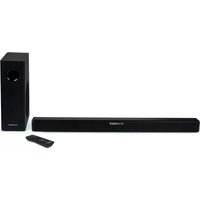
SB350BTS - Soundbar THOMSON - Free user manual and instructions
Find the device manual for free SB350BTS THOMSON in PDF.


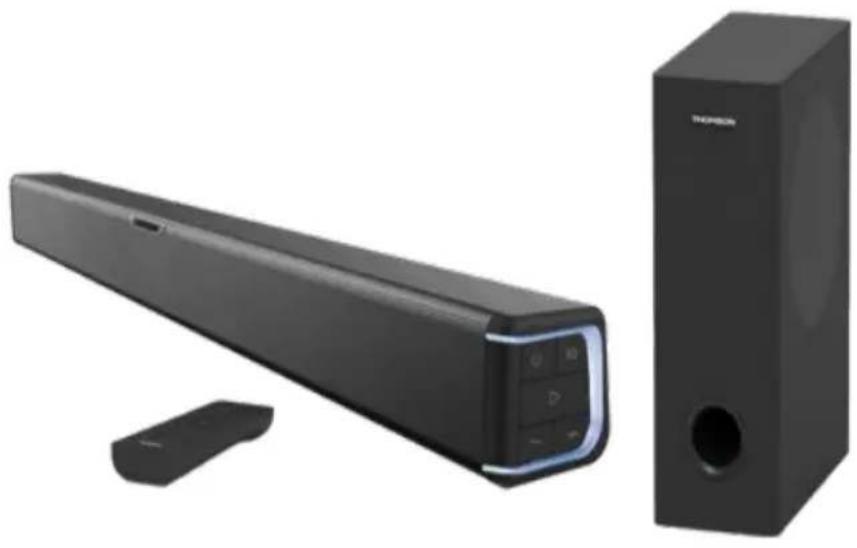
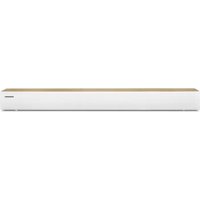
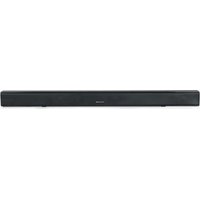
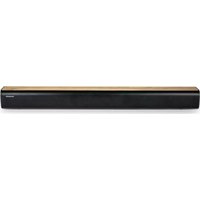
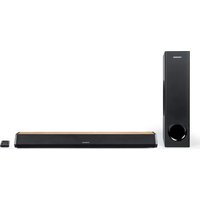
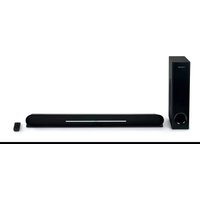
| Product Type | Soundbar with wired subwoofer |
| Dimensions (W x H x D) | 825 x 70 x 60 mm |
| Weight | 4.6 kg |
| Power Supply | Power adapter 18 V / 3.5 A (model GJ60WD-1800350V) |
| Standby Consumption | 0.4 W (adapter: ≤ 0.2 W) |
| Bluetooth Version | 5.0 |
| Bluetooth Range | 10 m |
| Peak Power | 180 W |
| RMS Power | 4 x 7.5 W (bar) + 30 W (subwoofer) |
| Bar Speakers | 2 x 5.08 cm (2"), 10 W each, 4 Ω |
| Subwoofer Speaker | 13.33 cm (5.25"), 30 W, 4 Ω |
| Frequency Response | 30 Hz - 20 kHz |
| Signal-to-Noise Ratio | ≥ 55 dB |
| Inputs | Digital Optical, 3.5 mm Auxiliary |
| Audio Modes | Bluetooth, Optical, Auxiliary |
| Equalizer | Standard, Movie, Music, Game |
| Remote Control | Yes (included) |
| Auto Standby | After 10 minutes of audio inactivity |
| Box Contents | Soundbar, subwoofer, power adapter, 3.5 mm auxiliary cable, optical cable, remote control |
| Warranty | 2 years |
| Manufacturer | Bigben Interactive, 396 rue de la Voyette, CRT2 – Fretin CS 90414, 59814 Lesquin Cedex, France |
| Technical Support | 09 69 39 79 59 (Mon-Fri 10am-6pm, Metropolitan France) / support.thomson@bigben.fr |
Frequently Asked Questions - SB350BTS THOMSON
User questions about SB350BTS THOMSON
0 question about this device. Answer the ones you know or ask your own.
Ask a new question about this device
Download the instructions for your Soundbar in PDF format for free! Find your manual SB350BTS - THOMSON and take your electronic device back in hand. On this page are published all the documents necessary for the use of your device. SB350BTS by THOMSON.
USER MANUAL SB350BTS THOMSON
natural_image
Exterior view of a black TP580R audio streaming device with a side-mounted speaker and control panel (no text or symbols visible)MODE D'EMPLOI
AVANT D'UTILISER CET APPAREIL, VEUILLEZ LIRE ATTENTIVEMENT CE MODE D'EMPLOI ET LE CONSERVER AFIN DE POUVOIR LE CONSULTER ULTÉRIEUREMENT
natural_image
Symbol of a trash bin with crossed lines indicating no waste, and a solid black rectangle below (no text or labels)BELGIQUE, customerservice@bigben-interactive.be
NEDERLAND, customerservice@bigben-interactive.nl
ESPAÑA, soporte@metronic.com
Tel.: 93 713 26 25
SOUNDBAR WITH WIRED SUBWOOFER
natural_image
Exterior view of a black audio streaming device with a speaker tower and control panel (no visible text or symbols)OPERATING INSTRUCTIONS
PLEASE READ THIS USER MANUAL CAREFULLY BEFORE
OPERATING THIS UNIT AND RETAIN FOR
FUTURE REFERENCE
Getting started 11
Safety warning and notice 11
What's in the box? 13
Description of parts 13
Features and connections 14
Using Bluetooth 15
Product specifications 16
Care for the environment 17
Additional information 17
Declaration of conformity 17
Getting started
- Remove the appliance from the box.
- Remove any packaging from the product.
- Place the packaging inside the box or dispose of it safely.
Safety warning and notice
Read and understand all instructions before you use this product. If damage is caused by failure to follow the instructions, the warranty does not apply.

- Never remove the casing from this device.
- Never place this device on other electrical equipment.
- Protect the power cord from being walked on or pinched, particularly at plugs, sockets, and the point where they exit from the device. Make sure that the power voltage corresponds to the voltage printed on the back label. When you unplug the AC power cord, always pull the plug from the socket. Never pull the cord. Before connecting the power cord, make sure you have completed all other connections.
-
Only use equipment/accessories specified by the manufacturer.
-
Refer all repairs to qualified service personnel. Repairs are required when the device has been damaged in any way, such as:
-
damaged power-supply cord,
- spilled liquids, or objects have been inserted into the device,
- the device has been exposed to rain or moisture,
- the device does not operate normally,
-
or the device has been dropped.
-
The rating label is placed on the bottom side of the device.
- Never block the ventilation openings
- Make sure there is enough space around the product for ventilation. Place the appliance in a stable location
- This device must be used in moderate climates, away from direct sunlight, naked flames or heat, heating devices, stoves or other apparatus (including amplifiers) that produce heat. Do not install near any heat sources.
- Batteries (battery pack or individual batteries installed) must not be exposed to excessive heat such as sunshine, fire, etc.
- Unplug the device before cleaning. Never lubricate any part of this device. Clean the
appliance with a soft cloth. Do not use abrasive products or harsh cleaners.
-
Make sure you always have easy access to the power cord, plug or adaptor to disconnect this device from the power, if necessary.
-
Do not use this apparatus near water. It must not come into contact with dripping or splashing. Do not use this unit in wet or damp conditions.
-
Unplug this device during lightning storms or when unused for long periods of time.
-
This appliance can be used by children aged 8 years and above and persons with reduced physical, sensory or mental capabilities or lack of experience and knowledge if they are supervised or have received instruction on using the appliance safely and understand the hazards involved. Children must not play with the appliance. Cleaning and user maintenance must not be done by children without supervision.
-
This device must only be supplied with very low safety voltage corresponding to the marking on the appliance.
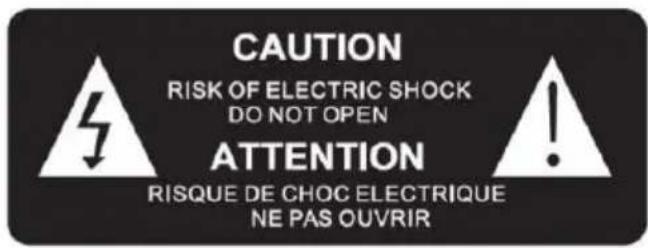

The lightning symbol inside an equilateral triangle warns users of the presence inside the product of uninsulated hazardous electrical voltages powerful enough to represent an electrocution risk.

The exclamation mark within a triangle indicates the presence of important operating and maintenance (repair) instructions in the literature accompanying the unit.
Place the unit in the required position and unravel the mains cable. Insert the cable into the supply socket and switch on as required.
| Class II material | |
| Direct current | |
| Alternating current | |
| For indoor use only |

Note the following information: only use the power supply listed below: 18V / 3.5A AC adaptor
What's in the box?
Check and identify the contents of your package:
- Soundbar
- Subwoofer
- AC adapter
• 3.5mm auxiliary cable - Optical cable
- Remote control
Description of parts
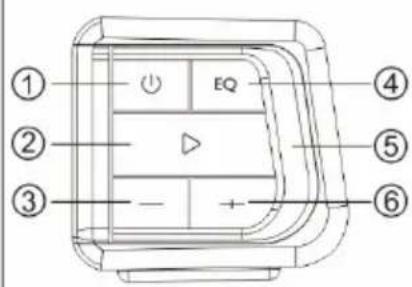
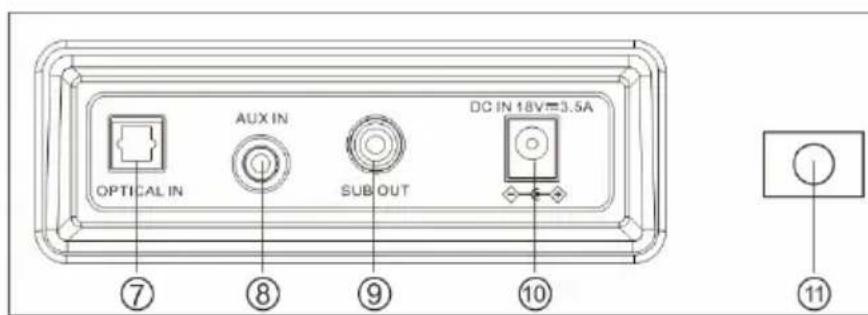
- Long-press this button to turn the device on/off. Also press this button to select the mode (Bluetooth/optical input/auxiliary input)
- Play / Pause
Long-press (3 seconds) this button to disconnect the Bluetooth device - Previous
Long-press this button to reduce the volume - Equaliser mode: MUSIC / FILM / GAME / STANDARD
- LED indicator
- Next
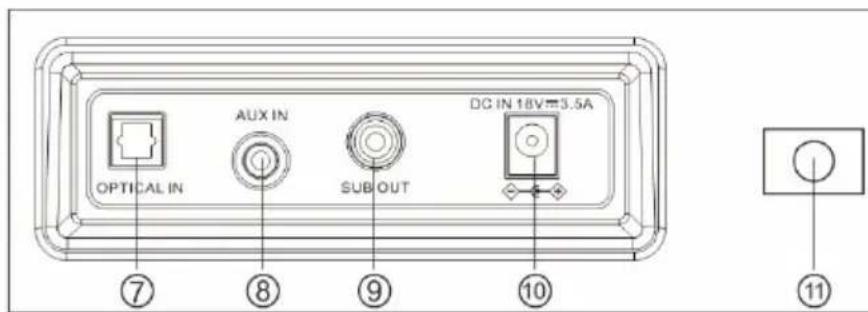
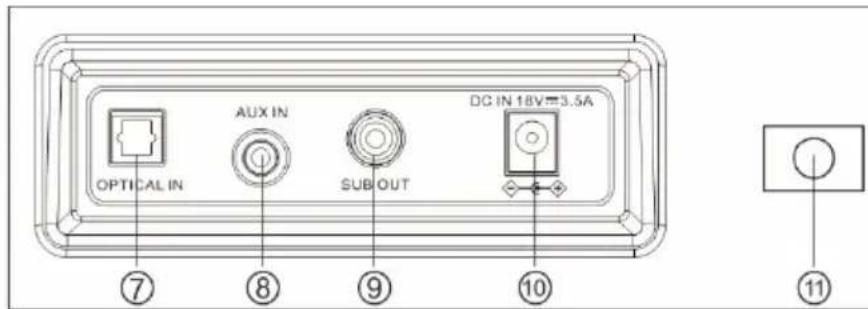
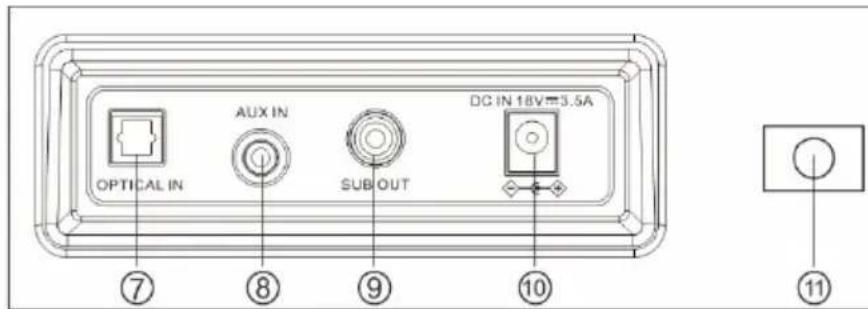
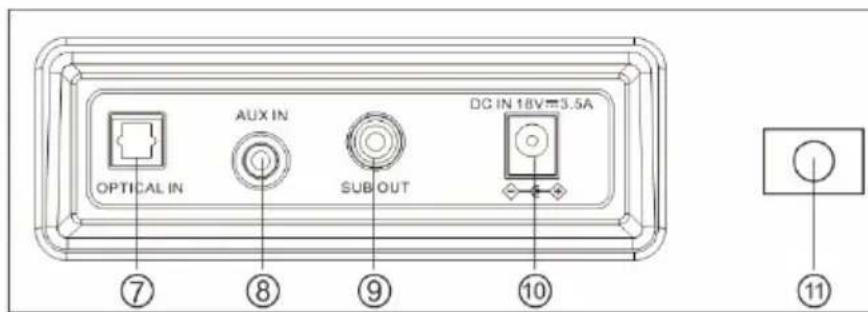
Long-press this button to increase the volume - Optical input
- Auxiliary input
- Subwoofer connector
- DC power input jack (DC 18.0V / 3.5A)
- Wall mount bracket
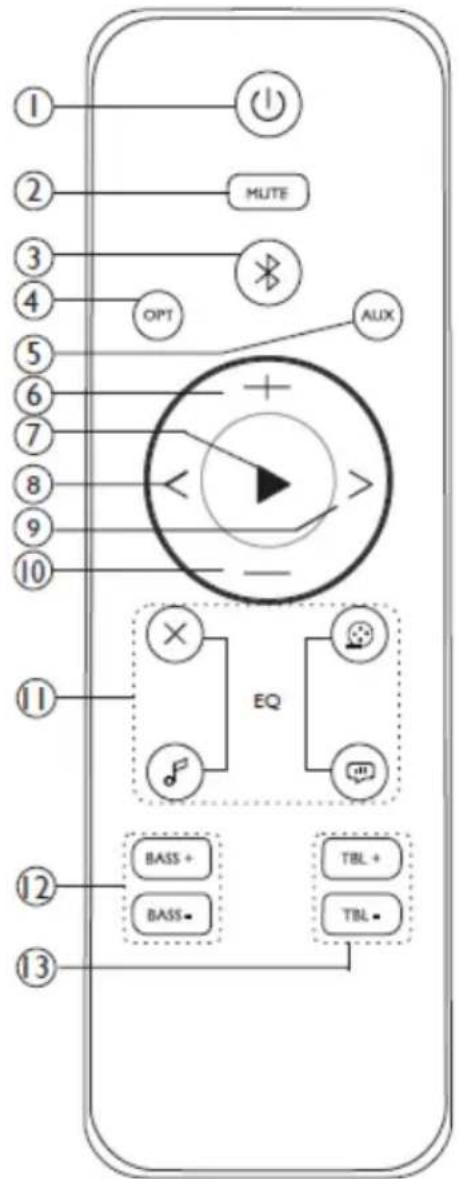
Remote control
- Power on/off
- Mute button
- Bluetooth mode
- Optical mode
- Auxiliary mode
- Volume +
- Play / pause
- Back
- Forward
- Volume -
- Equaliser mode Standard-film-music-game
- Bass + / -
- Treble + / -
Auto standby
When playing audio media from a connected device, the soundbar automatically switches to standby if:
- No button is pressed for 10 minutes;
- No audio data is transmitted from a connected device for 10 minutes.
Features and connections Using the optical input
You will need: an audio source with an optical audio output and a digital optical audio cable (included).
Connect the digital optical audio cable to the optical output on the audio source and to the optical input on the soundbar.
- Long-press the ⏻ button on the unit or press the ⏻ button on the remote control to switch the unit on.
- Press the ⏻ button repeatedly on the unit or press the OPT button on the remote to
switch to optical mode.
- The white LED light will come on.
- Audio from the connected audio source will now be played through the speakers.
Using the auxiliary input RCA (3.5mm RCA cable, supplied)
- Connect a 3.5mm audio input cable (not included) to the 3.5mm audio input on the soundbar and an audio source.
- Long-press the ⏻ button on the unit or press the ⏻ button on the remote control to switch the unit on.
- Press the ⏻ button repeatedly on the unit or press the AUX button on the remote to switch to AUX mode.
- The green LED light comes on.
- Use the controls on the connected audio device to begin playing music through the connected soundbar.
Using Bluetooth
Note: The maximum connection distance is around 10 metres. Please place your Bluetooth speaker as close as possible to this device to avoid the connection being disturbed.
Please make sure your mobile phone is Bluetooth-enabled. Specific pairing steps may vary with different mobile phones. Please refer to the user manual of your mobile phone for further information. The main pairing steps are as follows:
- Keep the SB350BTS soundbar and Bluetooth mobile phone within 1 metre of each other when pairing.
- Long-press the ⏻ button on the unit or press the ⏻ button on the remote control to switch the unit on.
- Press the ⏻ button repeatedly on the unit or press the ✗ button on the remote to switch to BT mode. The blue LED light will switch on.
- Switch on your mobile phone's Bluetooth function and search for Bluetooth devices. After the search is completed, select "SB350BTS" from the Bluetooth device list.
- As indicated, enter the password or PIN code: "0000" and press "Yes" or "Confirm".
- After successful pairing, select "SB350BTS" from the Bluetooth device list and press "Connect".
- Press ▶ to play / pause the music.
- Long-press “+” to turn up the volume.
- Long-press “-” to turn down the volume.
- Press "<" to return to the previous song.
- Press “>” to skip to the next song.
Using the equaliser function
Press the EQ button to switch the equaliser mode to music, film and game mode.


X Press "X" on the remote control to cancel EQ (equaliser) mode.
Product specifications
| Type | Specifications | Type | Specifications |
| Speaker | Soundbar: 5.08cm, 10WSubwoofer: 13.33cm, 30W | Speaker impedance | Soundbar: 4ΩSubwoofer: 4Ω |
| Peak power | 180W | ||
| RMS power | 4 x 7.5W + 30W | Bluetooth version | 5.0 |
| Power consumption | 0.4W | Bluetooth frequency | 2.402-2.480 GHz |
| Input power | DC 18.0V / 3.5A | Transmission distance | 10m |
| S/N ratio | ≥55dB | EIRP | EIRP -0.92dBm |
| Speaker frequency | 30Hz-20kHz | Bluetooth pairing name | SB350BTS |
| Dimensions | 825 x 70 x 60mm | Weight | 4.6kg |
Adaptor specifications
• Adaptor manufacturer name or trademark: GJTL
• Adaptor model number: GJ60WD-1800350V
• Input voltage and frequency: 100-240V, 50/60Hz
• Output voltage, current, power: 18.0V, 3.5A, 63.0W
• Average active efficiency: 86.95%
• Efficiency at low load (10%): 93.6%
• No-load power consumption: ≤0.2W
In an environment with electrostatic discharge, the device may power off.

Your product is designed and manufactured with high-quality materials and components, which can be recycled and reused.
Attention should be drawn to the environmental aspects of battery disposal.

natural_image
Symbol of a trash bin with crossed lines indicating no waste or restriction, and a solid black rectangle below (no text or symbols)When this crossed-out wheeled bin symbol is attached to a product, it means that the product is covered by European Directive 2002/96/EC. Please check the local separate collection system for electrical and electronic products. Please act according to your local rules and do not dispose of your old products with your normal household waste. Correct disposal of your old product helps to prevent potential negative consequences for the environment and human health.
Additional information
- If there is an incoming call while your SB350BTS soundbar is connected to your mobile phone for music playback, it will pause as soon as you answer the call and resume after the call ends. (Sometimes, it will remain on pause after the call ends, depending on your mobile phone.)
- The Bluetooth® word, brand and logo are registered trademarks owned by Bluetooth SIG, Inc., and any use of such marks by Bigben Interactive is under licence. Other trademarks and trade names are those of their respective owners.
• You can find the information on the plate located at the back of the unit.
• THOMSON is a brand of Talisman Brands, Inc. used by Bigben Interactive under licence. - This product has been manufactured and sold under the responsibility of Bigben Interactive.
- THOMSON, and the THOMSON logo are trademarks used under license by Bigben Interactive – further information at www.thomson-brand.com.
- All other products, services, companies, trademarks, trade or product names and logos referenced herein are the property of their respective owners.
Declaration of conformity
- Bigben Interactive hereby declares that the radio equipment type SB350BTS is in compliance with Directive 2014/53/EU. The full text of the EU declaration of conformity is available at the following internet address: www.bigben-interactive.co.uk/support/
Warranty
This product is guaranteed by Bigben for a period of 2 years from date of purchase, except in countries of the European Economic Area which offer a longer warranty period. We strongly advise you to keep your receipt of purchase in order to prove the date of purchase of this product. A default product has to be returned to the point of purchase or the online store where it has been purchased. Warranty covers defects due to faulty materials or workmanship. If you are missing a part into the product when you unwrapped it, you may contact our technical support. The warranty doesn't cover irregular use.
Made in China
Manufactured by BIGBEN INTERACTIVE
396, Rue de la Voyette
CRT2 - FRETIN CS 90414
59814 LESQUIN Cedex - France
www.bigben.eu
Email: support.thomson@bigben.fr




Fabricant : Bigben Interactive FRANCE
396, Rue de la Voyette, C.R.T. 2, Fretin,
CS90414 - 59814 Lesquin Cedex, France
BELGIQUE, customerservice@bigben-interactive.be
NEDERLAND, customerservice@bigben-interactive.nl
ESPANA, soporte@metronic.com
Tel.: 93 713 26 25
natural_image
Exterior view of a black audio streaming device with a speaker tower and control panel (no visible text or symbols)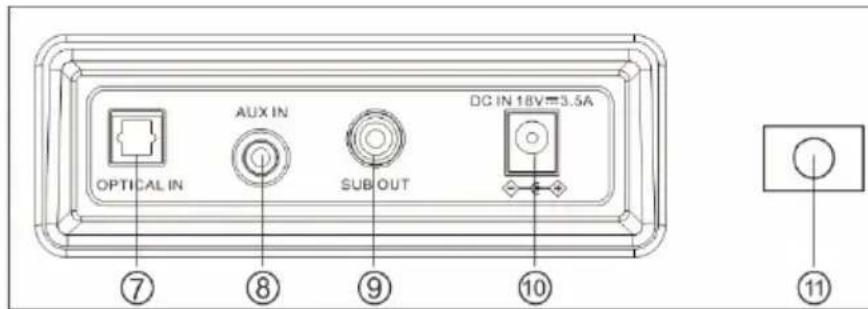
Mando a distancia
natural_image
Symbol of a trash bin with crossed lines indicating no waste, and a solid black rectangle below (no text or labels)BELGIQUE, customerservice@bigben-interactive.be
NEDERLAND, customerservice@bigben-interactive.nl
ESPAÑA, soporte@metronic.com
Tel.: 93 713 26 25
natural_image
Exterior view of a black audio streaming device with a speaker tower and control panel (no text or symbols visible)ISTRUZIONI PER L'USO
PRIMA DI UTILIZZARE L'APPARECCHIO, LEGGERE ATTENTAMENTE LE ISTRUZIONI PER L'USO E CONSERVARLE PER
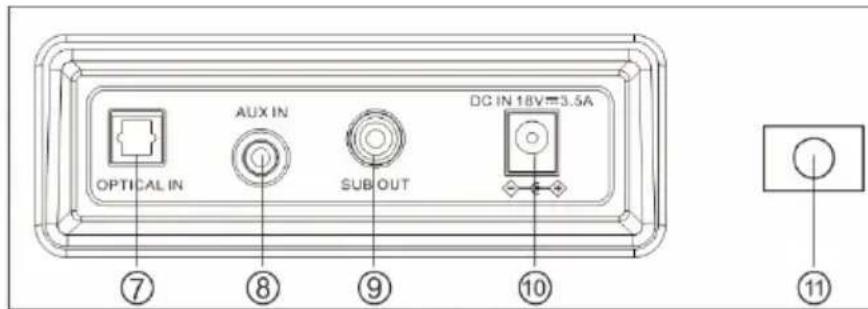
Telecomando
BELGIQUE, customerservice@bigben-interactive.be
NEDERLAND, customerservice@bigben-interactive.nl
ESPAÑA, soporte@metronic.com
Tel.: 93 713 26 25
natural_image
Exterior view of a black audio streaming device with a speaker tower and control panel (no visible text or symbols)MODO DE UTILIZAÇÃO
ANTES DE UTILIZAR ESTE APARELHO, LEIA ATENTAMENTE ESTE
MANUAL DE INSTRUÇÕES E GUARDE-O
PARA CONSULTA POSTERIOR
BELGIQUE, customerservice@bigben-interactive.be
NEDERLAND, customerservice@bigben-interactive.nl
ESPAÑA, soporte@metronic.com
Tel.: 93 713 26 25
natural_image
Exterior view of a black TP580R audio streaming device with a side-mounted speaker and control panel (no text or symbols visible)BEDIENUNGSANLEITUNG
natural_image
Symbol of a trash bin with crossed lines indicating no waste or restriction, and a solid black rectangle below (no text or symbols)BELGIQUE, customerservice@bigben-interactive.be
NEDERLAND, customerservice@bigben-interactive.nl
ESPAÑA, soporte@metronic.com
Tel.: 93 713 26 25
natural_image
Black TP5800 audio streaming device with a side-mounted speaker and control panel (no visible text or symbols)GEBRUIKSAANWIJZING
ALVORENS DIT APPARAAT TE GEBRUIKEN, LEES DEZE INSTRUCTIES AANDACHTIG DOOR EN BEWAAR DEZE VOOR TOEKOMSTIGE RAADPLEGING
Starten
Afstandsbediening
BELGIQUE, customerservice@bigben-interactive.be
NEDERLAND, customerservice@bigben-interactive.nl
ESPAÑA, soporte@metronic.com
Tel.: 93 713 26 25
natural_image
Black TP5800 audio streaming device with a side-mounted speaker and control panel (no visible text or symbols)INSTRUKCJA OBSŁUGI
BELGIQUE, customerservice@bigben-interactive.be
NEDERLAND, customerservice@bigben-interactive.nl
ESPAÑA, soporte@metronic.com
Tel.: 93 713 26 25
- OPERATING INSTRUCTIONS
- Getting started
- Safety warning and notice
- What's in the box?
- Description of parts
- Remote control
- Auto standby
- Features and connections Using the optical input
- Using Bluetooth
- Using the equaliser function
- Adaptor specifications
- Additional information
- Declaration of conformity
- Warranty
- Mando a distancia
- Telecomando
- BEDIENUNGSANLEITUNG
- Starten
- Afstandsbediening
Brand : THOMSON
Model : SB350BTS
Category : Soundbar