EasyManual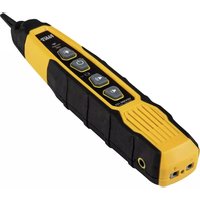
Probe-PRO - Measuring equipment Klein Tools - Free user manual and instructions
Find the device manual for free Probe-PRO Klein Tools in PDF.



User questions about Probe-PRO Klein Tools
0 question about this device. Answer the ones you know or ask your own.
Ask a new question about this device
Download the instructions for your Measuring equipment in PDF format for free! Find your manual Probe-PRO - Klein Tools and take your electronic device back in hand. On this page are published all the documents necessary for the use of your device. Probe-PRO by Klein Tools.
USER MANUAL Probe-PRO Klein Tools
- REPLACEABLE PROBE TIP
- When used with VDV500-063 Toner-Pro2 ENGLISH GENERAL SPECIFICATIONS The Klein Tools VDV500-123 Probe-Pro is a professional-series tone tracer, featuring an inductive probe with speaker for amplification, and LED light for use in dark spaces. It also features a headphone jack for use in extreme noise environments.
Relative Humidity: 10% – 90% non-condensing
Storage Temp: -4° to 140°F (-20° to 60°C)
Weight: 5.7 oz. (161.6 g) including batteries
Auto-Power Off: After 10 minutes of inactivity Specifications subject to change.
Worklight On/Off Button
Signal Strength Indicator
Volume Increase Button
Volume Decrease Button
Speaker P10 Lanyard Slot P11 "-" (Negative) Terminal P12 "+" (Positive) Terminal P13 Terminal Release Buttons P14 Verification Indicator P15 Battery Cover P16 Battery Cover Screw (#2 Phillips) P17 3.5mm Headphone Jack*
- CAUTION: Excessive volume can cause permanent hearing damage. Use as low a volume as possible. FEATURE DETAILS3
P11 P12 P14 FEATURE DETAILS4 ENGLISH WARNINGS To ensure safe operations and service of the instrument, follow these instructions. Failure to observe these warnings can result in re, electric shock, severe injury or death.
The Probe-Pro is designed for use on extra-low voltage cabling systems (less than 60 volts) for testing when NOT energized.
DO NOT use instrument if wet, as it could pose a shock hazard.
DO NOT use instrument if damaged in any way.
Turn off instrument before attempting to replace batteries.
The battery door must be in place and secure before you operate the instrument.
DO NOT open the case, other than the battery compartment. OPERATING INSTRUCTIONS READ ALL INSTRUCTIONS BEFORE OPERATING AND RETAIN
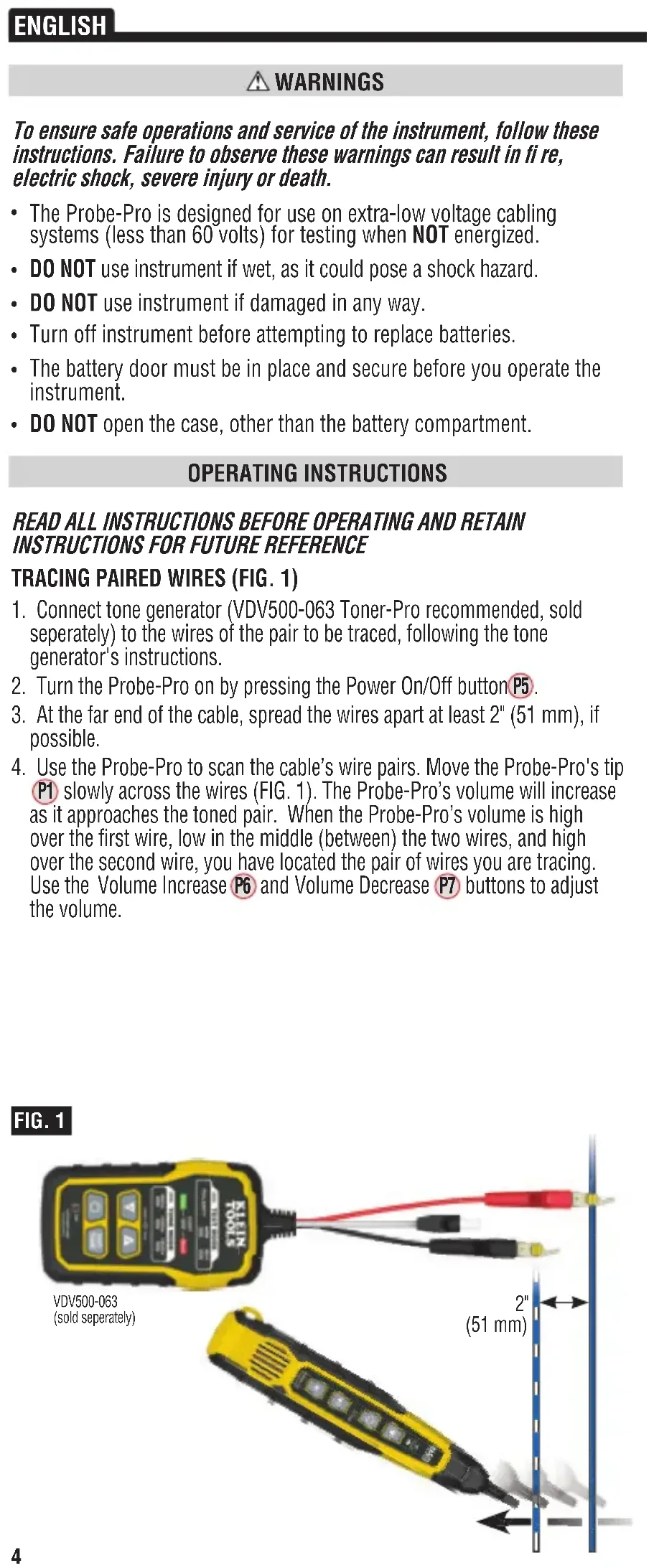
1. Connect tone generator (VDV500-063 Toner-Pro recommended, sold
seperately) to the wires of the pair to be traced, following the tone generator's instructions.
2. Turn the Probe-Pro on by pressing the Power On/Off button
3. At the far end of the cable, spread the wires apart at least 2" (51 mm), if
slowly across the wires (FIG. 1). The Probe-Pro’s volume will increase as it approaches the toned pair. When the Probe-Pro’s volume is high over the first wire, low in the middle (between) the two wires, and high over the second wire, you have located the pair of wires you are tracing. Use the Volume Increase
1. Connect tone generator (VDV500-063 Toner-Pro recommended, sold
seperately) to the cable to be traced, following the tone generator's instructions.
2. On the other end of the cable, remove approximately 2 mm (3/32") of the
outer jacket of each of the wires believed to be the toned pair.
3. Insert the wire connected to the positive test clip of the tone generator to
and the wire curently in the negative test clip of the tone generator to the "-" (Negative) Terminal P11 . To access the terminals, press their respective Terminal Release buttons P13 , insert the wire(s) and release (FIG. 2). The Verification Indicator P14 will illuminate when the correct pair is inserted. TRACING NON-PAIRED WIRES (FIG. 3)
1. Connect tone generator (VDV500-063 Toner-Pro recommended, sold
seperately) to the wires to be traced, following the tone generator's instructions.
2. Turn the Probe-Pro on by pressing the Power On/Off button
3. At the far end of the cable, spread the wires at least 2" (51 mm) apart, if
slowly across the wires. The Probe-Pro’s volume will increase as it approaches the toned wire. FIG. 2 Press 2 mm (3/32") FIG. 3
The Probe-Pro has a worklight
to aid in illuminating dark or low-light work areas. Press the Worklight On/Off button
to turn the light on and off. CUSTOMER SERVICE KLEIN TOOLS, INC. 450 Bond Street Lincolnshire, IL 60069 1-877-775-5346customerservice@kleintools.com www.kleintools.com CLEANING Be sure instrument is turned off and wipe with a clean, dry lint-free cloth. Do not use abrasive cleaners or solvents. STORAGE Remove the batteries when instrument is not in use for a prolonged period of time. Do not expose to high temperatures or humidity. After a period of storage in extreme conditions exceeding the limits mentioned in the GENERAL SPECIFICATIONS section, allow the equipment to return to normal operating conditions before using. WARRANTY www.kleintools.com/warranty DISPOSAL / RECYCLE Do not place equipment and its accessories in the trash. Items must be properly disposed of in accordance with local regulations. Please see www.epa.gov or www.erecycle.org for additional information. MAINTENANCE BATTERY REPLACEMENT When the Battery Status Indicator
blinks, the batteries must be replaced.
1. Turn off instrument(s) before attempting to replace batteries.
P16 on battery cover P15
3. Remove and properly dispose of four 1.5V AAA batteries.
4. Install new batteries (note proper polarity).
5. Replace battery cover and fasten securely with screw.
of the Probe-Pro is replaceable if damaged. To remove and replace tip:
1. Turn tip 1/4 turn and pull gently to remove.
2. Insert new tip with key in proper orientation and push gently.
3. Rotate 1/4 turn to lock into place.
To avoid risk of electric shock, do not operate while battery door is removed.7