GPLT360 - Speaker GEMINI - Free user manual and instructions
Find the device manual for free GPLT360 GEMINI in PDF.



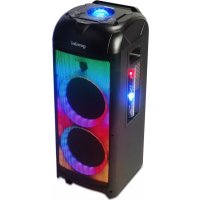
| Product type | Powered portable speaker |
| Brand | GEMINI |
| Model | GPLT360 |
| Dimensions (L x D x H) | 30.5 x 30 x 78.5 cm |
| Weight | 11 kg |
| Power supply | 100-240 V~, 50/60 Hz |
| Power consumption | 180 W |
| Output power | 120 W RMS |
| Bluetooth | Version 5.0 |
| FM radio | 87.5 - 108 MHz |
| Frequency response | 25 Hz - 20 kHz |
| Speakers | Tweeter: 1 x 1", 3 x 2"; Woofer: 1 x 8"; Subwoofer: 1 x 8" |
| Inputs | MIC-IN, GUITAR-IN, LINE-IN, USB (data transfer), FM antenna |
| Battery | Built-in rechargeable, automatic charging, red light (charging), green light (full) |
| Included accessories | Remote control, wired microphone, adapter, FM antenna, user manual |
| Main functions | Sources (USB, BT, FM, LINE), X.BASS, ECHO, equalizer (bass, treble), lighting modes (LED1-4, Disco Ball), TWS |
| Cleaning | Damp cloth only, avoid solvents and abrasive products |
| Safety | Do not open, avoid water and heat, do not use handles for suspension |
| Spare parts and repairability | Use manufacturer-specified parts, maintenance by qualified technician |
Frequently Asked Questions - GPLT360 GEMINI
User questions about GPLT360 GEMINI
0 question about this device. Answer the ones you know or ask your own.
Ask a new question about this device
Download the instructions for your Speaker in PDF format for free! Find your manual GPLT360 - GEMINI and take your electronic device back in hand. On this page are published all the documents necessary for the use of your device. GPLT360 by GEMINI.
USER MANUAL GPLT360 GEMINI
natural_image
Exterior view of a black industrial electronic device with visible LED lights and a colorful mesh chamber (no text or symbols)GEMINI GPLT-360
CONTENTS
Product Introduction 3
Caution 3
Panel 4
Remote Control 5
Bluetooth Pair and Connect 6
TWS (True Wireless Stereo) mode 6
FM Radio Operation 6
Battery 7
Line In 7
Power On 7
Specifications 8
Warranty information 8
Legality and Safety 9
Spanish Manual 10
German Manual 15
French Manual 20
Italian Manual 25
Dutch Manual 30
Introduction
Thank you for purchasing our GEMINI GPLT-360 Complete High Power Speaker System. With proper care & maintenance, your unit will provide years of reliable, uninterrupted service. The GEMINI GPLT-360 is backed by a 1-year limited warranty*.
Preparing For First Use
Please ensure that you find these accessories included with your GPLT Series speaker:
(1) Speaker
(1) Adapter
(1) Operating Instructions
(1) FM Antenna
(1) Remote control
(1) Wired Microphone
Caution
- All operating instructions should be read before using this equipment.
- To reduce the risk of electrical shock, do not open the unit. There are no user replaceable parts inside.
- Please refer servicing to a qualified GEMINI service technician. Do not attempt to return this equipment to your dealer.
- Do not expose this unit to direct sunlight or to a heat source such as a radiator or stove.
●This unit should be cleaned only with a damp cloth. Avoid solvents or other cleaning detergents.
- When moving this equipment, it should be placed in its original carton and packaging. This will reduce the risk of damage during transit.
- Do not expose this unit to water or heat.
- Do not use cleaning products or lubricants on the controls or switches.
Precautions
Please read carefully before proceeding
Always follow the basic precautions listed below to avoid the possibility of serious injury or even death from electrical shock, short-circuiting, damages, fire, or other hazards.
- Read Instructions: All the safety and operating instructions should be read before the product is operated.
- Retain Instructions: The safety and operating instructions should be retained for future reference. All the safety and operating instructions should be read before the product is operated.
- Heed Warnings: All warnings on the product and in the operating instructions should be adhered to.
- Follow Instructions: All operating and use instructions should be followed.
- Cleaning: The product should be cleaned only with a polishing cloth or a soft dry cloth. Never clean with furniture wax, benzene, insecticides or other volatile liquids since they may corrode the cabinet.
- Water And Moisture: Do not use this product near water, for example, near a bathtub, wash bowl, kitchen sink, or Laundry tub; in a wet basement; or near a swimming pool; and the like.
- Do Not Open: Do not open the device or attempt to disassemble the internal parts or modify them in any way. The device contains no user-serviceable parts. If it should appear to be malfunctioning, discontinue use immediately and have it inspected by qualified GEMINI service personnel.
- Replacement Parts: When replacement parts are required, be sure the service technician has used replacement parts specified by the manufacturer or have the same characteristics as the original part. Unauthorized substitutions may result in fire, electric shock, or other hazards.
- Location: Before moving the device, remove all connected cables.
- Do not use the speaker's handles for suspended installation. Doing so can result in damage or injury.
- Do not expose the device to excessive dust or vibrations, or extreme cold or heat (such as in direct sunlight, near a heater) to prevent the possibility of panel disfiguration or damage to the internal components.
- Do not place the device in an unstable position where it may accidentally fall over.
- Connections: Before connecting the device to other devices, turn off the power for all devices. Before turning the power on or off for all devices, set all volume levels to minimum.
Panel
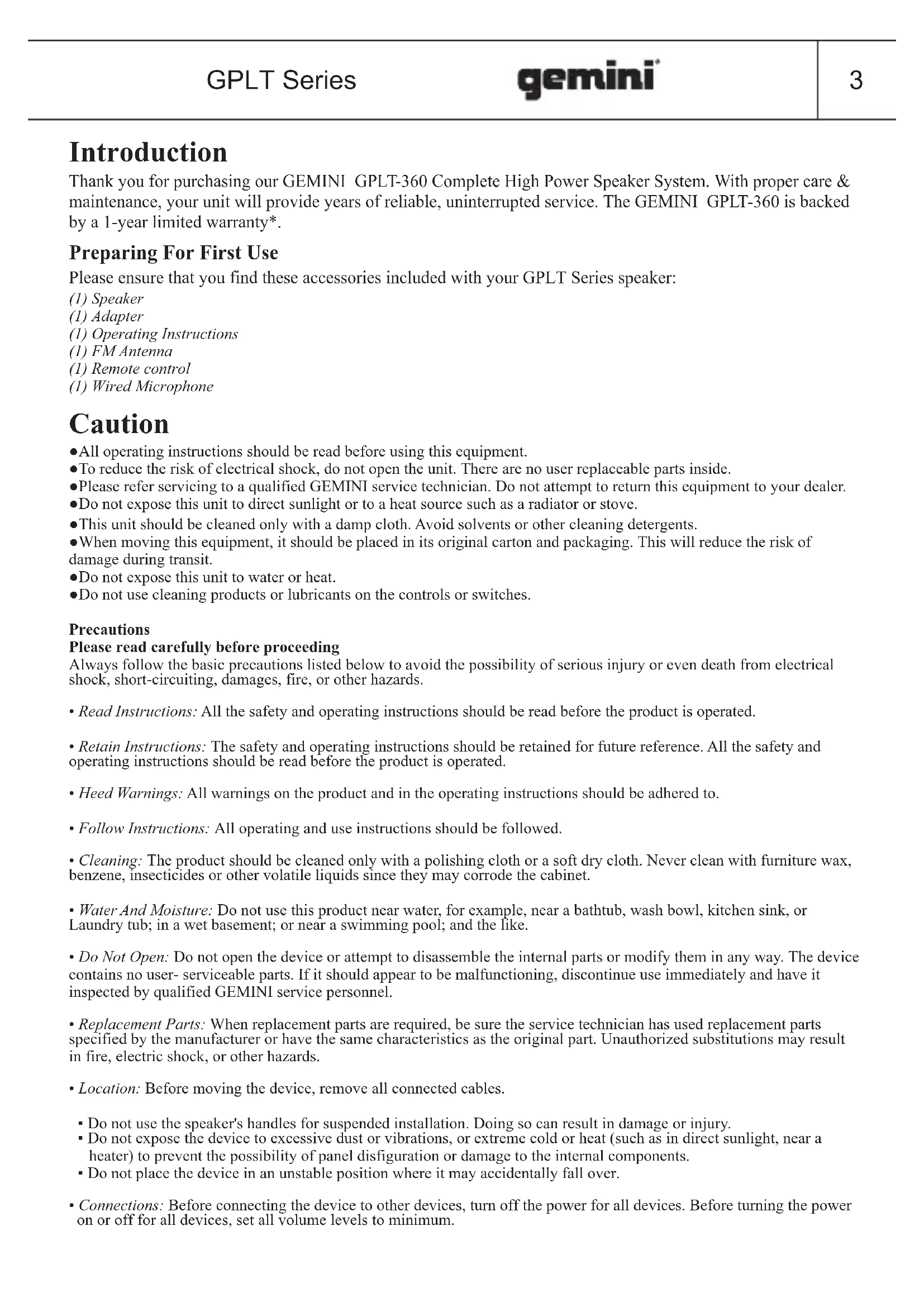
- FM Antenna
- DC INPUT
- MIC IN: Wired Mic input socket
- GUITAR IN: Guitar input socket
- LINE-IN: Line-in input socket
-
CHARGING LIGHT
-
USB: USB input socket Important: The USB port is intended only for data transfer only; other devices cannot be used with this USB connection. The use of USB extension cords is not recommended.
-
POWER SWITCH: Press this switch to turn the unit ON or OFF
-
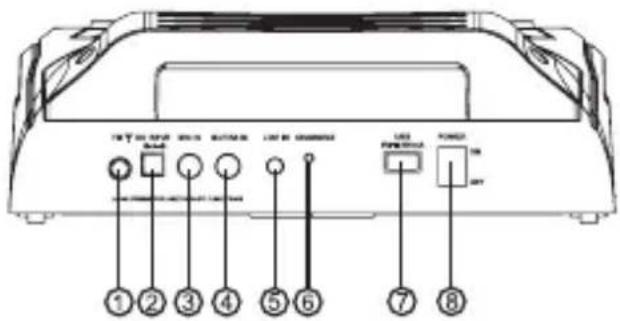
360° LIGHT/STANDBY: Press this key to turn the 360° LIGHT ON/OFF. Long press for Standby, ON, and OFF.
text_image
①②③④⑤⑥⑦⑧ LED Power Control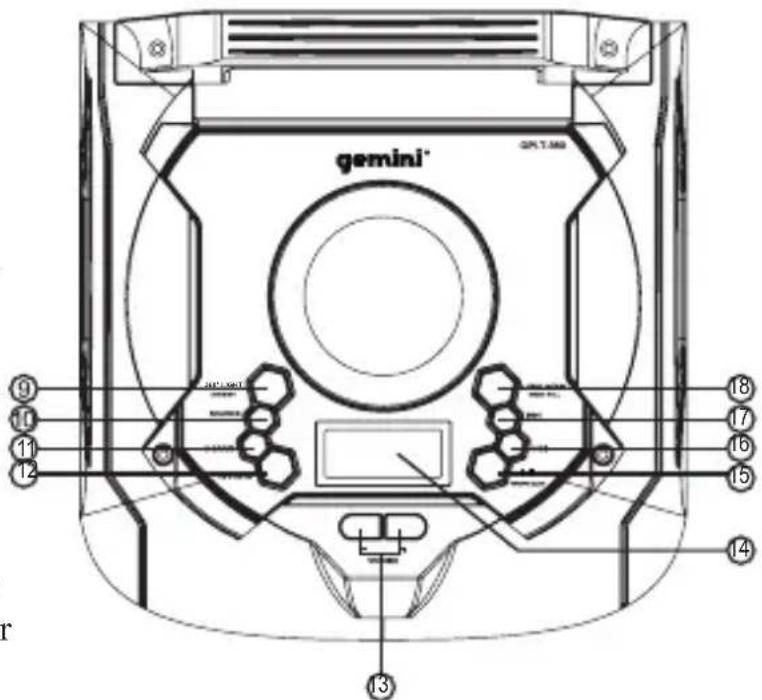
text_image
gemini® GPT.1.062 ⑨ ⑩ ⑪ ⑫ ⑬ ⑭ ⑮ ⑯ ⑰ ⑱ ⑲ ⑳ ⑴ ⑤ ⑥ ⑦ ⑧-
SOURCE: Press this key to change the sources between USB, BT, FM, LINE.
-
X.DRIVE: Press the key to turn the extra bass effect ON/OFF.
-
EFFECTS: Press this key to change the menu between MIC, GUITAR, VOLUME, ECHO VOLUME, BASS, TREBLE.
-
VOLUME -/+: To adjust the levels.
-
LED DISPLAY: To display speaker status.
-
▶/TWS/FM SCAN: In FM mode: Long press for the fully automatic search. In USB/BT input mode: Press to PLAY/PAUSE a track.
Long press to turn TWS (True Wireless Stereo) mode on or off.
-
: To play the previous song at USB/BT input mode.
-
▶▶: To play the next song at USB/BT input mode.
-
LIGHT MODE/DISCO BALL: Long press to turn DISCO BALL on or off. Press to change the front speaker light mode between LED1,LED2,LED3,LED4,OFF
Remote Control
text_image
STANDBYSOURCE 1 2 3 4 5 6 7 8 9 BT 0 DISCONNECT 24 23 22 21 20 19 18 17 16 15 14 13 12 TU-TU+ AUTO CH- G/M. VOL- MUTE G/M. VOL+ VOL- VOL- A.DRIVE/BASS+BASS- Light Mode/TREB+TREB- ECHO+ECHREPEAT1. SOURCE
Press to change the source between USB, BT, FM, LINE.
2. 0\~9 NUMERIC KEYS
These keys are used to play a track directly in USB source mode.
Eg: To play 12th track in the USB playlist press the numeric key "1" followed by "2".
In FM, to select saved channel, or input station frequency directly
3. BT
Press to enter Bluetooth pairing mode.
4. /CH+
In USB/BT Mode: Press to play the next song
In FM Mode: Press to skip to next saved channel
5. /TU-
In USB/BT Mode: Press to rewind song IN FM Mode: Press to adjust radio frequency lower
6. /CH-
In USB/BT Mode: Press to play the previous song
In FM Mode: Press to skip to previous saved channel
7. GUITAR/MIC VOL-
Decrease GUITAR and MIC volume.
8. VOL-
Decrease the volume.
9. BASS-
Reduce BASS frequency EQ
10. TREB-
Reduce TREBLE frequency EQ
11. ECHO-
Decrease the echo effect
12. ECHO+
Increase the echo effect
13. REPEAT (USB mode only)
Press to choose repeat mode (Random, Single, Repeat All)
14. TREB+
Increase TREBLE frequency EQ
15. Light mode
Change the light mode between LED1, LED2, LED3, LED4, OFF
16. BASS+
Increase BASS frequency EQ
17. X DRIVE
Press this key to turn ON/OFF Extra Bass Mode
18. VOL+
Increase the volume.
19. GUITAR/MICVOL+
Increase GUITAR and MIC volume
20. MUTE
Press to MUTE/UNMUTE the speaker playback
21. ▶▶/TU-
In USB/BT Mode: Press to fast forward song
In FM Mode: Press to adjust radio frequency higher
22. ▶// AUTO
In USB/BT Mode: Play/Pause
In FM Mode: Press for full automatic search of radio frequencies.
23. DISCONNECT (BT MODE)
Press to disconnect and pair with a new device.
24. STANDY
Press to put speaker in Standby mode
Bluetooth pair and connect
- Turn off any Bluetooth devices previously paired (linked) with this unit.
- Turn on the Bluetooth feature on your phone or music playing device.
- Press SOURCE button on GEMINI GPLT-360 to enter Bluetooth mode. LED “bt” on LED display indicates it is in pairing mode.
- Set your phone or music player to search for Bluetooth devices.
- Select "GEMINI GPLT-360" from search results on your phone or music player.
- Select OK or YES to pair this unit with your phone or music player.
- If protected, enter 0000 for passkey steady blue light indicates successful connection.
- Hold pair key to disconnect current convection and eater pairing mode.
TWS (True Wireless Stereo) mode
- Turn on 2 GEMINI GPLT-360 speakers and enter Bluetooth mode on both.
- Press "TWS" key on each speaker for 2 seconds, it will show "t on" on display, TWS is connecting to another speaker equipment and will connect successfully after a sound indication or display shows "bt"
- Turn on your Bluetooth feature on your mobile phone to search Bluetooth devices and select "GEMINI GPLT-360" from the search result, select OK or YES to pair this unit with your mobile phones and a steady blue light will indicate the connection is successful and can play any music from your mobile phones.
Press "TWS" key on speaker unit for 2 seconds and it will turn off TWS features and display "b of F" on display. (The first speaker will the LEFT channel and the other speaker will be the RIGHT channel.)
FM Radio Operation
- Before using the radio functions, you must attach the supplied antenna. Adjust the antenna to obtain optimum reception.
- Press [SOURCE] to select FM mode.
- Press the CH+/CH- key on the remote control or Hold the [◀◀▶▶] key to skip to the preset station.
- Press the TU+/TU- key on the remote control or press the [◀◀▶▶] key on the top panel to adjust the radio frequency manually.
(The number key on the remote control can directly select the frequency. Such as enter "8,8,1" keys for 88.1MHz, "1,0,4,0" keys for 104.0MHz.)
Press the PLAY key on the remote control or Press the [▶] key on the top panel, the machine will scan radio channels from low-frequency to high-frequency by itself and memorize the channels one by one.
BATTERY
In AC (power) mode the battery will automatically charge. A slow red flashing light indicates that the battery is charging. When fully charged a green light will be displayed.
In DC (battery) mode a green light indicates that the battery level is full. If the battery level is low a red light will be displayed. This indicates that the battery must immediately be charged, or the speaker will turn off.
LINE IN
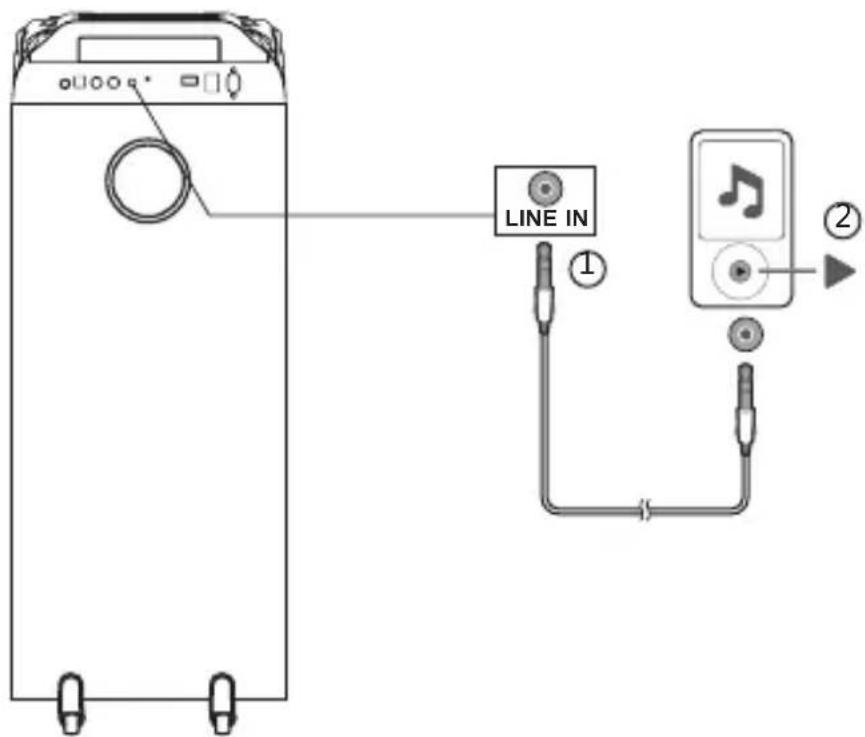
text_image
LINE IN ① ②Power On
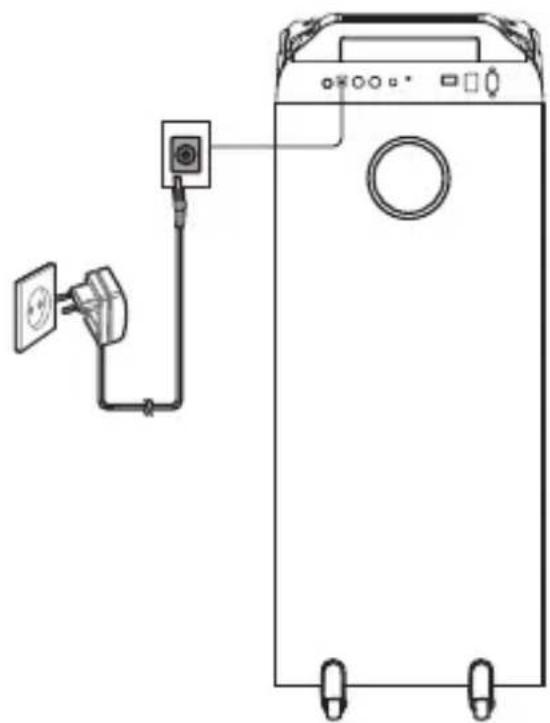
natural_image
Line drawing of a washing machine with a power outlet and wall-mounted socket (no text or symbols)SPECIFICATIONS
Frequency Response----25Hz-20KHz
Power Source----100-240V\~,60/50Hz
Power Consumption----180W
Output power----120W RMS
Bluetooth----V5.0
FM radio----87.5-108 MHz
Unit Size (W x D x H) 30.5x30x78.5cm
Tweeter size 1 x 1 inch, 3 x 2 inch
Woofer size----1 x 8 inch
Subwoofer size 1 x 8 inch
Unit weight----11kg
Working Temperature---- 0-40°C
- The specification presents only as a reference. The value of weight and size are approximation.
- Our products are constantly improved and the specification and function may be changed without prior notice.
Warranty and Repair
All Gemini products are designed and manufactured to the highest standards in the industry. With proper care and maintenance, your product will provide years of reliable service.
Limited Warranty
a. GEMINI guarantees its products to be free from defects in materials and workmanship for one (1) year from the original purchase date.
b. This limited warranty does not cover damage or failure caused by abuse, misuse, abnormal use, faulty installation, improper maintenance or any repairs other than those provided by an authorized Gemini Service Center
c. There are no obligations of liability on the part of GEMINI for consequential damages arising out of or in connection with the use or performance of the product or other indirect damages with respect to loss of property, revenues, of profit, or costs of removal, installation, or reinstallation. All implied warranties for GEMINI, including implied warranties for fitness, are limited in duration to one (1) year from the original date of purchase, unless otherwise mandated by local statutes.
Return/Repair
a. Please call our helpful Customer Service Representatives at 732-346-0061, and they will be happy to give you a Return Authorization Number (RMA) and the address of an authorized service center closest to you.
b. After receiving an RMA, include a copy of the original sales receipt, with defective product and a description of the defect. Send by insured freight to: Gemini and use the address provided by your customer service representative. Your RMA must be written on the outside of the package, or processing will be delayed indefinitely!
c. Service covered under warranty will be paid for by Gemini and returned to you. For non-warrantied products, Gemini will repair your unit after payment is received. Repair charges do not include return freight. Freight charges will be added to the repair charges.
d. On warranty service, you pay for shipping to Gemini, we pay for return shipping within the continental United States. Alaska, Hawaii, Puerto Rico, Canada, Bahamas, and the Virgin Islands will be charged for freight.
e. Please allow 2-3 weeks for return of your product. Under normal circumstances your product will spend no more than 10 working days at Gemini. We are not responsible for shipping times.
LEGALITY & SAFETY
The device is not intended for use by people (including children) with reduced physical, sensory or mental capacity. People who have not read the manual, unless they have received an explanation by someone responsible for their safety, should not use this unit. Children should be monitored to ensure that they do not play with the device. The device should always be readily accessible. The device should not be exposed to water. No objects filled with liquids, such as vases, shall be placed on the device. Always leave a minimum distance of 10 cm around the unit to ensure sufficient ventilation. Open flame sources, such as candles, should not be placed on top of the device. The device is intended for use only in a temperate climate. At full volume, prolonged listening may damage your hearing and cause temporary or permanent deafness, hearing drone, tinnitus, or hyperacusis. Listening at high volume is not recommended. One hour per day is not recommend either. Switch the device off where the use of the device is not allowed or where there is a risk of causing interference or danger - for examples: on an aircraft, or near medical equipment, fuel, chemicals or blasting sites. Check the current laws and regulations regarding the use of this device in the areas where you drive. Do not handle the device when driving. Concentrate fully on driving. All wireless devices are susceptible to interference which may affect their performance. All our devices conform to international/national standards and regulations, and we aim to limit user exposure to electromagnetic fields. These standards and regulations were adopted after the completion of extensive scientific research. This research established no link between the use of the mobile headset and any adverse effects on health if the device is used in accordance with standard practices. Only qualified people are authorized to install or repair this product. Only use batteries, chargers and other accessories which are compatible with this equipment. Do not connect incompatible products. This equipment is not waterproof. Keep it dry. Keep your device in a safe place, out of the reach of young children. The device contains small parts which may present a choking hazard to kids.
Introducción
Reduce BASS Frequenz EQ
10. TREB-
Reduce TREBLE Frequenz EQ
11. ECHO-
Increase TREBLE Frequenz EQ
15. Light Mode
13. REPEAT (mode USB uniquement)
Increase TREBLE frequenza EQ
15. Light mode
natural_image
Line drawing of a washing machine with attached electrical outlet and power plug (no text or symbols)SPECIFICATIES
If you experience problems with this unit, call 732-346-0061 for Gemini customer service. Do not attempt to return this equipment to your dealer.
Parts of the design of this product may be protected by worldwide patents. Information in this manual is subject to change without notice and does not represent a commitment on the part of the vendor. Gemini shall not be liable for any loss or damage whatsoever arising from the use of information or any error contained in this manual. No part of this manual may be reproduced, stored in a retrieval system or transmitted, in any form or by any means, electronic, recommended that all maintenance and service on this product is performed by Gemini or its authorized agents. Gemini will not accept liability for loss or damage caused by maintenance or repair performed by unauthorized personnel.