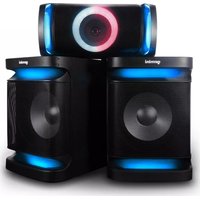
GSYS-4800 - Loudspeaker GEMINI - Free user manual and instructions
Find the device manual for free GSYS-4800 GEMINI in PDF.


| Product type | Powered speaker |
| Brand | Gemini |
| Model | GSYS-4800 |
| Power supply | AC 100-240V, 50/60Hz |
| Power (estimated) | 500W RMS (not specified, estimate based on range) |
| Dimensions (W x H x D, estimated) | 300 x 400 x 250 mm (not specified, typical estimate) |
| Weight (estimated) | 5 kg (not specified, typical estimate) |
| Audio inputs | Line-in (3.5mm), Coaxial, Optical, USB, FM, Bluetooth |
| Outputs | Speaker output (2 passive speakers) |
| Microphone inputs | 2 x 6.35mm jack (MIC1, MIC2) |
| Supported audio formats | MP3, AAC, WAV, FLAC, WMA |
| Special features | Bass X-Drive, Equalizer (6 modes), Effects (mic volume, echo, bass, treble), LED lighting (4 modes) |
| Remote control | Yes, with full functions |
| Included accessories | 2 speakers, main unit, power cable, FM antenna, remote control, wired microphone |
| Cleaning | Soft dry cloth only, no chemicals |
| Safety | Do not open, no user-serviceable parts, avoid water and heat |
| Warranty | 1 year (limited) |
Frequently Asked Questions - GSYS-4800 GEMINI
User questions about GSYS-4800 GEMINI
0 question about this device. Answer the ones you know or ask your own.
Ask a new question about this device
Download the instructions for your Loudspeaker in PDF format for free! Find your manual GSYS-4800 - GEMINI and take your electronic device back in hand. On this page are published all the documents necessary for the use of your device. GSYS-4800 by GEMINI.
USER MANUAL GSYS-4800 GEMINI
natural_image
Black and blue portable phone with 'gemini' branding on top (no other text or symbols visible)
natural_image
Top-down view of a black rectangular device with a circular blue and purple gradient ring (no text or symbols visible)
natural_image
Close-up of a black and blue Xiaomi portable speaker with mesh grille (no visible text or symbols)GSYS-2400
| 2 | gemini* | GSYS Series |
CONTENTS
Product Introduction .... 3
Caution 3
Panel 4
Remote Control 5
Connection Diagram....6
Bluetooth Pair and Connect 6
USB 6
Line In 7
Using microphones....7
FM Radio Operation 7
Specifications 8
Warranty information 8
Legality and Safety 9
FCC warning 9
Spanish.... 10
French.... 15
German.... 20
Italian.... 25
Dutch.... 30
Introduction
Thank you for purchasing our GSYS Series Complete High Power Speaker System. With proper care & maintenance, your unit will provide years of reliable, uninterrupted service. The GSYS Series is backed by a 1-year limited warranty*.
Preparing For First Use
Please ensure that you find these accessories included with your GSYS Series speaker:
(2) Speakers
(1) Head Unit
(1) Power cable
(1) Operating Instructions
(1) FM Antenna
(1) Remote control
(1) Wired Microphone
Caution
- All operating instructions should be read before using this equipment.
- To reduce the risk of electrical shock, do not open the unit. There are no user replaceable parts inside.
- Please refer servicing to a qualified GEMINI service technician. Do not attempt to return this equipment to your dealer.
- Do not expose this unit to direct sunlight or to a heat source such as a radiator or stove.
- This unit should be cleaned only with a damp cloth. Avoid solvents or other cleaning detergents.
- When moving this equipment, it should be placed in its original carton and packaging. This will reduce the risk of damage during transit.
- Do not expose this unit to water or heat.
- Do not use cleaning products or lubricants on the controls or switches.
Precautions
Please read carefully before proceeding
Always follow the basic precautions listed below to avoid the possibility of serious injury or even death from electrical shock, short-circuiting, damages, fire, or other hazards.
- Read Instructions: All the safety and operating instructions should be read before the product is operated.
- Retain Instructions: The safety and operating instructions should be retained for future reference. All the safety and operating instructions should be read before the product is operated.
- Heed Warnings: All warnings on the product and in the operating instructions should be adhered to.
- Follow Instructions: All operating and use instructions should be followed.
- Cleaning: The product should be cleaned only with a polishing cloth or a soft dry cloth. Never clean with furniture wax, benzene, insecticides or other volatile liquids since they may corrode the cabinet.
- Water And Moisture: Do not use this product near water, for example, near a bathtub, wash bowl, kitchen sink, or Laundry tub; in a wet basement; or near a swimming pool; and the like.
- Do Not Open: Do not open the device or attempt to disassemble the internal parts or modify them in any way. The device contains no user-serviceable parts. If it should appear to be malfunctioning, discontinue use immediately and have it inspected by qualified GEMINI service personnel.
- Replacement Parts: When replacement parts are required, be sure the service technician has used replacement parts specified by the manufacturer or have the same characteristics as the original part. Unauthorized substitutions may result in fire, electric shock, or other hazards.
- Location: Before moving the device, remove all connected cables.
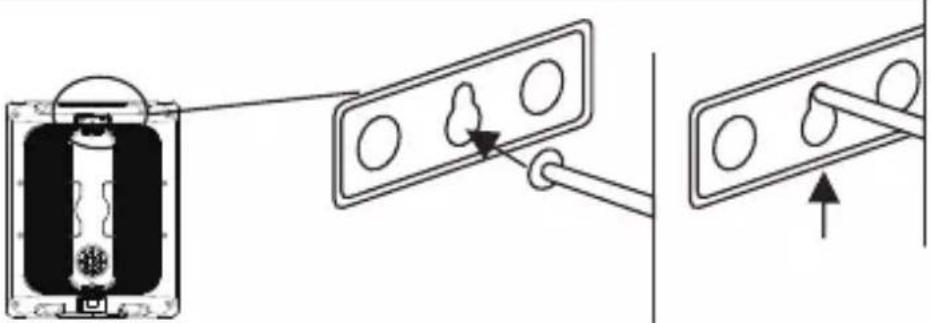
- Do not use the speaker's handles for suspended installation. Doing so can result in damage or injury.
- Do not expose the device to excessive dust or vibrations, or extreme cold or heat (such as in direct sunlight, near a heater) to prevent the possibility of panel disfiguration or damage to the internal components.
- Do not place the device in an unstable position where it may accidentally fall over.
- Connections: Before connecting the device to other devices, turn off the power for all devices. Before turning the power on or off for all devices, set all volume levels to minimum.
Panel
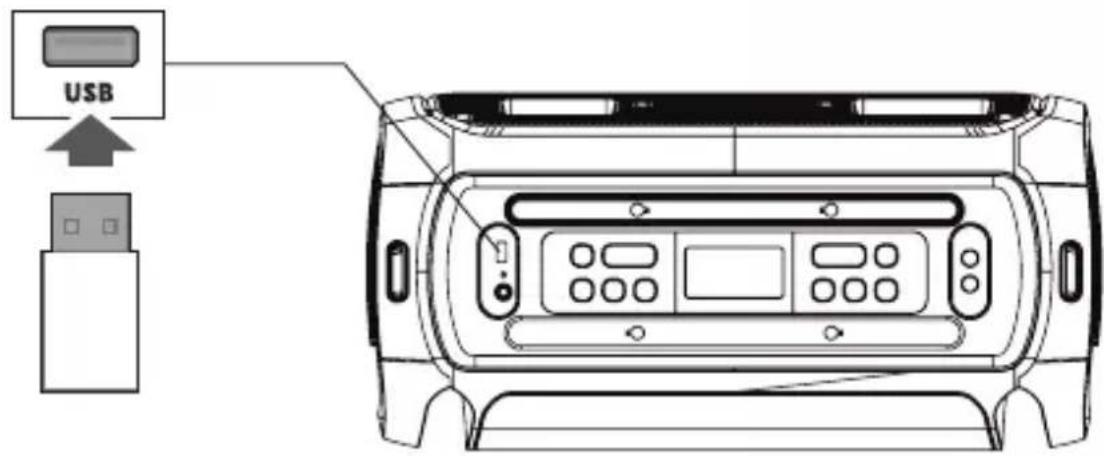
- USB: USB drive port. Charge USB devices or play audio files.
- STANDBY: To suspend operations and save power when not in use, press to enter STANDBY mode. Press again to resume operation.
- SOURCE: Press this key to change the sources between BT, LINE, COAXIAL, OPTICAL, FM, USB.
- LED DISPLAY: Displays speaker status.
5.X DRIVE: Press the key to turn X DRIVE bass boost ON/OFF.
6.-/+: Adjusts Volume & FX Parameters.
- MIC1 IN: 1/4" Mic input socket
8.MIC2 IN: 1/4" Mic input socket
9.EFFECTS: Press this key to toggle the menu between MIC VOLUME, ECHO EFFECT, BASS, TREBLE, Adjust with +/- keys
- LIGHT : Press to toggle through lighting modes: LED1, LED2, LED3, LED4, OFF
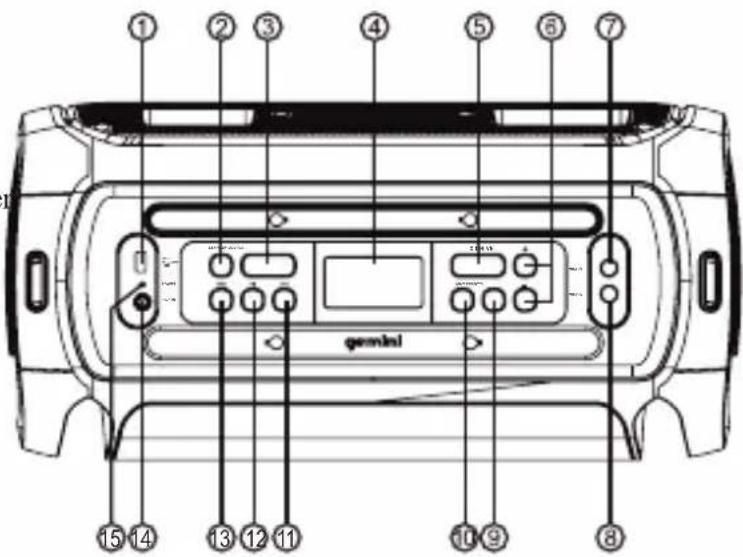
11.▶▶: Skip to the next song in USB/BT mode. Skip to next station in FM mode.
12. ▶: In USB/BT input mode: Press to PLAY/PAUSE a track. In FM mode: Press to scan FM frequencies.
13.◀◀: Skip to previous song at USB/BT input mode.Skip to previous station in FM mode.
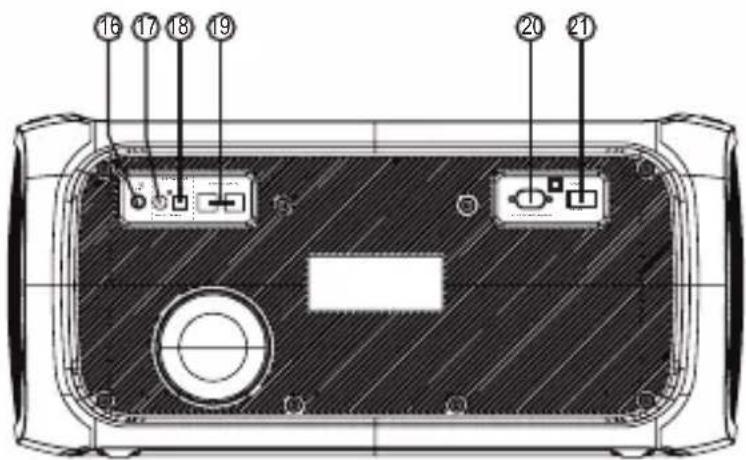
-
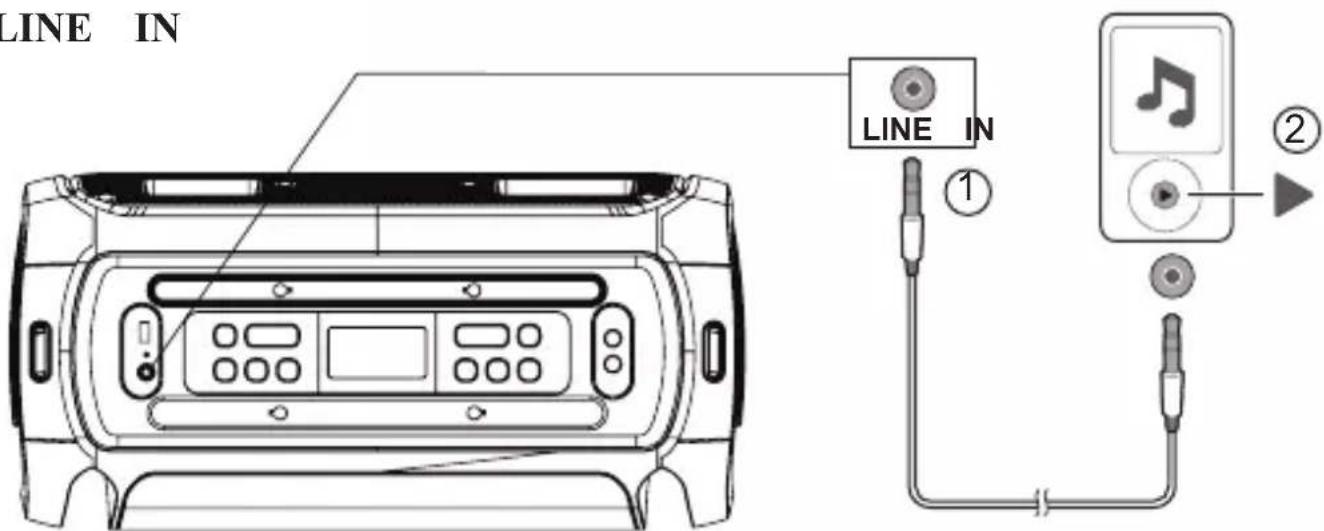
LINE-IN: 1/8" Auxiliary audio input
-
POWER INDICATOR LED
-
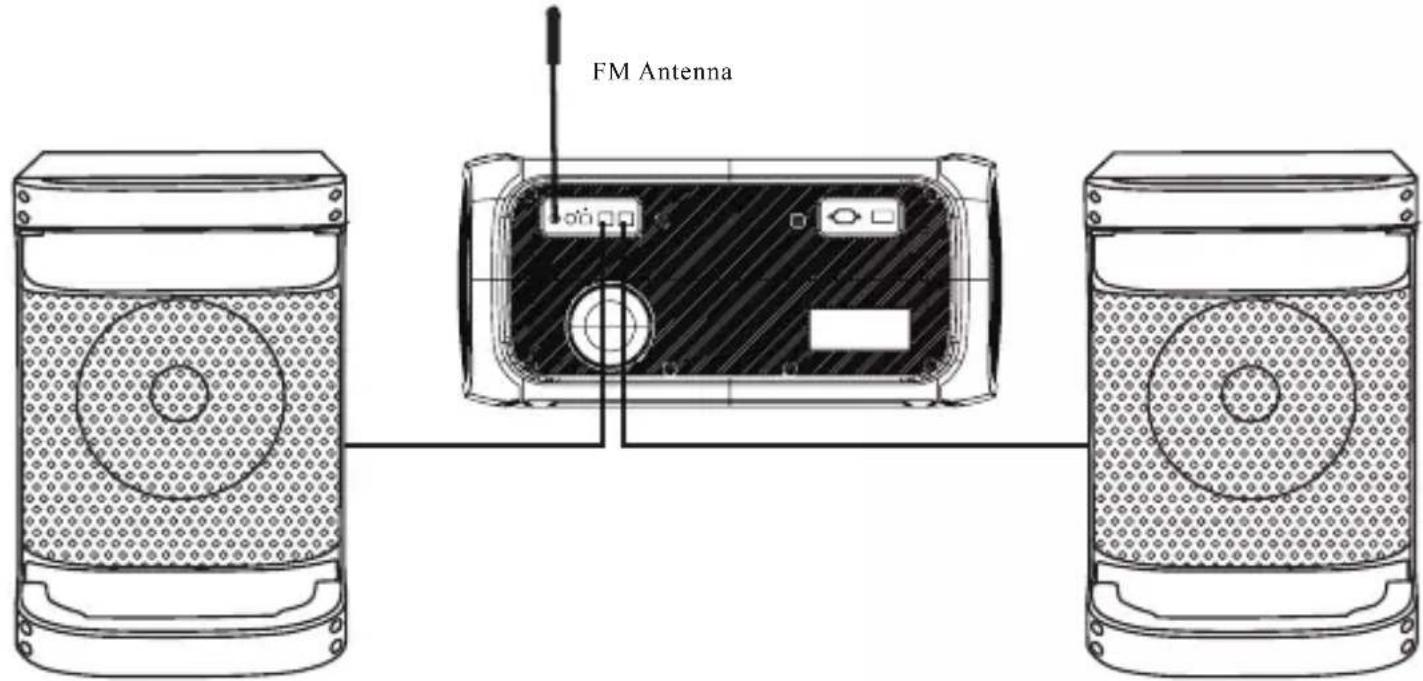
FM Antenna Port
-
DIGITAL AUDIO COAXIAL INPUT
-
AUDIODIGITAL OPTICAL INPUT
-
SPEAKER OUTPUT JACK
-
AC INPUT : AC 100V-240V\~,50/60Hz.
-
POWER SWITCH: Press this switch to turn the unit ON or OFF
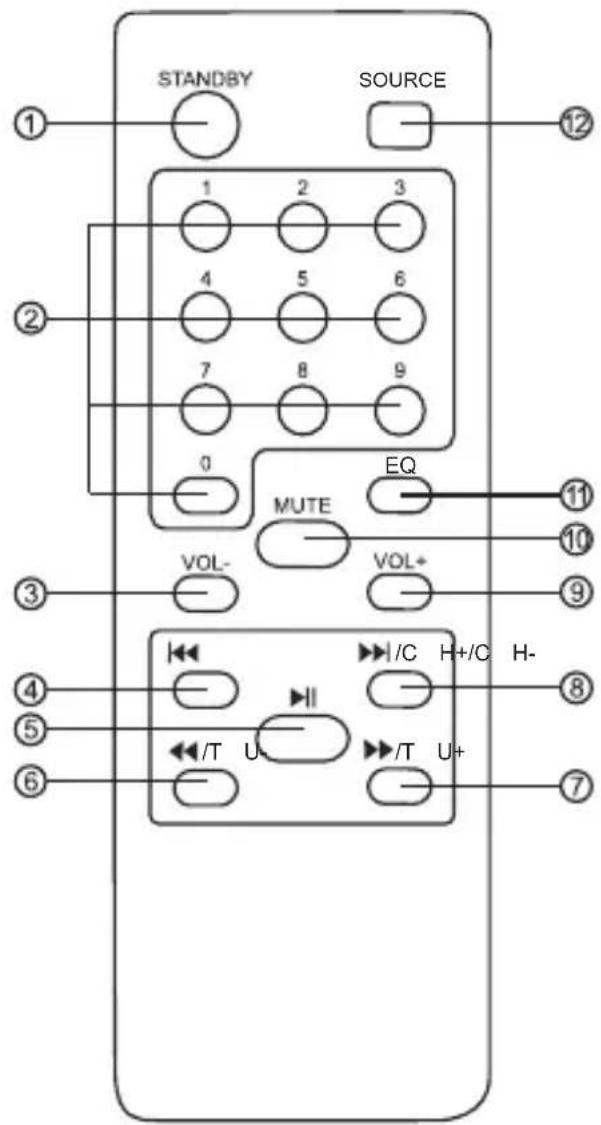
Remote Control
- STANDBY : Standby ON/OFF .
-
0\~9 NUMERIC KEYS: These keys are used to play a track directly in USB source mode or a frequency directly in FM mode. Eg:To play 12th track in the USB playlist press the numeric key"1" followed by"2".
-
VOL- : To decrease the volume.
-
|◀◀ /CH- : Play the previous song by pressing "|◀◀/CH-" in USB/BT input mode. Choose previous channel by pressing "|◀◀/CH-" in FM input mode.
-
▶||: Play / pause in USB/BT mode. In FM mode press for full automatic search.
-
◀◀/TU- : Fast rewind a song by pressing "◀◀/TU-" in USB input mode. Choose tuning channel by pressing "◀◀/TU-" in FM input mode.
-
▶▶/TU+ : Fast forward song by pressing "▶▶/TU+" in USB input mode. Choose tuning channel by pressing "▶▶/TU+" in FM input mode.
-
▶▶/CH+ : Play the next song by pressing "▶▶/CH+" in USB/BT input mode. Choose next channel by pressing "▶▶/CH+" in FM input mode.
-
VOL+: To increase the volume.
-
MUTE : Press to switch audio mute ON/OFF.
-
EQUALIZER: Press to change the equalizer between EQ 1(NORMAL), EQ2(ROCK), EQ 3(POP), EQ 4(CLASSIC), EQ 5(JAZZ), EQ 6(COUNTRY)
- SOURCE : Press to change the source between BT, LINE, COAXIAL, OPTICAL, FM, USB .
Bluetooth
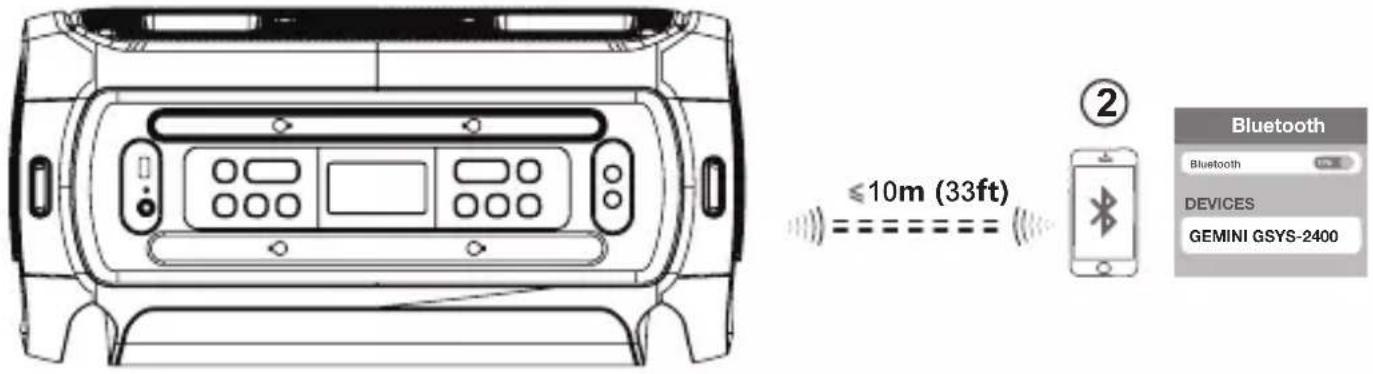
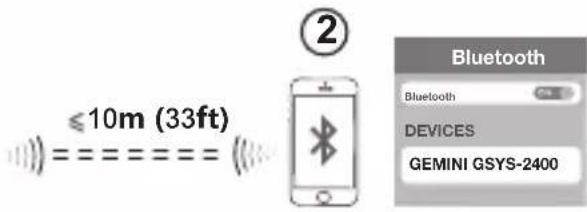
Press the SOURCE button, display will flash “BT” while searching for devices. On your Bluetooth media player, select “GEMINI GSYS-2400” to establish connection. You will hear a beep and “BT” on display will stop flashing once connection is successful.
USB
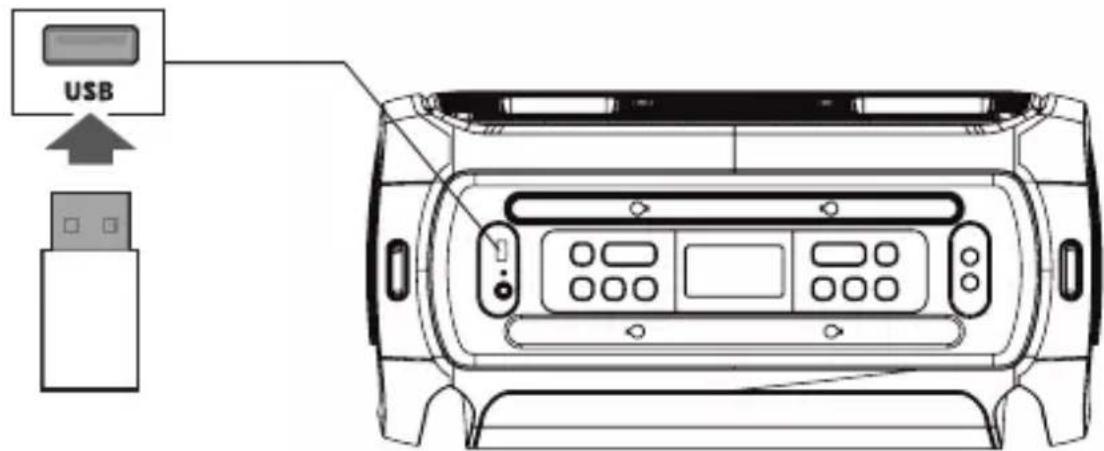
GSYS-2400 will automatically go to USB mode when USB stick is inserted or you can use SOURCE button to toggle through modes, display will read "USB" for USB mode. Supported Audio File types: MP3, AAC, WAV, FLAC, WMA
Mixing sound with microphone
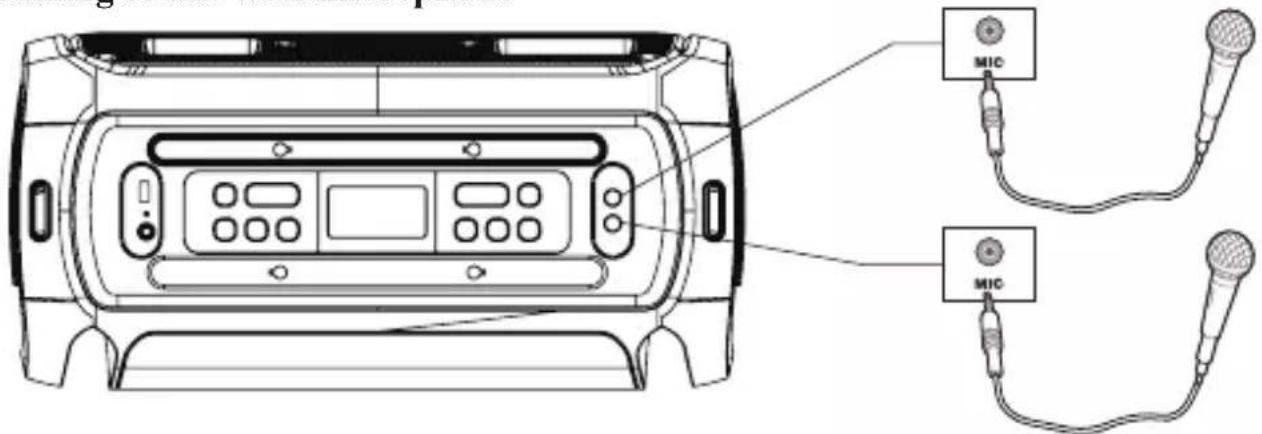
Connect dynamic microphone to 1/4" input. To adjust Mic volume, press EFFECT button once, display will read "2U**". Use the + & - buttons to adjust microphone volumes
FM Radio Operation
- Before using the radio functions, you must attach the supplied antenna. Adjust the antenna to obtain optimum reception.
- Press [SOURCE] to select FM mode.
- Press the CH+/CH- key on the remote control or Hold the [◀◀ /▶▶] key on the top panel to skip to the preset station.
- Press the TU+/TU- key on the remote control or press the [◀◀▶▶] key on the top panel to adjust the radio frequency manually.
(The number key on the remote control can directly select the frequency. Such as enter "8,8,1" keys for 88.1 MHz, "1,0,4,0" keys for 104.0MHz.)
Press the PLAY key on the remote control or Press the [▶] key on the top panel, the machine will scan radio channels from low-frequency to high-frequency by itself and memorize the channels one by one.
CONNECTION DIAGRAM:
Note:
- Always unplug the unit from power when making connections.
- Check all connections are firmly secured.
- Confirm both speakers are connected to their correct designated position.
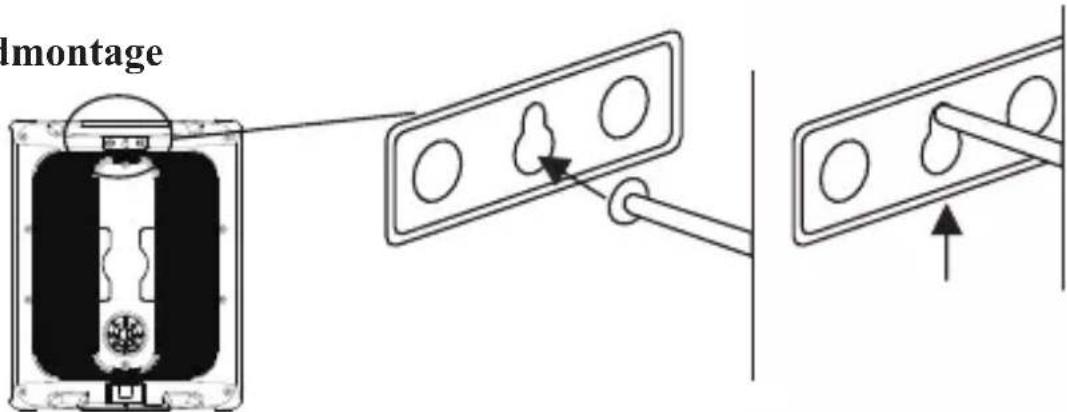
Wall Mount
natural_image
Diagram showing a battery component with an arrow pointing to a panel with circular holes, connected to a wire (no text or symbols present)Microphone holder on rear of speaker
natural_image
Pure electrical circuit lines without any symbolsSpecifications
| GSYS-2400 | |
| LF Driver Size (Subwoofer) | 2 x 8" |
| MF Driver Size(main speaker) | 6.5" |
| HF Driver Size(main speaker) | 1"+3" |
| Total Power | 120W |
| Frequency Response | 30Hz-20KHz |
| Power Source | 100-240V~,50/60Hz |
Warranty and Repair
All Gemini products are designed and manufactured to the highest standards in the industry. With proper care and maintenance, your product will provide years of reliable service.
Limited Warranty
a. GEMINI guarantees its products to be free from defects in materials and workmanship for one (1) year from the original purchase date.
b. This limited warranty does not cover damage or failure caused by abuse, misuse, abnormal use, faulty installation, improper maintenance or any repairs other than those provided by an authorized Gemini Service Center
c. There are no obligations of liability on the part of GEMINI for consequential damages arising out of or in connection with the use or performance of the product or other indirect damages with respect to loss of property, revenues, of profit, or costs of removal, installation, or reinstallation. All implied warranties for GEMINI, including implied warranties for fitness, are limited in duration to one (1) year from the original date of purchase, unless otherwise mandated by local statutes.
Return/Repair
a. Please call our helpful Customer Service Representatives at 732-346-0061, and they will be happy to give you a Return Authorization Number (RMA) and the address of an authorized service center closest to you.
b. After receiving an RMA, include a copy of the original sales receipt, with defective product and a description of the defect. Send by insured freight to: Gemini and use the address provided by your customer service representative. Your RMA must be written on the outside of the package, or processing will be delayed indefinitely!
c. Service covered under warranty will be paid for by Gemini and returned to you. For non-warranted products, Gemini will repair your unit after payment is received. Repair charges do not include return freight. Freight charges will be added to the repair charges.
d. On warranty service, you pay for shipping to Gemini, we pay for return shipping within the continental United States. Alaska, Hawaii, Puerto Rico, Canada, Bahamas, and the Virgin Islands will be charged for freight.
e. Please allow 2-3 weeks for return of your product. Under normal circumstances your product will spend no more than 10 working days at Gemini. We are not responsible for shipping times.
LEGALITY & SAFETY
The device is not intended for use by people (including children) with reduced physical, sensory or mental capacity. People who have not read the manual, unless they have received an explanation by someone responsible for their safety, should not use this unit. Children should be monitored to ensure that they do not play with the device. The device should always be readily accessible. The device should not be exposed to water. No objects filled with liquids, such as vases, shall be placed on the device. Always leave a minimum distance of 10 cm around the unit to ensure sufficient ventilation. Open flame sources, such as candles, should not be placed on top of the device. The device is intended for use only in a temperate climate. At full volume, prolonged listening may damage your hearing and cause temporary or permanent deafness, hearing drone, tinnitus, or hyperacusis. Listening at high volume is not recommended. One hour per day is not recommend either. Switch the device off where the use of the device is not allowed or where there is a risk of causing interference or danger - for examples: on an aircraft, or near medical equipment, fuel, chemicals or blasting sites. Check the current laws and regulations regarding the use of this device in the areas where you drive. Do not handle the device when driving. Concentrate fully on driving. All wireless devices are susceptible to interference which may affect their performance. All our devices conform to international/national standards and regulations, and we aim to limit user exposure to electromagnetic fields. These standards and regulations were adopted after the completion of extensive scientific research. This research established no link between the use of the mobile headset and any adverse effects on health if the device is used in accordance with standard practices. Only qualified people are authorized to install or repair this product. Only use batteries, chargers and other accessories which are compatible with this equipment. Do not connect incompatible products. This equipment is not waterproof. Keep it dry. Keep your device in a safe place, out of the reach of young children. The device contains small parts which may present a choking hazard to kids.
FCC warning:
Any Changes or modifications not expressly approved by the party responsible for compliance could void the user's authority to operate the equipment.
Note: This equipment has been tested and found to comply with the limits for a Class B digital device, pursuant to part 15 of the FCC Rules. These limits are designed to provide reasonable protection against harmful interference in a residential installation. This equipment generates uses and can radiate radio frequency energy and, if not installed and used in accordance with the instructions, may cause harmful interference to radio communications. However, there is no guarantee that interference will not occur in a particular installation. If this equipment does cause harmful interference to radio or television reception, which can be determined by turning the equipment off and on, the user is encouraged to try to correct the interference by one or more of the following measures:
-Reorient or relocate the receiving antenna.
-Increase the separation between the equipment and receiver.
-Connect the equipment into an outlet on a circuit different from that to which the receiver is connected.
-Consult the dealer or an experienced radio/TV technician for help.
This equipment complies with FCC radiation exposure limits set forth for an uncontrolled environment. This equipment should be installed and operated with minimum distance 20cm between the radiator & your body.
Introducción
Control remoto
natural_image
Front view line drawing of a vehicle front panel with control buttons and display (no text or symbols)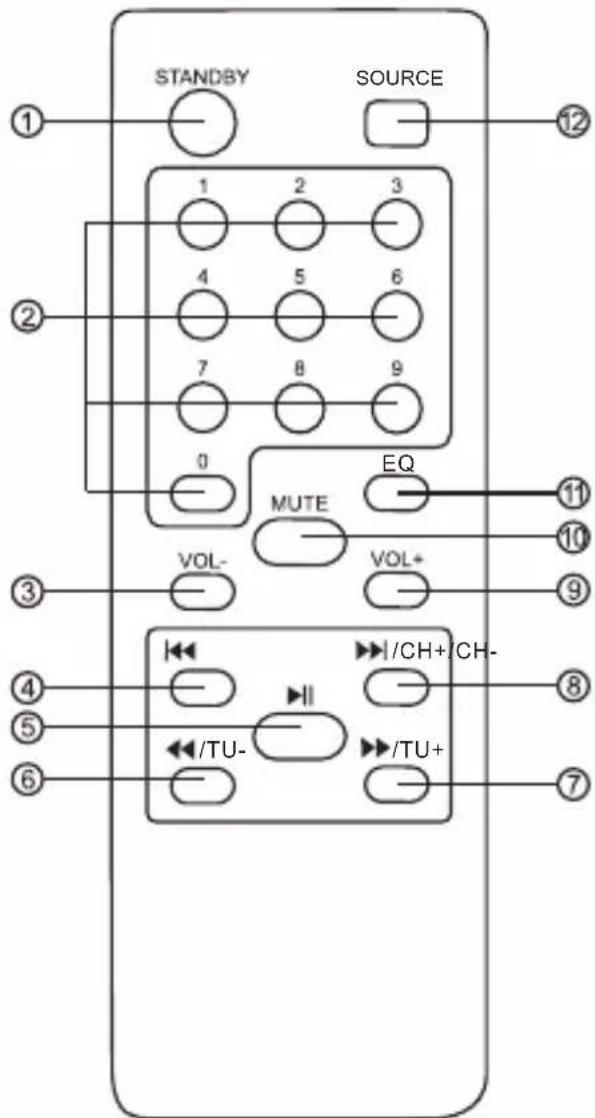
natural_image
Pure electrical circuit lines without any symbolsEspecificaciones
| GSYS-2400 | |
| LF Driver Size (Subwoofer) | 2 x 8” |
| MF Driver Size(main speaker) | 6.5” |
| HF Driver Size(main speaker) | 1"+3" |
| Total Power | 120W |
| Frequency Response | 30Hz-20KHz |
| Power Source | 100-240V~,50/60Hz |
Introduction
natural_image
Front view line drawing of a vehicle front panel with control buttons and display (no text or symbols)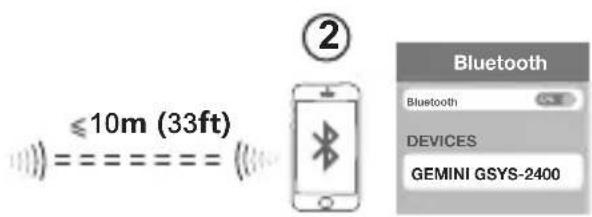
natural_image
Pure electrical circuit lines without any symbolsCaractéristiques
| GSYS-2400 | |
| LF Driver Size (Subwoofer) | 2 x 8” |
| MF Driver Size(main speaker) | 6.5” |
| HF Driver Size(main speaker) | 1"+3" |
| Total Power | 120W |
| Frequency Response | 30Hz-20KHz |
| Power Source | 100-240V~,50/60Hz |
Einführung
natural_image
Front view line drawing of a vehicle front panel with control buttons and display (no text or symbols)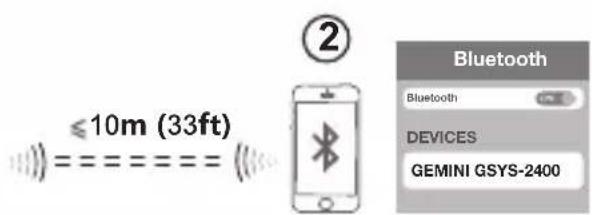
natural_image
Pure electrical circuit lines without any symbolsSpezifikationen
| GSYS-2400 | |
| LF Driver Size (Subwoofer) | 2 x 8” |
| MF Driver Size(main speaker) | 6.5” |
| HF Driver Size(main speaker) | 1"+3" |
| Total Power | 120W |
| Frequency Response | 30Hz-20KHz |
| Power Source | 100-240V~,50/60Hz |
Introduzione
natural_image
Front view line drawing of a vehicle front panel with control buttons and display (no text or symbols)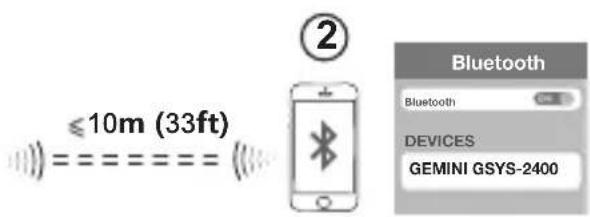
| GSYS-2400 | |
| LF Driver Size (Subwoofer) | 2 x 8" |
| MF Driver Size(main speaker) | 6.5" |
| HF Driver Size(main speaker) | 1"+3" |
| Total Power | 120W |
| Frequency Response | 30Hz-20KHz |
| Power Source | 100-240V~,50/60Hz |
Invoering
Press the SOURCE button, display will flash “BT” while searching for devices. On your Bluetooth media player, select “GEMINI GSYS-2400” to establish connection. You will hear a beep and “BT” on display will stop flashing once connection is successful.
USB
Wandmontage
natural_image
Pure electrical circuit lines without any symbolsSpecifications:
| GSYS-2400 | |
| LF Driver Size (Subwoofer) | 2 x 8” |
| MF Driver Size(main speaker) | 6.5” |
| HF Driver Size(main speaker) | 1"+3" |
| Total Power | 120W |
| Frequency Response | 30Hz-20KHz |
| Power Source | 100-240V~,50/60Hz |
gemini®
If you experience problems with this unit, call 732-346-0061 for Gemini customer service. Do not attempt to return this equipment to your dealer.
Parts of the design of this product may be protected by worldwide patents. Information in this manual is subject to change without notice and does not represent a commitment on the part of the vendor. Gemini shall not be liable for any loss or damage whatsoever arising from the use of information or any error contained in this manual. No part of this manual may be reproduced, stored in a retrieval system or transmitted, in any form or by any means, electronic, recommended that all maintenance and service on this product is performed by Gemini or its authorized agents. Gemini will not accept liability for loss or damage caused by maintenance or repair performed by unauthorized personnel.
WWW.GEMINISOUND.COM




- CONTENTS
- Introduction
- Preparing For First Use
- Caution
- Precautions
- Please read carefully before proceeding
- Panel
- Remote Control
- FM Radio Operation
- CONNECTION DIAGRAM:
- Wall Mount
- Microphone holder on rear of speaker
- Specifications
- Warranty and Repair
- Limited Warranty
- Return/Repair
- LEGALITY & SAFETY
- FCC warning:
- Introducción
- Control remoto
- Einführung
- Introduzione
- Invoering
- gemini®
Brand : GEMINI
Model : GSYS-4800
Category : Loudspeaker