GHK-2800 - Loudspeaker GEMINI - Free user manual and instructions
Find the device manual for free GHK-2800 GEMINI in PDF.



| Product Type | Bluetooth speaker with party LED lighting |
| Brand | Gemini |
| Model | GHK-2800 |
| Category | Versatile portable speaker |
| Power Supply | Mains (power cord included) |
| Speakers | 2 x 8" (20.3 cm) woofers and 2 x 2.75" (7 cm) tweeters |
| Connectivity | Bluetooth, USB (up to 64 GB), AUX 3.5 mm, mic input 6.35 mm, guitar input 6.35 mm, FM radio |
| Main Features | RGB LED lighting (4 modes), DJ sound effects (scratch, air horn), vocal reduction, mic priority, 5-band equalizer, treble/bass control, TWS (pair with another GHK), USB recording |
| Display | LCD screen with remote control |
| Included Accessories | Remote control, wired microphone, power cord, warranty card |
| Care and Cleaning | Clean with a damp cloth; do not use solvents or detergents |
| Safety | Do not expose to water, heat, or direct sunlight; do not open the device (no user-serviceable parts) |
| Warranty | One-year limited warranty |
Frequently Asked Questions - GHK-2800 GEMINI
User questions about GHK-2800 GEMINI
0 question about this device. Answer the ones you know or ask your own.
Ask a new question about this device
Download the instructions for your Loudspeaker in PDF format for free! Find your manual GHK-2800 - GEMINI and take your electronic device back in hand. On this page are published all the documents necessary for the use of your device. GHK-2800 by GEMINI.
USER MANUAL GHK-2800 GEMINI
natural_image
Black portable electronic device with two circular earbuds and a colorful ring pattern on top (no visible text or symbols)2
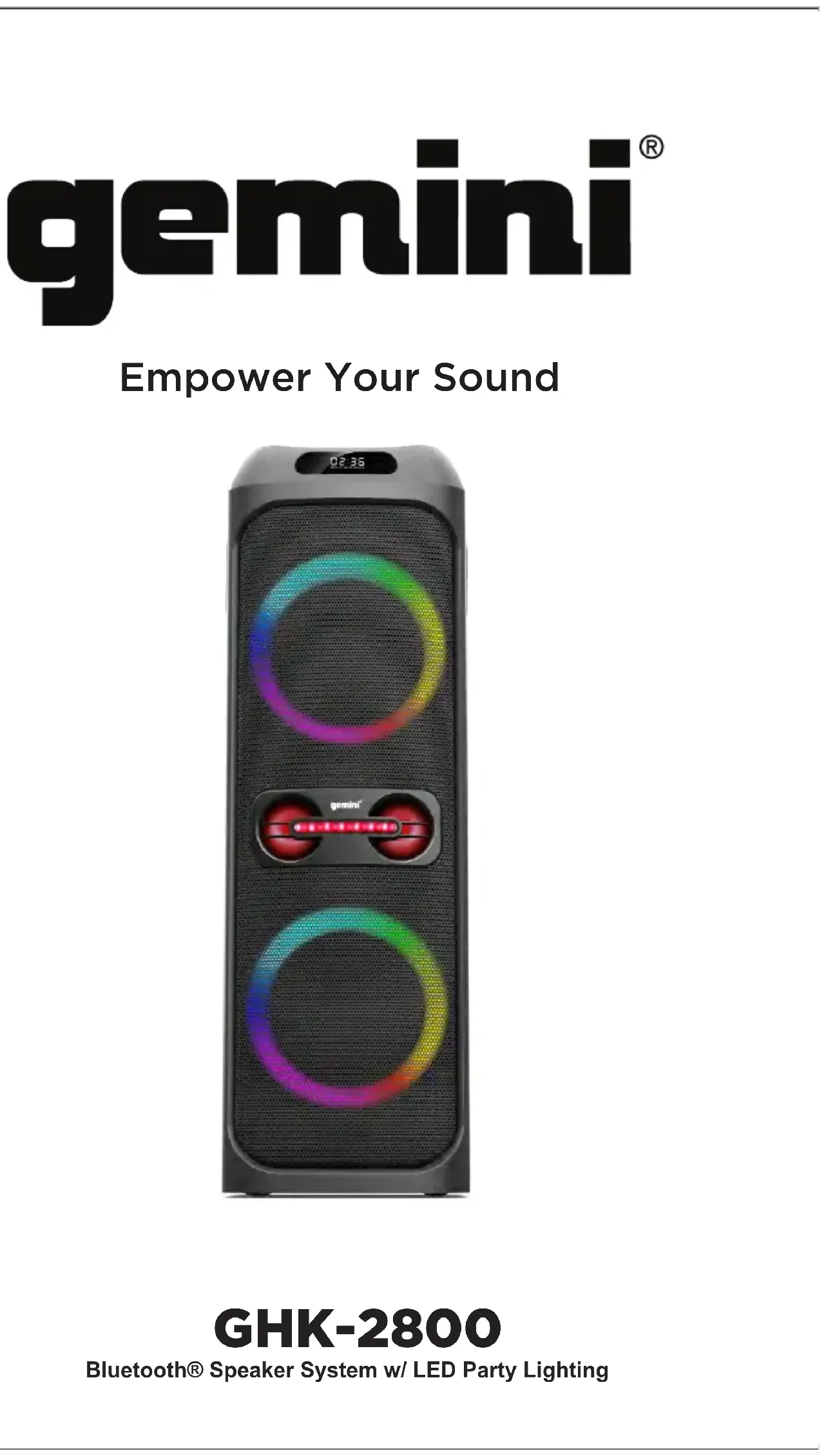
GHK-2800
Bluetooth® Speaker System w/ LED Party Lighting

3
Index 2
What's Included 2
Features 3
Product Overview 4
Introduction 8
Precautions 8
FCC Compliance Statement 9
Limited Warranty 11
Return/Repair 11
With huge sound, party lighting and a variety of audio input options, the
GHK-2800 will meet all your party audio needs. Allowing for Karaoke
parties and Musical Performances, this isn't your average Bluetooth speaker!
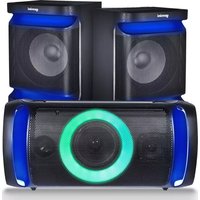
LED LIGHTING FX
Dazzle partygoers with 4 different modes of multi-color RGB lighting effects
built right into the front of the speaker.Turns any space into a club!
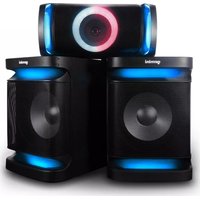
FULL RANGE OF SOUND
Dual 8" Woofers and 2.75" High Frequency Tweeters produce ultra-smooth
low-end bass and clear high-end treble.Bass Boost
function elevates the experience to Earth shaking proportions.
ASSORTED AUDIO OPTIONS
Dedicated inputs for guitar and the included microphone, in addition to
AUX input, USB playback and Bluetooth connectivity. Whatever your
sound source, the GHK-2800 will have the connections you need.
Supported formats: MP3/WAV/WMA
DJ EFFECTS
Includes DJ style Sound FX, Vocal Pitch shifting as
well as Echo for mic and guitar to have you sounding like a pro!
natural_image
Black electronic device with two circular earbuds and a red speaker grille (no visible text or symbols)What's Included
Please ensure that you find these
accessories included with your
GHK-2800 speaker:
(1) GHK-2800
(1) Wired Microphone
(1) Remote Control
(1) Power Cable
(1) Manual
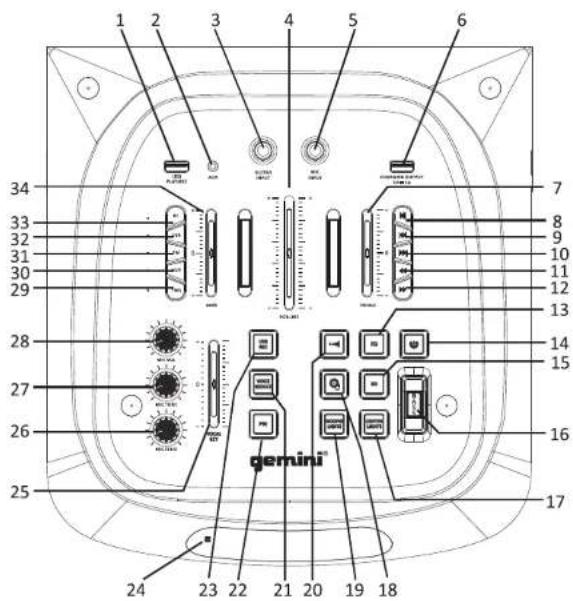
1. USB Play / Record
Insert the USB device to USB jack to play compatible MP3/WAV/WMA files (Max. size of USB device that can be connected is 64GB) Audio recordings are saved to USB here.
2. AUX Input Jack
Insert 1/8" cable to AUX jack to connect to external device
3. Guitar Input Jack
Connect Guitar with standard 1/4" cable
4. Music Volume Fader
Control music playback volume in relation to other inputs
5. Microphone Input Jack
Insert wired microphone to the Mic jack
6. Charging Port
DC 5V,1A USB Output for charging your devices (eg. Smartphone)
7. Treble EQ
Use this fader to adjust treble equalization
8. Play/Pause Button
Notes: Press this button once to pause music being played. Press again to resume play; In FM mode, press this button to search and save the channels automatically, press again to stop the search.
9. Previous Track Button
Press this button to skip to previous track
10. Next Track Button
Press this button to skip to next track
11. Back Button
Seek backward during playback(rewind)
12. Forward Button
Seek ahead during playback(fast forward)
13. EQ effect
Press this button to switch EQ preset:Normal,Classical,Jazz,Pop,Rock
14. Standby Button
Press STANDBY button to suspend unit from power
15.3D Effect
Press this button to turn on or turn off the 3D audio effect
16.Bass Effect
Press this button to turn on or turn off the extra bass effect
17. Center Light Control Button
Press this button to switch between the different center light modes: Strobe, Fade & Off.
18. Record Scratch Sound Effect
Press this button to play Record Scratch sample
19. Woofer Light Control Button
Press to switch between the different main light effects. Press and hold to turn off all lights.
20. Air Horn
Press this button to play Air Horn sample
21. Voice Reduce
Press this button to lower vocal frequencies from audio playback. Press again for normal playback. (Noted: Not available for MIC/GUITAR input)
6
GHK-2800
Bluetooth® Speaker System w/ LED Party Lighting

7
22.Mic Priority Button
Press this button to lower music playback volume when using the microphone
23. USB Record
In BT/FM/AUX/USB mode, press REC button to start recording music and MIC source to a connected USB device. Press REC button again to stop recording. Press and hold REC button to play/stop playing the recorded media.
24. Display Window
Displays playback info.Point remote at sensor marked on left side of screen.
25. Vocal Key
Use this fader to adjust the pitch of the microphone input
26. Microphone Echo Volume Adjustment
Turn MIC ECHO knob to adjust the echo sound level of microphone
27.Micphone Tone Volume Adjustment
Turn MIC TONE knob to adjust the equalization of MIC input
28. Microphone Volume Adjustment
Use MIC VOL knob to adjust the sound level of microphone
29.TWS Function Button
Use TWS to pair with another GHK speaker
30.AUX Function Button
Activate Aux mode
31.FM Function Button
Activate FM Radio
32.USB
Activate USB Mode
33. Bluetooth Function Button
Activate Bluetooth mode
34.Bass EQ
Use this fader to adjust treble equalization
INTRODUCTION
Thank you for purchasing our GHK-2800. We are confident that the Gemini platform of products will not only make your life easier through the use of the latest technological advancements in cross-platform connectivity and sound reproduction but will raise the bar for DJ and pro audio products. With the proper care & maintenance, your unit will likely provide years of reliable, uninterrupted service. All Gemini products are backed by a 1-year limited warranty ^4 .
PREPARING FOR FIRST USE
Please ensure that you find these accessories included with the GHK-2800:
(1) Power Cord
(1) Wired Microphone
(1) Operating Instructions
(1) Remote Control
(1) Warranty Card
PRECAUTIONS
- All operating instructions should be read before using this equipment.
- To reduce the risk of electrical shock, do not open the unit. There are NO USER REPLACEABLE PARTS INSIDE. Please refer servicing to a qualified Gemini Sound Products service technician. Do not attempt to return this equipment to your dealer.
- Do not expose this unit to direct sunlight or to a heat source such as a radiator or stove.
- This unit should be cleaned only with a damp cloth. Avoid solvents or other cleaning detergents.
- When moving this equipment, it should be placed in its original carton and packaging. This will reduce the risk of damage during transit.
- DO NOT EXPOSE THIS UNIT TO WATER OR HEAT.
- DO NOT USE CLEANING PRODUCTS OR LUBRICANTS ON THE CONTROLS OR SWITCHES.
CONNECTIONS
Make sure your equipment is completely OFF and also lower ALL VOLUME, LEVEL,
& GAIN controls before powering speaker on.
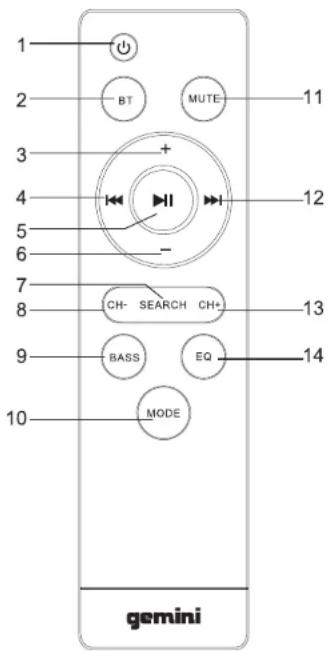
- Power On/Off
- Bluetooth
- Increase Volume (+)
- Previous Track
- Play / Pause
- Decrease Volume (-)
- FM Radio Search
- Previous FM Radio Channel
- Bass
- Change Mode (BT/FM/AUX/USB)
- Mute Audio
- Next Track
- Next FM Radio Channel
- Switch EQ Preset
DECLARATION OF CONFORMITY
Safety And EMC Compliance Specifications
The purpose of the statement described above is consistent with applicable union harmonization legislation:
RED 2014/53/EU
ETSI EN 300 328 V2.1.1(2016-11)
ETSI EN 301 489-1 V2.1.1(2017-02)
ETSI EN 301 489-17 V3.1.1(2017-02)
EN 62479:2010
EN 60950-1:2006+A11:
2009+A1:2010+A12:2011+A2:2013
EN 60065:2014
The RoHSDirective 2011/65/EU
IEC 62321-3-1:2013
IEC 62321-5:2013
IEC 62321-4:2013
IEC 62321-6:2015
IEC 62321-7-1:2015
IEC 62321:2008 ANNEX C
FCC Compliance Statement
This device complies with Part 15 of the FCC Rules.
The operation is subject to the following two conditions:
(1) This device may not cause harmful interference, and
(2) This device must accept any interference received, including interference that may cause undesired operation.
Note: This equipment has been tested and found to comply with the limits for a class B digital device, pursuant to Part 15 of the FCC Rules. These equipment generates uses and can radiate radio frequency energy and if not installed and used in accordance with the instructions, may cause harmful interference to radio communications. However, there is no guarantee that interference will not occur in a particular installation. If this equipment does cause interference to radio or television reception, which can be determined by turning the equipment off and then on, the user is encouraged to try to correct the interference by one or more of the following
Measures:
" Reorient or relocate the receiving antenna.
" Increase the separation between the equipment and receiver.
"Connect the equipment to a different outlet so that the equipment and receiver are on different branch circuits.
"Consult the dealer or an experienced radio/TV technician for help.
FCC ID:2AE6G-GHK2800
LEGALITY & SAFETY
The device is not intended for use by people (including children) with reduced physical, sensory or mental capacity. People who have not read the manual, unless they have received an explanation by someone responsible for their safety, should not use this unit. Children should be monitored to ensure that they do not play with the device. The device should always be readily accessible. The device should not be exposed to water. No objects filled with liquids, such as vases, shall be placed on the device. Always leave a minimum distance of 10 cm around the unit to ensure sufficient ventilation. Open flame sources, such as candles, should not be placed on top of the device. The device is intended for use only in a temperate climate. At full volume, prolonged listening may damage your hearing and cause temporary or permanent deafness, hearing drone, tinnitus, or hyperacusis. Listening at high volume is not recommended. One hour per day is not recommend either. Danger of explosion if battery is incorrectly replaced or not replaced by the same type or equivalent. The battery should not be exposed to excessive heat such as sunshine or fire. Different types of batteries, or new and used batteries, should not be mixed. The battery must be installed according to its polarity. If the battery is worn, it must be removed from the product. The battery must be disposed of safely.
Always use collection bins to protect the environment. The battery can only be replaced by the maker of this product, the sales department, or a qualified person. Switch the device off where the use of the device is not allowed or where there is a risk of causing interference or danger - for examples: on an aircraft, or near medical equipment, fuel, chemicals or blasting sites. Check the current laws and regulations regarding the use of this device in the areas where you drive. Do not handle the device when driving. Concentrate fully on
driving. All wireless devices are susceptible to interference which may affect their performance. All our devices conform to international/national standards and regulations, and we aim to limit user exposure to electromagnetic fields. These standards and regulations were adopted after the completion of extensive scientific research. This research established no link between the use of the mobile headset and any adverse effects on health if the device is used in accordance with standard practices. Only qualified people are authorized to install or repair this product. Only use batteries, chargers and other accessories which are compatible with this equipment. Do not connect incompatible products. This equipment is not waterproof. Keep it dry. Keep your device in a safe place, out of the reach of young children. The device contains small parts which may present achoking hazard to kids.
WARRANTY
A. Gemini guarantees its products to be free from defects in materials and workmanship for one (1) year from the original purchase date. Exceptions: Laser assemblies on CD Players, batteries, cartridges, and crossfaders are covered for 90 days.
B. This limited warranty does not cover damage or failure caused by abuse, misuse, abnormal use, faulty installation, improper maintenance or any repairs other than those provided by an authorized Gemini Service Center.
C. There are no obligations of liability on the part of Gemini for consequential damages arising out of or in connection with the use or performance of the product or other indirect damages with respect to loss of property, revenues, of profit, or costs of removal, installation, or reinstallation. All implied warranties for Gemini, including implied warranties for fitness, are limited in duration to one (1) year from the original date of purchase, unless otherwise mandated by local statutes.
RETURN/REPAIR
A. In the U.S.A. please call our helpful Customer Service Representatives at (732) 346-0061, and they will be happy to give you a Return Authorization Number (RA#) and the address of an authorized service center closest to you.
B. After receiving an RA#, include a copy of the original sales receipt, with defective product and a description of the defect. Send by insured freight to: Gemini and use the address provided by your customer service representative. Your RA# must be written on the outside of the package, or processing will be delayed indefinitely!
C. Service covered under warranty will be paid for by Gemini and returned to you. For non-warranted products, Gemini will repair your unit after payment is received. Repair charges do not include return freight. Freight charges will be added to the repair charges.
D. On warranty service, you pay for shipping to Gemini, we pay for return shipping within the continental United States. Alaska, Hawaii, Puerto Rico, Canada, Bahamas, and the Virgin Islands will be charged for freight.
E. Please allow 2-3 weeks for return of your product. Under normal circumstances your product will spend no more than 10 working days at Gemini. We are not responsible for shipping times.
1GHK-2800
Options audio assorties
8. Bouton Lecture/Pause
At Gemini, our highest priority is making your experience unforgettable. Need help setting up, troubleshooting, or looking for some tips? We're here for you, Monday through Friday 9-5PM EST.

1-844-GEMINI9

hello@geminisound.com

www.geminisound.com
Love coupon codes and an extended warranty?
E-mail us a link to your product review and we'll send you a coupon code for our website and extend your warranty 3 months.
*US ONLY*
Innovative Concepts and Design LLC
458 Florida Grove Road
Perth Amboy, NJ 08861


- GHK-2800
- LED LIGHTING FX
- FULL RANGE OF SOUND
- ASSORTED AUDIO OPTIONS
- DJ EFFECTS
- USB Play / Record
- AUX Input Jack
- Guitar Input Jack
- Music Volume Fader
- Microphone Input Jack
- Charging Port
- Treble EQ
- Play/Pause Button
- Previous Track Button
- Next Track Button
- Back Button
- Forward Button
- EQ effect
- Standby Button
- 15.3D Effect
- 16.Bass Effect
- Center Light Control Button
- Record Scratch Sound Effect
- Woofer Light Control Button
- Air Horn
- Voice Reduce
- 22.Mic Priority Button
- USB Record
- Display Window
- Vocal Key
- Microphone Echo Volume Adjustment
- 27.Micphone Tone Volume Adjustment
- Microphone Volume Adjustment
- 29.TWS Function Button
- 30.AUX Function Button
- 31.FM Function Button
- 32.USB
- Bluetooth Function Button
- 34.Bass EQ
- INTRODUCTION
- PREPARING FOR FIRST USE
- PRECAUTIONS
- CONNECTIONS
- DECLARATION OF CONFORMITY
- Safety And EMC Compliance Specifications
- LEGALITY & SAFETY
- WARRANTY
- RETURN/REPAIR
- 1GHK-2800
- Options audio assorties
- Bouton Lecture/Pause
Brand : GEMINI
Model : GHK-2800
Category : Loudspeaker