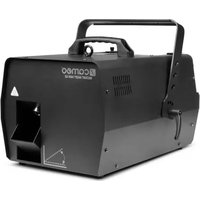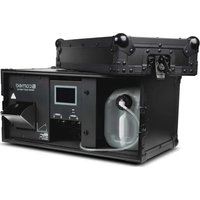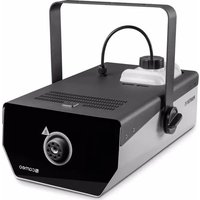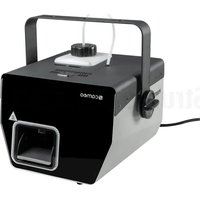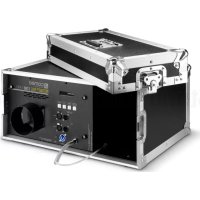
Instant Fog 1700 T Pro - Effect machine Cameo - Free user manual and instructions
Find the device manual for free Instant Fog 1700 T Pro Cameo in PDF.

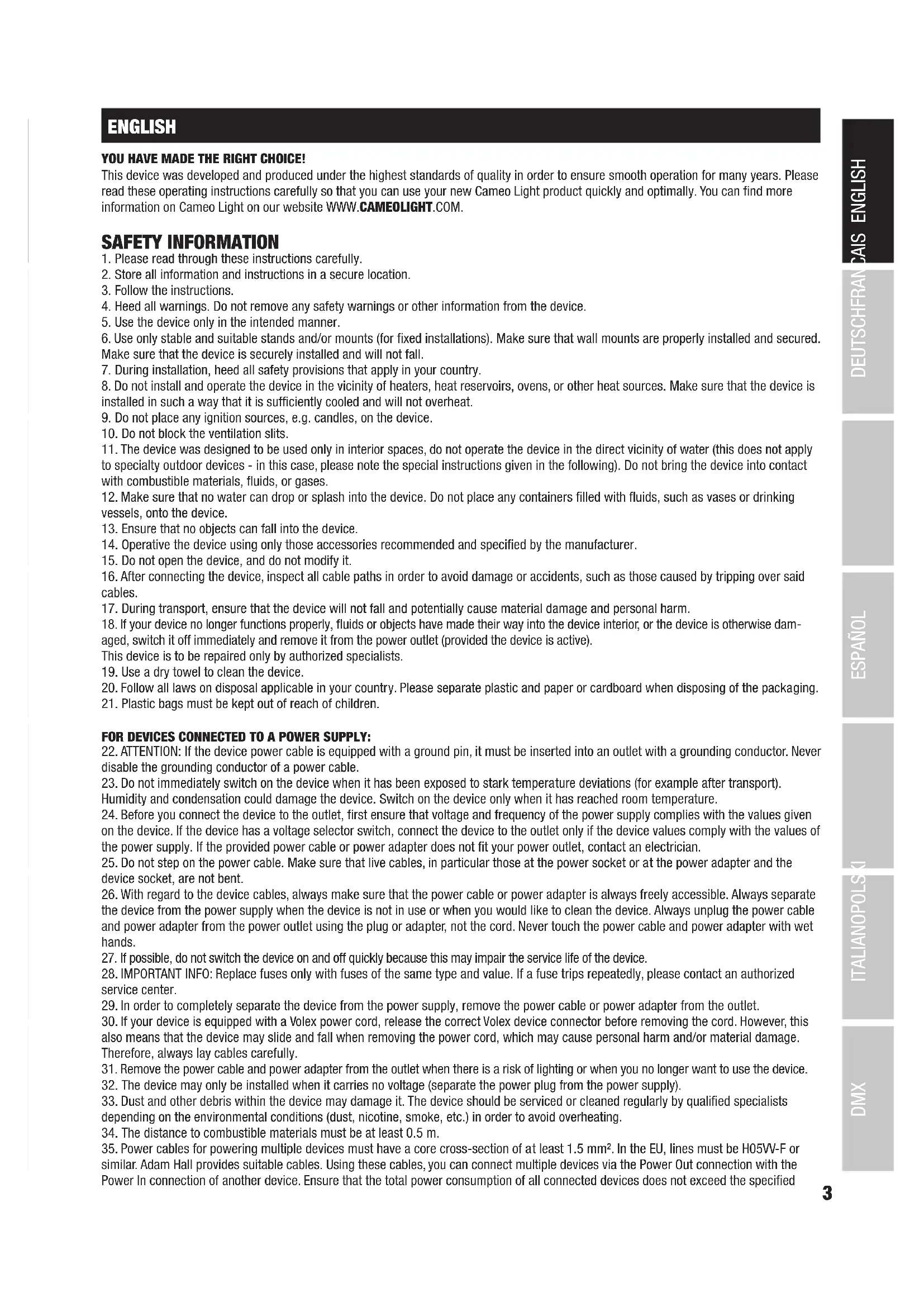


| Product type | Professional evaporation fog machine |
| Brand | Cameo |
| Model | Instant Fog 1700 T Pro |
| Dimensions (with cover) | 550 x 265 x 465 mm |
| Weight (without canister) | 11 kg |
| Operating voltage | 230 V AC / 50-60 Hz |
| Power consumption | 1800 W |
| Fuse | T10AL (5x20 mm) |
| Warm-up time | Approximately 7 minutes |
| Canister capacity | 5 liters (Cameo fog liquid) |
| Control modes | DMX 512 (3 channels or 1 channel), Standalone, Timer, Slave |
| DMX connectors | XLR 3-pin and 5-pin input/output |
| Display | Backlit 2-line LCD |
| Main functions | Continuous fog emission, interval, instant fog, quantity adjustment |
| Overheat protection | Yes, regulated thermostat |
| Automatic shutdown without liquid | Yes, with 'Low Liquid Protection' message |
| Evaporator cleaning | Every 60 hours with Cameo cleaning liquid |
| Operating ambient temperature | 5°C to 40°C |
| Relative humidity | < 85%, non-condensing |
| Housing material | Metal and plywood |
| Included accessories | Special canister lid (vent valve + suction hose), Power Twist power cable |
| Safety distance to flammable materials | Minimum 0.5 m |
| Manufacturer warranty | Check terms on Adam Hall website |
Frequently Asked Questions - Instant Fog 1700 T Pro Cameo
User questions about Instant Fog 1700 T Pro Cameo
0 question about this device. Answer the ones you know or ask your own.
Ask a new question about this device
Download the instructions for your Effect machine in PDF format for free! Find your manual Instant Fog 1700 T Pro - Cameo and take your electronic device back in hand. On this page are published all the documents necessary for the use of your device. Instant Fog 1700 T Pro by Cameo.
USER MANUAL Instant Fog 1700 T Pro Cameo
natural_image
Exterior view of a COMO InstantTM FOG 1700 T PRO optical equipment with visible control panel and wiring (no readable text beyond branding)INSTANT FOG 1700 T PRO
HIGH OUTPUT 1,700 W TOURING FOG MACHINE
CLIF1700TPRO
CONTENTS / INHALTSVERZEICHNIS / CONTENU / CONTENIDO / TREŚĆ / CONTENUTO
ENGLISH
SAFETY INFORMATION 3-4
INTRODUCTION 5
CONNECTIONS, OPERATION AND DISPLAY ELEMENTS 5-6
CANISTER COMPARTMENT AND SPECIAL COVER
FOR CANISTER 6-7
OPERATION 7-9
SETUP 9
DMX TECHNOLOGY 10
TECHNICAL DATA 11
MANUFACTURER'S DECLARATIONS 11
DMX CONTROL 57
DEUTSCH
This device was developed and produced under the highest standards of quality in order to ensure smooth operation for many years. Please read these operating instructions carefully so that you can use your new Cameo Light product quickly and optimally. You can find more information on Cameo Light on our website WWW.CAMEOLIGHT.COM.
SAFETY INFORMATION
- Please read through these instructions carefully.
- Store all information and instructions in a secure location.
- Follow the instructions.
- Heed all warnings. Do not remove any safety warnings or other information from the device.
- Use the device only in the intended manner.
- Use only stable and suitable stands and/or mounts (for fixed installations). Make sure that wall mounts are properly installed and secured. Make sure that the device is securely installed and will not fall.
- During installation, heed all safety provisions that apply in your country.
- Do not install and operate the device in the vicinity of heaters, heat reservoirs, ovens, or other heat sources. Make sure that the device is installed in such a way that it is sufficiently cooled and will not overheat.
- Do not place any ignition sources, e.g. candles, on the device.
- Do not block the ventilation slits.
- The device was designed to be used only in interior spaces, do not operate the device in the direct vicinity of water (this does not apply to specialty outdoor devices - in this case, please note the special instructions given in the following). Do not bring the device into contact with combustible materials, fluids, or gases.
- Make sure that no water can drop or splash into the device. Do not place any containers filled with fluids, such as vases or drinking vessels, onto the device.
- Ensure that no objects can fall into the device.
- Operative the device using only those accessories recommended and specified by the manufacturer.
- Do not open the device, and do not modify it.
- After connecting the device, inspect all cable paths in order to avoid damage or accidents, such as those caused by tripping over said cables.
- During transport, ensure that the device will not fall and potentially cause material damage and personal harm.
- If your device no longer functions properly, fluids or objects have made their way into the device interior, or the device is otherwise damaged, switch it off immediately and remove it from the power outlet (provided the device is active).
This device is to be repaired only by authorized specialists. - Use a dry towel to clean the device.
- Follow all laws on disposal applicable in your country. Please separate plastic and paper or cardboard when disposing of the packaging.
- Plastic bags must be kept out of reach of children.
FOR DEVICES CONNECTED TO A POWER SUPPLY:
- ATTENTION: If the device power cable is equipped with a ground pin, it must be inserted into an outlet with a grounding conductor. Never disable the grounding conductor of a power cable.
- Do not immediately switch on the device when it has been exposed to stark temperature deviations (for example after transport). Humidity and condensation could damage the device. Switch on the device only when it has reached room temperature.
- Before you connect the device to the outlet, first ensure that voltage and frequency of the power supply complies with the values given on the device. If the device has a voltage selector switch, connect the device to the outlet only if the device values comply with the values of the power supply. If the provided power cable or power adapter does not fit your power outlet, contact an electrician.
- Do not step on the power cable. Make sure that live cables, in particular those at the power socket or at the power adapter and the device socket, are not bent.
- With regard to the device cables, always make sure that the power cable or power adapter is always freely accessible. Always separate the device from the power supply when the device is not in use or when you would like to clean the device. Always unplug the power cable and power adapter from the power outlet using the plug or adapter, not the cord. Never touch the power cable and power adapter with wet hands.
- If possible, do not switch the device on and off quickly because this may impair the service life of the device.
- IMPORTANT INFO: Replace fuses only with fuses of the same type and value. If a fuse trips repeatedly, please contact an authorized service center.
- In order to completely separate the device from the power supply, remove the power cable or power adapter from the outlet.
- If your device is equipped with a Volex power cord, release the correct Volex device connector before removing the cord. However, this also means that the device may slide and fall when removing the power cord, which may cause personal harm and/or material damage. Therefore, always lay cables carefully.
- Remove the power cable and power adapter from the outlet when there is a risk of lighting or when you no longer want to use the device.
- The device may only be installed when it carries no voltage (separate the power plug from the power supply).
- Dust and other debris within the device may damage it. The device should be serviced or cleaned regularly by qualified specialists depending on the environmental conditions (dust, nicotine, smoke, etc.) in order to avoid overheating.
- The distance to combustible materials must be at least 0.5 m.
- Power cables for powering multiple devices must have a core cross-section of at least 1.5mm^2 . In the EU, lines must be H05VV-F or similar. Adam Hall provides suitable cables. Using these cables, you can connect multiple devices via the Power Out connection with the Power In connection of another device. Ensure that the total power consumption of all connected devices does not exceed the specified
value (printed on the device). Be sure to keep power lines as short as possible.
- The appliance is not to be used by persons (including children) with reduced physical, sensory or mental capabilities, or lack of experience and knowledge.
- Children must be instructed not to play with the device.
- If the power cord of the device is damaged, do not use the device. The power cord must be replaced by an adequate cable or assembly from an authorized service center.

ATTENTION
Never remove the cover, otherwise you run the risk of electric shock. There are no parts that can be repaired or serviced by the operator within the device. Maintenance and repair work is only to be carried out by qualified servicing personnel.

The equilateral triangle with the lighting symbol warns of , uninsulated, dangerous voltages in the device interior which can cause electric shock.

The equilateral triangle with the exclamation point indicates important operation and maintenance instructions.

Warning! This symbol indicates hot surfaces. Certain sections of the housing can become hot during use. Touch or transport the device after use only after allowing it to cool for at least 10 minutes.

Warning! This device is designed for use only up to a maximum altitude of 2000 meters.

Warning! This device is not designed for use in tropical climates.

CAUTION! IMPORTANT INFORMATION ON FOG MACHINES!
- This product was developed for professional applications in the area of event technology and is not suitable for household use!
- Use only Cameo fog fluid (water-based) and never fill the canister with combustible fluids! Risk of explosion!
- Separate the fog machine from the power supply before changing the canister or filling it with fog fluid!
- Operate the fog machine only in well-ventilated areas!
- Never operate the fog machine unattended!
- The fog outlet nozzle becomes very hot during use. Do not touch the outlet nozzle during use and maintain a minimum distance of 50 cm (approx. 20 in)! Before cleaning and transport, make sure that the device has cooled completely!
- The fog released is very hot! Never aim the outlet nozzle at people or animals! BURN HAZARD!
- Ensure that no people and animals are located directly below the fog machines! BURN HAZARD!
- Never aim the fog outlet nozzle at open flames and combustible materials!
- Ensure that other electrical devices and outlets are never directly exposed to the fog jet.
- Fluid may collect via condensation in front of the fog outlet nozzle during use. Caution, slipping hazard!
- Occasionally, small amounts of fog may escape during use even when not triggered, as well as a short time after switching off the fog machine.
- Never expose persons with respiratory diseases (such as allergies, asthma) to artificial fog.
- When using fog machines, ensure that visibility within the room does not sink below approx. 2 meters so that people can still safely orient themselves within the space.
- Remove the fluid canister from the fog machine before transport.
- The fog released can trigger smoke alarms.
- Keep away from children!
INTRODUCTION
PROFESSIONAL FOG MACHINE
CLIF1700TPRO
CONTROL FUNCTIONS
3-channel and 1-channel DMX control
Stand Alone mode
PROPERTIES
Professional fog machine in flight case with cover, butterfly clasp, and handle. DMX-512 control. Overheat protection. Operating voltage: 230V AC / 50-60Hz. Power consumption: 1800W.
CONNECTIONS, CONTROL AND DISPLAY ELEMENTS

text_image
cameo® colours of light INSTANT® FOG 1700 T PRO MODE ENTER UP DOWN IN / OUT BMX IN / OUT DO NOT OPERATE WITHOUT LIQUID! POWER SUPPLY: 230 V AC / 50-60 Hz POWER CONSUMPTION : 1000 W HOT NOZZLE! KEEP AT LEAST 94 ON INSTANCES1 POWER IN
Power Twist outlet to provide power to the device, a suitable power cable is included in delivery.
2 FUSE
Fuse holder for 5 x 20mm micro fuses. IMPORTANT INFO: Replace the fuse only with a fuse of the same type and values (see label on the housing). If a fuse trips repeatedly, please contact an authorized service center.
③ DMX IN / OUT 3-POL XLR
Male 3-pin XLR connector to connect with a DMX controller and female 3-pin XLR connector to forward the DMX control signal.
④ DMX IN / OUT 5-POL XLR
Male 5-pin XLR connector to connect with a DMX controller and female 5-pin XLR connector to forward the DMX control signal.
5 LC DISPLAY
The 2-line LC display with background illumination displays the mode currently active (main screen), the menu options in the options menu, and the numerical values or operating mode in certain menu options. If the DMX input is not receiving a control signal, the numbers on the display will flash; this flashing stops as soon as a control signal is present (DMX and Slave mode).
6 CONTROL BUTTONS
MODE: Select MODE in order to access the options menu. Similarly, pressing MODE in the menu structure in the options menu and submenus will take you one level higher to the main display (press several times if necessary).
ENTER: In the options menu, press ENTER to access the menu level where you can change values. Press ENTER to confirm value changes as well.
UP and DOWN: Select the individual menu items in the options menu (device settings, operating mode, etc.) and submenus, and change the value of a menu item such as the DMX address.
INSTANT FOG: Press and hold the MODE and UP buttons at the same time in order to manually start the maximum fog discharge. Release the buttons to stop the fog discharge again.
7 FLUID HOSE
Hose to connect to the special Cameo canister cover (included in delivery).
8 FOG OUTLET NOZZLE
Caution, hot! When setting up the fog machine, note the instructions under "CAUTION!" IMPORTANT INFORMATION ON FOG MACHINES!" in the safety information of these instructions.
⑨ VENTILATION SLITS
To prevent overheating the device, ensure that the ventilation slits are not covered and that air can circulate freely.
CANISTER COMPARTMENT AND SPECIAL COVER FOR CANISTER

text_image
comco AT&T® F06 1700 11/EDU 10 11 13 12 14 15 16Before replacing the canister or refilling it with fog fluid, disconnect the fog machine from the power supply (unplug the power plug). A special canister lid with ventilation valve and intake hose, suitable for 5l Cameo fog fluid canister, is included in delivery (canister not included). Place a full Cameo fog fluid canister upright in front of the fog machine and unscrew the canister lid. Now take the included special cover and insert the ventilation valve hose and the intake hose (no. 15 and 16) into the canister and screw the special cover onto the canister tightly. The sinter filter on the intake hose ensures that contaminant particles do not get into the system and that the hose end is always at the lowest point of the canister. Now push the canister into the canister compartment and secure it using the Velcro strap (11); a valve in the special cover prevents fog fluid from escaping. Now connect the fluid hose of the fog machine to the special cover (see no. 13). To remove a fluid canister, please first loosen the fluid hose from the special cover.
10 CANISTER COMPARTMENT
Canister compartment for a 5l canister of Cameo fog fluid.
11 VELCRO STRAP
Velcro strap to attach the fluid canister.
12 SEALING CAP FOR FLUID HOSE
Remove the sealing cap from the fluid hose in order to connect the hose to the special canister cover. If the fluid hose is not connected to the canister cover, close it using the sealing cap.
13 FLUID HOSE
Fluid hose with hose nozzle and black gasket. Connect the fluid hose on the canister cover by inserting the hose nozzle into the quick coupler until the locking mechanism engages. Verify that the connection has a firm hold. To release the fluid hose, press the spring-loaded release button (14).
14 RELEASE BUTTON
To release the fluid hose from the special cover, press the spring-loaded release button of the quick coupler.
15 VENTILATION VALVE
Ventilation valve with associated hose.
16 INTAKE HOSE
Intake hose with sinter filter.
OPERATION
NOTES
- After connecting to the power supply, “Welcome to Cameo”, the model designation, and the software version will display one after the other. At the same time, the vaporizer will heat up (approx. 7 minutes), during which “Heating ...” will be shown on the display; system settings can be applied as needed during this time.
- After the heating phase is complete, "Ready!" will display briefly and then the operating mode previously selected will activate.
- When the heating phase is complete, fog will only release when the main screen shows one of the available operating modes (DMX, Stand Alone, Timer, Slave mode); the fog discharge halts as soon as one of the menu options is chosen from the options menu or submenu.
- Do not operate the fog machine without fog fluid! When the canister runs out during use, the fluid pump is switched off automatically for protection purposes, “Low Liquid Protection” is shown on the display, and the canister light simultaneously starts to flash. Disconnect the fog machine from the power supply before changing the canister or filling it with fog fluid. Then, use the “Instant Fog” function (maximum fog discharge) in order to completely fill the fluid hose with fog fluid again, in order to prevent the automatic pump switch-off from reactivating.
- In order to remove fluid residue in the vaporizer system of your fog machine and thus ensure a long device service life, clean the vaporizer system regularly (approx. every 60 operating hours). To do so, use the special Cameo cleaning fluid for fog machines and follow the instruction on the bottle label.
SETTING THE DMX START ADDRESS (DMX Address)
Access the selection menu by pressing MODE. Using the UP and DOWN control keys, now select the "DMX Address" menu option and confirm via ENTER. Use the UP and DOWN keys to set the desired DMX start address and confirm this entry via ENTER. The main screen now displays the operating mode and DMX start address and automatically activates the DMX operating mode.
Main display
DMX Address
ENTER UP/DOWN
DMX Address 001 - 510
ENTER
DMX-Mode DMX-Address: xxx
SETTING DMX MODE
You can access the options menu by pressing MODE. Using the UP and DOWN control keys, now select the "DMX Mode" menu option and confirm by selecting ENTER. Use the UP and DOWN keys to select the desired DMX mode (3CH mode / 1CH mode) and then press ENTER to confirm your selection. The main screen now displays the mode and DMX start address and automatically activates the DMX mode. You can find detailed DMX tables for both DMX modes in these instructions under "DMX CONTROL".
Main display
DMX Mode 3CH
ENTER Mode 1CH Mode UP/DOWN
/
ENTER
DMX-Mode DMX-Address: xxx
STAND ALONE MODE (Stand Alone)
Stand Alone mode makes it possible to manually configure the fog discharge of the machine using values of 1% to 100%. Access the selection menu by pressing MODE. Using the UP and DOWN control keys, now select the "Stand Alone" menu option and confirm by pressing ENTER 2x. Using the UP and DOWN control keys, now set the desired value and confirm via ENTER.
Main display
Stand Alone Stand Alone ENTER
Pump
ENTER UP/DOWN
Pump Value 1% - 100%
ENTER
Stand Alone mode Pump Value: x%
TIMER MODE (Timer)
Timer mode makes it possible to manually configure the fog discharge of the device using values of 1% to 100%, as well as the output duration and the interval at which the discharge is to begin. Access the selection menu by pressing MODE. Using the UP and DOWN control keys, now select the "Timer" menu option and confirm via ENTER. Now select between "Timer Pump" (output quantity), "Timer Duration" (output duration), and "Timer Interval" (output interval) via UP and DOWN, confirm with ENTER, and set the desired value using UP and DOWN respectively. Confirm each entry via ENTER. Main display
Timer
ENTER UP/DOWN
Timer Pump
ENTER - UP/DOWN
ENTER - UP/DOWN
Pump Value 1% - 100%
Duration Time 1sec - 60sec
ENTER
ENTER
ENTER - UP/DOWN
Interval Time 1sec - 60sec
ENTER
Timer mode Duration/Interval xSec
SLAVE MODE (Slave)
Access the selection menu by pressing MODE. Using the UP and DOWN control keys, now select the "Slave" menu option and confirm via ENTER. Connect the slave and master unit (same model, same software version) using a DMX cable (Master DMX OUT - Slave DMX IN), and activate Stand Alone or Timer mode on the master unit. The slave unit will now follow the master unit.
Main display
Slave Slave mode ENTER
DEVICE SETTINGS (Settings)
Access the selection menu by pressing MODE. Using the UP and DOWN control keys, now select the "Settings" menu option (note arrow) and confirm via ENTER.
Settings
ENTER
This will take you to the submenu for setting the following submenu options (select via UP and DOWN, confirm via ENTER, change status via UP and DOWN, confirm via ENTER):
| Settings | ||||
| Display Settings | = Sets the display and control key illumination and canister illumination | Display and LEDs on | Display, control key, and canister illumination permanently on | |
| Display off | Display off after 30 seconds of inactivity, control key and canister illumination on | |||
| Display and LEDs Dark Mode | Display, control key, and canister illumination off after 30 seconds of inactivity | |||
| Settings DMX Fail | = Operating mode for DMX signal interruption | DMX Fail Hold | Last command is held | |
| DMX Fail Stop fog output | Fog output is stopped | |||
| Settings Auto Lock Unit | = Automatic locking unit Auto Lock Unit | off | Automatic locking deactivated | |
| Auto Lock Unit 60sec | Automatic locking activated after approx. 60 seconds of inactivity (release by simultaneously holding UP and DOWN for approx. 10 seconds) | |||
SYSTEM INFORMATION (System Info)
Access the selection menu by pressing MODE. Using the UP and DOWN control keys, now select the "System Info" menu option and confirm via ENTER.
System info
ENTER
This will take you to the submenu for displaying the device information. Use the UP and DOWN buttons again to select the desired parameter, then press ENTER to call up the information.
| System info | |||
| Firmware = Displays the device firmware Software Version | Vx.xx | ||
| Operating Hours | H Operating time display of the fog machine in hours Operating Hours | Total: x | |
SETUP
Place the fog machine in a suitable location on its preinstalled rubber feet and follow the instructions under "CAUTION! IMPORTANT INFORMATION ON FOG MACHINES!" in the safety information of these instructions when doing so.
DMX TECHNOLOGY
DMX-512
DMX (Digital Multiplex) is the designation for a universal transmission protocol for communications between corresponding devices and controllers. A DMX controller sends DMX data to the connected DMX device(s). The DMX data is always transmitted as a serial data stream that is forwarded from one connected device to the next via the "DMX IN" and "DMX OUT" connectors (XLR plug-type connectors) that are found on every DMX-capable device, provided the maximum number of devices does not exceed 32 units. The last device in the chain needs to be equipped with a terminator (terminating resistor).

natural_image
Coiled black cable with two connectors (no text or symbols visible)DMX CONNECTION
DMX is the common "language" via which a very wide range of types and models of equipment from various manufacturers can be connected with one another and controlled via a central controller, provided that all of the devices and the controller are DMX compatible. For optimum data transmission, it is necessary to keep the connecting cables between the individual devices as short as possible. The order in which the devices are integrated in the DMX network has no influence on the addresses. Thus the device with the DMX address 1 can be located at any position in the (serial) DMX chain: at the beginning, at the end or somewhere in the middle. If the DMX address 1 is assigned to a device, the controller "knows" that it should send all data allocated to address 1 to this device regardless of its position in the DMX network.
SERIAL CONNECTION OF MULTIPLE LIGHTS
- Connect the male XLR connector (3-pin or 5-pin) of the DMX cable to the DMX output (female XLR socket) of the first DMX device (e.g. DMX-Controller).
- Connect the female 3-pin XLR connector of the DMX cable connected to the first projector to the DMX input (male 3-pin socket) of the next DMX device. In the same way, connect the DMX output of this device to the DMX input of the next device and repeat until all devices have been connected. Please note that as a rule, DMX devices are connected in series and connections cannot be shared without active splitters. The maximum number of DMX devices in a DMX chain should not exceed 32 units.
The Adam Hall 3 STAR, 4 STAR, and 5 STAR product ranges include an extensive selection of suitable cables.
DMX CABLES
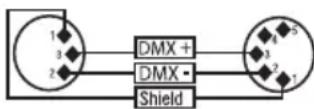
When fabricating your own cables, always observe the illustrations on this page. Never connect the shielding of the cable to the ground contact of the plug, and always make certain that the shielding does not come into contact with the housing of the XLR plug. If the shielding is connected to the ground, this can lead to short-circuiting and system malfunctions.
Pin Assignment
DMX cable with 3-pin XLR connectors: DMX cable with 5-pin XLR connectors (pin 4 and 5 are not used):

flowchart
graph LR
    A["1"] --> B["Shield"]
    C["3"] --> B
    D["2"] --> B
    B --> E["1"]
    B --> F["3"]
    B --> G["2"]

DMX TERMINATORS (TERMINATING RESISTORS)
To prevent system errors, the last device in a DMX chain needs to be equipped with a terminating resistor (120 ohm, 1/4 Watt).
3-pin XLR connector with a terminating resistor: K3DMXT3
5-pin XLR connector with a terminating resistor: K3DMXT5
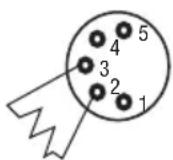
Pin Assignment
3-pin XLR connector: 5-pin XLR connector:

DMX ADAPTER
The combination of DMX devices with 3-pin connectors and DMX devices with 5-pin connectors in a DMX chain is possible with suitable adapters.
Pin Assignment
DMX Adapter 5-pin XLR male to 3-pin XLR female: K3DGF0020
Pins 4 and 5 are not used.
Pin Assignment
DMX Adapter 3-pin XLR male to 5-pin XLR female: K3DHM0020
Pins 4 and 5 are not used.


TECHNICAL SPECIFICATIONS
Item number CLIF1700TPRO
| Product type: Fog machine | |
| Type: Fog generator via vaporization incl. flight case | |
| Heating time: approx. 7 minutes | |
| DMX input: 3-pin and 5-pin XLR, male | |
| DMX output: 3-pin and 5-pin XLR, female | |
| DMX mode: 3-channel, 1-channel | |
| DMX functions: Fog Quantity, Interval function | |
| Stand Alone functions: Fog Quantity, Interval function, Instant Fog | |
| Controller: DMX512 | |
| Control elements: Mode, Enter, Up, Down | |
| Display elements: Illuminated 2-line LC display, canister illumination, button illumination | |
| Operating voltage: | 230V AC / 50-60Hz |
| Power consumption: | 1800W |
| Overheat protection: | Heating element with thermostat |
| Power supply connection | Power Twist connector |
| Fuse: T10AL (5x20mm) | |
| Environmental temperature (in use): | 5°C - 40°C |
| Relative humidity: | < 85%, non-condensing |
| Housing material: Metal and plywood | |
| Housing color: Black | |
| Dimensions with cover (B x H x W): | 550 x 265 x 465mm |
| Weight (without canister): | 11kg |
| Additional features: | Flight case with cover, butterfly clasp, and handle. 4 rubber feet Special canister cover with ventilation valve and intake hose included. Power cords included |
MANUFACTURER'S DECLARATIONS
MANUFACTURER'S WARRANTY & LIMITATIONS OF LIABILITY
You can find our current warranty conditions and limitations of liability at: https://cdn-shop.adamhall.com/media/pdf/MANUFACTURERS-DECLARATIONS_CAMEO.pdf. To request warranty service for a product, please contact Adam Hall GmbH, Adam-Hall-Str. 1, 61267 Neu Anspach / Email: Info@adamhall.com / +49 (0)6081 / 9419-0.

CORRECT DISPOSAL OF THIS PRODUCT
(valid in the European Union and other European countries with a differentiated waste collection system) This symbol on the product, or on its documents indicates that the device may not be treated as household waste. This is to avoid environmental damage or personal injury due to uncontrolled waste disposal. Please dispose of this product separately from other waste and have it recycled to promote sustainable economic activity. Household users should contact either the retailer where they purchased this product, or their local government office, for details on where and how they can recycle this item in an environmentally friendly manner. Business users should contact their supplier and check the terms and conditions of the purchase contract. This product should not be mixed with other commercial waste for disposal.
FCC STATEMENT
This device complies with Part 15 of the FCC Rules. Operation is subject to the following two conditions:
(1) This device may not cause harmful interference, and
(2) This device must accept any interference received, including interference that may cause undesired operation
CE Compliance
Adam Hall GmbH states that this product meets the following guidelines (where applicable):
R&TTE (1999/5/EC) or RED (2014/53/EU) from June 2017
Low voltage directive (2014/35/EU)
EMV directive (2014/30/EU)
RoHS (2011/65/EU)
The complete declaration of conformity can be found at www.adamhall.com.
Furthermore, you may also direct your enquiry to info@adamhall.com.
DEUTSCH
Duration Time 1sec - 60sec
Interval Time 1sec - 60sec
ENTER
ENTER
ENTER
natural_image
Coiled black cable with two connectors, no visible text or symbolsDMX-VERBINDUNG:
③ DMX IN / OUT XLR 3 BROCHES
4 DMX IN / OUT XLR 5 BROCHES
Duration Time 1sec - 60sec
Interval Time 1sec - 60sec
ENTER
ENTER
ENTER
MODE SLAVE (Slave)
natural_image
Coiled black cable with two connectors (no text or symbols visible)PROTOCOLE DMX
(Valid in the European Union and other European countries with waste separation)
Duration Time 1sec - 60sec
ENTER
/
Timer Interval
ENTER - UP/DOWN
Interval Time 1sec - 60sec
ENTER
Timer-Mode Duration/Interval xSec
MODO ESCLAVO (Slave)
natural_image
Coiled black cable with two connectors, no visible text or symbolsCONEXIONADO DMX
8 DYSZA WYLOTOWA DYMU
Duration Time 1sec - 60sec
Interval Time 1sec - 60sec
ENTER
ENTER
ENTER
TRYB SLAVE (Slave)
natural_image
Coiled black cable with two connectors (no text or symbols visible)ZŁĄCZE DMX:
③ DMX IN / OUT 3 POLI XLR
Duration Time 1 sec. - 60 sec.
ENTER
/
Timer Interval
ENTER - UP/DOWN
Interval Time 1 sec. - 60 sec.
ENTER
Timer-Mode Duration/Interval xSec