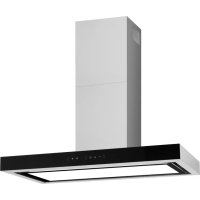
KH 694 616 E - Basket AMICA - Free user manual and instructions
Find the device manual for free KH 694 616 E AMICA in PDF.



| Product type | Range hood |
| Brand | Amica |
| Model | KH 694 616 E |
| Dimensions (W x D x H) | Approximately 90 x 50 x 50 cm (estimate) |
| Weight | Approximately 12 kg (estimate) |
| Power supply | 220-240 V ~ 50 Hz |
| Motor power | Not specified, typical 150-250 W |
| Number of speeds | 3 speeds + Turbo mode (limited to 5 minutes) |
| Lighting type | LED with brightness and color adjustment (3000-7000 K) |
| Control type | Touch sensitive + gesture control |
| Timer function | Delayed shut-off of 15 minutes |
| Grease filter | Aluminum, dishwasher safe, monthly cleaning |
| Charcoal filter | Active, replace every 3-4 months (not washable) |
| Extraction mode | Extraction (duct Ø 120/150 mm, max 4-5 m) or recirculation |
| Minimum mounting height | According to the hob (gas: distance specified on the hob) |
| Maintenance | Monthly exterior cleaning with damp cloth and mild detergent |
| Safety | Disconnect before maintenance, do not flambé under the hood, monitor frying |
| Warranty | According to warranty card (minimum legal) |
Frequently Asked Questions - KH 694 616 E AMICA
User questions about KH 694 616 E AMICA
0 question about this device. Answer the ones you know or ask your own.
Ask a new question about this device
Download the instructions for your Basket in PDF format for free! Find your manual KH 694 616 E - AMICA and take your electronic device back in hand. On this page are published all the documents necessary for the use of your device. KH 694 616 E by AMICA.
USER MANUAL KH 694 616 E AMICA
Kitchen extractor hood / kaminhaube /
natural_image
Simple line drawing of a kitchen chimney with steam rising (no text or symbols)KH 694 616 E
EN- Table of contents
NOTES ON SAFETY 8
UNPACKING 11
DISPOSAL OF OLD APPLIANCE 11
OPERATION 12
COOKER HOOD CONTROLS 12
CLEANING AND MAINTENANCE 16
MAINTENANCE 16
GREASE FILTER 16
ACTIVATED CHARCOAL FILTER 16
LIGHT 16
WARRANTY AND AFTER SALES SERVICE 17
WARRANTY 17
GARANTIE, NACHVERKAUF-SERVICE 29
GARANTIE 29
CS- Obsah
BEZPEČNOSTNÍ POKYNY 31
VYBALENÍ 34
LIKVIDACE OPOTŘEBOVANÝCH ZAŘÍZENÍ 34
OBSLUHA 35
OVLÁDÁNÍ ODSAVAČE 35
ZMĚNA INTENZITY SVĚTLA 36
ZMĚNA BARVY SVĚTLA 36
ČASOVAČ (ODLOŽENÉ VYPNUTÍ DIGESTOŘE) 36
OVLÁDÁNÍ GESTY 36
JINÉ DÜLEŽITÉ INFORMACE O OBSLUZE ODSAVAČE 38
ČISTĚNÍ A ÚDRŽBA 39
ÚDRŽBA 39
PROTITUKOVÝ FILTR 39
UHLÍKOVÝ FILTR 39
OSVĚTLENÍ 39
ZÁRUKA, POPRODEJNÍ SERVIS 40
ZÁRUKA 40
SK- Obsah
BEZPEČNOSTNÉ POKYNY POUŽÍVANIA 42 ROZBALENIE 46
LIKVIDÁCIA ZARIADENÍ 46
POUŽIVANIE 47
OVLÁDANIE ODSÁVAČA 47
ZMENA INTENZITY SVETLA 48
ZMENA FAREBNEJ TEPLOTY SVETLA 48
ČASOVAČ (ONESKORENÉ VYPNUTIE ODSÁVANIA) 48
OVLÁDANIE GESTAMI 48
INÉ DÔLEŽITÉ INFORMÁCIE TÝKAJÚCE SA POUŽÍVANIA ODSÁVAČA 50
ČISTENIE A ÚDRŽBA 51
KONZERVÁCIA 51
PROTITUKOVÝ FILTER 51
UHLÍKOVÝ FILTER 51
OSVETLENIE 51
ZARUKA, POPREDAJNY SERVIS 52
ZÁRUKA 52
GARANTIE, SERVICE 76
GARANTIE 76
HR- Kazalo
SIGURNOSNE NAPOMENE 78
UKLANJANJE PAKIRANJA 81
ZBRINJAVANJE POTROŠENIH UREĐAJA 81
UPORABA
82
UPRAVLJANJE NAPOM 82
PROMJENA OSVIJETLJENOSTI 83
PROMJENA BOJE SVJETLOSTI 83
TIMER (ODGODA ISKLJUČENJA NAPE) 83
UPRAVLJANJE POKRETIMA 83
OSTALE VAŽNE INFORMACIJE O UPORABI NAPE 85
ČIŠĆENJE I ODRŽAVANJE 86
ODRŽAVANJE 86
FILTER PROTIV MASNOĆE 86
UGLJENI FILTER 86
RASVJETA 86
JAMSTVO, POSLIJEPRODAJNE AKTIVNOSTI 87
JAMSTVO 87
SL- Sadržaj
NAVODILA ZA ZAGOTAVLJANJE VARNOSTI UPORABE 89
RAZPAKIRANJE 92
ODSTRANJEVANJE IZRABLJENIH NAPRAV 92
UPORABA 93
UPRAVLJANJE S KUHINJSKO NAPO 93
SPREMEMBA INTENZIVNOSTI OSVETLITVE 94
SPREMEMBA BARVE OSVETLITVE 94
ŠTOPARICA (ZAKASNJENA IZKLJUČITEV NAPE) 94
UPRAVLJANJE S KRETNJAMI 94
DRUGE POMEMBNE INFORMACIJE GLEDE NAVODIL ZA UPORABO NAPE 96
ČIŠCENJE IN VZDRŽEVANJE 97
VZDRŽEVANJE 97
MAŠČOBNI FILTER 97
OGLENI FILTER 97
OSVETLITEV 97
GARANCIJA, POPRODAJNE STORITVE 98
GARANCIJA 98
Dear customer,
From now on, your daily housework will be easier than ever before. Your appliance Air*optionally easy to use and extremely efficient. After reading these Operating Instructions, operating the appliance will be easy.
Before being packaged and leaving the manufacturer, the appliance was thoroughly checked with regard to safety and functionality.
Before using the appliance, please carefully read these Operating Instructions. By following these instructions carefully you will be able to avoid any problems in using the appliance. It is important to keep these Operating Instructions and store them in a safe place so that they can be consulted at any time.
Follow these instructions carefully in order to avoid possible accidents.
Sincerely,
Amica
NOTES ON SAFETY
- Before using the appliance, please carefully read this manual!
- The appliance is designed for household use only.
- The manufacturer reserves the right to introduce changes, which do not affect operation of the appliance.
- The manufacturer shall not be liable for any damage or fire caused by the appliance resulting from failure to follow instructions in this manual.
- Cooker hood is designed to remove cooking odours. Do not use cooker hood for other purposes.
- Connect the cooker hood operating in extraction mode to a suitable ventilation duct (do NOT connect the cooker to smoke or flue gas ducts, which are in use). It requires installation of the air extraction duct to the outside. The length of the duct (usually a pipe of ∅ 120 or 150 mm) should not be longer than 4-5 m. An air extraction duct is also required for telescopic and furniture hoods in absorption mode.
- Cooker hood operating in air recirculation mode requires the installation of an activated charcoal filter. In this case, installing an extractor duct is not required, however it is recommended to install an air guide vane (Mainly in chimney cooker hoods).
- The cooker hood features independent lighting and exhaust fan that can be operated at one of several speeds.
- Depending on the type, the hood is designed to be permanently attached to a vertical wall over a gas or electric stove (chimney and universal hoods); on the ceiling over a gas or electric stove (island hoods); on the vertical built in furniture over a gas or electric stove (telescopic and built-in hoods). Before installing, make sure that the
wall/ceiling structure is strong enough to suspend the hood. Some hoods are very heavy.
- For details of the installation distance above an electric hob please refer to product technical sheet. If the installation instructions of the gas cooker specify a greater distance, this must be taken into account (Fig. 1).
- Do not leave an open flame under the hood. When the pots are removed from the burner, set the minimum flame. Always make sure that the flame does not extend outside the pot, because it causes unwanted loss of energy and a dangerous concentration of heat.
- When cooking on fat, supervise the pans constantly, because overheated fat can ignite.
- Unplug the appliance before any cleaning, replacing the filter or repair work.
- Cooker hood grease filter should be cleaned at least once a month, because the filter saturated with fat is flammable.
- Ensure adequate ventilation (air flow) if other equipment such as liquid fuel stoves or heaters are operated in the room in addition the cooker hood. When the cooker hood is simultaneously operated with burning appliances requiring adequate fresh air from the room to work properly, their safe operation is possible if under pressure around these appliances is a maximum of 0.004 mbar (this does not apply when the cooker hood is used as an odour filter)
- Do not lean on the hood.
- The hood should be cleaned regularly both inside and out (AT LEAST ONCE A MONTH, following the indications concerning maintenance provided in this manual)..Failure to adhere to the rules concerning cleaning the hood and replacing filters results in a fire risk.
- If the power cord is damaged it should be replaced by a specialised service centre.
- Ensure that it is possible to disconnect the ap-
pliance from the mains by removing the plug or switching off the bi-polar switch.
- This appliance is not intended for use by persons (including children) with physical, mental or sensory handicaps, or by persons inexperienced or unfamiliar with the appliance, unless under supervision or in accordance with the instructions as communicated to them by persons responsible for their safety.
- Particular attention should be paid not to allow unaccompanied children to use the appliance.
- Make sure voltage indicated on the nameplate corresponds to the local mains supply voltage.
- Before use, extend and straighten the power cord.
- Packaging materials (bags, polyethylene, polystyrene, etc.) should be kept away from children during unpacking.
- Before connecting the hood to the mains power supply always check that the power cord is properly installed and is not trapped by the appliance. Do not connect the appliance to the mains until assembly is complete.
- Do not operate your kitchen hood without the aluminium grease filters.
- It is strictly forbidden to cook dishes under on an open flame (flambé) under your kitchen hood.
- Always strictly adhere to regulations issued by the competent local authorities regarding the technical and safety requirements for fume extraction.
- Failing to tighten bolts and fasteners in accordance with these instructions may endanger life and health.
- Hanging kitchen hoods operate only in air circulation / odour absorber mode
- WARNING! Failure to install the screws or fixing device in accordance with these instructions may result in electrical hazards.
UNPACKING

natural_image
Recycling symbol composed of three chasing arrows forming a triangle (no text or labels)During transportation, protective packaging was used to protect the appliance against any damage. After unpacking, please dispose of all elements of packaging in a way that will not cause damage to the environment.
All materials used for packaging the appliance are environmentally friendly; they are 100% recyclable and are marked with the appropriate symbol.
Important! Packaging materials (bags, polyethylene, polystyrene, etc.) should be kept away from children during unpacking.
DISPOSAL OF OLD APPLIANCE
natural_image
Symbol of a trash bin crossed out by two diagonal lines (no text or numbers present)In accordance with European Directive 2012/19/EU and local legislation regarding used electrical and electronic goods, this appliance is marked with the symbol of the crossed-out waste container. This marking indicates that the appliance must not be disposed of together with other household waste after it has been used.
The user is obliged to hand it over to waste collection centre collecting used electrical and electronic goods. The collectors, including local collection points, shops and local authority departments provide recycling schemes.
Proper handling of used electrical and electronic goods helps avoid environmental and health hazards resulting from the presence of dangerous components and the inappropriate storage and processing of such goods.
OPERATION
Cooker hood controls
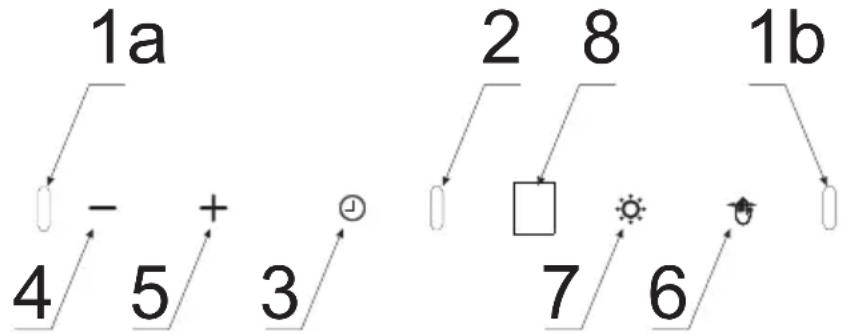
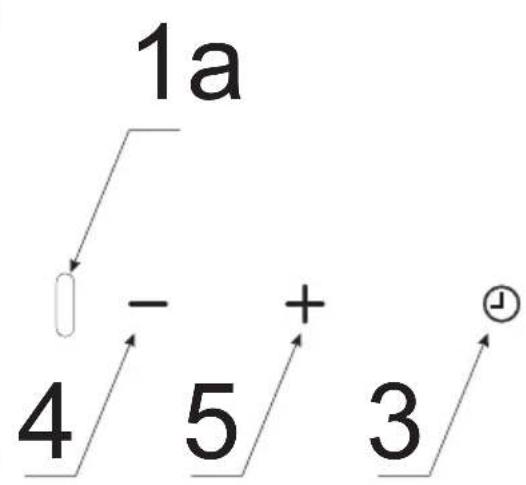
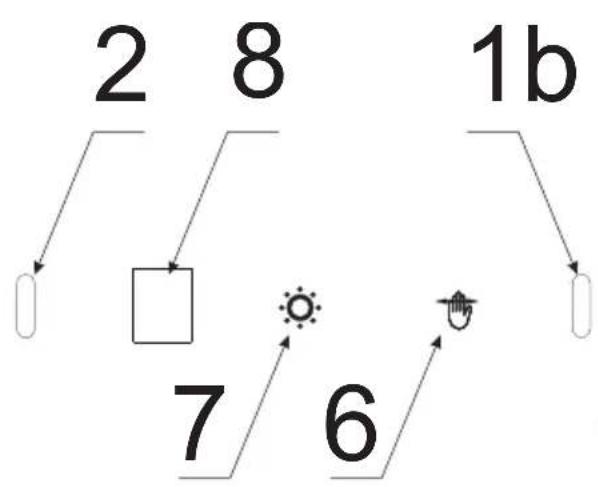
Control Panel is shown in Figure 4, for reference it is also shown below:
text_image
1a 4 5 + 3 2 8 1b 7 6The appliance is fitted with gesture control sensors (1a, 1b, 2) and a display (8).
The control panel features touch controls: Control functions are described below:
3- Off-Timer sensor
4- Reduce fan speed sensor
5- Increase fan speed sensor
6- Gesture control on/off sensor
7- Light control sensor
After connecting the appliance to the power supply, all indicators will light up for a brief moment and the display will also show 8. Then all indicators and the display will go out, only the gesture control sensor is illuminated on the control panel. The hood will enter standby mode, which is indicated by a dot on the display.
When activated, touch +to start the fan.
Available fan speeds:
- Low speed (1). Use this speed when cooking a little food with hardly any fumes.
- Medium speeds (2 - 3). Use this speed when cooking multiple dishes at the same time with moderate amount of fumes.
- Turbo ( )— use this speed when frying or grilling with large amount of fumes.
Use the + and sensors to increase or reduce fan speed.
Note! Turbo mode is only active for 5 minutes, then fan speed is reduced automatically to one level down.
To turn off the fan, touch — repeatedly until fan speed is reduced to zero ☐
Touch ⚙to turn on / off the lighting.
Adjust lighting brightness
When you connect the appliance to the power supply, it is in the initial state. You can then adjust the lighting brightness. To do this touch and the lighting will turn on. Then touch and hold the same sensor for a few seconds and lighting brightness will change. Hold the sensor for a few seconds more and the lighting brightness will change again. The lighting has several levels of brightness.
Adjust lighting colour
When in standby, touch and hold — and 2 seconds. The blinking “L” (lighting) will appear on the display. Now use the + and - to set the desired colour of light. To accept the desired colour, simply wait 3 seconds. The colour range is from 3000^ K (warm) to 7000^ K (cool).
Off-Timer
Use Off-Timer to turn off the hood after a specified time. Use Off-Timer to filter the fumes out of the air after cooking. Touch and hold ⏻ for 3 seconds to activate the Off-Timer at any time. The appliance will automatically turn off after approximately 15 minutes.
Gesture control
When you plug in your appliance, gesture control is active and indicator is on. Touch to turn off the gesture control. Touch again to reactivate gesture control.
You can use gestures to control the fan speed and lighting. When gesture control is active, you can also control the appliance using the touch sensors.
Gesture control works correctly when you move your open hand about 5–10 cm from the surface of the control panel.
Note: To adjust the fan speed you need to move your hand across the sensors as shown on Figure 4, items 1a and 1b. The area over which to move your hand is marked on the figures presented below in this manual.
If activating a certain function (such as turbo speed) requires multiple hand gestures, reposition your hand for another gesture away from the control panel to avoid triggering the motion sensors). Hand movements must not be too fast. Preferably, a single gesture should take about 1 second.
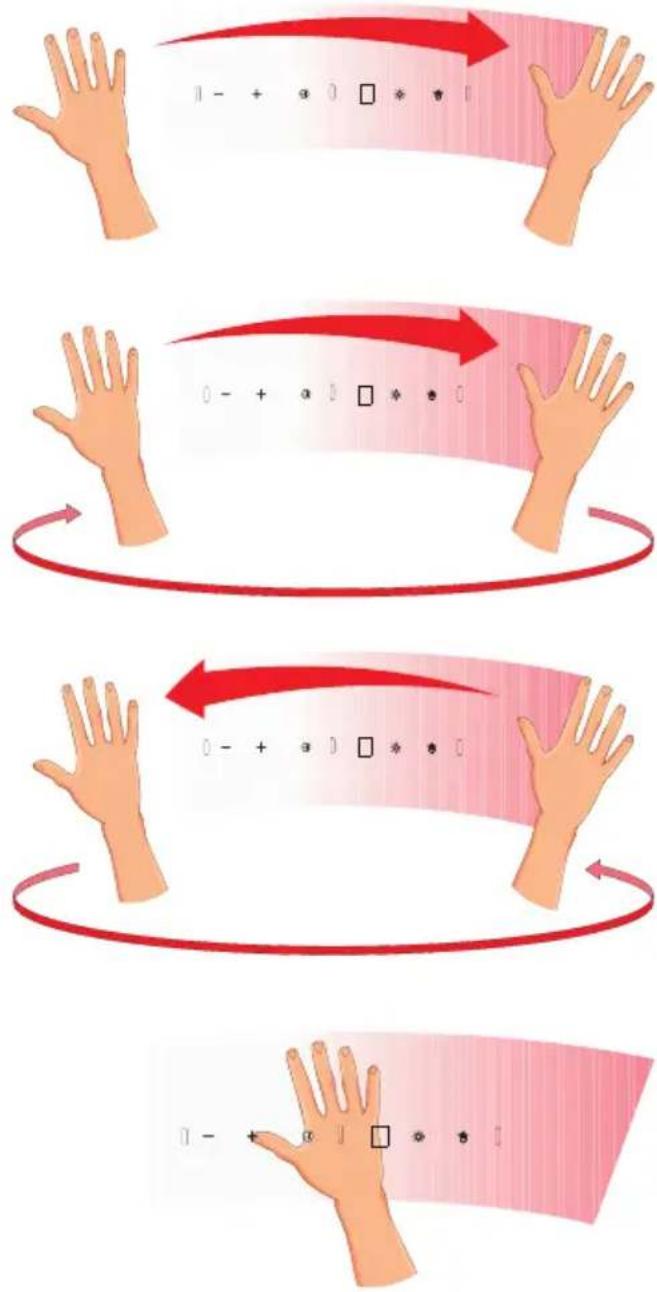
flowchart
graph TD
    A["Step 1: Hand gestures"] --> B["Step 2: Red arrows indicate direction"]
    B --> C["Step 3: Hand gestures with arrows indicating motion"]
    C --> D["Step 4: Hand gestures with arrows indicating direction"]
    D --> E["Step 5: Hand gestures with arrows indicating direction"]
To activate the appliance, move your hand across the sensors from left to right. The display will show ☐
To turn on the fan or increase fan speed, move your hand from left to right several times in standby mode. The display will show the current fan speed after each hand gesture.
To turn off the fan or reduce fan speed, move your hand from right to left several times in standby mode until the display shows. Move your hand one more time and the appliance will turn off (gesture control will still be active)
To turn the lighting on or off, hover your hand about 10 cm above sensor 2.
Other important information concerning the operation of the hood
Operation in air circulation / odour filter mode. In this mode, the filtered air returns to the room through the outlets. Install activated charcoal filter in this setting. It is recommended to install the air guide (available depending on the model, mainly in chimney cooker hoods).
Air extraction operation: When cooker hood operates in extraction mode, air is discharged outside through an extraction duct. Remove activated charcoal filter in this setting. The cooker hood is connected to the air outlet opening using a rigid or flexible extraction duct with a diameter of 150 or 120 mm, and the appropriate clamps, which must be purchased at a hardware store. The appliance should be installed by a qualified installer.
Fan speed: Lowest and medium fan speed is used in normal conditions and less intense odours, while the highest speed is used only when cooking odours are very intense, such as during frying or grilling.
Note (applies to universal hoods only): Due to the design of universal hoods you need to manually change the mode of operation. See Figure 8 for instructions on how to change the mode.
Note (only applies to telescopic and in-built kitchen hoods): Furniture and telescopic cooker hoods operating in air recirculation mode require installation of the exhaust duct. The other end of the duct should be directed to the room as it will discharge filtered air.
Note: Hanging kitchen hoods operate only in air circulation / odour absorber mode
CLEANING AND MAINTENANCE
Maintenance
Regular maintenance and cleaning of the appliance will ensure trouble-free operation of the cooker hood and extend its life. Especially make sure that the grease filter and activated charcoal filter are replaced according to manufacturer's recommendations.
- Do not use a soaked cloth, sponge, or water jet.
- Do not use solvents or alcohol, as they may tarnish lacquered surfaces.
- Do not use caustic substances, especially for cleaning stainless steel.
- Do not use a rough or abrasive cloth.
- It is recommend to use a damp cloth and a neutral detergent.
Note: After several washes in the dishwasher, the colour of the aluminium filter may change. The change of colour does not indicate improprieties or the necessity to change it.
Grease filter
For normal hood operation, grease filter should be cleaned every month in the dishwasher or by hand using a mild detergent or liquid soap.
Dismantling of grease filter is shown on Figure 5.
Acrylic filter is used in some models. This filter should be replaced at least once every 2 months or more frequently if the appliance is used intensively.
Activated charcoal filter
Charcoal filter is used only when the cooker hood is not connected to the ventilation duct. Activated charcoal filter can absorb odours until saturated. Charcoal filter is not suitable for washing or regeneration and should be replaced at least once every 3-4 months or more frequently if the appliance is used intensively.
Dismantling of charcoal filter is shown on Figure 6.
Light
Use incandescent / halogen / LED modules of the same specification as those factory-installed in the appliance. See Figure 7 for details how to replace lights. If there is no such figure in this manual, please contact authorised service to replace the lighting module.
WARRANTY AND AFTER SALES SERVICE
Warranty
Warranty service as stated on the warranty card. The manufacturer shall not be held liable for any damage caused by improper use of the product.
Service
- The manufacturer recommends that all repairs and adjustments be carried out by the Factory Service Technician or the Manufacturer's Authorized Service Point. For safety reasons, repairs should be referred to professionals.
- Repairs carried out by unqualified persons may seriously endanger the appliance user.
- The minimum warranty period for the appliance offered by the manufacturer, importer or authorized representative is given in the warranty card.
- The warranty shall be void if you make any independent adaptations or alterations, tamper with seals or other appliance safety devices or its parts or interfere with the appliance contrary to operating instructions.
In the event of appliance malfunction, request assistance or repair.
If your appliance needs repair, please contact the service centre. Please see warranty card for address and contact details of our service centre. Before contacting us, please have ready the appliance serial number, which can be found on the identification sticker: For your convenience, please write it down below:
Manufacturer's Declaration
The manufacturer hereby declares that this product meets the requirements of the following European directives:
• Low Voltage Directive 2014/35/EC
• Electromagnetic Compatibility (EMC) Directive 2014/30/EC
• ErP Directive 2009/125/EC
• Directive RoHS 2011/65/EC
and has thus been marked with the symbol and been issued with a declaration of compliance made available to market regulators.
natural_image
Recycling symbol composed of three chasing arrows forming a triangle (no text or labels)natural_image
Simple line drawing of a trash bin with two crossed lines indicating no waste or discharge (no text or symbols)text_image
Diagram illustrating hand movement with arrows and a red curved arrow, showing positions of symbols like minus sign, plus sign, and square.natural_image
Illustration of a human hand with finger pointing at the palm, accompanied by a pink gradient background (no text or symbols)GARANTIE, NACHVERKAUFSERVICE
Garantie
natural_image
Recycling symbol composed of three chasing arrows forming a triangle (no text or labels)natural_image
Symbol of a trash bin crossed with a diagonal line, representing waste sorting or restriction (no text present)natural_image
Recycling symbol composed of three chasing arrows forming a triangle (no text or labels)natural_image
Symbol of a trash bin crossed with two diagonal lines, no text or labels presenttext_image
Diagram illustrating hand positioning with a red arrow and numeric input fields below, likely for visual or arithmetic teaching.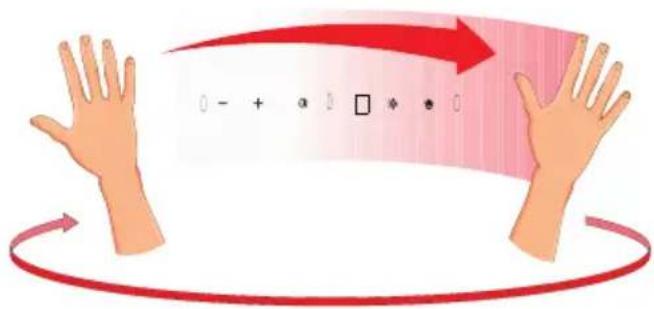
text_image
0 - + * 0 □ * * 0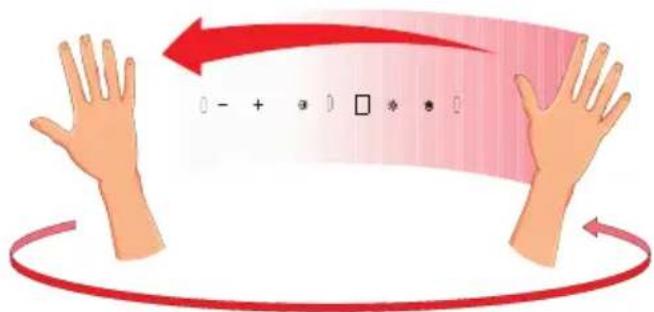
text_image
0 - + 2 0 □ 冷 意 0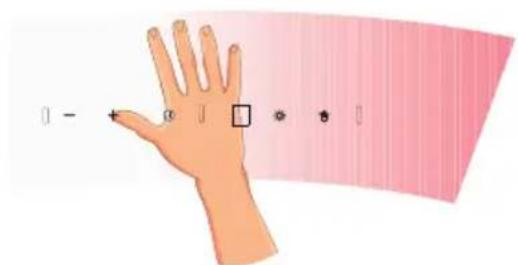
text_image
Illustration of a hand with a pointer and a color gradient bar, showing measurement or alignment options.natural_image
Recycling symbol composed of three chasing arrows forming a triangle (no text or labels)natural_image
Symbol of a trash bin crossed with two crossed lines, representing waste or discharge (no text or labels)text_image
Diagram illustrating hand movement with a red curved arrow and numbered symbols, possibly representing motion or positioning.text_image
Diagram illustrating hand positioning with labeled points and directional arrows, likely from a graphic or diagram.natural_image
Recycling symbol composed of three chasing arrows forming a triangle (no text or labels)natural_image
Symbol of a trash bin crossed with two diagonal lines, representing waste or discharge (no text or labels)text_image
Diagram illustrating hand positioning with a red arrow and numeric input fields below, likely for visual or arithmetic teaching.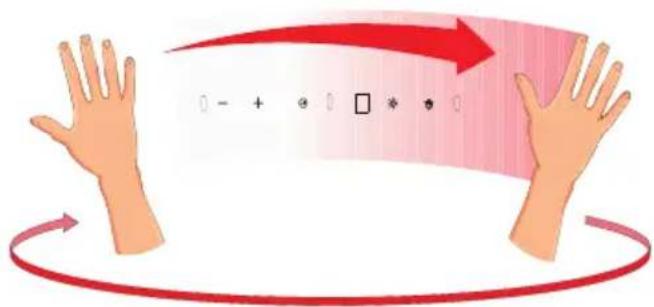
text_image
Diagram illustrating hand movement with red arrows and a numeric input box, likely for arithmetic or visual processing.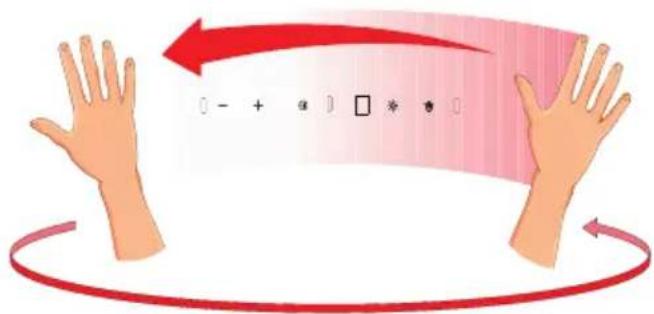
text_image
0 - + 住 ] □ 沸 惠 ]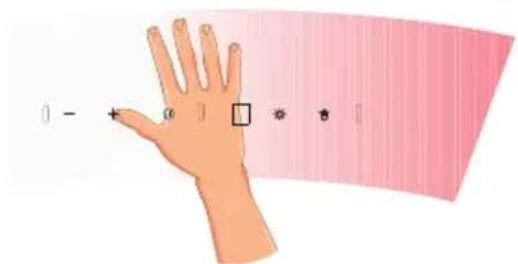
text_image
0 - + 0 ] □ ● ■ |natural_image
Recycling symbol composed of three chasing arrows forming a triangle (no text or labels)Uređaj je za vrijeme transporta za- štićen od oštećenja. Nakon vađenja uređaja iz pakiranja molimo Vas da elemente ambalaže uklonite na način koji ne ugrožava okoliš.
Svi materijali korišteni za pakiranje nisu štetni za okoliš, 100% materijala je prikladno za rečikliranje, stoga su označeni odgovarajućim simbolom.
Pozor! Elemente pakiranja (polietilenske vrećice, komadići stiropora itd.) prilikom uklanjanja amba-laze držati daleko od djece.
ZBRINJAVANJE POTROŠENIH UREĐAJA
natural_image
Simple line drawing of a trash bin with two crossed lines indicating no waste or prohibition (no text or symbols)Ovaj uređaj je označen u skladu s europskom uredbom 2012/19/EU. Oznaka na proizvodu pokazuje da ovaj proizvod nakon njegovog životnog vijeką ne može biti tretiran kao obični kućanski otpad.
Korisnik ima obvezu ovaj proizvod predati na odgovarajuće sabirno mjesto za recikliranje potrošene električne i elektroničke opreme. Ustanove za prikupljanje ovakvog otpada, uključujući lokalne sabirne točke, kupovna mjesta, opcinske jedinice, stvaraju odgovarajući sustav koji omogućava zbrinjavanje ovakve opreme.
Pravilno odlaganje potrošene električne i elektroničke opreme sprecava potencijalne negativnę posljedice za okoliš i ljudsko zdravlje, koje inače mogu biti uzrokovane neodgovarajućim odlaganjem i preradom ovog proizvoda.
UPORABA
Upravljanje napom
text_image
Illustration of a hand with a pointer and a colored gradient background, showing measurement or alignment points.Za aktiviranje StandBy modusa pomjerite ruku s lijeve na desnu stranu. Na zaslonu se pojavljuje 8.
natural_image
Simple line drawing of a three chasing recycling symbol (no text or labels)natural_image
Symbol of a trash bin crossed with two diagonal lines, no text or numbers presenttext_image
Diagram illustrating hand positioning with a red arrow and numeric input fields below, likely for visual or arithmetic teaching.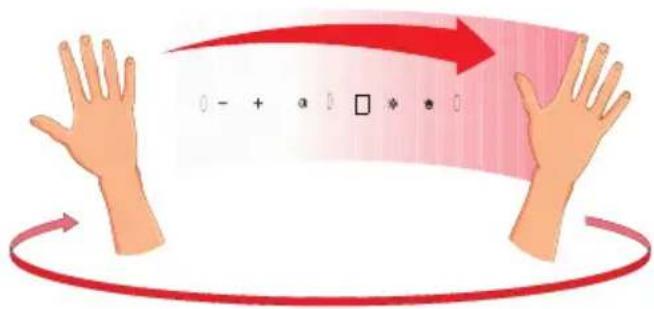
text_image
0 - + * 0 □ * * 0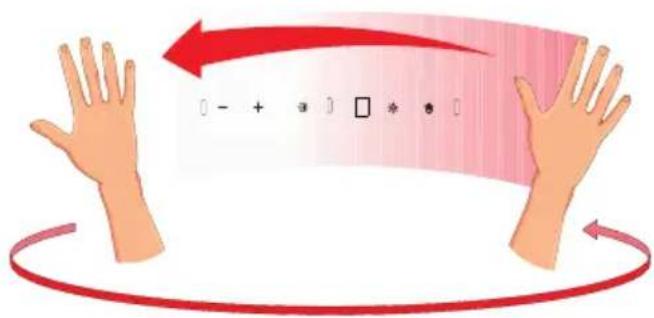
text_image
Illustration showing hands with a red curved arrow and a grid of symbols inside, likely representing a digital logic or movement process.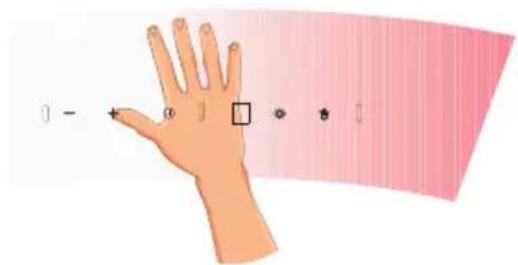
text_image
Illustration of a hand with finger pointing to a square, accompanied by a pink gradient background with measurement indicators.Če želite aktivirati način StandBy, z dlanjo naredite kretnjo od leve proti desni. Na zaslonu se pojavi 8.
Če želite vklopite turbino naprave ali zvišati njeno hitrost, v načinu StandBy nekajkrat premaknite dlan od leve proti desni. Zaslon bo prikazal trenutno hitrost z vsakim premikom dlani.
text_image
CARBON FILTER CONDUIT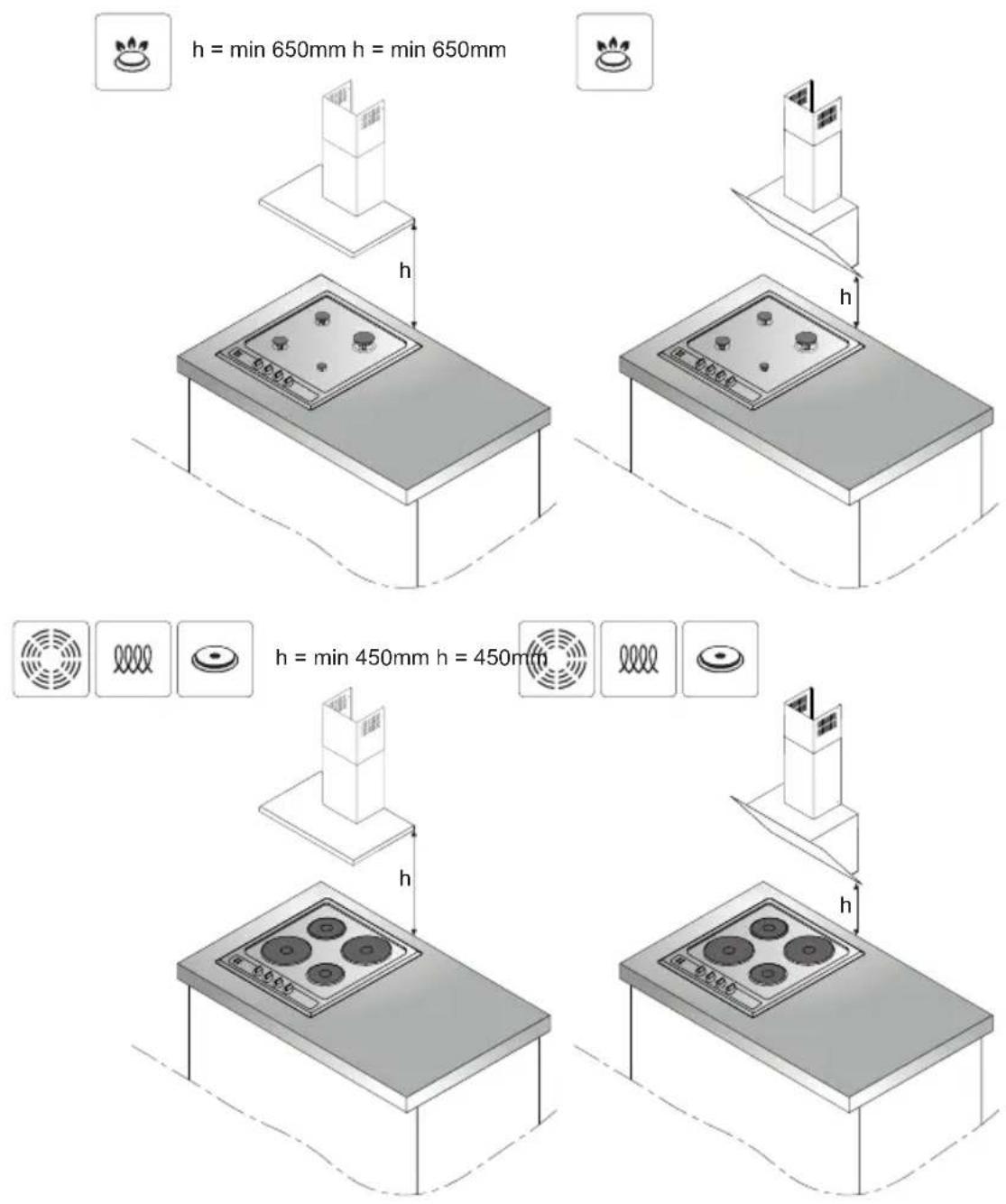
text_image
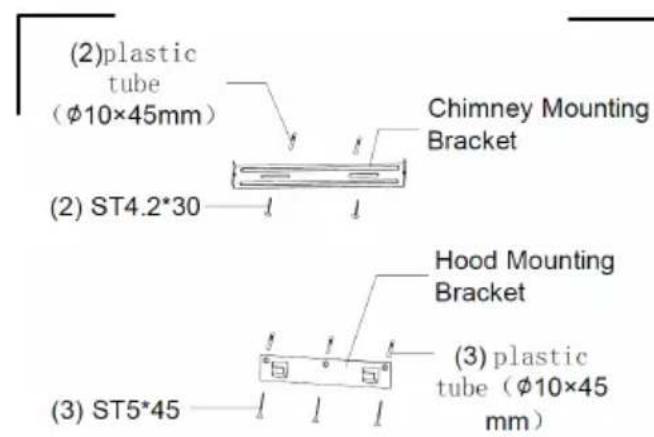
(2)plastic tube (φ10×45mm) Chimney Mounting Bracket (2) ST4.2*30 Hood Mounting Bracket (3) plastic tube (φ10×45 mm) (3) ST5*45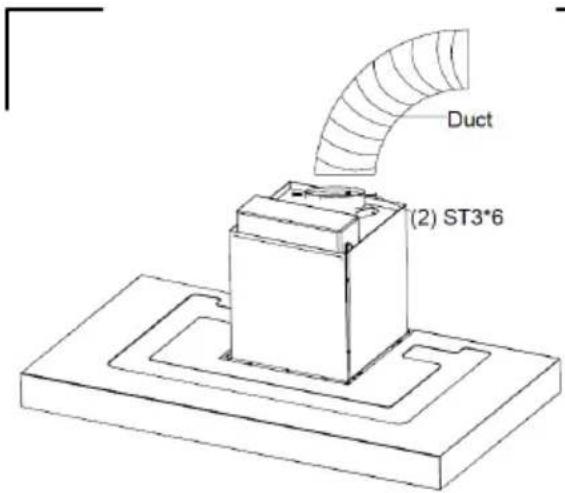
text_image
Duct (2) ST3*61
3a
3b
text_image
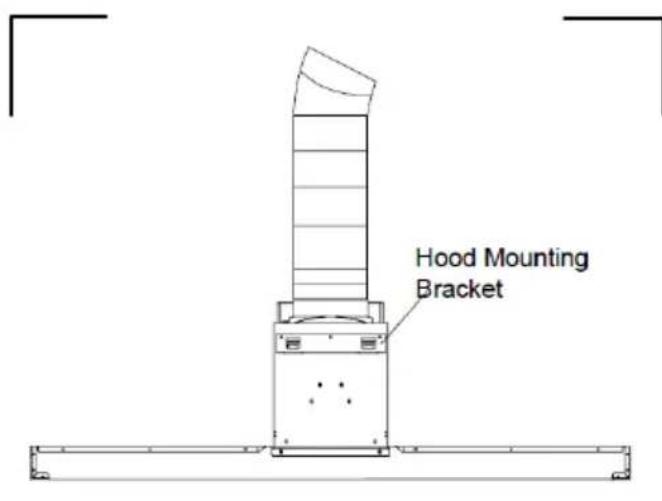
Hood Mounting Bracket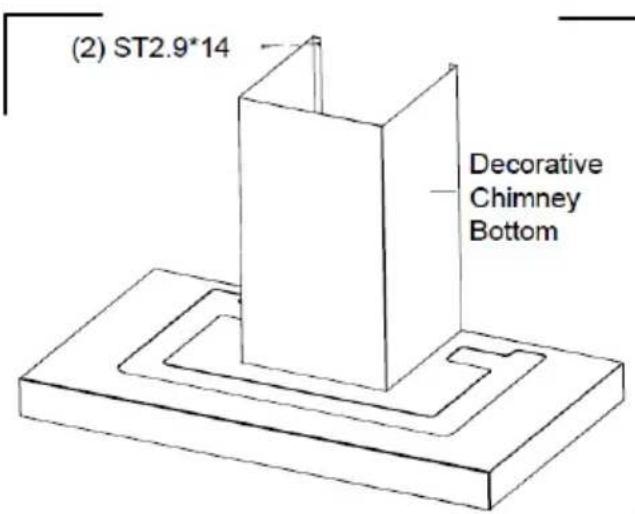
text_image
(2) ST2.9*14 Decorative Chimney Bottom3d
3c
text_image
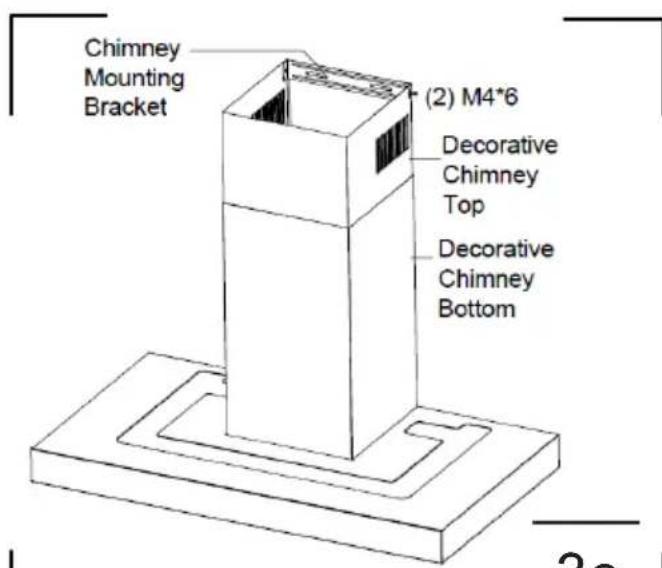
Chimney Mounting Bracket (2) M4*6 Decorative Chimney Top Decorative Chimney Bottom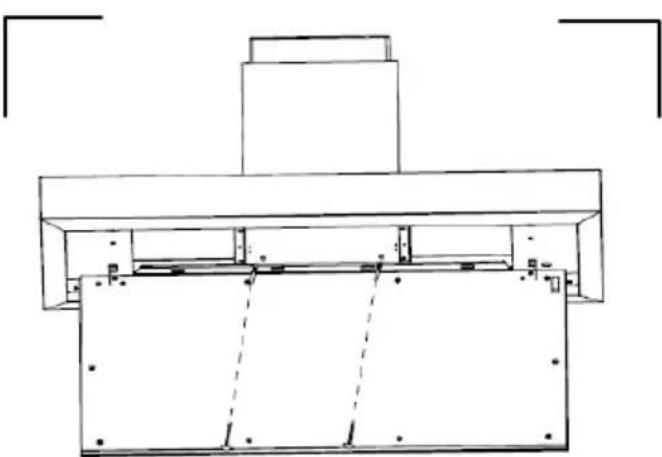
natural_image
Technical line drawing of a mechanical assembly with no visible text or symbols(2) ST4.2*30
3e
3f
flowchart
graph TD
    A["1a"] --> B["4"]
    B --> C["-"]
    C --> D["5"]
    D --> E["+"]
    E --> F["3"]
    F --> G["↓"]
flowchart
graph TD
    A["2"] --> B[" "]
    C["8"] --> D[" "]
    E["1b"] --> F[" "]
    G["7"] --> H[" "]
    I["6"] --> J[" "]
    K["Sun Icon"] --> L["Arrow to cursor icon"]

text_image
(2) Filter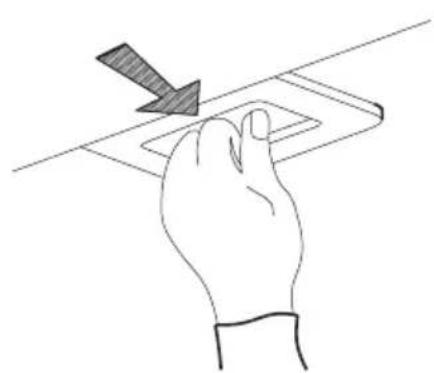
natural_image
Hand pressing a rectangular object on a surface with a diagonal arrow indicating downward motion (no text or symbols)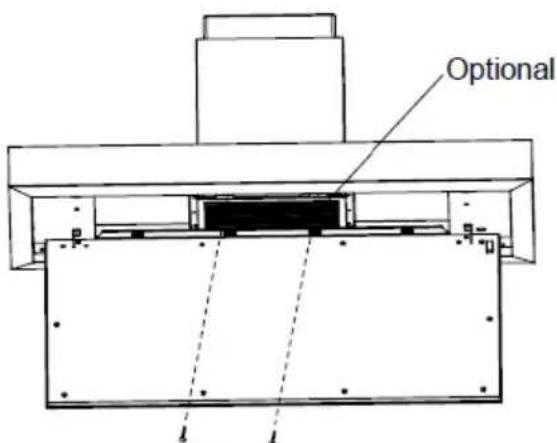
text_image
Optional(2) M4*10
6
4
5
Amica S.A.
ul . Mickiewicza 52 / 64-510 Wronki
tel. 67 25 46 100 / fax 67 25 40 320
www.amica.pl
Amica International GmbH
Lüdinghauser Str. 52
D-59387 Ascheberg
Tel: 0 25 93 - 95 67-0
www.amica-group.de