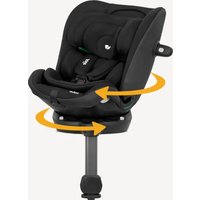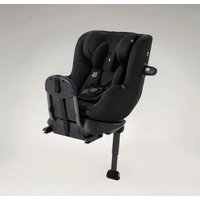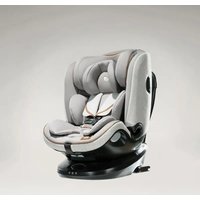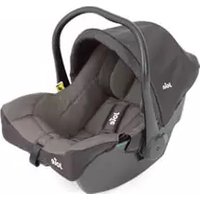
iVenture R - Car seat Joie - Free user manual and instructions
Find the device manual for free iVenture R Joie in PDF.


User questions about iVenture R Joie
0 question about this device. Answer the ones you know or ask your own.
Ask a new question about this device
Download the instructions for your Car seat in PDF format for free! Find your manual iVenture R - Joie and take your electronic device back in hand. On this page are published all the documents necessary for the use of your device. iVenture R by Joie.
USER MANUAL iVenture R Joie
enhanced child restraint
GB Instruction Manual
FR Manuel d'instructions
DE Bedienungsanleitung
NL Instructiehandleiding
IT Manuale di Istruzioni
natural_image
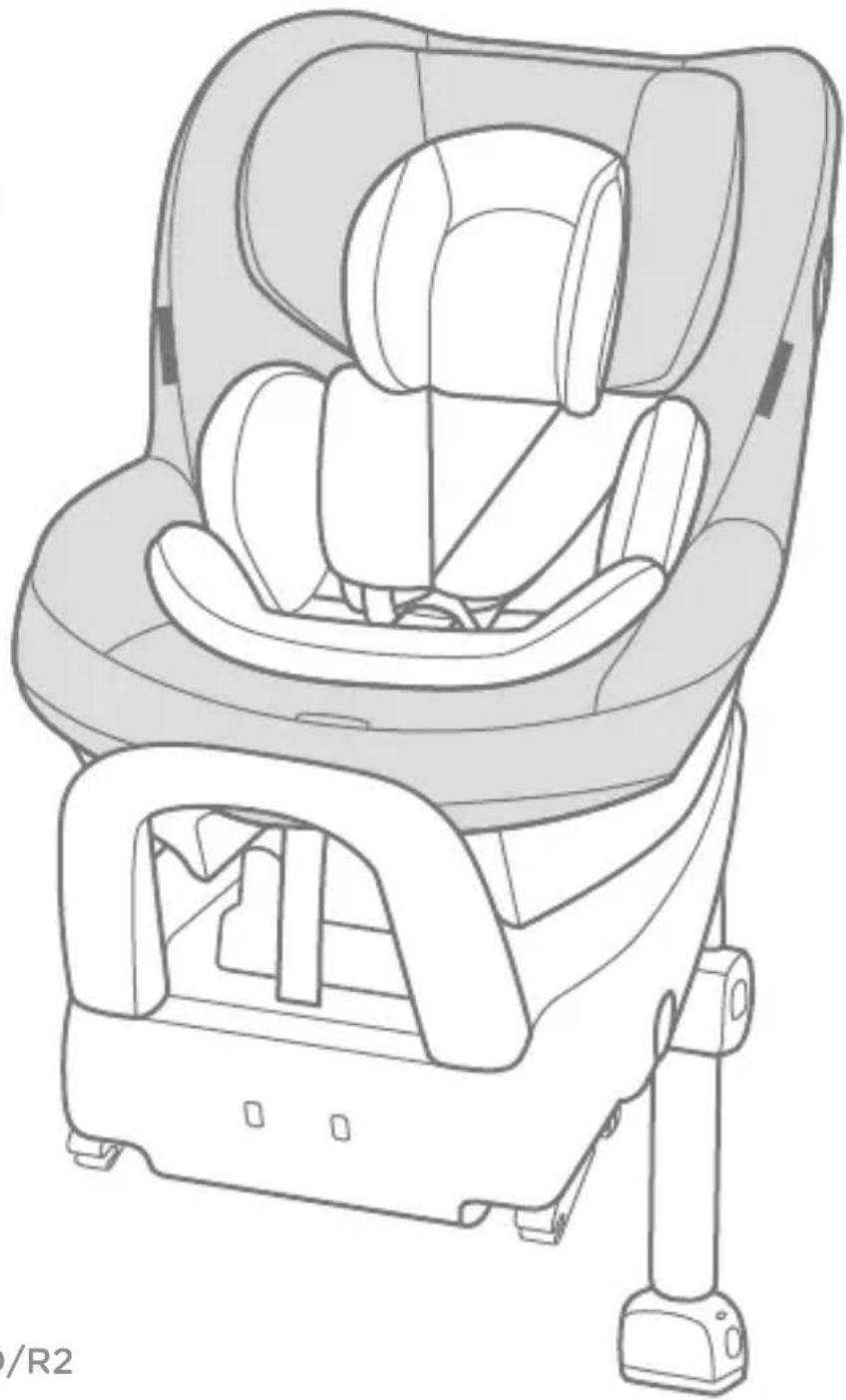
Line drawing of a car comfort seat with seats and seatbelt (no text or symbols)
natural_image
Simple icon depicting a person relaxing and sitting next to a child (no text or symbols)ECE R129/03: ISO/F2X, ISO/R2
ECE R129/03: i-Size
GB Welcome to Joie™
Congratulations on becoming part of the Joie family! We are so excited to be part of your journey with your little one. While traveling with the i-Venture™ R enhanced child restraint you are using a high quality, fully certified safety i-Size enhanced child restraint. Please carefully read this manual and follow each step to ensure a comfortable ride and best protection for your child.
To use this Joie enhanced child restraint with the i-Size ISOFIX connections according to the ECE R129/03 Regulation, your child must meet the following requirements.
Rearward Facing: Child height 40cm-105cm/ Child weight 18.5kg; Forward Facing: Child height 76cm-105cm/ Child weight 18.5kg;
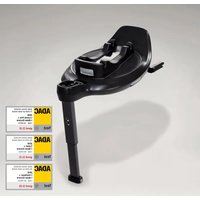
Base
Please read all the instructions in this manual before installing and using the product.
! IMPORTANT: KEEP FOR FUTURE REFERENCE. PLEASE READ CAREFULLY.
Please keep the instruction manual in the storage compartment at the bottom of the base as right figure.
For warranty information, please visit our website at joiebaby.com
natural_image
Illustration of a device with an open book and a lever, set against a solid yellow background (no text or symbols)Parts List
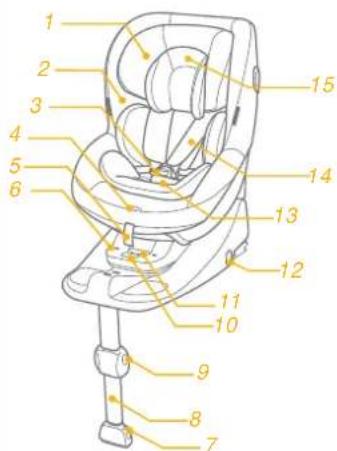
Please make sure there are no missing parts. Please contact the retailer if anything is missing.
1 Head Support
2 Seat Pad
3 Buckle
4 Webbing Adjustment Button
5 Adjustment Webbing
6 Enhanced Child Restraint Latched Indicator
7 Load Leg Indicator
8 Load Leg
9 Load Leg Adjustment Button
10 Enhanced Child Restraint Release Button
11 Recline Adjustment Button
12 ISOFIX Releasing Button
13 Crotch Strap
14 Shoulder Strap
15 Infant Insert
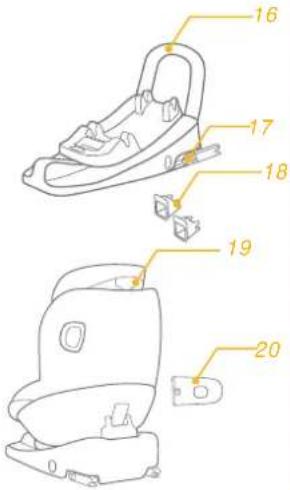
16 Rebound Bar
17 ISOFIX Connector
18 ISOFIX Guides
19 Head Support Adjustment Lever
20 Side Impact Protection
text_image
Diagram of a car seat with numbered labels pointing to different compartments or parts.*i-Base Advance is sold separately.
text_image
16 17 18 19 20WARNING
NO enhanced child restraint can guarantee full protection from injury in an accident. However, proper use of this enhanced child restraint will reduce the risk of serious injury or death to your child.
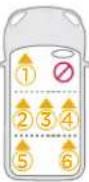
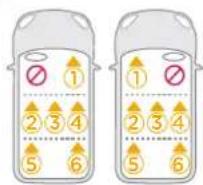
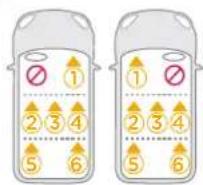
! The enhanced child restraint may not fit in all approved vehicles when used in one of these positions.
! Be sure that the enhanced child restraint is installed in such a way that no part of it interferes with movable seats or in the operation of vehicle doors.
! DO NOT use the rearward facing enhanced child restraint systems in seating positions where there is an active frontal airbag installed. Death or serious injury may occur. Please reference vehicle owner's manual for more information.
! To use this enhanced child restraint with the ISOFIX connections according to the Regulation No.129/03, your child must meet the following requirements.
Rearward Facing:
Child height 40cm-105cm/ Child weight≤18.5kg;
Forward Facing:
Child height 76cm-105cm/ Child weight≤18.5kg;
WARNING
! IMPORTANT - DO NOT USE FORWARD FACING BEFORE THE CHILD'S AGE EXCEEDS 15 months (Refer to instructions).
! Any support-leg should be in contact with the vehicle floor and any straps restraining the child should be adjusted to the child's body. The straps should not be twisted.
When using this enhanced child restraint in baby or toddler mode, the child harness must be used correctly, and ensure that any lap strap is worn low down, so that the pelvis is firmly engaged.
! DO NOT continue to use this enhanced child restraint after it has suffered any type of crash, even a minor one. Replace immediately as there may be invisible, structural damage from the crash.
! DO NOT install this enhanced child restraint without following the instructions in this manual or you may put your child at serious risk of injury or death.
! DO NOT make any modification to this enhanced child restraint or use it along with component parts from other manufacturers.
! NEVER leave your child unattended with this enhanced child restraint.
WARNING
! DO NOT use the enhanced child restraint system without the soft goods.
! The enhanced child restraint system soft goods should not be replaced with any other than the ones recommended by the manufacturer, because the soft goods constitutes an integral part of the restraint performance.
! DO NOT put anything other than the recommended inner cushions in this enhanced child restraint.
! Any luggage or other objects liable to cause injuries in the event of a collision shall be properly secured.
! Please keep this enhanced child restraint without a textile cover away from sunlight, because it may be too hot for child's skin. Always touch the enhanced child restraint before placing child in it.
! DO NOT use this enhanced child restraint if it has damaged or missing parts.
! DO NOT have your child in large/oversized clothes when using this enhanced child restraint in baby or toddler mode, because this may prevent your child from being properly and securely fastened by the shoulder harness straps and the crotch strap between the thighs.
WARNING
! Always secure child in enhanced child restraint, even on short trips, as this is when most accidents occur.
! DO NOT leave this enhanced child restraint, or other items unbelted or unsecured in your vehicle because an unsecured enhanced child restraint can be thrown around and may injure occupants in a sharp turn, sudden stop, or collision. Remove it if not in regular use.
! DO NOT use this enhanced child restraint as a regular chair as it tends to fall down and could injure child.
! NEVER use a second-hand enhanced child restraint or an enhanced child restraint whose history you do not know because it may have structural damage that endangers your child's safety.
! Do not place other items on top of the enhanced child restraint if it is in the car boot to prevent damage.
! Do not allow the enhanced child restraint harness or buckles to become trapped or caught in the vehicle seat or door.
! Remove this enhanced child restraint from the vehicle seat when it is not in use for a long period of time.
WARNING
! To avoid suffocation, remove plastic bag and packaging materials before using this product. The plastic bag and packaging materials should be kept away from babies and children.
! Consult the retailer for issues concerning maintenance, repair and part replacement.
! Do not place any objects in the load leg area in front of your base.
! Frequently check the ISOFIX guides for dirt and clean them if necessary. Reliability can be effected by ingress of dirt, dust, food particles etc.
! DO NOT use any load bearing contact points other than those described in the instructions and marked on the child restraint.
! Correct Installation is only permitted by use of the ISOFIX connectors.
! Must use the rebound bar in rearward facing mode, and remove the rebound bar in forward facing mode.
! DO NOT install this enhanced child restraint under the following conditions:
-
Vehicle seats facing sideways or rearward with respect to the running direction of the vehicle.
-
Vehicle seats movable during installation.
Emergency
In case of emergency or accidents, it is most important to have your child taken care of with first aid and medical treatment immediately.
Product Information
" i-Size" (Integral Universal ISOFIX Enhanced Child Restraint Systems) is a category of Enhanced Child Restraint System primarily designed for use in all i-Size seating position of a vehicle.
- This is an "i-Size" Enhanced Child Restraint System. It is approved according to Regulation No.129, for use in, i-Size compatible vehicle seating positions as indicated by vehicle manufacturers in the the vehicle users' manual.
- If in doubt, consult either the Enhanced Child Restraint System manufacturer or the retailer.
Materials Plastics, metal, fabrics
Patent No. Patents pending
Concerns on Installation
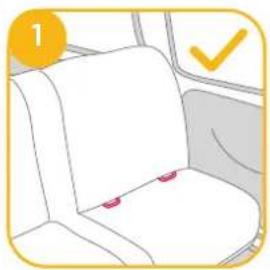
see images ① - ②
natural_image
Illustration of a car seat with red buttons and a yellow checkmark (no text or symbols)2 1
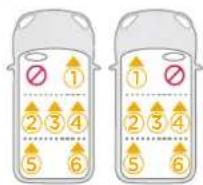
2
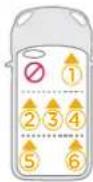
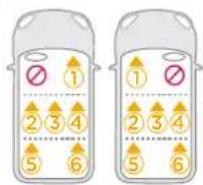
Check provided car fitting list for approved seats for enhanced child restraint attachment.

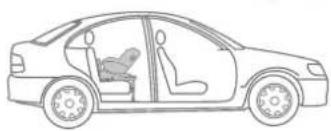
natural_image
Line drawing of a car showing a seatbelt and passenger seat, no text or symbols presentChoose the Installation Mode
| ECE R129/03 | Child's Size | Installation Mode | Installation | Reference Age | Recline Position |
| 40cm-105cm/≤18.5kg | Baby mode | 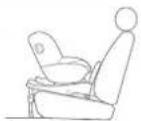 | Approx<4 years | Position 1-7 | |
| 76cm-105cm/≤18.5kg | Toddler mode | 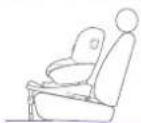 | Approx15 months to4 years | Position 1-7 |
Installing the i-base advance for use with the i-Venture R seat
Installation of i-size ISOFIX Base System
see images 3 - 11
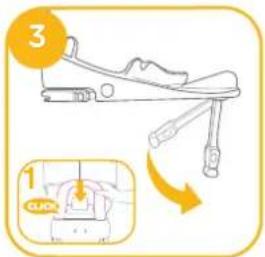
! Install the rebound bar to the base. Push the rebound bar down into the base until you hear a click sound. 3-1
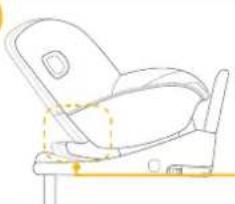
After placing i-Base Advance on the vehicle seat, adjust the load leg length to ensure the load leg indicator shows green and the base is in contact with the vehicle seat.
! The load leg has multiple positions. When the load leg indicator shows red this means the load leg is in the wrong position. ! Make sure the load leg is in full contact with the vehicle floor pan. ! Squeeze the load leg releasing button, then shorten the load leg upwards.
text_image
3 1 CLHD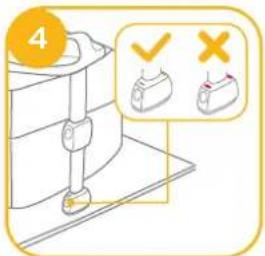
text_image
4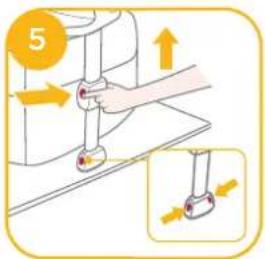
text_image
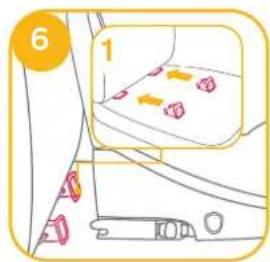
5! Insert ISOFIX guides to assist with installation. 6-1
! There are 9 adjustable positions for ISOFIX. Press the ISOFIX adjuster button to extend the ISOFIX. 7-1 & 7-2
! Make sure that both ISOFIX connectors are securely attached to their ISOFIX anchor points. The colors of the indicators on both ISOFIX connectors should be completely green. 8-1
text_image
6 1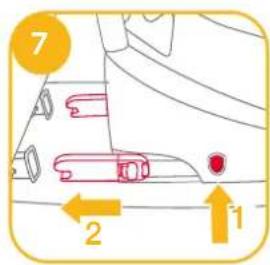
text_image
7 2 1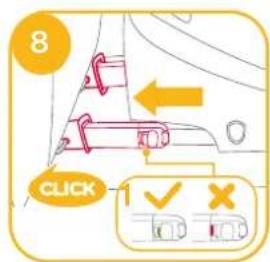
text_image
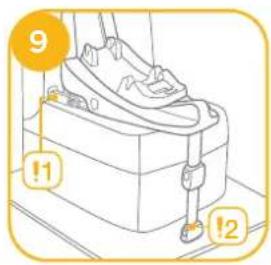
8 CLICK! The ISOFIX connectors must be attached and locked onto the ISOFIX anchor points. 9-1
! The load leg must be installed correctly with green indicator. ⑨-2
To remove the base from the vehicle, press and release the connectors from the vehicle's ISOFIX. 10-1 & 10-2
To prevent damage during transit, press the ISOFIX releasing button 11-1 and fold the connector completely. 11-2
text_image
9 !1 !2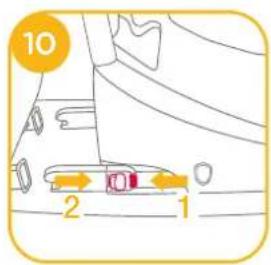
text_image
10 2 1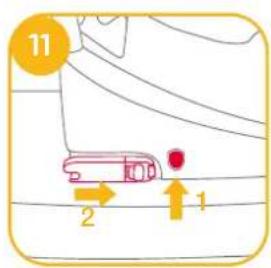
text_image
11 2 1Installing the i-Venture R seat into the i-base Advance
see images 12 - 27
Rear Facing Mode
Rearward Facing Child height 40cm-105cm/Child weight 8.5kg Recline position Position 1-7
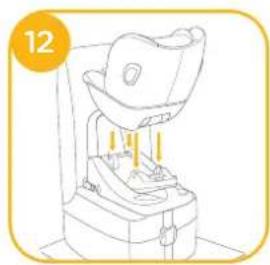
! Please install i-Venture R and the base on the rear vehicle seat, then place the child in i-Venture R seat.
! Ensure the rebound bar is installed onto the base.
! The easiest to install i-Venture R seat to the base is when the base is in the 7th recline position.
! Pull up on the i-Venture R seat to make sure it is securely latched onto the base.
! Make sure that there is no gap between the base and vehicle seat.
natural_image
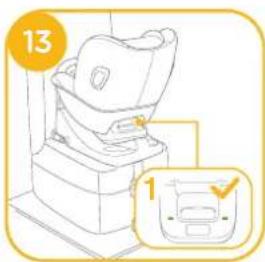
Line drawing of a laboratory instrument with a bowl and clamped components, labeled with number 12 (no text or symbols on the device itself)Ensure the enhanced child restraint latched indicator on the base show green so that i-Venture R seat is securely installed onto the base; if it shows red that means the i-Venture R is incorrectly installed. 13-1
Securing your Child
- Press the webbing adjustment button, while pulling out the shoulder harnesses to the proper length. 14

Adjustment webbing
- Press the red button to disengage the buckle. 15
natural_image
Line drawing of a car seat with a magnified inset showing the front view (no text or symbols)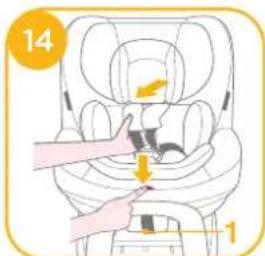
text_image
14 1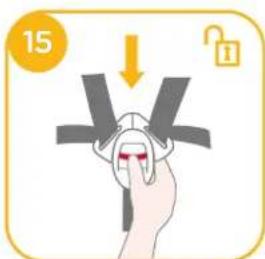
text_image
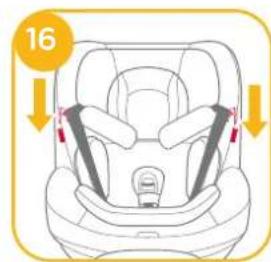
15- Fix the buckles on the both sides of the seat located on the both sides of seat as shown to make placing the child in rear facing mode more convenient. 16
- Please make sure the infant insert has the wedge assembled before using it for infant. ^17
- Please make sure the infant insert has the wedge assembled before using it for infant. ^17
text_image
16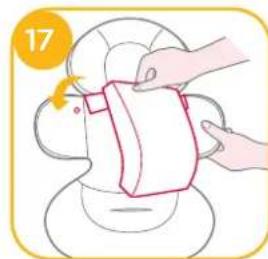
natural_image
Illustration of hands cleaning a small object with a cloth (no text or symbols)| Detach the snaps on the head support to remove the head portion of the insert. | Remove the head support portion of the infant insert when the child's head no longer fits comfortably. | |
| Remove the body portion of the infant insert when the infant's shoulders no longer fit comfortably. | ||
| Remove the infant insert cushion by detaching the snaps to allow more space when the infant does not fit comfortably. The cushion can be used separately without being attached to the insert to bolster the infant's back for more comfort. |
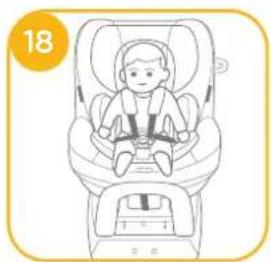
- Place the child into the i-VentureR and pass both arms through the harnesses. 18
natural_image
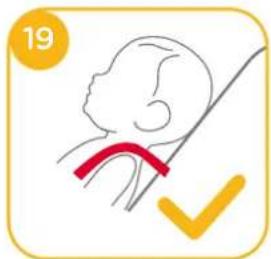
Line drawing of a baby car seatbelt in a car seat, no text or symbols present! The shoulder harnesses height must be even or slightly lower than the child's shoulder. 19
natural_image
Simple line drawing of a human head with a red ribbon and a yellow checkmark (no text or symbols)! After the child is seated, re-check whether the shoulder harnesses are at the proper height.
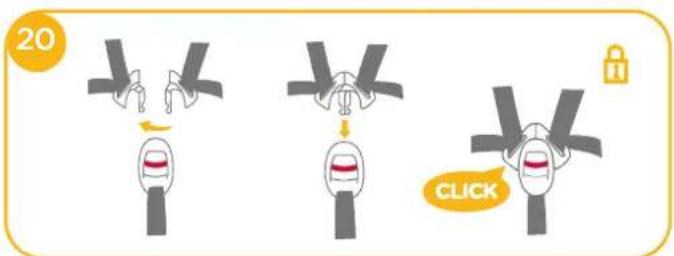
- Engage the buckle. 20
text_image
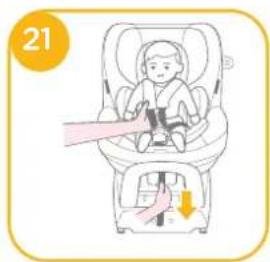
20 CLICK- Pull down the adjustment webbing and adjust it to the proper length to make sure your child is snugly secured.
! Always keep child secured in harness and properly tightened by removing any slack.
! To remove the i-Venture R seat off the base, press and hold the enhanced child restraint seat release button on the base then lift the seat off from the base. Please ensure the child is not in the seat first. 22
natural_image
Illustration of a baby in a car seat being lifted by a belt, with a downward arrow indicating pressure or force (no text or symbols)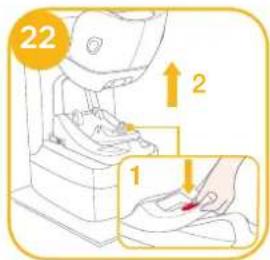
text_image
22 1 2Forward Facing Mode
Forward Facing Child height 76cm-105cm/Child weight 48.5kg; Recline position Position 1-7
! Please install the i-Venture R and base on the vehicle seat, and then put the child in the i-Venture R seat.
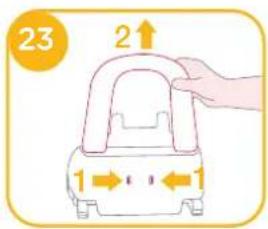
! Ensure the rebound bar is removed. 23
The easiest to install i-Venture R seat to the base is when the base is in the 7th recline position.
Ensure the enhanced child restraint latched indicator on the base show green so that i-Venture R seat is securely installed onto the base; if it shows red that means the i-Venture R is incorrectly installed. 25-1
! Pull up on the i-Venture R seat to make sure it is securely latched onto the base.
! Make sure that there is no gap between the base and vehicle seat.
text_image
23 2↑ 1←↓←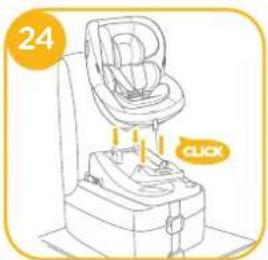
natural_image
Line drawing of a baby car seat with a click button and number 24 (no text or symbols on the device itself)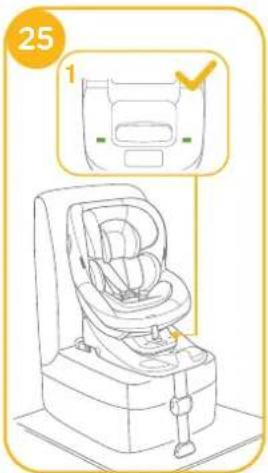
text_image
25 1Securing your Child
Note
- Please remove the infant insert when the child is in the forward facing mode.
- Please install the i-Venture R and base (without the rebound bar attached) on the vehicle seat, and then put the child in the i-Venture R seat.
-
After the child is placed into the i-Venture R, check whether the shoulder harnesses are at proper height.
-
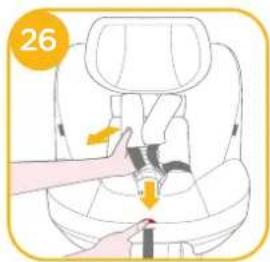
Press the webbing adjustment button, while pulling out the shoulder harnesses to the proper length. 26
- Press the red button to disengage the buckle as 15.
- Fix the buckles on the both sides of the seat located on the both sides of seat as shown to make placing the child in forward facing mode more convenient. 27
text_image
26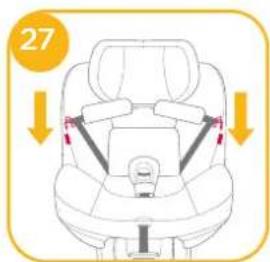
text_image
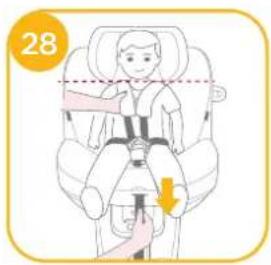
27- Place the child into the i-Venture R and engage the buckle. 28
! After the child is seated, re-check whether the shoulder harnesses are at the proper height. - Pull down the adjustment webbing and adjust it to the proper length to make sure your child is snugly secured. 28
! Always keep child secured in harness and properly tightened by removing any slack.
To remove the i-Venture R seat off the base, press and hold the enhanced child restraint seat release button on the base then lift the seat off from the base. Please ensure the child is not in the seat first. ^29-1 ^29-2
text_image
28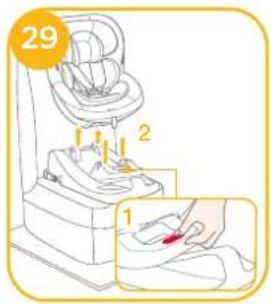
text_image
29 1Use Side Impact Shield
see images 30 - 31
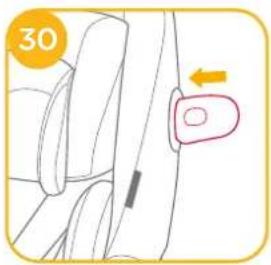
This enhanced child restraint is delivered with detachable side impact protection. This side impact protection must be used on the door side of the vehicle for best protection. Installation shown in. 30
text_image
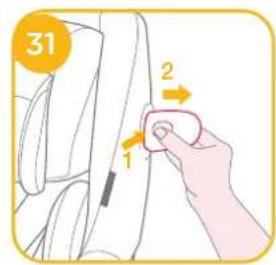
30- Press the release button to remove side impact protection. §1-1 §1-2
text_image
31 1 2Recline Adjustment
see images 32 - 34
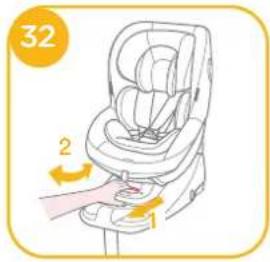
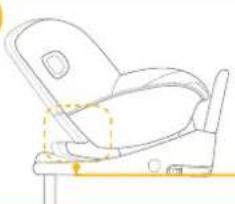
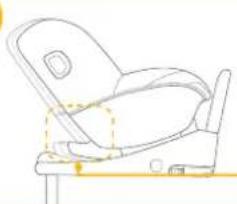
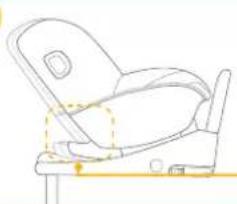
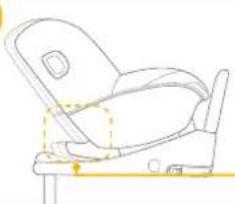
! Please re-check the load leg position after adjusting the recline button.
text_image
32 2 1Both rear facing mode and forward facing mode have 7 recline positions.
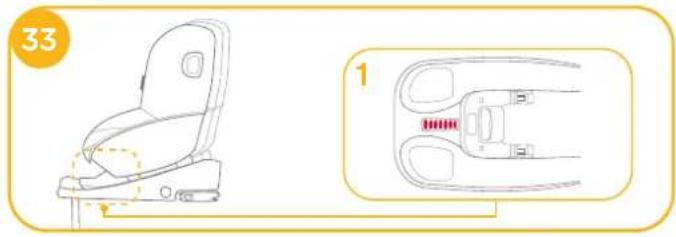
natural_image
Technical line drawing of a car seat assembly (no text or symbols)34
natural_image
Line drawing of a car seat assembly (no text or symbols)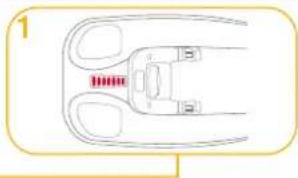
natural_image
Diagram of a mechanical component with two curved arms and a central shaft (no text or symbols)Height Adjustment
see images 35
- Please adjust the head support and check if the shoulder harnesses are at the correct height according to 19 28.
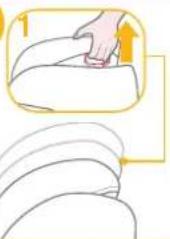
- Squeeze the head support adjustment lever 35-1, meanwhile pull up or push down the head support until it snaps into one of the 8 positions. The head support positions are shown as 35.
35
natural_image
Illustration of a hand pressing down on a curved surface, with arrows indicating motion direction (no text or symbols)Detach Soft Goods
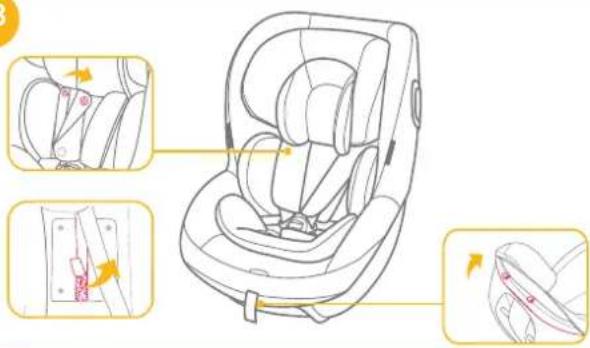
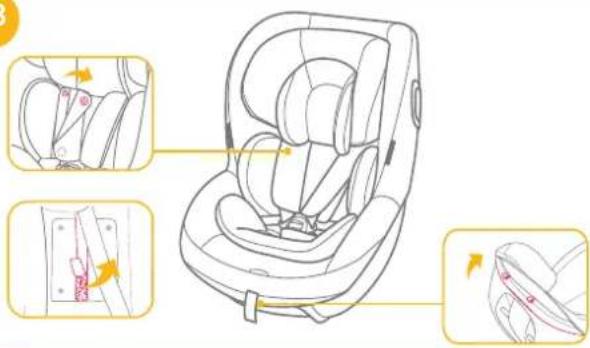
see images 36 - 38
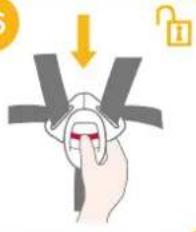
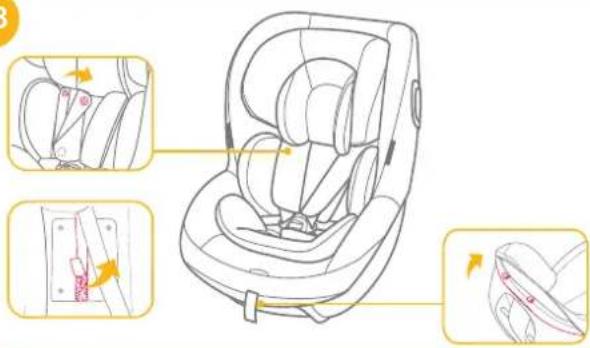
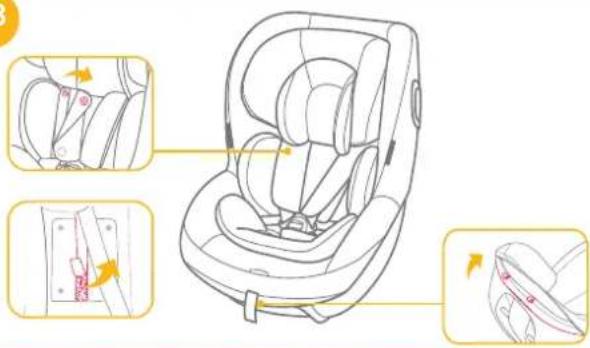
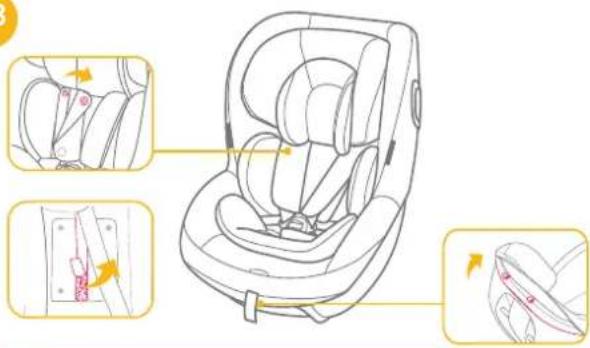
Press the red button to disengage the buckle as 38. To re-attach the soft goods please repeat the above steps in the reverse order.
36
natural_image
Illustration of a hand holding a grip with a lock icon, no text or symbols present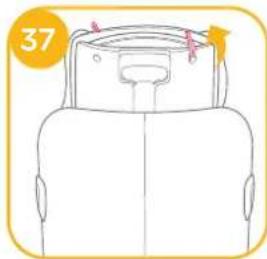
natural_image
Top-down line drawing of a car backrest with seat and neck (no text or symbols)38
text_image
Diagram illustrating car seat assembly steps with labeled parts and directional arrows indicating movementCare and Maintenance
! After removing the wedge from the insert, please store it somewhere that the child cannot access it.
! Please wash the seat cover and inner padding with cold water under 30^ C.
! Do not iron the soft goods.
! Do not bleach or dry clean the soft goods.
Do not use undiluted detergents, gasoline or other organic solvent to wash the i-Venture R seat or i-base Advance. It may cause damage to i-Venture R enhanced child restraint.
Do not wring out the seat cover and inner padding to dry. It may leave the seat cover and inner padding with wrinkles.
! Please hang dry the seat cover and inner padding in the shade.
! Please remove the i-Venture R seat or i-base Advance from the vehicle seat if not in use for a long period of time. Put the i-Venture R enhanced child restraint in a cool, dry place where your child cannot access it.

natural_image
Yellow line drawing of a vehicle with an open book and a diagonal arrow pointing to it (no text or symbols)Liste des pièces
text_image
Diagram of a car comfort seat with numbered labels pointing to different compartments or parts.natural_image
Illustration of a car seat with red buttons and a checkmark (no text or symbols)2
1
2
natural_image
Line drawing of a car showing a seatbelt and passenger seat (no text or symbols)natural_image
Line drawing of a vintage gramophone press machine with no visible text or symbolsnatural_image
Illustration of a hand holding a pink object over a circular object, with no visible text or symbolsnatural_image
Line drawing of a baby car seat with seatbelt and seat, no text or symbols presentnatural_image
Simple line drawing of a human head with a red band and a yellow checkmark (no text or symbols)natural_image
Line drawing of a baby car seat with a click button and number 24 (no text or symbols on the device itself)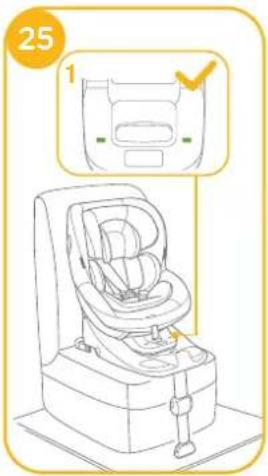
text_image
25 1natural_image
Diagram of a car seatbelt buckle with a highlighted belt (no text or symbols)natural_image
Line drawing of a car seat assembly with a highlighted section showing internal components (no text or symbols)34
natural_image
Line drawing of a car seat assembly (no text or symbols)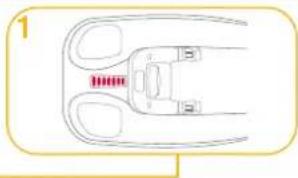
natural_image
Diagram of a mechanical component with two curved arms and a central slot, no text or symbols presentnatural_image
Illustration of a hand pressing down on a curved surface with directional arrows (no text or symbols)natural_image
Illustration of a hand holding a device with a lock icon, no text or symbols present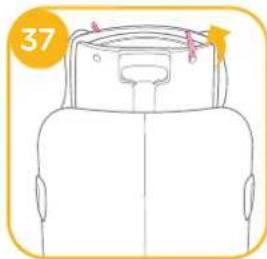
natural_image
Top-down line drawing of a car backrest with seat and neck (no text or symbols)38
text_image
Diagram illustrating car seat assembly steps with labeled parts and directional arrows indicating movementnatural_image
Yellow line drawing of a device with an open book and connected to a cylindrical component (no text or symbols)Teileliste
text_image
Diagram of a car seat with numbered labels pointing to different compartments or parts.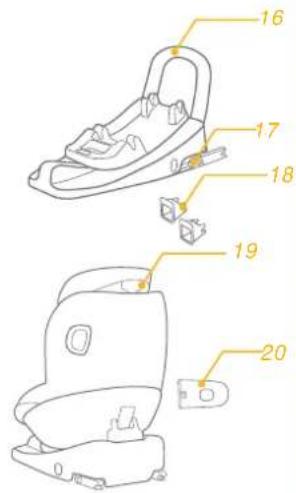
text_image
16 17 18 19 20natural_image
Illustration of a car seat with red buttons and a yellow checkmark (no text or symbols)2 1
2
natural_image
Line drawing of a laboratory instrument with a bowl and clamped components, labeled with number 12 (no text or symbols on the device itself)natural_image
Line drawing of a mechanical device with a numbered label (13) and an inset showing a magnified view of a component (no text or symbols present)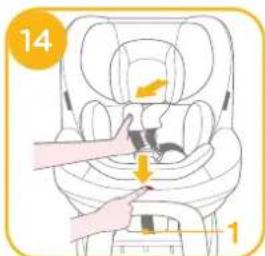
text_image
14 1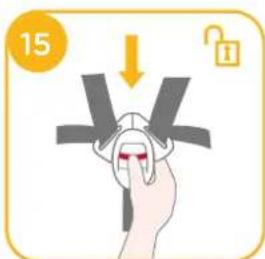
text_image
15natural_image
Illustration of a hand holding a pink object over a circular object, with no visible text or symbols
natural_image
Line drawing of a baby car seat with seatbelt and seat, no text or symbols presentnatural_image
Simple line drawing of a baby's head with a red band and a yellow checkmark (no text or symbols)natural_image
Illustration of a baby in a car seat being lifted, with a hand pointing to the seat (no text or symbols)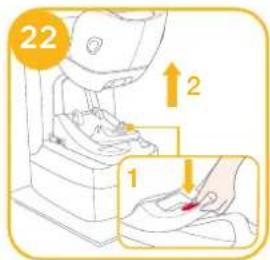
text_image
22 ↑2 1natural_image
Line drawing of a baby car seat with a click button and number 24 (no text or symbols on the device itself)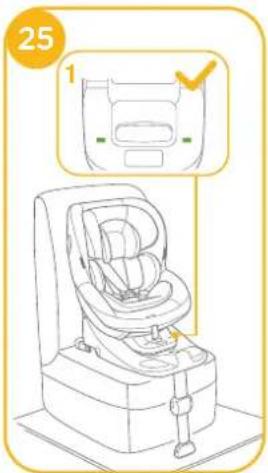
text_image
25 1Kind sichern
Bitte beachten
natural_image
Line drawing of a car seat with seatbelt and seat, no text or symbols present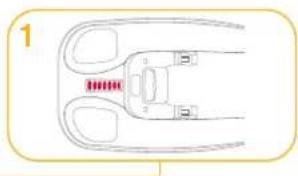
natural_image
Diagram of a mechanical or electrical component with two curved arms and a central rod, no text or symbols present.34
natural_image
Line drawing of a car seat assembly (no text or symbols)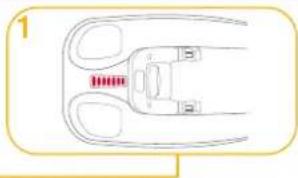
natural_image
Diagram of a mechanical component with red pins and two curved arms (no text or symbols)natural_image
Illustration of a hand pressing down on a curved surface, with no text or symbols presentnatural_image
Line drawing of a car backrest with seat and neck (no text or symbols)38
text_image
Diagram illustrating car seat assembly steps with labeled parts and directional arrows indicating movementPflege und Wartung
natural_image
Simple line drawing of a device with an open book and a pointer, no text or symbols present.Onderdelenlijst
text_image
Diagram of a car comfort seat with numbered labels pointing to different compartments or parts.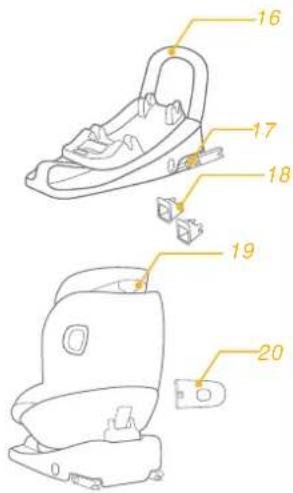
text_image
16 17 18 19 20natural_image
Illustration of a car seat with red buttons and a yellow checkmark (no text or symbols)2 1
2
natural_image
Side-view line drawing of a car showing the interior and exterior view of the seat (no text or symbols)natural_image
Line drawing of a laboratory instrument with a bowl and clamped parts, labeled with number 12 (no text or symbols on the device itself)natural_image
Illustration of a car seat with two side straps and a numbered label '16' (no text or symbols on the diagram itself)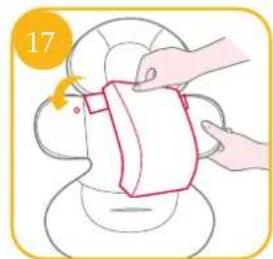
natural_image
Illustration of hands cleaning a bag with a cloth, no text or symbols present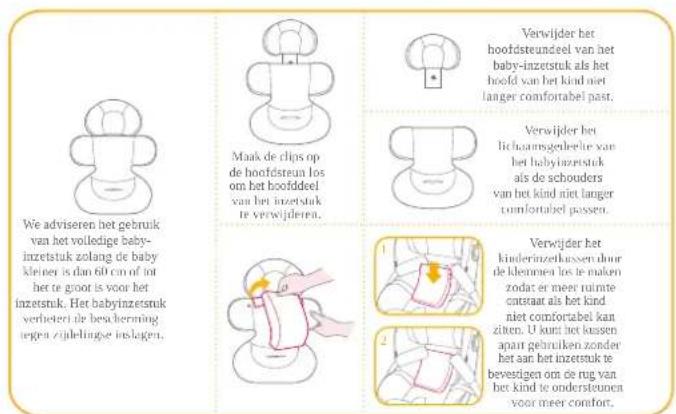
natural_image
Line drawing of a baby car seat with seatbelt and seat, no text or symbols presentnatural_image
Simple line drawing of a human head with a red band and a yellow checkmark (no text or symbols)natural_image
Illustration of a baby in a car seat being lifted, with a hand pointing to the seat (no text or symbols)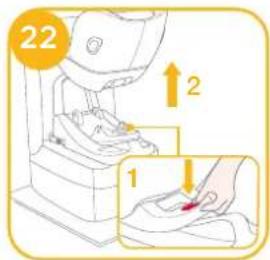
text_image
22 1 2natural_image
Diagram of a car seatbelt with a highlighted door and arrow (no text or symbols)natural_image
Technical line drawing of a car seat assembly (no text or symbols)34
natural_image
Line drawing of a car seat assembly with no text or symbols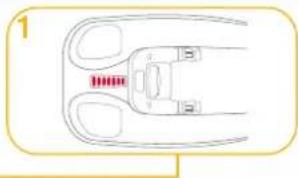
natural_image
Diagram of a mechanical component with two curved parts and a central housing (no text or symbols)Hoogteafstelling
zie afbeeldingen 35
natural_image
Illustration of a hand pressing down on a curved surface, with arrows indicating motion direction (no text or symbols)natural_image
Line drawing of a car backrest with seat and neck (no text or symbols)38
text_image
Diagram illustrating car seat assembly steps with labeled parts and directional arrows indicating movementnatural_image
Diagram of a vehicle interior with an open book and a connecting rod, set against a solid yellow background (no text or symbols)Elenco parti
text_image
Diagram of a car comfort seat with numbered labels pointing to different seats and body parts.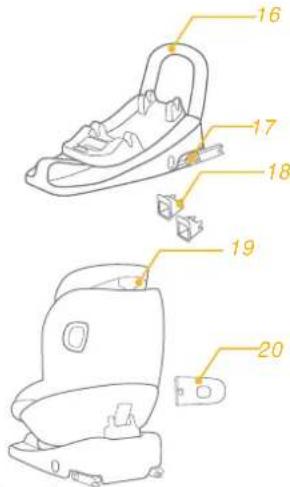
text_image
16 17 18 19 20natural_image
Illustration of a car seat with red buttons and a checkmark (no text or symbols)2
1
2
natural_image
Side-view line drawing of a car showing the interior and exterior view of the seat (no text or symbols)text_image
8 CLICK I ✓ Xnatural_image
Line drawing of a vintage sewing machine with a spool and base mount (no text or symbols)natural_image
Illustration of a toilet with a magnified inset showing a water level measurement (no text or symbols)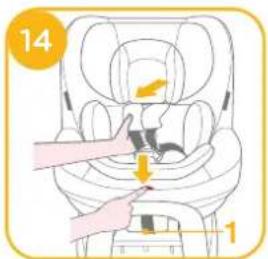
text_image
14 1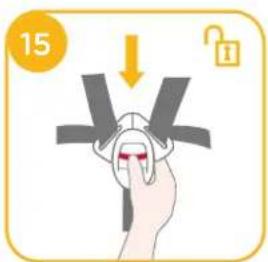
text_image
15natural_image
Illustration of hands cleaning a container with a cloth (no text or symbols)natural_image
Illustration of a child wearing a car seatbelt, no text or symbols presentnatural_image
Simple line drawing of a baby with a red band and yellow checkmark (no text or symbols)natural_image
Illustration of a baby in a car seatbelt being lifted by a hand, with no text or symbols present.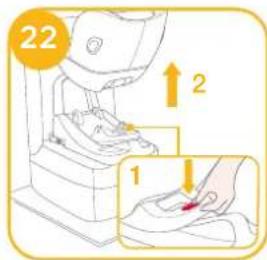
text_image
22 1 2 1natural_image
Line drawing of a car seat assembly with a highlighted side view (no text or symbols)34
natural_image
Line drawing of a baby seat with a highlighted seat area (no text or symbols)
natural_image
Diagram of a mechanical component with red pins and two curved arms, no text or symbols presentnatural_image
Illustration of a hand pressing down on a curved surface with an arrow indicating motion (no text or symbols)natural_image
Illustration of a hand holding a grip with a lock icon (no text or symbols)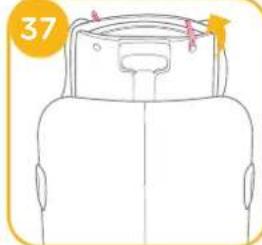
natural_image
Line drawing of a car front view with seat, dashboard, and seatbelt (no text or symbols)38
text_image
Diagram illustrating car seat assembly steps with labeled parts and directional arrows indicating movementCura e manutenzione
Allison Baby UK Ltd, Venture Point, Towers Business Park Rugeley, Staffordshire, WS15 1UZ
NUNA International B.V. Van der Valk Bourmanweg 178 C, 2352 JD Leiderdorp, The Netherlands