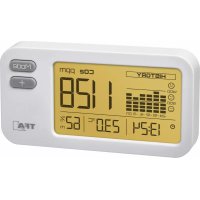
AirCo2ntrol COACH 31.5009 - Measuring equipment TFA - Free user manual and instructions
Find the device manual for free AirCo2ntrol COACH 31.5009 TFA in PDF.



| Product type | CO₂ Monitor |
| Brand | TFA |
| Model | 31.5009 |
| Category | Measuring equipment |
| Housing dimensions | 105 x 32 x 55 mm |
| Weight | 86 g (device only) |
| Power supply | DC 5V, ≥300 mA via micro-USB (cable included) |
| CO₂ measurement range | 0 ... 9999 ppm |
| CO₂ accuracy | ±7 % or ±100 ppm (0-3000 ppm), ±10 % (>3000 ppm) |
| CO₂ measurement method | NDIR (non-dispersive infrared) |
| Temperature range | 0 °C to 50 °C |
| Temperature accuracy | ±1.0 °C |
| Humidity range | 1 % to 95 % RH |
| Humidity accuracy | ±3 % RH (35 to 75 % RH) |
| Historical display | Graph of the last 24 hours (averages per interval) |
| Screen lighting | Multicolor (green, yellow, red) – modes Auto, Alarm, Manual, OFF |
| CO₂ alarm | Adjustable from 400 to 3000 ppm in steps of 100 ppm |
| Maintenance | Clean with a soft, damp cloth; do not use solvents |
| Safety | Use only with a suitable USB power supply (DC 5V, ≥300 mA); do not expose to water |
| Storage temperature | -20 °C to 60 °C |
| Compliance | WEEE |
Frequently Asked Questions - AirCo2ntrol COACH 31.5009 TFA
User questions about AirCo2ntrol COACH 31.5009 TFA
0 question about this device. Answer the ones you know or ask your own.
Ask a new question about this device
Download the instructions for your Measuring equipment in PDF format for free! Find your manual AirCo2ntrol COACH 31.5009 - TFA and take your electronic device back in hand. On this page are published all the documents necessary for the use of your device. AirCo2ntrol COACH 31.5009 by TFA.
USER MANUAL AirCo2ntrol COACH 31.5009 TFA
natural_image
Technical line drawing of a mechanical component with spring and housing (no text or symbols)
AIRCO _2 NTROL COACH – CO _2 Monitor

AIRCO _2 NTROL COACH – CO _2 Monitor

AIRCO _2 NTROL COACH – CO _2 Monitor

AIRCO _2 NTROL COACH – CO _2 Monitor
D

EMC/RFI
AIRCO _2 NTROL COACH – CO _2 Monitor
D
AIRCO _2 NTROL COACH – CO _2 Monitor

AIRCO _2 NTROL COACH – CO _2 Monitor

7.2 Einstellmodus
1 = WEISS
2 = HELLBLAU
3 = DUNKELBLAU
4 = VIOLETT
5 - BOT
6 - GELF
7 = GRÜN
AIRCO _2 NTROL COACH – CO _2 Monitor

AIRCO _2 NTROL COACH – CO _2 Monitor

AIRCO _2 NTROL COACH – CO _2 Monitor
D

AIRCO _2 NTROL COACH – CO _2 Monitor
D
Thank you for choosing this instrument from TFA.
1. Before you use this product
- Please make sure you read the instruction manual carefully.
This information will help you to familiarize yourself with your new device, to learn all of its functions and parts, to find out important details about its first use and how to operate it and to get advice in the event of a malfunction. - Following and respecting the instructions in your manual will prevent damage to your instrument and loss of your statutory rights arising from defects due to incorrect use.
- We shall not be liable for any damage occurring as a result of non following of these instructions. Likewise, we take no responsibility for any incorrect readings or for any consequences resulting from them.
- Please take particular note of the safely advice!
- Please keep this instruction manual safe for future reference.
2. Delivery contents
• CO _2 Monitor
- USB cable
• Instruction manual
16
17
AIRCO _2 NTROL COACH – CO _2 Monitor

3. Range of application and all the benefits of your new instrument at a glance
- For monitoring the CO _2 concentration in buildings, where people are present, eg: schools, offices, public facilities
- Indication of actual CO_2 concentration and history value of the last 24 hours
- Multi-function display illumination in different colours
- Indication of time, temperature and humidity
- Micro USB port (5V) to power via PC or power adapter
4. For your safety
- This product is exclusively intended for the range of application described above. It should only be used as described within these instructions.
- Unauthorized repairs, alterations or changes to the product are prohibited.

Caution!
Risk of electrocution!
- Connect the device via the USB cable only to a suitable USB power source such as a computer, USB power adapter (DC 5V ≥300mA).
18
AIRCO _2 NTROL COACH – CO _2 Monitor

- The device and the USB cable must not come into contact with water or moisture. Only suitable for indoor use
- Do not use the device if the housing or the USB cable are damaged.
- Operate the device out of reach of persons (including children) who cannot fully appreciate the potential risks of handling electrical equipment.
- Unplug the device if any fault occurs or if the device is not used for a long period of time.
- Route the USB cable lead so that it does not come into contact with sharp-edged or hot objects.

Important information on product safety!
- Do not expose the device to extreme temperatures, vibrations or shocks.
- To avoid damage to the electronics, do not remove the protective cover or insert sharp object through the ventilation slots.

EMC/RFI
- Protect the unit from EMI (Electro Magnetic Interference) from induction heaters, microwave ovens and Electro Static Discharge. Readings may be affected if the unit is operated within a radio frequency electromagnetic field strength of approximately 3 volts per meter. The performance of the instrument will not be permanently affected.
19
AIRCO _2 NTROL COACH – CO _2 Monitor
5. Elements
5.1 Display (Fig. 1)
A 1: CO _2 indication
A 2: CO _2 history of the last 24 hours
A 3: Time
A 4: Temperature
A 5: Humidity
5.2 Buttons (Fig. 1)
B 1: MODE button
B 2: + button
5.3 Housing (Fig. 2+3)
C 1: Micro USB port
C 2: Mounting holes
6. Getting started
- Insert the supplied USB cable with the micro USB plug into the provided opening on the device. Connect the device via the USB cable only to a suitable USB power source.
GB
AIRCO _2 NTROL COACH – CO _2 Monitor
GB
- "Auto" is displayed shortly after a successful connection, then "----" The backlight turns on.
• The black bars disappear one by one.
• The device is ready for use.
• The actual measurements will appear on the display: CO _2 concentration, temperature, humidity. - The clock must be set to the current time in setting mode.
7. Settings
7.1 Selection of the multi-function display illumination
- The device has a multi-function display illumination in different colours. Depending on the setting, the illumination colour is used to evaluate and interpret the current CO_2 measured values.
- You can select your respective setting by pressing the MODE button.
- Wait some seconds until the display returns to normal mode to confirm the setting.
• The following four settings are available:
7.1.1 „Auto" (default)
In this mode, the display colour changes automatically in smooth transitions between the 3 colour shades, depending on the current reading of the CO_2 levels.
Green: Optimal air quality: The CO 2 concentration is below 800 ppm.
Yellow: Medium air quality: The CO 2 concentration is between 800 ppm and 1400 ppm.
Red: Poor air quality: The CO _2 concentration is over 1400 ppm.
21
20
AIRCO _2 NTROL COACH – CO _2 Monitor

7.1.2 „AL”
In this mode, the red display illumination is activated as an optical signal in the event of an alarm when the limit value (default>1400 ppm) has been exceeded.
You can set the alarm limit value in setting mode.
7.1.3 „on"
In this mode, you can set the display illumination to a single colour. Choose between 7 colours in setting mode.
7.1.4 „OFF
The backlight is off in this mode.
7.2 Setting mode
- Press and hold the MODE button for 3 seconds. SEL COL appears and you can use the + button to select the display illumination colour for the 'on' mode.
1 = WHITE
2 = LIGHT BLUE
3 = DARK BLUE
4 = PURPLE
5 = RED
6 = YELLOW
AIRCO _2 NTROL COACH – CO _2 Monitor

7 = GREEN
- Confirm with the MODE button.
- "AL" appears and the default setting is 1400 ppm.
- Use the + button to set the desired alarm limit (400 to 3000 ppm) in increments of 100 for the "AL" mode
- Confirm with the MODE button.
• The time appears on the display. The hour digits flash. - Press the + button to adjust the hours.
- Press the MODE button again and set minutes in the same way.
- Confirm with the MODE button.
- "ECO L" appears and the default setting is OFF. If the ECO LIGHT function is activated, the light is dimmed between 22:00 and 6:00. Please set the actual time to use this function.
- Press the + button to activate (ON) or deactivate (OFF) the function.
- Confirm the setting with the MODE button to return to normal mode.
- The device will automatically quit the setting mode if no button is pressed for 20 seconds.
8. Display section HISTORY
- The graph shows the measured CO 2 values of the last 24 hours clearly. - The bar on the position "0 h" always corresponds to the current measured value of the CO 2 level (the bar is updated every 10 seconds, together with the measured value).
AIRCO _2 NTROL COACH – CO _2 Monitor

- The bar "- 3" corresponds to the average of the CO _2 levels of the last 3 hours.
- The bar "-6" corresponds to the average value of the CO _2 levels for the period between 3 to 6 hours.
- The bar "- 12" corresponds to the average value of the CO₂ levels for the period between 6 to
12 hours. - The bar "- 18" corresponds to the average value of the CO _2 levels for the period between 12 to
18 hours. - The bar "- 24" corresponds to the average value of the CO _2 levels for the period between 18 to
24 hours. - The average values of bars "-3" to "-24" are recalculated and updated every 10 minutes.
9. Care and maintenance
- Clean the device with a soft dry cloth. Do not use solvents or scouring agents. Protect it from moisture.
- Keep the device in a dry place.
10. Troubleshooting
Problem Solution
No display → Connect the device with the micro USB cable to a suitable power source
AIRCO _2 NTROL COACH – CO _2 Monitor

Incorrect indication → Restart the device
Display 9999 → System error
Restart the device
11. Waste disposal
This product has been manufactured using high-grade materials and components which can be recycled and reused.

This product is labelled in accordance with the EU Waste Electrical and Electronic Equipment Directive (WEEE). Please do not dispose of this product in ordinary household waste. As a consumer, you are required to take end-of-life devices to a designated collection point for the disposal of electrical and electronic equipment, in order to ensure environmentally-compatible disposal.
12. Specifications
Power consumption DC 5V, ≥300mA (USB)
USB cable included
| CO2Measuring range 0 ...9999 ppmResolution 1 ppmAccuracy ±7 % or ±100 ppm at 0...3000 ppm (whichever is greater)±10 % at >3000 ppm |
| Update interval 10 seconds |
| Warm-up time approx. 10 seconds |
| Method Non-Dispersive-Infrared Technology (NDIR) |
| TemperatureMeasuring range 0 °C ... 50 °CResolution 0.1°CAccuracy ± 1.0°C |
| HumidityMeasuring range 1% to 95% rHResolution 1% RHAccuracy ±3 % rH (at 35...75 % rH) |
AIRCO 2 NTROL COACH – CO 2 Monitor GB
| Operating temperature 0 °C ... 50 °C |
| Storage range -20 °C ... 60 °C |
| Dimensions 105 x 32 x 55 mm |
| Weight 86 g (device only) |
No part of this manual may be reproduced without written consent of TFA Dostmann. The technical data are correct at the time of going to print and may change without prior notice. The latest technical data and information about this product can be found in our homepage by simply entering the product number in the search box.
www.tfa-dostmann.de
AIRCO _2 NTROL COACH – Monitor CO _2
AIRCO _2 NTROL COACH – Monitor CO _2

AIRCO _2 NTROL COACH – Monitor CO _2

AIRCO _2 NTROL COACH – Monitor CO _2


EMC/RFI
AIRCO _2 NTROL COACH – Monitor CO _2

AIRCO _2 NTROL COACH – Monitor CO _2

AIRCO _2 NTROL COACH – Monitor CO _2
①
AIRCO _2 NTROL COACH – Monitor CO _2
①
AIRCO _2 NTROL COACH – Monitor CO _2

AIRCO _2 NTROL COACH – Monitor CO _2


AIRCO _2 NTROL COACH – CO _2 Monitor
AIRCO _2 NTROL COACH – CO _2 Monitor

AIRCO _2 NTROL COACH – CO _2 Monitor

AIRCO _2 NTROL COACH – CO _2 Monitor

5. Onderdelen
5.1 Display (Fig. 1)
A 1: Indicatie CO,
AIRCO _2 NTROL COACH – CO _2 Monitor
NL
AIRCO _2 NTROL COACH – CO _2 Monitor
NL
AIRCO _2 NTROL COACH – CO _2 Monitor
AIRCO _2 NTROL COACH – CO _2 Monitor
NL
AIRCO _2 NTROL COACH – CO _2 Monitor
NL
10. Storingswijzer
Probleem Oplossing
AIRCO _2 NTROL COACH – CO _2 Monitor
NL
AIRCO _2 NTROL COACH – CO _2 Monitor
NL
AIRCO _2 NTROL COACH – Monitor CO _2
AIRCO _2 NTROL COACH – Monitor CO _2

AIRCO _2 NTROL COACH – Monitor CO _2

AIRCO _2 NTROL COACH – Monitor CO _2


EMC/RFI
AIRCO _2 NTROL COACH – Monitor CO _2
5.3 Cuerpo (Fig. 2+3)
AIRCO _2 NTROL COACH – Monitor CO _2

AIRCO _2 NTROL COACH – Monitor CO _2

7.2 Modo de ajuste
AIRCO _2 NTROL COACH – Monitor CO _2

AIRCO _2 NTROL COACH – Monitor CO _2
E
AIRCO _2 NTROL COACH – Monitor CO _2
E

AIRCO _2 NTROL COACH – Monitor CO _2
E
- AIRCO _2 NTROL COACH – CO _2 Monitor
- EMC/RFI
- Einstellmodus
- Before you use this product
- Delivery contents
- Range of application and all the benefits of your new instrument at a glance
- For your safety
- Caution!
- Risk of electrocution!
- Important information on product safety!
- Elements
- Buttons (Fig. 1)
- Housing (Fig. 2+3)
- Getting started
- Settings
- Selection of the multi-function display illumination
- „Auto" (default)
- Setting mode
- Display section HISTORY
- Care and maintenance
- Troubleshooting
- Problem Solution
- Waste disposal
- Specifications
- AIRCO _2 NTROL COACH – Monitor CO _2
- Onderdelen
- Storingswijzer
- Modo de ajuste
Brand : TFA
Model : AirCo2ntrol COACH 31.5009
Category : Measuring equipment