MST55 - Inhaler PureGuardian - Free user manual and instructions
Find the device manual for free MST55 PureGuardian in PDF.


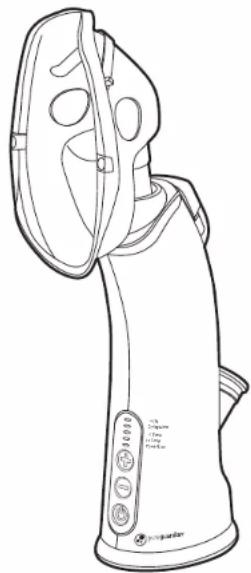
| Product Type | Personal Steam Inhaler |
| Brand | PureGuardian |
| Model | MST55 |
| Power | Standard wall outlet (polarized plug) |
| Reservoir Capacity | Fill to maximum level (approximately 100 ml) |
| Water Required | Distilled water only |
| Adjustable Temperature | Yes, via +/- buttons (low and high) |
| Automatic Drying Cycle | Yes, 10-minute duration |
| Automatic Shut-off | Yes, when reservoir is empty |
| Mask Included | Yes, adjustable with metal nose clip |
| Essential Oil Compartment | Yes, with pad (do not add to water) |
| Cleaning | Empty and dry reservoir after each use; clean mask with soapy water; do not dishwash |
| Safety | Automatic shut-off, electrocution protection, do not use without water, do not tilt |
| Warranty | 1-year limited |
| Customer Service | 1.866.603.5900 (US and Canada) |
| Website | www.guardiantechnologies.com |
| Replacement Parts | Aroma pads, essential oils (sold separately) |
Frequently Asked Questions - MST55 PureGuardian
User questions about MST55 PureGuardian
0 question about this device. Answer the ones you know or ask your own.
Ask a new question about this device
Download the instructions for your Inhaler in PDF format for free! Find your manual MST55 - PureGuardian and take your electronic device back in hand. On this page are published all the documents necessary for the use of your device. MST55 by PureGuardian.
USER MANUAL MST55 PureGuardian
To the consumer, Guardian Technologies LLC warrants this product to be free of defects in materials or workmanship commencing upon the date of the original purchase. In order to be eligible for this Limited Warranty, an original sales receipt or comparable substitute proof of purchase bearing the date of original purchase is required. Refer to the original product carton or specific product/model page on the Guardian Technologies website for warranty length for your particular model. This warranty applies only to the original purchaser of this product from the original date of purchase. This warranty covers product purchased from authorized distributors only.
This warranty applies to repair or replacement of product found to be defective in materials or workmanship. This warranty does not apply to damage resulting from unusual wear, commercial, abusive, unreasonable use or supplemental damage. This warranty does not cover damage from unauthorized repairs or from any use not in accordance with the instruction manual. Defects that are the result of normal wear and tear will not be considered manufacturing defects under this warranty.
If this product should become defective within the warranty period, we will repair or replace any defective parts free of charge. All warranty repairs must be completed by Guardian Technologies LLC. This warranty gives you specific legal rights and you may also have other rights (other rights may vary from state to state in the U.S.A.)
To submit product under warranty the complete machine must be delivered pre-paid to Guardian Technologies LLC. Please include complete information including: the problem, the model number of the product, the day of purchase, and a copy of the original sales receipt along with your name, address, and telephone (email optional). Address returns to the attention of: Customer Service, at the address below. Additional questions or comments can be made toll free to the number listed below.
USA and Canada
Guardian Technologies LLC
26251 Bluestone Blvd.
Euclid, Ohio 44132
1.866.603.5900
www.guardiantechnologies.com
Please go to www.guardiantechnologies.com to register your product. We consider the registration process important to ensuring superior service to our customers, however submitting the warranty registration is optional and does not affect your rights to utilize this warranty according to the conditions stated above.
Additional copies of the instruction manual can be obtained by accessing and printing directly from our website or calling customer service.

guardian
technologies™
©2016 Guardian Technologies LLC

guardian technologies™
USE & CARE INSTRUCTIONS
natural_image
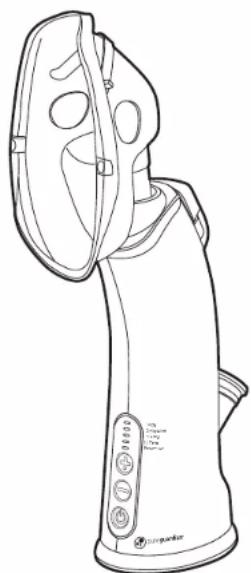
Line drawing of a steamer with handle and control panel (no text or symbols)Personal Steam Inhaler
Model No. MST55
1-Year Limited Warranty
Customer Service
1.866.603.5900
www.guardiantechnologies.com
Date Purchased month ____ year ____
English E - 1 French F - 1 Spanish S - 1
Use GENUINE Guardian Technologies replacement parts only.
REV0320
READ ALL INSTRUCTIONS BEFORE USING

This product should be used only in accordance with the specifications outlined in this manual. Usage other than what has been specified here may result in serious injury.
DANGER – To reduce the risk of electrocution
• Always unplug the device when not in use.
- Do not use while bathing.
- To protect against a risk of electric shock, do not use device if it is wet or immersed in water or other liquid. Do not use or store device where it may fall in water.
- Do not reach for a product that has fallen into water. Unplug immediately.
- Plug: This device will plug into a polarized outlet either way. If it does not fit your outlet, contact a qualified electrician. Do not attempt to modify the plug in any way.
- Extension Cords: If an extension cord is necessary, use an approved extension cord. Care should be taken to arrange the cord so that it cannot be pulled or tripped over.
WARNING – To reduce the risk of burns, electrocution, fire, or injury to persons.
- This product should be used only in accordance with the specifications outlined in this manual. Usage other than what has been specified here may result in serious injury. This product is for household use.
- DO NOT attempt to repair or adjust any electrical or mechanical functions on this unit. Doing so will void your warranty. The inside of the unit contains no user serviceable parts. All servicing should be performed by qualified personnel only.
- A product should never be left unattended when plugged in.
- Consult your physician before using any steam inhaler product.
- Use the steam inhaler only for its intended use as described in this manual.
• The product should be used with the mask attached. - Only use Guardian Technologies accessories.
- The device is not recommended for children under the age of 13.
- Close supervision is necessary when the product is used by, on, or near children or invalids.
- Stop using the inhaler and contact your physician if you have respiratory symptoms which you believe are associated with periods of use of this product, even if you are following maintenance directions.
- Never use while sleeping or drowsy.
- User should hold the product by hand during the operation.
- Do not tip or shake.
- Do not tip during use. Hold upright to avoid hot water leaking out.
-
Do not add any oils or additives to the water tank. Use the aroma compartment pad only.
-
Use ONLY distilled water in the device. Unplug this product before filling. Do not over fill. Do not use any additives in the water reservoir, any other liquid or water with minerals (e.g. bottled, purified or boiled water) will damage the device and will void the warranty.
- The device should always be turned "OFF" and be silent (i.e. let the automatic drying cycle stop the fan) before unplugging from outlet.
- Do not operate device with a damaged cord or if the device has been damaged.
- Keep device and cord away from heated surfaces. Position cord to avoid pulling or tripping.
- Do not use device without the water reservoir cap in place.
- Do not use device outdoors or near anything flammable.
- During use do not block the air vents on the top or bottom of the device such as wrapping the product in a blanket.
- Never insert any object or body part into any opening.
- Do not place mask(s) or device in dishwasher. They are NOT dishwasher safe.

WARNING: Cancer and Reproductive Harm- www.P65Warnings.ca.gov.
SAVE THESE INSTRUCTIONS
CLEANING AND STORAGE
- Empty and dry the reservoir after each use.
NOTE: If needed the inhaler dry cycle can be manually started. When the device is in sleep mode or in water empty mode, press the low temperature button and hold for 5 seconds, then the device will come to the drying cycle. - If the steam inhaler has been in storage for an extended period of time, rinse the water tank with distilled water then fill and let the device run for 5 minutes to prevent any odor.
- Periodically you may clean the outside of the device with a damp cloth. Make sure the device is unplugged while cleaning the outside.
- Do not put in dishwasher or immerse in water. Do not use abrasives to clean.
- Remove the mask from the device and clean with soapy water. Do not use in dishwasher.
- Make sure to store both the device and water at room temperature.
STORAGE
- Dry the inhaler completely before storing. DO NOT store with water inside the unit.
- Pack the unit in its original carton and store in a cool, dry location.
DIRECTIONS FOR USE
SET UP
Before first use:
1) Purchase distilled water for use in the inhaler.
2) Rinse the water tank with distilled water.
3) Follow the directions below to fill the inhaler with distilled water, then let the unit run through a cycle before using. Refill then, proceed with using the inhaler according to the directions.
TO USE:
- Plug cord into the device.
- Plug the device into a standard wall outlet.
natural_image
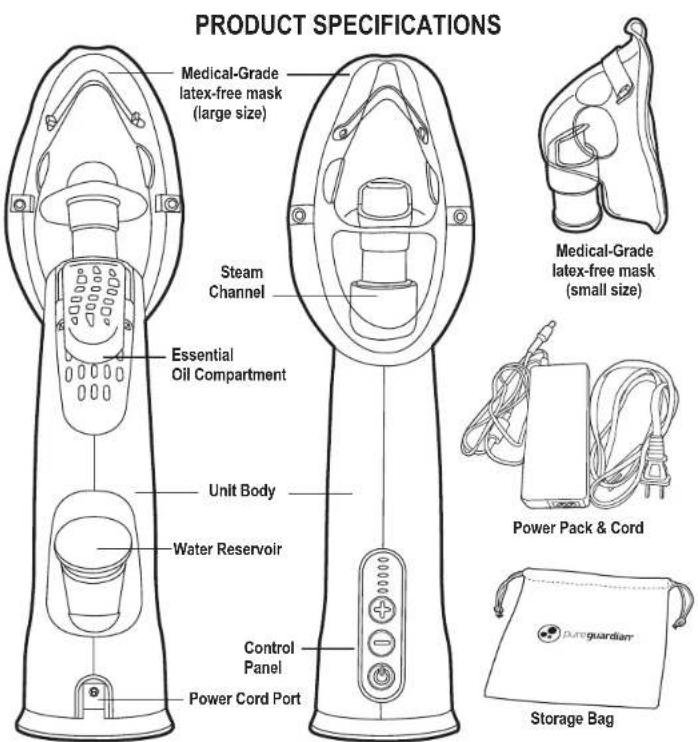
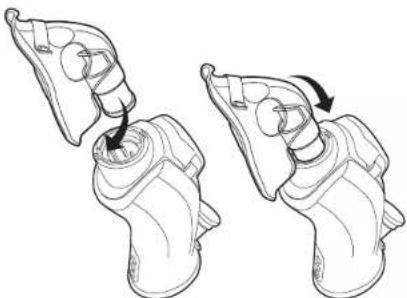
Illustration of two identical mechanical components with arrows indicating motion or assembly (no text or symbols)- Select mask that comfortably covers nose and mouth. Then, attach mask to the inhaler by inserting the front stem of the mask into and under the small edge of the steam channel. Finish inserting the rest of the mask. NOTE: only use the inhaler with the mask attached.
natural_image
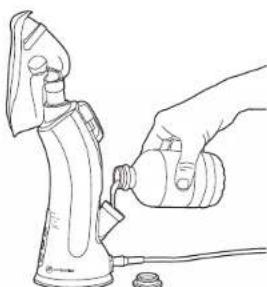
Line drawing of a hand using a hairdryer to lift a small object, with no text or symbols present.- Fill water tank to the max fill line with DISTILLED WATER ONLY. DO NOT OVERFILL. Place cap over reservoir.
natural_image
Line drawing of a hand holding a screwdriver and a small electronic device (no text or symbols)WARNING: DO NOT add oils or other additives directly into the water tank.
Add only to the pad in the tray. Oils added to the tank will damage the tank and the whole unit. Any use of such additives in the tank will void the manufacturers warranty.
Pureguardian essential oils and replacement pads sold separately at www.guardiantechnologies.com
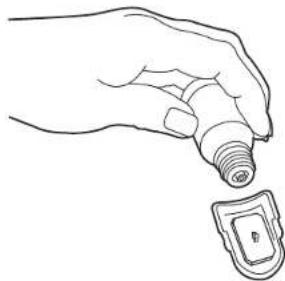
- Optional essential oils can be used. To use, remove essential oil compartment cover and add a small amount of your favorite pure essential oil to the oil pad (start with only a drop or two and add more if needed). Be sure to use only high quality pure essential oils.
DIRECTIONS FOR USE
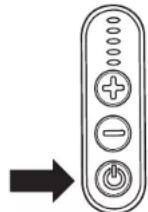
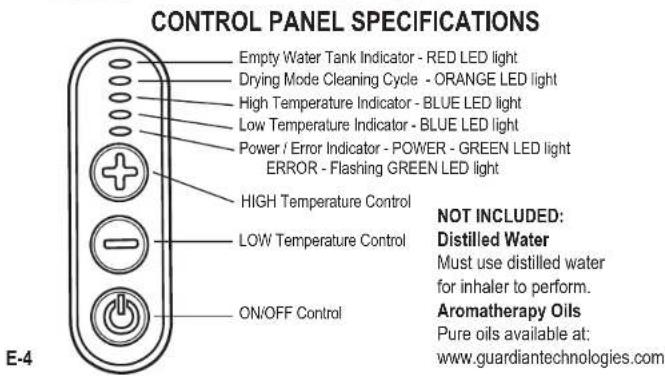
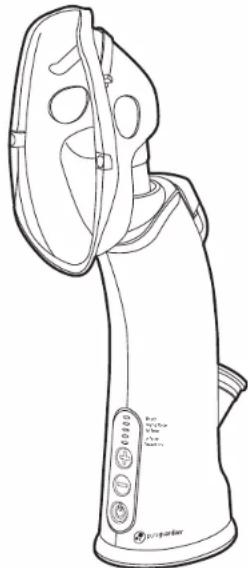
- Press the ON/OFF button to allow the water to warm up. This will take approximately
1-2 minutes. You can start and stop the device as much as you want - just make sure you let it run the drying cycle once finished.
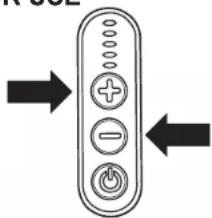
- Use the temperature buttons (+/-) to select either low or high temperature depending on your preference.
NOTE: You will notice a difference in the sound of the fan on low and high temperatures, this is normal.
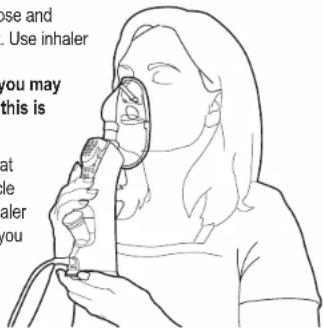
- Use Steam Inhaler by placing mask over your nose and mouth lightly. Pinch the metal tab for a secure fit. Use inhaler in upright position only.
NOTE: During use, the device will cycle and you may feel a momentary cooler temperature steam, this is part of the cycle and normal.
-
Take slow, deep breaths through your nose, for at least 2-5 minutes. Repeat as necessary until cycle completes. It is not recommended to use the inhaler longer than 20 minutes in one sitting. However, you can repeat the steam inhalatoin 2-3 times per day as symptoms persist.
-
Steam Inhaler will run a drying cycle and then turn off automatically when out of water
(a red "Empty" light appears). For longer use, refill the reservoir and turn the device on. The power light will turn green. If the Green Error light is blinking make sure you are using the correct water. Replace water with distilled water only.
IMPORTANT: Please note that using any additives in the water tank, any other liquid or water with minerals (e.g. bottled, purified, or boiled water) will damage the device and will void the warranty.
- Automatic Drying Cycle: Each time after the device is turned OFF, a fan will run for 10 minutes to dry internal parts of the device. It stops automatically when complete.
IMPORTANT: Do not interrupt, refill reservoir, unplug or turn off the device when the fan is running the drying cycle.
- If you have water remaining in the water tank AFTER the drying cycle is complete, you can empty the remaining water.
TROUBLE SHOOTING GUIDE
Troubleshooting your device, please make sure that you have distilled water in the device.
| PROBLEM | SOLUTION |
| Red “Empty” light indicator. | A red light means the unit is out of water or the water level is too low. Refill the water tank. |
| Fan noise when orange light is on. | If you hear the fan during a orange light, the drying cycle is on. Leave it until it stops by itself or start another session. |
| Green blinking Error light. | You are using water that is not distilled. Please replace water with distilled water. You may have to do this repeatedly until the light stops blinking.Inhaler may be tipped over too far. Hold upright while using. |
| Steam gets cool while using. | This is normal and part of the water heating cycle. |
| Inhaler won’t start or stops working. | Check water level and add more distilled water if needed.Check that plug is inserted into both the unit and the wall outlet. |
| Steam feels too hot. | Check that unit is set to low setting.Take breaks, as needed, while using the inhaler. |
| Inhaler has an odor. | Before first use or after unit has been stored, rinse water tank and run inhaler through a complete cycle before using. |
GARANTIE LIMITÉE
Guardian Technologies LLC
26251 Bluestone Blvd.
Euclid, Ohio 44132
1 866 603-5900
www.guardiantechnologies.com
©2016 Guardian Technologies LLC

guardian technologies™
UTILISATION ET INSTRUCTIONS D'ENTRETIEN
natural_image
Line drawing of a portable steam purifier device with control panel and buttons (no text or symbols)natural_image
Illustration of two mechanical components with arrows indicating motion or assembly (no text or symbols)natural_image
Line drawing of a hand using a tool to adjust or install a component on an iron shaver (no text or symbols present)natural_image
Line drawing of a hand holding a light bulb and a small electronic device (no text or symbols)Guardian Technologies LLC
26251 Bluestone Blvd.
Euclid, Ohio 44132
1.866.603.5900
www.guardiantechnologies.com
©2016 Guardian Technologies LLC

guardian technologies™
UTILISATION ET INSTRUCTIONS D'ENTRETIEN