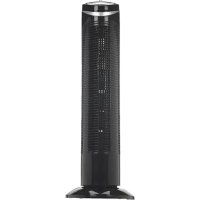
TF2113B - Fan PureGuardian - Free user manual and instructions
Find the device manual for free TF2113B PureGuardian in PDF.


| Brand | PureGuardian |
| Model | TF2113B |
| Product Type | Oscillating Tower Fan |
| Number of Speeds | 3 (Low, Medium, High) |
| Oscillation | Yes, with dedicated button |
| Power Supply | 120 V AC, 60 Hz (polarized plug) |
| Electrical Protection | 2.5A / 125V fuse in plug |
| Intended Use | Indoor only, air circulation in living spaces |
| Assembly Required | Yes, screw-on base (4 screws provided) |
| Minimum Distance from Walls | 15 cm (6 inches) |
| Maintenance | Clean exterior with a soft, damp cloth; dust grilles with a soft brush |
| Cleaning | Unplug before cleaning; do not immerse |
| End-of-Season Storage | Clean, store in original box, cool dry place |
| Warranty | Limited 1 year (parts and labor) |
| Customer Service | 1.866.603.5900 (United States and Canada) |
| Replacement Parts | Use only genuine Guardian Technologies parts |
| Repairability | User-replaceable fuse; other repairs by an authorized center |
| Safety | Do not use in window, do not immerse, do not use with a dimmer |
| Certification | Compliant polarized plug; California Proposition 65 warning |
Frequently Asked Questions - TF2113B PureGuardian
User questions about TF2113B PureGuardian
0 question about this device. Answer the ones you know or ask your own.
Ask a new question about this device
Download the instructions for your Fan in PDF format for free! Find your manual TF2113B - PureGuardian and take your electronic device back in hand. On this page are published all the documents necessary for the use of your device. TF2113B by PureGuardian.
USER MANUAL TF2113B PureGuardian
guardian technologies™
USE & CARE INSTRUCTIONS
natural_image
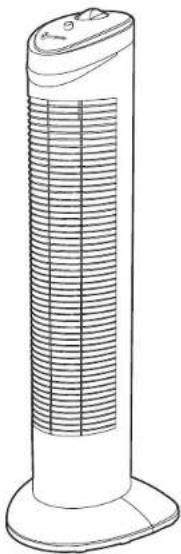
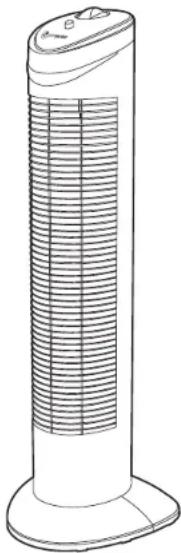
Line drawing of a tall cylindrical electronic device with a flat top and side base (no text or symbols)3-Speed Oscillating Tower Fan
Model No. TF2113
1-Year Limited Warranty
Customer Service
1.866.603.5900
www.guardiantechnologies.com
Date Purchased month ____ year ____
English E-1 French F-1 Spanish S-1
Use GENUINE Guardian Technologies replacement parts only. REV0319

guardian technologies™
Guardian Technologies LLC
26251 Bluestone Blvd. • Euclid, OH 44132
1.866.603.5900 • www.guardiantechnologies.com
©2016 Guardian Technologies LLC
READ AND SAVE THESE INSTRUCTIONS WARNINGS
Failure to comply with the warnings listed below may result in electric shock or serious injury.

This product should only be used in accordance with the specifications outlined in this manual. Usage other than what has been specified here may result in serious injury. INTENDED USE: This product is intended to circulate the air in indoor living spaces only. This product is not intended for commercial or industrial uses. Any other use not recommended by the manufacturer may cause fire, electric shock or injury to persons.
When using electrical appliances, basic safety precautions should always be followed including the following:
- Read all instructions before using this appliance.
- To avoid fire or shock hazard, plug the appliance directly into a 120V AC electrical outlet.
- Keep the cord out of heavy traffic areas. To avoid fire hazard, NEVER put the cord under rugs, near heat registers, radiator, stoves or heaters.
- Carefully discard any plastic wrapping that was used for the packaging.
- To protect against electrical hazards, DO NOT immerse in water or other liquids. Do not use near water.
- Always unplug the appliance before moving it, cleaning or whenever it's not in use. Be sure to pull out of the outlet by the plug and not the cord.
- Avoid contact with moving parts.
- Do not operate in the presence of explosive and/or flammable fumes.
- Do not cover cord with throw rugs, runners, or similar coverings. Do not route cord under furniture or appliances. Arrange cord away from traffic area and where it will not be tripped over.
- DO NOT operate any appliance with a damaged cord or plug, if motor fan fails to rotate, after the appliance malfunctions, or if it has been dropped or damaged in any manner. Call Customer Service.
- The use of attachments not recommended or sold by the appliance manufacturer may cause hazards.
- Do not let the cord hang over the edge of a table, counter or come in contact with hot surfaces or leave exposed to high traffic areas.
- To disconnect, grip lug and pull from wall outlet. Never yank on cord.
- Always use on a dry, level surface.
- Do not operate fan until fully assembled with all parts properly in place.
- To reduce the risk of electrical shock and injury to persons, do not use in window.
- This appliance is not intended for use by persons (including children) with reduced physical, sensory or mental capabilities, or lack of experience and knowledge, unless they have been given supervision or instruction concerning use of the appliance by a person responsible for their safety. Children should be supervised to ensure that they do NOT play with the appliance.
- WARNING: To reduce the risk of fire or electric shock, do not use this fan with any solid-state speed control device.
IMPORTANT - This appliance has a polarized plug (one blade is wider than the other). To reduce the risk of electric shock, this plug is intended to fit in a polarized outlet only one way. If the plug does not fit fully in the outlet, reverse the plug. If it still does not fit, contact a qualified electrician. Do not attempt to defeat this safety feature.

WARNING: This product can expose you to chemicals including lead or lead compounds, which are known to the State of California to cause cancer or birth defects or other reproductive harm.
For more information go to www.P65Warnings.ca.gov.
FUSED SAFETY PLUG
This product employs overload protection (fuse). A blown fuse indicates an overload or short-circuit situation. If the fuse blows, unplug the product from the outlet. Replace the fuse as per the user servicing instructions (follow product marking for proper fuse rating) and check the product. If the replacement fuse blows, a short-circuit may be present and the product should be discarded or returned to an authorized service facility for examination and/or repair.
USER SERVICING INSTRUCTIONS
If your fan loses power and you suspect that the fuse on your fan has blown, grasp plug and remove from the receptacle or other outlet device. Do not unplug by pulling on cord.
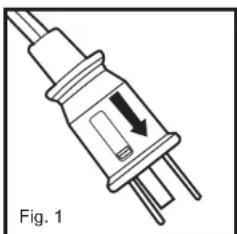
- Slide fuse cover, located on the top of the plug, towards the prongs of the plug. (Fig. 1)
- Carefully remove the blown fuse and snap a new fuse into place. To reduce the risk of fire, replace fuse only with 2.5 Amp, 125 volt fuse. Fully close the fuse door by sliding back into place. (Fig. 2) Discard the blown fuse. The plug should now be ready for normal use.
- To reduce the risk of fire, do not replace attached plug. Contains a safety device (fuse) that should not be removed. Discard product if the attached plug is damaged.
- If you need further information on how or when to replace the fuse in the safety plug, please contact Guardian Technologies customer service.
natural_image
Illustration of a plug with a downward arrow indicating compression or dislocation (no text or symbols)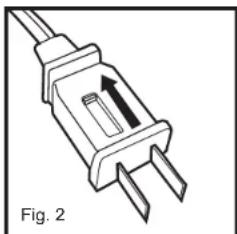
natural_image
Line drawing of a plug with two leads and a central port, labeled Fig. 2 (no text or symbols on the diagram itself)PRODUCT SPECIFICATIONS AND PARTS
ASSEMBLY
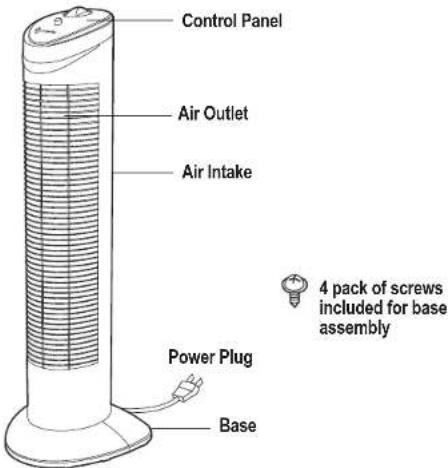
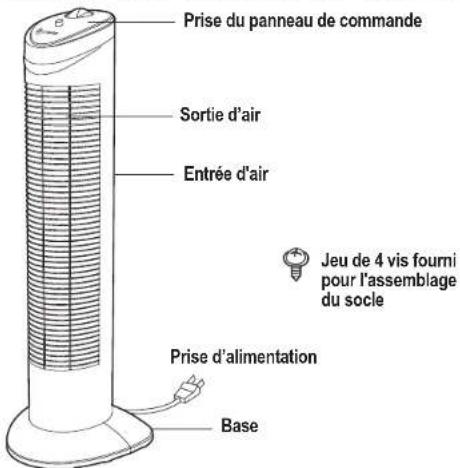
- Carefully unpack your tower fan and the set of 4 screws. Remove all plastic bags. Remove shipping tape strips from the sides of the fan.
- Gently turn the fan upside down. Place the front base piece on the bottom of the unit.
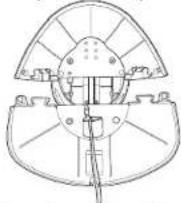
3. Place the power cord through the notch on the back base piece.
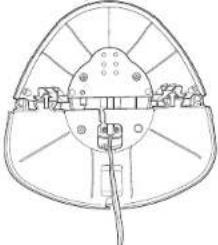
natural_image
Technical line drawing of a mechanical component with no visible text or symbols- Connect the back piece to the front piece by aligning the notches.
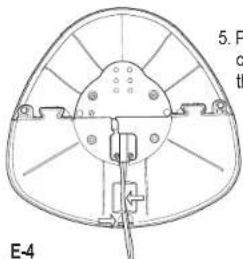
natural_image
Technical line drawing of a mechanical component with no visible text or symbols- Put the power cord through the cord guides.
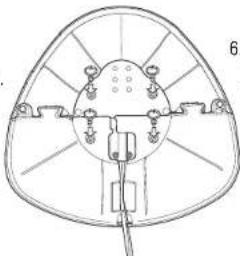
natural_image
Technical line drawing of a mechanical component with no visible text or symbols- Secure base to the fan with the 4 provided screws.
E-4
DIRECTIONS FOR USE
- Plug into a 120V electrical outlet based on the voltage indicated on the rating label.
- Select a firm, level flat location – at least six inches (15 cm) from any wall or object for proper air flow. Point air outlet away from wall.
- Turn "on" by turning control knob to preferred fan speed.
0 - Off
1 - Low Speed
2 - Medium Speed
3 - High speed - Press "Oscillation button" to make the tower fan oscillate back and forth.
CLEANING AND MAINTENANCE
- Turn the tower fan off and unplug it before cleaning.
- The outside of the tower fan can be cleaned with a soft, clean dampened cloth.
- The air inlet and outlet can be cleaned of dust with a small, soft brush.
- Do not allow moisture to come in contact with the main body of the tower fan.
Ensure that the fan is switched off from the supply mains before removing the guard.
END OF SEASON STORAGE
Follow the cleaning instructions if the fan will be stored at the end of the season.
Pack the unit in its original carton and store in a cool, dry location.
TROUBLE SHOOTING GUIDE
| PROBLEM | SOLUTION |
| Unit won't operate. | Check to make sure the unit is plugged in.Check to make sure the unit is on.Check the fuse in the power cord (page 3).Check to make sure the outlet is working properly.Check that the base is correctly assembled. |
| Decreased air flow. | Check to make sure nothing is blocking the air inlet or outlet.Be sure the plastic bag has been removed from the unit. |
LIMITED WARRANTY
To the consumer, Guardian Technologies LLC warrants this product to be free of defects in materials or workmanship commencing upon the date of the original purchase. In order to be eligible for this Limited Warranty, an original sales receipt or comparable substitute proof of purchase bearing the date of original purchase is required. Refer to the original product carton or specific product/model page on the Guardian Technologies website for warranty length for your particular model. This warranty applies only to the original purchaser of this product from the original date of purchase. This warranty covers product purchased from authorized distributors only.
This warranty applies to repair or replacement of product found to be defective in materials or workmanship. This warranty does not apply to damage resulting from unusual wear, commercial, abusive, unreasonable use or supplemental damage. This warranty does not cover damage from unauthorized repairs or from any use not in accordance with the instruction manual. Defects that are the result of normal wear and tear will not be considered manufacturing defects under this warranty.
If this product should become defective within the warranty period, we will repair or replace any defective parts free of charge. All warranty repairs must be completed by Guardian Technologies LLC. This warranty gives you specific legal rights and you may also have other rights (other rights may vary from state to state in the U.S.A.)
To submit product under warranty the complete machine must be delivered pre-paid to Guardian Technologies LLC. Please include complete information including: the problem, the model number of the product, the day of purchase, and a copy of the original sales receipt along with your name, address, and telephone (email optional). Address returns to the attention of: Customer Service, at the address below. Additional questions or comments can be made toll free to the number listed below.
USA and Canada
Guardian Technologies LLC
26251 Bluestone Blvd.
Euclid, Ohio 44132
1.866.603.5900
www.guardiantechnologies.com
Please go to www.guardiantechnologies.com to register your product. We consider the registration process important to ensuring superior service to our customers, however submitting the warranty registration is optional and does not affect your rights to utilize this warranty according to the conditions stated above.
Additional copies of the instruction manual can be obtained by accessing and printing directly from our website or calling customer service.

guardian
technologies™
UTILISATION ET INSTRUCTIONS D'ENTRETIEN
natural_image
Line drawing of a tall cylindrical electronic device with a grid-like ventilation grille (no text or symbols)natural_image
Electrical plug with three leads and a downward arrow indicating internal connection (no text or symbols)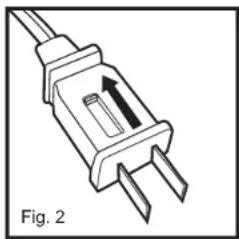
natural_image
Electrical plug with two leads and a central port, labeled Fig. 2 (no text or symbols on the diagram itself)SPÉCIFICATIONS DE L'APPAREIL ET PIÈCES
natural_image
Technical line drawing of a mechanical component with no visible text or symbolsnatural_image
Technical line drawing of a mechanical component with no visible text or symbolsnatural_image
Technical line drawing of a mechanical component with no visible text or symbolsMODE D'EMPLOI
NETTOYAGE ET ENTRETIEN
Guardian Technologies LLC
26251 Bluestone Blvd.
Euclid, Ohio 44132
1 866 603-5900
www.guardiantechnologies.com
Guardian Technologies LLC
26251 Bluestone Blvd. • Euclid, OH 44132
1.866.603.5900 • www.guardiantechnologies.com
©2016 Guardian Technologies LLC

guardian technologies™
natural_image
Line drawing of a tall, multi-layered industrial tower with ventilation grilles (no text or symbols)natural_image
Electrical plug with a black arrow indicating downward force, labeled as Fig. 1 (no text or symbols on the plug itself)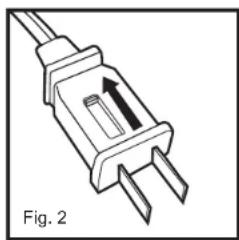
natural_image
Diagram of a plug with two leads and a central port, labeled Fig. 2 (no text or symbols on the diagram itself)ESPECIFICACIONES Y PARTES DEL PRODUCTO
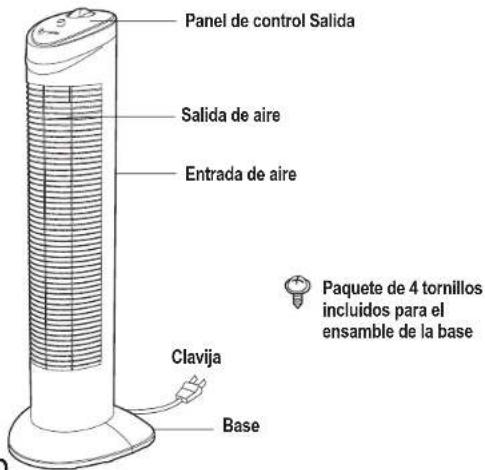
natural_image
Technical line drawing of a mechanical component with no visible text or symbolsnatural_image
Technical line drawing of a mechanical component with no visible text or symbolsnatural_image
Technical line drawing of a mechanical component with no visible text or symbolsINSTRUCCIONES DE USO
26251 Bluestone Blvd.
Euclid, Ohio 44132
1.866.603.5900
www.guardiantechnologies.com
Guardian Technologies LLC
26251 Bluestone Blvd. • Euclid, OH 44132
1.866.603.5900 • www.guardiantechnologies.com
©2016 Guardian Technologies LLC