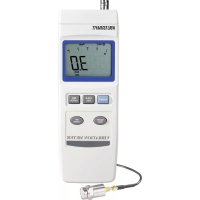
VBM100 - Measuring equipment VOLTCRAFT - Free user manual and instructions
Find the device manual for free VBM100 VOLTCRAFT in PDF.


User questions about VBM100 VOLTCRAFT
0 question about this device. Answer the ones you know or ask your own.
Ask a new question about this device
Download the instructions for your Measuring equipment in PDF format for free! Find your manual VBM100 - VOLTCRAFT and take your electronic device back in hand. On this page are published all the documents necessary for the use of your device. VBM100 by VOLTCRAFT.
USER MANUAL VBM100 VOLTCRAFT
© Copyright 2009 by Voltcraft®

Impressum /legal notice in our operating instructions
These operating instructions are a publication by Voltcraft ^® , Lindenweg 15, D-92242 Hirschau/Germany, Phone +49 180/586 582 7 (www.voltcraft.de).
All rights including translation reserved. Reproduction by any method, e.g. photocopy, microfilming, or the capture in electronic data processing systems require the prior written approval by the editor. Reprinting, also in part, is prohibited.
These operating instructions represent the technical status at the time of printing. Changes in technology and equipment reserved.
© Copyright 2009 by Voltcraft®

© Copyright 2009 by Voltcraft®

© Copyright 2009 by Voltcraft®
01_0309_02/HD

These operating instructions belong with this product. They contain important information for putting it into service and operating it. This should be noted also when this product is passed on to a third party.
Therefore look after these operating instructions for future reference!
A list of contents with the corresponding page numbers can be found in the index on page 18.

Thank you for making the excellent decision to purchase this Voltcraft® product.
You have acquired a high-quality product with a brand name that stands out for professional competence and permanent innovation in the field of measuring, charging and power technology.
With Voltcraft®, you will be able to cope even with difficult tasks as an ambitious hobbyist or as a professional user. Voltcraft® offers reliable technology with an exceptional cost-performance ratio.
We are certain: Starting to work with Voltcraft will also be the
beginning of a long, successful cooperation.
Enjoy your new Voltcraft® product!
Table of contents
Introduction 18
Intended use 19
Safety instructions ....19
Scope of delivery 20
Controls 21
Operation 22
Inserting the battery 22
Connecting the measuring sensor 22
Setting up the meter 22
Automatic power-off 22
Switching on/off 22
Carrying out a measurement 22
Preparing to measure....22
Select measuring function 23
Select measurement and unit....23
HOLD function 23
Min/max memory "REC" 23
Null balancing....24
Data logger 24
Setting and adjusting the time interval 24
Using the data logger 25
Reading out memory on the meter....25
Memory output via interface 25
Deleting the memory 26
RS-232 interface 26
Maintenance and cleaning....27
Replacing the battery 27
Disposal 28
Troubleshooting 28
Specifications....29
Intended use
The vibration meter is intended for measuring machines and installations for maintenance and servicing purposes. It provides inferences about the condition of the measured device in terms of synchronism, misalignments or loose parts in the vibration frequency range of 10 Hz to 1 kHz (rel. sensitivity according to ISO 2954).
The vibration sensor is separate from the meter. It can be attached to ferromagnetic metal cases using a magnet. The device is equipped with a built-in data logger to record series of measurements. The RS-232 interface allows further processing of the measuring data via an optional data cable.
Average value, peak value, MIN/MAX display and data hold function.
The device can be used for the following measurements:
- Acceleration: 0.5 - 199,9 m/s ^2 , 0.05 - 20.39 G, 2 - 656 ft/s ^2
- Velocity: 0.5 - 199.9 mm/s, 0.05 - 19.99 cm/s, 0.02 - 7.87 inch/s
- Displacement 0.001 - 1.999 mm, 0.001 - 0.078 inch
A 9V (PP3) battery (type 1604A) is required for operation. Measurements must not be carried out under adverse ambient conditions.
Adverse ambient conditions include:
- Excessive dampness or humidity
- Dust or combustible gases, vapours or solvents
- Hot light sources.
Any use other than that described above will cause damage to the product.
No part of the product must be modified or rebuilt!
The safety instructions must be observed!
Safety instructions

Please read through the operating instructions before using the product for the first time; they contain important information on proper operation.
The warranty/guarantee is rendered void in cases of damage resulting from failure to comply with these operating instructions! We assume no liability for any consequential damage!
We do not assume liability for personal injury or material damage resulting from improper use or disregarding the safety instructions! In such cases the warranty/guarantee is voided!
This device left the factory in perfect condition in terms of safety.
To maintain this condition and ensure safe operation, you, as the user, must comply with the safety instructions and warnings contained in these instructions. The following symbols must be observed:



An exclamation mark in a triangle indicates important information in these operating instructions that has to be observed.
This device is CE certified and meets the necessary national and European regulations.
The hand symbol informs you that there are special tips and hints concerning the operation.
For safety and licensing reasons (CE), unauthorised conversion and/or modification of the device is not permitted.
Measuring instruments and accessories are no toys and do not belong in the hands of children!
The meter contains magnetic parts. Keep it away from people with pacemakers etc.
The accident prevention regulations of the relevant trade associations for electrical systems and operating materials are to be observed in commercial institutions.
In schools, training centres, hobby and self-help workshops, the operation of measuring instruments must be supervised by trained personnel.
Do not switch on the measuring instrument immediately after it has been taken from a cold to a warm environment. The condensation generated could cause serious damage to the device. Allow the device to reach room temperature before switching it on.
Do not leave packaging material lying around carelessly. It could become a dangerous toy for children.
You should also observe the safety instructions in the individual chapters.
Scope of delivery
External sensor with screw-on magnet
Plastic case
Operating instructions
Controls
(see fold-out page)
1 Sensor plug connection (12)
2 Display
3 HOLD/ESC button
4 "POWER" switch to turn the device on/off
5 FUNCTION/SEND button
6 UNIT/LOGGER button
7 REC/ENTER button
8 Tripod socket
9 RS-232 interface
10 Tilt stand
11 Battery compartment
12 Sensor plug
13 Sensor
14 Screw-on magnet
Display symbols
REC Memory mode symbol
Max Maximum value display
Min Minimum value display
Peak Current peak value
Max HOLD The max peak value is measured constantly and recorded
H Data hold, display is locked
RMS Average value display
VEL Velocity display
DISPp-p Max displacement display
ACC Acceleration display

Battery replacement symbol
Button functions
POWER Power switch; to switch the device on or off
HOLD Data hold in normal mode, "forward" in logger mode
ESC Exits the setup menu
REC Starts recording
ENTER Confirmation button used in setup menu
FUNCTION Max hold function in normal mode, "backward" in logger mode
SEND Starts data transfer (RS-232 interface)
UNIT Switches between measuring functions and units
LOGGER Starts recording in logger mode
Operation
Inserting the battery
Before first use you must insert a 9V (PP3, alkaline) battery in the meter. See chapter "Maintenance and cleaning" on how to insert the battery.
Connecting the measuring sensor
Connect the round sensor plug (12) to the connection (1) on the meter. Turn the plug to lock it (bayonet connector). Always make sure the plug is connected tightly to avoid faulty measurements.
Setting up the meter
To facilitate reading, the meter can be set up using the tilt stand on its back (10).
The device can be mounted on a tripod using the tripod socket (8).
Automatic power-off
To keep battery lifetime as long as possible, the device has an automatic power-off function. The meter is automatically switched off if no button has been pressed over a period of about 10 minutes. You can switch the meter back on by pressing the "POWER" button (3).
In recording mode (REC) automatic power-off is deactivated.
Switching on/off
Press the "POWER" button (4) to switch on the meter. After a short while initialisation (display and system test) is complete and the meter is ready for use.
Hold down the "POWER" button (4) for about 2 seconds to switch off the device. The device shuts down with a signal tone.
Carrying out a measurement

Watch out for moving parts when measuring. Risk of injury!
Only currentless surfaces may be measured. The temperature at the sensor must not be outside the specified temperature range. After every measurement, remove the sensor from the test object and switch off the meter.
Preparing to measure
- Connect the sensor to the meter (1) at the bayonet connector (12). Turn the plug until it engages.
- Press the "POWER" button to switch on the device.
- Hold the sensor (13) against the position at which to measure. Ensure proper flatness. When dealing with ferromagnetic materials (e.g. iron), the provided screw-on magnet (14) can be screwed onto the sensor (13). It will stick to the metal to facilitate your work.
Select measuring function
- Press the "FUNCTION" button (5) to select the measuring function. Every keystroke switches to the next function. Available functions are:
RMS Measurement of average value
PEAK Measurement of current peak value (not available for displacement measurement (DISP))
Max HOLD Measurement of absolute peak value. The current peak value is shown on the display and updated if exceeded.

Vibration monitoring usually provides average values with the “RMS” measuring function.
Select measurement and unit
- Press the "UNIT" button (6) to select the measuring type and the desired unit. Every keystroke switches to the next display. Available measurements are:
| Measurement Display | Metric unit English unit | |||
| Acceleration ACC m/s | 2 | G ft/s | 2 | |
| Velocity VEL mm/s cm/s | inch/s | |||
| Displacement DISPp-p | mm | inch | ||

Vibration monitoring usually measures acceleration or velocity.
- To switch between the metric system and the English system, hold down the "UNIT" button (6) for about 5 seconds when measuring. The unit is switched accompanied by a signal tone.
- Read off the result on the display. The bargraph helps to read the tendency.
HOLD function
Press the "HOLD" button (3) to hold the current test result. The "H" symbol appears on the display to indicate the HOLD function is active. Press the button again to turn off the function.
Min/max memory "REC"
The Min/max memory records the minimum and maximum values of a measurement. These values can be retrieved at any time during the measurement. Quitting this function or switching off the meter will automatically delete the min/max memory.
Proceed as follows to switch on the min/max function:
- Press the "REC" button (7) when measuring. "REC" is displayed and recording begins.
- Press the "REC" button again to switch to display mode. Every keystroke now switches between the display of "REC Max" and "REC Min". The recording is halted in display mode.
- Press the "ESC" button (3) to start recording again. Min and max are no longer displayed.
- Hold down the "REC" button (6) for about 2 seconds to switch off the min/max memory function. The "REC" symbol disappears.
Null balancing
The meter and the sensor can be null balanced. This becomes necessary when the meter shows a low test result (instead of 0.0) in neutral position.
To null balance, proceed as follows:
- Connect the sensor to the meter and switch on the meter.
- Select acceleration "ACC" for measuring
- Leave the sensor in a motionless position. Wait until the display has stabilised.
- Hold down the "HOLD" button (3) for about 5 seconds. Null balancing concludes with a signal tone. The display is set to zero.

Null balancing has no influence on the measuring function, but it increases the accuracy of measurements.
Null balancing is possible at zero deviation to a maximum of 10 digits (display shows e.g. 1.0, 0.10).
Data logger
The meter can record up to 500 results over a longer period of time. The automatic recording interval can be set to 1 s, 2 s, 5 s, 10 s, 30 s, 60 s, 600 s, 1800 s, or 3600 s. You can also record manually (interval: 0 s).

The setup menus to set and read out the parameters can only be exited by switching off the meter.
Setting and adjusting the time interval
- Switch off the meter.
- Hold down buttons "HOLD" (3) and "REC" (7) and press the "POWER" button (4) to switch on the device.
- Let go of all three buttons when you hear the beep. The current time interval is flashing. You are now in programming mode.
- Press the "UNIT" button (6) to select the desired time interval. Every keystroke selects the next highest value. After the last value (3600) the display starts over (0).
0 = manual data logging
1 - 3600 = automatic data logging - To confirm your selection, press the "REC" button (7) followed by the "ESC" button (3).
- Switch off the meter to exit the setup menu.
Using the data logger
The data logger can be activated when in normal measuring mode. The set time interval is used for data logging. There are two available modes depending on the set time interval: automatic or manual data logging. Manual data logging only logs results when a key is pressed. The data is stored even when the meter is switched off.
Automatic data logging (time interval: 1 - 3600 s)
To activate data logging, proceed as follows:
- Switch on the meter ("POWER" button) and wait until initialisation is complete.
- Press the "REC" button (7). "REC" is displayed permanently.
- Press the "LOGGER" button (6). The set time interval is displayed for a short time. The "REC" symbol flashes accompanied by a beep at the set time interval. The data logger is running. Press the "LOGGER" button (6) to halt or start data logging alternately.
- To exit this function, stop logging ("REC" is permanent again") and hold down the "REC" button (7) for about 2 seconds. The display switches back to normal measuring mode.
Manual data logging (time interval: 0 s)
To activate data logging, proceed as follows:
- Switch on the meter ("POWER" button) and wait until initialisation is complete.
- Press the "REC" button (7). "REC" is displayed permanently.
- Press the "LOGGER" button (6). Every keystroke logs the current result. This is confirmed by a beep.
- To exit this function, hold down the "REC" button (7) for about 2 seconds. The display switches back to normal measuring mode.

If the internal memory if full (max. 500 results), "FULL" is displayed. This is accompanied by a steady signal tone. Press the "ESC" button to stop data logging. The signal tone stops.
Reading out memory on the meter
- Switch off the meter.
- Hold down buttons "HOLD" (3) and "REC" (7) and press the "POWER" button (4) to switch on the device.
- Let go of all three buttons when you hear the beep. The current time interval is flashing. You are now in programming mode.
- Use the "HOLD" button (3) to select the first memory position. After a short while, the logged result is displayed.
- Pressing the "HOLD" button moves up to the next memory position. The "FUNCTION" button (5) moves down to the previous memory position.
- Switch off the meter to exit the setup menu.
Memory output via interface

For memory output via the interface, functions "REC" and "HOLD" have to be deactivated. Symbols "REC" and "H" must not be displayed.
- Establish a connection to your computer via the optional data cable and run the transfer program. See chapter "RS-232 interface" for a description of the interface and the data packet.
- Switch on the meter ("POWER" button) and wait until initialisation is complete.
- Hold down the "SEND" button (5) for about 2 seconds. "232" flashes on the display.
- Press the "SEND" button (5) to start data transfer. The display counts down from the highest value of the memory position to 0. Press the "SEND" button to restart data transfer at any time.
- Press the "ESC" button (3) to exit this mode with a triple beep and return to normal measuring mode.
Deleting the memory
- Switch off the meter.
- Hold down buttons "HOLD" (3) and "REC" (7) and press the "POWER" button (4) to switch on the device.
- Let go of all three buttons when you hear the beep. The current time interval is flashing. You are now in programming mode.
- To delete the memory, hold down the "REC" button (7) for about 5 seconds. The delete process is confirmed with a long, continuous tone. All data is now deleted, "0" is displayed.
- Switch off the meter to exit the setup menu.
RS-232 interface
The meter is equipped with a serial interface (9) to exchange data with a computer. It is located under a cover on the right hand side of the meter. Open the cover with a pointed object. The interface has the shape of a 3.5 mm mono jack plug socket and requires a specific data cable which is optionally available.
The data cable has the following assignment:
| Jack plug 3.5 mm mono 9-pole D-sub PC connector | |
| Centre contact Pin 4 | |
| External contact Pin 2 | |
| Between pin 2 and pin 5 a resistance of 2.2 kOhm is required. | |
The serial data signal is made up of 16 bits in the following order: D15 D14 D13 D12 D11 D10 D9 D8 D7 D6 D5 D4 D3 D2 D1 D0
The data bits carry the following information:
| D15 Start signal | |||||
| D14 4 | |||||
| D13 Display line indicator: 1 = upper line, 2 = lower line | |||||
| D11+D12 Unit on the display: 92 = m/s | ^2 | 93 = mm/s 94 = mm 95 = cm/s | |||
| 96 = inch 97 = ft/s ^2 | 98 = inch/s 57 = G | ||||
| D10 Polarity: 0 = positive, 1 = negative | |||||
| D9 Position of decimal point (DP) from right to left:0 = no DP, 1 = 1 DP, 2 = 2 DP, 3 = 3 DP | |||||
| D8 down to Measuring resultD1 D8 = most significant bit (MSD), D1 = least significant bit (LSD).If 1234 is displayed, the corresponding bit formation reads “00001234”. | |||||
| D0 End signal | |||||
RS-232 settings: Baud rate: 9600, parity: none, data bits: 8, stop bit: 1 (9600, N, 8, 1)
Maintenance and cleaning
Apart from battery replacements and occasional cleaning, the device is maintenance-free. Use a clean, lint-free, antistatic and dry cloth to clean the device. Do not use any abrasive or chemical agents or detergents containing solvents.
Replacing the battery
If the battery symbol appears on the display, the battery has to be replaced as soon as possible to prevent faulty measurements.
Proceed as follows to replace the battery:
- Switch off the meter
- Loosen the battery compartment screw on the back and slide the lid off the housing in the direction of the arrow.
- Replace the used battery with a new alkaline battery of the same type (e.g. 1604A).
- Properly close the housing again in reverse order.

Do not leave flat batteries in the device. Even batteries protected against leaking can corrode and thus release chemicals which may be detrimental to your health or damage the device.
Batteries must not be short-circuited or thrown into fire. Batteries must not be recharged. There is danger of explosion.
Leaking or damaged batteries/rechargeable batteries can cause burns if they come into contact with the skin. It is therefore advisable to use suitable protective gloves.

You can order a suitable alkaline battery stating order number 65 25 09.
Disposal
Used electronic products are raw materials and do not belong in the household waste. When the device has reached the end of its service life, please dispose of it according to the current statutory requirements at your local collecting point. It is prohibited to dispose of the device in the household waste.
Disposal of used batteries/rechargeable batteries!

The end user is legally obliged (battery regulation) to return all used batteries and rechargeable batteries. Disposal in the household waste is prohibited!
Batteries containing toxic substances are marked with the symbols shown that indicate they must not be disposed of in the household waste. The heavy metals concerned are: Cd = cadmium, Hg = mercury, Pb = lead. You can return flat batteries/rechargeable batteries free of charge to the collection points in your community, our branches or anywhere else where batteries or rechargeable batteries are sold.

You will thus carry out your legal obligations and contribute to the protection of our environment!
Troubleshooting
By purchasing this meter you have acquired a state-of-the-art product which operates reliably.
Nevertheless, problems or malfunctions may occur.
For this reason, the following is a description of how you can eliminate possible malfunctions yourself:

Always observe the safety instructions!
| Error Possible cause | Remedy | |
| The meter cannot Is the battery dead? Check the battery status.be switched on. Remove the battery and insert it | again (reset device). | |
| Measuring results are faulty. Is the sensor positioned flat on the measured surface.on the surface? If necessary, use the provided screw-on magnet.If necessary, null balance the device. | ess of the meter provided | |
| Meter cannot be The H controlled. ("H" is displayed) | OLD function is activated Deactivate the hold function by pressing the "HOLD" button (3). | |
| Undefined system status Remove the battery and insert it again (reset device). | ||

Any repair work other than that described above must be carried out by an approved specialist.
If you have questions concerning the use of the meter, our technical support service is available at the following telephone number:
Voltcraft, Lindenweg 15, 92242 Hirschau, tel. no. 0180 / 586 582 7
Specifications
Display.....LC display with bargraph
Sensor measuring frequency....10 Hz – 1 kHz (sensitivity according to ISO 2954)
Battery 1x 9V (PP3) battery (006P, MN1604)
Power input ....approx. 13 mA
Operating temperature ....0 to + 50°C
Relative humidity ....../< 80%rF, non-condensing
Weight ......Device approx. 253 g, sensor approx. 99 g
Dimensions (L x W x H mm) .....200 x 68 x 30 (device)
(∅ x L mm) 16 x 37 (sensor)
Sensor cable length....approx. 1.2 m
Measuring tolerances
Accuracy at 80 and 160 Hz in ± (% of readout + display errors in counts (= number of smallest points)). The accuracy is valid for one year at a temperature of +23°C (± 5°C) with relative humidity less than 80 %rF, non-condensing.
Acceleration "ACC"
| Unit m/s | 2 | G (1 G = 9.8 m/s 2) ft/s | 2 |
| Measuring range 0.5 | - 199.9 m/s 2 | 0.05 – 20.39 G 2 - 656 ft/s | 2 |
| Resolution 0.1 m/s | 2 | 0.01 G 1 ft/s | 2 |
| Accuracy ± (5 % + 2) | ± (5 % + 2) ± (5 % + 2) | ||
| Balance point 50 m/s | 2 (160 Hz) 50 m/s | 2 (160 Hz) 50 m/s | 2 (160 Hz) |
| Measuring function RMS, PEAK, Max HOLD RMS, PEAK, Max HOLD RMS, PEAK, Max HOLD | |||
Velocity "VEL"
| Unit mm/s cm/s inch/s | |||
| Measuring range 0.5 | -199.9 mm/s 0.05 - 19.99 | cm/s | 0.02 - 7.87 inch/s |
| Resolution 0.1 mm/s | 0.01 cm/s | 0.01 inch/s | |
| Accuracy ± (5 % + 2) | ± (5 % + 2) ± (5 % + 2) | ||
| Balance point 50 mm/s | (160 Hz) | 50 mm/s | (160 Hz) |
| Measuring function RMS, PEAK, Max HOLD RMS, PEAK, Max HOLD RMS, PEAK, Max HOLD | |||
Displacement "DISPp-p"
| Unit mm | inch | |
| Measuring range 1.9 | 99 mm | 0.078 inch |
| Resolution 0.001 mm | 0.001 inch | |
| Accuracy ± (5 % + 2) | ± (5 % + 2) | |
| Balance point 0.141 | mm (160 Hz) | 0.141 mm (160 Hz) |
| Measuring function | RMS, Max HOLD | RMS, Max HOLD |
Reference values
ISO 2372 and VDI 2056 distinguish between 4 classes for the evaluation of machines and equipment. Vibration limits (in mm/s) are specified in these classes.
The classification is as follows:
Group K Small machines with electric motors of up to 15 kW.
Group M Middle-sized machines with electric motors >15 kW to 75 kW, without special base
Group G Huge machines with heavy base
Group T High-performance machines with special base
| Group K Group M | Group G Group T | |||
| Good 0 - 0.71 mm/s | 0 - 1.12 mm/s | 0 - 1.8 mm/s | 0 - 2.8 mm/s | |
| Acceptable 0.72 - 1 | 8 mm/s | 1.13 - 2.8 mm/s | 1.81 - 4.5 mm/s | 2.8 - 7.10 mm/s |
| Still tolerable 1.81 - | 4.5 mm/s | 2.81 - 7.1 mm/s | 4.51 - 11.2 mm/s | 7.11 - 18 mm/s |
| Hazardous | >4.5 mm/s | >7.1 mm/s | >11.2 mm/s | >18 mm/s |
Relative deviation to reference ISO 2954 (80 Hz)
The following measuring errors deviating from the reference frequency of 80 Hz may occur.
Interface RS232....40